Input reports that Apple has put right-wing social media site Parler on notice:
In an email sent by Apple to Parler this morning (Pacific Time) and obtained by _Input, _the company provided numerous examples of Parler users explicitly calling for violence and referenced CEO John Matze’s comment that he doesn’t “feel responsible for any of this and neither should the platform.”
Apple disagrees. “We want to be clear that Parler is in fact responsible for all the user generated content present on your service and for ensuring that this content meets App Store requirements for the safety and protection of our users,” the company said. “We won’t distribute apps that present dangerous and harmful content.”
Inciting violence isn’t “free speech.” Assuming Parler doesn’t cave and change its entire business philosophy: Good riddance.
Amid a hardening consensus that conspiracy theories emboldened this week’s Capitol Building rioters—many adorned with “Q” garments, waving Q flags, screaming about election fraud—Reddit is quietly weeding out spreaders of election-related conspiracies.
As the Daily Dot first reported, Reddit admins on Thursday permanently suspended the account for r/conspiracy’s head moderator, axolotl_peyotl. He recently posted about the nascent, baseless conspiracy theory that Italy used a military satellite to interfere with U.S. election systems.
Reddit has also banned the unofficial Donald Trump subreddit r/donaldtrump, Axios first reported, and a Reddit spokesperson confirmed in an email.
Twitter permanently banned President Donald Trump on Friday, days after a pro-Trump mob stormed the US Capitol leaving five dead.
“After close review of recent Tweets from the @realDonaldTrump account and the context around them we have permanently suspended the account due to the risk of further incitement of violence,” Twitter said in a statement Friday.
Probably years too late, but after the events of Jan. 6, this fellow doesn’t deserve the reach of any self-respecting commercial social-media platform.
Update: Twitter’s statement says that it is likely Trump’s tweets are already being taken as signals to commit more acts of violence between now and Inauguration Day:
Our determination is that the two Tweets above are likely to inspire others to replicate the violent acts that took place on January 6, 2021, and that there are multiple indicators that they are being received and understood as encouragement to do so.
Good riddance to this national embarrassment. America will begin the hard work of cleaning up the mess he made in 12 days.
This Macworld keynote is jam-packed with stuff that would really change Apple’s trajectory for years to come. Mac OS X would spin off other operating systems to power things from the iPhone to the Apple Watch. iTunes has since been replaced, but music is still near and dear to Apple. Most people haven’t thought about iDVD in years, but we all use Apple devices to shoot and share video. And, of course, Apple is still in the business of making fast and capable Macs.
A lot of people are baffled when I explain that I do most of my writing on the Mac inside Bare Bones Software’s BBEdit, which is a text editor that’s loaded with features for software and web developers.
BBEdit has been my primary writing tool for more than two decades, and yes, a lot of the time I’m just pushing the cursor from left to right, something I could do in Microsoft Word or Google Docs or just about anywhere else. I think the reason I stick with it is that it’s not just a writing tool, but a text processing tool. Even if I stopped writing in BBEdit, it would still be an indispensable utility because of all the other ways it saves me time. Its full support for regular expressions would be enough.
This week I’ve been getting caught up on work that I deferred during the last half of 2020 due to the 20 Macs for 2020 project and the avalanche of Apple releases. And BBEdit has, once again, been a life-saver.
There’s an iOS music utility I’ve been loving for a while now, and when I praised it during the 2020 Upgradies I realized I’d never written about it.
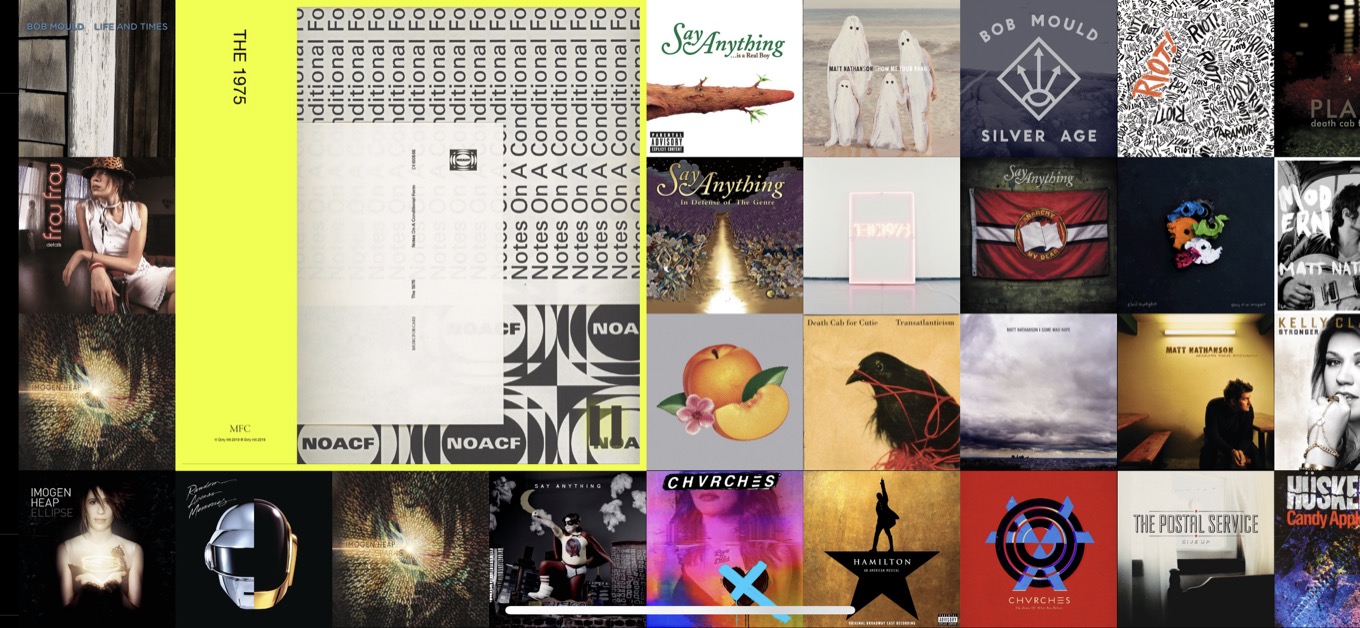
It’s Longplay, a $3 app by Adrian Schönig. What it does is incredibly simple: It shows you the albums in your Apple Music library. You can sort them by personal popularity, in alphabetical order, grouped by color, or (very cleverly) to highlight albums you love but haven’t listened to in a while.
You swipe around in Longplay and tap on an album to start playing it. The playback actually happens in the Music app (sorry, it’s not compatible with Spotify), so you don’t have to manage Longplay as if it’s a different player app. It’s just a way to pick an album and listen to it from start to finish. Which is a joy, even in this era of readily available playlists both curated and algorithmic. (You can opt to display favorite playlists as well.)
Though I am still primarily powered by Apple Music’s ALT CTRL playlist these days, in 2020 I made an effort to listen to albums when I was listening on my iPad while writing. Though most of my 2020 listening ended up being focused on The 1975’s Notes on a Conditional Form and Taylor Swift’s Folklore, I also revisited a bunch of old favorites, including Daft Punk’s Random Access Memories and Death Cab for Cutie’s Transatlanticism.
Steve Jobs was famously obsessed with album art, and his enthusiasm sometimes led Apple into weird user-interface choices in both iTunes and the Music app. But he would’ve loved Longplay—and I do, too.
Killer apps for AR and VR, video chat etiquette tips, how we’ll use tech differently in 2021, and the advertising and marketing decisions that we’d toss out the window.
I was surprised by Jay’s comment, but the more I thought about it, the more it made sense to me. During the 2010s, Apple took a remarkably conservative approach to the Mac—with a few oddball exceptions that prove the rule.
I first wrote about HazeOver when Mojave’s Dark Mode debuted. It’s a utility that can change the appearance of your background windows, so in Dark Mode it’ll squelch any windows that are too bright.
With the arrival of Big Sur, of course, there are a lot of complaints that it’s hard to differentiate between active windows. I haven’t had a problem with this, but once again, this is a pretty good use case for HazeOver, since it will dim all the windows that aren’t in the foreground, making the top window pop.
For several years, Continuity has been a growing set of features that ties macOS to its more mobile cousins. Here’s how Apple describes these features:
When you sign in to your Apple ID on all of your devices, you can use Continuity features that make it seamless to move between your devices. Click a feature below to learn about it, such as how to automatically unlock your Mac when you’re wearing your Apple Watch or how to use your iPad to extend the workspace of your Mac.
Better together, mostly.
Under the Continuity umbrella live several different features:
Handoff — Switching to an application or document from one device to another.
Universal Clipboard — Copying and pasting content from one device to another.
iPhone Cellular Calls — Making and receiving calls on Macs, iPads and iPod touches on the same Wi-Fi as an iPhone.
Text Message Forwarding — Sending and receiving SMS and MMS messages on non-iPhone devices.
Instant Hotspot — Connect to Personal Hotspot without the need of a password.
Auto Unlock — Logging into and authenticating on an Mac while wearing an Apple Watch.
Continuity Camera — Using an iOS device to take a photo for instantly inserting into a document on a Mac.
Continuity Sketch — Creating a sketch on an iOS device for inserting into a document on a Mac.
Continuity Markup — The same as above, but for uhhh … marking up a document.
Sidecar — Using an iPad as a second Mac display.
AirDrop — Wirelessly sharing content between devices if the stars are properly aligned.
Apple Pay — Using an Apple Watch to authenticate Apple Pay on a Mac without Touch ID.
That’s a lot of stuff under one overarching name, and while I understand the impulse to unify these features, I would argue that this particular collection is a bit out of sorts.
Many of these features feel like children of Handoff, especially Continuity Camera, Sketch and Markup, as well as Universal Clipboard. On the other hand, AirDrop feels like it doesn’t belong on the list at all.
Beyond just being angsty about labels, my main problem with Continuity is the overall lack of control a user has over its many features. Additionally, what features can be tweaked are often scattered across various Settings screens and System Preferences panes.
Here are just a few examples of how messy this can be:
On the Mac, there is a single setting named “Allow Handoff between this Mac and your iCloud devices” at the bottom of the General preference pane. It doesn’t say this, but this single checkbox enables (or disables) both Handoff and Universal Clipboard.
Auto Unlock is enabled in macOS’ Security & Privacy settings, which requires a mid-2013 or later Mac, and an Apple ID with two-factor authentication turned on. Even then, macOS seems inconsistent about when it will prompt to confirm something via a connected Apple Watch and via a password prompt.
To set up Text Message Forwarding, a user has to go into Settings on their iPhone, then navigate to Messages and then “Text Message Forwarding.”
To take advantage of Continuity Camera, Sketch and Markup, an individual Mac app has to support it, and so far, the list of those that do isn’t very long. To use it, a user has to find an insert or import command, which vary in location app to app.
AirDrop lives in the Share menu across devices, and the settings for which devices can be accessed via the features live in Finder, Big Sur’s new Control Center, and in the Settings app on iOS.
On the Mac, phone calls are managed through the FaceTime app’s own settings screen.
I know this messiness is the natural outcome of Apple adding these features piece by piece over several years and several OS revisions, and on the whole, they do make using the Apple ecosystem a more fluid place to work and play.
However, many users need more control over features than Apple’s current web of confusing settings and features. If someone wants to use Handoff, but Universal Clipboard poses problems for them, they don’t have enough options. SMS forwarding relies on device names, which can be confusing and very slow to update via iCloud when one is changed, and I’d wager most users have no idea what Continuity Camera, Sketch and Markup even are.
It’s not that these features are bad; Apple just needs to clarify what they do and how to manage them. That’s just as much as a marketing challenge as it is an engineering one.
[Stephen Hackett is the author of 512 Pixels and co-founder of Relay FM.]
As I filed my final entry in the 20 Macs for 2020 project, I decided to dig around in my document archive to see if I could find when the project really got started.
While I had been noodling over the idea in late December of 2019, the moment that the project officially started was when I made a new document in BBEdit and titled it 20 macs. It was January 2, 2020, at 11:32 a.m.
So the project really bracketed the year, though originally my intent was to launch it in the spring. The pandemic derailed my plans, though I kept working on it and launched it with 22 weeks left in the year, giving me a couple weeks of headroom that I would end up needing.
With the project complete, I thought I’d address one of the most common questions I got while I was spooling out my list: “How could you not include [name of computer here]?” Of course, as I explained back in August, my list is based on my ranking of Macs in terms of the squishy category of notability, and is intended to be completely subjective. I’m not ranking the best Macs (because some of the ones I picked are real stinkers!) or even my favorite Macs.
The truth is, my biggest consideration when I picked my final list of 20 Macs in early January (and yes, they appeared in the same order that I chose back then) was if there was a good story to tell about that particular model. Some of the earlier entries were a bit esoteric, but I enjoyed unearthing strange corners of Mac history and using them to tell larger stories about Apple. (For example, my essay about Xserve is really about Apple’s quixotic quest to be a player in server hardware. The Power Computing entry allowed me to write a story about the strange couple of years when Mac clones were for sale.)
My initial list of possible contenders for my top 20 list was much larger—there were more than 40 items. I’m sure I could’ve written essays about each one of them, though I’d probably end up repeating myself a bit—and there’s no way I could’ve written 40 more essays and produced 40 more podcasts and edited 40 more videos. (When I decided 20 Macs for 2020 would be a multimedia extravaganza, I dramatically increased my workload.)
In any event, as the project rolled along, there were a few Macs that people asked me about that just missed making the list. Limiting myself to 20 meant that some of them were left on the outside looking in.
The 12″ PowerBook G4 was my favorite Mac of all time for a long time. Until the MacBook Air hit the scene, it was the ultimate small Apple laptop. And its edge-to-edge keyboard wouldn’t really be replicated until the 12-inch MacBook hit the scene.
2006’s original MacBook wasn’t quite as small as the 12″ PowerBook G4, but it was the smallest Intel-based Mac laptop for quite a while, and introduced the chiclet-style laptop keyboard that remains on Apple keyboards to this day. And yes, even though you had to pay a $150 “black tax” to get it, the matte black MacBook was a thing of beauty.
The 12-inch MacBook would be an interesting computer to write about, not only because of its status as the most aggressively tiny Mac laptop ever, but because it introduced the hated butterfly keyboard and also seemed to be a preview of what ARM-powered Macs might look like. (Wrongly, it turned out.)
A strong case can be made for the Mac Plus, Mac Classic, and plain ol’ Mac SE, but I rolled them into my coverage of the original Mac and the SE/30. (I also thought about cheekily including the Lisa, which I also covered in the essay about the original Mac.)
I considered the iMac Pro and the 2013 Mac Pro for inclusion because they would both allow me to tell the story of how the Mac lost its way in the middle of the 2010s. It felt like ground I’ve covered an awful lot at Six Colors already, though. If this were 25 Macs for 2025 I’d definitely make space for one or both.
(This is also one reason why most of the Macs on my list are of an older vintage. You need a little bit of historical perspective before deciding if a particular Mac model is notable—and if my goal is to tell some interesting stories about the grand sweep of Apple history, it’s probably wise to allow some time to pass before doing so.)
I strongly considered writing about the Centris 610/Power Mac 6100 pizza box—a boring yet omnipresent mid-90s Apple design, and also about the Power Mac G3 product line, which might be the apotheosis of boring Mac design, released just before the revolution came.
The project was well underway when Apple released the three first M1 Macs, and many people asked if they would make an appearance near the top of my list. That was never going to happen—as I wrote earlier, my list was locked in January 2020. Regardless, we don’t know what the story of Apple silicon Macs will actually be. These M1 Macs are impressive for what they are on the inside, and what they represent, but they’re also just Apple silicon versions of extremely familiar Mac designs.
I have a lot of hope that Apple will use its transition to Apple silicon to create some dramatically new and interesting Macs that will go down in history as some of the most notable Macs of all time. But those Macs are yet to come. Sure, the M1 MacBook Air might go down in history—but I’m inclined to believe it’ll just be a footnote. We’ll have to wait and see.
Finally, is there a 21-item list coming from me in 2021? Back in 2020 I definitely had a few ideas about what a follow-up project might look like. But after spending a couple of very intense months writing essays, writing and editing podcasts, and editing videos, I am not in a mental state where I am willing to commit to another longform project. We’ll see if that changes as the year goes on.
In any event, I am grateful to everyone who sent in positive feedback about the essays (thanks to Scholle McFarland for copy editing them), podcasts (thanks to Brian Hamilton for smoothing out my edits), and videos (thanks to Stephen Hackett for collaborating and co-hosting). I hoped 20 Macs for 2020 would be a fun project that would spur some fun discussion, and it was! I’m happy with the quality of the work, it gave the shape to my 2020 work life that I was seeking, and writing and editing a scripted podcast provided a unique creative challenge.
2021 has arrived, so it’s time for Jason to predict what he thinks Apple will do this year. But it’s also time for Myke to look back on his 2020 predictions and judge how well those came out. Also, DC joins Marvel in amplifying streaming-service programming plans.
Here’s the thing about being one of the most prominent—and, by some measurements most valuable—companies in the world: it paints a heck of a target on your back. Apple’s long found itself on the receiving end of attacks from competitors, smaller challengers, and the government, and that hasn’t changed in recent years.
But as we flip our calendars over to 2021, there are already a handful of battles in progress that could have marked effects on Apple’s business in both the short and long terms. Of course, a company with as many resources as Apple may be able to weather the occasional squall, but every once in a while you get a perfect storm that’s harder to fend off.
Let’s take a look at these three brewing fights and how they might force Apple to batten down its hatches in the year ahead.
Good morning! We’re so glad you could join us today, here at Apple Park. We’ve got a lot of exciting announcements to share with you, but before we get started, I want to take a moment to look back at everything Apple has achieved in 2020.
Even in the face of a global pandemic, Apple continued to deliver products to surprise and delight its customers, who remain trapped in their own homes with their glowing screens as the only comprany they have. Here at Apple, our employees have worked tirelessly to help make sure that you can stay safe by having food delivered to your door, providing a non-stop slew of content to binge, and enabling you to keep endlessly doomscrolling, even as the world dissolves into chaos around you. Also, we released five new iPhones!
We’re glad that we’ve been able to do our part to get people through this tough time…but we think we can do better.
Today, we’re announcing Apple’s most exciting new product ever. We’ve combined our expertise in hardware, software, and services to bring consumers something that we think will make a big difference in the way they experience every single day of their lives.
And we’re calling it…2021.
2021 is unlike anything Apple has ever made before. It’s handcrafted from state of the art materials, the same ones used in the construction of actual reality, with performance that’s so fast and so smooth, it feels just like you’re actually in a photo or video. Even the technology behind our Pro Display XDR pales in comparison to the ultra high infinite resolution of 2021.
This isn’t just about engaging your visual senses either. In 2020, we rolled out our Spatial Audio feature for AirPods Pro and AirPods Max, a revolutionary new way of listening to your content. But with 2021, we’ve taken it a step further: it’s not just about audio sounding like it’s coming from your iPhone or your iPad, but about everything in the environment creating sound that originates from a specific location. The hum from that refrigerator over there sounds like it comes from that refrigerator over there. When a bird chirps from outside your window, it’s indistinguishable from a bird chirping outside your window.
But of course, design isn’t just about how it looks, it’s about how it works. With the iPhone and iPad, Apple pioneered the Multi Touch interface, and over the years we’ve brought touch to Mac, Apple TV, and Apple Watch too. Now, with 2021, we’re taking it to the next level, with an interface technology that’s unlike anything that’s ever been done before. Because now Multi Touch isn’t just about what the device senses from you, but what you sense from it. You can feel what you interact with, from the softness of a flower petal to the harsh roughness of sandpaper. It’s all at the tips of your fingers, with 2021.
Best of all, developers don’t need to do any additional work to bring their apps to 2021. If an app uses Apple’s latest frameworks, all of these amazing new features—the ultra high resolution, the updated spatial audio, Multi Touch 2—are baked right in, so users can immediately take full advantage of them, simply by using 2021.
We believe that only Apple, with its intersection of technology and the liberal arts, has the expertise to execute on this singular vision, to bring this revolutionary technology to all of you, to change the world and help make life just a little bit better for everyone.
2021 releases on January 1 and it’s a free update for everyone. We think you’re going to love it.
[Dan Moren is the East Coast Bureau Chief of Six Colors, as well as an author, podcaster, and two-time Jeopardy! champion. You can find him on Mastodon at @dmoren@zeppelin.flights or reach him by email at dan@sixcolors.com. His next novel, the sci-fi adventure Eternity's Tomb, will be released in November 2026.]
It was the late 90s and Apple was on the ropes. Steve Jobs knew the company needed a lifeline, fast. And 10 months after Jobs took back control of the company, he announced the product that would fund Apple’s resurgence and change its future forever.
It was the best of times, it was the worst of times. Okay, for most of us 2020 wasn’t the best of times. But on the iOS front, Apple definitely seemed to be in a feast-or-famine mode.
The company released five new iPhone models (did you forget the second-generation iPhone SE?), and there was a major iPad Air revision that basically turned it into a low-end iPad Pro. The iPad Pro got an underwhelming update—but an amazing new accessory in the Magic Keyboard for iPad!
There was more to cheer than boo in the iPhone and iPad world in 2020, and that puts it pretty much ahead of most of the world. But can 2021 deliver something better? It’s time for some predictions.
2020 was a big year for the Mac—and we shouldn’t take that for granted. The first year I started predicting things in this column, I felt a little optimism about 2016, and it turned out to be an almost vacant year for the Mac. The last few years show that Apple has become more attentive to the Mac, culminating in a year that might not have been as revolutionary as I was expecting, but still a landmark in Mac history.
So with the M1 processor here and Apple in the midst of a major processor transition, there’s no doubt that 2021 will be an interesting one for the Mac! Change will abound! The question is… what form will that change take?
Every year in this space I make a slew of predictions for the coming year, a combination of analysis and wishcasting that can be a fun exercise in gauging our expectations and understanding what Apple might be planning. And a year ago, I got it right!
2020 didn’t go quite the way we all planned, but I predicted that 2020 would bring the first Macs powered by Apple-designed chips, and I got it right!
I’ll grant you, it was something like the third straight year that I have made that prediction. But this time Lucy didn’t pull the football away from me! Truly, if you persevere and keep predicting the inevitable, you will eventually be right.
As for the rest of the predictions… okay, maybe don’t call me Nostradamus after all.
Macs running on Apple silicon are pretty great. But whenever there’s a major hardware transition, many wise people point out that it’s safer to wait rather than rushing in, because there are always growing pains.
In the case of the M1 Macs, the growing pains seem awfully mild, but there’s one area where they are being felt: wiping and restoring. It’s not surprising, really, given that Apple built a new boot process based on the one found on iOS, but adapted for all of the needs of the Mac.
In any event, in certain cases the act of wiping and restoring an M1 Mac can get complicated, as this article from Mr. Macintosh points out:
Order of that you should follow for reinstalling macOS on Apple Silicon.
1. macOS Recovery
2. System Recovery – (Will boot automatically if macOS Recovery is unavailable)
3. macOS Big Sur USB Installer Drive – (External boot for macOS Installers is enabled by default on Apple Silicon)
4. Apple Configurator 2 REVIVE option – This option will reinstall macOS Recovery (retains user data on the SSD hard drive)
5. Apple Configurator 2 RESTORE option – This option will Reinstall macOS Recovery, ERASE
your SSD hard drive and reinstall macOS
It’s a change, and a little messy, but things are slowly resolving. And Apple has posted numeroustech notes about the issues. It’s worth bookmarking all of this just in case you end up in a situation where you need to recover your M1 Mac—or the M1 Mac of someone you know.