Just like the crew of a ship would join each other in song to keep up their spirits on a long, isolated journey, TikTok users began to duet and remix the aged sea shanty… A sea shanty such as this one was meant to help keep sailors on tempo as they worked on the ship. The lyrics and melody typically aren’t too tricky to sing for that reason, which also happens to make the genre a perfect fit for the collaborative users of TikTok. You can just join in for the surprisingly catchy chorus or, if singing isn’t your thing, add some musical accompaniment instead.
While I’m on the sea shanty beat, I also appreciated this Tweet:
sea shanties are popular right now because behavioral synchrony feels really, really good to humans and many of us have been social distancing for months and deprived of this, thanks for coming to my ted talk
There’s also a nice Daily Dot report about how “The Wellerman” made it big thanks to a band called The Longest Johns and the pirate-themed video game, Sea of Thieves.
I’ve been a fan of tiny Mac laptops for many years. From the 12-inch PowerBook G4 to the iBook to the 11-inch MacBook Air, I’ve always opted for the smallest laptop I could get my hands on.
And yet, with the discontinuation of the 12-inch MacBook, the smallest Apple goes is the 13-inch MacBook Air. Is the Air as small as a Mac laptop can get? I don’t think so. And that’s why I think Apple should add an additional laptop to its product line and bring back the 12-inch MacBook.
MacRumors reader David Chu today alerted us that the hidden “Items” tab in the Find My app can be enabled on iOS 14.3 and later by typing in the link findmy://items into Safari and tapping on “Open” in the prompt that appears.
I just tried this myself, and sure enough, it works: the Find My app opens to an Items screen where you can tap Add Item and it will start searching for nearby tags.1
But that raises the question of why the product hasn’t been released yet: Is it not quite ready to go? If the software component is in the shipping OS, it would seem to be pretty far along. Is Apple waiting for a more opportune moment, say, when people are actually leaving their house and traveling again in order to make a more compelling product story? Certainly possible. Or, heaven forbid, is this another AirPower story where the enthusiasm has outstripped the ability to actually ship a product? One doubts that Apple would get bitten in that same way twice, but nothing’s impossible.
Or maybe, just maybe, Apple’s tracking tags are readying for an imminent launch. Stranger things have happened!
Just to play devil’s advocate, this could simply be an interface for Apple to offer compatibility with third-party trackers like Tile—the words “tags” or “AirTags” don’t appear anywhere within the interface. But come on. ↩
The “big announcement” teased yesterday is an expansion of Apple’s Racial Equity and Justice Initiative, which the company founded last year after the killings of George Floyd, Breonna Taylor, and others sparked mass protests:
These forward-looking and comprehensive efforts include the Propel Center, a first-of-its-kind global innovation and learning hub for Historically Black Colleges and Universities (HBCUs); an Apple Developer Academy to support coding and tech education for students in Detroit; and venture capital funding for Black and Brown entrepreneurs. Together, Apple’s REJI commitments aim to expand opportunities for communities of color across the country and to help build the next generation of diverse leaders.
Apple’s putting $100 million towards these efforts, which it sees as part of its goal to leaving the world a better place.
One of the cleverest things Jason does, which I think he undersells, is nibble away at the dataset as he processes it. In this screenshot we see that “Delete matched lines” is checked. By deleting each set of entries as he finds them, he makes it easier to develop the criteria for finding the next set. And with “Copy to clipboard” checked, he hasn’t lost the entries he’s just found—they’re ready to be pasted into a new document for checking and counting. This nibbling technique is one I’ve never used but will keep in mind the next time I’m faced with this type of problem.
Drang, of course, compliments me before displaying how he can do a lot of what I did with a single Terminal command:
sort cancolors.txt | uniq -c | sort -nr
Drang’s command doesn’t weed out misspellings, which is why I used my approach (and also because I had never even considered using Terminal commands to do this!). Anyway, if you’re curious about how many ways you can misspell Bondi Blue, here’s the list that came out of my survey results when I used Drang’s script.
In some ways, Fitness+ couldn’t have come at a better time. At one point or another, we’ve all probably made that New Year’s resolution to work out more, and with the pandemic forcing many of us to stay in our homes, a friendly exercise option is suddenly much more appealing.
Both my wife and I have spent the last several weeks with Fitness+1, and in general, the service has really impressed us. The trainers are an inclusive, engaging group and the focus on mobility and providing alternative workout options is a marked contrast from many other competitors.
But that’s not to say that there aren’t improvements to be made. Even after just a few weeks, we’ve definitely run into places where the service could be tweaked or offer more. That’s understandable, given that Fitness+ just launched, and no doubt Apple is planning to make changes down the road, especially once it sees how customers are using the service. But just in case Cupertino’s paying attention, here are a few ways we’ve noticed that Fitness+ could use a little more attention.
Get back in the groove
It’s certainly not ideal to have to stop a workout in the middle, but sometimes life gets in the way. The kids need attention, or someone rings the doorbell, or heck, the Fitness+ app crashes. We’ve all grown accustomed, in this modern era, to being able to drop out of something and pick up right where we left off. But Fitness+ has proved to be much touchier about such interrupts. My wife has had her workout prematurely ended a couple times, and thus far the only option is to start all over again, which clearly isn’t ideal.
Certainly, a workout is a little more complicated than a movie, since your Apple Watch is tracking your vitals at the same time, but there should still be an option to easily jump back in where you left off. Right now, you can’t even fast forward through workouts to get back to where you were, which can quickly turn what should have been a positive experience into a frustrating one.
Switch it up
Along those same lines, it should be easier to switch devices mid-workout. If you’re using the Apple TV to do your yoga workout, and somebody else wants to use the TV, you should be able to switch to your iPad without missing a beat. Again, it’s the kind of seamless continuity we expect from other Apple apps. Even trying to use AirPlay from your iPad to your Apple TV and then switch to using the iPad can cause some hiccups in the workout experience, and then it’s back to our previous problem about resuming interrupted workouts.
Filter it out
Currently, Fitness+ lets you filter by three criteria: type of workout (cycling, yoga, strength, etc.), duration, or trainer. That’s all useful, but when you’re trying to do a little more targeted exercise, it would be helpful to have some additional information about workouts. For example, Fitness+ could let you filter by which part of the body a session focuses on (upper body, lower body, core, etc.) or even by the intensity of the workout.
Fitness+’s filtering feature is useful, but could be improved.
To the latter point, yes, Fitness+ does do a nice job of providing different options within a workout, but some trainers and some sessions can definitely be more strenuous than others, and it would be helpful to have a better idea of what you’re getting into. The Absolute Beginner classes are a great way to start off, but beyond those it would be nice to know whether you’re diving into the deep end or taking a slower ramp up.
The Absolute Beginner workouts are great, but where do you go from there?
Context is king
The integration with the Apple Watch is definitely part of Fitness+’s secret sauce, but it would be nice if those metrics had a little more context to them. For example, Fitness+ shows you your progress through the workout in the corner of the screen, including your current heart rate, but there’s not a great indication of what your heart rate should be.
One useful data point would be whether your heart rate is within the target range for the workout. (Target heart rate is generally based on your age and the kind of workout you’re doing.) That would make it easier for you to adjust on the fly during a workout, taking things up a notch if you’re not quite feeling the burn, or maybe cutting back if you’re going too hard.
Get social
One aspect that Fitness+ is kind of light on at present are social features. The only real concession to connecting with other people—aside from the Apple Watch’s built-in competitions and achievements—is the Burn Bar.
The Burn Bar is supposed to give you an idea of how you’re doing compared to other people who’ve done the same workout. The more calories you burn, the better you do on the Burn Bar, which at least gives you some idea of context (see above)—except that the Burn Bar is only available in a small number of workout types: Treadmill, High-Intensity, Rowing, and Cycling.
Now, I get it: I may not want to be focusing on how my calorie burning stacks up to everyone else when I’m doing a relaxing yoga workout, but in some of the others, like Core, or Strength, or even Dance, it would be nice to at least have the option to turn it on.
And if Apple wants to take social features a step further and create ways for you to, say, remotely do a workout with a friend, or otherwise compare performance, that might be fun too—assuming, of course, that they’re purely opt in.
The rest
In addition to the above areas, there are a handful of other small improvements that Fitness+ could stand. The Apple TV app could use a way to access workouts you’ve saved to your list (if there is one, I couldn’t find it); likewise, on the Apple TV, it’s impossible to do a workout if you don’t have an Apple Watch, which seems like an unnecessary requirement given that the iPad version doesn’t require it; and it would be useful to have more overarching, holistic guidance if you’re working toward a specific goal—say, running a 5K—rather than relying on the algorithms which seem to suggest workouts based largely on things you’ve already done.
On the iPad, Fitness+ lets you workout without an Apple Watch, but not on the Apple TV.
On the whole, despite the potential for improvement, Apple Fitness+ has had a promising start. It’s only a month old at this point, and Apple’s obvious commitment to continually adding new content does provide a solid hook to keep coming back, but it will be intriguing to see where the company goes from a feature standpoint over the next years or so.2
And remember, stay active and close your rings.🤣 ↩
[Dan Moren is the East Coast Bureau Chief of Six Colors, as well as an author, podcaster, and two-time Jeopardy! champion. You can find him on Mastodon at @dmoren@zeppelin.flights or reach him by email at dan@sixcolors.com. His next novel, the sci-fi adventure Eternity's Tomb, will be released in November 2026.]
It’s January and the avalanche of 2021 Apple product rumors has already begun. But we also take time to reflect about the first decade of the Mac App Store, have a difficult discussion about when tech companies should deplatform those planning political violence, and Jason exchanges helpful messages about buying late-model Intel Macs with someone who is a friend, a fish, or both.
I think we can all agree that there are times when the current reality could be a little…better.
For several years, Apple has talked up the potential of the augmented reality space, and more recently, there have been rumors that the company is getting ready to take those ambitions to the next level by releasing a product focused on augmented reality, virtual reality—or possibly both.
But Apple isn’t one to take on projects casually: despite the multitude of calls for Apple to enter this market or that, the company tends to be very conservative in what projects actually make it through the extensive gauntlet to become shipping products. As Steve Jobs once said, “innovation is saying no to 1,000 things.”
If Apple truly is ready to take the plunge into this new product area—which reports are now suggesting could happen sooner rather than later—then that’s because the company believes that it’s figured out how to bring the combined might of its hardware, software, and services to bear on a type of device that no company has cracked quite yet. Which raises the question: what the heck is this thing?
Via The Verge, a statement from Apple PR regarding its removal of the “free speech” trumpeting Twitter clone Parler from the App Store:
“We have always supported diverse points of view being represented on the App Store, but there is no place on our platform for threats of violence and illegal activity. Parler has not taken adequate measures to address the proliferation of these threats to people’s safety. We have suspended Parler from the App Store until they resolve these issues,” reads a statement from the company on Saturday evening.
We’ll see if Parler’s community standards—it apparently removed some death threats from whackadoo lawyer L. Lin Wood earlier today—can ever be brought to a level that Apple feels is appropriate.
Mike Masnick of TechDirt about social-media moderation and why Trump’s stream needed to be shut down:
The regular rules could never apply to Trump because Trump is not a regular person. And, no, not even comparisons to foreign leaders are apt, because as silly as American exceptionalism is, the United States is still different than nearly every other country in the world. And, it’s not just the position he’s in (for the next few days anyway), but also Trump’s willingness to use his account to make pronouncements unlike pretty much any other world leader (or at least, world leader of consequence).
Trump is, perhaps, the perfect example of why demanding clear rules on social media and how they moderate is stupid.
As for the question of why now? Well, clearly, the context has changed. The context is that Trump inspired a mob of goons to invade the Capitol building this week, and there remain legitimate threats that his cultish followers will continue to do significant damage. Certainly some people have insisted that this kind of violence was always a risk — and it was. But it had not actually erupted to this level in this fashion. Again, we’re talking about context. There’s always more context.
Input reports that Apple has put right-wing social media site Parler on notice:
In an email sent by Apple to Parler this morning (Pacific Time) and obtained by _Input, _the company provided numerous examples of Parler users explicitly calling for violence and referenced CEO John Matze’s comment that he doesn’t “feel responsible for any of this and neither should the platform.”
Apple disagrees. “We want to be clear that Parler is in fact responsible for all the user generated content present on your service and for ensuring that this content meets App Store requirements for the safety and protection of our users,” the company said. “We won’t distribute apps that present dangerous and harmful content.”
Inciting violence isn’t “free speech.” Assuming Parler doesn’t cave and change its entire business philosophy: Good riddance.
Amid a hardening consensus that conspiracy theories emboldened this week’s Capitol Building rioters—many adorned with “Q” garments, waving Q flags, screaming about election fraud—Reddit is quietly weeding out spreaders of election-related conspiracies.
As the Daily Dot first reported, Reddit admins on Thursday permanently suspended the account for r/conspiracy’s head moderator, axolotl_peyotl. He recently posted about the nascent, baseless conspiracy theory that Italy used a military satellite to interfere with U.S. election systems.
Reddit has also banned the unofficial Donald Trump subreddit r/donaldtrump, Axios first reported, and a Reddit spokesperson confirmed in an email.
Twitter permanently banned President Donald Trump on Friday, days after a pro-Trump mob stormed the US Capitol leaving five dead.
“After close review of recent Tweets from the @realDonaldTrump account and the context around them we have permanently suspended the account due to the risk of further incitement of violence,” Twitter said in a statement Friday.
Probably years too late, but after the events of Jan. 6, this fellow doesn’t deserve the reach of any self-respecting commercial social-media platform.
Update: Twitter’s statement says that it is likely Trump’s tweets are already being taken as signals to commit more acts of violence between now and Inauguration Day:
Our determination is that the two Tweets above are likely to inspire others to replicate the violent acts that took place on January 6, 2021, and that there are multiple indicators that they are being received and understood as encouragement to do so.
Good riddance to this national embarrassment. America will begin the hard work of cleaning up the mess he made in 12 days.
This Macworld keynote is jam-packed with stuff that would really change Apple’s trajectory for years to come. Mac OS X would spin off other operating systems to power things from the iPhone to the Apple Watch. iTunes has since been replaced, but music is still near and dear to Apple. Most people haven’t thought about iDVD in years, but we all use Apple devices to shoot and share video. And, of course, Apple is still in the business of making fast and capable Macs.
A lot of people are baffled when I explain that I do most of my writing on the Mac inside Bare Bones Software’s BBEdit, which is a text editor that’s loaded with features for software and web developers.
BBEdit has been my primary writing tool for more than two decades, and yes, a lot of the time I’m just pushing the cursor from left to right, something I could do in Microsoft Word or Google Docs or just about anywhere else. I think the reason I stick with it is that it’s not just a writing tool, but a text processing tool. Even if I stopped writing in BBEdit, it would still be an indispensable utility because of all the other ways it saves me time. Its full support for regular expressions would be enough.
This week I’ve been getting caught up on work that I deferred during the last half of 2020 due to the 20 Macs for 2020 project and the avalanche of Apple releases. And BBEdit has, once again, been a life-saver.
There’s an iOS music utility I’ve been loving for a while now, and when I praised it during the 2020 Upgradies I realized I’d never written about it.
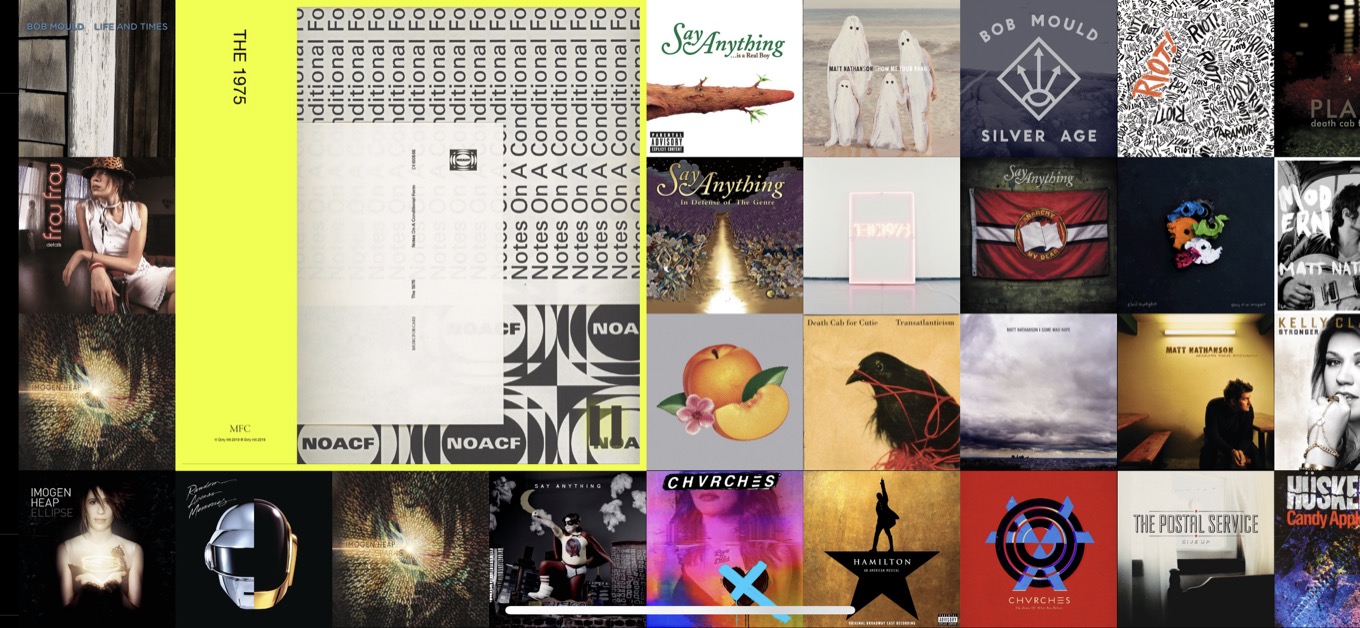
It’s Longplay, a $3 app by Adrian Schönig. What it does is incredibly simple: It shows you the albums in your Apple Music library. You can sort them by personal popularity, in alphabetical order, grouped by color, or (very cleverly) to highlight albums you love but haven’t listened to in a while.
You swipe around in Longplay and tap on an album to start playing it. The playback actually happens in the Music app (sorry, it’s not compatible with Spotify), so you don’t have to manage Longplay as if it’s a different player app. It’s just a way to pick an album and listen to it from start to finish. Which is a joy, even in this era of readily available playlists both curated and algorithmic. (You can opt to display favorite playlists as well.)
Though I am still primarily powered by Apple Music’s ALT CTRL playlist these days, in 2020 I made an effort to listen to albums when I was listening on my iPad while writing. Though most of my 2020 listening ended up being focused on The 1975’s Notes on a Conditional Form and Taylor Swift’s Folklore, I also revisited a bunch of old favorites, including Daft Punk’s Random Access Memories and Death Cab for Cutie’s Transatlanticism.
Steve Jobs was famously obsessed with album art, and his enthusiasm sometimes led Apple into weird user-interface choices in both iTunes and the Music app. But he would’ve loved Longplay—and I do, too.