Bai, featuring a great Christopher Walken appearance followed by a silent, quizzical take from Justin Timberlake. I still don’t know what Bai is. (Wait, I looked it up. It’s sweetened water? Yuck.)
Budweiser, showing the story of the German brewer who emigrated to America and founded the brewery. I don’t have to like their beer, but I like their commercial.
My thanks to 5 Calls for sponsoring Six Colors this past week.
5 Calls is a site that makes it easier for people who are unhappy with recent developments in American politics to have their voices heard in the most effective way—by calling members of the House and Senate. The site lets you select the issues that matter to you and based on your Zip code, provides you with phone numbers. If you’re never sure what to say in these sorts of calls, they provide call scripts you can use as a guide. Check it out at 5calls.org.
Most Apple fiscal quarters are 13 weeks long. Once in a while, however, they need a 14 week quarter. You might call it a “leap quarter”. There was a good explanation of this financial practice a few years ago in Slate. Apple’s Q1 2017 was a 14 week quarter, for the first time since Q1 2013.
He’s absolutely right that Apple was able to show greater per-quarter growth because this quarter was longer, and even a slow week would add enough to counting stats to push it above the year-over-year quarter, which was 13 weeks long.
We can unravel it more if we like: You can back out a huge settlement benefit that hit the first quarter of FY16, which makes Services look even better (but doesn’t change the overall net). You can start to calculate out the channel and supply constraints and get a better sense of demand. In other words, you can make the numbers tell the story you want to tell, with charts to match, and slice it nine different ways.
But, for better or for worse, the window we get into Apple’s finances is based on its financial statements—and that means the quarters as Apple defines it. This was a record quarter for Apple. But it’s also fair to point out that Apple’s definition gives it a one-time windfall, an extra week of sales that it won’t get again for another few years. And it’s a windfall that next year’s year-over-year holiday-quarter comparison will have to overcome in one fewer week.
Here’s the thing: This multipronged approach is nothing new to Apple. And while I do believe that Apple is investigating building computers based solely on the same type of ARM architecture it uses in its iOS devices, this latest report doesn’t necessarily draw a straight line to that future. After all, the Touch Bar and Touch ID sensor in the new MacBook Pro already rely on an ARM chipped dubbed the T1.
Mainly, it’s another example of Apple mixing and matching technologies where appropriate so that it always has the best tool for the job.
Note: This story has not been updated for several years.
There’s been a lot of debate about whether Apple would ditch Intel processors and start making Macs with ARM processors like the ones that power the iPhone and iPad. Those discussions have generally been about a binary choice between Intel and ARM, even after the new MacBook Pro with Touch Bar muddied the waters substantially.
Now here comes a new report by Mark Gurman and Ian King at Bloomberg that suggests the new MacBook Pro could be a bigger clue to the future of the Mac than previously expected. It’s an approach that blows away the binary choice of Intel-versus-ARM and potentially leads the Mac down a product design path that’s quintessentially Apple.
Like every Mac released since 2006, the MacBook Pro with Touch Bar is powered by an Intel-built processor. But the Touch Bar, Touch ID sensor, and front-facing camera on the MacBook Pro are operated by the T1 processor, an Apple-designed ARM processor in the lineage of the chips that power the iPhone, iPad, Apple Watch, and Apple TV. It’s being controlled by an embedded variant of watchOS.
According to Bloomberg, this hybrid approach to building a laptop may be just the beginning:
Apple engineers are planning to offload the Mac’s low-power mode, a feature marketed as “Power Nap,” to the next-generation ARM-based chip. This function allows Mac laptops to retrieve e-mails, install software updates, and synchronize calendar appointments with the display shut and not in use. The feature currently uses little battery life while run on the Intel chip, but the move to ARM would conserve even more power… by connecting to other parts of a Mac’s system, including storage and wireless components, in order to take on the additional responsibilities.
Intel processors have a lot of advantages. They’re built for traditional PC operating systems like the Mac and Windows, and the tasks that big desktop (and laptop) computers work on. The entire Mac software base is compiled for them. The slowest Intel processors Apple uses in the slowest Macs are about as fast as the fastest Apple processors used in Apple’s most advanced iOS devices. Building an ARM-based processor that could power a high-end iMac1 is probably something Apple could accomplish, but it might not happen anytime soon—and making such a processor might not be a priority for Apple’s development road map.
This report suggests that Apple may instead be investigating the advantages of a hybrid computer, one that can harness the power of the standard Intel processors that every PC maker uses, but combine it with the unique characteristics of Apple’s own ARM processors. You could argue that since 2006, Apple has only been able to differentiate the Mac from the PC based on software and industrial design. If the Mac evolves into a product that’s a combination of Intel and Apple-designed ARM processors, coordinated by Apple’s operating system, that makes the Mac unique—and potentially gives it some major advantages over other PCs.
The strength of the A-series chips found in the iPhone and iPad is that they are incredibly power efficient, optimized for battery-operated devices, while also providing remarkable graphics and processor performance. If you were to list Mac functions that might be offloaded to an ARM processor, Power Nap would be a good place to start, especially if macOS were tuned to be more aggressive about putting the system to sleep.
What would an ARM-Intel hybrid Mac look like? Would whole segments of the operating system run on the ARM processor, allowing the more power-hungry Intel chip to be put to sleep except when it was absolutely needed? There are a bunch of big questions here, most notably the identity of the code that would run on the ARM processor and where it came from. Would Mac apps include extensions or plug-ins that would be designated to run on ARM? Would Mac apps provide two separate sets of program binaries so that the system could switch them between processor architectures at will?
And then there’s the question of what the change would mean for the specs of Apple’s future laptops. Presumably the value of doing all this work would be to create a MacBook or MacBook Pro with vastly improved battery life, because theoretically the more work gets shifted to the power-efficient ARM processor, the more power efficient the entire system gets. If done right, it could give Mac laptops a huge advantage over ones that run Windows—and it would be an advantage that would be much more difficult for competitors to overcome.
(This might also mean that users who truly take advantage of the power of the Intel processors—video editors might be a good example—might continue to find that Apple’s battery-life breakthroughs don’t seem to actually improve battery life for them, because most battery-life improvements have to do with being more power efficient when the computer is idle or doing non-taxing work.)
It’s a weird idea, but I can see the appeal. And this approach allows Apple to dip its toe in the water, experimenting with ARM on the Mac without going all-out and releasing a line of entirely ARM-based Macs. If all goes well, though, it’s hard not to imagine that Apple would eventually do away with the Intel processors altogether… but a hybrid approach would allow that shift to happen over years, rather than all at once.
As for the near future, well, this seems to be the answer to the question, “If Apple’s going to embed a separate processor and operating system in every MacBook Pro, what if they were capable of doing more than just running the Touch Bar?” If this report is accurate, that’s exactly what we’ll see. Maybe the Mac’s future is weirder than we’ve previously imagined.
Or some sort of “pro” Mac desktop, if one existed. ↩
The Iconfactory has a new drawing app out called Linea: http://blog.iconfactory.com/2017/01/introducing-linea/
Apple’s quarterly results are coming, but we don’t have them yet: http://investor.apple.com/
Super Mario Run has some new features: http://www.macworld.com/article/3163468/ios/super-mario-run-gets-an-easy-mode-pulls-in-the-big-bucks-for-nintendo.html
The LG monitors Apple sells have some, uh, problems: https://arstechnica.co.uk/gadgets/2017/01/apple-lg-5k-display-issues/
You can’t get Apple’s old poker app anymore: http://www.macrumors.com/2011/11/17/apple-removes-texas-holdem-its-only-ios-game-from-app-store/
But Lex recommends Poker Night at the Inventory: http://store.steampowered.com/app/31280/
Our thanks this week go to Harry’s (http://harrys.com/Rebound). Harry’s sells premium shaving products for much less than those crappy blades that you have to get someone to unlock from a cabinet. With coupon code “REBOUND”, you’ll get a free shave balm. Don’t wait, get the shave you deserve.
Our thanks to Blue Apron (http://blueapron.com/rebound) for sponsoring this episode of The Rebound. Blue Apron ships you ingredients and amazing recipes. Learn while you cook and cook meals you’ll love. Go to BlueApron.com/REBOUND and get three meals FREE with free shipping.
Note: This story has not been updated for several years.
Even though I’ve been waiting for the much-anticipated Sonos-Alexa integration, it hadn’t occurred to me that I could be using my Amazon Echo in conjunction with other media. So today’s announcement by Plex that it was rolling out an Alexa skill allowing control of your media library took me by surprise. So I fired it up and quickly ran it through its paces. The verdict? Definitely shows some promise–though it’s hampered by a few limitations, not all of which are under Plex’s control.
The Plex skill is definitely one of the more complex third-party features I’ve used. First you have to enable it, then log in to your Plex account, then authorize Alexa to access your Plex account. But wait, there’s more! After that, you have to set both your default server and player. The latter was where I ran into my first hiccup: I intended to set my Apple TV as the default player, but at first it wasn’t detected–presumably because the set-top box was asleep. But eventually after waking it up and opening the Plex app (and opening the Plex app on my iPhone and on the web), I was finally able to set the Apple TV as my default player.1
Once the setup’s done, there are actually quite a few commands available in the skill. You can have Plex play back a specific movie, album, or TV episode. You can ask what’s in your On Deck listing (which is Plex’s version of the Up Next feature that Apple added in its TV app), what you recently added to your library, or what you left off watching. You can even have Plex recommend what to watch or listen to next, complete with slightly snarky commentary–when I turned down listening to a new song, it then suggested I instead go with an old favorite which it commented I had listened to a lot. It wasn’t wrong.
There were a couple minor glitches, though. For example, the Plex skill didn’t understand when I asked it to “play the newest episode” of a show (or “play the latest episode”), in both cases saying it couldn’t find the first episode of that show. When I did get to play the newest episode of a show–by simply telling it to play the show–I ran into a weird behavior where the audio started playing even as the Apple TV was still displaying the screensaver. (Not sure if that one was Apple or Plex’s fault, frankly.)
As cool as that feature is, there are some drawbacks, some of which have been long predicted for this kind of interface. For example, it took a couple tries to get Alexa to successfully pause the video on Plex, since it seemed to have a tough time hearing me over the audio from the TV. 2
And, of course, the Plex skill is somewhat limited because it talks directly to the Plex app; there’s no control of hardware. Once you have the TV and media player turned on, it’s fine, but you have to get to that point first.
But despite all that, there’s a lot of promise here because it combines two features we’ve seen independently: ubiquitous voice control and voice control of media playback. My biggest problem with voice control of the Apple TV is that I don’t usually use the bundled remote, which makes its Siri functionality a non-starter. I do often use the Echo to turn on my Apple TV while I’m doing something else, like preparing dinner, so being able to now use that to furthermore start playing a show is a nice improvement.3 Being able to simply ask Alexa to play something and not having to fumble around and look for a tiny slab of glass and metal is a huge plus. Apple should take a page out of this playbook for future versions of the Apple TV.
One of the other major advantages that the Plex skill brings is the ability to address multiple players. For example, I can tell it to play a certain show on my iPhone, or on my Apple TV, or in any other Plex app I currently have running.4 I can see that potentially being a handy feature for households that share an Echo but have multiple screens. It also seems like it might be a beneficial thing for young kids who haven’t quite mastered the art of remotes yet.
Overall, the Alexa-Plex integration seems like a winner. Really, my biggest regret is that I’ve moved so much of my media consumption away from Plex of late, relying instead on the Apple TV’s other apps like Netflix, Hulu, and the network-specific offerings. Because now that I have the ability to cue up some of my TV via voice, I want to be able to do that everywhere.
It also wanted me to address the Apple TV by the name I’d given it, rather than as “Apple TV.” ↩
I also found the phrase “Alexa, ask Plex” surprisingly tricky to say at times–it’s a bit of a tongue twister. You can also say “Alexa, tell Plex” though that doesn’t always feel particularly natural. ↩
I do hope the Plex skill adds a “cue up” feature where I can ask it to open a show and immediately pause it, so I can just start playing it when I’m ready. But maybe that’s just me. ↩
It seems like the Sonos integration will boast a similar feature for its integration. ↩
[Dan Moren is the East Coast Bureau Chief of Six Colors, as well as an author, podcaster, and two-time Jeopardy! champion. You can find him on Mastodon at @dmoren@zeppelin.flights or reach him by email at dan@sixcolors.com. His next novel, the sci-fi adventure Eternity's Tomb, will be released in November 2026.]
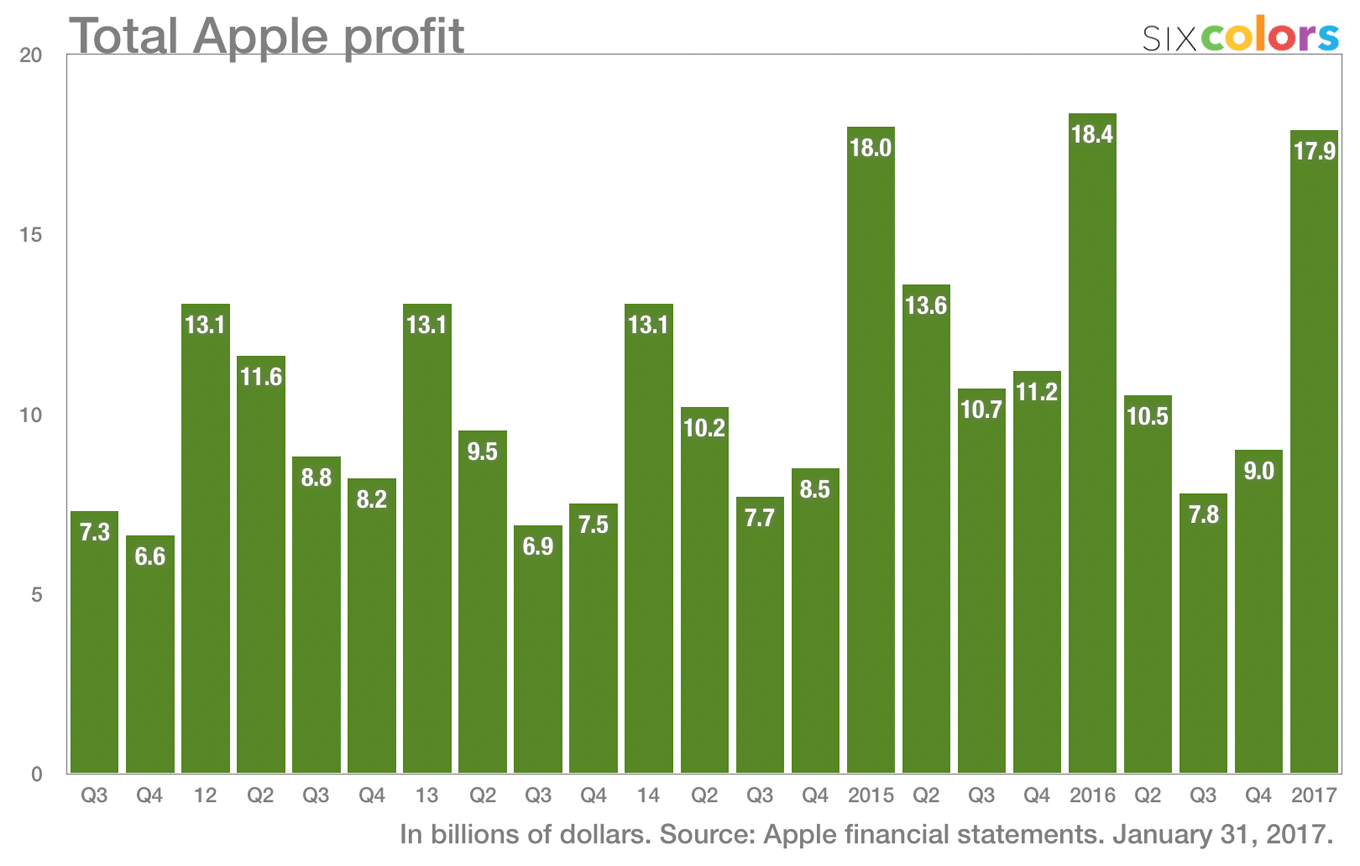
It’s fair to say that, from a financial-results perspective, 2016 was rough for Apple. Sure, the company still made billions in profit on massive revenues, but Wall Street wants to see growth and the massive iPhone sales of 2015—when the company introduced the larger-sized iPhone 6 and iPhone 6 Plus—were just too big for 2016 to match.
But it’s a new fiscal year, and Apple’s latest financial results, announced Tuesday, suggest that the story of Apple in 2017 will be different. The company took a page out of its 2015 playbook, setting an all-time record for revenue, and provided guidance that it will likely show year-over-year revenue growth again next quarter. The company broke a bunch of other records, too-for Apple Watch, Services, and the Mac.
To be fair, Apple really does holiday quarters right. (Even the year-ago holiday quarter was a record.) It’s the company’s biggest quarter of the year by far, but that means there’s than much more at stake. Bottom line: Apple’s 2016 holidays were good. Here’s a deeper dive into some of the other interesting things we learned as a part of Apple’s regular disclosure of numbers and give-and-take with financial analysts about Q1 2017.
Mr. Cook declined to elaborate on Apple’s possible legal options, except to say that “we want to be constructive and productive.” He said that since the order was signed, he’s received numerous emails from Apple employees with “heart-wrenching stories” about how the order will affect friends and family. One employee who’s expecting a child said the future grandparents have Canadian and Iranian citizenship and won’t be able to visit to meet their new grandchild.
And, as many have noted, late Apple co-founder Steve Jobs was himself the son of a Syrian immigrant, which makes this case all the more personal for the company.
In the biggest about-face since Paul Marcarelli, the “Can You Hear Me Now?” guy, went from shilling Verizon to working for Sprint, actor Justin Long, who portrayed the Mac in Apple’s long-running “Get a Mac” line of commercials, is now appearing in ads for Chinese tech company Huawei.
The ads don’t trade heavily on Long’s previous appearances (“I have a ton of experience in tech” is about all he says), and he’s traded in his hoodie and t-shirt for a tweed jacket and, later, “director’s outfit.” There is also no sign of John Hodgman, and more’s the pity.
So, how are the ads? Pretty meh, I’d say. (Not unlike Huawei’s products–zing!) You can judge for yourself.
Here are the iPad sales numbers in millions for the last four holiday quarters: 26, 21, 16, 13. Apple sold half as many iPads for the 2016 holiday quarter as it did in 2013.
Meanwhile, average selling price sagged, after a brief buoying caused by the release of the 9.7-inch iPad Pro—a sign that during this sluggish holiday period, iPad sales were largely comprised of older, cheaper models.
The iPad has 85 percent of the market of tablets priced over $200. The important facts here: Apple’s not interested in selling a sub-$200 iPad, and so that means it’s doing spectacularly well in the market. The market’s just contracting. So this isn’t necessarily about the rejection of the iPad—it could be about flagging enthusiasm for the entire category of premium tablets.
Apple CEO Tim Cook, famously bullish on the iPad, had a few explanations (or excuses, depending on your level of charity) at the ready when he was asked about the iPad at the very end of his conference call with financial analysts.
Among them:
A year ago Apple stuffed 900,000 iPads into the channel (those new iPad Pro models, for example), while this year it removed 700,000 iPads from the channel. That has a 1.6 million unit swing, so Apple would argue that the numbers aren’t quite as bad as they seem. (It would still be a drop if you factored out inventory, but less of one.) This may indicate that Apple’s drawing down inventory because there are new iPads in the pipeline. It might also just indicate that Apple’s got a glut of iPads that aren’t selling.
Apple misunderstood iPad demand for the holiday quarter, which, compounded with a shortage from one of its suppliers, meant that it couldn’t ship as many new iPads as it could have.
The number of people buying the iPad for the first time is very strong, according to Cook, which means that the tablet market isn’t actually saturated.
Customer satisfaction scores are “through the roof”, which means that people who do buy iPads love them. On iPad Pro, Cook said, the customer-sat number is 99 percent. “It’s stunning,” he said.
Still, to find positive things to say about the iPad, Cook had to “zoom out of the 90-day clock” of quarterly results and try to get us all to see the forest for the trees.
“We have exciting things coming on iPad,” he said. “I still feel very optimistic on where we can take the product… so I see a lot of good things and hope for better results.”
Looking and hoping for positive signs. It feels like we’ve been doing that for a couple of years now. It’s probably going to take a major push from Apple—new hardware and improved software—to give the iPad a chance of seeing some turnaround. I hope it happens soon.
So, Apple wants to get into the video content game. The more the merrier, I say! But you don’t just pluck new TV shows of the caliber of Westworld and Stranger Things out of thin air. No, these things need to be carefully crafted, expertly created, honed within an inch of their life. So here are my off-the-top-of-my-head pitches for a handful of shows that I think could bring Apple the attention and critical acclaim it’s looking for.
Boot Time When three engineers working on a top secret project are zapped back in time to the early days of Silicon Valley, they realize that it’s up to them to put the world’s technology on the right course, so that they can get home again—and hopefully not the slow way. (Executive notes: So, it’s *Halt and Catch Fire meets any of the six million time travel shows on TV right now. Maybe a little reductive and derivative. What’s next?)
The Tech Crusader Simon Bishop is a billionaire tech CEO, but he harbors a dark secret: by night, he haunts the streets of Palo Alto as the Tech Crusader, using his technical know-how and immense resources to dole out criminal and social justice to the denizens of Silicon Valley. But when he discovers that the biggest threat might in fact be his very own company, he has to make some hard choices, teaming up with plucky young programmer Karen Kwan to combat threats from both inside and out. (Executive notes: Well, every network probably needs its own superhero show, and the crossover into the realm of hard questions makes it a little more thinky than your average comic book show. But seems a little pulpy—what have we got that’s more serious?)
The Bible: An Adaptation Who says there aren’t any good wholesome shows on these days? This anthology series covers stories from the venerable text, each week covering a different tale, from Genesis to Revelation. (Executive notes: Perhaps a little bit outside our core audience, but could be a compelling watch: a series that discusses serious moral issues, without any of the violence and sex that seems to permeate modern—wait, which testament now?)
Fahrenheit 451 Guy Montag is a fireman who loves to burn book—no, listen, sorry. This one just hits a little bit close to home right now, guys. Can we maybe do something else instead?
1984 Ha ha. Yes, I see what you did there. Look, how about something a little less controversial, that we can all agree on.
We Rate Dogs Capitalizing on the popular Internet Twitter account, this reality series follows one team’s quest to track down and comprehensively rate all the dogs in the world. Boopable noses a h_ck of a plus. Tagline: It’s a Good Show, Brent __(Executive notes: Perfect. Greenlit.)_
[Dan Moren is the East Coast Bureau Chief of Six Colors, as well as an author, podcaster, and two-time Jeopardy! champion. You can find him on Mastodon at @dmoren@zeppelin.flights or reach him by email at dan@sixcolors.com. His next novel, the sci-fi adventure Eternity's Tomb, will be released in November 2026.]
Subscriber Nolan writes in with a question about photos:
This fall I am getting married and instead of giving all of my information to a “free” website like the knot I decided to make my own site with Squarespace. So far it has been fairly easy but it has led me to another thought — photos.
No, my wife-to-be didn’t let me get away with not having a professional photographer. I’m curious if you have had experience or tried a photo sharing app?
Nolan’s got some specific criteria for the app he’s looking for: private, paid, and with good app support.
I’ve dealt with a problem very much like this before. A few years back, my family had a big reunion to coincide with my uncle and aunt’s fiftieth wedding anniversary. Several of the people there were taking pictures and we wanted an easy way to share all of them—but more than a few of the folks were on the less tech-savvy end of the equation. So, what to do?
After going through available options at the time, I settled on a surprising candidate: Dropbox.
Why Dropbox? In the end, it handled much of what I was looking for in a photo-sharing solution, and more than a few of those criteria seem to overlap with Nolan’s requirements
First: privacy. There are plenty of apps that offer cloud storage, but Nolan—and many others—are understandably wary about putting the photos in the hands of big companies like Google, Apple, or Amazon. Dropbox may still be a big company, but I generally trust that my files remain my files. And, in terms of data security, Dropbox stores them locally on my computer, rather than only consigned to living some place in the cloud and downloaded on demand. (Plus, Dropbox’s version history helps insure that your data is safely backed up.)
Second: Sharing control. Dropbox provides a couple options for sharing content; it’s easy enough to share a folder with specific individuals if they already have Dropbox accounts, but one of the advantages of the service is that it’s also relatively simple to just send a private link, which simplifies matters for those who don’t have—or don’t want to sign up for—a Dropbox account. You can even secure that sharing link with a password, in case you’re concerned about others peeping in on your photos.
Third: Collaboration. This is one of the places that Dropbox really shines for me when it comes to photo-sharing. A lot of other services make it tricky to collect photos from a variety of sources. For example, in my aforementioned family reunion situation, I wanted to have the ability for anybody present to contribute to the overall collection of pictures, without jumping through a lot of hoops. Dropbox has in the last year or so added the ability to make file requests, which allows people to upload files to somebody else’s Dropbox. (Previously, I relied on tools like the now-defunct Send to Dropbox, which allowed people to email attachments and have them automatically imported to a specific Dropbox folder.) You should be able to upload photos to a Dropbox file request no matter what platform you’re coming from.
One of Nolan’s other concerns was that he was looking for a paid service, as he doesn’t like the idea of Facebook or Google trying to pull in revenue from looking at his photos, even if it’s just for machine learning purposes; Dropbox is free, true, but it gets its revenue from charging for more storage space, so it’s less concerned with scraping information from people’s content.
He also wanted to insure that the service in question had good app support on both iOS and Android. Dropbox ticks that box as well.
Now, there are some downsides to Dropbox as a photo-sharing service. For one thing, it’s not really designed for photo-sharing, so while it’s possible to get a reasonably useful thumbnail gallery view, it lacks many of the bells and whistles for sorting and searching pictures. You won’t get any of Google’s fancy machine-learning features that identify specific people, for example. More recently, Dropbox has added some photo-centric features, including the ability to create albums that you can share links to, but they seem to lack some of the fine-grained access controls of your standard folders.
All things considered, though it’s not specifically designed for the purpose that Nolan had in mind, it seems like Dropbox might very well be the ideal tool to accomplish just what he needs.
[Dan Moren is the East Coast Bureau Chief of Six Colors, as well as an author, podcaster, and two-time Jeopardy! champion. You can find him on Mastodon at @dmoren@zeppelin.flights or reach him by email at dan@sixcolors.com. His next novel, the sci-fi adventure Eternity's Tomb, will be released in November 2026.]
A bit earlier I told you my sob story about a bad iTunes decision I made. What I often prefer to do is buy Blu-Ray discs, which are a “bag of hurt”, but can be converted into a much less painful (and more flexible) format. Here’s what I use to make that happen. (For a little more detail, here’s a story I wrote two years ago on the subject.)
USB Blu-Ray Drive. I have a couple of these drives, and they work just fine. You can’t use them to play Blu-Ray discs on the Mac, but that’s not the point—they work and work well, and you can use them to rip your old music CDs if you really want to, too.
MakeMKV. This utility lets you extract video files off of a Blu-Ray disc and save them in the Matroska Video container format. It takes time and uses up space, but it works! Once they’re off the disc and on your hard drive, you can convert them to playable formats with other software.
Don Melton’s transcoding scripts. Former Apple engineer Don Melton has spent an awful lot of time finding the best presets for converting those extracted files from Blu-Ray discs into high-quality, playable videos. Installing his scripts is somewhat technical—you need to install them via the command line, and if that terrifies you, you should probably just use Handbrake, which is a standard Mac app and works well, and comes with a bunch of presets that let you choose the right level of quality.
Once I got Don’s scripts running, though, I found that I prefer them to Handbrake because I’d rather trust in Don than in Handbrake. So, if you’re up for a little Terminal work, give Don’s stuff a try. If you’re not, Handbrake will convert those MKV files just as well.
Plex. I used to add video files to iTunes and use the Computers item on the Apple TV to play them on my network. These days I use Plex, which I run on my Mac mini server (but you can also run on network-attached storage devices like those from Synology). Plex apps are available for iOS and Apple TV and Amazon Fire TV and many other platforms, so I can browse my entire video collection from just about anywhere. The Plex server can transcode video on the fly for the appropriate device and network connection speed. You can also download videos from a Plex server to the Plex app on the iPad and play them back when you’re offline.
(Plex will transcode MKV files, too—I use Don’s scripts to do the transcoding because I don’t want to save the enormous Blu-Ray files and I prefer to hang on the option to load my videos directly onto my iPad rather than use an intermediary like Plex.)
Plex is a bit strange when it comes to metadata, but this article by Casey Liss showed me the one true way to name your video files. Once you follow Casey’s guide, the Plex experience becomes a lot easier to navigate. There’s also a great episode of Mac Power Users that talks a whole lot about using Plex.
Format pain. I’m not going to go deep into this, but yes, I do sometimes use TunesKit to convert iTunes-purchased videos to DRM-free format. It works, but it’s not cheap and it’s not for everyone. Still, if you want to get your iTunes movies playable on non-Apple devices, this is the way to do it. Also, if you’re a big fan of Marvel/Pixar/Disney movies, you should sign up for Disney Movies Anywhere—basically, it’s a free service that lets you connect your iTunes, Google, and Amazon accounts, so if you buy a movie in one store, it’s automatically available to you in all the different stores. (It also upgraded my old standard-def copy of Iron Man to HD!)
So that’s my story. In a couple of days my “When Harry Met Sally” Blu-ray will arrive, and my Plex server will get it soon after.
I went to Hawaii with my family a few weeks ago. (In case you missed it, I got to take some underwater pictures with an iPhone for the first time.) We took advantage of a quirk in our local school schedule—our children both had the first week of January off—to vacation right after Christmas week, which is presumably one of the busiest tourism weeks of the year.
This meant that we would be spending New Year’s Eve on Kauai, making us one of the last time zones to celebrate the new year. (Just to give you some idea of what this means, we were frolicking on the beach in the early afternoon when London was celebrating, and eating dinner when the ball dropped in Times Square. GMT -1000 is a funny place to be.)
One of my wife’s and my New Year’s traditions is a viewing of the 1989 romantic-comedy classic, “When Harry Met Sally,” which is largely set during the holidays and ends at the stroke of midnight on New Year’s Eve. (We also usually watch the Marx Brothers classic “Duck Soup”, but that’s an entirely other story and is entirely the fault of my friend Philip Michaels. Hail Freedonia!)
Of course this year we’d be in a Hawaii condo on the night. I had meant to just bring along a digital copy from my home media server, when I discovered to my shock that I didn’t seem to own the movie on Blu-Ray. It was too late to order the Blu-Ray and have it with me in Hawaii, so I decided to buy the movie on iTunes instead. I even brought an HDMI cable and adapter so I could play it straight from my iPad onto the TV in Hawaii. We would not be denied our tradition!
After some spectacular fireworks over Poipu Beach, we walked back to our room, the kids went to bed, and I started the movie. It’s one of those movies I’ve seen a few dozen times, so I know most of the dialogue, beat for beat, as well as all of the music.
So we’re watching the movie, and about 45 minutes in something extremely weird happens. A thing happens in the movie that has never happened before. This isn’t me noticing a small detail—that happens nearly every time I closely re-watch any movie. This is a change to a film I know by heart. In the scene—which immediately follows the single funniest line in the movie, “I’ll have what she’s having”—the film jumps to Christmas, and we see skaters at Rockefeller Plaza and snow covering Central Park. Newly minted friends Billy Crystal and Meg Ryan are buying a tree from a lot on the sidewalks of New York. All the while, “Winter Wonderland” by Ray Charles is playing in the background.
Except this time it isn’t. It’s some weird, unintelligibly quiet piano noodling. And I get this sinking feeling that I know what’s going on: A lot of movies and TV shows originally licensed music without specifying future formats like streaming video or even home video. And the choices for the distributors are either to pay more money to re-license the music, or change the music in the work itself.
The thought is just hanging in the air there, like a speech balloon in a cartoon, when the scene shifts to the film’s first New Years Eve sequence, in which Harry and Sally dance at a party. In the background, Harry Connick sings “I Could Write a Book”, which culminates in a couple of Meaningful Stares just as Connick sings the line “To make two lovers from friends.” This emotionally charged moment sets off the entire second half of the movie, as the nature of the two leads’ relationship changes—and it leads directly to the second New Years Eve sequence that ends the movie.
In the iTunes version, Connick’s version has also been replaced with generic jolly party music. Losing Ray Charles was bad, but this is worse, because it’s not just ripping mood out of the movie, but actual subtext that’s supporting the entire structure of the film.
Somewhere between 45 minutes and all night, my wife fell asleep, but I kept watching. Perhaps the universe was showing her some kindness, because she didn’t witness the worst change of all. The film’s climax features Billy Crystal, walking alone on the streets of Manhattan on New Year’s Eve, flashing back through his relationship with Meg Ryan. At the moment he realizes that he really does love her, the music suddenly swells and Frank Sinatra sings “It Had to Be You”, which plays over the entire final scene of the film and counterpoints the jaunty Connick piano version that plays over the opening credits.
You can guess what happens in this haunted iTunes edition: Nothing. No swelling of music. Instead, Billy Crystal’s life-changing realization is accompanied by a slow droning of saxophone noodling. It is a complete disaster. Crappy New Year everyone!
visual saxophone
So this is my iTunes movie horror story. Does it have a happy ending, despite all appearances? Yes, in a few ways. The rest of our vacation was great. I went to iTunes as soon as the credits rolled and discovered that almost all of the reviews gave the film one star and cited the changes in music from all other editions as the reason. (I also found a great NPR article about this very issue, in this very film.)
And, finally, I ended up with a fantastic experience with iTunes email support. That very night I requested a refund from iTunes. On January 2 I got an email from Apple support saying they would immediately refund my money, and on January 5 I got a second note saying that the refund had been processed. At the time I wondered—how many people have this as a New Year’s Eve tradition and also requested refunds? And how long would it take for someone at Apple to realize that this generally loved film was hoving just above one star on iTunes for a very particular reason?
Turns out that might be the happiest ending of all. Last week I checked iTunes for “When Harry Met Sally,” and the movie is gone. Apparently enough was enough? Even more baffling is that the film is still available for viewing on Hulu, and appears there with all the music intact.
So here’s what I learned. First, digital purveyors of movies and TV shows need to clearly label when the content has been changed from its original version. That was standard practice on home video—my old VHS copy of “Wayne’s World” had a note to indicate that Led Zeppelin had forced them to remove the first few notes of “Stairway to Heaven” from the scene in the guitar store—but seems to have vanished in the world of streaming? Second, there’s no value in releasing an utterly stripped version of a classic film—Apple and other digital providers should save themselves the grief of offering refunds and not bother. Third, Apple has a refund policy—I have always known that, but never used it—and it seems to work seamlessly.
Oh, and I ordered the Blu-ray of the movie on Amazon and will watch that—or a digital version of it—from now on. I’m done taking chances with streaming services and old movies I love.
There was a time when every quarter was a record for Apple, but after last year’s rough year of regression (following a record-smashing 2015), it wasn’t a sure thing that we’d see more of those for a while. But for the holiday quarter of calendar-year 2016, Apple beat its own advance guidance and reported a record revenue of $78.4 billion.
It was also an all-time record quarter in a bunch of other areas, including iPhone sales (78.2 million).
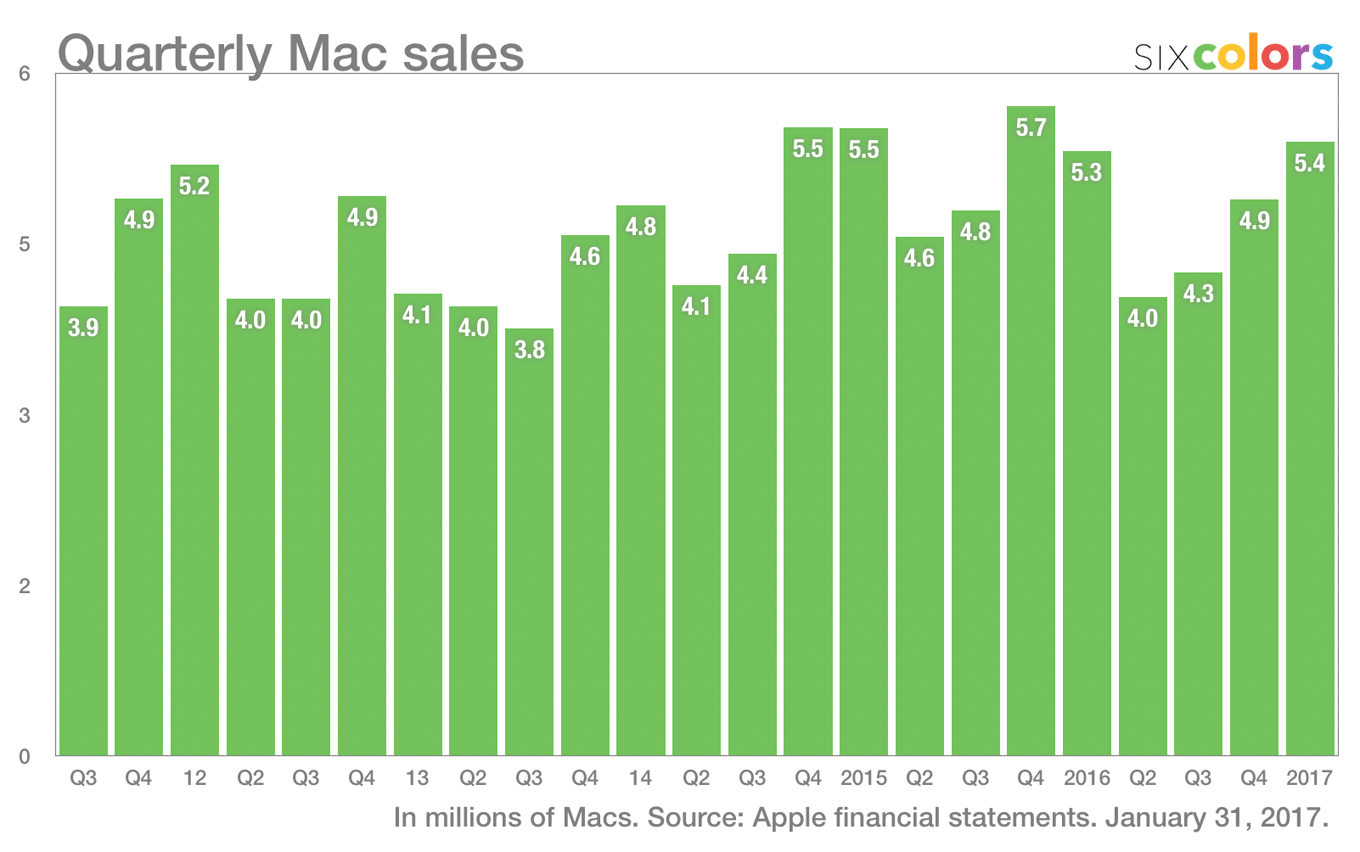
Mac unit sales weren’t a record, but because of rising average sale prices (thanks, MacBook Pro!), Mac revenue set a record.
Services revenue was a record once again, and Services continues to follow a strong growth trajectory.
Apple Watch revenue, while not disclosed, was also a record.
What can you say about the iPad? No records here, really, unless you split regions finely and talk about growth in Mainland China and India. But there’s no new growth here. (Perhaps unsurprising, given that no new iPads have been released since last spring.) Average selling prices of iPad dropped this quarter, presumably because consumers are buying cheaper, lower-end iPads for the holidays.
It’s been a bumpy ride for the LG UltraFine 5K display. It didn’t go on sale for a long time. John Siracusa lamented it on Accidental Tech Podcast. Today in Slack one of my friends referred to it as “remarkably cheap feeling” with a “deeply unpleasant hinge mechanism.” Red flags abound!
LG UltraFine 5K Display has a critical usability issue… that doesn’t affect other external monitors: the hardware can become unusable when located within 2 meters of a router.
LG support says the router issue only affects its 5K monitors and no other LG displays. Without more 5K monitors on the market to test, it’s unclear if this limitation will be hardware specific or an issue in all external 5K displays coming soon.
Apple’s financial results for the last calendar quarter of 2016 will be released today at around 1:30 p.m. Pacific, followed by a phone call with financial analysts at 2 p.m. (Anyone can listen in, but only special handpicked analysts get to ask questions!)
As you might expect, Six Colors will be following the proceedings and posting a bunch of charts followed by analysis of the call. If we do any live analysis of the phone call you’ll be able to see it here and our event Twitter account, @sixcolorsevent.
Here’s a chart with what we expect Apple’s total revenue to look like, based on the guidance Apple made back in late October.