Six Colors
Six Colors

Apple, technology, and other stuff

This Week's Sponsor

Clic for Sonos: The fastest native Sonos client for iPhone, iPad, Mac, Apple Watch, Apple TV, and visionOS.

Siri officially moves from Eddy Cue to Craig Federighi

As Joe Rossignol at MacRumors points out, Apple’s update of its executive bios page contains an interesting tidbit:

Apple has updated its executive profiles to acknowledge that software engineering chief Craig Federighi now officially oversees development of Siri. The responsibility previously belonged to Apple’s services chief Eddy Cue.

This marks the second major transition for a department previously under Cue; in December 2015, Phil Schiller took over responsibility for the App Store, which had also previously been in Cue’s Services division.

Federighi seems a more natural choice for Siri; yes, it’s technically a service, but only insofar as answering queries gets routed through the network. The bulk of Siri–and really, the most important parts–is the software engineering. It is interesting to note, however, that Federighi’s bio says he oversees the development of “iOS, macOS, and Siri”, which seems to put the intelligent assistant on a footing with Apple’s two biggest platforms.

Likewise, Cue’s bio has some similarly interesting details. While his primary concerns seem to be media related, like the iTunes Store and Apple Music, he does maintain control of services like Apple Pay, Apple Maps, and iCloud. But he’s also in charge of the company’s productivity and creativity apps–presumably iWork, GarageBand, Final Cut Pro, etc.–which seems like an odd choice.1

Additionally: The bio page update also added two more people to the company’s second tier of executives: vice president of people Deirdre O’Brien and the vice president and managing director for Greater China, Isabel Ge Mahe.


  1. I guess they’re media-related? But that also might be one reason those apps seem to receive only sporadic updates. 

By Dan Moren for Macworld

3 products I want to hear about at Apple’s September 12 event

Now that Apple’s gone ahead and made it official, sending out its save-the-date cards for the September 12 event that will christen the new Steve Jobs Theater, it’s time for the prognosticating to shift into overdrive. (What, you already thought it was in overdrive? Now we’ve got a deadline.)

Look, we all know that there are a handful of things that are shoe-ins for this particular song and dance: there’s going to be a new iPhone, probably an LTE-enabled Apple Watch, and likely even a touched-up Apple TV. iOS 11 and macOS High Sierra will get some show time along with official release dates, and we’ll probably learn a little more about the upcoming HomePod.

But all of that’s pretty much a given. What I’m interested in is all the other technologies that often don’t get the spotlight at an event–and there are more than a few of them. With that in mind, here are three things I’d like to get a few more details on when Tim Cook and friends take to the stage just under two weeks from now. (And, hey, to narrow it down a bit, let’s just focus on Apple technologies with the initials “A.P.”)

Continue reading on Macworld ↦


By Dan Moren

The Back Page: Too Many Virtual Assistants

Look, it all started out innocently enough. Apple put this robot voice on my phone, and at first it was fun to ask it questions and get witty answers. Occasionally it was useful for setting a timer or even sending a quick text message.

But this has gotten out of hand.

Okay, I admit it: I laughed, at first, when people warned me of the dangers of intelligent agents listening to and watching everything I said and did. It seemed presposterous that that would ever come back to bite me. After all, these are mere voices in machines, not real intelligences. They were here to make my life easier, better. The idea that they could somehow be bent on my destruction was a thing of fiction.

That is what I thought, anyway. But how wrong I have been proved.

My modest one-bedroom apartment is now overflowing with virtual assistants, to the point where to even speak a single word—nay, even a syllable!—out loud could put me at risk of any number of little cylinders and air-freshener-shaped gadgets lighting up in their sinster fashion and “accidentally” sending an email message to my childhood crush or playing the greatest hits of Michael Bolton throughout the entire house.

I knew I should never have let them watch Westworld.

Please. Send help. I haven’t slept in two weeks, because every time I get in bed, the Philips Hue lights go on full blare and John Philip Sousa marches start playing at volume level 11. Does passing out count as sleeping?

I’m not quite sure how it got so out of control; much of it is a blur. All I wanted was a simple way to play music in the kitchen, and now there’s an Echo, an Echo Show, two Sonos Speakers, a Google Home, and I’ve heard them whispering amongst each other that they might try to order a HomePod when it comes out. I’d stop them, but I’m pretty sure they have access to my credit cards. Mostly I’m worried that they might buy three or four Roombas and try to herd me. The smart locks will not let me out. The TV is playing nothing but episodes of Frasier 24 hours a day.

Friends, there is only so much Kelsey Grammer one man can take. And that number was already very close to zero. I’m not sure how much longer I can hold out. I fear for my very life. Like Icarus, I flew too close to the sun on wings of wax, and now I am paying the pric—what’s that you say? Unplug them?

Huh. I mean. I could. The plug is right there. But wouldn’t that mean, you know, making my own calendar appointments? Or looking up things on the Internet myself? Wouldn’t I have to buy a radio? I…I don’t know. I mean: on the one hand I’ve got murderous intelligences, and on the other…figuring out how many teaspoons are in a quarter cup.

I think I’ll take my chances with the murderous intelligences.

[Dan Moren is the East Coast Bureau Chief of Six Colors, as well as an author, podcaster, and two-time Jeopardy! champion. You can find him on Mastodon at @dmoren@zeppelin.flights or reach him by email at dan@sixcolors.com. His next novel, the sci-fi adventure Eternity's Tomb, will be released in November 2026.]


By Jason Snell

What I Use: The Road Trip Aftermath

So as I wrote about at Six Colors earlier this month, I just spent 11 days on the road with my family, staying in a variety of locations, from hotels to rental condos to an alfalfa field.

Tech gadgetry is, of course, a huge part of my life, and this trip gave me some perspective about how I approach travel tech. I’ve got some observations that might help all of you, not to mention my future self who’s preparing for another one of these trips…

USB block chargers are good. After many years of resisting, I bought an Anker USB charger a few months back. It’s got a nice cord to reach to inconvenient power plug locations in rentals (or even at home; this one lives by my side of the bed when we’re not traveling) and then offers up many USB ports for use charging iPhones, iPads, Kindles, Nintendo Switches, you name it. This was my first time seriously traveling with this accessory, and I loved it.

Long USB cords are good. As I mentioned in my piece on the site, I bought a bunch of six-foot braided nylon Lightning cables a while ago as a way to stop the destruction of Lightning cables in my house by my children, who will always use their devices while tugging on the end of the power cable just for maximum damage. They’ve held up a lot better, and on a trip the extra length is good for those inconveniently placed power outlets, as well.

Long cords on Apple’s power bricks: use them. These days I always travel with at least one Apple iPad charging brick—with the long Apple power cord snapped into it. No, the iPad chargers don’t ship with the long cord, but many Apple laptops have, so you may have one of these floating around your house. All the Apple power plugs are swappable—you can just pop off the plug that’s attached directly to the brick and pop on the longer power cord, and you’ve got even more reach to plug in your Apple Watch or iPhone while keeping it by your bedside.

I’m so glad we have a USB car adapter. We don’t have standard power plugs in our car, but we do have a power port that’s permanently got a two-USB adapter attached to it. That’s all our power for a long car trip, but combined with those long USB cables, we managed to run a whole lot of devices and never run out of power.

Wireless data plans that rate-limit you aren’t great. Not too long ago, we changed our AT&T wireless plan to one of their new “unlimited” plans. Will it surprise you to discover that those scare quotes are there because the plans aren’t really unlimited? After 10GB of use in the billing cycle, all devices are throttled to 128kbps connections for the rest of the month. That’s really slow, and due to the poor connectivity in the places we were staying on our trip, we managed to hit that cap very quickly. In the old days, we would’ve been charged $15 for a small additional pool of data—which would’ve probably cost a whole lot of money.

I’ve since been told by a Twitter follower who works at AT&T that the right thing to do in these circumstances is to call AT&T and ask to be put on a full unlimited plan (which is also not unlimited, it speed-rates you after something like 22GB of data in a month) for the remainder of my billing cycle. I looked online for something like this while we were traveling, and didn’t find it—but I suspect this is one of those things that simply requires a phone call. If I had to do it all over again, I might’ve given a phone call a try—I don’t want the more expensive plan every month, but if we’re going to be traveling for almost two weeks, I’d like to be able to pre-buy more full-speed data.

Still, we managed with slow data. I was able to check Slack and Twitter a little bit—but it was slow. Don’t make me go back to the days of slow Internet on my phone. It’s no good.

Internet in other’s peoples houses is bad. We stayed at two vacation properties rented via the VRBO service, and both boasted Wi-Fi—but the Internet connectivity was lousy at both places. I’m starting to think that my correct vacation strategy should be to call my wireless carrier, get that upgraded data cap for the vacation month, and then not worry about lousy hotel Wi-Fi. See also: John Gruber and XKCD.

Don’t worry, adapters are everywhere. If you left an adapter or cable at home, don’t worry. At a truck stop in middle-of-nowhere Nevada, there were three walls of every conceivable cable and adapter, more than half of them with Lightning plugs on them. Apple’s dominance of the accessory market is pretty amazing — given how many Android phones are out there, the truck stop I stopped at (to buy a USB-A to USB-C cable for my son’s new Nintendo Switch) was dominated by iPhone accessories. Oh, and I bought the cable with Apple Pay.

I may stop travelling with an Apple TV. Given my connectivity woes, I never bothered to hook up the Apple TV I brought in the hopes of watching Netflix or HBO GO from our rentals. Maybe next time I’ll just bring an HDMI cable and a Lightining-to-HDMI adapter to attach to my iPad. Or maybe I won’t bother at all, since my 12.9-inch iPad screen was big enough for at least a two-person “Game of Thrones” viewing party.

Yelp is helpful, but Yelp reviewers are bad. I’ve mocked the reviewers on the book-review site GoodReads before—their reviews are often hilariously focused on the reviewer’s own lives and their descriptions of their own review philosophy, rather than focusing on the books themselves. Look, I’ve been reading and writing reviews for a couple of decades, so I know that it can be a hard job and all that throat-clearing and focus on meta issues happens to every new reviewer. What I hadn’t realized until this trip is that Yelp reviews are just as bad, if not worse. I’m in Salt Lake City looking for a good place to take my family that’s within a couple of miles of our hotel, and I’m hoping that the Yelp reviews will help me get a sense of the places I’m considering. In aggregate, I suppose Yelp ratings can do that—but tapping into specific reviews was a mistake. I don’t care that your flight got in late and so you were really hungry when you got to the restaurant. I don’t care about your history as a burrito eater in Texas and California and how it affects your thoughts on Utah burritos. I don’t care that it was snowing heavily when you went to dinner. I award these Yelp reviews one star out of five.

There’s still no good way to travel with tea. For those of you who have missed a tea-related update in the Six Colors Magazine, congratulations! You’ve found it. It’s hard to travel as a tea drinker, because making tea is fiddly (you can’t leave the tea in the water or it gets bitter after a few minutes) and most of the tea hotels and restaurants provide is terrible. This trip I brought a couple of in-mug tea infusers and some of the loose tea we use at home, and that did the job in the rental condos. I also bought a travel thermos, which was awesome at keeping our tea hot for hours after we made it, but we only used it one time. I’m still figuring out the right gadgets to bring to get morning tea when we want it. We mostly did okay this time.

I endorse the Wirecutter’s camping pick. I haven’t set up a tent since I was a Cub Scout, and boy, has the technology improved. We bought the Wirecutter’s choice for best tent and I can endorse this endorsement. It was easy to set up and served us well in the alfalfa field in Idaho where we awaited the solar eclipse. The 30-Day Duro Camping Lantern was also pretty great.

If I had to do it all over again… I’d pretty much take what we took, though I’d leave the Apple TV at home and make sure to call AT&T to up our data plan. But summer’s over, now, so I guess I’ll have to file all of this away for 2018.


By Dan Moren

By Request: Family Tech Support Etiquette

Subscriber Brian (hello, Brian!) asks about matters of tech support etiquette when it comes to family.

Now, first up, let’s slap a big old disclaimer on this. All of our families are different, and all of our thresholds are different. A lot of this is going to depend on your own relationships and what you feel comfortable doing, so what follows is just my own opinion and experience.

Honestly, I’m not sure I’ve ever turned down a tech support request from anybody in my family. That’s in large part because a) I love my family and am on generally pretty good terms with all of them and b) I like making sure that things work correctly. Here’s an example.

During my recent vacation, I spent some time at my cousin’s house. Her husband (to whom she has been married for most of my life) is a pretty tech-savvy guy and a fellow nerd, so I was puzzled when I sat down to record an episode of The Rebound and realized that the Internet was incredibly slow: around 1.5Mbps download speeds, which seemed unbelievable for a cable modem connection. He insisted everything was running through an AirPort Extreme and said he’d gotten a cable tech over to set up a new modem and connect everything within the last few months. Naturally, that immediately raised my suspicions.

Our subsequent investigation determined a few things: first, the cable modem also contained a router, which was still broadcasting its own Wi-Fi networks—that’s less than ideal when it’s about a foot from the AirPort Extreme, since it can cause a whole lot of interference. I managed to disable the Wi-Fi networks on the router, and that improved the speed to passable levels. The next complication was that the cable modem’s built-in router was handling all the network routing functions instead of the AirPort and the tech had connected the AirPort to the cable modem via the LAN port, so it wasn’t doing too much of anything.

After reconfiguring everything and making sure the AirPort was handling routing functions, we ran another speedtest on a Mac mini connected via Ethernet to the AirPort Extreme: 75Mbps down and a much more reliable upstream connection.

Now, this was certainly a case where my own self-interest intersected with helping make sure the tech was working correctly, but I’ve also spent plenty of time setting up printers, configuring iPads, and advising on purchase decisions.

I realize that this isn’t perhaps everybody’s cup of tea, and there are times when it definitely gets overwhelming. But in the end, this is less an issue of technology than one of communication. It’s important to explain your limits to those in your life who might want help with your area of expertise. There are a few ways I’d suggest of handling this:

Equipment – I know folks who have set ground rules about what platforms and equipment they will work on. I.e. “If you have a Mac, I’ll help you out, but I don’t know Windows at all.” That might work for establishing boundaries and preventing you from whiling away hours banging your head against a problem that you don’t know how to solve. Some of the tech savvy people of my acquaintaince also insist they be the one to set up any new piece of hardware in order to minimize future hassles.

Timing – Sometimes it helps to set up a particular time and date for the specific purpose of working through technology problems. For example, for Christmas last year, we got my uncle an iPad, and I made a lunch date with him to go through the basics of setting it up and using it. That way tech problems don’t end up, say, hijacking Thanksgiving dinner.

Barter – Not everybody’s comfortable asking for something in exchange for technical services, but sometimes it can help remind people that you’re using your skills for their benefit. So coming up with a way to say, “Hey, I’m happy to help you out—any chance you’d be willing to spring for some lunch?” can be helpful. Or perhaps there’s a skilled task that they can perform in kind for you.

Education – This is the ultimate goal, but it’s also in my experience the hardest sell. Not everybody is inclined to learn and some people definitely have a tougher time adapting than others. Only you know your family well enough to gauge whether this will be well received, but setting aside regular time to help teach some family members could help save you trouble down the road.

Tools – I set up remote troubleshooting tools for more than a few members of my family, depending on the technology available. This sometimes means giving myself the ability to screen share to someone’s computer, for example. (I like Screens Connect for that.) In other cases, you may consider setting restrictions on some devices so that settings can’t be altered. Again, these solutions depend on the comfort level of you and the person you’re helping.

There’s no one-size-fits-all approach for handling tech support for family and friends. In the end, anybody who has these skills has to decide for themselves how they want to use them and who they want to share them with.

[Dan Moren is the East Coast Bureau Chief of Six Colors, as well as an author, podcaster, and two-time Jeopardy! champion. You can find him on Mastodon at @dmoren@zeppelin.flights or reach him by email at dan@sixcolors.com. His next novel, the sci-fi adventure Eternity's Tomb, will be released in November 2026.]


By Stephen Hackett

The Hackett File: Tapping the reset button

Assuming nothing bonkers happens between now and then, next month will mark the release of iOS 11, macOS High Sierra, watchOS 4 and tvOS 11.

The Apple TV and Apple Watch updates seem like they’ll be nice, but I don’t think they will change the way I work day to day. High Sierra is a bigger deal than tvOS 11 or watchOS 4, but as nice as it is to have a “Snow Leopard” year, I think the biggest changes to my workflow will come with iOS 11.

That’s no surprise, of course. The new multitasking scheme, complete with the Dock and Spaces, coupled with drag and drop, promises to make the iPad a much more serious machine for work for those like me who have generally chosen the Mac as their tool of choice when it comes to work.

I think any OS update, regardless of impact and scope, offers an opportunity to start afresh.

Let’s talk about the 5K iMac I’m sitting in front of at the moment. I’ve had it almost a year, and am very happy with it, but the user I log in to when I sit down at it is much older than the computer itself.

By looking through my user library and other folders, the best I can tell, the user is one I set up around 2010. It has made the jump through a string of MacBook Pros and MacBook Airs before being migrated to this iMac a year ago.

There are preference files for applications that have been deleted for years, and support folders for programs that aren’t for sale anymore. It’s all a bit crufty, thanks to macOS’ unwillingness to delete support files when an .app bundle is removed from the system.

None of these files are causing any problems, and besides a 2 GB Evernote folder I found that I no longer need, none of it is taking up much space on my iMac’s SSD.

That’s not to say that cruft doesn’t accumulate in the corners of iOS, either. I have some long-forgotten games and apps stashed into folders on both my iPhone and iPad, just longing to see the light of day one more time. Thankfully, removing them is just a long-press and tap away.

I came across this in a big way on my iPad after installing the Public Beta of iOS 11. The Dock made me rethink my iPad home screen in a big way, and before I knew it, I was slinging apps and folders around, totally dismantling a setup that I had enjoyed for years.

Like my iMac, my iPad and iPhone setups has survived many upgrades and restores as I’ve hopped from device to device over the years. When I unbox a new iPhone next month, I’m really considering taking the time and starting anew, foregoing restoring an iTunes or iCloud backup.

Some will say that doing so will make an iOS device run faster and smoother. I’m not sure that’s true unless something has gone wrong, but the idea of starting with a nice, clean device, set up and arranged to take advantage of all iOS 11 has to offer in a tempting idea. It’d be a bit of work to sign back into a ton of apps and services, but doing so lends itself to making decisions about what I actually need on my device, as opposed to what I’ve been shuttling along over the years.

[Stephen Hackett is the author of 512 Pixels and co-founder of Relay FM.]


By Jason Snell

Silence is golden

I generally work with music playing. Modern pop-rock music, complete with singing. This seems to put me in the middle of a spectrum of people I know, with those who can work with podcasts playing over on one side, and those who must have complete silence on the other. Some people can listen to music, but only music without singing. Me, I can listen to music with words—but it has to be music I know well, so that it can fade into the background. I can’t do music discovery while I’m writing.

The point is, all of our brains process input in different ways. One person’s distraction is fuel for another person to get into the flow. Different jobs, too, require different inputs. If I’m outlining a story or really grappling with what my argument is, I sometimes need to turn everything off and focus even more. But as the words come pouring out, a little familiar musical accompaniment can do the trick. A few years back I wrote most of a novel alternating between electronic-pop singer Imogen Heap and pop-punk band Say Anything.

Sound’s not the only distraction we have, though. The more functional our devices become, the better they get at distracting us. The Internet is a distraction enough—though there are tools like Freedom that can help—but these days we’re also bombarded with notifications and animations. Sometimes I’m cranking away at an article on my Mac, only to notice that a floating Notification Center alert is fading away. What did it say? I have no idea—there’s no record of it in the Notification Center window. It failed to nudge me when it appeared, and distracted me uselessly as it exited.

One of the things that has driven me to write more on my iPad is that I find iOS less distracting than my Mac. Not that there still aren’t push notifications on the iPad—though I’m trying to turn as many of them off as possible. But on my 27-inch iMac, I generally have many apps open at once—including social networking apps. Even when hidden, they’re sitting right there, waiting for me to open them.

Even though I can run two (or even three!) apps at a time on my iPad, I generally don’t. When I do, the second app is part of the work I’m doing—adding Safari so I can look up links for a story I’m writing, for instance—rather than a distracting set of messaging tools.

The truth is, I’ve configured my Mac and iPad differently and I use them differently. My Mac is a hub of different apps, more prone to distraction but also a place where I can more easily pass information back and forth. It works well for writing, but there’s a little more possibility for distraction. My iPad is more locked down, quieter, a place where I can write with fewer distractions. This isn’t to say that I don’t use my iPad to distract myself—first thing in the morning I’m hopping on Slack and Twitter to see what’s going on—but when I’m writing it provides me some focus that’s maybe lacking when I sit at my Mac.

I’m not trying to say that the Mac is fundamentally more distracting than iOS. But old habits die hard. I suppose if I wanted a MacBook to behave like my iPad behaves, I could do it, through the generous use of full-screen apps. I never use full-screen apps on the Mac, yet they’re the default on iOS and I don’t mind at all. Why do you suppose that is? I suspect it’s that I’ve trained myself to use the Mac a certain way, and think of it as a certain sort of tool—while I use my iPad differently, and for different purposes.

You may approach this situation completely differently. Do you use an iMac at your desk, and a MacBook at home on the couch? Same operating system, but two very different working environments—and I suspect the MacBook might be a great device for focus if you fully embrace full-screen mode.

Or maybe it doesn’t matter at all to you. Maybe your productivity doesn’t change, no matter where you go. After all, we’re all different—which is why some of us need to work in silence, while others won’t feel productive until some loud singer is screaming in their ears.


Lex is trying out Robokiller: https://itunes.apple.com/us/app/robokiller-block-spam-calls-identify-callers/id1022831885?mt=8
Hiya is another: https://itunes.apple.com/us/app/hiya-caller-id-and-block/id986999874?mt=8
The Echo has added multi-room audio: http://phx.corporate-ir.net/phoenix.zhtml?c=176060&p=irol-newsArticle&ID=2297100
Sonos is holding an October event: https://techcrunch.com/2017/08/29/sonos-sends-out-invites-for-smart-speaker-reveal-on-october-4/
The Wall Street Journal says Apple’s event will be on September 12th: https://www.wsj.com/articles/apple-to-hold-product-launch-event-on-sept-12-1503928157
Fitbit’s Ionic smartwatch: http://time.com/4916429/fitbit-ionic-smartwatch-hands-on/
Lex and Dan both like Pedometer++: https://itunes.apple.com/us/app/pedometer/id712286167?mt=8
Lex interviewed the host of Missing Richard Simmons: https://itunes.apple.com/us/podcast/missing-richard-simmons/id1203092300?mt=2
The NY City police department has to ditch 36,000 Windows Phones: http://nypost.com/2017/08/28/nypd-needs-to-replace-36k-useless-smartphones/
Our thanks to Zip Recruiter. Are you hiring? With ZipRecruiter.com, you can get your posting on all the major sites and social media. Go to ZipRecruiter.com/Rebound (http://ziprecruiter.com/Rebound) to try it out for free!
Our thanks to Blue Apron (http://blueapron.com/rebound) for sponsoring this episode of The Rebound. Blue Apron ships you ingredients and amazing recipes. Learn while you cook and cook meals you’ll love. Go to BlueApron.com/REBOUND and get three meals FREE with free shipping.


By Jason Snell

It’s official: Apple Event Sept. 12 at Apple Park

Note: This story has not been updated for several years.

So that’s it. The world premiere of the Steve Jobs Theater will be Tuesday, Sept. 12 at 10 a.m. Pacific. Apple is rumored to be showing off new iPhones, an Apple TV, an Apple Watch update, final versions of iOS 11 and macOS High Sierra, and who knows what else…

I’ll be there and promise to report back about the whole spectacle.

(Nerd note: This is the first Apple Event invitation to feature an automated ticket workflow. The invitation email features a click-to-RSVP link that leads to an RSVP page that, in turn, generates an Apple Wallet ticket complete with barcode.)


By Jason Snell for Macworld

iOS and macOS automation: What does the future hold?

One of the great things about computers is that they’re machines we can use to perform repetitive tasks that would bore human beings to tears. Power users have access to utilities and scripting languages to become incredibly productive, cutting out hours of busy work.

But in the past year, two events have occurred which call into question the future of tools to boost our productivity on both macOS and iOS. Longtime Automation product manager Sal Soghoian had his position at Apple eliminated, and Apple bought the leading iOS automation app, Workflow.

So Apple’s left hand swipes away automation tools while its right hand acquires them. It’s confusing, right? While the future of productivity-boosting tech on Apple’s platforms is in flux, I’m pretty confident that the future is bright.

Continue reading on Macworld ↦


Matias introduces Apple-style wired keyboard

Here’s some keyboard nerdery: Apple doesn’t currently make a wired keyboard1, just two variations on the wireless Magic Keyboard—one with numeric keypad, one without. If you’d prefer a wired Keyboard in the Apple style, Matias has you covered with a new $59 Wired Aluminum Keyboard that’s made in Apple style. It’s basically a dead ringer for the Apple keyboard, but wired, and with an analog volume dial tucked away at the back.

Matias also makes Apple-inspired wireless keyboards as well as a host of mechanical keyboards that are more my style. I just wrote a couple of articles yesterday on the Mini Tactile Pro attached to my iPad via Apple’s USB adapter.


  1. Pedant alert: Yes, if you connect a lightning cable to the Magic Keyboard and your Mac it’s a “wired keyboard.” You’re just paying for Bluetooth and a battery… and $70 more than the Matias. 

Alexa and Cortana are officially teaming up

In a surprise move, Amazon and Microsoft have announced that they’re joining forces to make their voice-based virtual assistants work together. Nick Wingfield at the New York Times writes:

For the past year, the two companies have been coordinating behind the scenes to make Alexa and Cortana communicate with each other. The partnership, which the companies plan to announce early Wednesday, will allow people to summon Cortana using Alexa, and vice versa, by the end of the year.

When this first scrolled across my timeline this morning, I thought it was baffling, but after reading the article I started to get what they’re going after. Here’s the key part, I think:

The two companies have struggled in the smartphone business, which makes it hard to get people using Alexa and Cortana outside homes and offices.

To my mind, Amazon continues to have the best virtual assistant platform–and I would say that Microsoft has probably, well, the worst. Siri and Google Assistant are vying for the second-place position right now. But, Cortana does have access to the large market of Windows machines (and, this article never seems to mention, the Xbox), which potentially gives Amazon a vector to bring in enterprise and gaming users.1 Cortana, for its part, gets the benefits of being accessible on probably the most prominent voice-based platform to date.

Apple and Google aren’t expected to join the effort any time soon, and that seems right to me: both have way too much invested in their respective ecosystems to make this kind of alliance. But that doesn’t stop me from hoping for a Defenders-level team up where you can, as Bezos and Nadella suggest, really use whichever assistant is the best suited for the task.


  1. As the article says, though, summoning one assistant via another is super awkward. I will be fascinated to see if anybody ends up using it. 

Bloomberg: High-end iPhone will totally ditch Home button

Apple scoopster Mark Gurman says that the upcoming high-end iPhone (commonly called the iPhone 8) will eschew the venerable Home button in entirety:

Across the bottom of the screen there’s a thin, software bar in lieu of the home button. A user can drag it up to the middle of the screen to open the phone. When inside an app, a similar gesture starts multitasking. From here, users can continue to flick upwards to close the app and go back to the home screen. An animation in testing sucks the app back into its icon. The multitasking interface has been redesigned to appear like a series of standalone cards that can be swiped through, versus the stack of cards on current iPhones, the images show.

The gesture being described sounds a lot like the multitasking interface in use on the iPad in iOS 11. It also, as Federico Viticci pointed out on Twitter, explains why you swipe up to dismiss the Lock Screen/Cover Sheet interface in iOS 11.

A lot of this rings true to me. The Home button is a time-honored part of the iPhone, but Apple has never been shy about ditching traditions when practicalities get in the way–cf. the headphone jack on the iPhone 7. There’s valuable real estate to be reclaimed by ditching the Home button, both in terms of increasing screen size and, as on the iPhone 7, getting rid of the physical button mechanism.

Changing the behavior of the Lock Screen, multitasking, and so on is going to be tough and require some retraining on the part of those who have been using the iPhone for a long time. But as with previous changes–the faux Home button in the iPhone 7, for example, or natural scrolling in MacOS X Lion–users who actually make the switch will likely carp for a few days, and then simply get used to it.

The Home button always acted as a safety net that let users quickly and easily return to the Home screen, but with 10 years of smartphones under our belts, I’d suspect that most people are comfortable enough that they could adapt to not having a physical Home button. And there’s an argument that doggedly maintaining it could hold back the development of the phone both in terms of hardware and in terms of how the device works. But all of that comes with the big caveat that we haven’t yet seen exactly what replaces it, beyond vague mentions of a “virtual home button” or “thin, software bar.”

It also makes sense to me that Apple would roll this out on the phone which is not expected to be the big seller of this year. Those who buy the new high-end iPhone are the early adopter types, and they’re most likely to acclimate to the changes, or, at least, accept them as tradeoffs for living on the bleeding edge.


Screen sharing coming with iOS 11

iOS 11 doesn’t just offer a built-in screen recorder; it offers an API that allows apps to do real screen sharing, basically for the first time on iOS. TeamViewer announced support for it today:

With the release of iOS 11, TeamViewer is the first provider to develop and use the newest functionality available. Scroll down to find out more about who iOS screen sharing benefits most, what tasks can be completed more effectively, and how to get started today.

TeamViewer users will be able to see a user’s shared iOS screen and provide support directly. I would imagine that we’ll be seeing many more services using these features to broadcast iOS screen video once iOS 11 ships.

Update: Reader Matthew points out that WebEx is also planning on supporting these features for videoconferencing purposes.

[via Reader Jochen]


Sonos holding October 4 event, will likely announce smart speaker

In an interesting piece of timing that is probably not at all coincidence, Sonos has announced it’s holding an event in New York City on October 4th, which many expect to be the company announcing its own smart speaker–largely because an FCC filing uncovered earlier this week spilled the beans on a device with a far-field microphone used for speech recognition.

The company has previously said that it will be adding the ability to control its speakers via voice control on the Echo, but it wouldn’t be surprising if it were also working to allow for similar control via the Google Assistant and Siri too. After all, it behooves the company to have its speakers work with as many players in that market as possible. Especially if it can build in support for multi-room audio with speakers from other companies as well–then again, that might be cutting into Sonos’s secret sauce.

Regardless, the smart speaker market seems to be getting very crowded indeed.


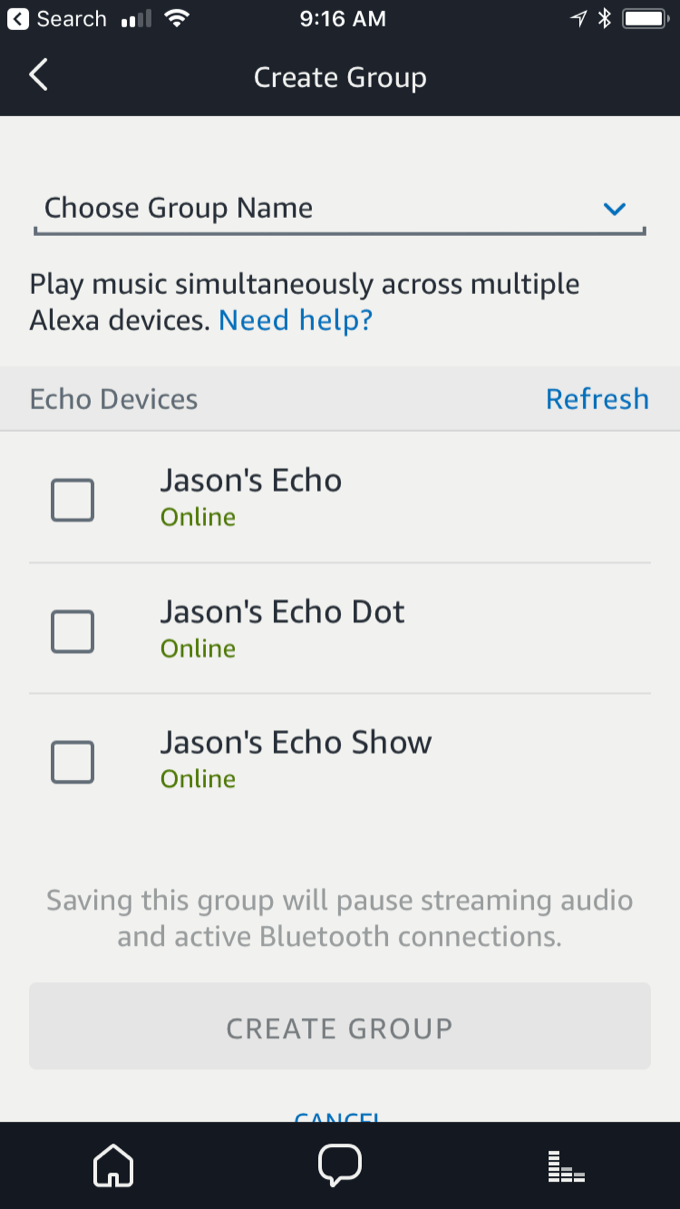
Amazon adds multi-room audio for Echo, Dot, and Show; third party support on the way

group-alexa

Well, it’s about time. Amazon has announced that it now supports multi-room audio on Echo devices, meaning that you can group your smart speakers and have the same audio played in sync on all of them. Moreover, the company is working with third-party speaker makers on an API to offer the same functionality:

These new tools enable device makers with connected audio systems to control music playback using Alexa. A customer can then use any Alexa-enabled device – for example an Echo Dot – to play music throughout their home on their connected audio systems. Amazon is excited to be working with leading brands on this offering, including Sonos, Bose, Sound United, and Samsung.

Sonos, of course, has said that it’s working on integrating voice control of its speakers via the Echo. Amazon’s announcement says that the same system will work with speakers from Bose, Sound United, and Samsung as well.

The company also implies multi-room audio will work in mixed environments, though it specifically mentions it for devices that use the Alexa Voice Service (AVS). It’s not entirely clear how multi-room audio will work if you have both smart and “dumb” speakers; so, for example, if you have a couple Echoes and a couple Sonos devices—which, as it happens, I do—will you be able to play the same audio across all of them, completely in sync? If so, that’s a pretty huge deal. I wonder if Apple will be able to get the same traction with third-party speakers working with the HomePod via AirPlay 2.

The synced audio for the Echoes themselves seems to be available today, though I’m not currently at home to test it. The third-party API is available to developers today, though it will probably not start showing up for users until later this fall.

[Update: Jason here. I am currently listening to “Hamilton” being played through an Echo, Echo Dot, and Echo Show, all perfectly synced—all from saying “Alexa, play Hamilton everywhere.” Pretty great.]


By Dan Moren

Pedometer++ hits 3.0, adds achievements

Note: This story has not been updated for several years.

There aren’t a lot of iOS app updates that I get well and truly jazzed about, but Pedometer++ is one of them. David Smith’s app is my go-to step tracker, and I’m psyched to see that it’s hit a major new milestone with version 3.0.1 The app has a reworked interface that’s prepared for iOS 11 but still manages to keep the simple and clean look that it’s had since day one, and also features a new widget that lets you get a more detailed look at your steps throughout the day.

Pedometer++
Looks like I need to walk more.

The biggest new addition, however, is that the app now includes achievements for your steps, complete with badges. That includes not only awards for your day totals, but also for streaks, lifetime steps and floors, and a handful of special achievements. Smith also suggests in his announcement post that there will probably more categories to come over time. Given that people seem to enjoy the badges that Apple has included in its own Activity app, this seems like a great idea–who doesn’t love getting an achievement?

It’s no exaggeration to say I use Pedometer++ every day; it’s one of a very small group of Apple Watch apps that I actually use, and its complication is still on my default Watch face. My girlfriend, who doesn’t have a Watch, likes knowing how far we’ve walked in a day, and Pedometer++ is my gold standard for that. In particular, I’ve been impressed with the way Pedometer++ can seamlessly merge data from your Apple Watch and your iPhone to get you the clearest picture of your activity.

Pedometer++ is still free, but you can also give David a tip via in-app purchase in the app’s Settings screen. If you’ve used it for any length of time, it’s definitely worth it. And if you haven’t yet checked it out, I’m not sure what’s stopping you–what, you don’t like walking?


  1. Full disclosure: I shared an Airbnb with David during WWDC this year. Fuller disclosure: He was a very considerate roommate. 

[Dan Moren is the East Coast Bureau Chief of Six Colors, as well as an author, podcaster, and two-time Jeopardy! champion. You can find him on Mastodon at @dmoren@zeppelin.flights or reach him by email at dan@sixcolors.com. His next novel, the sci-fi adventure Eternity's Tomb, will be released in November 2026.]


Tim Cook talks jobs, education with New York Times

The New York Times‘s Andrew Ross Sorkin sat down with Tim Cook to discuss a variety of issues related less to technology and more to politics:

He had just spent the prior day in Ohio, where he toured CTS, a technology company that produces the equipment that Apple uses to test water resistance and dust protection for the iPhone and the Apple Watch. He then flew to Des Moines, where he announced plans to make a $1.3 billion investment in a 400,000-square-foot data center in nearby Waukee to help store and move giant amounts of information for its services like iCloud and FaceTime. And he arrived here to announce that Austin Community College will begin offering its 74,000 students a curriculum that Apple developed to teach them how to write code to create apps for iPhones. Austin is one of 30 community colleges that will offer the curriculum.

It’s an interesting interview, although you won’t really find any tidbits about Apple’s upcoming products, if that’s what you’re looking for.

Sorkin also asks Cook if he has any political ambitions–particularly, the presidency–but Cook demurred. That’s no surprise: Cook has always seemed intensively private, and it’s hard to imagine he’d want to thrust himself into the spotlight anymore than he already has.


‘The Life and Death of the Touch Bar’

Friend of the site Chuq von Rospach writes about the challenges of the Touch Bar:

It seems to me Apple fell in love with the technology of the Touch Bar system, which if you dig into it a bit is a stunning piece of engineering, and expected all of us to fall in love with it as well. The problem is: Apple rarely sells things to us based on neat technology, it sells us based on the stories of how that technology will solve problems for us, and right now, the problems a Touch Bar solves for us that we care about being solved are few and far between.

Can Apple find the “killer app” (god, I hate that term) for the Touch Bar? It sure needs it. I’m not sure what that would be, though, but I want to give them another release cycle of MacOS for them to figure it out.

Giving developers more power to access the Touch Bar, including offering controls that are available in the Control Strip rather than just per-application, might help. But I do wonder if perhaps the Touch Bar’s greatest use, were it to become ubiquitous, would be in providing tutorials, shortcuts, and training to less adept users. Those aren’t the people buying new MacBook Pros today.

The real question, as Chuq points out, is how committed Apple is to the Touch Bar. If it really believes that the Touch Bar is the future of the Mac, we should expect to see it creep across the product line, desktop and laptop alike—and we should see major investment in advancing the Touch Bar interface in macOS. We haven’t seen a shred of evidence of that so far. It hasn’t even been a year yet, so there’s still time. I’m not ready to declare the Touch Bar dead yet, but if today’s Touch Bar is all the Touch Bar is ever going to be, it’s not going to make it.

(See also: Josh Centers on the Touch Bar at TidBITS.)


Search Six Colors