Six Colors
Six Colors

Apple, technology, and other stuff

This Week's Sponsor

Magic Lasso Adblock: Effortlessly blocks ads, trackers and annoyances on your iPhone, iPad, Mac and Apple TV


By Jason Snell

Raiders of the dead drive

Lights on, nobody home

Back in the early days of the pandemic, the Drobo 5D disk array attached to my Mac mini died—and with it went my access to all my archival podcast and video files (including a few works in progress), a backup of my photo library, and a large collection of movies and TV shows ripped from DVDs and Blu-Rays.

Over the course of the next few weeks, I spent a lot of time pondering what my backup strategy should be and what I should get to replace my dead Drobo as my household’s mass storage device. I detailed a version of this story on Upgrade back in May, but never wrote about it. So here’s the story of where I started and where I (happily!) ended up.

RIP, old buddy
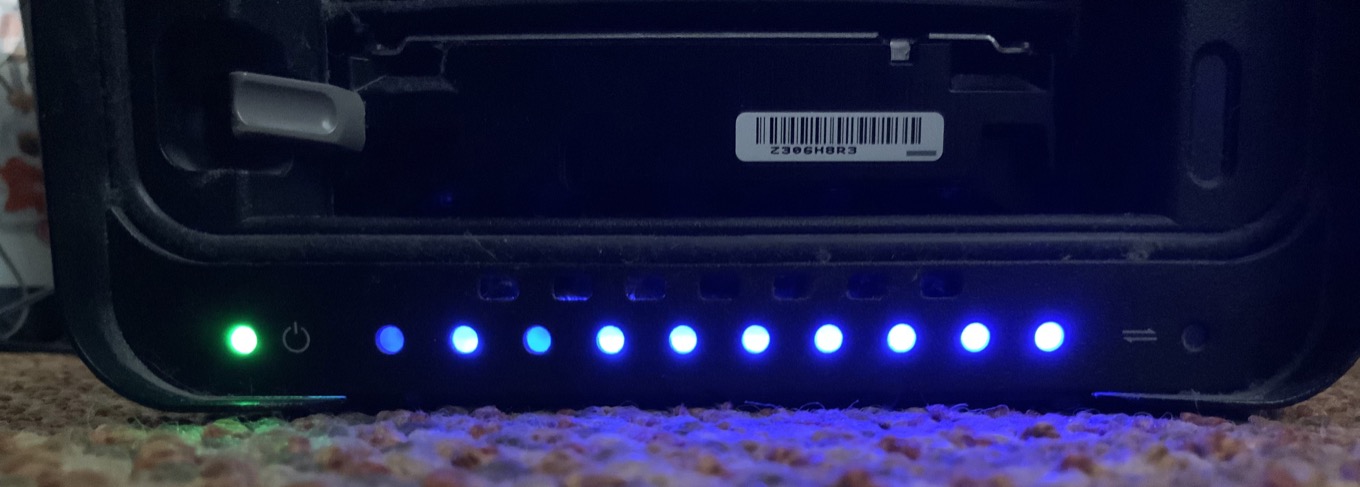
My data was (probably) intact, but the Drobo hardware itself was fried.

I have been using Mac minis as home servers for years, and my most recent one is an upgraded model from 2018. Since I find it super convenient to have a Mac available on my network at all times, I haven’t ever been in the market for network-attached storage devices. The Drobo 5D was a five-disk array attached to my Mac mini via Thunderbolt, with five spinning disks storing about 12 terabytes of data, with data distributed across the drives so that any one of them could die and be swapped out for a new one without losing any data. (And in fact, this had happened—over the course of many years I’d swapped out all but one of the original drives I had installed in the Drobo, and had never lost any data.)

But guarding against the loss of an individual hard drive isn’t the same as guarding against the loss of the Drobo hardware itself. And that’s what failed in March, the Drobo 5D hardware. Drobo Support had me run a few diagnostics to confirm that while the data on my drives (in Drobo’s proprietary format) was probably secure, the unit itself was not.

In order to close the book on the Drobo side of the story, I’ll reveal that the data was intact on the drives, and I was able to buy a used Drobo 5D on eBay, install my drives, attach it to my Mac, and copy off all the data. (And then I sold that Drobo on eBay for more than I paid for it!) But the incident had reinforced something I had been feeling for a few years—that I didn’t want to stay in Drobo’s proprietary world. But I did appreciate having a multi-disk array with lots of storage and redundant protection against drive failures.

The backups held, mostly

It took quite a while to confirm that the drives in my Drobo were still functional, and the data on them would be retrievable. In the interim, I proceeded under the assumption that I wouldn’t get access to that data, and turned to my backups.

I use Backblaze for online backup, and I was happy to discover that my backup set was safe on Backblaze’s servers. However, I didn’t back up everything to Backblaze—the contents of my video library and my Windows virtual machines weren’t in there. Still, it would get me my most important files—and Backblaze offers a service where it will send you a USB hard drive containing your backup. Despite the creeping pandemic, a week later I had a USB drive containing all my data.

I was also using the ARQ Backup utility to use some of my extra Dropbox space to back up some of my files more regularly. This provided me access to my most vital in-progress work, including some files that hadn’t yet had a chance to back up completely to Backblaze.

Unfortunately, I also discovered a hole in my backup strategy: The evening before the Drobo died, I had moved a podcast project from my iMac to the Drobo. My iMac’s Time Machine backup didn’t catch it, and neither Backblaze or ARQ were able to run before the Drobo died. That data was lost unless the Drobo could be retrieved, though I was able to piece together most of the files from other sources with only some lost work.

The lesson here: Offsite backups are vital, and they work. One is nice, and two is even better. I was very happy with Backblaze’s USB backup service—they charge you for the drive, but if you return it within a relatively generous window, they refund that charge—and using ARQ to provide a second set of backups in some of my unused cloud storage also proved helpful.

Hi, we’re the replacements

SoftRAID keeps my server volumes running smoothly.

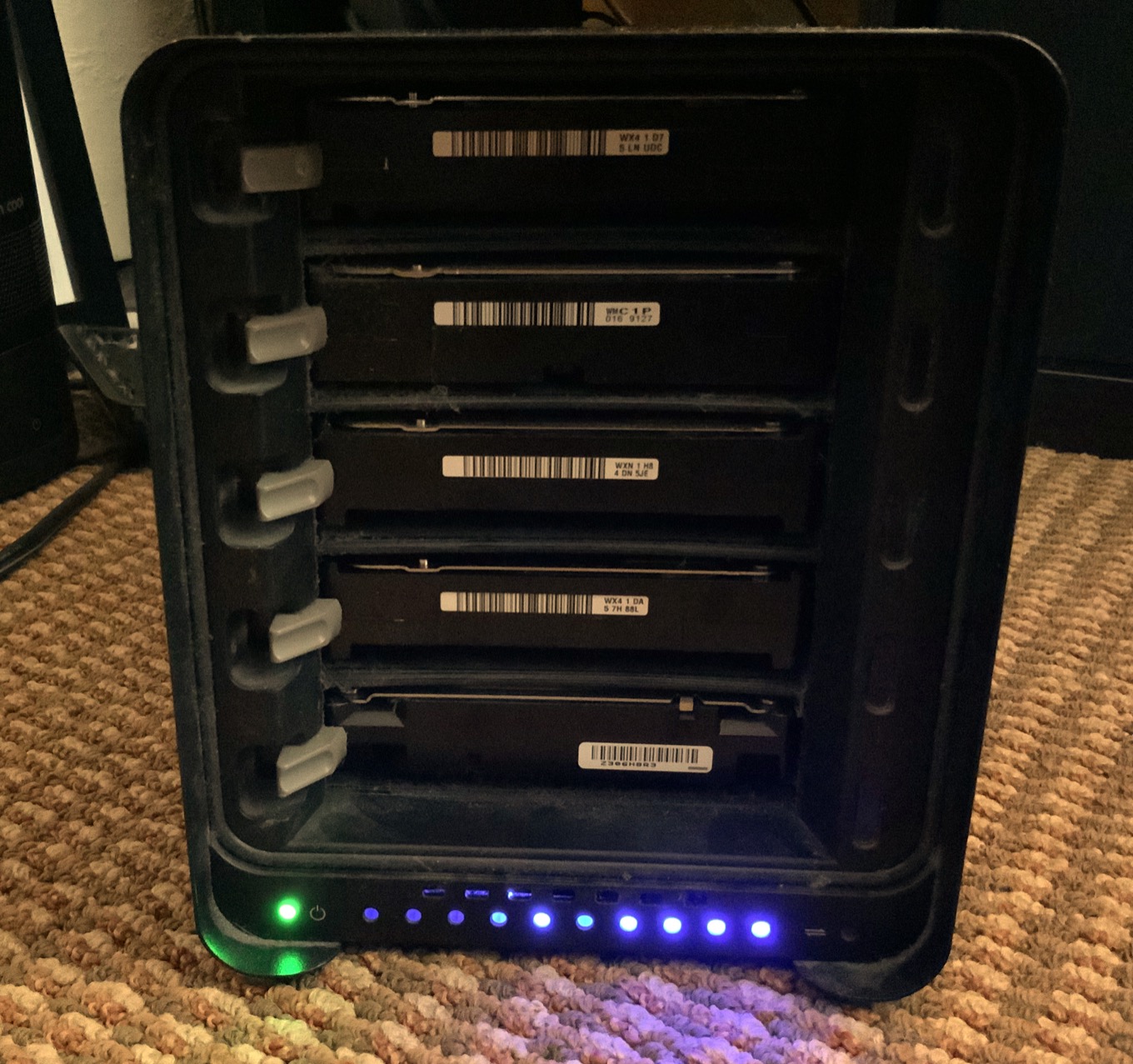
So, with the Backblaze USB drive and (eventually) the eBay Drobo, I got all my data back. But where to put it? I decided to buy an OWC ThunderBay 4 RAID, and ordered two 12TB hard drives to go with two lightly used 8TB drives from the Drobo in the four-disk enclosure.

The Thunderbay hardware comes with a feature-limited version of SoftRAID, an app that allowed me to configure my storage to resemble the setup I had on the Drobo. Unlike Drobo, SoftRAID doesn’t let you mix and match drives of different sizes, so I set up 8TB on all four drives to be a RAID 5 volume with a total of 24TB of available storage. As with my Drobo, RAID 5 means that if one drive were to die, I could swap it out and replace it with a new drive without losing any data.

The Thunderbay 4 RAID holds all the data now.

SoftRAID also allowed me to set up the spare 4TB portions of my two larger drives as a mirrored volume, which I use for Time Machine backups from my other Macs. Because that volume is mirrored—in other words, all the data is identical on the two separate drives—I’ve once again got some data redundancy in case one drive mechanism dies.

My Drobo 5D also included a 256GB SSD that it used as a cache; I bought a tiny enclosure to turn that into a USB hard drive. That drive is now set up to be a bootable backup to my Mac mini’s internal drive, just in case something bad happens there. Use all parts of the buffalo, I say.

Two is one and one is none

Finally, I decided to bite the bullet and finally commit to having a local backup of my enormous storage drive, something that I wasn’t willing to do before—and which almost bit me. I took the two largest drives from my old Drobo setup and installed them into a cheap older-model OWC Mercury Elite Pro Dual two-disk enclosure, and formatted those drives as a single volume. Every few weeks I plug it in, turn it on, and run SuperDuper! to make a backup.

The good news is, I didn’t lose any data. I had to buy some new hardware, though at least I made $100 on selling the Drobo I bought on eBay! And I gained a new perspective on what I’m truly willing to lose from my big server hard drive. I was more than happy to pay a few hundred dollars for the privilege of not needing to rebuild my video library. And I reconfigured my backup strategy to make it less likely that a failure at just the right time would wipe out an irreplaceable set of files.

So here’s my advice to you: Make sure your stuff is backed up to the cloud. Consider a local backup, even if it’s for an enormous server that’s supposedly redundant. And thus far, my experience with the OWC Thunderbay and SoftRAID has been great—but I won’t know for sure just how I feel about it until a drive fails and I’ve got to go through process of replacing it.

I look forward to the day when I can replace spinning disks with small and silent SSDs for large-scale storage, but I’m not there yet. I hope my new setup will last me until the day when it’s possible.



Our top-two streaming media services, our thoughts on MagSafe returning to the Mac, gadgets we think still need work, and what we use instead of Instagram, Oculus, and WhatsApp.


Using Mac tools to build a ‘searchable news firehose’

Audio producer James Shield, who works on the daily news podcast of the Times and the Sunday Times (of London), details how he’s using digital tools to make it easier to cover breaking news:

We’ve been doing the bulk of our editing in Descript since we were piloting in January 2020. It transcribes all your material and you can edit the audio directly from the transcript and in collaboration with others. It’s like Google Docs for sound.

I used Descript to edit 20 Macs for 2020, and it was a revelation. Shield feeds audio clips from news sources into Descript, which automatically transcribes it all and makes it almost instantly searchable and clippable—important for producing a podcast.

But wait, there’s more—they wanted to be able to cover the U.S. presidential election using reports from major TV news sources:

Three browsers playing the live streams from each of the networks – plus a radio streaming app – were recorded into Audio Hijack. (To get the TV network streams I used my colleague Matt ‘TK’ Taylor’s excellent VidGrid, which every news producer should know about.) Audio Hijack started a new chunk of those recordings every 15 mins, saving them into a Dropbox folder. I used Zapier to monitor that Dropbox folder and – using Descript’s Zapier integration – automatically import the audio into a Descript project to be transcribed and made searchable.

Audio Hijack

Which I admit sounds like overkill for a podcast. But now it’s built, we can spin it up whenever a breaking news event is unfolding, as we did on 6th January during the insurrection at the US Capitol.

And the approach works for video, too.


If reports are to be believed, 2021 is shaping up to be a year where the Mac takes two steps forward—but only after taking one step back. We analyze the rumors of new MacBook Pros, iMacs, and Mac Pros. A new Apple display? The death of the Touch Bar? Magsafe returns to the Mac? Is it 2015 again or are we just dreaming?


By Dan Moren for Macworld

Will 2021 be the year Apple’s U1 chip goes wide?

Apple’s no stranger to introducing and popularizing new technologies. The original iMac wasn’t the first to use USB, but it drove adoption of the standard. Multitouch displays existed before the iPhone, but it was the first real commercial product offering it. Sometimes those technologies take a while to gestate, though. And there may be no better example in recent years than Apple’s take on ultra wideband, or UWB.

Like those other technologies, ultra wideband isn’t new as a concept, but it’s something that hasn’t really found a home in the consumer market. In 2019, Apple released the iPhone 11 series and included a custom chip dubbed the U1. During the introduction, Apple talked up the amazing properties of the U1, and how it could be used to not only track the location of objects with amazing precision, but even has the ability to point you in the right direction towards them.

But almost a year and a half later, U1 remains a technology without much of an application. Yes, it’s built in to AirDrop to show you which other devices are closest, but that only works with other U1-enabled iPhones and it’s more of a proof of concept than an actual feature to tout. Other than that, there’s really not much there there—yet. With a few U1-enabled technologies waiting in the wings, 2021 finally be the breakout year for this technology.

Continue reading on Macworld ↦


By Jason Snell

Safari 14 added WebExtensions support. So where are the extensions?

Note: This story has not been updated since 2021.

Library Extension helps you find library books, but it doesn’t work on Safari—yet.

At WWDC 2020, Apple announced it was going to support Chrome-style browser extensions (the WebExtensions API) in Safari. But with a catch, as Dan pointed out:

Apple’s approaching this in an unsurprisingly Apple-like fashion. If you want to distribute a web extension, it’s got to be wrapped in a native Mac application designed in Xcode. Installing the app from the app store will also install the web extension.

This feature, which shipped last fall in Safari 14 (on Big Sur, Catalina, and Mojave), theoretically lets the developers of JavaScript-based extensions—for Chrome, Firefox, Edge, and other browsers—bring largely the same code and make it available to Safari users on the Mac.

At the time, it seemed to me like it might all amount to nothing if extension developers didn’t want to do the extra work to get up and running in Safari:

That’s a lot of barriers just to reach Mac users running Safari who could just as easily open a different browser to get that functionality…. If you’ve got a favorite Chrome extension that you’d like to see come to macOS, you may need to write to the developer and try to convince them.

I hope Apple makes this work and Safari gets a much richer extension library out of this, but there’s also a scenario where plug-in developers just don’t bother with Safari. That would be a shame. We’ll see.

Months after Safari 14’s release, are developers “bothering with Safari?”

The answer seems to be largely no—at least, not yet. The Mac App Store’s Safari extensions library seems to be largely populated with the same stuff that was there before Safari 14 was released, though there are some exceptions.

OneTab, now on Safari, collects open tabs in a single window.

PocketTube is a YouTube-focused extension that recently added Safari support. OneTab coalesces open tabs into a single page. And Blue Canoe Dictionary lets you highlight English words and learn how to say them

Tony Andrews of Blue Canoe Learning says that Blue Canoe was happy to port its extension to Safari, motivated by the ability to reach all of those Safari for Mac users who were previously unable to use it. “It definitely helps if you’re already familiar with the Apple developer tools and ecosystem,” he told me, and said the process went very smoothly.

Andrew Abrahamowicz is the developer of the excellent Library Extension, which overlays book availability from your local library on top of book-related pages at sites like Amazon. Abrahamowicz has been developing Library Extension for a decade now, and while it doesn’t support Safari yet, he’s working on it.

Abrahamowicz told me that since Library Extension isn’t his day job, he’s limited in the amount of effort he can give to it—and of course, supporting a new platform takes a lot of extra work. However, I discovered that Abrahamowicz had recently gotten a new M1 Mac and had begun work on a Safari version of Library Extension. Beyond needing to get set up with Xcode, Abrahamowicz has had to deal with some specific security limitations Apple applies to extensions, which may require him to actually write some Mac-specific code in order to give the Safari version of Library Extension the same features it has on other platforms.

Blue Canoe, now on Safari, lets you look up and hear pronunciations for English words.

I was encouraged by Abrahamowicz’s interest in building a Safari extension, but my conversation with him also highlighted some of the barriers many extension developers may have: Limited time, lack of access to Apple hardware, unfamiliarity with Apple’s developer tools, Safari’s incompatibility with some existing extension-development tools, and the requirement to make some code changes in order to fit inside Apple’s security model.

Even the most popular browser extensions are, like Library Extension, the product of someone who is scratching their own itch in their spare time. If that person doesn’t use Safari or even own a Mac, it’s a lot harder to imagine they will do the extra work to bring their extension to Safari users.

Take Beyond20, an excellent extension that connects the D&D Beyond character sheet to virtual tabletop services like Roll20. When I want to use Beyond20, I have to switch to Chrome or Firefox, but when Apple made its announcement last year I wondered if I might one day be able to use it in Safari.

A visit to Beyond20 support cleared that up in a hurry. Beyond20 project owner Youness Alaoui wrote:

This wouldn’t happen unfortunately because I don’t use Safari and it’s not chromium based so it would require additional work to get it working. Even Microsoft have contacted me asking to add the extension to the Edge store (zero changes required) and I’m hesitating because of the extra overhead in submitting the package to yet another site upon release.

Getting it to work with Safari would be a headache in itself that I don’t think I’ll ever be ready for. Sorry!

Alaoui’s reluctance to submit his extension to Microsoft’s directory says it all—it’s more work, and commitment to ongoing support, for what is essentially a passion project. (And presumably there’s also the $99/year cost of an Apple developer account, which is beyond the scope of a lot of these projects.)

The good news is, if an extension is an open-source project, it might only take a motivated fan to get it up and running on Safari. The Vue developer tools for JavaScript don’t work on Safari, but someone is trying to get community funding to pay someone to make it work. That requires a community with time or money—and a developer who thinks it’s worth the work—but it’s not impossible.

So in the end, what was the net effect of Apple’s announcement of support for the WebExtensions API in Safari? It’s a work in progress. A very small number of extensions have appeared in the App Store, and it seems quite likely that others will follow at their own pace. Other developers remain utterly unmoved by all the extra work moving to Safari would entail.

It strikes me that Apple could rapidly drive adoption of Safari extensions if it would finally bring that technology to iOS. Targeting the Mac is nice, but if they could target iPads and iPhones, we might really have something.


Major spoilers for the Mac in 2021

If you like to be surprised about what new products Apple is planning, you might want to avert your eyes. On Friday there were two major reports about Apple’s forthcoming Mac plans.

First off, Mark Gurman of Bloomberg reported about new Mac desktops.

Gurman reports that Apple will (finally) redesign the iMac, launching two new versions that are styled more like the Pro Display XDR, with small bezels and a flat back, and using a next-generation version of the M1 processor.

On the Mac Pro side, Gurman says that Apple is planning an update to the Mac Pro that might actually retain Intel processors, but is also designing a half-sized Mac Pro (he likens it to the Power Mac G4 Cube) that would run on souped-up Apple silicon chips.

And then Gurman drops this news:

As part of its revived Mac desktop efforts, Apple has started early development of a lower-priced external monitor to sell alongside the Pro Display XDR. Apple’s current monitor debuted in 2019 and costs $5,000 — before factoring in the $1,000 stand.

It’s hard to imagine Apple releasing a new Mac Pro mini without an external monitor, but it still boggles my mind that Apple only sells a $5,000 monitor right now.

In laptop news, supply-chain analyst Ming-Chi Kuo is at it again, with details about forthcoming Mac laptops, as reported by Benjamin Mayo at 9to5Mac.

Kuo’s report says that Apple will release two new MacBook Pro models in the second half of the year, both using those next-generation Apple silicon processors that more capable than the M1. He says these laptops won’t have Touch Bars, but will use a new version of the old-fashioned MagSafe plug to charge.

Kuo also says the laptops will offer more diverse IO options to reduce the need for dongles, which is a little perplexing—SD card slot? USB-A port? HDMI port? What does it mean?

In any event, 2021 is shaping up to be an eventful year for the Mac.


Apple TV+ website gets better

Apple has tidied up the Apple TV+ website, according to Benjamin Mayo of 9to5Mac:

As of today’s overhaul, the new TV+ website homepage features the same featured header that you see in the Apple TV app, along with sections for latest releases and genre categories. This makes it feel much more familiar for customers who are used to the native TV app experience.

The Web interface is required if you want to watch Apple TV+ content on Windows, Android, or Macs not running Catalina or later. Of course, as Mayo points out, the site still has a lot of limitations. But at least it’s a bit better now.


By Dan Moren

Export your Apple Notes in bulk

I’m an avid user of Apple’s Notes app: it’s where I keep all my random jottings, from ideas for books to thoughts for podcasts I’m recording, and pretty much everything in between. In general, I’m pretty happy with the built-in iCloud syncing that makes sure those notes are available on all my devices in short order, but what if you want to take those notes out of Notes, either to share them with somebody who’s not on iOS, or perhaps to back them up.

Turn out, it’s surprisingly tricky. Yes, you can sort of export a single note using the Share button—though it doesn’t really save it to a file—or, if you’re on a Mac, you can export one as a PDF.1 But if you want to export a bunch of notes as individual files, seems like you’re out of luck!

But there’s a loophole, and it comes courtesy savvy Six Colors reader Ken, who reports that he discovered a way to bulk export your Notes into text files, and all it takes is an iPad and some digital—the finger kind, not the ones and zeroes kind—acumen.

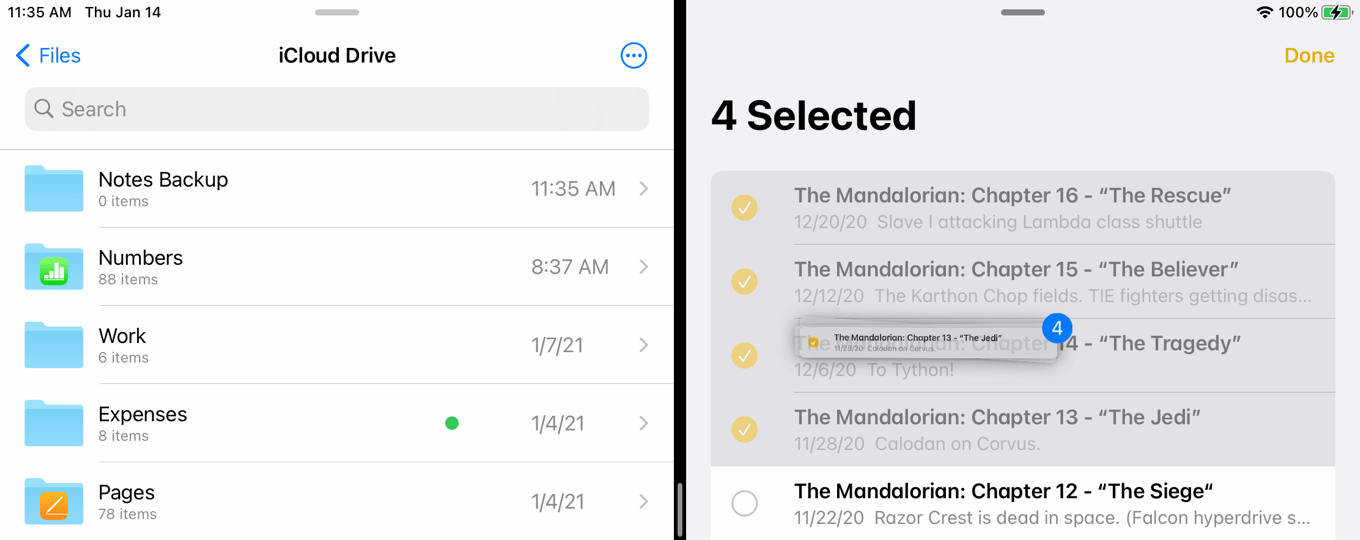
First up, you’ll want to arrange your iPad in Split Screen mode with Notes on one side and the Files app on the other. Make sure that your Files app is viewing iCloud Drive.

Tap the Edit button to select the notes that you want to export.

Now for the magic: using iPad OS’s drag and drop feature, tap and hold on the notes until you see them gathered in a “bundle.”

Selecting Multiple Notes

Drag the bundle over to the Files app until you see the + sign appear on the bundle. Then release.

Copying Notes to Files

Your notes will be automatically converted to rich text (RTFD) files inside iCloud Drive, which not only preserves the formatting, but also includes attachments. So, for example, if you’ve drawn something using Notes’s sketching tools, or dropped in an image for a web, or even taken a photo using Notes, they’ll be included in the exported file. (Though, in a test, a document I scanned didn’t make the trip, and embedded images were displayed in the RTFD document at 100 percent, making them a little unwieldy.) Original tipster Ken also notes that this may not work correctly with external file providers, such as Dropbox or Google Drive; I confirmed that in my tests.

As far as I can tell, this feature isn’t available on any other Apple device: the iPhone doesn’t support drag-and-drop, and on the Mac side, you can’t really drag multiple notes. If anything, this seems like more of a side effect of the drag-and-drop feature that Apple added to iPadOS than a concerted effort to build an export option into Notes.

Hence why, if you try to select multiple notes on the Mac, you’ll notice that the Share icon gets grayed out immediately. It’s a little annoying that Apple doesn’t make it easy for you to get your own information out of one of its apps into another format, just in case you want to do so.

Thanks again to Ken for sharing the tip!


  1. It lets you choose File > Export as PDF even if you have several selected, but only exports the topmost note in the list for…reasons? 

[Dan Moren is the East Coast Bureau Chief of Six Colors, as well as an author, podcaster, and two-time Jeopardy! champion. You can find him on Mastodon at @dmoren@zeppelin.flights or reach him by email at dan@sixcolors.com. His next novel, the sci-fi adventure Eternity's Tomb, will be released in November 2026.]


January 14, 2021

A pirate’s life—and little laptops—for us. Also, AirTags stalkers and Fitness+ possibilities.


Yet another leak of Apple’s tracking fobs, who should moderate online content, good password hygiene, and Spotify’s podcast listeners.


We’ll take our leave and go

Clayton Ashley of Polygon can help explain why you’re hearing sea shanties in your head now. And if you’re not hearing them now, you will be hearing them as soon as you click through:

Just like the crew of a ship would join each other in song to keep up their spirits on a long, isolated journey, TikTok users began to duet and remix the aged sea shanty… A sea shanty such as this one was meant to help keep sailors on tempo as they worked on the ship. The lyrics and melody typically aren’t too tricky to sing for that reason, which also happens to make the genre a perfect fit for the collaborative users of TikTok. You can just join in for the surprisingly catchy chorus or, if singing isn’t your thing, add some musical accompaniment instead.

Don’t miss Kermit getting in on the action.

While I’m on the sea shanty beat, I also appreciated this Tweet:

There’s also a nice Daily Dot report about how “The Wellerman” made it big thanks to a band called The Longest Johns and the pirate-themed video game, Sea of Thieves.


By Jason Snell for Macworld

The case for a 12-inch MacBook Air

I’ve been a fan of tiny Mac laptops for many years. From the 12-inch PowerBook G4 to the iBook to the 11-inch MacBook Air, I’ve always opted for the smallest laptop I could get my hands on.

And yet, with the discontinuation of the 12-inch MacBook, the smallest Apple goes is the 13-inch MacBook Air. Is the Air as small as a Mac laptop can get? I don’t think so. And that’s why I think Apple should add an additional laptop to its product line and bring back the 12-inch MacBook.

Continue reading on Macworld ↦


Existence of Apple’s item tracking tags leaks…again

MacRumors’s Joe Rossignol:

MacRumors reader David Chu today alerted us that the hidden “Items” tab in the Find My app can be enabled on iOS 14.3 and later by typing in the link findmy://items into Safari and tapping on “Open” in the prompt that appears.

I just tried this myself, and sure enough, it works: the Find My app opens to an Items screen where you can tap Add Item and it will start searching for nearby tags.1

Find Items screen

Apple’s tracking tags are probably the worst kept secret in the history of the company’s products, given the sheer number of times that indications of their existence have leaked over the past year or two. Most recently, we saw a leak from a third-party company’s designs for accessories for the Apple product.

But that raises the question of why the product hasn’t been released yet: Is it not quite ready to go? If the software component is in the shipping OS, it would seem to be pretty far along. Is Apple waiting for a more opportune moment, say, when people are actually leaving their house and traveling again in order to make a more compelling product story? Certainly possible. Or, heaven forbid, is this another AirPower story where the enthusiasm has outstripped the ability to actually ship a product? One doubts that Apple would get bitten in that same way twice, but nothing’s impossible.

Or maybe, just maybe, Apple’s tracking tags are readying for an imminent launch. Stranger things have happened!


  1. Just to play devil’s advocate, this could simply be an interface for Apple to offer compatibility with third-party trackers like Tile—the words “tags” or “AirTags” don’t appear anywhere within the interface. But come on. 

Apple amps up its Racial Equity and Justice Initiative

The “big announcement” teased yesterday is an expansion of Apple’s Racial Equity and Justice Initiative, which the company founded last year after the killings of George Floyd, Breonna Taylor, and others sparked mass protests:

These forward-looking and comprehensive efforts include the Propel Center, a first-of-its-kind global innovation and learning hub for Historically Black Colleges and Universities (HBCUs); an Apple Developer Academy to support coding and tech education for students in Detroit; and venture capital funding for Black and Brown entrepreneurs. Together, Apple’s REJI commitments aim to expand opportunities for communities of color across the country and to help build the next generation of diverse leaders.

Apple’s putting $100 million towards these efforts, which it sees as part of its goal to leaving the world a better place.


Dr. Drang on text utilities

I had a sneaking suspicion that my post about using BBEdit to process text might tempt Dr. Drang to write a nerdy follow-up post or two, and it did:

One of the cleverest things Jason does, which I think he undersells, is nibble away at the dataset as he processes it. In this screenshot we see that “Delete matched lines” is checked. By deleting each set of entries as he finds them, he makes it easier to develop the criteria for finding the next set. And with “Copy to clipboard” checked, he hasn’t lost the entries he’s just found—they’re ready to be pasted into a new document for checking and counting. This nibbling technique is one I’ve never used but will keep in mind the next time I’m faced with this type of problem.

Drang, of course, compliments me before displaying how he can do a lot of what I did with a single Terminal command:

    sort cancolors.txt | uniq -c | sort -nr

Drang’s command doesn’t weed out misspellings, which is why I used my approach (and also because I had never even considered using Terminal commands to do this!). Anyway, if you’re curious about how many ways you can misspell Bondi Blue, here’s the list that came out of my survey results when I used Drang’s script.


Search Six Colors