We’ve got the hot news about search engines (I hear great things about that AltaVista), the woes of watch ownership, and we’ll catch up on all the -gates this side of Bill.
Browser’s Castle
Last week brought us the news that back in 2020 (is something that happened three years ago “news”?), Microsoft held exploratory meetings with Apple to discuss selling Bing. The deal did not happen largely because Google shoots a firehose of money at Apple in order to keep its search engine as the default on Apple’s platforms.
Also, something about “quality and capabilities”, yadda-yadda-yadda.
Apple, of course, didn’t let such trivialities concern it when it walked away from Google Maps back in 2012, but Google was demanding more user information. Which is why two years prior to discussing Bing with Microsoft, Apple was interested in making DuckDuckGo the default search engine for private mode in Safari, conducting around 20 meetings and phone calls with the company. Ironically, one of the reasons the company didn’t do the deal was that DuckDuckGo relies on Bing for search results.
All this information is brought to you by the U.S. government’s antitrust trial against Google. So, hug a federal agent the next time you see one. (Disclaimer: do NOT under any circumstances attempt to hug a federal agent. Even if they’re a family member.)
So, Apple didn’t use DuckDuckGo because of Bing. Then it didn’t buy Bing because of Google. Perfectly clear.
It’s tempting to laugh at people who bought an incredibly expensive watch that everyone knew was going to be deprecated at some point, but it’s likely that, for the people who actually bought a gold Apple Watch, its cost was a smaller portion of their net worth than a $399 aluminum Watch is of its average buyer’s net worth.
So, technically, the joke’s on us, not them.
Sssorry.
Is Apple end-of-lifing a $17,000 Watch that came out eight years ago better or worse than the fact that Google won’t repair a $280 one you bought yesterday?
A fun thing to do when you’re killing time is to see how fast you can name all the purported iPhone 15 scandals.
You got your Casegate, of course. That’s easy. Then there was Lipgate for a minute. Hotgate was hot for a while. That’s three. But have you heard about Bendgate 2, The Rebendening?
Bendgate 11 revolved around our plucky hero the iPhone 6 which, if you applied pressure to the center in one direction and the ends in the opposite direction would (I know this is a long sentence, are you still with me?)… bend.
Weird, but true.
Not to give too much away about the sequel but… (if you’re spoiler-averse you may want to skip ahead) I hear…
…this time it’s personal.
No, really. I heard that.
Fortunately, like kind of all of these (except Casegate), this appears to be much ado about nothing.
Huh, looks like they build headlines out of all of Betteridge’s Law these days.
There’s even a video of Consumer Reports cracking an iPhone 15 Pro Max, if you can stand to watch it. I couldn’t. Horrible. Just horrible. How about a content warning next time, Consumer Reports?
It’s actually Bendgate 4 in the planned Bendgate franchise but in order to understand the creators’ entire vision you have to watch a 45-minute YouTube video and who has time for that? ↩
[John Moltz is a Six Colors contributor. You can find him on Mastodon at Mastodon.social/@moltz and he sells items with references you might get on Cotton Bureau.]
My thanks to Kolide for sponsoring Six Colors again this week.
AI is a hot topic in lots of businesses, but most companies still haven’t come up
with policies to manage AI usage—and employees are potentially handing over all sorts of sensitive data to tools that may or may not be trustworthy.
Browser extensions that offer AI features, but steal user data, are everywhere. That’s why many companies—including Apple—have banned their employees from using large-language models. And that’s just one potential attack surface.
Kolide lets IT and security teams write checks that detect device compliance issues, and have started creating checks for malicious (or dubious) AI-based tools. Here’s a video about how Kolide can help companies enforce device compliance.
iPhone designs change at a glacial pace. It’s rare that a new iPhone looks completely unlike the previous model. They’ve all looked more or less the same since the iPhone X ditched the home button back in 2017. Careful observation indicates that the iPhone 15 Pro design is different from the iPhone 14 Pro, which is different from the iPhone 13 Pro—but the external differences are extremely subtle.
This is okay. The iPhone is clearly on a multi-decade trajectory toward becoming a thin, featureless slab of glass. In the meantime, Apple keeps varying materials and colors and upgrading the processors and cameras in order to ensure that people buying a new iPhone will find it at least somewhat different from the ones in their pockets.
It may not be logical, but it’s absolutely true that after spending around $1000 on a new phone, I don’t want it to be exactly like the one it’s replacing. What’s the fun in that?
Variations pro and con
Natural Titanium is the best “color” among a monochrome set.
The iPhone 15 Pro offers very nice variations in materials and utterly boring variations in color. The replacement of heavy, shiny stainless steel with light, textured titanium is a winning move. (Truth be told, I think the iPhone 12-13-14 Pro design was a mistake, from the heavy fingerprint-laden frame to the subdued rear color palette. The non-pro iPhone 12-13-14 models were lighter and more colorful.)
By objective measurement, the iPhone 15 Pro isn’t much lighter than previous models, but it sure feels lighter. Maybe that’s because the big weight reduction is on the outside edges, but when I first picked one up, I expected the difference in feel to be imperceptible—and it was absolutely noticeable from the first moment. Anyone upgrading from the last three iPhone models should notice, too.
There are a few ways to add color to titanium. You could just paint it, but Apple already tried that, and it didn’t work out. You could use anodization, which is the process Apple uses to color aluminum, and my understanding is that anodized titanium can similarly hold colors pretty well. But for whatever reason, Apple chose a PVD coating.
I’m not going to pretend to be a materials scientist, so I can’t tell you about the tradeoffs involved in choosing a process in terms of ruggedness or in terms of color range. All I know is that my pal Dan’s iPhone 15 coating has already scuffed and that the colors on these phones are thoroughly boring. Bad on all fronts.
Apple offers four colors in the iPhone 15 Pro, which I’d describe as black, bluish gray, medium gray, and light gray. I don’t dispute that some people don’t want a colorful phone, and many people put cases on their iPhones so they never really see the color. But what about people who do enjoy color, who do use their iPhone without a case? It would be nice if Apple offered an iPhone Pro for them, and it steadfastly refuses to do anything more than toss in a single dim shade that’s almost indistinguishable from the rest of the monochrome parade. It’s such a dull set of colors that the best of the bunch is probably Natural Titanium, an unabashedly metallic medium gray.
Moving away from the tragedy of the world’s most exciting technology product being wrapped in the world’s dullest colors, let me applaud Apple’s choices in rearchitecting the glass front and back of the iPhone 15 Pro. Following its changes in the regular iPhone 14, Apple has redesigned the iPhone 15 Pro to make the device much more repairable. It’s also slimmed down the size of the bezels around the display, making the device slightly easier to hold than its predecessors.
Perhaps the best tiny adjustment is that the edges of the phone that transition between the bezels and the sides are no longer sharp angles. It’s like sanding off the edges of a piece of wood: the whole thing just feels smoother and nicer to hold in your hand. Combine that with the weight changes, narrower bezels, and overall size reduction, and you get a bunch of positive steps forward in iPhone ergonomics.
So where does iPhone design go from here? Leaving aside the possibility of folding models, it feels to me like the biggest opportunity lies in addressing the cameras on the back. Whether that’s reducing the distance they stick out, arranging them across the width of the phone rather than in one corner, or something else, I have to believe there’s a better approach than the current one. (Spreading out the camera terrace would also allow Apple to give more parallax separation to cameras capturing spatial video for the Vision Pro, too. Just sayin’.)
Take action
The Action Button settings are something extra.
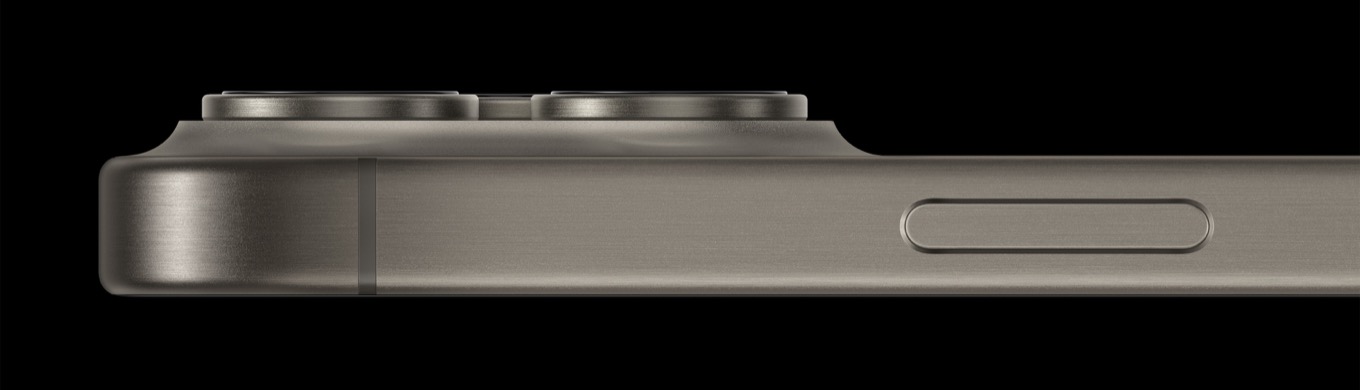
Apple likes to keep things simple. When you see the company adding a physical button to a device, it’s a big deal. In this case, it’s removed the ring/silent switch that’s been on the iPhone since the start and replaced it with a new Action Button.
Let’s get this out of the way first: If you’re one of those people who could always remember which position of the ring/silent switch meant silent and which meant ring and could feel that in your pocket, this is a regression. You will now have to pull out your phone to look at the status or use the Action Button as a ring/silent button and feel for the proper haptic to indicate the status. I understand why that would stink.
As for literally everyone else—the people who couldn’t remember which position meant which, the people (I’m one) who always left their phone in silent mode, and the monsters who never silenced their phones… that switch was a waste of space. And now the Action Button lets us choose to use that space for something more useful.
The Action Button is a ring/silent toggle by default, but it’s easily changed in the Settings app. Apple offers a bunch of options, including a flashlight toggle, Do Not Disturb toggle, Voice Memo, Camera, and Magnifier. And if none of those speak to you, you can assign it to a shortcut—including both complex, user-built shortcuts and simpler Apple Shortcuts provided by the people who make the apps you use.
It’s hard to express just how great this is. The Action Button will be relevant to far more users than the ring/silent switch ever was. The Action Button section of the Settings app is big and clear and animated and almost fun to use, and makes it very easy to change your settings. Apple has taken the most obvious alternate uses people would want and baked them right in—I imagine that Camera and Flashlight will be big winners. And with Shortcuts, almost anything is possible.
More to the point, it shows how good physical buttons can be. As revolutionary as the iPhone’s all-touchscreen design was, sometimes I think Apple has taken the lesson a little too far. iPhones are still physical devices existing in reality, held in meaty human hands. Swiping and tapping on a Retina-quality touchscreen is usually delightful, it’s true, but if you’re just trying to find your way in the dark or quickly get a shot of your kids playing, it’s not.
There is something to be said for the fact that, if you set the Action Button to Camera, you know with certainty that in one gesture you can pull your phone out of your pocket, smashing one meaty finger on the Action Button as you do so—and by the time you can see the screen it’s ready to take a picture. (And on top of that, you can leave your finger right where it was—in Camera mode, the Action Button will also take a picture.) Muscle memory takes over.
Apple nailed this feature, but it’s also left some room to grow. While its defaults should always remain simple and difficult to trigger accidentally (you must hold the Action Button purposefully to trigger it), it sure would be nice if it could optionally be made a little more complex. Perhaps it could register double-presses or offer additional interactions in the specific app it launched (as it already does in the Camera app).
As for me, I’ve turned my Action Button into a trigger that launches a simple Shortcut that listens for dictation and places the result (as transcribed text) into my main Reminders list. Maybe it’ll stick, or maybe I’ll find some other feature I use more often. The sky’s the limit.
RIP Lightning
The iPhone 15 Pro now has a USB-C port instead of Lightning. It’s a good change, though (as all port changes are) it’ll be disruptive to people who have invested in a bunch of Lightning-specific accessories. Still, in most cases, this is a matter of swapping cables—and Apple includes a very nice braided USB-C to USB-C cable in the box. It’s been more than five years that Apple has been moving its products over to USB-C, and with a few minor outliers, the job is now done.
Did Apple do it because the EU is about to mandate USB-C for all phones? Oh, to be a fly on the wall in Cupertino. I’d argue that this change actually feels a year or two late, and I look forward to slowly filtering all my Lightning cables out and placing them in a bag somewhere.
All port changes suck, of course, because there’s confusion and forgotten cables and the like. But there are advantages: in the case of the iPhone 15 Pro, the USB-C port also supplies USB 3.0 speeds. This is the fastest you’ve ever been able to pull data off of an iPhone. Within the first four days I was using an iPhone 15 Pro, I had to pull off a two-hour-long 4K HDR video file so I could send it to a video editor. That file was huge, but I was able to transfer it to my Mac so much faster than I would ever have been able to do in the past. This is a big win for people with big files. (You can also now shoot ProRes video directly to an external USB drive, another win.)
Even better than the real thing
Four years ago Apple introduced the U1 chip, which added Ultra Wideband (UWB) technology to the iPhone for the first time. Proving that it still hasn’t found what it’s looking for, it’s introduced a second-generation UWB chip in the iPhone 15 and 15 Pro.
Thus far, Apple’s attempts to light the UWB fire have been a bit forgettable. But the technology is no lemon—it has true promise, and the more Apple devices that incorporate it, the more potential it has. UWB’s magic trick is that it can provide absolute positioning in three-dimensional space, unlike technologies such as Bluetooth that try to tease out the distance between two devices by measuring how strong or weak a radio signal is.
Right now it feels like this technology is running to stand still, but UWB will eventually support smart car doors and door locks, and of course, it allows clever tricks like offering to move your music to a nearby HomePod based entirely on your proximity to it. Eventually, your smart home devices should be able to react to your physical presence as you desire. (That’s when you create a Shortcut that plays a fanfare every time you enter the room1, which you’ll use exactly once before being shamed into deactivating it.)
I recently went to a football game (it was a beautiful day in Berkeley, California) and was trying to figure out where my wife had gone—we were separately looking for concessions amid the rattle and hum of a busy stadium walkway. Then I remembered we both had new iPhone 15 models, and I opened Find My—the app that lets you find all that you can’t leave behind—and enabled the remarkable new UWB-powered feature that lets you find nearby friends. Not only did I almost immediately discover that she was to my right (so I began heading that way), but she was also notified that I was looking for her. We found each other and had fun doing it!
Anyway, it’s a little weird that this new second-generation UWB chip doesn’t have a name.
Impressive camera changes
Four steps of iPhone 15 Pro Max camera: 0.5x wide, 1x main, 2x main, and 5x telephoto.
The iPhone 14 Pro added a 48-megapixel sensor to its main camera, but Apple’s software support for the sensor felt a little halfhearted. The images were an upgrade, for sure, but most people were just shooting 12MP images, with each pixel comprised of four pixels on the sensor. You had to turn on RAW format to snap a detailed 48MP image.
With the iPhone 15, the software (and presumably the processor; otherwise, it’s mystifying why the iPhone 14 Pro is not also covered by what I’m about to describe) finally seems to have been tailored to make the most of that main camera sensor. By default, the Camera app captures multiple 12MP images that take advantage of the pixel binning feature that gathers more light, but also captures a full-resolution 48MP image and then combines them all into a 24MP image, twice the size of last year’s main-camera images, mixing the best features of the binned and non-binned sensor data.
In fact, the camera system goes beyond that: it’s really tuned to provide excellent results anywhere from 1x (in which it’s using the entire 48MP sensor) to 2x (in which it’s zoomed into the center area of the sensor). Apple’s so confident in its various capture and fusion algorithms that it’s placed various presets between 1x and 2x, corresponding to the equivalents of common focal lengths.
In a very Apple move, the iPhone 15 now has enough intelligence to detect if a photo is eligible for Portrait Mode and automatically capture depth information. This means that you can retroactively add portrait blur to photos you’ve taken that qualify—generally, ones containing people, cats, or dogs. Taking a feature that most people will forget to turn on and then regret later, and making it automatic, is a quintessential Apple move and I’m here for it.
The new 5x zoom camera on the iPhone 15 Pro Max is quite impressive. I used to bring an SLR camera and a long lens to football games and shoot action shots; while the 5x lens can’t quite get me that close, it was able to approximate those shots in ways that no other iPhone camera has ever been able to.
I shot this from 20 rows back. (Cropped to show actual pixels; the real image has a much wider field of view.)
I’m also impressed with how good digitally zoomed images a bit beyond 5x look. They’re processed, sure, but it’s really good processing—at least to a point. Apple’s clearly using some machine-learning tricks to make zoomed-in pictures look better, and if you look closely at extreme zoom-ins, you’ll find some bizarre effects. I recommend not looking too closely, and not zooming all the way in.
When you zoom in a lot, the image system does a lot of processing—and it can have weird results. On the left, the helmet logo is distorted and the name of the back of the jersey is scrambled. On the right, grass from the background encroaches on the band member’s face.
The iPhone 15 Pro Max’s image stabilization is remarkable, counteracting shaky human hands, and (on both phones) when you zoom in a lot, a pop-up of the full frame appears to give you guidance about exactly where you’re aiming. Well done.
If you’re someone who takes a lot of zoomed-in phone photos, especially if you find yourself frequently going beyond the optical zoom into digital territory, the iPhone 15 Pro Max will be an excellent upgrade. But you’ll need to be comfortable taking on the extra size of the device. After years of gradually creeping iPhone size increases, the iPhone 15 Pro Max doesn’t appear laughably huge—but I still can’t stretch my fingers and thumb across it to use it one-handed, and I’m not willing to sacrifice that in order to use that 5x camera. But if you are, you will get access to an excellent zoom camera.
Processor progress on pace
With the iPhone 15 Pro comes the new A17 Pro chip, a new Apple-designed processor that’s using TSMC’s new 3nm process. Bragging rights aside, what the A17 Pro brings are CPU and GPU performance boosts more or less in line with previous generational updates.
The iPhone 15 Pro ends up with a big jump in graphics performance mostly because Apple has added one GPU core to the mix, but on a per-core basis, it’s a pretty standard update.
I do wonder about Apple’s emphasis on gaming when it announced the iPhone 15 Pro. Apple’s history with gaming is long and tortured, but the iPhone is by far the most successful device it has ever made for people to play games on. Still, bringing console games to the iPhone feels a little… weird? (I’ve used a Backbone controller with an earlier-generation iPhone, and it’s pretty cool… but how many people are yearning to turn their iPhones into a Nintendo Switch in their pocket?)
Sometimes, Apple just uses game performance as a proxy for graphics prowess. It knows most people won’t be playing Resident Evil Village on an iPhone 15, but the fact that they could shows how awesome Apple’s chips are. Fair enough. I do wonder if Apple might also be trying to apply a platform-wide strategy here that leads to more games arriving on iPhone, iPad, and Mac. Will the M3, presumably the Mac chip based on the A17 Pro, also offer more impressive graphics performance that will make it a better gaming device? We’ll have to see.
As it is, most of the games I play on my iPhone don’t remotely tap the power of the device. I suspect that’s true for most people. I’m not sure if there’s anything Apple can do to change that.
An upgrade diagnosis
We product reviewers spend a lot of time focusing on those incremental updates between last year’s model and this year’s. There are a lot of reasons why that makes sense, but it does ignore the fact that most people will be upgrading from an older model. If you’re upgrading from the iPhone 14 Pro, look above! Otherwise, read on.
If you’re updating from an iPhone 11 Pro model or earlier, you’ll get a taller phone with a larger screen, and access to fast 5G cellular networks for the first time, plus all the upgrades below.
If you’re upgrading from the iPhone 12 Pro after three years, you’ll get a ProMotion display with a faster refresh rate, making scrolling buttery smooth. And the 3x zoom will be a nice step up from the 2x zoom on your current telephoto lens. You’ll also have access to Cinematic Mode, which lets you create videos with selective focus, like blurred backgrounds. And you’ll pick up Photographic Styles, a feature that lets you tweak the settings of Apple’s image pipeline to make all the photos you take more in line with your own taste. And you’ll get every upgrade I describe below.
If you’re upgrading from an iPhone 13 Pro after two years, you’ll get an always-on display, including support for always-on StandBy mode. The screen’s also quite a bit brighter.
You’ll also get the Dynamic Island, which replaces the useless display notch with a floating black oval that morphs and changes to indicate things that are currently happening in the background on your iPhone.
Upgraders also get access to the new 48MP main camera sensor and Action Mode, which lets you shoot extra-stabilized video in situations where you might otherwise create ugly shaky-cam videos.
Finally, upgraders will get access to Apple’s newest safety features: Satellite SOS lets you send text messages requesting assistance when you’re unable to get a cellular signal from any carrier, as long as you’ve got a view of the sky. And Crash Detection will detect when you’ve been in a car crash and automatically call emergency services for help.
Thanks to Relay FM member Matt C for the inspiration. ↩
One of the biggest points of anticipation around this year’s iPhone models was the transition from Apple’s proprietary Lightning port to the USB-C standard. Some were worried about the transition requiring them to replace all their accessories, while others—yours truly included—looked forward to a future of being able to use a single cable for their iPad, MacBook, and iPhone.
Now that the new models are out in the wild, however, the USB-C transition has proved to be a rose bearing some thorns. It’s not as simple as having one port to rule them all; and, in some cases, the move away from Apple’s controlled ecosystem has introduced some challenges that its users haven’t had to deal with in the past. These bumps in the road may get ironed out in time, but it’s worth being aware before you just blithely start connecting all your USB-C gadgets.
iCloud is, when you think about it, kind of a thankless service. At its best you don’t notice it—everything, in the unofficial mantra of Apple dating back decades, just works. Your data is in sync across all your devices, changes update immediately, and you never get a single error message.
The thing is, like a lot of Apple tech, it’s a black box. Data goes in, data goes out. What happens in the middle…well, shrug. You just put your faith in the fact that what’s working will keep working.
But as anybody who’s ever tried to troubleshoot iCloud problems can tell you, when it goes wrong, trying to fix it is an exercise in frustration—as I learned recently, in a particularly spectacular fashion.
Intermittently cloudy
This is a bad news error message.
At about 9am Eastern this past Monday, my connection to iCloud went kaput. I first noticed the issue on my MacBook Air: my iCloud mail wasn’t being fetched, messages that I read or deleted were popping up again, and I couldn’t access files in my iCloud Drive.
At first blush, my other devices seemed to be fine, leading me to conclude that there was some specific issue with iCloud on the MacBook. I chalked it up to some weirdness with having reinstalled the final version of Sonoma atop the beta, and started off on the usual troubleshooting steps: quitting apps, restarting, and then the big guns—logging out of iCloud.
That’s the point where things went truly amiss. While I was nominally able to log back into iCloud, most of my data wasn’t actually syncing back. A dialog box told me that I needed to verify my account in order to re-establish end-to-end encryption for sensitive information like my keychain and health data, but clicking the prompted button did…absolutely nothing.
As a very busy September turns over into October, we’ve got an episode packed with follow-up: Tim Cook takes another European vacation, the Vision Pro product roadmap recedes, Apple considers its search-engine strategy, and we review macOS Sonoma.
A new iPhone SE will probably arrive some day, unlike some other potential Apple products I could mention (cough, car and low-cost Vision Pro). Meanwhile Jony Ive is keeping busy hastening the robot apocalypse.
SE what I did there?
If you don’t have the bank for an iPhone 15, let alone an iPhone 15 Pro, don’t fret. A new iPhone SE is on the horizon. Wayyy over there between the land and the sky.
The new SE, which isn’t expected until 2025, will reportedly have the same form factor as the iPhone 14, but will feature an action button and, of course, USB-C connectivity. It would be the first SE with Face ID rather than Touch ID and is reportedly being used to test Apple’s own 5G modem.
Speaking of more consumer-friendly smartphones, Samsung recently leaked details of its new Galaxy S23 FE which, despite what you may think, is not the one with a high-density floppy drive. In this case, the “FE” stands for “Fan Edition”.
No, not because it has a fan in it.
I don’t think.
Lest you think “At least ‘FE’ stands for something. ‘SE’ doesn’t stand for anything!”, not so. Phil Schiller has previously indicated that “SE” stands for “Special Edition”. So there you go. As the codename for Apple’s end-run-around-Qualcomm modem is “Sinope”, let’s just hope “SE” doesn’t stand for “Sinope Explosions”.
Not seeing it
You may one day be able to get a fourth-generation iPhone SE, but it’s looking less likely that two other rumored Apple products will make it to market any time in the near future.
According to Ming-Chi Kuo, “The development of the Apple Car seems to have lost all visibility at the moment.” I’m not an automotive expert but I think losing visibility is definitely not something you want in a car. Kuo says that Apple will have to “adopt an acquisition strategy” if it hopes to ship anything in the foreseeable future. Possibly a good time to make an offer to a narcissist distracted by money-losing vanity projects?
The car’s not the only Apple product Kuo has bad news about. He further believes Apple may have canceled plans to ship a low-cost Vision Pro, which previous rumors suggested could have launched in 2025.
Christmas 2025 is officially ruined.
If you’re feeling disappointed by this news, look at it this way: it’s probably saving you something like $103,000.
As reported by The Information, Ive has been in talks with Altman about building a new AI device. It’s unclear at this point what the purpose of this device will be or what it will look like…
Picture a black rectangle, with a glowing red circle set in it. What could go wrong? As long as you don’t get between it and a power outlet, you should be fine.
…but sources familiar with the conversations say that they want to create a “new hardware for the age of AI.”
Ive is, of course, legendary for his beautiful designs. But the latter part of his tenure at Apple—marked by iOS 7, butterfly keyboards and a “NO MORE PORTS OF ANY KIND” mentality—would indicate he was somewhat less focused on usability. That could be a perfect match for a device that has a mind of its own.
I’ve always said that if you’re going to make a humanity-killing artificial intelligence then it should at least come in a pretty box.
[John Moltz is a Six Colors contributor. You can find him on Mastodon at Mastodon.social/@moltz and he sells items with references you might get on Cotton Bureau.]
And thus was Tim Cook finally brought low—not by Apple’s anti-union practices, nor by his continued willingness to do business with a charming individual like Elon Musk, nor even by Apple’s questionable relationships with the Chinese government.
But by an iPhone case.
The tapestry of Cook’s descent is woven finely, with threads coalescing from across his tenure. As the history books tell us, the beginning of the end for Tim Cook’s regime at Apple, those many years ago, was precipitated by what seemed the most reasonable of initiatives: replacing leather goods with a more environmentally sustainable material. After all, who ever got in trouble for not slaughtering a sacred cow?
The problem, however, lay in the new material. An attempt to ape the feel of premium suede, it proved vulnerable to scratches, easily stained, and less durable than the animal-based material it had supplanted.
All of that would have been bad enough, but the subsequent revelation that the so-called fabric was nothing more than cut-up patches of Eddy Cue’s suits shook the Apple community to its very core.
Cook was barraged with emails, day and night, from irate customers across the world insisting that he return the fine Corinthian leather to its rightful place among Apple cases and watchbands. Attempts to placate them, to explain the environmental impact of animal products, fell on deaf ears, even after two further sketches starring Octavia Spencer followed by a thirteen-episode miniseries on Apple TV+, One Tough Mother Nature. The merest mention of the case’s material—soon banned from utterance in Apple Park’s halls—evinced the most Tim Apple of reactions.
The only refuge for the CEO was the barren moonscape afforded to him by his nightly forays with the Vision Pro. So complete was his solitude, that Cook surprised everyone when he opted to have the company’s future development in the product line halted, so that he would not be disturbed in his “lunar sanctuary.”
Soon he took to spending more and more time there, donning the spatial computer in meetings while his deputies looked on in dismay and attempted to cover for him. “Tim is just very personally invested in the future of AR,” Craig Federighi assured befuddled project leads, even as they found themselves pinned by the dead-eyed stare of Cook’s simulated gaze.
Even Apple’s storied PR handlers couldn’t spin this debacle forever. It wasn’t long before discontented murmurs of replacement began to crescendo amongst the rank and file. But even before any action could be taken, Cook simply…vanished. One morning, at 4:30am, his assistant entered his office to find it vacant but for a set of chic eyeglasses, neatly folded on the desk.
What became of Cook is still unknown to this day, but there are those who say that if you stroll amongst Apple Park’s orchard in the dead of night and listen carefully, you can still hear an anguished voice crying “FineWooooovennnnnnn.”
[Dan Moren is the East Coast Bureau Chief of Six Colors, as well as an author, podcaster, and two-time Jeopardy! champion. You can find him on Mastodon at @dmoren@zeppelin.flights or reach him by email at dan@sixcolors.com. His next novel, the sci-fi adventure Eternity's Tomb, will be released in November 2026.]
My thanks to Kolide for sponsoring Six Colors this week.
Getting OS updates installed on end user devices should be easy, but of course it isn’t. Forcing restarts without user approval will lead to data loss (and angry users), but most users don’t install updates themselves!
OS updates are the single most common issue Kolide’s customers want them to
solve. Kolide reaches out to users directly with instructions on how to get their devices into compliance. The user chooses when to restart, but if they don’t fix the problem by a predetermined deadline, they’re unable to authenticate with Okta.
Apple updated almost every system app in watchOS 10. Unfortunately, the redesign of the Timer app is a serious regression, according to Iconfactory developer Craig Hockenberry:
The new visual appearance and functionality of watchOS 10 is a welcome change. There was clearly a lot of design and engineering effort put into this new interface and the improvements are tangible for most apps.
Unfortunately, the app that I use the most on the Apple Watch has lost much of its usability, both in functionality and accessibility.
Using plenty of examples and use cases, Hockenberry masterfully chronicles all the ways the new app fails him and, presumably, many other users. The details matter.
So it sounds like a lot of people don’t like Apple’s new FineWoven material, which is used in the company’s new iPhone 15 cases instead of leather.
FineWoven has variously been described as plasticy, tacky (usually in the materials/stickiness sense), and cheap feeling. I received a (mulberry) FineWoven case this week and clapped it onto an iPhone 15 Pro. No one should be more surprised than me to find that… get ready…
I didn’t hate it.
At first.
In my brain, I’m a lovable contrarian, always happy to talk about price and accessibility when the rest of the world is going all wobbly for a new camera system, titanium or ProMotion. I relish the space I inhabit. But I did not expect to have an opinion, contrarian or otherwise, about FineWoven.
Here is where I confess that I care about cases. My phone has two; a leather wallet case from Tucah and the Smartish Gripmunk for when I’m at home.
That’s right. I switch when I get home, just like Mr. Rogers and his sweater. Judge me if you must.
But I don’t usually buy Apple cases, because there’s no full-on wallet style, and the price for the bumper styles is too high for my taste—FineWoven definitely included. My two third-party cases equal the approximate cost of one FineWoven.
And so, when an iPhone 15 Pro accompanied by a FineWoven case came skidding into my life this week, I opened the case package first. Because drama!
Don’t expect FineWoven to feel or look like leather. It does not. But putting the case on my phone did not result in instant outrage or palpitations. It was, like the name says, fine. The sides feel good to hold—smooth, but not too slippery.
The back is a bit of another story. Dragging my nails across the material yielded a sort of rhythmic squeakiness that I suppose I meant to be reminiscent of suede. (The case did not become scratched when I did this.) This surface does seem like a potential dirt magnet, but in the day I’ve been carrying it around, the dirt seems to have remained at bay. I have not dropped it from great heights, or given it to a family pet to gnaw. My first impression of FineWoven durability, except the part that’s colored by some of the most scorching product reviews I’ve ever read, has been: It’s fine.
Some users have reported problems with the connector cutouts at the bottom of the new cases. Sure enough, the first non-Apple USB-C cable I plugged into the phone fell right out. When I took the case off, everything was great again, just as it had been with a new Apple cable that shipped with the iPhone 15 Pro. Whatever my take on the aesthetics of the case, a bad connector cutout is a stone-cold deal breaker, even though I also have a couple of MagSafe pucks in service.
My advice to any who resisted the pull of first-day ordering, and might want to go FineWoven, is to view and touch them in person before you buy one. Look at the (surely well handled) ones in an Apple Store. Roll one around on your palm. And by all means, watch the YouTube videos where people torture a $60 case, rather than the phone it’s meant to protect.
And even if you like the case, consider waiting a few weeks or months for a new supply with better connector cutouts. Fortunately, there are a lot of less expensive cases out there, though they may not provide FineWoven’s eco bonafides, and certainly don’t have the branded appeal of an Apple logo.
One of the biggest imprints Steve Jobs and Jony Ive left on Apple’s design process is a certain kind of product idealism. At its best, Apple is striving to take ridiculously complex products, fusions of cutting-edge computer hardware design and eye-wateringly enormous software code bases, and make them simple.
It’s a philosophy that has led Apple to build wildly successful products that its customers love. And there’s one new iPhone 15 feature that perfectly illustrates why Apple’s idealism can take it to very interesting places.
Our favorite (or least-favorite) features in macOS Sonoma, our harrowing AppleCare stories, the cases we do or don’t have on our phones, and whether we upgraded to an iPhone 15.