Six Colors
Six Colors

Apple, technology, and other stuff

Support this Site

Become a Six Colors member to read exclusive posts, get our weekly podcast, join our community, and more!

By Jason Snell for Yahoo

This Week In Space: Mining Asteroids, Reusing Spacecraft, and Orbiting Venus

In the United States, the Federal Aviation Administration (FAA) makes all the rules about air travel. But what about space travel? It turns out that Congress has actually barred the FAA from setting rules for it. A new law will now keep it that way until at least 2023.

Perhaps more interestingly, the same law allows for “commercial recovery of space resources” — meaning that if you could fire a rocket, go to an asteroid, and dig up a bunch of valuable metals, they’d belong to you. Right now the cost of going into space is the limiting factor in making a profit by mining asteroids. But it’s definitely possible that it will become cost-effective sometime this century.

Continue reading on Yahoo ↦


By Dan Moren for Yahoo

The Next iPhone: Headphone Jack Wouldn’t Be First Technology Apple Has Killed

As a rule, Apple doesn’t like to look back. The company has never been shy about discarding old technologies in favor of new ones, even when doing so makes its customers scream. So rumors that the company might omit the venerable headphone jack from the next version of the iPhone are hardly unprecedented: There are plenty of examples of Apple making similarly radical design decisions.

Continue reading on Yahoo ↦


By Jason Snell

Podcasting from inside a browser with Cast

Note: This story has not been updated for several years.

Recording a podcast with other people over the Internet can be complicated. Everyone needs microphones, sure, but they also need to connect to you so you can hear one another, and for the best audio quality, they need to record their end of the conversation and then send that file to you.

The new web service Cast makes the recording process easy by not requiring that panelists install any special software (beyond Google Chrome—it doesn’t work with Safari yet) or sign up for anything in order to be a part of the conversation. You just send them a link, they open it in Chrome, and they’re up and running. (The service also provides basic in-browser audio editing and podcast hosting, all in the aim of making it easier than ever to get your podcast heard.)

Cast’s recording interface.

I tried Cast a few times this summer as a part of the service’s beta test, and wasn’t thrilled with the results, but now that the service is officially ready for the world, I gave it a spin this week. Dan Moren and I recorded a short podcast available to Six Colors subscribers using Cast.

I was pretty happy with the sound quality of the conversation, both as we were talking and when we played it back. There weren’t any noticeable artifacts, and the final version on the server sounded good. Cast works by streaming live audio while simultaneously recording your microphone locally and uploading a higher-quality version in the background.

Cast is limited to three guests (plus the host), but large panels are unruly and difficult to edit (take it from me), so I’m not sure it’s a major limitation.

Cast’s recording interface also takes care to add some features that will be quite useful to hosts and panelists alike. A Show Notes button lets hosts write down information about the recording, including when there were issues that will require attention when it’s time to edit the podcast. And the Raise Your Hand button allows a panelist to indicate that they’ve got something to say, which can help smooth out the conversation—I know a lot of podcasters who type the word “hand” into their Skype windows to get the same effect.

Once the recording is done, you can jump into Cast’s editing interface, or—and I like this feature a lot—just walk away with everyone’s files, recorded locally and uploaded invisibly behind the scenes, and pop them into your audio editor of choice. Since the host controls the start and stop of the recording session, the files all start at the same point, which saves you from having to manually synchronize them. Files come down as 128kbps MP3s, which is absolutely acceptable quality for a spoken-audio podcast. (The first time I tried this with the files from my session with Dan, the download failed. I went back later and tried again, and there was no problem.) The show notes are also downloadable as a text file, tagged to the time code of your recording.

Cast’s editing interface.

Editing in Cast is pretty basic, as you might expect from a browser-based editor. You can edit out chunks of the entire recording, which is useful to make the beginning and end of the show line up perfectly, as well as remove any digressions or mistakes in the middle. You can also adjust the volumes of various tracks, so you can balance out the relative volumes of all your guests. Unfortunately, you can’t trim out noise from a single track, so if someone has a coughing fit while someone else is talking, Cast can’t help you.

You can add new audio layers to the Cast editor, letting you overlay audio (say, sound effects or music) on your session. There’s also a clever “Wedges” feature, which lets you insert audio that pauses your session, plays the audio file, and then continues your session—useful for introductions, ads, and that sort of thing.

Once you’re done, click Mix and Cast with collapse all your audio files into a single mixed-together file. You can choose Standard mix, which leaves your audio alone, or a dynamic-compression mix, which is supposed to smooth out your audio levels. Unfortunately, I found the dynamic-compression mix to be too aggressive—the whole thing sounded overmodulated.

Cast is $10/month (for up to 10 hours of recording time) or $30/month (for 100 hours of recording). I didn’t test Cast’s podcast-hosting feature, but offering unlimited hosting certainly sweetens the deal if you’re currently playing for hosting with a service like Libsyn or Podbean. I published an excerpt of my podcast with Dan to Cast if you’d like to give it a listen and, in the process, test out Cast’s hosting infrastructure.

If you’re a podcast host who has a lot of different guests, non-technical panelists, or panelists who don’t remember to press the recording button or send you their file in time, Cast offers an appealing and simple way to get good quality audio out of guests without asking them to install Skype. If you’re a podcaster or potential podcaster who is frustrated or confused by the Skype-and-local-recording rigamarole, Cast also seems like a service worth trying. And if you don’t want to do more than basic editing, Cast can potentially be a one-stop shop for all your recording, editing, and hosting, which is quite compelling.

Check Cast out for yourself at tryca.st.


By Jason Snell for Macworld

An iPad Pro wish list

I’ve been using the iPad Pro for the last three weeks, and all in all, I like it. Possibly enough to buy to replace my iPad Air 2, even.

But just because I’ve enjoyed the past three weeks doesn’t mean I haven’t thought of any number of potential improvements I’d like to see to the iPad Pro experience, whether it’s from accessory companies, third-party app developers, or Apple itself.

Continue reading on Macworld ↦


APPLE MIGHT REMOVE THE HEADPHONE JACK ON THE IPHONE 7 EVERYONE PANIC: http://www.macrumors.com/2015/11/27/iphone-7-no-3-5mm-headphone-jack-lightning/
Dan has a Logitech Smart Control and likes it: http://support.logitech.com/en_us/product/harmony-smart-control
Lex likes these cheap iPad covers from Poetic: http://www.amazon.com/Poetic-iPad-Air-Case-Slimline/dp/B00EX9J95G/
Moltz is now a happy Plex user: https://itunes.apple.com/us/app/plex/id383457673?mt=8
Amazon may be making an Apple TV app: http://arstechnica.com/apple/2015/11/amazon-is-apparently-making-a-video-app-for-the-new-apple-tv-after-all/
Lex likes Infuse for iOS for streaming media and offline playing: https://itunes.apple.com/us/app/infuse-pro/id893249751?mt=8
Is a smaller iPhone coming? Neh? http://www.businessinsider.com/credit-suisse-apple-iphone-6s-component-orders-are-cut-2015-12
Our thanks this week to Mack Weldon (https://www.mackweldon.com). Mack Weldon makes fucking glorious underwear to hold your bits in the way they deserve. It is truly awesome stuff. So go to mackweldon.com and use the promo code “REBOUND” to get 20 percent off your order.
Our thanks as well to Chocolate Selfie (http://www.mychocolateselfie.com). Use the code “REBOUND” to get 10 percent off your order! They’re delicious and Kosher!
Our thanks also to Canary, the complete home security system in one device. Go to meetcanary.com (http://meetcanary.com) and use the promo code “REBOUND” to get free shipping on your Canary.


Swift goes open source

Delivering on a promise from WWDC, Apple’s made its new Swift programming language open source, publishing the whole shebang under the Apache 2.0 license. (The site is, not entirely surprisingly, being hammered as of this writing.)


By Dan Moren

Pedometer++ 2.3 steps up Apple Watch support

Note: This story has not been updated for several years.

Pedometer++

Increase the number of apps I’m actively using on my Apple Watch by one: David Smith’s latest update to Pedometer++ brings a significant enhancement to the way the app works with your Apple Watch. Perhaps its most impressive feature is the ability to better estimate your step count by figuring out whether to use data from your iPhone or Apple Watch:

The concept of a fixed priority device doesn’t really work for step data. As you move between the various activities of your daily life, the best device for measuring your movement is constantly switching. Thus you need a data merging algorithm that can dynamically analyze your step data and determine which device’s data is best at any particular time.

That is exactly what Pedometer++ now does. It goes through your daily data and can dynamically determine which device to use for any particular point in your day. The result is a much richer and complete picture of your daily activity than you’d get from Health.

The Watch app now has a workout mode that makes tracking an active walk much easier than Apple’s Workout app (which, I agree with David, is pretty darn fiddly to use) and there’s also a complication that you can add to your watchface, showing how close you are to meeting your step goal for the day.1 If you’re a fan of Apple’s Activity rings but find them sometimes inscrutable, Pedometer++ offers a more straightforward alternative. Getting your step count from Apple’s Activity app is an annoying process, but if you just want to see your steps on your watchface, Pedometer++ is the way to go.

Pedometer++ has been one of the few Glances that I’ve kept active on my Apple Watch, and I’m thrilled that the app’s even more closely integrated–previously I’ve found significant discrepancies between Pedometer++ and Apple’s own Health app, and I always wondered why.

Best of all this is done behind the scenes in a way that’s transparent and doesn’t require you to do much of anything beyond install the app. Pedometer++ is free, with optional donations if you want to thank David for his work.


  1. Thanks to a lingering foot issue, the answer for me is really, really far from my goal. 

[Dan Moren is the East Coast Bureau Chief of Six Colors, as well as an author, podcaster, and two-time Jeopardy! champion. You can find him on Mastodon at @dmoren@zeppelin.flights or reach him by email at dan@sixcolors.com. His next novel, the sci-fi adventure Eternity's Tomb, will be released in November 2026.]


By Dan Moren

Resolving Calendar duplicates

Note: This story has not been updated for several years.

My calendar has gotten really packed lately. Unfortunately, this was in large part because something had decided to start duplicating many of my events with wild abandon.

Look, I celebrate the legacy of the late Dr. King as much as anybody, but this is a bit excessive.

My main calendar setup involves syncing with a Google account—as I have a lot of shared calendars I don’t rely on iCloud for calendar syncing at all—as well as Apple’s “special” calendars: U.S. Holidays, Birthdays, and El Capitan’s new Found in Mail option. But duplicates only seemed to be appearing on my personal Google calendar and on the Holidays calendar, and only on my iMac—my MacBook and iOS devices were unscathed.

Deleting the extraneous events didn’t help: like comic-book characters, they never seemed to stay gone for long. Force-quitting Calendar and restarting my Mac didn’t seem to have any effect; neither did disabling and re-enabling my calendar accounts—the dupes didn’t always show up at first, but they always seemed to pop in after a bit.

Time for extreme measures. I did some looking around and found this suggestion for dealing with sync problems; it’s a couple years old, but the general ideas remain the same. Turn off all your calendar accounts via the Internet Accounts preference pane or in Calendar’s Preferences, quit Calendar, delete your Calendar files in ~/Library/Preferences/, your ~/Library/Calendars/ folder, and anything calendar-related in ~/Library/Caches/. Then re-open Calendar, which should now be reset to defaults and restore your accounts.

Shazam: duplicates begone! If you’re running into problems with a similar setup, you could do worse than salting the earth calendar.

[Dan Moren is the East Coast Bureau Chief of Six Colors, as well as an author, podcaster, and two-time Jeopardy! champion. You can find him on Mastodon at @dmoren@zeppelin.flights or reach him by email at dan@sixcolors.com. His next novel, the sci-fi adventure Eternity's Tomb, will be released in November 2026.]


By Dan Moren

Facebook, Twitter are making end-runs around Apple TV login problems

Note: This story has not been updated for several years.

Last week, Facebook announced a beta of its SDK for tvOS, which, among other things, aimed to simplify logging in to apps on the Apple TV:

Facebook Login: A fast and easy way for people to log into your app and for you to provide rich, personalized experiences. To log into an app with their Facebook account, people can simply enter a confirmation code displayed on the TV into their smartphone or computer, rather than entering their username and password with the remote.

Now, Twitter has made a similar announcement with Digits for tvOS:

Using Digits’ device authorization, your app on the Apple TV will show a short alphanumeric code. Your user then simply enters the code on digits.com/appletv via their laptop or smartphone to authorize the device to their account. Once that’s done, the TV device receives a Digits session for the user’s account which you can use to instantly identify your user and personalize their experience. [emphasis theirs]

Apple’s left a pretty big gap in its armor by not coming up with a better way to handle logins, and Twitter and Facebook are tripping over themselves to graciously offer their services to developers.

Even more eyebrow-raising, in both of those cases notice the phrase “personalized experiences.” That could be innocuous, but let’s consider that these are social networks that stand to gain by learning more about users’ likes, dislikes, and so on. That’s potentially a big opportunity for Twitter and Facebook, which explains why they’ve been so quick to leap into the fray.

It’s unlike Apple to leave a major functional opening for other companies to swoop in like this, especially when we’re talking about something tied this tightly to users. Frankly, I wouldn’t think Apple would want Facebook or Twitter anywhere near this.

[Dan Moren is the East Coast Bureau Chief of Six Colors, as well as an author, podcaster, and two-time Jeopardy! champion. You can find him on Mastodon at @dmoren@zeppelin.flights or reach him by email at dan@sixcolors.com. His next novel, the sci-fi adventure Eternity's Tomb, will be released in November 2026.]


By Dan Moren

Talking back to your TV’s more fun when it listens

Note: This story has not been updated for several years.

Call me crazy, but this voice control thing might be the way of the future.

I haven’t been shy about my fondness for the Amazon Echo, the retail giant’s voice-based intelligent assistant wrapped in a crunchy Bluetooth speaker shell–and the company’s continued to expand the capabilities of Alexa, as the resident intelligence has been dubbed.

Last week, I decide to pick up a new Harmony remote for my AV setup, for a few reasons. Firstly, while my Harmony 700 is well-regarded (it was The Wirecutter’s pick for best remote before it was discontinued), I find it a bit more complex than what I need. And one of its buttons–the right button on the directional pad–was starting to get cranky, often requiring frequent presses to register. (I also suspect that its rechargeable battery was showing its age.)

Harmony SmartControl

I’d complained on The Rebound a few weeks back that I wanted a simpler remote, and a couple people, including listener Darren Rogers recommended the Harmony Smart Control. I’d seen it before in my browsing: it has relatively few buttons and no LCD screen, which were both selling points for me.1 But it also comes with the Harmony Hub, which intrigued me: it’s essentially a Wi-Fi- and Bluetooth-enabled infrared transceiver. Plug it in and place it near your equipment, and you can use the Smart Control remote to control all of your devices.

Of course, a universal remote will already do that, but the Hub has a couple of particular benefits: first, its Bluetooth capability lets it control devices that don’t support infrared controllers, such as the Amazon Fire TV.2 Since it’s on your Wi-Fi network, it can auto-detect some of your devices, to make setup easier, and lets you control your devices from your phone, if such a thing interests you.3 But best of all, the Hub also supports online scripting service IFTTT, allowing you to use triggers to start or end activities.

You know what else supports IFTTT? Yep, the Amazon Echo. Even more recently, the Echo added an ability to trigger IFTTT workflows of your creation with a phrase that you designate.

Well, that was too good an opportunity to pass up. So I created a recipe that allows me to say “Alexa, trigger Apple TV,” which in turn tells the Harmony Hub to turn on the TV and receiver, and set them to the correct inputs for the Apple TV. I added similar scripts for over-the-air TV, the Fire TV, and my Xbox One. I also added a script that allows me to turn off all those devices.

Apple TV IFTTT recipe

Is this a huge timesaver? Maybe not. It’s not that onerous to press a button on a remote, after all. But it does have its benefits, like being able to turn on the TV from anywhere in the house, without fiddling with a remote or my phone. And when I have guests, it’s a lot easier for them to control the system without having to figure out what buttons they need to press on the remote.

Most importantly, it’s just cool. While the capabilities are fairly limited right now, it’s not hard to extrapolate out from this and envision a more integrated connected home where I could use voice commands to not only turn on my devices, but also have them open the right apps, cue up the next episode of the show I want to watch, and so on.

The setup isn’t perfect. I wish that the Echo didn’t require me to say “trigger” and instead let me use plain English phrases like “watch Apple TV” but I understand the limitations inherent in the system. And while I like how much simpler my new remote is than its predecessor, it still has some shortcomings: for one, I don’t have access to Siri on the Apple TV or voice search on the Fire TV, since the universal remote has no mic. For another, I can’t get certain things to map correctly, like the double-press of the home button on the Apple TV remote, which brings up the multitasking switcher.

Perhaps the biggest annoyance of all is Logitech’s Harmony iOS app, which is Awful. Yes, that’s a capital A. It’s that bad. It’s clunky, slow, and needlessly complicated, and on my first attempt at setup it failed a number of times with an unhelpful error message that gave me options only to “Close” or “Restart.” About the best I can say about it is that the iOS app is better than the weird web-based version that I used to have to run on my Mac. Faint praise, indeed.

Jason’s recent adventures in scripting have me thinking seriously for the first time about some Wi-Fi enabled lights for my living room, especially since the Harmony Hub potentially lets me control those along with my entertainment setup to create a movie watching mode. Alexa, trigger WE GOT MOVIE SIGN!


  1. The one on Logitech’s own site seems to be an updated model dubbed the Harmony Companion; the one I bought was a manufacturer-refurbished model. In the meantime Logitech seems to have added more buttons with an eye towards more home automation control. 
  2. It actually pairs with the Fire TV as a “game controller” which I thought was an interesting workaround. 
  3. It generally doesn’t. Ever had to pause your TV program because you’re getting a phone call? Now imagine that the phone that is ringing is also your remote. Yeah. It’s a problem. 

[Dan Moren is the East Coast Bureau Chief of Six Colors, as well as an author, podcaster, and two-time Jeopardy! champion. You can find him on Mastodon at @dmoren@zeppelin.flights or reach him by email at dan@sixcolors.com. His next novel, the sci-fi adventure Eternity's Tomb, will be released in November 2026.]


1: December 1

Jason and Dan talk about what’s up this week, just for subscribers.


Adobe’s final thoughts on Flash

Adobe:

Today we are announcing Animate CC, previously Flash Professional CC, which will be Adobe’s premier web animation tool for developing HTML5 content while continuing to support the creation of Flash content. Adobe Animate CC will be available in early 2016. In addition, Adobe will release an HTML5 video player for desktop browsers, which will complement Adobe’s support for HTML5 on mobile.

This is Adobe finally admitting that Flash is dead, or at least dead for everything except “web gaming and premium video,” which is a start. The Flash creation app has a new name and a new focus on HTML5.


Sketch leaves the Mac App Store

Sketch, winner of an Apple Design Award back in 2012, is leaving the Mac App Store:

There are a number of reasons for Sketch leaving the Mac App Store–many of which in isolation wouldn’t cause us huge concern. However as with all gripes, when compounded they make it hard to justify staying: App Review continues to take at least a week, there are technical limitations imposed by the Mac App Store guidelines (sandboxing and so on) that limit some of the features we want to bring to Sketch, and upgrade pricing remains unavailable.

This is just the latest in high profile departures, with companies like Bare Bones and Panic deciding to go their own way on OS X. The state of the Mac App Store is really pretty shameful these days, but it seems that this is the only way Apple might actually pay attention to these issues.


By Jason Snell

Understanding “Optimize Mac Storage” in Photos for Mac

Note: This story has not been updated for several years.

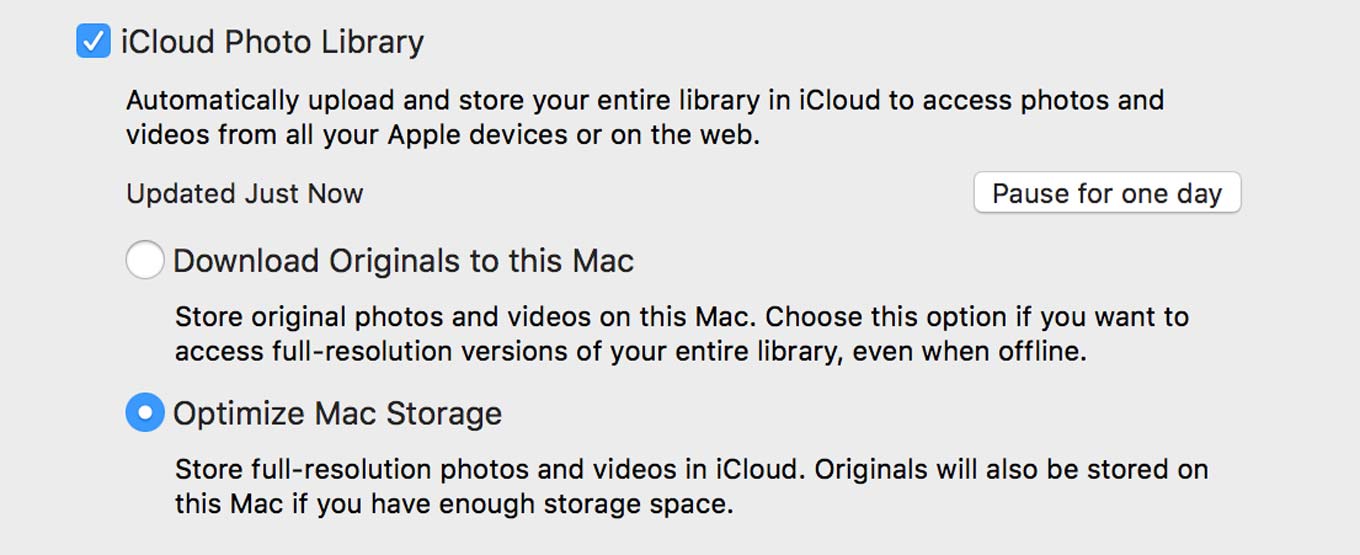
One of the more interesting features of Photos for Mac is its ability to not store my entire photo library on my Mac’s drive.1 It does this by syncing the entire library to iCloud Photo Library2 and then dynamically loading and unloading photos as you use it.

In true Apple fashion, Photos protects the user from thinking about managing storage — everything happens automatically, with absolutely no intervention from the user. That’s as it should be, but a few optional controls for the control freaks among us wouldn’t be the worst thing in the world.

This thought occurred to me when I was fishing a file out of my Pictures folder and noticed that my Photos library takes up 46GB of my precious iMac SSD storage space.

That’s a lot, especially when you’re supposed to render an HD video in Final Cut Pro, but you can’t because you’re out of disk space. There’s no button for me to press to put Photos in Austerity Mode, no interface to force it to slim down what it’s using. In fact, there’s no communication at all from the app about how it manages its own storage space.

Plumbing the depths of the Internet, I found this pretty great post on StackExchange that charts the size of the Photos library and a Mac’s disk usage. Photos is definitely optimizing the size of its library, though it’s still not entirely clear to me whether it only does this when it’s running, or if there’s some background process that might do it all the time. (My guess is that it’s the former.)

What that post does clarify is that Photos apparently has an optimization target: 10 percent of free disk space. So on my 467GB partition, it’s trying to free up roughly 47GB of free space. (At the moment that drive has 42GB free, so I guess it’s working?)

I’m also a little surprised at the 16GB of thumbnails in my Photos Library. That’s 240K in thumbnail data for every one of my 67,782 photos. It turns out that the Photos library actually generates two thumbnail files for each image: one “1024” image (roughly in the ballpark of 1024-by-768 pixels, though it varies based on aspect ratio) that’s 200K-300K, and a standard thumbnail that’s more like 480-by-360 and 50K-75K.

Those thumbnails are what make the Photos interface so pretty and responsive, even at Retina resolutions. At the same time… 135,000 thumbnail files on my SSD taking up 16GB of space. I guess that’s the trade-off of having a huge cloud photo library, but… wow.

I’m so happy that this feature exists, but in a future update I’d love to see a bit more transparency about how the storage is being optimized, and perhaps even a user option to blow out the cache or reduce the library size by some amount. Or, failing that, it needs to be much more aggressive in pruning its library in low-disk situations.


  1. After all, my photo library is larger than my Mac’s drive, so it just won’t fit! I had to break my old iPhoto Library into pieces and store it on a server. 
  2. You can’t use this feature if you aren’t using iCloud Photo Library, because Photos needs a data source for the files it’s deleting. 

“The Expanse” episode 1, free on iTunes

James S.A. Corey’s Expanse series is the best Sci-Fi book series I’ve read in the last five years. It’s been adapted into a TV series for SyFy, and the show premieres in December.

Set a couple of hundred years in the future, humanity has spread out into the Solar System. Earth and an independent Mars are nearly at war, and rebellion grows from the downtrodden in the asteroid belt and outer-planet colonies. Into this scene come a noirish detective (he’s even got a hat!) and a young officer on an outer-system ice hauling ship. Where the story goes will surprise you.

Last week the first episode was made available to watch for free on SyFy.com and YouTube. Today it’s been added to iTunes, too.

I’ve watched the first episode and it’s terrific. I highly recommend checking it out.


By Dan Moren

The Back Page: Here’s to the crazy ones

When I started out as a professional writer almost a decade ago, one of my goals was to write the back page column for Macworld. The back page was always, to me, the most interesting part of the magazine, since it often contained the sort of idealistic pie-in-the-sky ideas that really sparked my imagination. So I thought it would be nice to honor that tradition with some certifiably crazy ideas of my own.

A lot of people are wondering these days about convergence. When it comes to Apple, the big source of so much hair-pulling focuses on whether OS X and iOS will remain their own separate things or whether Apple will jam these two delicious flavors together into one unholy combination.

Listen to me: Convergence is inevitable. It’s coming. And there’s no reason to fear this future, because it’s going to be amazingly magical. Because we’re not talking about some Frankenstein’s monster hybrid touchscreen Mac here, oh no. We’re talking about something totally and insanely revolutionary, something beyond this mundane everyday reality.

Because the next logical step for Apple is virtual reality. I know, I can see you shaking your heads out there. How can I see you? Virtual reality. (Actually, I just guessed, but that didn’t really work as a punch line.)

Just think… right now, Apple invests huge swaths of money in buying components, sending them to factories, assembling their products, shipping them to customers, and so on. Not only is it an expensive proposition, it’s also time-consuming and prone to leaks, so that by the time the products get to end users, everybody whines about how there are no surprises left.

But what if instead of building actual products, Apple built virtual ones? Now, rather than all those costly physical parts and that unwieldy infrastructure, you can have a virtual version of the device that’s in your hands immediately. That saves Apple money, and it gives you what you want: want a Macintosh IIfx that runs the most current version of OS X? Knock yourself out. A 16-inch iPhone? Go nuts! There’s no need for Apple to be constrained by petty limitations like physics—the topology of Apple’s design can go places its never gone before.

And most importantly, there’s no longer anything to hold Jonathan Ive back from making the Apple products of which he’s dreamed so long. Finally, he can us use all of the various paintbrushes at his disposal.

Don’t worry, though. They’re all just different shades of white.

[Dan Moren is the East Coast Bureau Chief of Six Colors, as well as an author, podcaster, and two-time Jeopardy! champion. You can find him on Mastodon at @dmoren@zeppelin.flights or reach him by email at dan@sixcolors.com. His next novel, the sci-fi adventure Eternity's Tomb, will be released in November 2026.]


By Jason Snell

By request: Apple and OS convergence

In every issue of Six Colors Magazine, we’ll take a request from a subscriber. This one comes from Kevin Miller:

“I’d like to hear your take on Tim Cook flat-out denying that they want iOS and OS X to converge. Literally true? Or one of those check-back-in-five-years things?”

There was a time when it seemed clear that iOS and OS X were going to converge. Take Lion in 2011. That release was full of features and design changes that seemed to bring it closer to its mobile counterpart. “Natural scrolling” and auto-hiding scrollbars were introduced, matching the scrolling metaphors across the two platforms. LaunchPad aped the iOS home screen. Auto-save and versioning allowed you to quit apps without saving and keep your files intact—and in fact, the OS itself could shut down apps if it wanted to recapture resources.

Over time, iCal became Calendar and Address Book became Contacts and iChat became Messages, all in the same of harmony. As a Mac user it would have been hard not to feel that iOS was closing in.

But after Apple got rid of Scott Forstall, there seems to have been a change in philosophy on this point. In early 2014, I got to interview Phil Schiller, Craig Federighi, and Bud Tribble at Apple on the occasion of the Mac’s 30th birthday. And their message, which they hit upon again and again in our interview session, was this: The Mac’s not going anywhere, and it’s not converging with iOS.

Let me quote Federighi verbatim from that interview:

To say these two should be the same, independent of their purpose, let’s just converge, for the sake of convergence, is absolutely a nongoal. You want to feel to some extent that these are authored by the same hand, reflecting of the same set of beliefs and principles, and yet logically the consequence of their purpose.You don’t want to say the Mac became less good at being a Mac because someone tried to turn it into iOS. At the same time, you don’t want to feel like iOS was designed by this company and Mac was designed by this company, and they’re different for reasons of lack of common vision. We have a common sense of aesthetics, a common set of principles that drive us, and we’re building the best products we can for their unique purposes. So you’ll see them be the same where that makes sense, and you’ll see them be different in those things that are critical to their essence.”

And Tim Cook, on a conference call a few months later, famously said this:

I think anything can be forced to converge, but the problem is that products are about tradeoffs, and you begin to make tradeoffs to the point where what you have left at the end of the day doesn’t please anyone. You can converge a toaster and a refrigerator but y’know, those things are probably not going to be pleasing to the user.

Meanwhile, Microsoft is in the Toaster-Fridge business with Surface, which acts like a Windows tablet (with an appropriate touch UI) in tablet mode but like a standard Windows PC (complete with keyboard and mouse!) when in PC mode. Even Google is feinting in this direction with its convergence of Android and Chrome OS.

As I wrote in my iPad Pro review:

The iPad alone makes as much money as the Mac does, and both products are dwarfed by the success of the iPhone. iOS is Apple’s flagship operating system, so rather than mash the Mac and iOS together, it’s decided to keep them separate.

But what are people going to want? Converged PC tablets? Tablets with the power of PCs but none of their trappings? Or perhaps smartphones for some, large American-designed tablets for others. Always in motion is the future. Over the long haul, I think Apple’s approach is the correct one: The Surface’s convertibility smacks of a transitional product if ever there was one. But since we’re in a transition period right now, maybe something like the Surface is what people want.

And that’s why I can’t help asking myself, if Apple made a Retina MacBook whose screen popped off and became an iPad, would I buy it? It seems like such a Frankenstein product, so inelegant a concept and so clearly not the way the world is going. And yet, I would be tempted. Not because it’s a bold direction forward, but because it’s a compromise that grants me some comfort in a time of change.

So is it possible that Apple will build a device that is an iPad and a Mac? It’s possible, but even if it does so, it will likely be a weird transitional hybrid, not something that will stand the test of time. People use Macs because they’re Macs, and making a Mac into an iPad ruins that. Let the Mac be the Mac, and the iPad be the iPad. I believe that, and I think Apple does, too.


By Jason Snell

What I Use: iPad Pro with Cellular


For the last few weeks I’ve been using an iPad Pro rather than either my iPad Air 2 or my MacBook Air. It’s been a bit of adaptation, but long after my full review has been written and posted, I still find myself using it and liking it.

In fact—and here I’m going to sound like one of those old razor-commercial testimonials—I liked it so much, I bought one. During the very writing of this newsletter, in fact. I usually opt for a mid-range model for most of the Apple devices I use, but Apple has limited my options with the iPad Pro, and I guess it worked: I bought the 128GB cellular model. (Space Gray, of course. I always go Space Gray. Even my Apple Watch is the “Space Black” Apple Watch Sport.)

I opted for the model with more storage space because, as I’ve written about on Six Colors, I’ve been editing podcasts on the iPad Pro using an app named Ferrite, from the amusingly named Wooji Juice. But podcast audio files can be quite large, and I want the iPad Pro to have room to hold them all.

Then there’s the matter of a cellular option. I’ve been thinking about the iPad’s cellular option for a while now, and there’s probably a Six Colors piece on it out there somewhere, so forgive me if some of this ends up on the site in some form in the future.

My thought process traditionally goes like this: I’ve always got an iPhone with me, and it’s got Personal Hotspot built in, so why would I ever be somewhere that I would need to access the Internet from my iPad and not my iPhone? It doesn’t seem like it’s worth the extra $130—Apple’s standard price increase for cellular models—for a feature I probably won’t ever use.

Just the other day, though, I was in an office lobby before a meeting. There was no Wi-Fi, and my iPhone had a single bar of AT&T service, degraded down to 4G from LTE. And I needed to fix something on the Six Colors website. And I thought to myself, now would be a handy time to have an iPad with access to a different carrier. I realize that’s an edge case, but it’s a practical one: If there’s no AT&T service, maybe Verizon or T-Mobile will do the trick. It’s an interesting thought, and T-Mobile sweetens the deal by offering 200MB per month for free.

So that’s one scenario. Another is battery related: Two devices with cellular means that if your iPhone dies, you still have data on your iPad. And another is travel related: iPads aren’t locked to a cellular carrier like iPhones are, so if you’re traveling abroad and want data access, it may actually be a lot cheaper for you to access the Internet via an iPad than via your iPhone.

I’m sure I’m missing scenarios here. Maybe there are scenarios where kids have iPads but not iPhones, and are sometimes away from their parents, and so it makes sense for them to use devices with their own Internet connection? And after all, at least on my plan it’s only $10/month to add another tablet to my pool of data. (I had a similar discussion with my father-in-law over Thanksgiving about cars that connect to 4G and have in-car Wi-Fi. Can’t this be just solved by tethering?)


Can the MacBook Pro replace your iPad?

A modest proposal from Fraser Speirs:

If you have certain very specifically-defined workflows, and a work environment where you can guarantee yourself a chair and desk, you can probably get your work done on a MacBook Pro. For the rest of the world, there’s iPad.


Search Six Colors