When iPhone users want to download apps, they mostly go to a single place: Apple’s App Store…. Venture capitalist Ernestine Fu aims to solve that problem. Her firm, Blackstorm Labs Inc. of Mountain View, sells technology that allows developers to distribute their apps without going through the App Store. Instead, the apps are available through links that consumers can send to their friends.
This seems to be an attempt to build app platforms inside other apps. WeChat is currently offering a function that sells “mini functions” in an in-app store.
I appreciate the financial opportunity that might exist by suctioning off even a small percentage of Apple’s 30 percent cut in App Store revenue, but this seems like a bad business to be in. Apple has shown repeatedly that any attempt to abuse or bypass Apple’s methods will get your app removed from the store. Hiding inside Facebook Messenger or WeChat means it would be a higher-stakes escalation if Apple were to make an issue of it, but Apple’s showdown with Spotify suggests that Apple isn’t afraid of escalating things with major vendors if it means safeguarding the walls of the App Store.
It began with one manufacturer in Malmo, Sweden – a trip which ended with all of their bags, notes and equipment being stolen from their cars while they were inside a restaurant having dinner.
“They knew we were building a phone,” Fadell said.
“We asked our host where to get to dinner,”Š we were there all of 20 or 30 minutes because we were tired.
“When we got back to the car, every single thing in the car was gone. Every single bag. We swear it was corporate espionage.”
Also included are “the time Tony Fadell lost an iPhone prototype on a plane,” “the time Tony Fadell went behind Steve Jobs’s back to make the iPhone work with a stylus (though it didn’t eventually ship with one),” and “the time Tony Fadell laughed and laughed at Steve Ballmer.” Basically, there’s a lot of Tony Fadell.
Note: This story has not been updated for several years.
The original iPhone, today.
It’s true—ten years ago Apple announced the iPhone. This is the first of two 10th birthdays the iPhone will get this year, because although the device was announced at Macworld Expo in January of 2007, it wasn’t actually released until June 29.
As for me, I was fortunate not only to be in the audience for the keynote, but I got to be one of the few members of the press who were allowed to try one out in a briefing room off the show floor later that week. Fortunately, my story about that experience is still online, so you can read it for yourself. Here’s my favorite bit:
In any event, I can admit that I found it quite difficult to form complete sentences while I was holding the iPhone. In terms of sheer gadget magnetism, its power can not be overstated.
When the iPhone arrived, I wrote the Macworld review, and reading it back today I’m amazed at how much time I spent on the phone portion of the device. Today, my iPhone is revolutionary internet communication device first, widescreen “video iPod” second, and telephone third. And that’s okay. But at the time, whether it was a decent phone was a big question.
This is also the 10th anniversary of Apple changing its corporate name from Apple Computer to Apple Inc. Look back at that keynote and you can see why: Not only did it unveil the iPhone, the product that has come to represent Apple and dominate its business… it was also the day that the original Apple TV was named and given a ship date. All while the iPod was wildly successful. If there was ever a day for Apple to remove the word “computer” from its name, that was the day.
Yes, I have an original iPhone and an iPod Hi-Fi. And they both still work!
One final anecdote about the original iPhone: Six months is a long time to wait for such an anticipated product. The closest Apple analog I can provide is probably the Apple Watch, which was also announced six months before it shipped. Apple’s initial announcement and subsequent press briefings the week of Macworld Expo was all the information we got until the product shipped. We had so many questions and there weren’t a lot of answers.
We also had about three official images, released by Apple, to use as the basis for our magazine coverage. As you can imagine, every single story about the iPhone used those images. You saw them everywhere, in all web coverage as well as in magazines. We were really concerned about putting the same old image on the cover of the magazine—especially since we assumed our competitor would be using that image, too.
So what we ended up doing was working with an illustrator named Joe Zeff, who made some amazing 3-D illustrations for many issues of Macworld. Joe created a photorealistic iPhone (and a set of white earbuds!) in 3D and we used it as the cover art for our first iPhone issue, with an Apple-supplied iPhone screenshot added in. (We would later repeat this process for the iPad, which had similar issues of being announced—with limited photography available—way before it actually shipped.)
Anyway, if there’s one theme that runs through all these reminiscences today, it’s that it’s hard to believe that it’s been ten years. I really do believe that the day the iPhone was announced is probably the single most significant day in the history of the technology industry, because the modern smartphone—a product category defined by the iPhone—has changed the world and will continue to change it for years into the future. We got to witness a bit of history being made on stage that day in San Francisco.
(See you back here in six months for the iPhone’s real birthday.)
My thanks to Fat Cat Software and PowerPhotos for sponsoring Six Colors this week. PowerPhotos goes well beyond what Apple wants you to do with Photos for Mac. It lets you merge photos across multiple libraries, split libraries in two, merge libraries together, remove duplicated photos, search across multiple libraries, and a lot more.
You can try PowerPhotos today by downloading a free copy from the Fat Cat Software website. Six Colors readers can use offer code SIXCOLORS to receive 20% off a license that will allow you unlimited copying, merging, and duplicate finding.
“That’s really important,” Schiller says, “and I’m so glad the team years ago set out to create Siri”Š–”ŠI think we do more with that conversational interface that anyone else. Personally, I still think the best intelligent assistant is the one that’s with you all the time. Having my iPhone with me as the thing I speak to is better than something stuck in my kitchen or on a wall somewhere.”
Well, I reply, Amazon sees its Alexa voice interface not as something pinned to one device, but a ubiquitous and persistent cloud-based product that can listen to you anywhere.
“People are forgetting the value and importance of the display,” he says “Some of the greatest innovations on iPhone over the last ten years have been in display. Displays are not going to go away. We still like to take pictures and we need to look at them, and a disembodied voice is not going to show me what the picture is.”
I don’t know that I’d agree with Schiller’s assessment here. For one thing, I find dealing with a voice-based interface in the privacy of my home a lot more friendly than standing around in public talking to my phone, and I think most people would tend to agree with that.
As for the display issue, well, it’s clear that Amazon’s already thinking ahead to that, but I think that Siri’s biggest problem is that it does rely too much on having a screen to fall back to, which can be annoying if you’re in a situation where you’re not near your phone. It’d be great if Apple had a way to detect if your phone was in your hand or on the table (and it probably can, using the accelerometer, for example), and responded in the way that was appropriate for the context.
Either way, I think voice-based assistants are here to stay, but they definitely haven’t achieved their full potential yet.
Note: This story has not been updated for several years.
Holy cow, the iPhone turns ten today! A decade of multitouch and little rounded-rectangle icons.
No joke: I took a picture of where I was sitting reading the iPhone keynote liveblog. Guess I knew it would be historic.
Ironically, the original iPhone keynote was pretty much the only Apple event I missed during my tenure at Macworld. Ten years ago today, I was sitting in a hallway in the Las Vegas Convention Center, where I’d been sent–as a freelancer–to cover CES, and instead I was refreshing live coverage from my colleagues at the MacUser blog who were watching live at the Moscone Center. (Ah, the days before Apple events were streamed live.)
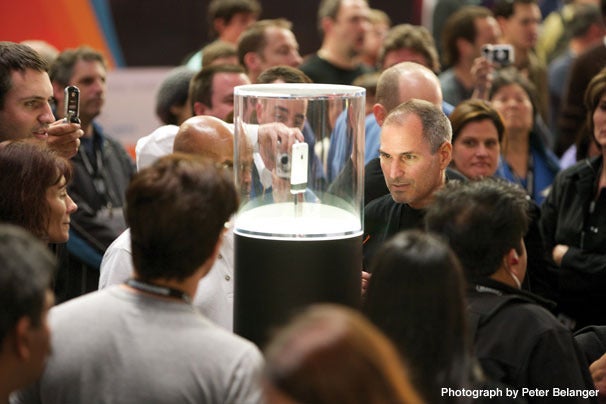
The original iPhone on the show floor at Macworld Expo 2007.
Needless to say, the only thing anybody at CES was talking about for the next day was the iPhone, and I gladly hopped my flight to the Bay Area to get a look at the device close up. (Well, in a giant rotating glass cylinder on the Macworld Expo Show Floor.) It would be almost six months before we could get our hands on shipping units, but it was clear even then that this was about to change everything.
Today’s iPhone is both noticeably different from that first model and yet instantly recognizable as an evolution of the same product. I’ve owned most of the models over the years (excepting the Plus versions, the SE, and randomly, the iPhone 5s), and the experience certainly has remained more or less constant over that time. Some rumors suggest Apple’s planning a major revision for the tenth anniversary of the iPhone–I’m skeptical. Apple doesn’t tend to care too much about marking the passage of time: if the company’s ready to deliver a major revision of the product, it will; if it isn’t, then it won’t. It’s not going to make that decision based on a calendar.
So here’s to another decade of the iPhone’s success. If you want a look back at where it all started, enjoy this trip down memory lane: the original keynote. Which I wasn’t at. Not that I’m bitter.1
[Dan Moren is the East Coast Bureau Chief of Six Colors, as well as an author, podcaster, and two-time Jeopardy! champion. You can find him on Mastodon at @dmoren@zeppelin.flights or reach him by email at dan@sixcolors.com. His next novel, the sci-fi adventure Eternity's Tomb, will be released in November 2026.]
A TV station in San Diego did a story about a little girl buying things accidentally through an Amazon Echo. Then the anchor said something he shouldn’t have:
“I love the little girl, saying ‘Alexa ordered me a dollhouse,'” said [Jim] Patton. As soon as Patton said that, viewers all over San Diego started complaining their echo devices had tried to order doll houses.
You can turn off voice ordering on the Echo, and maybe you should. But broadcasters and podcasters alike are going to need to be aware of the trigger words that exist for these devices and try not to use them for as long as this is an issue.
Update: I heard from a few people on Twitter who think that broadcasters shouldn’t modify the way they speak out of fear of activating badly implemented voice technology. Those people have a deep misunderstanding of the responsibility any communicator has with his or her audience. It doesn’t matter if the tech is badly implemented—what matters is that something you say can mess up the technology of people in your audience, and to take care to not trigger that technology is to show your audience care and respect. To blithely ignore it because it’s really the fault of Apple or Amazon or Google or Microsoft (or worse, the fault of the user for having the tech configured that way) is disrespectful, rude, and arrogant.
No professional broadcaster wants to alienate their audience, which is why I suspect that a lot of TV and radio people are learning rapidly that there are a few key phrases that should probably not be spoken for the next few years, until this technology improves. Yep, it’s dumb and it should be that way, but that’s life.
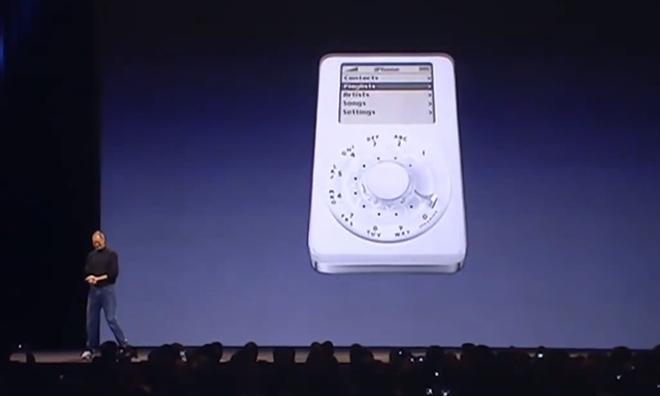
Instead of the modern touch-driven interface we now call iOS, it featured an operating system dubbed “Acorn OS” (this was an internal code name, and it unclear if it would have kept that name if it had been released), which is derived from the acorn shown on boot. It presents an on-screen click wheel, which took up the bottom portion of the screen, and on the other half of the screen, a UI identical to the one found on the beloved iPod, with options such as “Dial”, “SMS”, “Music”, “Contacts” and “Recents”, however lacking a browser option. The interface is interacted with in the same way an iPod would be operated.
It’s long been documented that there were essentially two factions in the development of the iPhone: Tony Fadell, who helped created the iPod and wanted the iPhone to run a version of the music player’s OS, and Scott Forstall, who argued that the iPhone should instead be based on the Mac’s operating system. Forstall won, Fadell left the company, and the rest is history.1
There’s never been much seen of the iPod-based iPhone concepts since Apple is pretty rigorous about destroying prototypes (some patent drawings do exist), but Dickson’s pictures seem to be showing the actual prototype version of the iPod-based OS. It’s easy to knock them with a decade’s hindsight, but at the same time I think we can agree that Apple probably wouldn’t have been the one to reinvent the smartphone market if this were what it had come out with.
The nail in the coffin of course being when Steve Jobs jokingly showed off a rumored look at the iPhone in the smartphone’s debut. ↩
I often hear Marketplace Tech’s weekly Silicon Tally segment while I’m waking up on Friday mornings, so it was a little bit jarring to have to sit in a chair and actually play the game with host Ben Johnson. But it was a lot of fun, and my dad got to hear my name on the radio, so that’s always a plus. My segment starts at about the 3:27 mark, but the first few minutes is an interesting interview with the screenwriter of the movie Hidden Figures, and is well worth the listen.
Ah, the Consumer Electronics Show. Home to smart fridges, video games, automotive technology, and a whole lot of technological gadgets and junk. It’s bad enough sifting through all the news from the comfort of my own office–I just heave a sigh of relief that I haven’t needed to actually set foot at the show in almost a decade.
And the reason that I’ve been able to avoid the Las Vegas Convention Center is because Apple isn’t really a presence there. Oh, sure, there are plenty of companies developing iPhone add-ons or showing off their new apps, but Apple itself doesn’t attend in any official capacity. That’s in large part because the company is perfectly capable of making its own splash whenever it wants to, simply by calling a press event.
But another big reason is that Apple simply doesn’t see itself as a “gadget” purveyor that needs to compete with any of the other companies at the show. Because when it comes to CES, gadgets are a lot of what draw the eye.
Lenovo has announced an Alexa-powered Echo-type device: http://www.macrumors.com/2017/01/03/ces-2017-lenovo-alexa-smart-speaker/
Mattel’s Aristotle is an Alexa clone for kids: http://www.theverge.com/circuitbreaker/2017/1/3/14152800/digital-assistant-children-mattel-aristotle
Police have already tried to get an Echo’s recordings to get information on a murder: http://arstechnica.com/tech-policy/2016/12/police-ask-alexa-did-you-witness-a-murder/
Dan’s look at the Google Home: https://sixcolors.com/post/2017/01/google-home-early-impressions-of-an-echo-competitor/
Here’s an Echo and a Google Home talking to each other forever: https://www.youtube.com/watch?v=ZfCfTYZJWtI
More information on the Nintendo Switch will be coming on the 12th: http://www.theverge.com/2016/10/26/13431334/nintendo-switch-information-coming-next-year
Lex is building a Raspberry Pi game emulator: http://lifehacker.com/how-to-turn-your-raspberry-pi-into-a-retro-game-console-498561192
Our thanks to Blue Apron (http://blueapron.com/rebound) for sponsoring this episode of The Rebound. Blue Apron ships you ingredients and amazing recipes. Learn while you cook and cook meals you’ll love. Go to BlueApron.com/REBOUND and get three meals FREE with free shipping.
There are plenty of arguments for Apple’s journeyman-user methodology. It is, above all, comforting. To know that your tools are of good quality and preordained by a master allows you to focus on your work. I think this is why the new MacBook Pro is disappointing: It indicates that our teacher may not be leading us where we should go.
There’s something wistful about Joel’s piece, which details his experiments leaving the Mac for Windows. But I think it encapsulates a particular feeling a lot of Mac users have right now, of not being exactly sure whether they’re standing on solid ground, or have just stepped into quicksand.
DeepMind’s AlphaGo is back, and it’s been secretly crushing the world’s best Go players over the past couple of weeks. The new version of the AI has played 51 games online and won 50 of them, including a victory against Ke Jie, currently the world’s best human Go player. Amusingly, the 51st game wasn’t even a loss; it was drawn after the Internet connection dropped out.
Now I’m going to assume when an anonymous player beats me at anything online that it’s a robot. Heck, sometimes in real life too.
Note: This story has not been updated for several years.
A new year means anticipation of all the things that might be packed into the next twelve months. But so often–especially in adulthood–anticipation seems to follow a direct line to disappointment. Still, even with the disaster that was 2016, I haven’t had all optimism crushed from my spirit quite yet. Here are a few things, mostly technological, that I’m looking forward to in the year ahead.
Sonos-Echo integration:First announced last summer, this year’s best team-up should see my favorite virtual assistant joining forces with everybody’s favorite purveyor of wireless speakers to offer voice control of music playback in any room in the house. As someone who now owns a pair of Echos and a pair of Sonos Play:1s, this is literally music to my ears. It’d be extra great if said music could play on the Echo and the Sonos simultaneously, but I guess I shouldn’t hold my breath. The initial announcement says the feature will arrive some time in 2017, after a beta period.
Nintendo Switch: I haven’t owned a Nintendo console since the very first DS (the only other Nintendo console I owned was an original NES), but I’m intrigued by the upcoming Nintendo Switch. In part because of its hybrid approach that lets you hook it up to a TV or take it on the go, and in part because as much as I wanted to like the Wii, it never quite ended up being a compelling buy for me.
If the Switch is as good as it looks–and hey, Nintendo makes a pretty marketing video, but we all know that’s not necessarily reflective of reality–and there’s, say, a new version of Mario Kart, then I am in. (Alternatively, if Nintendo would like to follow up on the success of Super Mario Run and bring a Mario Kart game to iOS, well, that would be just fine and dandy as well.) The company’s expected to dish out more information on the Switch in a livestream on January 12, so we’ll be paying attention to that; the console itself is slated to ship in March.
VR: Vague, I know, but hear me out: last year saw a lot of movement in the virtual reality space, and there are now a bunch of viable products that are actually on the market. This year, we can expect to see companies start to announce the second-generation versions of those devices, which should get closer to the VR that we’ve all imagined: lighter, cheaper, wireless, and so on. There are also some big question marks in the VR market. Sony’s launched its PSVR headset, for example, but Microsoft doesn’t seem to have made any tip towards VR on the Xbox, beyond pre-announcing its Project Scorpio update to the console, which should have the horsepower to at least handle VR. Personally, I wouldn’t be surprised if I owned a VR setup by the end of the year.
Whatever Apple comes up with: VR, AR, wearable tech, wireless charging…Apple’s got to have something up its sleeves for 2017. There have probably been more lackluster years for Apple than 2016–like pretty much any year in the ’90s–but it wasn’t until the AirPods squeaked in at the very end of the year that there seemed to be an Apple product that really hit the zeitgeist. (Sorry, Touch Bar!) The Mac Pro and AirPort lines are on life support, with a prognosis that is far from positive, and the iPad and much of the rest of the Mac are in need of some updates. That product pipeline would seem to have backed up a bit; here’s hoping it gets unclogged this year.
Episode VIII: Okay, it’s not exactly technology per se, but come on. Much as I liked Rogue One, I’m eager to see what happens in the still-as-yet-untitled next chapter of the main saga. Does Rey master the Force? Will Finn wake up from his coma? Can Luke Skywalker work his way up to a single line of dialogue? And in the light of Carrie Fisher’s recent passing, this probably marks the last outing for everybody’s favorite senator/princess/general/all-around badass. I’ll be at Star Wars Celebration in April, and I’ve got my fingers crossed that it’ll mark the debut of the official trailer for the next installment.
[Dan Moren is the East Coast Bureau Chief of Six Colors, as well as an author, podcaster, and two-time Jeopardy! champion. You can find him on Mastodon at @dmoren@zeppelin.flights or reach him by email at dan@sixcolors.com. His next novel, the sci-fi adventure Eternity's Tomb, will be released in November 2026.]
Note: This story has not been updated for several years.
A new year means anticipation of all the things that might be packed into the next twelve months. But so often–especially in adulthood–anticipation seems to follow a direct line to disappointment. Still, even with the disaster that was 2016, I haven’t had all optimism crushed from my spirit quite yet. Here are a few things, mostly technological, that I’m looking forward to in the year ahead.
Sonos-Echo integration:First announced last summer, this year’s best team-up should see my favorite virtual assistant joining forces with everybody’s favorite purveyor of wireless speakers to offer voice control of music playback in any room in the house. As someone who now owns a pair of Echos and a pair of Sonos Play:1s, this is literally music to my ears. It’d be extra great if said music could play on the Echo and the Sonos simultaneously, but I guess I shouldn’t hold my breath. The initial announcement says the feature will arrive some time in 2017, after a beta period.
Nintendo Switch: I haven’t owned a Nintendo console since the very first DS (the only other Nintendo console I owned was an original NES), but I’m intrigued by the upcoming Nintendo Switch. In part because of its hybrid approach that lets you hook it up to a TV or take it on the go, and in part because as much as I wanted to like the Wii, it never quite ended up being a compelling buy for me.
If the Switch is as good as it looks–and hey, Nintendo makes a pretty marketing video, but we all know that’s not necessarily reflective of reality–and there’s, say, a new version of Mario Kart, then I am in. (Alternatively, if Nintendo would like to follow up on the success of Super Mario Run and bring a Mario Kart game to iOS, well, that would be just fine and dandy as well.) The company’s expected to dish out more information on the Switch in a livestream on January 12, so we’ll be paying attention to that; the console itself is slated to ship in March.
VR: Vague, I know, but hear me out: last year saw a lot of movement in the virtual reality space, and there are now a bunch of viable products that are actually on the market. This year, we can expect to see companies start to announce the second-generation versions of those devices, which should get closer to the VR that we’ve all imagined: lighter, cheaper, wireless, and so on. There are also some big question marks in the VR market. Sony’s launched its PSVR headset, for example, but Microsoft doesn’t seem to have made any tip towards VR on the Xbox, beyond pre-announcing its Project Scorpio update to the console, which should have the horsepower to at least handle VR. Personally, I wouldn’t be surprised if I owned a VR setup by the end of the year.
Whatever Apple comes up with: VR, AR, wearable tech, wireless charging…Apple’s got to have something up its sleeves for 2017. There have probably been more lackluster years for Apple than 2016–like pretty much any year in the ’90s–but it wasn’t until the AirPods squeaked in at the very end of the year that there seemed to be an Apple product that really hit the zeitgeist. (Sorry, Touch Bar!) The Mac Pro and AirPort lines are on life support, with a prognosis that is far from positive, and the iPad and much of the rest of the Mac are in need of some updates. That product pipeline would seem to have backed up a bit; here’s hoping it gets unclogged this year.
Episode VIII: Okay, it’s not exactly technology per se, but come on. Much as I liked Rogue One, I’m eager to see what happens in the still-as-yet-untitled next chapter of the main saga. Does Rey master the Force? Will Finn wake up from his coma? Can Luke Skywalker work his way up to a single line of dialogue? And in the light of Carrie Fisher’s recent passing, this probably marks the last outing for everybody’s favorite senator/princess/general/all-around badass. I’ll be at Star Wars Celebration in April, and I’ve got my fingers crossed that it’ll mark the debut of the official trailer for the next installment.
[Dan Moren is the East Coast Bureau Chief of Six Colors, as well as an author, podcaster, and two-time Jeopardy! champion. You can find him on Mastodon at @dmoren@zeppelin.flights or reach him by email at dan@sixcolors.com. His next novel, the sci-fi adventure Eternity's Tomb, will be released in November 2026.]
After painstakingly merging cards in this manner for an hour or so (!), I had stopped paying close attention to whether conflicting data was being persisted well or not. At one point I stumbled upon the realization that I lacked the phone number for a contact whom I had sent an SMS message just within the past week. Other contacts were missing key data, too. An outdated email address here, a missing mailing address there. Whoops! Abort mission! Time to recover from that backup file.
Spoiler: his local backup was incomplete, and he had to eventually go to iCloud to recover his original–if still messy–data.
I ran into a similar problem earlier this year, when trying to remove duplicates in my Contacts database. The app decided to merge cards for people who lived at the same physical address–i.e. my mom and dad, my uncle and aunt, and my cousin and his wife–into a single card. I think I’m still untangling parts of that. So be very careful with those features.
If you’ve been jealous of the tea robot that Jason and I wax poetic about but don’t have the budget or space for such a luxury, consider a DIY option. Using a Raspberry Pi mini computer and an old CD drive–and come on, who doesn’t have one of those lying around?–you can make your own. Github user achilikin has already done the heavy lifting of writing the code for you. (Although it looks like it dunks up and down for a set number of cycles which is just not kosher in my tea book.)
Note: This story has not been updated for several years.
As a happy Amazon Echo user for nearly two years now, you might think I wouldn't be in the market for any other voice-controlled virtual assistant—and you'd be wrong. Dead wrong.
Upon returning home from my lengthy trip last month, one of the boxes awaiting me contained a Google Home that I'd ordered while abroad. Given how much I enjoy and appreciate the Echo, I've concluded that it's incumbent upon me to at least try out the major competitors in the field, and right now that means Google's lady-in-the-canister.1
To date, I've only had a fairly limited opportunity to put the Home through its paces, and if the Echo is any indication, these devices are evolving quickly. With that in mind, here are some of my first impressions of Google's foray into the smart speaker market.
Why the heck is it that Apple's Siri seems to be the only virtual assistant that can have either a male or female voice? Where's our gentleman-in-the-canister?! ↩
This rundown from Hack*Blossom is one of the most in-depth, thorough guides to cybersecurity that I’ve read. It covers everything from simple browser add-ons to encrypting your texts and emails all the way to setting up a flash drive with a custom OS that you can use on any computer. Some of the recommendations are definitely on the more severe end of things, but there are plenty of resources if you even want to up your security and privacy game just a little bit. It’s framed specifically from a feminist angle, but it’s good advice for anybody and everybody who lives their life online.