Marco Arment’s review of the 2018 Mac mini: https://marco.org/2018/11/06/mac-mini-2018-review
John Gruber’s review of the 2018 MacBook Air: https://daringfireball.net/2018/11/the_2018_retina_macbook_air
Gruber’s commentary on Dan Frakes’s move to Apple: https://daringfireball.net/linked/2018/11/02/frakes-mac-app-store
Our thanks to Legacybox (http://legacybox.com/rebound) the world’s largest, most trusted, digitizer of home movies and photos. There’s never been a better time to digitally preserve your old home movies, film reels, and photos. Go to Legacybox.com/REBOUND to get 40% off your first order!
Our thanks as well to Indochino (https://www.Indochino.com) where you’ll find the best made to measure shirts and suits at a great price. Use the promo code “REBOUND” and get any premium suit for just $359.
And our thanks to the National Security Agency. The National Security Agency plays a big role in protecting us from foreign cyber operations, and you can help! If you work in computer science, networking, programming or electrical engineering, learn more about careers at the National Security Agency by visiting IntelligenceCareers.gov/NSA (http://intelligencecareers.gov/nsa).
Note: This story has not been updated for several years.
If it seems like just a couple weeks ago that we were getting news on Jon Favreau’s live action Star Wars series, The Mandalorian, that’s because it…was. But Disney has already announced it’s working on a second live action series set in the Star Wars universe, this one following Rogue One‘s Cassian Andor. Actor Diego Luna will return to the role for the show, which will center on espionage adventures prior to the events of Rogue One, for obvious reasons.
Honestly, I was just thinking about Cassian the other day and how I was bummed we wouldn’t get more about him. That said, I’m fascinated to see how they draw his character; when we meet him in Rogue One, he’s not exactly the nicest of guys. Will this be a darker series in tone?
Given Solo‘s apparently disappointing box office and the death of the Boba Fett movie, this seems to point to Disney repositioning Star Wars into a serialized TV format. (This makes three series, including the currently airing Resistance animated show, and not including the forthcoming conclusion to the Clone Wars series).
In some ways, that pivot’s no surprise, given the era of Peak TV we live in now, plus the ability to build ongoing original content for the company’s upcoming streaming service. The question is whether viewers will show up for this content in a way that they didn’t necessarily for the feature films. Right now Disney’s Episode IX is still scheduled for December 2019, and there is a trilogy in development from The Last Jedi‘s Rian Johnson as well as some number of films from Game of Thrones producers David Benioff and D.B. Weiss–but little is known about any of those movies.
[Dan Moren is the East Coast Bureau Chief of Six Colors, as well as an author, podcaster, and two-time Jeopardy! champion. You can find him on Mastodon at @dmoren@zeppelin.flights or reach him by email at dan@sixcolors.com. His next novel, the sci-fi adventure Eternity's Tomb, will be released in November 2026.]
Update: The guide linked below uses some pictures from the 2014 Mac mini model, and though they are apparently similar to the 2018 in many ways, those looking to do their own upgrades will be better served by waiting for an official guide from iFixit.
Glad as we all are to see Apple didn’t solder the RAM to the motherboard in its latest Mac mini update, the process still isn’t as simple as in days of yore. Rod Bland has posted a guide on iFixit detailing the process, which requires a few specialized tools.
I’ve upgraded Mac minis in the past, and while everything is friendlier than the first models, which famously required a putty knife to open, this is yet another reminder that the days of easily upgradable computers are waning. It’ll be interesting to see what the company’s forthcoming Mac Pro looks like in this department.
There was a time when magnets were the most terrifying things in computing. Magnets erased floppy disks and tape cassettes and even hard drives. But in the modern era, magnets are our friends. Apple has used them for various important tasks over the years, from the convenient breakaway charging cable of MagSafe to the sensor that knows you’ve closed your MacBook’s lid—and the attraction that helps keep it closed.
But in the last few years, Apple has brought the rules of magnetic attraction to the Apple Watch, the iPhone, and now the iPad. How do they work? You don’t need to know to appreciate what magnets do for modern Apple devices. And that goes double for the new iPad Pro, with its 102 magnets—as cited in Apple’s launch video about the product, no less—and all of the magnetic accessories that go along with it.
Ars Technica’s Samuel Axon scored an interview with Apple’s Phil Schiller and Anand Shimpi all about Apple’s custom silicon in the new iPad Pro. It’s an interesting read, and a rare dive into the nitty gritty technical details.
The iPad Pro outperforms every MacBook Pro we tested except for the most recent, most powerful 15-inch MacBook Pro with an 8th generation Intel Core i9 CPU. Generally, these laptops cost three times as much as the iPad Pro.
“You typically only see this kind of performance in bigger machines—bigger machines with fans,” Shimpi claimed. “You can deliver it in this 5.9 millimeter thin iPad Pro because we’ve built such a good, such a very efficient architecture.”
Ars also gets into the more interesting context to these chip discussions: namely, how does Apple’s venture into custom silicon affect the future of the Mac? That remains one of the most interesting and exciting potential stories of—likely—the next year or two, so it’s interesting to pick up the breadcrumbs here and there.
Note: This story has not been updated for several years.
Think back to the fall of 2010. The iPad was just a few months old, and Apple introduced a new design for the MacBook Air. The previous model was an impressively thin and light laptop (that could famously fit in a mailing envelope), but it was expensive and had a single USB port concealed beneath a weird flip-down door. But the new models—and there were two, at 13 and 11 inches—were entirely different. They were still thin and light, but now they offered two USB ports and a new wedge-shaped design.
In that moment, the MacBook Air went from being a bit of an oddball to being the heart and soul of the Mac laptop line—and since two-thirds of Mac sales are laptops, it’s probably safe to say that the MacBook Air is the definitive Mac of this decade. For the past eight years, its exterior design has largely remained unchanged, as other products have come and gone.
Just when we thought it was dead, after several years of essentially no updates, the MacBook Air has returned with a new version that’s clearly inspired by the classic design. It’s been so long since the last major MacBook Air update, in fact, that most of the “new” features on this device are simply a recap of all the changes Apple has made to other Macs the past few years, finally rolled into this one: a new keyboard, Retina display, Force Touch trackpad, Apple-designed T2 processor, USB-C/Thunderbolt 3, “Hey Siri”, and Touch ID.
Surprise! The definitive Mac of the 2010s is going to survive this decade. And while this MacBook Air is dramatically different from previous models in many ways, it’s also got a bunch of familiar touches that make it undeniably a MacBook Air. Like its predecessors, it’s not the computer for everyone… but it will probably be the most popular laptop among the (count ’em) six models Apple currently offers.
Note: This story has not been updated for several years.
When the Mac mini was introduced at Macworld Expo in 2005, what caught the eye was the $499 base price, the lowest price ever for a Mac1. In an era where the iPod was in the process of entirely rehabbing the Apple brand in the eyes of the general public, the Mac mini was for switchers—people who decided that the iPod was so good, maybe a computer made by Apple would be better than whatever PC they were using right then.
It was a good idea, and I suspect that the Mac mini drove a lot of switchers—or at least got them into an Apple Store, where perhaps they ended up walking out with an iMac instead.
Apple and the Mac are in very different place today, though. Most of the Macs it sells are laptops. The concept of the low-end desktop switcher feels outmoded. (Which is not to say there aren’t any, just that there maybe aren’t as many as there might have been in 2005.)
In the intervening 13 years, the Mac mini has become something different. As the one Mac without a built-in monitor that isn’t an expensive and large Mac Pro, it’s become a bit of a Swiss army knife, fitting as a tiny Internet or file server (I’ve had a Mac mini running in my house more or less constantly for more than a decade), running lights and audio in theaters and at rock concerts, and thousands of other small niches that are vitally important for the people who live in them.
Just last week, hours after an Apple media event, I found myself in an edit bay at the offices of Stitcher in midtown Manhattan, recording a podcast. The multi-microphone, multi-display audio setup was powered by—you guessed it—a Mac mini.
Apple has witnessed how the Mac mini has gone from being the best Mac it could build for $499 to one that’s a vital tool for professional and home users in a variety of contexts. And so, after a long time in the wilderness, the Mac mini has at last been updated—the right way. The last time the Mac mini got updated, Apple took away the highest-end configurations. This time, the Mac mini has been built with those many niche uses in mind.
What is dead may never die, as the Ironborn of Game of Thrones are fond of saying. This week, Apple resurrected both the MacBook Air and the Mac mini at its event, proving that death is sometimes only a temporary state of affairs–at least where tech products are concerned.
But just as this week’s Apple event giveth, there’s also the suggestion that it might taketh away; some Apple products and technologies find themselves in limbo after the announcements of the week, meaning that the writing may perhaps be on the wall for them.
Of course, not all of these products and technologies will die immediately–some may linger on for a while yet, and a few of them may not stay dead. (As the Air and mini showed us, sometimes they’re just hibernating.) But Apple has a habit of being brutal when it comes to cutting the dead weight from its lineup, even when it comes to killing those things that it once considered its darlings.
It’s another record quarter as a part of a record fiscal year for Apple. The revenue was nearly $63 billion, the profit more than $14 billion, and for the year Apple generated $265 billion in revenue and nearly $60 billion in profit. It’s the company’s eighth straight quarter of revenue growth, and that growth has accelerated every one of those quarters. This is a healthy company; you couldn’t find a healthier one if you tried.
Yes, Apple’s stock is getting hit because its guidance—the amount of money it expects to make during the current quarter—is actually slightly below what Wall Street analysts were expecting. For the record, the revenue Apple has guided to—between $89 and $93 billion—would be the most revenue Apple has ever generated in a quarter, and somewhere between 1 and 5 percent growth. In other words, get ready for another record Apple quarter, because this one’s shaping up to be huge.
As always, it’s worth reading between the lines of the federally-mandated financial disclosure tables and listening to the specifics of the company’s ritual phone call with financial analysts to see what else is on the company’s mind. Here are a few things that I noticed.
Apple announced new MacBook Airs and Mac minis: https://www.macrumors.com/2018/10/30/2018-macbook-air-mac-mini-hands-on/
And new iPads: https://www.macrumors.com/2018/10/30/2018-ipad-pro-hands-on/
Jason Snell’s thoughts on the event: https://sixcolors.com/post/2018/10/brooklyn-event-impressions-love-for-the-mac/
Our thanks to LightStream (http://lightstream.com/rebound). Consolidate your credit card debt with a LightStream loan featuring great interest rates and no fees. You could save thousands of dollars in interest! Get an additional rate discount by going to LightStream.com/REBOUND.
And our thanks to the National Security Agency. The National Security Agency plays a big role in protecting us from foreign cyber operations, and you can help! If you work in computer science, networking, programming or electrical engineering, learn more about careers at the National Security Agency by visiting IntelligenceCareers.gov/NSA (http://intelligencecareers.gov/nsa).
[Here’s a complete transcript of Thursday’s Apple call with analysts.]
Tim Cook: Good afternoon everyone and thanks for joining us. I just got back from Brooklyn where we marked our fourth major launch event of the year. In addition to being a great time it put an exclamation point at the end of a remarkable fiscal 2018. This year we shipped our two billionth iOS device, celebrated the 10th anniversary of the App Store, and achieved the strongest revenue and earnings in Apple’s history.
Apple reported the results from its fiscal fourth quarter Thursday, saying it generated $62.9 billion in revenue, with Services revenue reaching an all-time high of $10 billion. iPhone sales were up slightly over the same quarter last year, but iPhone revenue during the same period was up 29 percent. Mac sales dropped 2 percent but Mac revenues rose 3 percent. iPad unit sales fell 6 percent and iPad revenues dropped 19 percent.
A phone call with analysts is forthcoming. We’ll be here with llive coverage of the analyst call, and more. And yes, if you want to be in on the excitement of the analyst call1, you can listen to it too.
If there’s one thing Apple has no shortage of, it’s consumer-oriented mobile computing devices. (or, as they’re catchily known in the biz, COMCDs—wait, that’s nothing.) With the company’s resurrection of the MacBook Air, there’s a full line-up of these products, from the lowly $329 iPad all the way up to the top-of-the-line MacBook Pro.
Now, this may seem confusing. After all, if you’re in the market for a Mac laptop, which MacBook do you get? How do you tell the difference between the MacBook, MacBook Air, and MacBook Pro? Why would you pay hundreds of dollars more for an iPad Pro over a cheap, but funcational iPad?
But this isn’t confusion—it’s brilliance. What we’re seeing here is the earliest stages of Apple’s brilliant new marketing plan: soon, all of Apple’s lineup will be mobile computing devices, sliced up for very specific markets. So it’ll be easy to pick the MacBook or iPad that’s perfect for you. Here are just a few of the earliest concepts that Apple is experimenting with for its COMCD—you know what, I’m just going to stop trying to make that a thing:
MacBook Throw We’ve all probably tossed our laptops down on a bed or a couch without thinking much about it. But what if you could toss your MacBook anywhere? Introducing the new MacBook Throw, with a form factor specially crafted to provide unparalleled aerodynamics. It’s the most throwable MacBook yet! Toss it on a counter. On a table. At a fleeing mugger. Plus, with a new feature we’re calling BooMacrang, your computer always returns right back to your hands. Why worry about dropping a MacBook when you can throw it?
MacBook Hair If you live in colder climates, as I do, you’ve winced when you’ve picked up your aluminum laptop on a frigid day. Or maybe you just don’t care for the hard, unyielding feeling of metal. Either way, the new MacBook Hair, coated entirely in the finest alpaca, may be right for you! Its amazingly soft exterior is luxurious to the hand, and attractive to the eye, and you’ll never find yourself looking at recycled aluminum the same way again. Included in the box is the latest Apple Comb to let you unsnarl those tangles that invariably occur. Word has it that braiding the hair is amazingly therapeutic!
SnackBook There you are, sitting at your desk, when 10:30am rolls around and you find yourself with a craving. But you’re tethered to your computer, desperately trying to get work done—what to do? Enter the SnackBook, Apple’s one-stop shop for productivity and combating the munchies. The SnackBook is built from a revolutionary alloy of marzipan that’s one hundred percent edible and biodegradeable. Just need something to take the edge off? Pop off a delicious keycap from the resilient butterfly keyboard. Want some heartier fare? Snap off a section of the chassis—as big as you like—and chow down. With the new SnackBook as your witness, you’ll never go hungry again.
iPad Bro Bro, do you even iPad, bro? Coated in an indestructible shellac of Axe body spray and shame, the iPad Bro is the mobile computing device that got two collars popped way up from the Washington Brost. With a new High Five feature that’ll never leave you hangin’ and an optional attachment that dispenses very very cheap beer1, the iPad Bro is sure to be perfect for every Broseph and Broreen in your life. Just don’t tell Todd—that dude is such a killjoy.
Non-alcoholic, of course. Not that they’ll ever notice. ↩
[Dan Moren is the East Coast Bureau Chief of Six Colors, as well as an author, podcaster, and two-time Jeopardy! champion. You can find him on Mastodon at @dmoren@zeppelin.flights or reach him by email at dan@sixcolors.com. His next novel, the sci-fi adventure Eternity's Tomb, will be released in November 2026.]
In that love-it-or-hate-it iPad commercial, it was asked “What’s a computer?”. The answer to that may still be unclear to some, but with the new Mac mini, Apple has another head-scratcher for us:
“What’s a pro?”
When Tom Boger, Apple’s head of Mac product marketing, introduced the new machine, he joked that it came in space gray because “pro customers are going to love that,” before praising it for being “an absolute beast on the inside.”
Boger then laid out his case. The new Mac mini comes with four or six processor cores in every model, can support up to 64 GB of user accessible RAM, and up to 2 TB of SSD storage, leaving all spinning media in the past. This is accessed via four Thunderbolt 3 ports, as well as a couple of USB A ports and an optional 10Gb ethernet upgrade. Apple’s custom T2 chip is onboard, keeping things safe, secure and speedy, and the Mac mini has an all-new cooling system designed to keep all of this hardware cool, quietly.
The new Mac mini is up to five times faster than the machine it replaces, but that dual-core system is four years old, so just about anything should be noticeably faster.
The Mac mini is a home run in the GPU department. All SKUs come with integrated graphics in the form of the Intel UHD Graphics 630 chipset. Needless to say, this wasn’t mentioned on stage when Boger was going through all of other much-improved hardware.
I am not saying this chipset is the end of the world. While it does benchmark slightly lower than something like the Intel Iris Plus Graphics 655 in the $1,7999 13-inch TouchBar MacBook Pro, it is up to the tasks that home user will put it through.
But there’s my sticking point — the Mac mini is supposed to be for pros now. While it’s roughly in the same performance class as the 13-inch MacBook Pro, that means it’s not the machine for everyone.
It depends on your answer to the question: “What’s a pro?”
If you’re looking to do complex video editing, 3D rendering or other high-end tasks, you’re not the sort of pro the Mac mini can serve without the addition of an eGPU, which will easily add $1200 or more to the cost of the system.
You could easily spend entry-level iMac Pro money on a loaded Mac mini with an eGPU and 5K display.
However, if you aren’t the most demanding user, this Mac mini looks like a great option. You don’t have to be making the next Pixar film in your basement to be a pro these days.
Record or edit a podcast? You’re a pro.
Work in Photoshop, Illustrator or Sketch? You’re a pro.
Are you building an app in your spare time? Here, take this hat. It says “I’m a pro” on it.
Buying a pro Mac is complicated. The iMac is a great machine, but with high core counts on the horizon, it makes it a hard recommendation at the moment. The Mac Pro is … coming … soon … probably.
However, the MacBook Pro is more powerful than ever, and only getting better next month with the optional Vega GPU. The iMac Pro is the ultimate combination of power and elegance, and now, the Mac mini is on the table, too, as long as your work isn’t super bound to the GPU and can pay to skip over the entry-level Core i3 CPU.
[Stephen Hackett is the author of 512 Pixels and co-founder of Relay FM.]
Everybody predicted that Apple would do a second event this fall, thanks to rumors that an iPad Pro and new Mac laptop were on the horizon. But nobody would’ve predicted that the event would be held in Brooklyn, New York. Yet there I was yesterday, standing outside an opera house on the campus of the Brooklyn Academy of Music, with multiple streets blocked off and a large Apple logo hanging off the front of the building. Surprise!
Also, no one would have predicted earlier this year that Apple would revive the seemingly dead MacBook Air and Mac Mini, but that’s what happened. For the first time in what feels like a long time, Apple took the stage and spend a lot of time talking about the Mac. As a Mac user it was good to see, and to see two products that were basically left for dead by the side of the road get updates at last.
As a longtime MacBook Air user, I’m happy that Apple has brought it back. As you’ll read later, I’m under no illusions that this product was in Apple’s original plans. It felt like the MacBook was being groomed as the Air’s replacement, but for whatever reason, that never happened. The new MacBook Air’s price tag means that in many ways, it’s also not really replacing the old MacBook Air. But if you like the shape, size, and look of the Air, it’s back—and is Apple’s most affordable Retina MacBook, even if it’s $200 more than the old Air.
I’m also a longtime Mac mini user and am happy to see it finally get an update. Again, the base price is more expensive than I’d like—but I appreciate that Apple didn’t skimp on features the way it did when it last updated this product four years ago.
But the star of the show, and the one part of the event that was entirely predictable, was an update to the iPad Pro. It seems to me that the iPad fits in a weird in-between place in Apple’s priority list. The Mac is about nostalgia and legacy and existing user bases and people who seek continuity. The iPhone is a must-have product that is Apple’s most successful and profitable by far. And then there’s the iPad, which benefits from some iPhone developments, but in many ways more closely resembles a new remix of the same stuff people do with their Macs.
By splitting the iPad line in two, with the low-end iPad at a pretty great price, it frees Apple to load up the high end with cutting-edge, high-end parts (and prices). The new iPad Pro is priced like a laptop, but it’s also got the power of the laptop. Still, the iPad is a product that exposes the fact that Apple’s running on all cylinders as a hardware company but doesn’t quite have it together when it comes to software.
For all the power in the new iPad Pro, there are a bunch of places where iOS itself lets the hardware down. That new USB-C port is great, but you can’t plug in a USB hard drive and see the files on it. There are plenty of reports that Apple intended iOS 12 to be full of iPad stuff and it ended up getting delayed to iOS 13. That means it’s entirely possible the new iPad Pros will be even more awesome next summer and fall. But right now, you can see the gap between Apple’s hardware ambitions and the ability for its software to deliver. (And if you think that’s harsh, remember that I love the iPad Pro and no longer travel with a Mac! Nobody knows the flaws of a product like someone who uses it every day.)
Last night as I was flying back from New York, I poured out everything I could think of about all the products in one sitting, fueled by complimentary soda, snacks and Wi-Fi from my airline. I posted them on Six Colors from the plane, but if you haven’t read them, I’ve added them to this special issue of the newsletter. It’s hot off the presses!
Note: This story has not been updated for several years.
I’ve been participating in Apple’s Public Beta programs for both iOS and macOS for the last couple years, and generally it’s been a pretty smooth experience. But there’s often some trickiness when it comes to getting off the beta–and this year, that’s where I hit a speed bump.
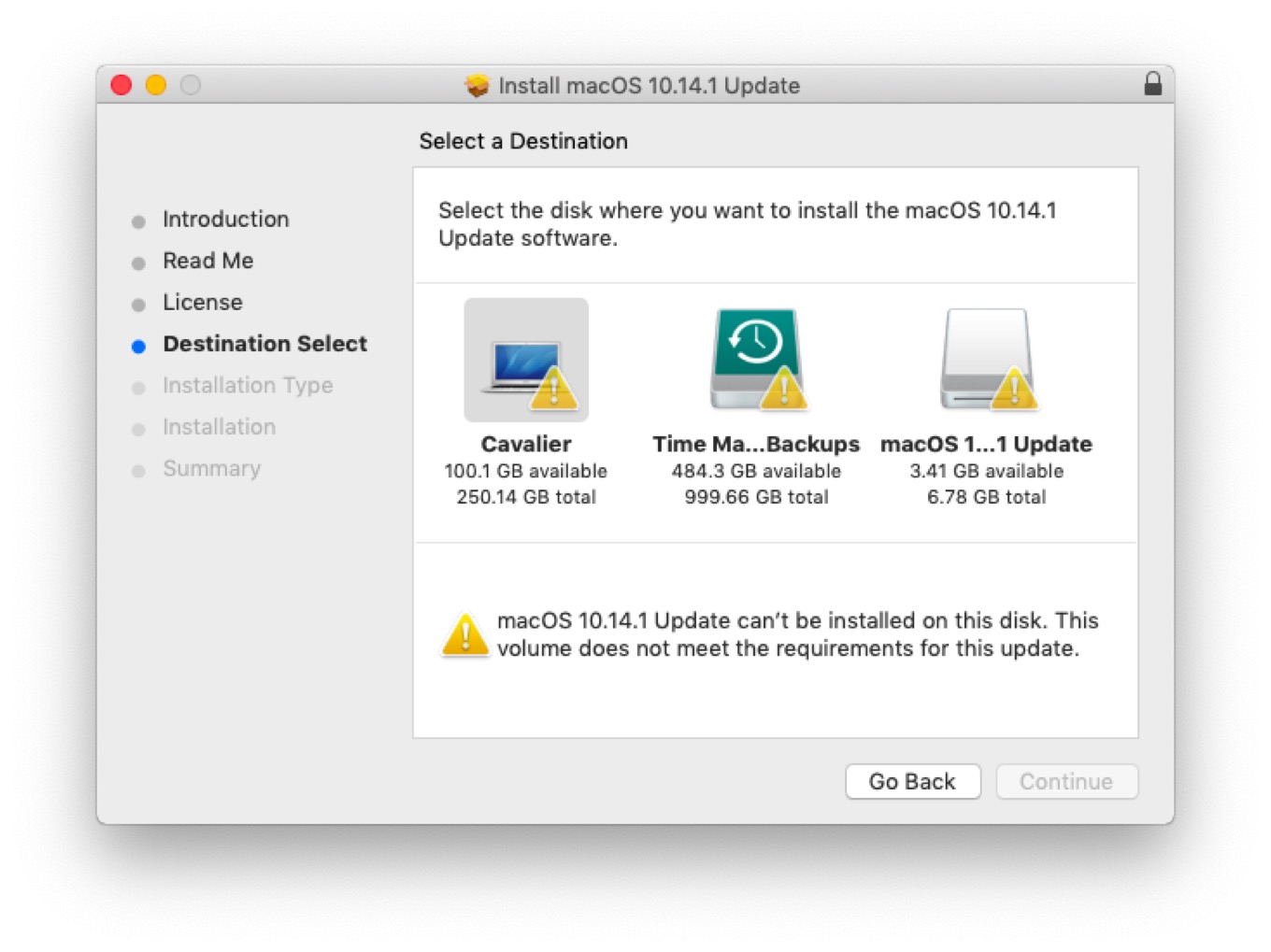
When macOS 10.14.1 arrived yesterday, I fired up Software Update–newly relocated in Mojave to a pane in System Preferences–to install it on my MacBook Air. Lo and behold, however, Software Update insisted that my current version of macOS Mojave 10.14 was the most recent, and no updates would be forthcoming, thank you very much.
Or so I thought. See, when I opened up the installer, I was met with another roadblock: an error message telling me that my Air “does not meet the requirements for this update,” with no further information. More and more puzzling.
I was fairly confident that the root of the issue here was something to do with having been in the Public Beta program. I’ve heard of others being stuck with dead-end builds of an OS and a tweet from Eric Holtam seemed to confirm that the build I was using, 18a389, wasn’t eligible for the update. I tried re-enrolling in the Public Beta program, restarting my Mac, then unenrolling and restarting again to see if it would point me towards the right update, but no dice.
So, what’s a guy to do? I contacted Apple Support, whose less than helpful suggestions were either a) roll back to a Time Machine backup from before I enrolled in the Public Beta and then install the update (less than ideal, since I would lose any files created after that backup or modifications to other files), or b) do a full restore and start from there.1
Neither of those were terribly appealing options, so I went for door number three: download the macOS Mojave installer from the App Store. I figured I would download it, reinstall Mojave to the shipping build of 10.14, and then install the 10.14.1 update on top of it.
In fact, it worked better than expected–downloading the Mojave installer kicked me back to the Software Update pane and informed me that I’d be downloading and installing the official build of 10.14.1. And half an hour and several progress bars later, here I am, on the latest update, safe and sound. And hopefully on a stable build that won’t run into this problem in the future.
So, if you’re likewise suffering from a case of no-update-itis, get thee to the Mac App Store post haste and try the Mojave installer. It sure beats restoring from a backup.
When I expressed some frustration about this, I was reminded that I shouldn’t be installing the Public Beta on a mission-critical machine. Fair enough. I’m not sure why some builds get dead-ended like this, but if it’s just an oversight on Apple’s part, seems like something that could be fixed. ↩
[Dan Moren is the East Coast Bureau Chief of Six Colors, as well as an author, podcaster, and two-time Jeopardy! champion. You can find him on Mastodon at @dmoren@zeppelin.flights or reach him by email at dan@sixcolors.com. His next novel, the sci-fi adventure Eternity's Tomb, will be released in November 2026.]
As always, Jeremy Burge of Emojipedia has the details about every change to emojis in iOS 12—not just the new emojis you’ve read about and how they’re implemented in Apple’s emoji picker, but some art changes to existing emojis as well. For example, the phone emoji is now an iPhone X:
Courtesy Emojipedia.
There are many more subtle changes, and Jeremy sees all and knows all, so check it out if you’re as fascinated by the evolution of emoji as I am.
As detailed in a blog post by the right-to-repair organization iFixit, helium atoms can wreak havoc on MEMS silicon chips. MEMS are microelectromechanical systems that are used for gyroscopes and accelerometers in phones, and helium atoms are small enough to mess up the way these systems function. Yet both Android and Apple phones use MEMS silicon for their devices, so why were only Apple phones affected?
The answer, it seems, is because Apple recently defected from traditional quartz-based clocks in its phones in favor of clocks that are also made of MEMS silicon. Given that clocks are the most critical device in any computer and are necessary to make the CPU function, their disruption with helium atoms is enough to crash the device.
No word on whether it caused Siri to speak in a very high voice.
Note: This story has not been updated for several years.
With the new iPad Pro, introduced Tuesday at Apple’s media event in Brooklyn, Apple got a chance to apply everything it’s learned in the past three years about what makes the iPad Pro different from the iPad, and everything it learned in building the iPhone X and XR. It got to address nagging issues with the Smart Keyboard and Apple Pencil. This is a reboot of the iPad Pro, and I’m so here for it.
Let me offer up a little disclosure right at the top: I love the iPad Pro. I basically don’t use a Mac laptop anymore. When I’m not at my desk on my iMac Pro, I am almost always using the 12.9-inch iPad Pro as my device of choice. The prospect of a new and improved iPad Pro was the thing I was looking forward to the most as I headed to the event on Tuesday morning. I wasn’t disappointed.
All the right moves
I love the new design of the iPad Pro models. The flat back with the flat sides, which remind me of the original iPad design and the iPhone 4/5/SE, is a delight. But when you pick one up, the first thing you notice is that the bezels are even all the way around—and they’re almost, but not quite, gone entirely.
This is the iPhone X factor, applied to the iPad. The home button is gone, replaced with a TrueDepth camera system that allows Face ID to work from any orientation. It’s surprising and impressive when you see the iPad unlock using Face ID when you’re holding the iPad upside-down. The camera can still see your face from down there? Apparently so.
I did immediately worry that my fingers were touching on the screen due to the small bezels, and that it would lead to a bunch of mistaken touches. I can only assume that Apple has applied the same software (or an updated version) that they wrote when the side bezels shrunk on the iPad Air—it does a surprisingly good job of ignoring fingers when they’re holding the iPad rather than tapping and swiping.
And if you hold your hand over the camera when it’s trying to unlock, it warns you — displaying a “camera covered” alert while also pointing at the camera with an arrow, to help you quickly realize which hand is doing the blocking.
We’ll see if there are quirks about any of this in practice—it’s very hard to get a real idea when you only get to handle the iPad for a few minutes in a very crowded, noisy room. (Having that TrueDepth camera also means that the iPad Pro can shoot portrait selfies and do Animoji, which is fun and cool.)
As it approached changing the design of the two different sizes of iPad Pro, Apple made the right decisions. The 10.5-inch model seemed like a great size, so they left it alone—and just stretched out the screen, creating an 11-inch diagonal model. The 12.9, on the other hand… that screen is gorgeous but there’s no denying that the iPad felt big, heavy, and awkward. (And I’m saying that as the guy who has used one for three years.)
So Apple kept the big, gorgeous screen and reduced the volume of the 12.9-inch model by 25% by shrinking the bezels and making it thinner. Again, it’s hard to judge by a few moments of holding it, but I’m hopeful that this will result in a device that’s better balanced and easier to hold. I was thinking that maybe this time I’d opt for the smaller iPad Pro, but having held the new 12.9-inch model, I’m starting to think that I’d rather take the big screen in a smaller package. We’ll see.
It’s a laptop, okay?
Apple made a bunch of announcements about the iPad Pro that I could summarize as: “Yes, this is a computer.” (No matter what that one iPad ad says.) It started with Tim Cook’s charts, comparing last year’s iPad unit sales to the unit sales of the top laptop makers. (The iPad sold more units than any of them.)
Then came the comparison of the A12X Bionic processor to PC laptops. According to Apple, the new iPad Pros are faster than 92 percent of all the portable PCs sold in the last 12 months. The larger point here is that the iPad Pro is not a low-powered device. It’s faster than your laptop, probably, so don’t write it off.
You know, fast storage is great. Lots of storage is great. The iPad Pro has both, offering a high-end option with a terabyte of storage. That’s the kind of storage real computers have. (I didn’t even have a terabyte of storage on my old 5K iMac!)
You can use all that storage for Photoshop and Autodesk files, I guess? That was probably the most predictable part of the iPad Pro announcement, given the fact that Adobe had previewed Photoshop for iPad on stage at Adobe Max a couple weeks ago. Still, the refrain “this is real Photoshop” is important. Real computers run real Photoshop. The iPad Pro is a real computer.
Which brings us to USB-C. The iPad Pro is the first iOS device to ditch Lightning for the port standard favored by computers. This is another sign that the iPad Pro is really embracing being a computer—but the sad fact is, it’s hamstrung by iOS itself. The hardware is willing, but the software is weak. iOS’s support for USB devices is sorely limited. It will import photos and videos from cameras and memory cards. You can hook up a keyboard or an Ethernet adapter or a microphone or audio mixer. And I assume the iPad Pro will be able to power a much wider array of devices than could have been powered by the USB 3 Lightning Adapter without a power assist.
But plug in a hard drive or flash drive and you can’t view the files in the Files app. Plug in a USB webcam and I assume nothing happens? There’s more to be done here. On a standard computer we have an expectation of what happens when we plug in a USB device. iOS has holes. Maybe the existence of USB on iPad will finally prompt Apple to prioritize better USB device support in future versions of iOS.
In the meantime, yes, it’s cool that the iPad Pro can drive a 4K or 5K external monitor—even though you can’t use it for input, so it’s just for mirroring or as a second screen for video previews, slide presentations and the like. And it’s cool that you’ll be able to use your iPad Pro to charge your iPhone! But there’s more to be done here.
Finally, if it’s a fast as a computer and it has ports like a computer and runs software like a computer and has storage like a computer… it’s going to have a price tag like a computer. And these iPad Pros do. Both of the base prices are higher than the previous models. (In fact, Apple’s keeping the old 10.5-inch iPad Pro in the price list at the original price.) So now you’ll shell out $799 for the base model 11-inch iPad, and $999 for the base model 12.9-inch. Throw in LTE or more storage and the price rapidly increases.
Again, you’re getting more so you’re paying more. And Apple still makes a low-cost iPad (with support for the Apple Pencil!), so there’s still an option for people who can’t envision spending $1000 on an iPad. I don’t love that these things cost more now, but I’ve come to heavily rely on my iPad Pro, so it’s worth it for me.
Pencil No. 2
When the iPad Pro made its debut, so did the Apple Pencil. Now it’s time for a second generation Pencil, and Apple has addressed all the major issues with the original.
This Pencil has a flat side that doesn’t roll off the table and attaches magnetically to a spot on the wide side of the iPad Pro. This means you can attach the Pencil to the iPad Pro and keep it there rather than having to look for it whenever you want to use it. (My podcast pal Myke Hurley stuck a loop on his iPad Pro so he could keep his pencil secure at all times.) The magnet’s not a light attraction, either—I shook an iPad Pro a bit, striking fear in the heart of the Apple employee responsible for its well-being—and it didn’t budge.
But it’s not just a magnet! That little spot is also an induction charger, so the Apple Pencil doesn’t just stay attached, it stays charged. And the first time you attach the Pencil to that spot, it offers to pair it with your iPad. Gone is the weird Lightning plug hiding under a rattly plastic cap.
Then there’s the desire many users had for gesture or button support on the pencil. Again, Apple sort of went its own way here. So far as I can tell, the Pencil must have an accelerometer inside it, just like the AirPods do, so it can detect when you do a double tap with your finger. Individual apps can decide what that double-tap gesture means; by default the Notes app considers it a toggle between whatever tool you’re using and the eraser, but you can also set it to just toggle between your two most recently used tools.
Keyboard reconfigured
Finally, the accessory I’m always the most interested in: the keyboard! I have always liked the Smart Keyboard, introduced with the Pencil and the iPad Pro back in 2015. Well, that’s not entirely true—I think it’s a pretty good keyboard in terms of typing feel, but the 12.9-inch model was always a victim of the massive area of the iPad itself. With the new 12.9-model being much smaller, I have some hopes that its keyboard accessory will also be less awkward.
But what we’re not getting with these models is another Smart Keyboard. Instead, Apple has relocated the Smart Connector to the back side of the device and created the Smart Keyboard Folio, which attaches magnetically to the device’s back and provides front and back protection.
We’ll see how easy it is to attach and detach the folio in practice, but it seems likely that it will be a little less fiddly than trying to attach the Smart Keyboard to the side of an iPad Pro. It’s also possible that this magnetic attachment will make the entire thing more stable, making it easier to use in your lap as well as on a table.
Apple seems to think it will, because it’s also put two grooves above the keycaps themselves, both of which allow you to place the iPad in a different display angle. Apple says one is more optimized for using on a table or desk, and the other for sitting in a lap.
As someone who has taken to clipping my iPad Pro into a metal shell in order to get a laptop-style feel, I’m fascinated by Apple’s new approach here. I’m going to need to use it in my lap before I decide how I feel, but I’m optimistic? It’s funny that Apple, after going entirely away from the front-and-back case approach in recent iPad generations, has apparently embraced it again with these models. I really like the Smart Cover, though, and I’m going to miss it if these models truly don’t have magnets in the right places to make a simple front cover work.
Speaking of keyboards, I need to once again bring up the Brydge Keyboard I use with my current iPad Pro. I’m curious how companies like Brydge and Logitech, which has made keyboard cases for previous iPad Pro models, will approach this new device. Brydge’s current design requires you to drop the iPad Pro in to two clips that go up against the device’s bezels. Welp! Those bezels are basically gone. Could the magnets on the back of the device be enough to hold an iPad Pro in place? Will any other vendor have access to the new Smart Connector location? Assuming people buy the iPad Pro, someone will try to provide alternatives to Apple’s keyboard. But what form that will take is anyone’s guess.