Kayla Cobb of Decider interviewed Ben Stiller, executive producer of the excellent “Severance” on Apple TV+. Cobb asked Stiller how Apple shares data about the show’s viewership with the people who make it, and Stiller’s response was strange, but not really surprising:
…They don’t tell, it’s really weird. They sort of give you kind of an idea. But it’s not like ratings or box office numbers or anything like that. It’s like graphs and charts that are relative… The fun thing was going to [San Diego] Comic-Con and having a full house for a panel and seeing all those people there. That was the first time I was like, “Oh, wow, this is really like… There are people who are really watching this, like human beings to connect with on it.”
This is a common complaint from the creative people involved in streaming TV. Unlike the days of Nielsen ratings, today the relative success of streaming television is data that’s treated like a trade secret. Knowing that people are liking your show, that it’s a hit or even a word-of-mouth cult sensation, can be a big boost to the energy and motivation of the people who make the shows.
The fact that Ben Stiller still doesn’t have any idea how many people watched “Severance” is par for the course in streaming TV today—this isn’t about Apple, it’s about the entire streaming business—but it’s also kind of ridiculous.
Thanks to the M2 MacBook Air, Myke has decided to live a two-laptop lifestyle. We ponder the rumored delay of iPadOS 16, whether it’s a good or bad thing, and what form a new iPad Pro might take.
Magic Lasso Adblock is a great Safari ad blocker for your iPhone, iPad and Mac. As a native content blocking extension, it blocks all intrusive ads, trackers and annoyances – letting you experience a faster, cleaner and more secure experience across all your devices.
I was struck by this section of a report by Politico’s Eric Geller involving the deletion of Secret Service messages related to the January 6 insurrection at the U.S. Capitol:
The phone resets occurred as the Secret Service was implementing a new mobile device management (MDM) platform, a technology that employers use to centrally manage and preserve emails, photos and other data stored on employees’ phones. Apple’s iMessages cannot be backed up by this system, because they are encrypted and stored on users’ devices, unlike regular text messages.
This explanation seemed off to me, because while iMessage data is end-to-end encrypted in transmission and not stored by Apple as a part of the transmission process, it’s not actually encrypted on the device itself. Which is why iCloud backups, which are unencrypted, can contain the entire contents of iMessage conversations. (This is a workaround that has been used by law enforcement to obtain iMessage records in numerous occasions.)
Geller goes on:
Because of this issue, the Secret Service couldn’t store iMessages in a central location the way it managed its email system and other technologies. Thus, when individual agents failed to manually back up their data before their phones were erased and reconfigured for the new management system, the only copies of those iMessages were lost.
This portion seems to suggest that this is more an issue about a failure of backing up phones before wiping them, rather than the encrypted nature of iMessage itself. I ran it by Tom Bridge, Principal Product Manager at JumpCloud and co-host of the MacAdmins podcast, in the Six Colors Discord, and here’s what he had to say:
iMessage histories may be device specific and limited, and if they were not utilizing iCloud Backup (for Federal Government Cloud Reasons) it is possible that when the devices were wiped and setup anew with the MDM — so that the devices are supervised by the new MDM — the previous history was lost.
In short, I suspect they were prohibited from using any iCloud service because iCloud isn’t FedRAMP certified for security, and when they wiped the device to set them up with the new MDM service, they could not restore even a local on-disk backup, because those backups would’ve stored the supervision identity and the MDM enrollment from the previous MDM service.
There would be a way to do this, but it would’ve been a pain in the butt to organize because it requires that you swap handsets with your nearest other handset. (Local backups CAN be restored if the device UDID is different, because the supervision identity and MDM enrollment are entangled with the hardware.)
We ran into this with a healthcare startup I used to support. When they swapped MDMs, their text history was not preserved because they did not believe iCloud’s security was adequate for their HIPAA requirements. (They later changed their mind.)
Is it possible that this was, in fact, malicious? 100% yes. Is it possible that this was, actually, unintentionally caused? Also 100% yes.
My thanks to Tom for picking through the technical details of what might have gone on here.
How we store and share files in the cloud, the streaming video services we go to when we’re looking for something new to watch, the one computer or tablet we’d use if we could only use one, and our webcam setups.
My Downstream co-host Julia Alexander, writing for Puck News (subscription required) about the launch of the Apple TV+ series “Black Bird”:
Anecdotally, as someone who talks to a lot of executives in the industry, conversations about “Black Bird” all go a similar way. First, they agree, it’s great. Next comes the shared observation that they hadn’t known anything about the show at all…. Maybe it’s because Apple is used to a keynote presentation creating all the press the company needs—just wait until the next iPhone announcement likely happening this September—but entertainment marketing is different from tech product marketing.
…I was told there were concerns among producers about Apple’s commitment to marketing its shows—to the point that at least one explored hiring outside marketing gurus on their own personal dime to ensure the show got proper support…
As a former studio executive and I spoke more about their frustrations, they noted the obvious irony. Apple, worth a staggering $2.6 trillion, is the world’s most innovative product and marketing company. It seemed strange that this competency had yet to make it to the content group.
Marketing during the era of peak TV is hard, but as someone who lives dead center in Apple’s ecosystem, I hadn’t even heard about “Black Bird” until last week, when Tim Cook mentioned it on the analyst call and I saw an extended trailer for it on last week’s “Friday Night Baseball.”
It is interesting that Apple, a master of product marketing, is perceived as struggling when it comes to promoting its entertainment shows.
Apple Inc. expects to delay its next major iPad software update by about a month, taking the unusual step of not releasing it at the same time as the new iPhone software, according to people with knowledge of the matter.
It’s unusual, but it makes sense. Not only is macOS already on a later timeline that’s not as tightly tied to the big iPhone release, but the addition of Stage Manager to iPadOS is an important moment for the iPad. The feature has been improving a lot in the summer betas, but there’s a lot more refinement to be done.
I’m glad Apple is apparently being patient with this update and not forcing it out the door when it doesn’t need to, just because that’s how it’s done it in the past.
Sometimes we go astray by confusing entertainment for value. In sports, it’s a draft or (in the case of this past Tuesday in Major League Baseball) a trade deadline that provides some entertainment-who will go where?!-but in the end, very little nourishment. The sound and fury you just witnessed don’t quite signify nothing, but what they signify won’t be known for months or years.
This happens in business, too. I’m thinking about it because of an exchange in last week’s Apple conference call with analysts. Piper Sandler analyst Harsh Kumar asked Tim Cook if, since stock prices have crashed for a lot of companies, Apple was specifically looking to acquire companies to grow its services business.
“We always look and we ask ourselves how strategic it is,” Cook replied. “And we never buy just to buy or buy just for revenue purposes. But we would buy something that is strategic for us. To date, we have concentrated on smaller IP and people acquisitions. But I wouldn’t rule anything out for the future. And obviously, we are constantly surveilling the market.”
Now, Apple has a lot of money. It could buy just about anything if it wanted to. But its track record largely involves buying unknown companies and quietly swallowing them whole, leaving no trace of their existence. In other words, not entertaining. I’m sure Kumar didn’t mean it this way, but so much speculation about Apple potentially buying companies is about how exciting or spectacular it would be, not whether it makes any business sense.
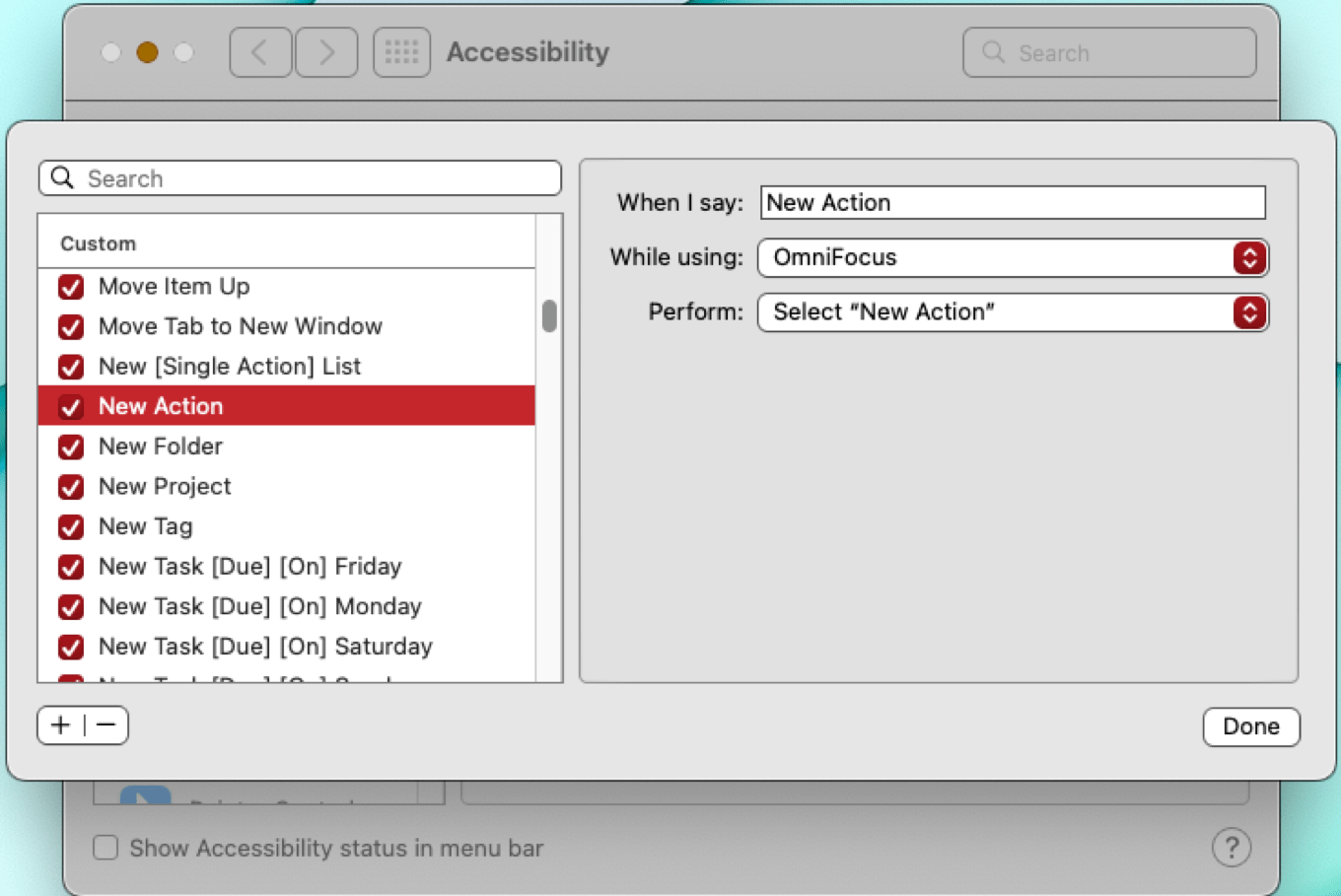
We told you a couple of weeks ago about the latest update to OmniFocus, the task manager from The Omni Group, which adds an interesting new way to control the app – with your voice. Now we’re going to take a closer look at how it works.
To import new voice commands, navigate to the Voice Control area of Accessibility in System Preferences. Here, a collection of OmniFocus commands has been installed.
Speak to the Task Manager
The Omni Group says that OmniFocus, plus Voice Control, plus custom voice command scripts you install on your Mac or iOS device, give you full control of the app with your voice. Create tasks, change their due dates, add information, export them, and use any OmniFocus menu item.
OmniFocus’ new voice commands rely on the Voice Control accessibility feature that’s built into macOS and iOS. Enable Voice Control, then use simple spoken commands to have OmniFocus do your bidding. Behind the scenes, OmniFocus uses the Omni Automation scripting implementation to make it all work on the Mac. On iOS or the Mac, voice commands can also trigger shortcuts.
Omni Automation is based on Core JavaScript in WebKit. All Omni apps support it, but OmniFocus is the first to allow control by voice. Omni Automation’s Open URL action encodes a URL within the script, allowing it to be sent to the receiving application when activated – in this case, by Voice Control.
Understanding Voice Control
Voice Control is designed for users with physical disabilities that make manipulating a mouse or keyboard challenging. It’s available in macOS Monterey and later, and iOS 14 and later. Voice Control includes commands that work on the OS level, a significant number of dictation entry and editing options, and a grid-based overlay that allows the Voice Control user to indicate the location onscreen (identified by number) where an action should be taken, like selecting or opening something. (Don’t confuse it with “classic” Voice Control, which Apple added to iOS in 2009, before Siri came along, and left in place long thereafter. Classic Voice Control let you Initiate a phone call or play a song, but not much else.)
Supercharging Voice Control for OmniFocus
Modern Voice Control offers some basic functions that are common to many apps, like opening, closing, or quitting. But for controlling highly specific elements, especially in a complex app like OmniFocus, Voice Control supports adding custom commands by importing XML scripts. That means you could create your own scripts to build a set of Voice Control commands for any app. Omni Group has done that for OmniFocus, offering a batch of scripts you can download and install, allowing you to create and modify tasks, control palettes, and activate any menu item.
To provide feedback as you use Voice Control, Omni Automation has added a voice synthesis class that makes it possible for scripts to respond via voice to confirm that a command you’ve given has been heard and obeyed. Voice feedback is implemented in the OmniFocus script examples the company provides. Since the scripts are just XML files, you can create your own, either from scratch or by using the Omni files as a template. You can, of course, modify them at will, perhaps to change the command the system responds to, or the spoken response you receive when your command succeeds. You can choose alert sounds instead of a spoken response if you prefer.
In macOS, you can execute OmniFocus voice commands in two ways: use Voice Control’s built-in Open URL action to run an Omni Automation script, or use a macOS shortcut. iOS Voice Control commands use Voice Control’s Run Shortcut action that in turn invokes an Omni Automation script. On both platforms, you install the scripts through the Voice Control interface.
Though Voice Control has been a part of Apple’s accessibility suite for a couple of years, shortcut support will be new in iOS 16. That’s good, but it could be better: If Apple implemented the Open URL action in iOS, Omni Automation could work entirely without Shortcuts on that platform.
Like seemingly everyone else, during the early days of the pandemic I tried to spruce up our outdoor space by buying some LED string lights. They were affordable, and with a simple kit I was able to suspend some nice lighting above my patio.
But plugging and unplugging the lights was no good, so I began my chase of an acceptable way to control the lights remotely—turning them on and off, yes, but also dimming them. I started with a radio-based remote dimmer, which worked—but the remote wasn’t very good, and frequently required multiple button presses to do the job.
I dreamt of an outdoor dimmer compatible with HomeKit. Lutron makes an outdoor smart plug that’s HomeKit compatible, and I tried it—but unfortunately, it doesn’t offer dimmer functionality, just on and off. I finally found the Treatlife outdoor smart dimmer plug, which did work—with Alexa and Google Home, but not HomeKit.
So it was Homebridge to the rescue! Turns out that Treatlife is just one brand name for the Tuya line of products, and there was a Homebridge app for that. After registering as a Tuya developer and getting an API key, I was able to get the dimmer to run somewhat reliably.
I set up a HomeKit automation that automatically turns on the lights, at about 20% brightness, after sunset and then turns them off after we’ve gone to bed for the evening. Even when we aren’t outside, it’s really nice to be able to look out the doors from our living room and see the patio rather than inky darkness.
But I never stopped looking for a proper HomeKit-enabled outdoor dimmer. And just the other week I found one, the $30 Meross Outdoor Dimmer Plug. I wish I could give you a lot of details about it, but that’s the thing… it just works. I pulled out the Treatlife/Tuya dimmer and popped in the Meross model in its place, added it to HomeKit via the Home app, and everything just works.
So if you, too, bought a bunch of cheap LED string lights and want to control them with HomeKit, I have good news! There’s finally something that will do the job.
This week Jason and Myke take a closer look at Apple’s weird quarterly results, which reassured Wall Street while not being altogether reassuring. Then automotive expert Sam Abuelsamid joins Jason to talk about what Apple’s WWDC 2022 announcement of a new integrated CarPlay might actually mean if and when it arrives late next year.
My thanks to Kolide for once again sponsoring Six Colors.
Kolide knows how challenging it can be to prove compliance to a third-party auditor—they just went through it themselves. They learned firsthand something their customers had been telling them for a while: that they couldn’t have gotten their SOC certification without using their own product.
Kolide is an endpoint security solution for Mac, Windows, and Linux devices. Kolide gives IT admins a single dashboard, through which you can prove that your fleet has the security measures in place that auditors care about.
Being a member of Six Colors means you get access to members-only posts, the Six Colors Podcast, and a whole lot more. For a few years we’ve also offered a community for members in Slack. Unfortunately, while we love Slack, it’s not really a product made for communities like ours. It doesn’t offer the tools we need to continue running our membership plans and building a solid, growing community.
So this week we turned on the lights at the new Six Colors Discord. If you’d like to join, you can click this link or visit the Six Colors member center and find the link there. You’ll need to log in to Discord (or create an Discord account if you don’t have one).
Inflation runs rampant. Threats of recession loom. And on Thursday Apple strolled right in, whistling a happy tune, turning in yet another record set of financial results. The company set a fiscal third-quarter revenue record, with $83 billion in receipts, up 2 percent from last year.
But look deeper, and you’ll see that this was an unusual quarter for Apple. The company was battered by a “cocktail of headwinds,” to quote Apple CFO Luca Maestri using a metaphor that wasn’t just mixed, but shaken and stirred. Mac sales were down, wearables took a beating, and even the seemingly invincible Services line showed some softness.
And yet, it was a pretty good quarter, considering. I realize that the word “considering” is doing a lot of work in that sentence, but it’s true. Wall Street seemed relieved that Apple turned in a good, if not great, quarter. Here’s what jumped out at me in the numbers (and in the post-game phone call Apple’s executives traditionally do with financial analysts).
As always, Apple CEO Tim Cook and CFO Luca Maestri are talking to analysts after revealing Apple’s quarterly financial results. Here’s an ongoing transcript.