Our thoughts on the Apple Watch Ultra, whether we do clean installs on our Macs, which iPhone 14s we’re getting, and what we’d change about Apple’s event presentations.
I’m not sure how you can underestimate one of the world’s most successful companies, but somehow we managed to do it with Apple regarding Wednesday’s “Far Out” event.
Take the Apple Watch Ultra: Back in July, Bloomberg’s Mark Gurman reported that Apple would be making an extreme-sports watch.
Gurman’s report got a lot of details right, and yet over the intervening two months, I think a lot of people (myself included) tried to stuff the narrative of this watch into the existing Apple narrative. And so that “extreme sports watch” got watered down until the general expectation was that Apple would probably just unveil a larger, more expensive Apple Watch.
That’s not what happened. Instead, Apple embraced the extreme-sports narrative. Sure, a lot—maybe even most!—people who buy an Apple Watch Ultra will not be using it in extreme sports. It’s the biggest and best and most expensive Apple Watch, and there’s always an aspirational quality to a product like that. But Apple is not shying away from the lucrative sports watch category, nor should it.
Fitness has been a fundamental part of the Apple Watch story from the beginning, so this extension of the brand feels right. It’s hard not to imagine Apple being a huge threat to the entrenched leader in the category, Garmin—so long as Apple remains focused. If Apple moves ahead halfheartedly or distractedly, it will have a harder time because the category means more to Garmin’s bottom line than Apple’s.
Then there’s the matter of iPhone pricing. With higher inflation, a strong dollar, and reports of Apple expecting to dramatically improve the average selling price of iPhones during this cycle, all signs pointed to Apple raising prices on at least some iPhone models. It didn’t happen—at least in the United States—and that was a pleasant surprise.
Of course, Apple did raise prices almost everywhere else in the world, which is unsurprising given the strength of the dollar. But while it could have probably raised prices on the iPhone Pro models pretty easily, it refrained. An Apple motivated entirely by hardware sales might have made a different decision, but as Ben Thompson points out, this is an Apple that’s also interested in selling services and ancillary products to its installed base. The lack of a U.S. price increase—which, given inflation, is essentially a price cut!—says a lot about the strategy of today’s Apple.
Landfall on Dynamic Island
Alan Dye introduces the Dynamic Island.
Which brings us to the Dynamic Island, a stark reminder about the limits of rumors emerging from Apple’s hardware supply chain. Everyone who reported on the size and shape of the new cutouts on the iPhone 14 Pro models was absolutely right—and yet couldn’t see the forest for the trees. The cutouts were only the start of the story.
Leaks from inside Cupertino are a lot harder to come by. And so we missed the bigger picture, which is that Apple took the reduced size of its sensor cutouts as an opportunity to redesign a big portion of the iOS interface. (Remember, it’s been five years since the iPhone X introduced the stable peninsula that we call the notch. That was the first cut at this sort of interface; the company’s had half a decade to think about its next move.)
With the presence of a strong hardware rumor and no software rumors at all, everyone did the rational thing and stuck to the concrete. It would have been very hard to predict that Apple was going to create a rounded interface element that dances around the cutouts and turns them from a blemish on an OLED screen into an ambient information zone.
And yet, having seen it, the whole thing immediately made sense to me. Think of how Apple characterizes the iPhone in the simplest possible silhouettes:
The early iPhones were defined by their large bezels at top and bottom, with a home button at the bottom. With the introduction of the iPhone X, the fundamental silhouette of the iPhone shifted. Apple embraced the notch. It wasn’t a blemish, but an identifying feature that represented the iPhone brand.
With the introduction of the iPhone 14 Pro, we’re entering a new era with a new silhouette. The new iPhones are defined by the floating Dynamic Island, and unlike the notch (which was basically treated like a blind spot you’d eventually forget was there) the Dynamic Island is meant to be noticed.
I don’t really know if the Dynamic Island will be a hit or a misfire. A few minutes playing around with it in Cupertino aren’t enough to tell me, one way or another. But its existence should be a reminder that with Apple, the details of the hardware are often just the beginning of the story. We underestimate Apple at our peril.
On Wednesday at the Code conference, Steve Jobs’s widow Laurene Powell Jobs, Jony Ive, and Tim Cook announced The Steve Jobs Archive, a website featuring historical material (including audio and video clips) from Jobs’s life.
The (unsurprisingly) spare website includes the following statement:
With respect for the past and excitement for the future, the Steve Jobs Archive offers people the tools and opportunities to make their own contribution.
We are building programs, fellowships, collections, and partnerships that reflect Steve’s values and carry his sense of possibility forward.
Jobs himself was famously not really interested in revisiting the past. “Respect for the past and excitement for the future” is a phrase that seems to balance the desire for information about Jobs and Jobs’s own focus on whatever comes next.
Dedicated Garmin sports watch user Thomas Ricker, at The Verge, about the growth possibilities for Apple Watch Ultra:
By pricing the first generation of the Ultra at $799, Apple has a lot of ceiling to roll out new Ultra editions in the years ahead that differ in features and capabilities. I’d readily pay more just to have Apple’s new emergency SOS satellite messaging on my wrist in addition to cellular data so that I can leave my phone (or Garmin InReach) behind when running remote trails or kitesurfing off the coast of the Western Sahara. Garmin, for example, sells a dizzying array of watches at every possible price point that sometimes differ only slightly in capabilities.
Garmin is the market leader in $500+ smartwatches. There are plenty of low-price, low-profit categories that Apple has no interest in entering. But a high-price, high-profit category that’s got an entrenched leader whose software game doesn’t match up to Apple’s? That’s a huge area of opportunity for Apple—and Apple Watch Ultra.
Apple has unveiled four new iPhones, new Apple Watches (including the new Apple Watch Ultra), and a new generation of AirPods Pro. Jason reports straight from the event—and still on the Apple Park campus!—as we break down all the details.
By now, we’re all familiar with the structure of an Apple event. The company trots out a coterie of executives to talk up its latest products, complete with slickly produced videos extolling the virtues of the latest technologies, all carefully constructed to get customers to open their Wallet apps.
But after the dust settles and more details emerge, it becomes clearer what are the real highlights of the event and which announcements may be more marketing than substance. Bearing in mind that nobody yet has these products in hand for a thorough review, here are my early picks for the winners and losers in today’s event—and those we still need to learn more about.
The Winners
AirPods Pro get more useful
As an owner and daily user of the first-generation AirPods Pro (recently replaced thanks to the infamous crackling problem), I’m not particularly looking to shell out for a new pair, and the improved audio and touch features aren’t calling out to me.
However, what I do want is the new AirPods Pro case, which solves a number of little frustrations with the current model. For one thing, it’s compatible with the Apple Watch’s magnetic charger, which can mean one less cable to carry around. For another, the case has Precision Finding for U1-compatible iPhones, making it even easier to track down when you’ve misplaced them (not to mention a built-in speaker that provides louder alerts).
Finally, and I realize this will seem silly to some, a built-in lanyard loop. Yes, the sleek elegance of the AirPods Pro case is lovely, but having a way to actually attach it to something without putting it in a third-party case? Now that’s a game-changer for me. If only I could just upgrade my first-gen AirPods Pro with a new case.1
The Apple Watch Ultra embraces buttons
For years, Apple has waged a war on buttons, a campaign that culminated in the deployment of the infamous third-generation iPod shuffle. But it seems as though with both Steve Jobs and Jony Ive gone from Apple, the button faction is making a comeback.
The new Apple Watch Ultra—the company’s ridiculously overpowered smartwatch that’s a way finder, dive computer, and rugged adventuring gadget all in one—features a brand new Action button, in brilliant orange. The button is contextual, allowing you to quickly start a workout, drop a waypoint, and more. But Apple also describes it as “customizable,” suggesting that users will be able to define their own uses for the button as well.
On a device as small as the Watch (even the larger Ultra), space is at a premium, and dedicating that space to a hardware button that users can configure for themselves, well, that says that this isn’t merely a whim. Here’s hoping the Action button might make its way into the Series 9.
“The Rings of Power” has arrived, but do Amazon’s viewing numbers mean anything? Also: Netflix’s weird identity crisis, NBC might give up its 10pm time slots, the difficulty of making sitcom hits, and your letters!
You might think that being away on paternity leave would mean 2am feedings, lots of diaper changes, and not a lot of spare time in which to muck about with silly technology projects.
And on two out of three of those, you’d be absolutely right.
But after several hours of tending to and entertaining a newborn, the brain starts to crave some other form of intellectual pursuit and delving into a knotty tech problem, well, that’s just my way of unwinding. I ended up undertaking a number of little projects over the last several weeks, from the unfortunately urgent—dealing with a dead computer (more on which in another post)—to the leisurely—upgrading and tweaking my office setup.
The Litra Glow in its natural habitat.
Most recently, I found myself trying to untangle a particular niche frustration. Several months back I bought a Logitech Litra Glow: it’s a small USB-powered light that perches atop my monitor, intended to help me improve my lighting setup for streams and videos. Previously I’d been using a $20 USB-powered book light that had gotten a little unwieldy.
The Litra Glow’s hardware controls.
The Litra Glow is a pretty nice piece of hardware: it has variable levels of brightness and color temperatures, has a well-designed adjustable mounting bracket, and is priced pretty reasonably at $60. It’s controlled by physical buttons on its back and has separate rockers for brightness and color temperature, as well as an on/off switch. That’s nice, though a little awkward because you have to reach up toward the camera to adjust your lighting.
However, the Litra Glow is also controllable via Logitech’s G Hub software. Which is, well, terrible. I’d much rather have control via my Stream Deck or Shortcuts or really any other software, but despite what look like a number of requests for Logitech to provide an open API, none has been forthcoming.
In previous months, I’d taken a desultory look at seeing if anybody else had cracked this, but hadn’t come across anything. But the other day, as I was making sure my office was all shipshape, I decided to take another crack at it.
This time I came across a Github project that had reverse engineered the Logitech API and provided command line tools to control the Litra Glow. Just one problem: the project was designed for use on Linux and wasn’t easily compatible with macOS. Adapting the project was beyond me, but I kept poking around, convinced that somebody else must have encountered this issue, and I quickly stumbled across the solution via programmer Paul Hubbard.
Paul had the technical know-how I lacked and supplied the biggest missing component: another Github project called hidapitester, a command-line tool that lets you interact with USB devices as long as you know what codes to send.
And good news! The creator of the Linux project that reverse-engineered the Litra Glow drivers had already done that heavy lifting, so all that remained was to turn those long codes into shorter commands, which Paul accomplished via the use of aliases in the zsh shell.1 I followed his instructions and sure enough, it works a treat.
Per Paul’s example, I was even able to set up a Shortcut to run a shell script that controls the lights in basic ways, which was then easy to port to the Stream Deck. And, it also means that it’ll be easier to automate this in the future as part of a larger workflow.
Yes, in an ideal world, there’d be a way to quickly tweak the relative lighting levels and color temperatures up and down, just like on the physical buttons, but that again requires slightly more complexity (either reading the device’s current state or storing that information locally). For the moment, I’ll have to be satisfied with having at least gotten this far. Big thanks to Paul Hubbard for blazing the trail here, and, I suppose, on to the next project.
Though he uses a system called Oh My ZSH! to manage the aliases, I just stuck with defining them in the .zshrc file in my home directory. ↩
[Dan Moren is the East Coast Bureau Chief of Six Colors, as well as an author, podcaster, and two-time Jeopardy! champion. You can find him on Mastodon at @dmoren@zeppelin.flights or reach him by email at dan@sixcolors.com. His next novel, the sci-fi adventure Eternity's Tomb, will be released in November 2026.]
As a native Safari extension, Magic Lasso blocks all intrusive ads, trackers and annoyances—letting you experience a faster, cleaner and more secure experience across all your devices.
Home improvement, Keyboard Maestro, and event anticipation
David Sparks of MacSparky joins Jason to discuss his Endor Studios project, the amazing Get Out of Jail Free card that is Keyboard Maestro, and all the things we don’t know about Apple’s forthcoming iPhone event.
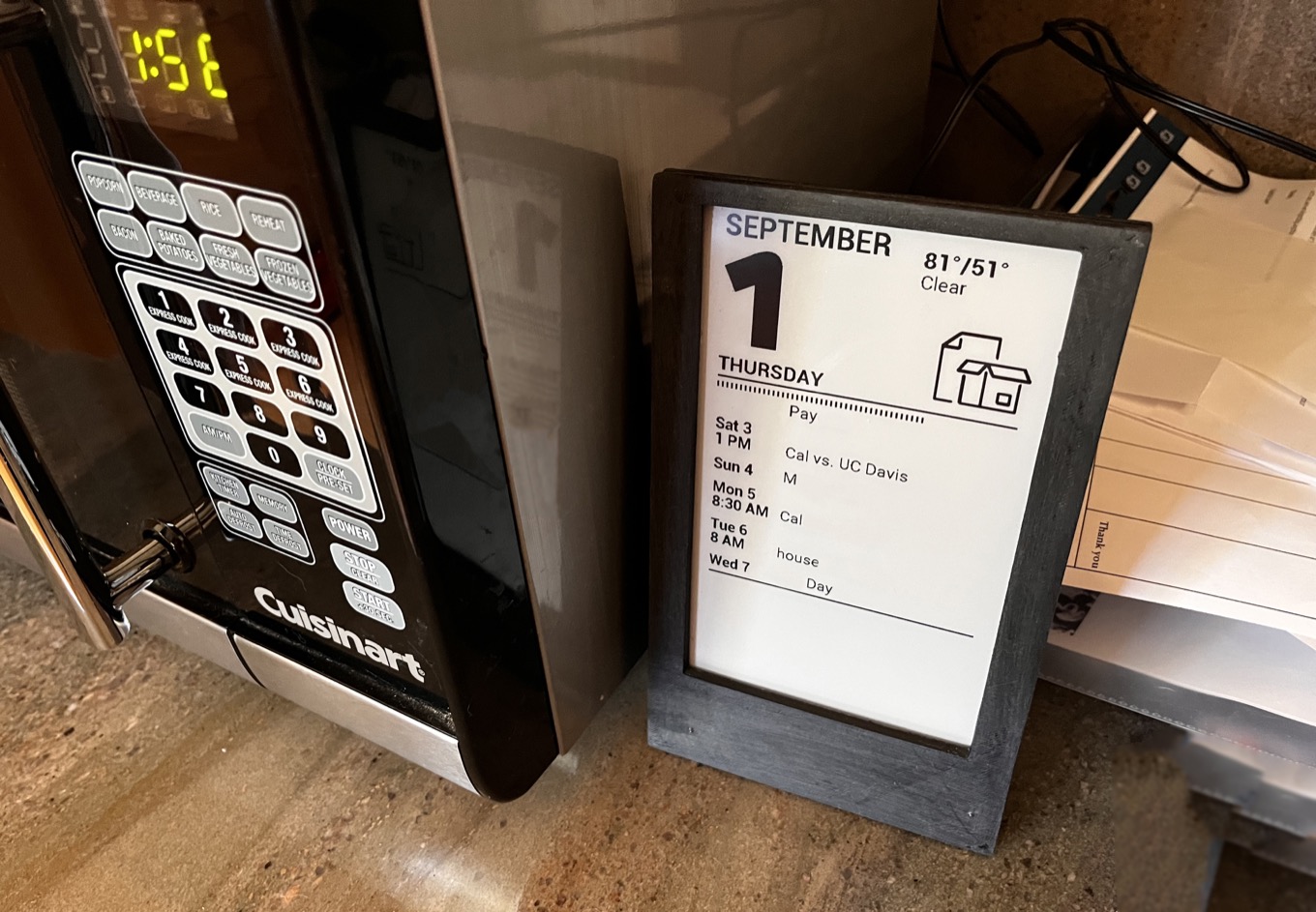
A (redacted) look at my E Ink kitchen calendar. It’s paper recycling night.
I’ve been fascinated with E Ink displays since I first used a Kindle. And I’ve been equally interested in smart home devices that display information in subtle ways since the first time I connected a Squeezebox music player to my home weather station and created a clock that also displayed the current temperature. (I use a Lametric Time for that now.)
So when John Gruber wrote about an E Ink status project by classic Mac developer John Calhoun, I was suddenly taken with the idea of building an E Ink status board of my own. It took a few months, but I finally got there.
Like Calhoun, I decided to use this GitHub project by Louis of 13Bytes as the basis for my project. Unlike Calhoun, I didn’t really want to create something that looked like a classic Mac—though I appreciated his creativity and artistry. I actually liked the original project’s embrace of the classic desk calendar look and thought I’d at least start there.
So I ordered a $57 800×480 E Ink display from Waveshare, which is designed to connect to a Raspberry Pi—and I happened to already have a Raspberry Pi 3 sitting around1.
The project works by writing text and graphics to image files (using Python, which I’ve been learning) and then writing the images to the E Ink display.
I made a bunch of customizations to the original script beyond basic font and layout tweaks. The primary task of the display is to show upcoming family calendar events, but the original script used iCal shared calendars, and we use Google Calendar. So I built in Google Calendar integration. I had already built a Python script that accessed Google Calendar for a different project, and was able to re-use that code. Then I added the current day’s weather forecast via Apple’s WeatherKit API.
Along the way, I had to grapple with a bunch of small challenges. Google Calendar doesn’t supply times for all-day events, so I had to invent them, which led to a challenge because all its events are listed in the UTC time zone. (If I defined an all-day event as beginning at midnight UTC, it would be listed as part of the previous day because my local time zone is seven or eight hours behind UTC. I ended up having to convert every event to my time zone, then insert all-day events, then sort them all together!)
Perhaps my favorite feature of the calendar was inspired by Calhoun, whose faux-Mac interface displayed a bulging Trash icon when it was trash-collection day. On our trash collection days, the local refuse company collects a paper bin and a glass-and-plastic-container bin on alternating weeks. To remind ourselves of which is which, we created two every-other-week events in our calendar. If it’s trash night, my script reads the event’s name to determine if it’s paper or containers, omits that event from the calendar listing, and instead displays a large icon to indicate which bins need to go out.
And recently, I added a subroutine that changes the display if it’s a holiday (either one from the official list or from a list of family-specific celebrations like birthdays and anniversaries).
One unfortunate thing about a project like this is that a bare E Ink display and a Raspberry Pi are a loose assortment of electronic parts, not a cohesive unit. Fortunately, the originator of the eInkCalendar project designed and 3-D printed a case—and put the 3-D model files in his open-source project on GitHub. I used the Craftcloud 3-D printing clearinghouse to order one.
The result is a little homely, but it works, and it allowed me to mount the display inside a frame and attach the Raspberry Pi on the back so it won’t fall off.
What I’d really like is for clever people out there to sell kits with everything—display, Raspberry Pi, and 3-D printed case—so I didn’t have to put it all together myself. Or at the very least, for people to build more awesome 3-D printable enclosure designs, like this one.
Am I satisfied with where I’ve ended up with my new kitchen E Ink calendar? Not really. There’s more screen space left over and more data sources to be hooked up. There are also more E Ink displays out there to be explored. I pre-ordered this one. What will I use it for? I have no idea. But I’m pretty confident I’ll figure something out.
These days, Raspberry Pis are in short supply because of supply chain issues. I suspect it’s because they’re constructed almost entirely out of parts from legacy nodes. ↩
If there’s a constant in the run-up to the announcement of new iPhones, it’s probably theoretically tech-focused commentators complaining that the smartphone is boring. Occasionally that’ll be leavened with some “Apple has lost its way” nonsense, but the most common thesis is just that the smartphone, the most exciting invention of the past couple of decades, is now not very exciting.
Well, duh.
We’re in Year 15 of the iPhone now. After a few years of breathless innovations from Apple and its competitors, things have been moving incrementally for some time. That’s what happens with any mature product category, and not even the mighty smartphone can avoid becoming a little boring once it has found its ideal form.
But just because the pace of innovation has slowed doesn’t mean there isn’t room for the iPhone, and smartphones in general, to progress. There are several key areas with growth potential before the phone hands it off to whatever the next great tech product category might be.
Today I needed to shut down the Six Colors Slack for members. (We moved to Discord; join us!) But Dan and I use that Slack to communicate and collaborate with others. So I didn’t want to delete it—just remove all the members from it.
Easier said than done. Slack doesn’t offer any tools to batch-deactivate users, so far as I can see. (Pity the poor corporate IT person who has to deactivate loads of people after a layoff, I guess…) You have to do it manually. Which requires going to Slack’s user list and then clicking on a button next to a user, clicking Deactivate from the sub-menu that appears, and then clicking the Big Red Button that appears to ask if you’re sure.
I was going to have to do this more than a thousand times.
So I did what you might expect: I put the work off for weeks. But today, I decided to dig in… and use Stairways Software’s $36 Keyboard Maestro to do the job. Here’s the macro I built, which you can download here:
Click on the button next to the user. I took a screenshot of the button and added it to Keyboard Maestro’s amazing Click at Found Image command. Since the user list contains many users with a button next to each of them, I told Keyboard Maestro to click on the topmost one.
After a brief pause for the interface to update, Keyboard Maestro then clicks on the Deactivate User button in the resulting sub-menu, again via a Click at Found Image command.
After another brief pause, Keyboard Maestro clicks on the Big Red Button, which it has once again matched via Click at Found Image.
After a two-second pause for the entire interface to refresh, Keyboard Maestro simulates a scroll wheel and scrolls down 77 pixels, which is the height of each user in the list of users. Now the deactivated user has scrolled off the top of the screen, and the topmost button will be the next user to be deactivated.
Keyboard Maestro moves the mouse to the top corner of the screen, because there’s a mouseover effect in the scrolling user list that confuses Click at Found Image.
Repeat 1000 times!
After three or four attempts that required refinement, I ran the macro and went out to run an errand. When I returned, my mass user deactivation had worked.
I know I say this all the time, but it bears repeating. If there is a boring, repetitive task you are being forced to do on your Mac, it can be automated. Even if you have to call in Keyboard Maestro to literally click on various parts of the interface for you.
Whether we’ll use Twitter’s new Twitter Circle feature, the least-exciting rumors for Apple’s upcoming September event, social media services we’re using more — not less — in the last year, and our thoughts on smartphones reaching their peak.
In the last six months macOS malware protection has changed more than it did over the previous seven years. It has now gone fully pre-emptive, as active as many commercial anti-malware products, provided that your Mac is running Catalina or later.
The XProtect Remediator software Oakley writes about actively scans for malware, in some cases several times a day, usually when the Mac is idle. This is in contrast to previous Apple scans for malware in macOS, which were more limited and primarily focused on new “quarantined” apps.
In true Apple fashion, of course, all of this scanning is completely invisible to the user. Oakley says that scans are now taking place on all Macs running macOS Catalina and later.
Jason and Myke predict what will happen at next week’s Apple media event. What new features will the new iPhones have—and will they be more expensive? Will the Apple Watch expand? And what other surprises might propel one of us to a decisive draft victory?