Six Colors
Six Colors

Apple, technology, and other stuff

This Week's Sponsor

Unite Pro: Turn websites into Mac apps with native enhancements

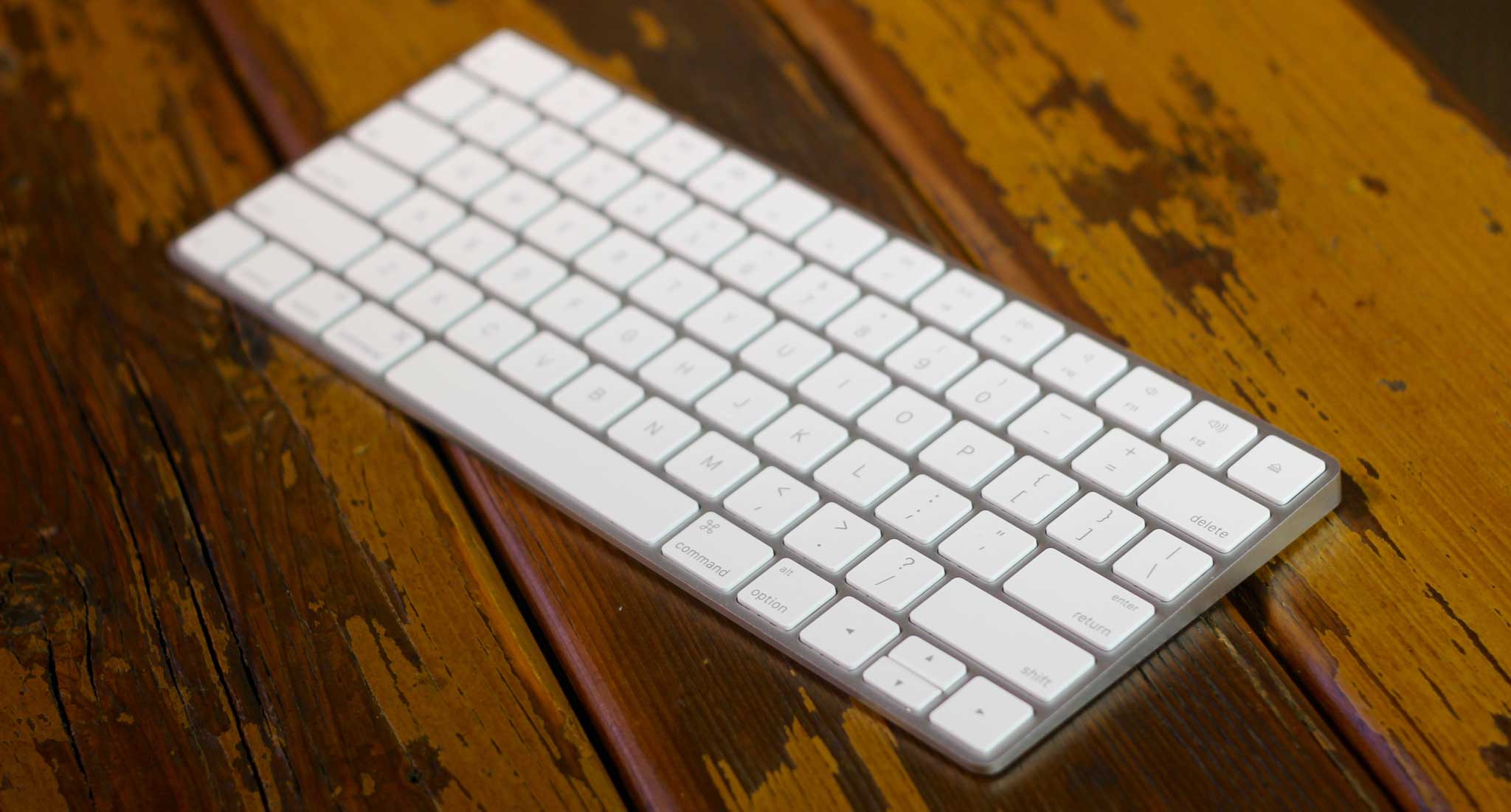
Apple's new Magic Keyboard.

By Jason Snell

Apple Magic Keyboard Review

Note: This story has not been updated since 2021.

I’m on the record as not being a fan of the new MacBook’s keyboard, but as a compromise in order to get that laptop to be as thin and light as possible, it at least makes sense. The fear I had was that Apple would decide that the work it had done on the MacBook keyboard shouldn’t be limited to that product, and the result would be that a design fit for a tiny laptop would spread across every Mac.

If nothing else, the new $99 Magic Keyboard1 seems to suggest that the keyboard dystopia I fear won’t come to be. This is a second new keyboard design from Apple in a year, and this one’s a lot more mainstream: It eschews the butterfly mechanism on the MacBook keyboard for a more traditional scissor mechanism, albeit one that Apple says has been tweaked to provide one of the features of the MacBook keyboard: improved key stability. The key caps are slightly larger, but the overall layout of the keyboard is pretty much the same as on all Apple keyboards since the last major Apple keyboard redesign back in 2007.

Old (top) and new in Apple keyboards.

The major key differences are the left and right arrow keys, which are now full-sized—I used the empty space around the arrows to orient on the keyboard, so occasionally I find myself completely at sea when typing and my text editor will get xinikerejt xibdyaws. (I’m sure I’ll adjust.) The function keys, formerly half height, are now full height.

Like the new mouse and trackpad released by Apple today, the Magic Keyboard ditches the AA batteries of the older model for an internal, rechargeable lithium-ion battery. As a result, the hump at the top of the keyboard is gone, reducing the border around the keyboard to a few millimeters, the overall footprint of the keyboard by 13 percent, and the pitch of the keyboard by half. Less pitch on a keyboard is a good thing—a keyboard that slopes up forces you to bend your wrists, which is pretty bad form ergonomically speaking.

Charge (and pair) via the Lightning connector on the keyboard’s back.

How to charge this new rechargeable keyboard, then? There’s a small lightning port on the back edge of the keyboard, and Apple includes a USB-to-lightning cable to charge it. According to Apple, the battery inside the Magic Keyboard will last “a month or more,” which is a darn sight longer than the Logitech rechargeable keyboard I’ve been using the last couple of years.

Apple has also built a neat trick into all of its new input devices, including the Magic Keyboard. When you connect them to a Mac running El Capitan via the USB-to-Lightning cable, they automatically pair with that Mac. No Bluetooth pairing two-step required; the whole thing is fast and easy.

The Magic Keyboard’s key travel is about 1mm, less than that on the old Apple keyboards. But typing on it feels much better than the MacBook’s keyboard did. It’s hard to explain typing feel in words, and people can have dramatically different tastes when it comes to keyboards. In general, I’d say I like it. It may well be better than the older model, but it’s definitely different. There’s less travel, but more key stability. The reduction in key travel didn’t bother me; in fact, when I went back to my Logitech keyboard, it felt really weird. I’m starting to think that either I need to switch to the Magic Keyboard or just go all the way back to a mechanical keyboard with insane amounts of travel and loud clicky noises.

People who love those kind of keyboards won’t like this any more than the last Apple model, but as modern, compact laptop-style keyboards go, this one feels fine and looks great. (I’ve made a brief and somewhat blurry video which includes audio of the new keyboard compared to the previous model Apple keyboard, so check that out if you want more on this subject.)

Unfortunately, one feature that would probably have made a lot of people happy—and also probably would’ve killed that month-long battery life—would be keyboard backlighting. This keyboard doesn’t have it, so if you’re in the market for that sort of thing, look elsewhere. Maybe my Logitech Easy Switch keyboard will satisfy you.

Apple doesn’t have the luxury to design a bunch of keyboards to fill different niches. Between this design, the MacBook keyboard, and that crazy fabric keyboard for the iPad Pro, we’re probably looking at Apple’s entire keyboard design output for the next five to ten years. Seen in that context, the Apple Magic Keyboard is exactly what was required: a solid keyboard that will work for most people. The rechargeability, battery life, reduced keyboard pitch, and plug-in pairing all contribute to making this a keyboard we can live with until sometime in the 2020s, if they’re still making keyboards then.


  1. Why is it “Magic”? I don’t know, but it does turn out that if you plug it in via its included Lightning-to-USB cable, you can turn off Bluetooth and it still works fine, sending its data via USB. 

By Jason Snell

Apple revises iMac line, adds 21.5″ Retina 4K model

Note: This story has not been updated for several years.

The new 21.5″ 4K Retina iMac, with a 27-inch model lurking behind.

On Tuesday Apple announced a revision to its entire iMac product line, with a new 21.5-inch iMac with 4K Retina Display and the conversion of the entire 27-inch iMac line to the 5K model, all while retaining the line’s six previous price points. Apple also announced three new input devices: the Magic Keyboard and the Magic Trackpad 2 and Magic Mouse 2.

I’ve spent the last few days with the iMac, and you can read my review of the 21.5-inch iMac with 4K Retina Display over at Macworld. If you want to hear me talk about the new products in depth, check out the just-posted episode 58 of Upgrade.

21.5-inch iMacs, topped by a 4K model

The new 21.5-inch iMac fills the $1499 slot in the iMac product line. For that price, you get a gorgeous 4096-by-2304 pixel screen1 driven by Intel 6200 integrated graphics, a 1TB hard drive, and a 3.1GHz quad-core i5 processor. All the 21.5-inch iMacs are using fifth-generation Intel Core processors, otherwise known as Broadwell. According to Apple, they can’t use the newer sixth-generation Skylake processors because those don’t yet come in a version with integrated graphics.

As I mention in my Macworld review, this model’s biggest flaw is that hard drive, a slow 5400rpm spinning platter. As someone who’s been using flash storage or Fusion Drives for the past few years, it was shocking to see just how sluggish the iMac was at certain actions. The hard drive is clearly the slowest thing about the iMac—and it’s a shame Apple couldn’t figure out a way to include a Fusion Drive in the base price. Instead, you’ll need to pay an extra $100 to get an Fusion Drive with 24GB of flash2 to go along with 1TB of spinning-disc storage.

There is some very good news for those people who pungle up for flash storage: Following the lead of the recent update to the MacBook Pro, all these new iMacs can support 4 lanes of PCI and have faster storage controllers, leading to what Apple says is a “2.5 times” increase in SSD speeds.

Though the $1099 and $1299 configurations of iMac don’t have the snazzy 4K Retina display, they’ve also been updated. As previously mentioned, the processors are all Broadwell, a 1.6GHz dual-core i5 in the $1099 model and a 2.8GHz quad-core i5 in the $1299 version. As before, that means there’s going to be a major performance difference between the $1099 and $1299 models. All the models come with 8GB of 1867MHz LPDDR3 RAM standard, but you can pay extra to upgrade it to 16GB.3 And these models all gain support for Thunderbolt 2 for the first time.

Here’s the skinny on the three 21.5-inch iMac models:

$1099: No Retina, 1.6GHz dual-core i5 (Broadwell), Intel HD Graphics 6000. Upgrade options: RAM to 16GB, 1TB Fusion Drive, 256GB SSD.

$1299: No Retina, 2.8GHz quad-core i5 (Broadwell), Intel Iris Pro Graphics 6200. Upgrade options: RAM to 16GB, 1TB Fusion Drive, 2TB Fusion Drive, 256GB SSD, 512GB SSD.

$1499: Retina, 3.1GHz quad-core i5 (Broadwell), Intel Iris Pro Graphics 6200. Upgrade options: 3.3GHz quad-core i7, RAM to 16GB, 1TB Fusion Drive, 2TB Fusion Drive, 256GB flash storage, 512GB flash storage.

27-inch iMacs go all Retina

Say goodbye to the non-Retina 27-inch iMac. After debuting above the top of the line last fall and taking over the top two spots in the iMac price list this spring, the Retina 5K iMac now holds down all three slots in the 27-inch iMac line.

These new 27-inch iMacs are all running sixth-generation Intel Core processors, otherwise known as Skylake, and offer discrete AMD Radeon GPUs. 8GB of 1867MHz DDR3 RAM is standard, but it’s configurable or user upgradeable to up to 32GB. While the cheapest configuration still suffers with a stock spinning hard drive, the other two models come standard with Fusion Drives. (Previously the $1999 configuration came with a spinning disc drive, so this is progress.)

Like the Retina 4K iMac, all these Retina 5K iMacs feature a display with an expanded color gamut. Apple says that these new displays can show 25 percent more colors, covering 99 percent of the P3 color space. Most of the improvement is in the red and green color areas, and as someone who’s red-green color blind, I am probably not the most fit to judge the differences. However, when Apple showed me sample images in both color spaces, I was able to discern differences in detail and color variation in greens and reds. I’m not sure the average person would notice the difference beyond a general feeling of increased vibrancy, this will be a great feature for people in photography, video, design, and other industries where representing color correctly matters a great deal.

Here’s how the 27-inch models stack up:

$1799: 3.2GHz quad-core i5 (Skylake), Radeon M380 (2GB), 1TB 7200rpm hard drive. Upgrade options: 16GB or 32GB of RAM, Radeon M395X (4GB), 1TB Fusion Drive, 2TB Fusion Drive, 3TB Fusion Drive, 256GB SSD, 512GB SSD.

$1999: 3.2GHz quad-core i5 (Skylake), Radeon M390 (2GB), 1TB Fusion Drive. Upgrade options: 16GB or 32GB of RAM, 4.0GHz quad-core i7, Radeon M395X (4GB), 2TB Fusion Drive, 3TB Fusion Drive, 256GB SSD, 512GB SSD, 1TB SSD.

$2299: 3.3GHz quad-core i5 (Skylake), Radeon M395 (2GB), 2TB Fusion Drive. Upgrade options: 16GB or 32GB of RAM, 4.0GHz quad-core i7, Radeon M395X (4GB), 3TB Fusion Drive, 256GB SSD, 512GB SSD, 1TB SSD.


  1. No, you can’t use these any of these Retina iMacs as external displays in Target Display Mode. Don’t even think about it. 
  2. Apple has cut the amount of flash storage on the 1TB Fusion Drive option to 24GB and reduced the price of the option. The 2TB and 3TB Fusion Drive options come with 128GB of flash storage, and those configurations are a better idea for people who tend to use very large files. 
  3. As before, the 21.5-inch iMac doesn’t come with a door for user access to memory, so you can’t easily add it later. 

Apple’s chip advantage

Steve Cheney wrote a piece boldly titled “On Apple’s Insurmountable Platform Advantage” that’s a great read, even though I am always wary of end-of-history words like “insurmountable.”

Cheney’s most interesting point is that Apple is no longer just a company that excels at synthesizing its expertise in hardware and software design into great products; it’s now one of the few companies in the world that excels at processor design:

The truth is the best people in chip design no longer want to work at Intel or Qualcomm. They want to work at Apple. I have plenty of friends in the Valley who affirm this. Sure Apple products are cooler. But Apple has also surpassed Intel in performance. This is insane. A device company – which makes CPUs for internal use – surpassing Intel, the world’s largest chip maker which practically invented the CPU and has thousands of customers.

Apple has a lot of challenges and the future is promised to no one, but this is a good example of why Apple remains at the top of its game—its mastery of the supply chain and its foresight into controlling key parts of its products in ways that its competitors will find hard to match.1


  1. Up next, according to Cheney: Apple replacing Qualcomm’s wireless radios with ones of its own design. 


By Jason Snell

Overcast 2 begins a new (podcast) chapter

Note: This story has not been updated since 2022.

overcast-chapter
Overcast 2 displays the current chapter at the top of the play controls and lists all chapters in the show-notes area.

Today Marco Arment released Overcast 2, a free update to his iOS podcast app. There are a lot of great iOS podcast apps out there, but Overcast remains my favorite, thanks to its excellent Smart Speed and Voice Boost features, as well as its flawless speed-boosting features.

Speaking of those features, in previous versions of Overcast they were unlocked when you made an in-app purchase. Beginning with Overcast 2, they’re free. The entire app is free, in fact, with Marco going to a patronage model—he requests donations if you use and like Overcast, to help support its continued development.

It’s an interesting move, but Marco was right to be concerned that the 80 percent of his users who didn’t pay weren’t seeing his app’s most notable features. Now everyone can use those features—and if a small percentage of Overcast users figure that it’s worth paying to thank Marco for his work, it should all work out.

That’s the End of That Chapter

An inside joke in the tech podcasting community has been that, for quite some time now, there have been some vocal podcast listeners who will strongly and repeatedly suggest that real podcasts embed chapter marks. It’s not fair to say that people are almost always German—sometimes they’re Austrian or Swiss.

For a long time I made AAC versions of my podcasts specifically to create chapter marks using GarageBand. But years ago, I gave up and went to MP3 versions only. However, it turns out that the MP3 format does support chapter marks too—it’s just never been supported in most podcast-creation tools or podcast-playing clients1.

Today, with the release of Overcast 2, the number of people who can take advantage of podcast chapter marks has skyrocketed. If you’re a podcaster wondering how you can add chapter marks to your podcast, your options are limited right now.

In fact, right now I know of only one, and it’s what I’ve been using for Clockwise for the last couple of years: the web app Auphonic. Auphonic is an audio processing tool—you upload your file and then set it to encode it, add chapter marks, provide leveling and filtering, and even automatically upload it to your host. You can process two hours of content per month for free, and there’s a sliding scale of what you need to pay for more processing time.

Auphonic’s Chapter Marks interface.

Auphonic also sells a Mac app called Auphonic Leveler Batch Processor, which does all the leveling and filtering, but unfortunately doesn’t (yet?) support adding MP3 chapter marks.

So for now, if you’re a podcaster and you want to experiment with chapter marks, I’d recommend that you check out Auphonic. But it’s hard to believe that someone won’t build a tool—even a quick and dirty one—to make this something you can do right on your Mac2.


  1. Downcast and the now-discontinued Instacast support this format. 
  2. If you come across one, let me know! 

By Dan Moren for Macworld

All together now: Would Apple ever go for Microsoft-style convergence?

A decade or so, the idea of convergence was king. Rather than having a slew of different devices like a media player and an ebook reader and a gaming console, the idea was that we’d some day have a single device capable of handling all the different tasks that we might throw at it. While the iPhone and iPad have in some ways delivered on those promises—they’re media players, Internet communicators, and so on—if anything, device proliferation has only gotten more pronounced over the last few years.

That’s why I find myself intrigued by one particular announcement from Microsoft—yes, that Microsoft—this past week. The Display Dock is a small box, probably about the size of an Apple TV, into which you plug a monitor and other peripherals, such as a mouse and keyboard. When you sit down at your desk, you dock your phone, and voilà, it becomes a computer. One device, multiple contexts. A strange idea, to be sure, but one that I think might be a harbinger of things to come.

Continue reading on Macworld ↦


By Jason Snell for SuperSite

With Surface Book, Microsoft adds Apple’s playbook to its own

There was a time when the idea of Microsoft building its own PC hardware seemed almost unthinkable. In the Bill Gates era and into Steve Ballmer’s reign, Microsoft was always the software supplier, with PC-makers like Dell and HP and a thousand smaller parties happy to compete with their hardware. The announcement of the original Surface was a surprise, and Microsoft’s purchase of Nokia a bit of a shock, but as of Tuesday it feels like the old ways are utterly over, once and for all.

The new Microsoft simply isn’t willing to put the fate of Windows 10 in the hands of its hardware partners. It’s targeting the most important hardware categories and building its own devices, integrating hardware and software together more closely than it has ever done before.

If this sounds familiar, it’s because this is the game that Apple has been playing for years now. And there are some huge advantages to the approach…

Continue reading on SuperSite ↦


Guy English joins Dan and Moltz this week as Lex is away.
The new Porsche 911 only has CarPlay: http://www.motortrend.com/features/mt_hot_list/13_cool_facts_about_the_2017_porsche_911/
Late-breaking FU, Google says it’s not asking for what Motor Trend said it was asking for: https://twitter.com/charlesarthur/status/651698998693220352
Microsoft made a Surface that “will replace your laptop”: http://www.theverge.com/2015/10/6/9460651/microsoft-surface-pro-4-tablet-announced-specs-price-release-date
Then it made a laptop: http://www.theverge.com/2015/10/6/9454051/microsoft-surface-laptop-announced-specs-price-release-date
It also released a Lumia with a dock that makes it a desktop: http://www.pcworld.com/article/2989780/windows-phone-os/microsofts-flagship-lumia-950-and-950xl-will-lead-windows-10-mobile-with-premium-specs.html
Amazon will not be selling Apple TVs or Chromecasts: http://www.nytimes.com/2015/10/02/business/amazon-to-stop-selling-apple-tv-and-chromecast.html?_r=0
Our thanks to Softlayer (http://softlayer.com), the cloud built to compete. You deserve cloud resources that meet your unique needs. Softlayer is one of the only cloud providers that provisions bare metal servers and virtual servers from a single, seamless platform. Go to http://softlayer.com/podcast and get your first $500 free.


By Dan Moren

Wi-Fi calling now available on AT&T iPhones

Note: This story has not been updated for several years.

AT&T Wi-Fi Calling

Update: It seems that AT&T is not supporting this feature on the iPhone 5s, only the iPhone 6 or later.

The good news is that AT&T and the FCC seem to have finally finished whatever spat discussions they’ve been having, and iPhone users on the carrier can now enable the Wi-Fi Calling feature added for all in iOS 9. (Previously, it was offered by other carriers, including T-Mobile, but not for AT&T.)

To enable the feature, open up Settings > Phone and flip the Wi-Fi Calling on This iPhone switch to On. You’ll then have to accept some agreements and update your emergency address–the reason being that when a call is routed over Wi-Fi instead of the traditional cellphone network, 911 emergency services can’t necessarily figure out your current location. If that happens when you’re on Wi-Fi, first responders will be sent to whatever your default location is (probably your home).

Wi-Fi Calling

Once you’ve got Wi-Fi Calling enabled, it should work automatically as needed. As a test, I flipped my phone into Airplane Mode, activated Wi-Fi, and sure enough, AT&T Wi-Fi showed up right in the status bar. Making a call on it worked perfectly fine, and while I didn’t notice any particular sound improvement, that may be because I was calling someone on a landline.1

As someone who lives in an apartment with an often unreliable cell signal–and as I write this, I note that my iPhone has automatically switched over to AT&T Wi-Fi–I’m looking forward to this feature.

Also of note: while in the past, it seemed like you had to choose between Wi-Fi Calling and the ability to place calls from your Macs, iPads, and so on, it seems that the conflict has been resolved as of iOS 9: I had both Wi-Fi Calling and Calls on Other Devices enabled, and there doesn’t seem to be any interference.


  1. The other week I called my cousin who is also on an AT&T iPhone, and we ended up with a crystal clear connection that sounded more like FaceTime Audio, so I assume that was an HD connection. 

[Dan Moren is the East Coast Bureau Chief of Six Colors, as well as an author, podcaster, and two-time Jeopardy! champion. You can find him on Mastodon at @dmoren@zeppelin.flights or reach him by email at dan@sixcolors.com. His next novel, the sci-fi adventure Eternity's Tomb, will be released in November 2026.]


By Jason Snell for Tom's Guide

Best 3D Touch apps for the iPhone 6S and 6S Plus

Of all the features introduced with the new iPhone 6s and 6s Plus, 3D Touch is the biggest. Taking a cue from Force Touch on the Apple Watch and the latest Apple laptops, 3D Touch can detect different levels of pressure when you press on the iPhone’s screen, summoning up everything from preview glances to additional menu options.

Because it developed the feature, Apple has had time to build 3D Touch into many of its own apps, but most iOS app developers are just starting to add 3D Touch support to their own apps. Still, if you look, you can find apps that are putting 3D Touch to use in interesting ways. Here are the best 3D Touch apps so far.

Continue reading on Tom's Guide ↦


After one year, this is the state of Apple Pay

Great rundown on Apple Pay, one year in, by MacStories’s Graham Spencer. He concludes with five questions for Jennifer Bailey, Apple’s VP of Apple Pay:

2. Given the slow rollout of Apple Pay outside the US, one could argue that Apple is more obsessed with securing profits from interchange fees than opening up Apple Pay to as many customers as possible and increasing the value of the iPhone and Apple Watch. How would you respond to that sentiment?

“Obsessed” may be a strong word: obviously, Apple wants to recoup its investment in rolling out this system worldwide, and I’m sure that expanding and maintaining profitably is ahead of just accruing marketshare–that’s tried-and-true Apple philosophy.

One question not on Spencer’s list that I’d like answered is whether or not we’ll see Apple Pay eventually used for the sale of digital goods. Right now, it’s pretty much restricted to physical goods, with companies being pushed towards in-app purchase–for which Apple gets a a 30 percent slice of the pie, far more than the fractions of percents it gets for Apple Pay–for subscriptions and digital goods. I’d hope there’s a rationale for that decision that doesn’t also come down to “Apple wants more money.”


By Jason Snell for Macworld

Learning to love the iPad Air 2

I was an iPad mini lover from the first. I bought the original model just so I could try it out, figuring I’d hand it down to a family member or sell it, and ended up adopting it as my own personal iPad. When the iPad mini 2 came out, I rushed to get one and adopted it as my own personal Retina iPad.

But a funny thing happened: This summer I bought a refurbished iPad Air 2 in order to try out Split View multitasking, a special feature of iOS 9 that no other iPad supported at the time. (The new iPad mini 4 also supports it, as will the forthcoming iPad Pro.) I spent the summer mostly using the iPad Air 2. So when the iPad mini 4 was announced, I responded by… not buying it. Instead, I’m planning on handing my iPad mini 2 down to my son and sticking with the iPad Air 2.

Continue reading on Macworld ↦


By Dan Moren

Wish List: 3D Touch in Control Center

Note: This story has not been updated for several years.

3D Touch

It’s been a couple weeks since the release of Apple’s newest generation of iPhones, and I’m still training myself to use 3D Touch. Not that the feature isn’t useful, mind you, but eight years of muscle memory is a tough thing to overcome.

That said, I think that 3D Touch is an awesome enhancement to iOS; I just wish that Apple had seen fit to use it in more places. In particular, I–and many of our readers, if my emails and Twitter replies are any indication–would love to see 3D Touch in use in iOS’s Control Center.

I’ve already made my frustrations with Control Center well known, but the addition of 3D Touch provides the perfect framework with which to address several of those issues. Now that Apple has established the interface convention of the Quick Actions pop-up menu, it wouldn’t be out of place to offer such a menu when pressing the Wi-Fi icon in Control Center, where it could provide a list of the nearest and most powerful Wi-Fi networks (or the ability to connect to a VPN). Or pressing on the Bluetooth icon to provide a list of devices to connect to. Even the ability to jump directly to those specific sections of the Settings app would be a handy time-saver.1

The quick launch apps at the bottom could also benefit from 3D Touch, even if it just meant showing the same Quick Action options available for those apps from the Home screen–starting a timer, for example, or quickly jumping to selfie mode in Camera. (I’d still prefer to be able to swap in my own choice of apps in those slots, but my breath capacity isn’t that great.)

Many of these scenarios are for the more fiddly among us, but let’s be honest: 3D Touch seems designed for just those kinds of users. This is a power feature, not unlike keyboard shortcuts–something for users to discover.

The good news is that 3D Touch is young, and while Apple has given us solid examples about things that it can do, there’s plenty of room for it to evolve and spread throughout the rest of iOS.


  1. Honestly, I’m surprised that the Settings app itself doesn’t have any Quick Actions associated with it. I frequently want to jump to specific sections. 

[Dan Moren is the East Coast Bureau Chief of Six Colors, as well as an author, podcaster, and two-time Jeopardy! champion. You can find him on Mastodon at @dmoren@zeppelin.flights or reach him by email at dan@sixcolors.com. His next novel, the sci-fi adventure Eternity's Tomb, will be released in November 2026.]


Ebookum patronus! Enhanced versions of Harry Potter available only on iBooks

Apple® today announced that enhanced editions of all seven books in J.K. Rowling’s Harry Potter series are now available exclusively on the iBooks Store℠  for readers around the world to enjoy on their iPhone®, iPad®, iPod touch® and Mac®. Customers can download individual books featuring full original text, interactive animations and elaborate artwork bringing these beloved stories to life in a unique way. Harry Potter fans will also find annotations throughout their literary journey, written by the author herself.

“I’m thrilled to see the Harry Potter books so beautifully realised on iBooks for the digital world; the artwork and animations in these enhanced editions bring the stories alive in a delightful new way,” said J.K. Rowling.

Who had Rowling in the “next celebrity touted by Apple” pool? Anybody? Anybody?


By Jason Snell

Fantastical 2.5 arrives for iPhone, iPad, Apple Watch

Note: This story has not been updated for several years.

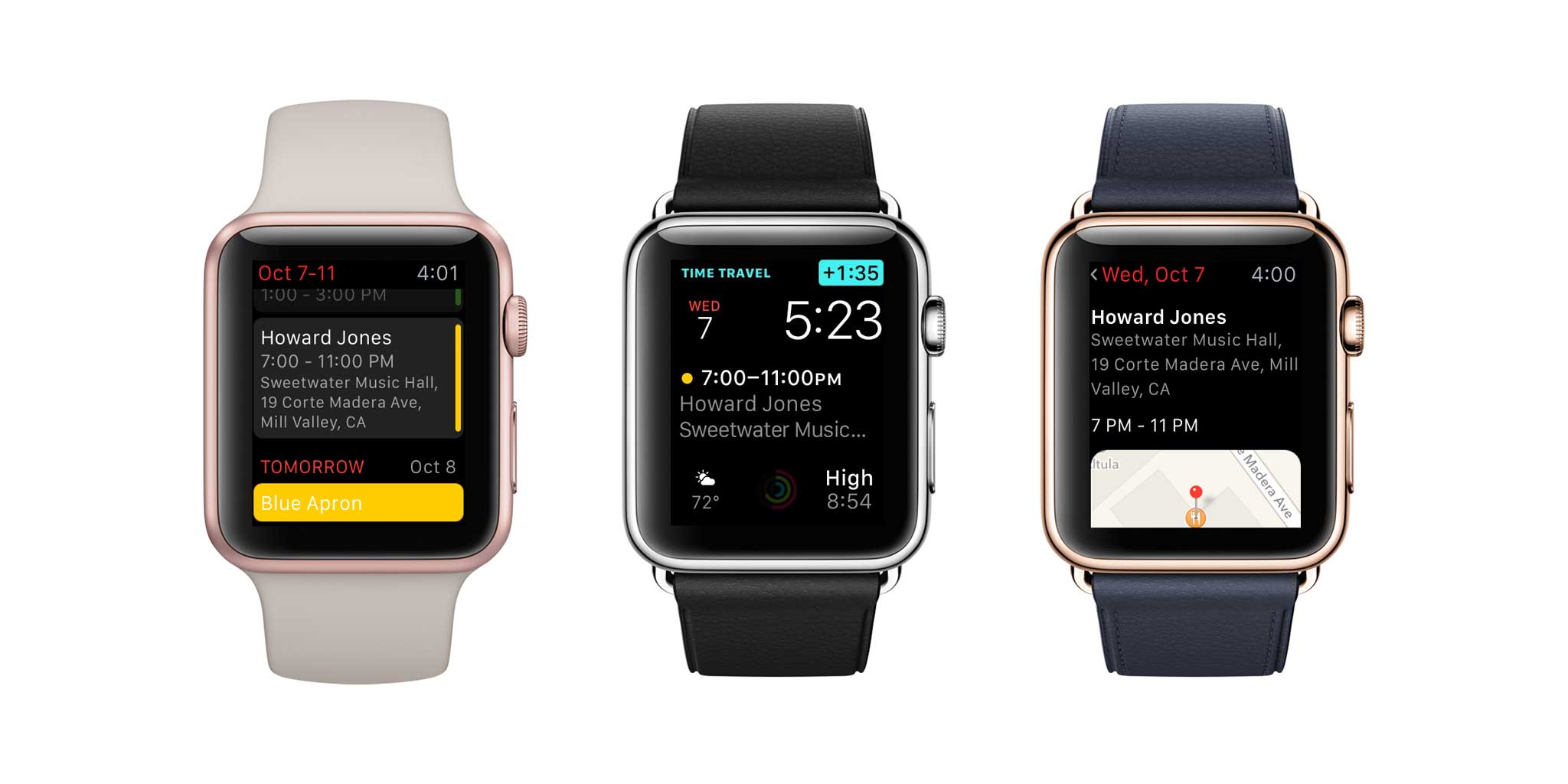
Speaking of products I like being updated, today Flexibits released Fantastical 2.5 for iPhone and iPad. Fantastical is my default calendar on Mac and iPhone, and with the new version I expect to be using it a lot more on iPad as well.

Using Fantastical in Slide Over mode.
Fantastical’s Quick Actions

As with so many apps this month, Fantastical is adding support for fancy new features like a Quick Actions menu for iPhone 6S and Split View and Slide Over for iPad. Flexibits also added keyboard shortcuts for those of us who sometimes use a Bluetooth keyboard with our iPads.

Fantastical’s Apple Watch app also got an update, including a Fantastical complication. The vocabulary of complications appears to still be forming—I’ve seen complaints today about Fantastical’s small complication, which simply displays how many more events you’ve got on a given day. (I’m not sure what else it would do in that space, frankly.) And apparently in the Utility face, if your calendar has no more items it clutters the “Enjoy your day” rather than gracefully fading away to nothing (or almost nothing) instead. (I’m a big fan of complications getting out of the way if they have nothing to say.)

But Flexibits has proven to be nothing if not, er, flexible. So I wouldn’t be surprised if Fantastical’s Apple Watch complications evolve over time, like the rest of the app has.


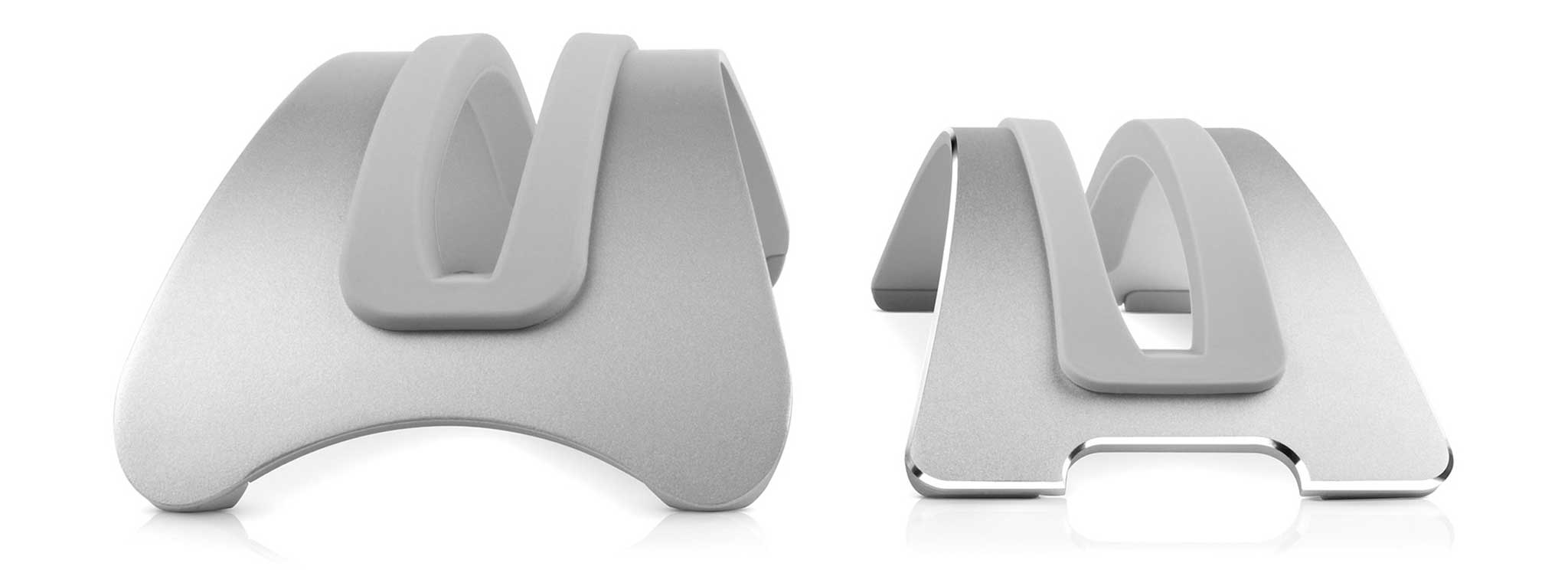
BookArcs old (left) and new.

By Jason Snell

Twelve South’s BookArc gets an update

Note: This story has not been updated for several years.

bookarc-action
New BookArc at Six Colors World Headquarters.

For ages now I’ve used a BookArc from Twelve South as my MacBook stand. When I used to commute, I would drop my 11-inch MacBook Air into the BookArc, plug in power and Thunderbolt, and go about my day with my laptop driving a Thunderbolt Display while vertical with its lid closed. These days I don’t use my MacBook Air in that configuration, but I still store and charge my Air upright in a BookArc. (And we bought a second one for my wife’s 13-inch MacBook Air.)

Today Twelve South announced the new BookArc, which replaces the old model that’s been around since 2009. (It was Twelve South’s first product, in fact.) It’s smaller and lighter, now made of aluminum and offering a touch of style with a shiny chamfered edge. It comes with silicone inserts sized for the Retina MacBook Pro, MacBook Air, and MacBook, so you can get just the right fit for your laptop—and know that your laptop’s aluminum skin is resting gently on a safe, non-scratching material.

Today I got a chance to use the new BookArc model, and from the silicone feet to the cut-outs for cable control, it’s got the same attention to detail that I’ve come to expect from Twelve South. If you run your MacBook in lid-closed mode, or are generally short on desk space, I highly recommend the BookArc.


By Jason Snell

ComiXology adds its last major publisher, Dark Horse

Note: This story has not been updated for several years.

Dark-Horse-Logo-Huge

There’s some big news for digital comics fans today. Dark Horse Comics, ComiXology, and Amazon have announced that all of Dark Horse’s single-issue digital comics will be available on the ComiXology and Amazon stores on the same day as print, starting now. This marks the last major comics publisher to hold out from selling issues on ComiXology, the leading digital comics app (that’s now owned by Amazon).

There were signs that this rapprochement might happen; back in June ComiXology began offering digital collections of Dark Horse Comics, including “Wasteland” and “Buffy the Vampire Slayer: Season Ten.” Now the single issues join the collection, meaning that if you’re a ComiXology user and a fan of an ongoing Dark Horse series, you don’t have to buy it and read it in a separate app.

According to ComiXology, more than 2,000 single issues from Dark Horse are launching today.

In other news related to New York Comic-Con, on Tuesday Comixology announced that they’ve re-upped their deal with independent publisher Oni Press, and extended that deal to Amazon’s comic store as well. Considering that ComiXology CEO David Steinberger is also the head of Amazon’s digital comic efforts, I’d expect to see a lot more crossover between the two stores in the near future.


By Dan Moren

The Chromecast Audio: Compact, but not compelling

Note: This story has not been updated for several years.

Chromecast Audio

Of the Google announcements from a week or so ago, the one I was most interested in was the Chromecast Audio, a small dongle that attaches to most any speaker and lets you stream audio over the network. At $35 it seemed like a pretty good way to liven up some speakers, so I placed an order for one.

Which I promptly forgot about, so I spent a while trying to puzzle out exactly what the envelope was when it showed up at my door the other day.

The Chromecast Audio is an interesting product, but after I spent about an hour or so playing around with it, I realized that I don’t really have much of a need for it. But that doesn’t mean it’s a bad product, necessarily, just that my setup doesn’t really lend itself to this device.

First, what I like about it.

Continue reading “The Chromecast Audio: Compact, but not compelling”…


Search Six Colors