Six Colors
Six Colors

Apple, technology, and other stuff

This Week's Sponsor

Clic for Sonos: The fastest native Sonos client for iPhone, iPad, Mac, Apple Watch, Apple TV, and visionOS.

Apple HomePod firmware release appears to reveal some iPhone plans: https://sixcolors.com/link/2017/07/apple-firmware-release-may-reveal-iphone-plans/
Allen Pike has some thoughts on possible iOS 11 usability improvements: http://www.allenpike.com/2017/developing-for-iphone-pro/
Vic Gundotra’s thoughts on the iPhone camera: https://www.facebook.com/vicgundotra/posts/10154573133695706
Apple’s quarterly results were pretty good overall: https://sixcolors.com/post/2017/08/apples-q3-fy17-financial-results/
Our thanks to Eero (http://eero.com) for sponsoring this episode. Whatever your needs, eero has the power to seamlessly blanket your home in fast, reliable WiFi. Get free overnight shipping by entering the code “REBOUND” at checkout and get easy, incredible coverage with Eero.
And our thanks to Casper (https://casper.com/therebound) for sponsoring this episode. You spend about a third of your life sleeping, make sure it’s on a good mattress. Go to casper.com/therebound to start your 100-day money-back trial. You’ll get $50 off by using the code “REBOUND”.


By Jason Snell

iPhone and Apple Pencil: Will they ever be friends?

Note: This story has not been updated for several years.

This week on the Download podcast, both Michael Gartenberg and Florence Ion expressed their love of Samsung’s S Pen, a stylus (much like the Apple Pencil) that works not just with Samsung’s tablets, but also the large phones in the Galaxy Note series.

On the podcast, Gartenberg professed his hope that perhaps Apple would find a way to bring the Apple Pencil, or something like it, to a future model of the iPhone Plus or perhaps even the new rumored high-end iPhone.

It’s an interesting idea. It’s been a year and a half since Apple introduced the Pencil, exclusively for use with the iPad Pro. By all accounts it’s been a success, but the iPad sells in tiny numbers compared to the iPhone. To open even certain iPhone models to the Apple Pencil would give the Pencil a chance to impact many more people than it ever could as an iPad-only accessory.

There are roadblocks, of course. First is the size of the current Pencil, which is just enormous—the size of a new, fresh-out-of-the-box Ticonderoga. An iPhone-friendly pencil would need to be shorter. It also seems highly unlikely to me that Apple would include a slot into which you’d slide the pencil, like Samsung does on the Galaxy Note—but that doesn’t mean that cases and clever magnetic attachments couldn’t be offered, either by Apple or third parties.

Second is the size of the screen—this is one reason why Samsung doesn’t support the S Pen on the standard Galaxy phone. But on larger screens like the iPhone Plus, there’s probably enough room to make a quick sketch or jot down a note, like you’re writing something down in a Moleskine or Field Notes notebook.

Like AirPods, the Apple Pencil has the feel of a product that has been tightly engineered and is difficult to make—so it’s an open question if, after a couple of years, Apple might be able to make a variation that’s smaller and more pocketable for iPhone users.

Up until now I’ve been skeptical of the possibility of Apple opening up support for the Pencil (and smaller Pencil cousins) on the iPhone, but I’m warming up to it now—thanks not just to the attitudes of people like Gartenberg and Ion, but to one of the new features of iOS 11. In iOS 11, there’s a feature called Instant Notes that allows you to automatically switch into a note when you put the Apple Pencil onto the screen… even if the iPad is locked. This make the iPad infinitely more Pencil friendly than when it requires you to unlock the device and and launch an app before you can start writing.

Sometimes new iOS features are all they appear to be—and sometimes they’re more, suggesting future hardware directions that are not entirely visible. I’m not entirely convinced that Instant Notes is anything more than what it seems: a nice iPad feature that makes the Pencil easier to use. But if Apple were considering the addition of Pencil support to an upcoming iPhone model, this is just the sort of feature I’d expect to be prioritized.

It could lead to people pulling out their iPhones and pencils and jotting something down for later, no notebook required… or it could lead nowhere. It all depends on if Apple thinks larger iPhones could be enhanced by the Apple Pencil… or thinks that writing on the screen should remain the province of the iPad Pro.


By Jason Snell

A bumpy road to the Apple conference call transcript

Note: This story has not been updated for several years.

So yesterday I generated an enormous transcript of Apple’s conference call with analysts. While I can type fast, I have to admit that fast typing is not what allowed me to generate this transcript—it was magic, resilience, and panic.

Three months ago I wrote about how I experimented with the Trint transcription service, which uses computerized speech-to-text algorithms to generate a transcript that I can then correct on the fly with a convenient browser-based text editor that connects with the underlying audio.

Trint did a great job last time, so I set up my workflow Tuesday to take full advantage. I set Audio Hijack to record the call and split those recordings into new chunks every 10 minutes, and hooked up Trint’s integration with Dropbox so that I could upload files to Trint just by copying them to the right folder. The plan was to listen to the first five or six minutes of the call, upload a first file to Trint, and then just keep working a little bit behind the live call. It was a foolproof way to generate an almost-live call transcript.

Except… during the call, Trint (or, apparently, the third-party speech-to-text engine Trint is based on) crashed and burned. I managed to get two transcripts returned to me, but none of the rest of my files were processed.

What saved my bacon was that a while ago, I set up an experimental feature of the Auphonic podcast postproduction service, which routes audio through Google’s speech-to-text engine and automatically generates a podcast transcript. Like the other machine-generated transcripts I wrote about earlier this year, the results aren’t readable by human beings without a pass by a human editor.

Anyway, what I ended up doing was uploading my audio files of the call to Auphonic, as if they were podcasts, and had the service process them and run them through Google’s service. I opened the resulting file in BBEdit and played back the call audio in iTunes, correcting as I go. (I use SizzlingKeys by Yellow Mug Software to add keyboard shortcuts to make iTunes jump back a few seconds, which is a huge help in editing a transcript.)

The result is a transcript that’s pretty accurate and was generated far faster than I could’ve typed it, though I definitely would have preferred to use the audio-linked text editor offered by Trint.

Here’s an original chunk from yesterday’s call, as heard by Google:

Mike that is a great question. Since we I and I could not be more excited about a are and what we’re seeing what they are kid in the early going in to answer question about what category it starts in, just take a look at what’s already on the on the web on terms of what people are doing and it is all over the place.

And here’s the cleaned-up version:

Mike, that is a great question. And I could not be more excited about AR and what we’re seeing with ARKit in the early going. And to answer your question about what category it starts in, just take a look at what’s already on the web in terms of what people are doing and it is all over the place.

(I have to say, I was really impressed with the quality of Google’s transcript. It made a lot of dumb mistakes, but it also correctly interpreted stuff that I would have never believed a computer could understand.)

If Trint had been working, I really do think I could’ve had the entire transcript up within 10 minutes of the call ending. Maybe next time.


By Jason Snell for Macworld

7 highlights of Tim Cook’s Q3 2017 financial call with analysts

Every 90 days there’s a new Apple financial quarter, a new raft of federally-mandated financial disclosures, and another hour-long conference call that lets us hear Tim Cook (and Apple CFO Luca Maestri) take questions from inquisitive Wall Street analysts. On Tuesday, Apple announced its quarterly earnings and followed it up with that exciting phone call. (If you’d like to read a complete transcript, I made one.) Here’s are seven highlights that I gleaned from Apple’s quarterly exercise in extremely limited disclosure…

Continue reading on Macworld ↦


By Jason Snell

Did the iPad turn the corner this quarter?

Note: This story has not been updated since 2020.

So this quarter was the one where the iPad news finally wasn’t terrible. It took a while. Seriously, it’s been more than three years since Apple posted year-over-year growth in iPad revenue. That’s a really long time—and a long slide downward on just about every iPad chart you can think of.

Yeah… that’s the one. A long, slow slide from more than 18 million units per quarter down to a little more than 10 million. It’s been a rough adolescence for the iPad. And all the while, those of us who are cheering for the iPad have been waiting for the moment when the iPad finally bottoms out and starts recovering. Where it finds its level. Where it plays within itself. Pick any metaphor you like—after 13 straight quarters of revenue regression, I’ve pretty much used them all.

This quarter on his call with analysts, Tim Cook didn’t even need to give one of his patented iPad pep talks. At the start, analysts would ask about the iPad sales drop-offs and he’d reply that he was “bullish on the iPad.” By the end, analysts wouldn’t even bother asking—and Cook would still go out of his way to mention that he felt the iPad was an important product with a bright future ahead of it.

That’s because this year was that quarter. The one where the iPad numbers no longer looked terrible. Now, one quarter doesn’t make a turnaround—but when you consider the contraction of the iPad business for the past 13 quarters, a 15 percent year-over-year growth spurt sticks out like a sore thumb.

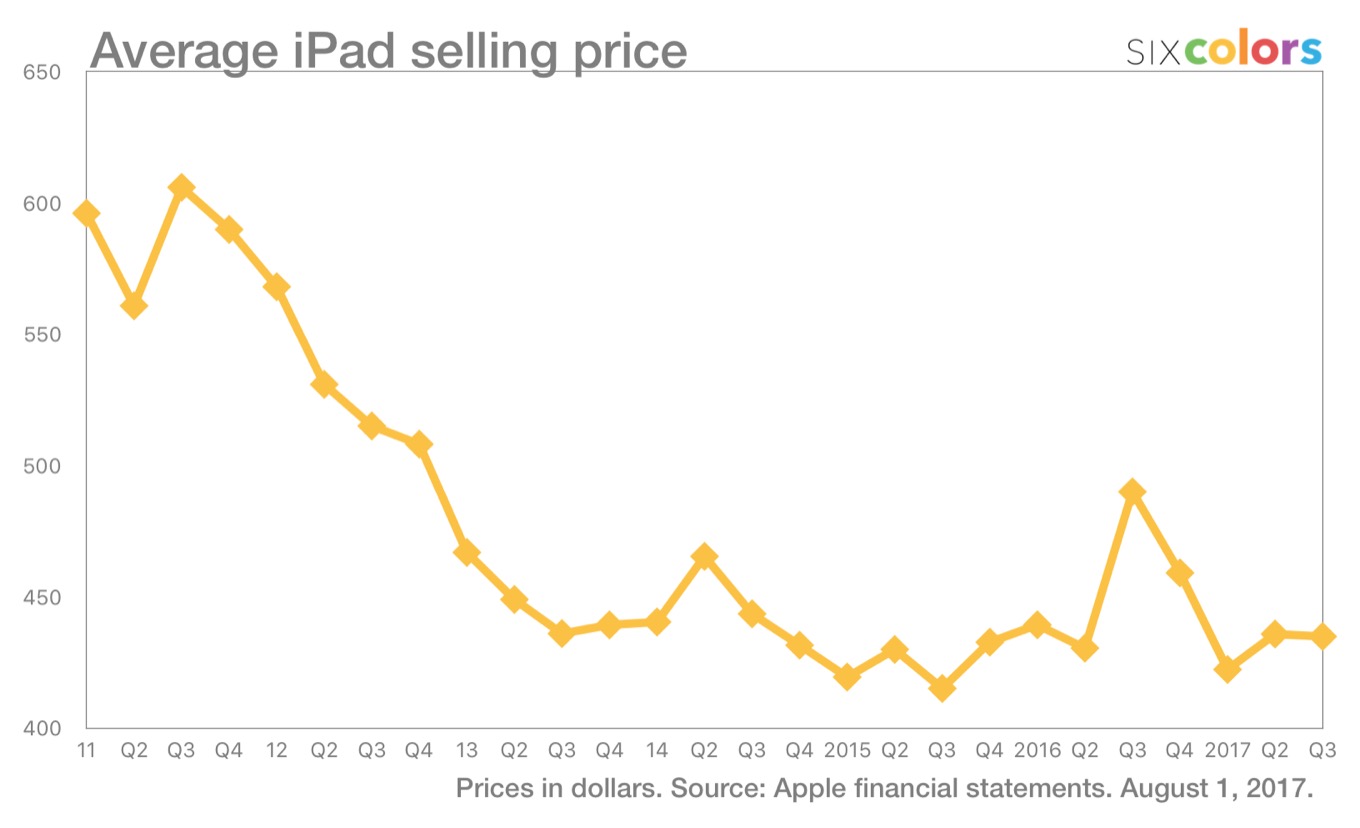
As much as I’d like to ascribe the iPad’s turnaround to those awesome new iPad Pro models, I can’t. As the astute John Gruber and Dr. Drang have already noted, the average sales price for an iPad actually decreased slightly this quarter, to $435—and overall iPad revenues were only up slightly over last year.

What this means it that boosted iPad sales are likely being driven by the $329 fifth-generation iPad. At this point, I’m happy to take the win if I’m an iPad fan, even if the growth is coming from the lower-end model.

In the analyst call, Cook highlighted improved sales to the U.S. education market and said that in China and Japan, more than half of iPad sales were to people who had never bought an iPad before. iPad sales also grew across all of Apple’s geographic segments—so this wasn’t a change caused by an aberration in one part of the world.

The story of the iPad isn’t over. It’s a real question about how it grows, and what size of a business it becomes for Apple in the long term. Will sales flatten or start to grow slowly? Is the iPad truly going to get enough of Apple’s attention to potentially evolve into a fitting next-generation replacement for the Mac? Or will it remain in its current form as a “tweener” of a product, neither Mac nor iPhone. (I will remind you that despite all this talk about the iPad’s troubles, it still generated $5 billion in revenue last quarter—only slightly less than the Mac’s 5.6 billion.)

A lot of questions, and no good answers. But for now, at least we can say that the iPad has broken the streak. And when iOS 11 arrives this fall, the iPad Pro experience is about to become a lot better. Perhaps that will put some more wind into the iPad’s sails—and sales.


By Jason Snell

Transcript: Tim Cook and the Apple Analyst Call (Q3 2017 edition)

Note: This story has not been updated since 2020.

Here’s a full transcript of today’s Apple conference call with analysts.

Tim Cook opening statement

Today we’re proud to announce very strong results for our fiscal third quarter, with unit and revenue growth in all of our product categories. We’ll review our financial performance in detail, and I’d also like to talk about some of the major announcements we made in June at our worldwide developers conference. It was our biggest and best WWDC ever, and the advances we introduced across hardware, software and services will help us delight our customers and extend our competitive lead this fall and well into the future.

For the quarter, total revenue was at the high end of our guidance range at 45.4 billion. That’s an increase of 7 percent over last year, so our growth rate has accelerated in three successive quarters this fiscal year. Gross margin was also at the high end of our guidance, and we generated a 17 percent increase in earnings per share.

iPhone results were impressive, with especially strong demand at the high end of our lineup. iPhone 7 was our most popular iPhone, and sales of iPhone 7 Plus were up dramatically compared to 6S Plus in the June quarter last year. The combined iPhone 7 and 7 Plus family was up strong double digits year over year. One decade after the initial iPhone launch, we have now surpassed 1.2 billion cumulative iPhones sold.

Services revenue hit an all-time quarterly record of 7.3 billion dollars, representing 22 percent growth over last year. We continue to see great performance all around the world, with double-digit growth in each of our geographic
segments.

Continue reading “Transcript: Tim Cook and the Apple Analyst Call (Q3 2017 edition)”…


By Jason Snell

Apple’s Q3 FY17 financial results

Note: This story has not been updated since 2023.

q317-pie

Apple announced its third-quarter financial results for fiscal 2017 today. In the most recent quarter, the company earned $45.4 billion in revenue, up from $42.4 billion in the year-ago quarter. Check out our transcript of the analyst call here for all the details. This post has charts. Lots of charts.

Continue reading “Apple’s Q3 FY17 financial results”…


By Dan Moren

The Back Page: The Next iPhone Will Just Know You

What much the next iPhone use for authentication? A TouchID sensor embedded beneath the display? One on the back of the phone? Might it forego TouchID entirely and use a form of facial recognition? This is among the most pressing discussions about Apple’s hotly anticipated new phone, but none of the rumors have even approached the truth.

The new iPhone will simply know you.

As it stands, you probably spend several hours a day with your phone, which gives it a lot of opportunities to learn about you. You probably carry it around in a pocket or a purse, which helps it recognize your gait. It recognizes the Wi-Fi networks and Bluetooth devices in close proximity to it. Its geolocation features can tell where you are. In the end, your phone knows more about you than probably any other object or person in your entire life.

But your phone knows the real you. It keeps track of all the things on your to-do list. It stores all your passwords. It knows about the celebrity news sites that you’re reading when you’re supposed to be paying attention at that all-hands meeting. It knows about your secret desires to give up a boring career in middle-management and really get down to writing that Vampire Diaries fan fiction where nobody’s really a vampire, it’s all a metaphor.

Your iPhone saw all those pictures you took on your vacation to Aruba with that girl last year, and it knew you weren’t really that into her, because why weren’t you more excited looking in all those selfies you snapped? And despite your protestation that you really like long walks on the beach, your iPhone will note that the Health app registers a negligible amount of steps taken in the vicinity of the ocean.

Your iPhone knows about all those late night “You up?” texts you sent and how you ghosted that one date from Tinder where things seemed to be going really well but you started getting freaked out when you realized things might get serious. Your iPhone thinks maybe you should call her and apologize—your iPhone thinks you could have had something really great there.

Your iPhone noticed that you’ve been binging a lot of Unbreakable Kimmy Schmidt on Netflix, and while your iPhone acknolwedges that it’s a pretty great show, it suggests that perhaps you shouldn’t have watched all three seasons back-to-back after finishing your rewatch of Parks and Recreation. More to the point, your iPhone thinks that perhaps you should consider getting out of the house. Your iPhone can call you a Lyft—it knows you prefer it over Uber. Your iPhone has taken the liberty of making reservations at that one restaurant that you rated 5 stars on Yelp, and it even dropped a text to that woman, who seemed glad to hear from you. You’re welcome.

Look, your iPhone knows you. Better than anyone. And it’s worried about you. So of course it can unlock for you—the real question is: why should it?

[Dan Moren is the East Coast Bureau Chief of Six Colors, as well as an author, podcaster, and two-time Jeopardy! champion. You can find him on Mastodon at @dmoren@zeppelin.flights or reach him by email at dan@sixcolors.com. His next novel, the sci-fi adventure Eternity's Tomb, will be released in November 2026.]


By Dan Moren

What I Use: What’s in My Dock: iOS Edition

Dan's Dock

Last month I talked a bit about how I have the Dock set up on my Macs. (Well, at least on the Macs I use everyday—my Mac mini server is a totally different story.) But let’s change gears just slightly and instead talk about iOS devices.

The iPhone: The iPhone dock is, of course, pretty limited. With room for just four apps, you have to be extremely selective about what earns a place in the Dock, and I can already feel the eyes upon me for some of my choices. But let’s get it out of the way:

Phone: Yes, that’s the Phone app. I get it, you don’t make phone calls anymore. Neither do I! And yet it’s proved difficult for me to wrest the Phone app from my Dock, if only because when I do want to make a phone call, I don’t want to have to dig around to find the app. No, I don’t use it every day, but I think I would feel weirdly unanchored without it in the bottom left corner of the Dock there. Perhaps someday it will find itself replaced—but, for me anyway, that day is not yet here.

Mail: Just like on the Mac, Mail remains one of my go-tos. No matter how much communication I do through Twitter, Slack, or Messages, my email is still the lifeblood of my work everyday. It’s the first thing I check in the morning, and generally the last thing I check at night. So it’s earned a place on that Dock.

Safari: This also kind of mirrors my Mac setup. Safari’s is one of those all-purpose apps that I need all the time. So much stuff gets done on the web that it feels weird not to have it always at my fingertips. Much as other apps have replaced some tasks that I do in Safari, there’s still plenty that I use the browser for.

Settings: Let’s bookend this with another controversial choice. Look, I know, Settings isn’t sexy, but it’s a workhorse. Even though Apple has added quick access to some of its features in Control Center and Siri, there are plenty of settings that I find myself needing to tweak on a regular basis—especially given my work as a tech journalist, where I often need to open up Settings to get a screenshot or test some feature or other. Certainly as long as I can’t 3D Touch on the Wi-Fi icon in Control Center to change Wi-Fi networks, I’ll be keeping Settings front and center.

Dan's Dock

The iPad: The iPad Dock offers a little more flexibility, especially under iOS 11, but it still doesn’t have the flexibility of the Mac’s Dock. The first thing you’ll note is that I don’t use the iPad Dock to its full potential—I’ve only got five apps on it instead of the maximum of six. Part of that is because choosing a last app to fit on there is just oh so difficult! There’s so many choices. But honestly, it’s because I usually use my iPad in landscape orientation and I just really like having the Dock icons line up with the columns of apps.

Mail/Safari: Just like on my iPhone, I use these apps all the time on the tablet, so they’ve easily earned their spots.

Photos: I do browse through photos a lot on my iPhone, but there’s no question that the iPad is a much more pleasant device to look at pictures on. To be honest, I probably don’t use it as much as the other apps here, but in the earliest days of using an iPad, it was one of my go-to demo apps, especially for my older relatives. Nice big, vibrant photos is always a good way to sell a screen.

Tweetbot: The only third-party app on any of my iOS devices’ Docks. I just can’t escape Twitter; despite all the challenges of using it in this day and age, I still keep up with many of my friends there, get news from the service, and use it to talk about my own work. (It’s proved invaluable for making connections around my book.) Tweetbot is my current client of choice on all my platforms, though I think the iPad app in particular is second-to-none. It’s earned its place here.

Settings: Just like on the iPhone, Settings is indispensable on my iPad. I frequently need to access any of a variety of features here, so having it always in the Dock means never having to go hunting.

And there you have it! My iOS device’s docks. iOS 11 may change the calculus slightly, especially on the new Dock on the iPad, but I imagine it will mainly be a case of which additional apps make the cut on the tablet. We’ll check in in a few months and see how it’s shaking out.

[Dan Moren is the East Coast Bureau Chief of Six Colors, as well as an author, podcaster, and two-time Jeopardy! champion. You can find him on Mastodon at @dmoren@zeppelin.flights or reach him by email at dan@sixcolors.com. His next novel, the sci-fi adventure Eternity's Tomb, will be released in November 2026.]


By Jason Snell

By Request: Storage: The Ugly Truth

Subscriber Brian asks: “Your hard drive schemes? Backups, cold storage, Plex servers?”

Okay, Brian, I guess I’ll give you want you want: A detailed account of my storage approach. Just because I do it doesn’t mean you should be like me!

My iMac has 512 GB of flash storage, with (as of this writing) 131 GB free (44 GB of which is “purgeable” space). I manage this free space by offloading files to the Mac mini that runs as a server about six feet away from me.

That Mac mini is a mid-2011 model attached via Thunderbolt to a Drobo 5D, a five-disk storage device that’s currently got 24 TB of disks inside of it. Because of the way Drobo redundantly stores data, I’ve currently got about 16 TB of storage there, with 10.7 TB in use. A couple of terabytes are devoted to a Time Machine partition, which I back up to from my iMac; the rest is server space where I move huge files (including archived versions of my podcasts) when I’m done working on them on my iMac.

The server also contains my movies and TV shows, largely ripped from Blu-Rays and DVDs and made available via Plex Server. (My music collection, ripped from CDs or downloaded via iTunes or Amazon MP3, is also on there.)

My server and my Mac both back up over the internet via CrashPlan. I’m only backing up a slice of the server, the really vitally important, irreplaceable stuff. My server’s also backing itself up via Time Machine to the Drobo backup volume. So I’ve got things backing up to various places, plus the Drobo itself offers some redundancy — I’ve lost three drives over the years, and I just pop them out and pop in a new one, and lose no data. It’s worked well for me so far.

I’ve got a Samsung 256GB external SSD, which I can connect to various Macs in my house via USB. I bought it so that I could (in early summer) reboot my iMac out of the current version of macOS and into the beta version. At some point in the summer, I’ll make the transition to the beta version on my main Mac drive, and then the external drive serves as an emergency life raft to take me back to the previous version in case there’s a horrible incompatibility problem.

To be honest, that’s it. I used to have a chain of external USB hard drives, but the Drobo has centralized that and has worked well for me. I don’t miss the chain of external drives one bit. If you can afford to buy yourself a RAID or a NAS (network-attached storage) device, I recommend it. They’re not cheap, but they’re so much cleaner in so many ways.


By Stephen Hackett

The Hackett File: The case for the Mac mini

When it was introduced at Macworld 2005, Steve Jobs pitched the Mac mini as the easiest way to switch to Mac OS X. It was the BYODKM Mac — bring your display, keyboard and mouse. A PC user could unhook their Dell or HP or whatever, drop in a Mac mini and be off to the races. The incredibly low price of $499 just sweetened the deal for would-be switchers.

Over the years, the Mac mini became more than just the budget Mac for new users. Higher-end models became more powerful and more expensive, creating a real fanbase for the little computer.

Mac mini enthusiasts were soon hooking the machines up to televisions, using them as in-car entertainment systems and even running them as servers, something that Apple recognized and blessed with separate “Server” SKUs that often came with more storage and a copy of OS X sever. Heck, there are companies that colocate Mac minis in data centers now.

I’m sure it has never sold as well as the iMac, but I think the mini holds an important place in Apple’s desktop line. Before its current crisis, the Mac mini was enjoyed by a wide range of users. People looking for a simple, small desktop buy them, as do the super nerdy. Very few products enjoy such range.

I have to admit, it’s weird to write about the Mac mini in the present tense. I often think about it in the past tense, and I fear Apple does as well.

As Andrew Orr recently pointed out, it has been over 1,000 days since Apple updated the Mac mini. Considering that the 2014 update removed the ability to upgrade the machine’s RAM and got rid of the quad-core models, that last update wasn’t all that great. Many people — including me — have 2011 and 2012 Mac minis still running strong here in 2017.

Is the Mac mini dead? When asked about it earlier this year, Phil Schiller said, “On that I’ll say the Mac Mini is an important product in our lineup and we weren’t bringing it up because it’s more of a mix of consumer with some pro use. The Mac Mini remains a product in our lineup, but nothing more to say about it today.”

WWDC came and went, and the Mac mini is still for sale. It’s not dead yet, and I think there are several good reasons the Mac mini should receive updates again.

Lure switchers: The original sales pitch for the Mac mini is still a good one. The entry-level models may not be the best Macs on the market, but they can hit a price point nothing else can. Consumers looking to switch to the Mac may be hesitant to buy an $1,099 iMac. $499 for a Mac mini looks a lot more appeasing.

Appease enthusiasts: For those of us who use the Mac mini in our entertainment centers or in our server closets, nothing else can meet the requirements this little computer can. I can’t stuff an iMac under my TV, and a Mac Pro is way too much computer for what I need to host at MacStadium. With the arrival of Thunderbolt 3 and eGPU support in macOS High Sierra, a well-specced Mac mini — complete with a quad-core processor and an SSD — could be a pretty good little development or gaming computer.

Love the Mac: Apple executives keep repeating their dedication and love for the Mac. The iMac Pro and future Mac Pro have certainly helped calm fears held by the Mac faithful. The Mac mini is the last low-hanging fruit when it comes to Mac hardware. It will never sell as well as the iMac or enjoy the power and expandability of the Mac Pro, but having any computer this old for sale is just … demoralizing.

I still believe in the Mac mini; I just want Apple to find its faith again.

[Stephen Hackett is the author of 512 Pixels and co-founder of Relay FM.]


By Jason Snell

Real relationships, real communities

One funny thing about being a person who lives on the cutting edge of technology: It means you’re always surrounded by people who don’t understand what you’re doing. I know that a lot of people get a rush from this—you’re in a privileged position over a bunch of people who are clueless—but it can be an awfully lonely place to be. As soon as I got a modem, I found friends online. But to everyone else in my life, those friendships weren’t real—and the time I measured as valuable time communing with my tribe, everyone else measured as solitary time away from reality.

That takeaway was exactly wrong. But people didn’t understand. They have gradually caught up, which is good, and our digital community-building tools have taken a quantum leap forward.

Still: there’s a lingering feeling that when you’re alone at your computer, you’re isolated. I honestly I have never felt that, not since I got that Hayes Smartmodem in 1983. Today I work at home, in my garage, and some people still ask me if I feel isolated.

Well, I don’t. First off, I live in a house with three other people (plus a cat and a dog!), so there’s plenty of physical action going on around me. But more than that, when I’m sitting at my desk, I am on Twitter talking to the world and on Slack talking to my colleagues and friends. When I record a podcast, I am talking to friends.

Don’t get me wrong—it’s extra fun to hang out when a bunch of us get together in person. But I don’t feel less of a “real” friend to these people because most of my daily interactions with them are plain text in Slack, with the occasional weekly voice call. It’s all real. It’s all good.

If I keep mentioning Slack, it’s because over the past couple of years, that app has eclipsed Twitter as my main means of staying in touch with my friends and colleagues. Twitter remains a good way to interact with the world at large, but it’s a public performance, and if I say anything on Twitter, it will almost certainly engender angry replies, dumb jokes, and more. I am much more careful and calculated with what I share on Twitter; on Slack, I can open up a lot more. Since I left my office job, Slack has been the channel that has allowed me to never feel remotely isolated.

A few months back, I opened up a Slack group for people who support my podcast network, The Incomparable. It was an experiment, but it has been quite successful as a way for us to chat about our common interests in a place that’s not quite the wildness of Twitter.

With that success, I decided that it was worth trying for members of Six Colors. And that’s why I’ve set up a Slack group exclusively for Six Colors Subscribers.

If you’ve never used Slack before, you’ve got a few options: You can use Slack in any web browser, and that works just fine. I prefer to use the Slack apps—they’re available for pretty much every platform, including Mac and iOS.

I can’t say what the Six Colors Subscriber Slack community will turn into. That depends on all of you. The funny thing about communities is that they create themselves. I can promise that Dan and I will be popping in and out and will join in the discussions, but I can also guarantee that the most interesting results of this group will be the interactions between all of you. Give it a try. I think it will be a lot of fun.


by Jason Snell

Apple firmware release may reveal iPhone plans

Nobody digs into Apple software releases like Steve Troughton-Smith. And this is a big one. Apparently Apple released a firmware download for the HomePod (not due until the end of the year!) on its servers, and inside that firmware there’s information about future iPhone hardware and support for an infrared face unlock feature code-named Pearl ID:

Somewhere, Mark Gurman of Bloomberg nods his head. No, wait, not somewhere—just on Twitter:

In addition, outline icons that appear to show the shape of the new iPhone are present:

And if you’re interested in HomePod skinny, it looks like the HomePod’s screen is an LED matrix that could possibly display simple symbols:


4K Apple TV in the works?

MacRumors’s Joe Rossignol reports that iTunes purchase history now lists if movies are 4K/HDR compatible, giving credence to the idea of a 4K/HDR-enabled Apple TV in the offing:

It’s conceivable that Apple could launch 4K content in iTunes alongside a new Apple TV with support for up to 4K video output and HDR, or high dynamic range, which allows for sharper colors and lighting. The current, fourth-generation Apple TV has a maximum 1080p video output, and no support for HDR.

Certainly feels like a good day to theorize about the future of the Apple TV.


72: July 28, 2017

Have you tried turning it on and off? Apple shuts down the iPod. Jason thinks you should see “Atomic Blonde.” And we reveal a new membership benefit!


By Dan Moren

Apple’s meager iPod touch boost

Note: This story has not been updated for several years.

iPod touch

In addition to discontinuing the iPods nano and shuffle, Apple also took the time to bolster its last remaining iPod yesterday. The iPod touch, sole bearer of its name, got a storage bump: instead of four models starting at 16GB, there are now just two options: 32GB for $199, and 128GB for $299.

There are a couple of things to take away from this announcement: firstly, the iPod touch isn’t dead. It may not be a top seller, but it’s clearly doing well enough at the moment that it survived the cull of the rest of its siblings. But keep in mind that the tech inside the iPod touch isn’t exactly state of the art: that A8 chip is Apple’s current workhorse, powering not only the Apple TV but also the upcoming HomePod. Basically, it’s a power-efficient 64-bit chip that Apple can probably make in large volume for cheap. But it also debuted in the iPhone 6 back in 2014, which means that it’s far from cutting edge.

Secondly, the rearrangement of the iPod touch line now, at the end of July, means that if you were hoping for a sizable iPod touch upgrade in the fall, well, think again. This is just enough attention shown to the iPod touch to show that it’s not being ignored, but it’s not likely to get any additional love. And to those holding out for some sort of other small, non-phone replacement for the touch/iPad mini, well, it could happen, but I definitely wouldn’t put my money down on it.

Like the nano, shuffle, and even the iPod classic before them, the iPod touch will stick around just as long as it makes sense in Apple’s line-up. And knowing the company, that could be a few years.

[Dan Moren is the East Coast Bureau Chief of Six Colors, as well as an author, podcaster, and two-time Jeopardy! champion. You can find him on Mastodon at @dmoren@zeppelin.flights or reach him by email at dan@sixcolors.com. His next novel, the sci-fi adventure Eternity's Tomb, will be released in November 2026.]


By Dan Moren for Macworld

Why Apple should make a cheaper, streamlined Apple TV

Apple is fond of talking about its four platforms: iOS, macOS, watchOS, and tvOS. But not all four get equal attention. At the company’s Worldwide Developers Conference in June, Tim Cook and friends said relatively little about the next version of tvOS—in fact, pretty much the only relevant announcement was that Amazon would be bringing its Prime Video app to the platform at some undisclosed time in the future.

Those interested in the Apple TV have thus resorted to pulling meager information from the company’s tvOS 11 beta. And even what changes have been uncovered there have been pretty meager: home screen syncing, Night-Shift-esque automatic light/dark mode switching, and improvements to notifications. Meanwhile, even some of the major improvements promised by Apple during last year’s September event have yet to come to fruition: single sign-on, for example, continues to lack support from the major cable companies.

As the fourth-generation Apple TV approaches the two-year mark, perhaps it’s time for Apple to take another look at its set-top box.

Continue reading on Macworld ↦


Adobe to end Flash support by 2020: https://arstechnica.com/information-technology/2017/07/with-html5-webgl-javascript-ascendant-adobe-to-cease-flash-dev-at-end-of-2020/
John Gruber on force quitting apps: https://daringfireball.net/2017/07/you_should_not_force_quit_apps
Dave Hamilton says you still need to force quit some apps: https://www.macobserver.com/tips/deep-dive/force-quit-ios-apps/
Our thanks to Blue Apron (http://blueapron.com/rebound) for sponsoring this episode of The Rebound. Blue Apron ships you ingredients and amazing recipes. Learn while you cook and cook meals you’ll love. Go to BlueApron.com/REBOUND and get three meals FREE with free shipping.
Our thanks as well to Indochino (https://www.Indochino.com) where you’ll find the best made to measure shirts and suits at a great price. Use the promo code “REBOUND” and get any premium suit for just $379.


by Jason Snell

Last of the iPods

Pour one out for the iPod shuffle and iPod nano, both discontinued by Apple today.

The iPod hasn’t been a relevant product for some time. It was removed from Apple’s financial statements several years ago. Now only the iPod touch remains, and you’ve got to wonder how strong Apple’s commitment is to that product.

How quickly things change in the technology world.


By Jason Snell for Macworld

iOS 11 brings iPad multitasking improvements… and quirks

This summer, iPad users who are testing out the iOS 11 Public Beta are getting their first taste of the future of iPad multitasking. From a redesigned app switcher to an entirely transformed Dock, iOS 11 will make things quite different.

While so many of these changes are welcome—I’ve been running iOS 11 on my iPad Pro since the very first beta release because I’ve been so desperate for some of these improvements—there are still some interesting wrinkles. It remains to be seen just what will change before iOS 11 goes final this fall, but here’s a look at where we are today, and where things might go in the future.

Continue reading on Macworld ↦


Search Six Colors