Six Colors
Six Colors

Apple, technology, and other stuff

This Week's Sponsor

Clic for Sonos: The fastest native Sonos client for iPhone, iPad, Mac, Apple Watch, Apple TV, and visionOS.

By Jason Snell

Us as a Service

For years now, Apple has been telling every Wall Street analyst that would listen about its increased focus on growing revenue from ongoing services. As iPhone sales growth has slowed, it’s been a source of growth—and that’s very important to investors.

It makes sense. Apple has built a customer base that is deeply connected with its ecosystem, and it’s a customer base that is willing to pay for good tech products. And yet, for a lot of people, it’s a bit disturbing to see Apple pivot to selling subscriptions to video services and news services and game services rather than focusing on what it does best, which is the combination of hardware and software.

As John Siracusa said on the Accidental Tech Podcast this week, if you’ve followed Apple for a long time, it’s not a surprise to see Apple change itself. Apple is, if anything, a company of constant reinvention. While this seems like a huge stretch from what Apple’s done in the past, though, it’s also a function of the times we live in. Even if Apple didn’t want to get into services, it would probably have to—because its competitors are doing it, and if it does nothing it risks getting left behind.

I’m sympathetic to Tim Cook’s suggestion that Apple is now about a synthesis of not just hardware and software, but services. The mere existence of the Internet as a connecting factor means that Apple hasn’t been able to just focus on hardware and software for years now. Apple’s first attempt at Internet services were almost laughable, but it keeps getting better. And the App Store and Apple Pay have been pretty successful. If Apple can find a way to bring its entire ecosystem—hardware, software, and services—together to create great experiences, people will happily pay for them.

But I am a bit concerned about what the growth of services does to the wallets of the people who use Apple’s products. I can put this all in the context of Wall Street demanding growth, which is true, but another way to view it is that Apple isn’t satisfied with you paying it every few years for a new Mac and a new iPhone—it wants your money every single month. So, by the way, do streaming services and cable companies and wireless companies and pretty much everyone else.

I’m not surprised we’ve gotten to this point. Pat McGovern, the founder of IDG (my old employer) used to talk about recurring subscription revenue all the time. He felt like the future of the media business was getting people to give you their credit card so you could charge them monthly. And Pat was right.

I also write this as someone who made his own foray into subscription services (of a sort) a few years ago. This newsletter is, of course, a benefit to people who have provided their credit card numbers and signed up for monthly or annual recurring payments. (Thank you! I’m happy to provide you this service.)

But as someone who relies on the monthly recurring support of others, the rise of so many different voices attempting to get your money does give me pause. While some might argue we are simply changing where our money goes, it’s hard not to think that this is all additive, and that at some point people will reach a breaking point. (It’s probably already starting.) Certainly few people will be able to subscribe to more than a couple of video-streaming services, but there will be a half-dozen major players in that space in the next year. They all can’t make it, can they?

In any event, as someone who is part of a subscription service, I want to thank you for subscribing. I appreciate that you’re the kind of person who finds it valuable to be a part of our community—newsletter, secret podcast, and Slack group—as well as wanting to support the work that Dan and I do as independent tech writers. Subscription services aren’t just for the big guys to pad their bank accounts. They’re also away for the little guys to find ways to make a living through memberships and Patreons. Thank you for being a part of this corner of the 21st century economy.


By Jason Snell for Tom's Guide

Apple Card Doesn’t Need to Be Revolutionary to Be a Hit

Apple Card, announced this week, isn’t a revolutionary new product that will change credit cards forever, nor is it the best deal in the world of payment cards. But its unique attributes, combined with Apple’s power as a platform owner, make this card a likely success—and a good choice for iPhone users.

Continue reading on Tom's Guide ↦


Apple cancels AirPower

Matthew Panzarino, once again, with the scoop. AirPower, the long awaited wireless charging pad that Apple announced back in 2017, has been officially canceled:

“After much effort, we’ve concluded AirPower will not achieve our high standards and we have cancelled the project. We apologize to those customers who were looking forward to this launch. We continue to believe that the future is wireless and are committed to push the wireless experience forward,” said Dan Riccio, Apple’s senior vice president of Hardware Engineering in an emailed statement today.

As Panzarino says (and I too had heard), the challenges appear to be ones of physics, rather than pure engineering. Heat was a real issue in the product, and one that the company wasn’t able to overcome.

What is most fascinating is that this comes amidst a lot of suggestions that AirPower would be shipping imminently, including support in the recently released iOS 12.2, images appearing on Apple’s websites, and even a picture on the back of the box for the new AirPods’ wireless charging cases. Which just goes to show you that sometimes where there’s smoke, there’s fire…and sometimes there’s just, you know, fire.


March 29, 2019

Six Colors is a service too!


By Dan Moren for Macworld

This week’s Apple event was still all about the ecosystem

Yes, this week’s Apple event wasn’t quite business as usual for the company. It was a long presentation, studded with A-list celebrities and announcements for services–no hardware in sight–that mostly aren’t shipping yet, many of which don’t even have price points. That’s not exactly the moves we’ve come to expect from Apple.

But we were warned upfront by Tim Cook that this time would be a little different, and the company has been banging the drum about bolstering its Services business for a few years now. So while there may have been some head-scratching about the execution of the event, there shouldn’t have been any shock about the overall purpose.

That said, though this event might have looked different on the surface, dig a little deeper and you’ll quickly realize that the more things change, the more they stay the same. Because every single announcement Apple made is, at its base, about one thing:

The Apple ecosystem.

Continue reading on Macworld ↦


By Jason Snell for Macworld

Can Apple’s product expertise make Apple TV+ a success?

I’ve seen numerous celebrities in the audience at Apple events over the years, but Monday’s event at the Steve Jobs Theater was different. Captain America himself, Chris Evans, was in the audience. (I just missed him, but I think I spotted Tim Robbins talking to Apple’s Eddy Cue.) On stage were plenty of famous entertainment-industry faces, from directors like Steven Spielberg and J.J. Abrams to actors like Jennifer Aniston and Reese Witherspoon. Even Oprah was there.

This was an Apple event unlike any other, and for many different reasons. There wasn’t any new hardware or software to speak of, for one, and such a concept would’ve seemed impossible for Apple even a couple of years ago. Stranger still, the event was aimed as much at the entertainment industry as at the people who buy Apple’s products—but then, Apple waded into some pretty strange waters when it became a full-fledged movie and TV producer.

Continue reading on Macworld ↦


The Apple Card’s missing number, rotating CVV, and more

Our pal Matthew Panzarino at TechCrunch has some more of the nitpicky details on how the Apple Card works, including how exactly that magstripe on the physical card works when there’s no number printed:

The physical Apple Card, of course, has no number. The app displays the last 4 digits of the card number that is on the mag stripe of the card only, you never see the full card number.

The most interesting part of this is all the security that’s going into the system. By tying this so closely to Apple Pay, the company can backport some of the security and privacy advances it’s made there to using the card for non-online transactions as well. I’m sure there are a lot of folks who would be all too happy to have a credit card with better security, even if it’s not the best reward card or lowest-interest card around.


Updated: Which Mac laptop to buy for a student?

Today I updated my story about which Mac laptop to buy for a student. When I wrote it in 2017, I was torn between the MacBook and the low-end 13-inch MacBook Pro. Today, the answer is a lot simpler: it’s the MacBook Air.

I wish I understood the status of my previous picks, which haven’t been upgraded as the rest of the MacBook line has been. And I suspect that anyone with a student who needs the kind of power that only a MacBook Pro with Touch Bar will provide has already heard from that student about their specific tech needs. This advice is meant to be more broad, and is based on what I get asked frequently by fellow parents.

(Also, yes, I recommend you send them with a can of compressed air and they should scope out where the Apple Authorized Repair center is on campus. Imagine how much stuff a college student can spill onto a keyboard…)


Federico Viticci’s first AirPods 2 impressions

As I sit here waiting for my AirPods to show up, here’s Federico at MacStories with some detailed first impressions:

The new H1 chip in the second-generation AirPods vastly improves connection times with faster speeds when switching AirPods between different Apple devices. Where the old AirPods used to take well over 5 seconds (and usually around 10, especially on the Mac) to switch as the active headphones between the iPhone, iPad Pro, or Mac mini, the second-generation AirPods can switch between devices/platforms in 2-3 seconds thanks to their improved wireless architecture. It’s downright remarkable how fast the new connection is. Whatever Apple has done with their new H1 chip in the AirPods, I hope to see adoption of it in more audio products from the company in the near future – starting, perhaps, with proper over-ear headphones.

The rumors are that Apple-branded over-ear headphones are on the way, and presumably the H1 will end up in Beats headphones as well. I actually gave up switching my AirPods between devices, due to a combination of slow connection times and decreasing battery life. I’m looking forward to giving this new pair a spin, and attaching a new sticker to their wireless-charging case.


By Jason Snell

Initial thoughts about Apple’s services event

Note: This story has not been updated for several years.


It was an unusual Apple event on Monday. No hardware, not much in the way of software, and a whole lot of services. Plus, a bunch of famous Hollywood types standing on a stage in Cupertino talking about their TV shows. Here are some quick-hit reactions…

Apple News+

Magazines!

Demoing Apple News+ on an iPhone rather than an iPad seems to be a careful choice to make it clear that this isn’t a digital replica like so many “magazine on iPad” efforts have been. The problem is, it seems like only about half of the magazines are in Apple News format rather than available as PDFs.

Apple News format articles are better in so many ways, including accessibility and readability on smaller devices. The PDF replicas are… less inspiring. Presumably Apple won’t bother recommending articles out of PDF replicas elsewhere in the News app, which suggests that Apple is very much trying to make it worth all the partners’ whiles to switch to the more flexible Apple News format.

Apple’s deals with newspapers also interest me. There aren’t too many, but as a Californian I like the idea of getting access to Los Angeles Times content that currently lives behind a firewall, as well as at least a select portion of Wall Street Journal content. The News app is a bit confused about the whole thing, however. I thought I favorited the L.A. Times in Apple News, but the page I went to was entirely paywalled—it was only when I used the Apple News+ tab and found a Times article, and then tapped on the Times logo, that I was able to favorite a version of the L.A. Times that gave me access to full articles.

In short, the News+ content in the News app itself seems to be a bit of a work in progress. It’s nice that the content is there, but it’s a mess. The entire Apple News app is still weird and awkward and could use with a complete overhaul; adding News+ into the mix just underscores that point.

Apple Card

Is the Apple Card going to be the best deal for people who are searching for cash-back bonuses from their credit card? Certainly not, just as Apple hardware is never going to be the cheapest in any category. If you want to do the work to find the best deal and redeem the right points in the right places, you have better options.

Apple is, however, hoping that a lot of its customers will not be interested in redeeming points and using gift cards and otherwise chasing that deal. Instead, Apple offers simplicity (sign up for the card right on your phone), privacy (private transactions and no resale of your data to third parties), and convenience (cash-back rewards appear the same day in Apple Pay Cash). That combination is pretty on-brand for Apple.

As for the physical Apple credit card, which joins a recent trend of fancy metal credit cards? It’s exactly what you’d expect from Apple, whether you think of Apple as cool, pretentious, or a bit of both.

Apple Arcade

The new Apple Arcade service seems to be Apple’s final acceptance that the economic structure of the App Store has led to the dominance of free-to-play games with in-app purchases. Apple makes a lot of money from that system, so rather than replace it, it’s adding a new service designed to provide a revenue stream to developers making a different sort of game, and to appeal to people who love those games. Our house is full of fans of your Monument Valleys and your Alto’s Odysseys, so we’re the perfect audience for Apple Arcade. There is something freeing about knowing that anyone in my family will be able to finish a game (or get bored with it) and then just flip through the Arcade tab in the App Store, looking for something else to play.

Will Apple charge more than we actually spend on games in the App Store every month? Almost certainly. But Apple Arcade will be convenient and curated and, undoubtedly, populated with a lot of desirable games that won’t be available anywhere else. Depending on the quality of the games in the service, it could be really great.

I do wonder how game developers view this service—and how well it will serve them once the service launches. Even if this service is great for consumers, it won’t work if developers just can’t make the economics work. I really do believe Apple is trying to create a place where games like these can be successful, and I hope it succeeds.

I’m also intrigued by Apple’s announcement that the Mac as a part of the service. I have to believe that this is linked, somehow, with its more general move to let iOS apps run on the Mac, beginning this fall. With a service like this spinning up, presumably Apple has made an effort to make it relatively easy for iOS game developers to get their games running on the Mac starting this fall. We’ll see.

Apple TV+

Introducing “See” with images projected on the walls of the Steve Jobs Theater.

It really had to happen. Apple’s not spending billions on a worldwide TV service in order to make some money selling more Apple TV boxes. When Apple announced its first deal to get Apple video content onto Samsung TVs in January, it was clear that it would be attempting to get its new video service everywhere. With its announcement that the Apple TV app will be on Roku and Amazon Fire TV devices, the deed is done. You can spend $29 and get Apple’s video service on your HDTV, via a cheap Roku box. You can spend $49 and get it in 4K. If you’d prefer an all-Apple experience, the Apple TV box is there for you, but it’s not required to watch Apple’s TV shows.

As for Apple TV+ itself, what can be said? We got a vague launch time—this fall—and no hint of a price. We also didn’t get any show trailers, just a single quick-hit “sizzle reel.” Instead, Apple relied on star power, with directors and actors presenting their shows in segments that felt a lot like the introduction to categories at the Oscars. Some were better than others (trained comedy professionals Steve Carell and Kumail Nanjiani showed off their skills), but it was otherwise kind of lifeless.

As my podcast partner (and chief TV critic at The Hollywood Reporter) Tim Goodman likes to say, in the end we need to see the shows—no sizzle reel, no trailer can really let us judge the work. Steven Spielberg’s story of opening up a copy of Amazing Stories as a kid is great, but I remember when he told that story in 1985… and then I saw “Ghost Train,” the first episode of the original NBC series. It was a lifeless drag. All the talent and on-stage storytelling can’t help you if the shows are no good. It’ll be fall before we have any idea on that front.

What I do love about Apple TV+ is that it’s going to roll out everywhere. This is what happens when you make your own stuff—Apple, like Netflix and Amazon, is basically insisting on the worldwide rights for all of the shows they make themselves, and the result is that these new-generation companies don’t get stuck with different rights in different countries like more traditional broadcast networks do. In the background, Apple has been hiring development executives all over the world, including several prominent hires from the BBC.

Of course, the shows they put on stage Monday are all made in North America. But they’re the ones that are the furthest along. Apple’s long-term goal is to supplement its high-budget Hollywood content with material made in other parts of the world, very much along the line of what Netflix is doing (but at a much smaller scale).

Anyway, I was excited to be in the same room as Jennifer Aniston and JJ Abrams, but it’s going to be the shows that make or break the service. All Apple needs is a couple of certifiable must-watch shows and people will pay.


By Dan Moren

Rogue Amoeba updates SoundSource

Note: This story has not been updated since 2022.

The audio mavens over at Rogue Amoeba have updated their SoundSource utility for macOS to version 4, bringing a ton of new features and a brand new interface.

Think of SoundSource like a supercharged version of the system audio widget that lives in your menu bar. But instead of only controlling volume, output, and (if you remember to hold down the Option key) input, it adds a ton of more powerful options, like the ability to control volumes and audio outputs on a per-app basis, apply Audio Units and EQ settings, and tweak input levels. There are also level meters for each app, so you can get an idea of where audio is coming from at a glance, and a Magic Boost feature that helps improve quiet audio without blowing out your eardrums by making loud sounds too loud.

It’s especially handy that you can now not only choose which apps you want to control, but also “pin” SoundSource to be visible, so you can easily refer to it while you’re checking levels in other apps.

I’ve long been a user of the earlier versions of SoundSource, and I’ve been testing betas of SoundSource 4 for a few months. It’s one of those apps that you don’t know you need until you use it for a while–then you wonder why it’s not installed on every single Mac you use.1

As with most of Rogue Amoeba’s apps, you can download a free, fully-featured trial version to check it out. A license runs $29, but if you’ve got SoundSource 3, you can snag a $19 upgrade.


  1. For podcasters, it can save a lot of headaches by making sure that your recording software is always set to the correct input. 

[Dan Moren is the East Coast Bureau Chief of Six Colors, as well as an author, podcaster, and two-time Jeopardy! champion. You can find him on Mastodon at @dmoren@zeppelin.flights or reach him by email at dan@sixcolors.com. His next novel, the sci-fi adventure Eternity's Tomb, will be released in November 2026.]


iOS 12.2’s new features

Lifehacker’s David Murphy runs down the new features in yesterday’s iOS 12.2 update, many of which I was unfamiliar with, including this absolute winner:

You’ll now be able to do other things while you’re using AirPlay to cast content from an iOS device to, say, your Apple TV. As Apple’s description notes, “AirPlay multitasking for video allows you to browse other apps, as well as play other short form audio and video files locally on your device without interrupting AirPlay.”

I was just lamenting the lack of this ability the other day. Glad to have it, along with some refinements to Wallet, Safari search, and–unmentioned in this article–the Settings app’s About screen. Anything else you’ve noticed?


By Jason Snell

Apple Event: “Show Time” at Steve Jobs Theater

Note: This story has not been updated for several years.

I’ll be posting live from the Steve Jobs Theater on Twitter at @sixcolorsevent, which is embedded below.


By Jason Snell

Find video files that won’t survive the 32-bit Mac apocalypse

Note: This story has not been updated for several years.

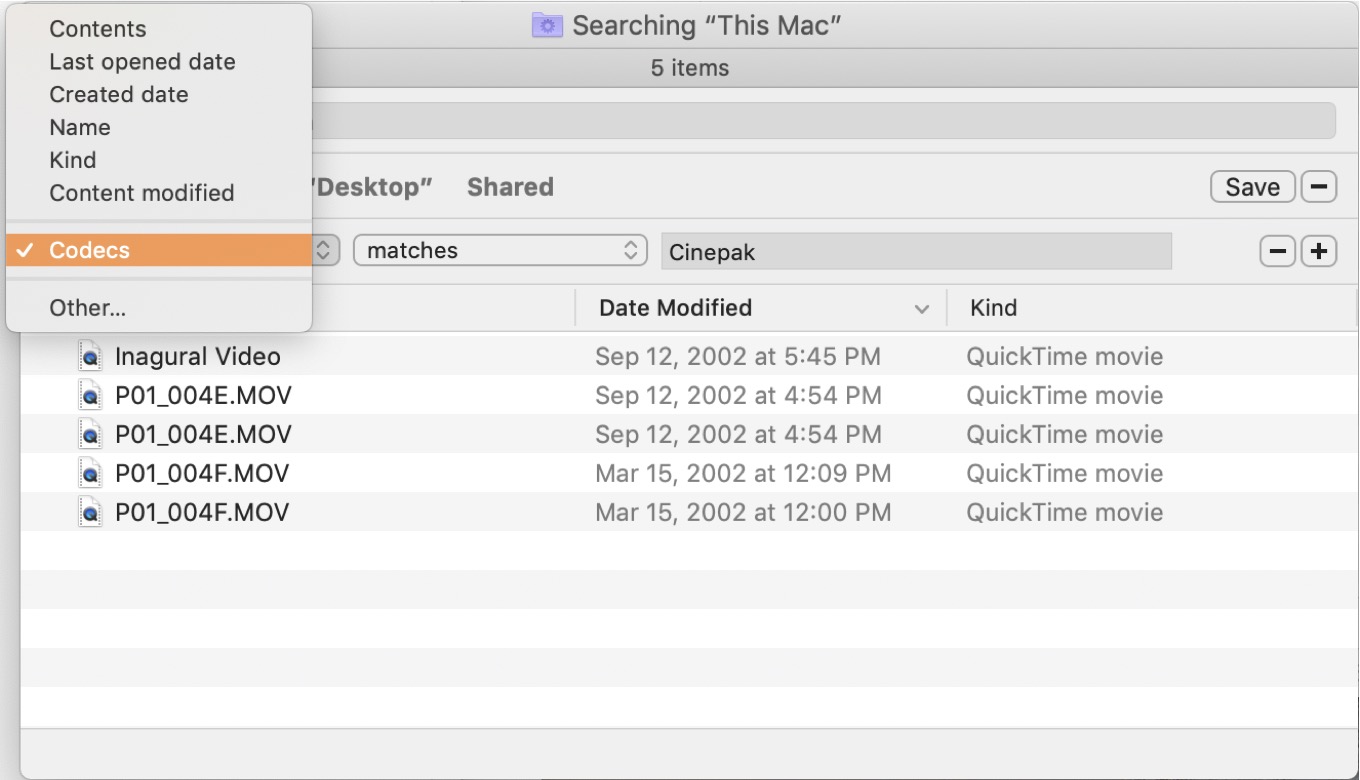
A spotlight codec search.

In future years we’re going to cling to macOS Mojave. Not because of any particular love for desert desktop images, but because it’s the last version of macOS to run 32-bit applications. If you rely on old software and old files, keep a Mac capable of running Mojave around, or make a Mojave virtual machine in an emulator, or both.

Among the stuff that will break this fall when Mojave’s replacement arrives is QuickTime, not just the app but the QuickTime 7 framework that is essentially the final version of Apple’s versatile, groundbreaking multimedia plug-in technology. A QuickTime Player app may go on into the future, and the concept of a file that’s a “QuickTime Movie” will probably continue, but the old QuickTime—all 32 bits of it—is being swept away.

I’ve lamented the loss of versatility of the old QuickTime 7 player app numerous times now, but yesterday Apple posted a tech note that’s worth pointing out. The deprecation of the 32-bit version of QuickTime means that the next version of macOS will lose the ability to play or convert a bunch of old video codecs. If you’ve got old project archive that use DivX or Flash or JPEG 2000 or Perian or Sorenson 3 or dozens of other old video formats, apps that rely on QuickTime to read and convert them—apps like QuickTime Player and Final Cut Pro—will lose that ability.

It would sure be nice if someone came up with a utility that knew all these old formats and could scan your drives for them, and maybe even offer to convert them to a modern, compatible format. But one little-known feature of Spotlight might help. If you start a new Finder search by typing Command-F, you’ll see that you can constrain your search by all sorts of variables, as chosen via pop-up items. So for example, you can set “Kind” to “PDF” and constrain searches to PDFs. Or set “Last opened date” to within the last x days.

That first pop-up contains a pretty amazing option, “Other…”, that when selected will take you to an enormous list of metadata that Spotlight catalogs based on the contents of the files on your Mac. Among the attributes that’s available is one called Codecs, and when I selected that I was able to find a few ancient video files encoded with Cinepak, one of the formats that will be deprecated in this fall’s release.

That might be one way to quickly determine if you have any files in these ancient formats. It might be worth a look before you upgrade any Macs beyond macOS 10.14. And again, the most prudent among us may keep a Mac around that’s capable of running Mojave, just in case a few years from now we find ourselves needing to run a 32-bit app or open a video file encoded with an obscure codec.

[Thanks to James Thomson and Joe Rosensteel for inspiring this piece.]


By Jason Snell

Yes, Logitech’s Crayon works with iPad Pro

Note: This story has not been updated for several years.

Over at 9to5 Mac, Zac Hall noticed that a few of us—at least myself and Nilay Patel from the Verge, and possibly others—have been passing along an interesting new iPad tidbit after meeting with Apple about the new iPad models this week. I realize that people may have missed the brief parenthetical in my Macworld story this week, so it’s worth restating here…

Logitech’s $70 Crayon, an interesting stylus that originally was available for education only and worked only with the sixth-generation iPad, will now be supported by all of Apple’s current iPad models. So not only do the new iPad Air and iPad mini work with the Crayon, but so does my 2018 12.9-inch iPad Pro running a beta version of iOS 12.2, which should be released next week.

(Update: I tested the Crayon with an earlier iPad Pro model, the 10.5-inch iPad Pro that was just discontinued to make way for the iPad Air, and it doesn’t work—even when running the 12.2 beta. So Crayon support seems to be limited to the currently shipping set of iPads.)

The Crayon charges via Lightning, but it’s got a female Lightning port so you can plug it in to pretty much any cord you use to charge an iPhone. It’s got an on/off switch and has a wider side and a narrower side, in the style of a carpenter pencil (so it doesn’t roll). It’s shorter than the Apple Pencil, made of anodized aluminum, and of course, is cheaper than either Apple Pencil model. It’s also versatile: if you bought one Crayon you could use it on both an iPad mini and an iPad Pro—when you’d need two different versions of Apple Pencil otherwise. And unlike Apple Pencil, Crayon works via proximity and not Bluetooth pairing, so if you are frequently in a multiple-iPad environment where styluses are shared, the Crayon will simply work on whatever device it’s touching—no pairing required.

The Crayon’s also much more limited than the Apple Pencil in that it doesn’t support pressure sensitivity. If you only use a stylus for notetaking or driving an app interface, that might be good enough. If you like to draw, it probably isn’t. (It also doesn’t support double-tapping to switch tools, a very nice feature of the second-generation Apple Pencil.)


March 22, 2019

Apple wakes from its holiday slumber and Jason goes to New York.


By Dan Moren for Macworld

With Apple, everything old is new again

Whoever said “out with the old, in with the new” clearly wasn’t talking about Apple’s playbook.

The company may have its fair share of new and updated devices, but it’s also made a habit of building off of its existing devices—and not just in terms of spec bumps and speed boosts, but in actively finding ways to use old products as launching points for brand new devices. It’s a move that most companies probably couldn’t pull off, but one with which Apple has had great success—and which it will probably continue to use in the future.

Continue reading on Macworld ↦


By Jason Snell

Review: iPad mini 2019 is a modern version of a small classic

Note: This story has not been updated for several years.

When three and a half years go by without Apple updating your favorite product, you start to get a little antsy. In the case of the iPad mini, Apple has spent those years completely reconfiguring the iPad line, introducing multiple models of iPad Pro and creating a new low-price sixth-generation iPad—thereby making redundant the iPad mini’s role as the most affordable iPad around.

But at least in this case, the despair wasn’t warranted. It took a while, but here’s the fifth-generation iPad mini—instantly recognizable since it’s got the same shape and size as its predecessor, but now powered by the same A12 Bionic processor found in the iPhone XS. It’s amazing what a difference three and a half years can make.

Say hello to my little friend, again

The sixth-generation iPad has effectively usurped the iPad mini’s role as The Cheap iPad, meaning that as of now, the only reason to buy an iPad mini is because you want a small iPad. And there are plenty of people who do—from extreme mobile workers to people who want to slip an iPad into a purse or coat pocket to businesses who want simple point-of-sale terminals to children with small hands and keen eyes.

For several years, the iPad mini was my primary iPad. Then I switched to the 12.9-inch iPad Pro, which was a radical size change. It was quite a feeling to hold an iPad mini in my hands again after all this time. Coming from the 12.9-inch iPad Pro, the iPad mini is staggeringly small. If you’ve forgotten, it’s 8 inches (203mm) high and 5.3 inches (135mm) wide, weighs two-thirds of a pound (300g), and has a 7.9-inch diagonal display.

And yet despite its small size, that display packs in all the pixels of the 9.7-inch iPad—2048 by 1536 resolution—meaning it’s got a pixel density of 326ppi. This is a better screen than the low-cost iPad, though—it’s laminated, so it’s closer to the surface of the glass, and it’s got support for the P3 wide color gamut and True Tone. All it’s really lacking when compared to the iPad Pro display is ProMotion—this display refreshes at 60Hz, not 120.

Reporter’s notebook

For a while now I’ve been advocating for the idea that the iPhone should support the Apple Pencil, so it could be used as a sketchbook or notepad. The big problem with that theory is that it would really require a smaller Apple Pencil, and when Apple redesigned the Pencil last year, it didn’t go this route.

The iPad mini isn’t an iPhone, exactly, but it’s less than twice the volume and half again the weight of the iPhone XS Max. (It’s also got fewer pixels, owing to the XS Max’s higher-density display.) So if you imagine the iPad mini as a sort of reporter’s notebook or artist’s portable sketchbook, it starts to make more sense as the most portable device yet to support the Apple Pencil.

Today every new iPad being made supports the Pencil, but it’s important to note that all the Lightning-based iPads—the iPad, iPad mini, and iPad Air—all use the Lightning-based original Apple Pencil model. The new Apple Pencil, supported only by the 2018 iPad Pro models, is superior in a whole lot of ways—but if you buy one of these non-pro iPads, you’ll be left with the older model. Not that the old Pencil is bad, it’s actually quite good, but it’s a bit painful to go back to a Pencil without a flat edge, matte finish, and magnetic-induction charging. (You can also use the Logitech Crayon on any of them.)

Drawing on the iPad mini (or these other low-end iPads) will also not be able to take advantage of the faster digitizer rate, which combined with the ProMotion display dramatically reduces lag—the space between where the stroke you just drew is visible and where the tip of the pencil is right now. It’s not a bad experience, it’s just not as good as the experience on the iPad Pro—but you’re also using a much smaller and cheaper device. It’s all a matter of trade-offs.

Paperback reader

I’ve always preferred using a Kindle to read books, but I have to admit that the iPad mini is a pretty great size if you’re primarily planning on using it to read books, newspaper apps, and websites. The screen may feel a bit cramped when using productivity apps, but switching to the iPad mini from the 12.9-inch iPad Pro was like going from a coffee-table book to a trade paperback. Reading from apps while holding the iPad mini in vertical orientation in one hand was easy and pleasant.

However, the increased screen density of this device means you’ll probably need to crank up the default text size in your apps and in the Text Size setting in the Display & Brightness section of the Settings app. As on previous iPad minis, everything’s just a bit smaller, and unless your eyes are particularly keen (and young) you’ll need to slide that text size up a notch or two in order to get it back into comfortable territory.

I wrote a large chunk of this article on the iPad mini, and while it’s capable of all the same stuff as just about any other iPad, writing is probably not its forte. Several companies do make add-on keyboards for the iPad mini 4 (all of which will work with this model, since they’re identical on the outside), its eight-inch width in horizontal orientation is not really wide enough to fit a keyboard with normal size keys. I ended up using an Apple Magic Keyboard in a Studio Neat Canvas case, which worked fine. If you don’t mind tiny keyboards with ultra-compact keys, cases like the ones from Zagg or Logitech or even Brydge might work for you. It certainly would make this a remarkably compact and portable writing device. You just have to deal with a nonstandard, compact keyboard layout.

I should mention one of the best features of the design of this iPad mini, which is that it’s entirely identical to the iPad mini 4. That might bore people who were hoping for a complete re-think of the device, but it’s pretty obvious that wasn’t going to happen. And because Apple didn’t tweak the exterior even a little bit, every accessory made for the iPad mini 4 will work on the fifth-generation iPad mini. And at least for right now, many of them are quite cheap, because the iPad mini was considered a dead product. Old iPad mini cases and covers and keyboards should work fine with this device, provided they were designed for the iPad mini 4. (Apple made changes in design between the iPad mini 3 and 4 that broke compatibility; accessories build for other models are not likely to be compatible.)

Multi-iPad lifestyle?

As the iPad line expands—it’s a family of five now—the different models are better suited for different tasks. The iPad mini is all about that small size, and with Apple Pencil support it can serve as a sketchbook or basic notebook. It’s also an ideal size for reading books, newspapers, and other web content. At $399 it’s worth asking if we’ve gotten to the point where people will consider pairing an iPad mini with a larger iPad and using them for different tasks. The truth is, the iPad mini’s processor means it’s capable of doing almost anything its larger siblings can do—it just does them all on a smaller screen.

The new iPad mini doesn’t need to be all things to all people. It doesn’t even need to be the cheapest iPad in the product line. It just needs to be small and light while still providing the power of a modern iPad, and it does that quite well.


Search Six Colors