Now, I’ll be the first to admit that selling a pair of headphones for $549 does seem a bit much. Will it succeed? That remains to be seen—and Apple sometimes does misjudge its prices, as happened with the original HomePod.
But in general, you should not be surprised about Apple selling a product for a high price. Apple’s pricing strategy shifts from product to product and from year to year, but it’s worth keeping in mind some basic rules of Apple pricing.
The world is full of web services for all manner of tasks, but sometimes what you want to do is connect two (or more) services in order to complete a single task. What do you need for that? Another service, of course!
There’s no shortage of sites that offer this kind of ability: the first I recall was Yahoo! Pipes, though I’m sure there were other similar options even at the time. More recently, I’ve used sites like IFTTT and Zapier, but in the past few weeks, I’ve been playing with a new-to-me option that I find very impressive: Integromat.
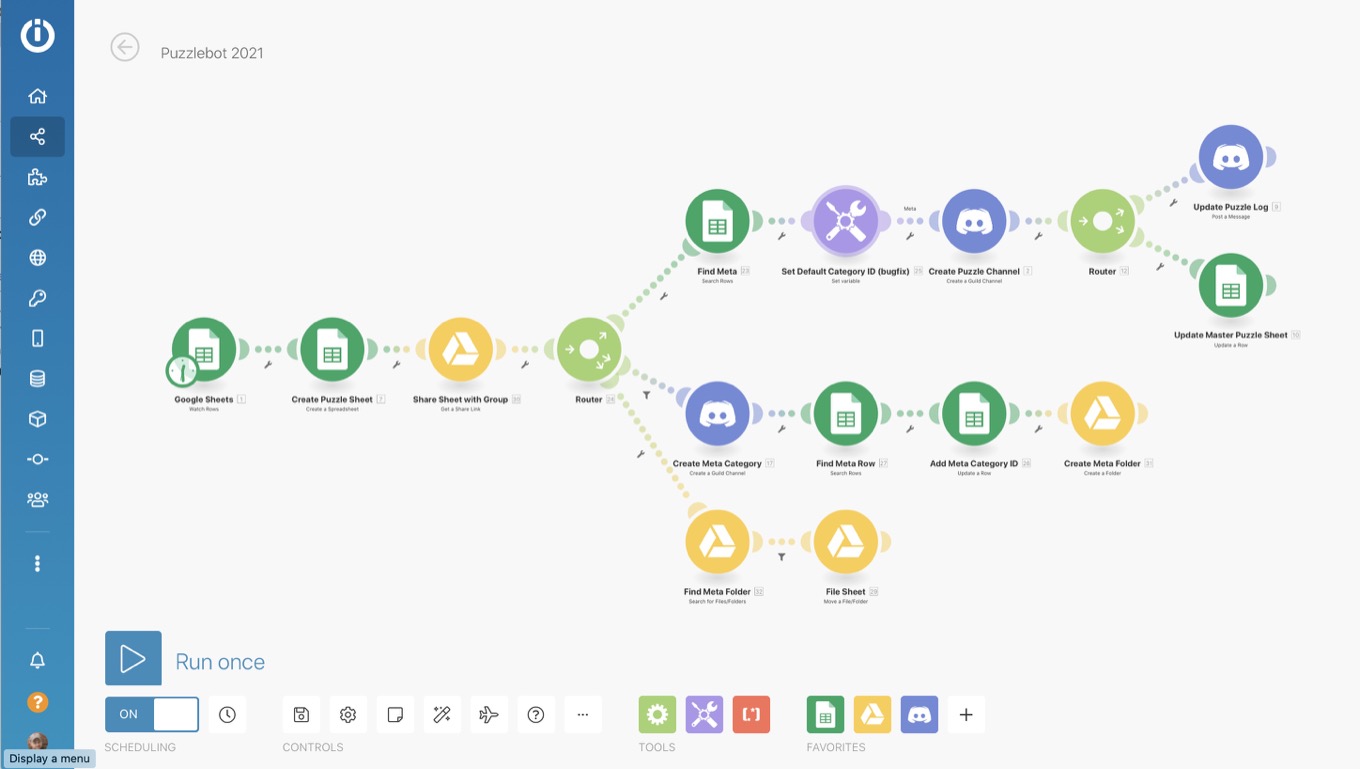
Integromat’s UI is easy to understand and navigate.
There are a few things that drew me to Integromat. For one, it seems to offer some integration capabilities that aren’t available on other platforms. For example, the project I was working on required me to interact with channels on a Discord server—a feature not offered by Zapier’s Discord integration. Integromat offered the options I was looking for, and a whole lot more—way more, in fact, than Zapier.
But the main thing that I really appreciate about Integromat is its interface. The layout is highly graphical, presenting each integration as a little bubble-like module. Click on any icon and you’ll get easy to read and understand parameters that you can quickly fill out. To connect that bubble to another task, just drag one of the handles on the side to the other module you’ve added and voilà!
Filtering makes your scenarios even more powerful.
Integromat also offers powerful features for flow control. So, for example, if your workflow has a branch that only needs to be completed in certain cases, it’s easy to set up a filter that checks for specific criteria and only executes if those are met.
There are also a ton of useful built-in programming-like features. I spent a while looking for a module that would convert a string to uppercase characters only to discover that I could put a conversion function right in the field that I wanted.
Built-in functions make Integromat’s modules even more powerful.
So far, I’ve only experimented with Integromat’s free plan, as I ramp up my workflow for actual use. I imagine I’ll need to sign up for at least a month’s worth of the paid plan, however, as I’m already approaching the limit on number of operations in a month. Which is one of the few downsides I’ve discovered so far with the service: depending on how complex your workflow is, it’s easy to end up using a lot of your quota—probably a testament to how simple it is to keep adding on to a workflow. That said, the service offers a very reasonable $9/month plan that should appease most casual users, as well as more expensive plans that are probably aimed more at business users.
I also ran into some problems with the Google Drive module Integromat offers: a new security process on Google’s side meant that I needed to jump through some hoops to access the API, something which took a little bit of know-how, although Integromat does walk you through the steps. (For some reason unknown to me, it seems as though Zapier’s integration with Google Drive doesn’t require this workaround at present; I’m not sure why.)
Overall, though, I’ve been very pleased with Integromat’s interface and performance. It seems pretty zippy, and I’ve rarely had anything fail to work (except, in the case of mistakes I mad myself); plus, I’ve barely scratched the surface of all that it has to offer. So if you’ve found yourself a little frustrated by IFTTT’s lack of power or Zapier’s cumbersome interface, maybe give Integromat a try.
[Dan Moren is the East Coast Bureau Chief of Six Colors, as well as an author, podcaster, and two-time Jeopardy! champion. You can find him on Mastodon at @dmoren@zeppelin.flights or reach him by email at dan@sixcolors.com. His next novel, the sci-fi adventure Eternity's Tomb, will be released in November 2026.]
First unveiled at Apple’s September event, Fitness+ provides a variety of workout videos with various trainers, and integrates with the both the Apple Watch—highlighting health data onscreen during relevant moments in the workout—and Apple Music. New content will be added every week, with a variety of session lengths, difficulty levels, and types of exercise.
Apple Fitness+ runs $9.99 per month or $79.99 per year in the U.S. and can be shared with up to six family members for that same price. (It’s also available in Australia, Canada, Ireland, New Zealand, and the UK.)
Existing Apple Watch users will get a free month, and customers who purchase a Series 3 or later will get three free months. It’s also available as part of the Apple One Premier bundle.
December surprise! As rumored, Apple had one more trick up its sleeve for the “year” that has been 2020. This morning the company announced its new AirPods Max headphones, a long-expected over-the-ear model that bring many of the features of its AirPods line.
Apple says that the new AirPods Max—which come in five colors1, including space gray, silver, sky blue, green, and pink—have a custom acoustic design and use the same H1 chips found in other AirPods models; each ear cup has one chip, and they both have 10 audio cores to power audio processing. Like the AirPods Pro, the Max have both Active Noise Cancelation and Transparency modes, as well as the new spatial audio introduced in iOS 14.
The ear cups are designed with memory foam to help seal in sound, and feature a mechanism to distribute ear cup pressure to fit one’s head. Inside each ear cup is a 40mm dynamic driver, with a “unique dual neodymium ring magnet” that Apple says helps maintain a distortion-free listening experience, even at high volumes. (Though no doubt audiophiles will make their own judgments when they arrive.)
Ah, but how will you control such a device? Well, look no further than the Apple Watch. The AirPods Max feature, yes, a Digital Crown, which you can use to control volume, as well as play/pause audio, skip tracks, answer and end phone calls, or, of course, activate Siri. There’s also a noise control button that can toggle between the ANC and Transparency modes.
Like the AirPods Pro, the setup of AirPods Max is done on your Apple device, and automatically pairs with all devices associated with your Apple ID. Optical and position sensors mean that playback automatically pauses if you lift one ear cup.
Apple also says that battery time is no slouch: the AirPods Max will provide 20 hours of audio playback, talk time, or movie playback with both ANC and spatial audio turned on.
The headphones also include a fascinating “soft” Smart Case, which puts AirPods Max into a low-power state when not in use. For charging, Apple uses a Lightning port (sorry USB-C fans) includes a Lightning-to-USB-C cable in the box, though, of course, no power brick.
All of this comes at a premium price, though. AirPods Max will cost $549, and are available to order today in the U.S. and more than 25 other countries and regions. They’ll start shipping on December 15.
Yay, non-boring colors! These are almost the same as the new iPad Air, with the exception of pink instead of rose gold. ↩
[Dan Moren is the East Coast Bureau Chief of Six Colors, as well as an author, podcaster, and two-time Jeopardy! champion. You can find him on Mastodon at @dmoren@zeppelin.flights or reach him by email at dan@sixcolors.com. His next novel, the sci-fi adventure Eternity's Tomb, will be released in November 2026.]
Warner Media is moving all its 2021 releases to HBO Max, but what will that mean for the future of the movie industry? Will streaming reign supreme, or is there a future for movie theaters? Meanwhile, a new Bloomberg report gives some shape to the future of Apple’s M-series processors—it turns out the M stands for “more cores.”
The current M1 chip inherits a mobile-centric design built around four high-performance processing cores to accelerate tasks like video editing and four power-saving cores that can handle less intensive jobs like web browsing. For its next generation chip targeting MacBook Pro and iMac models, Apple is working on designs with as many as 16 power cores and four efficiency cores, the people said.
No surprises here. Of course Apple’s going to scale up the core count on its higher-end computers. The question is merely by how much?
For higher-end desktop computers, planned for later in 2021 and a new half-sized Mac Pro planned to launch by 2022, Apple is testing a chip design with as many as 32 high-performance cores.
Yeah, by about that much. At this point, Apple’s demonstrated that it has the know-how to build chips that outpace performance across much of the rest of the industry. The only thing limiting them now is A) how much money it wants to throw at improving its silicon and B) the limitations of physics. Given that the company is financially well positioned and custom silicon is now the technology underlying every single product it makes, the only real limitation is B.
Other interesting tidbits from Gurman and King’s report: more powerful graphics chips with 16 and 32 core chips are in development, and those might eventually scale up as high as 128 cores, which has the possibility of providing truly impressive graphics performance. (The current M1 chips mostly have 8 cores in their GPUs.) And, of course, the above mention again of a “half-sized Mac Pro”.
Apple said it expected its transition to custom silicon to take two years, but there’s some wiggle room in there—two years from the announcement in June 2020? Two years from the launch of the first M1 Macs? Or just two calendar years? Regardless, we can clearly expect to see some significant new Apple silicon chips powering Macs next year, and those who are worried that the M1 was the height of Apple’s processor prowess should probably wait until the movie’s over before rendering a verdict.
Apple’s first attempt at the thin, light laptop of the future happened a couple of years too soon.
In early 2008, Apple introduced the original MacBook Air, a deeply compromised product. It was expensive (the base price was $1799), yet also the slowest Mac, sporting a pokey iPod-class hard drive. (A 64GB solid-state drive, a first on a Mac, was offered as an option—but at $999, it was eye-meltingly expensive.) The Air didn’t have an optical drive or FireWire port or Ethernet jack, just a single USB port hidden behind an awkward drop-down door. Its cooling system was so inadequate that the Air’s dual-core processor would stop working effectively in a warm room.1
The original Air’s weird drop-down door.
Its advantages were clear, though. The MacBook Air weighed only three pounds. That made it a full two pounds (40 percent!) lighter than the next-lightest Mac laptop sold at the time, and more than a pound lighter than any previous Mac laptop. And it was impossibly thin, a 0.16 inch wedge at the front widening out to 0.76 inches in the rear. In other words, the original Air’s heart was in the right place—but the technology just wasn’t good enough yet.
Two years later, Apple took another swing, and this time they got it right. The new MacBook Air resided at the bottom of Apple’s laptop price list rather than the top—thereby ensuring it would be the laptop of choice for most people. The new model kept the thinness and lightness of its predecessor, but offered a full array of ports and a perfectly capable Intel processor.
And perhaps best of all, it came in two different versions—a 13-inch model that was roughly the size of the original model, and a tiny 11-inch model for people who wanted the absolute smallest Mac laptop in existence.
The future of notebooks?
“It’s like nothing we’ve ever created before,”2 Apple CEO Steve Jobs said when introducing the new MacBook Air models. “We think it’s the future of notebooks.” Apple often proclaims that it’s creating the future. Rarely has it been as right.
Netbooks had cramped keyboards.
Just before the advent of the MacBook Air, many PC makers were creating Netbooks, a category of ultra-cheap ($200-$300!), ultra-small laptops that ran Windows and were powered by new, low-end Intel processors. Apple execs were constantly asked why the company wasn’t making a Netbook.
Sometimes I suspect that people lobby for Apple to enter a product category because the rest of the technology industry knows it hasn’t cracked the problem, and it’s hoping Apple will. As someone who tried out a couple of Netbooks during this period, I can attest to how lousy they were. They were impressive in a sort of novel, “can-you-believe-this-runs-Windows” kind of way, but they were cheap plastic garbage with shrunken-down keyboards that were impossible to type on.
In designing the 11-inch MacBook Air, Apple discovered a bright line that it would not cross: the size of the keyboard. The 11-inch Air was built around its full-sized keyboard, every key the same size as you’d find on other Apple laptops, desktop Macs, and pretty much any keyboard in existence. Apple would get this small, but no smaller. And of course, the MacBook Airs didn’t feel cheap, thanks to their anodized aluminum shells, machined out of individual pieces of metal.
The PC industry thanked Apple for its answer, and Intel promptly introduced the concept of Ultrabooks. An Ultrabook is best defined as a PC laptop that looks like a MacBook Air. (As for Apple, its other answer to Netbooks was the iPad, released a few months before the MacBook Air in 2010. Between the iPad and the MacBook Air, Apple had two very different responses to the same desire for a smaller, cheaper mobile computing device.)
As the decade wore on, every other laptop (including Apple’s other offerings) seemed to become more and more like the MacBook Air. The MacBook Pro shed its optical drive, switched to SSDs for storage, and got thinner and lighter. Today’s 13-inch MacBook Pro is itself a thin, light three-pound laptop.
Too popular to be killed
In 2018, Apple stopped trying to kill the Air and rebooted it.
As the decade went on, the MacBook Air kept getting better. Even with its thin profile and limited cooling system, it managed to add more robust processors as configurable options. An 11-inch MacBook Air with an Intel i7 processor could handle almost anything you could throw at it.
The biggest crisis in the MacBook Air’s lifespan came mid-decade, and the threat came from Apple itself. In 2015, Apple introduced the 12-inch MacBook, which was thinner and lighter than the Air, with a Retina display—but also $300 more expensive. A 13-inch MacBook Pro followed in 2016, clearly following in the MacBook Air’s footsteps—but its initial price was $500 more than the Air’s!
Still, the non-Retina MacBook Air just kept selling. It turns out that Apple’s customers felt it was a better value even without that shiny Retina display. In 2018, Apple relented and released a Retina Air. When Apple recently released the first MacBook Air based on its own processors, the company confirmed what we all suspected—that the MacBook Air is the company’s best-selling Mac3. (In all likelihood, that’s been true for most of the last decade.)
I think what made the Air so popular was that it offered the general public a computer that had exactly enough to do what was needed, and nothing more. Early in its life, computer nerds could complain about its scant storage, RAM limitations, lower-powered processors, lack of ports (Thunderbolt was added in an update), and requirement for an external optical drive if you wanted to use CDs or DVDs. But if you just wanted a thin, light, low-cost laptop to do email and look at the web and maybe work in Microsoft Office, you didn’t need any of that.
As the decade wore on, all those distinctions faded away, but I think the core appeal of the Air remained: It was Apple’s cheapest laptop, and compared to the thicker MacBook Pros, the thin wedge shape of the Air just seemed smaller and lighter and… less. With the Air, less is more.4
MacBook Air forever?
The M1 MacBook Air.
At this point, it’s hard to see the MacBook Air exiting the Apple product line any time soon. Apple presumably has learned a lesson from all its attempts to kill it, realizing that the Air’s design and price is what most of its customers want from a laptop.
I certainly agree. I’ve been using a MacBook Air as my laptop (and in many cases, my primary computer) since that original model came out in 2008. The 11-inch Air was my primary Mac from the day it shipped until my last day at Macworld, and I only replaced that final one last month, when I bought a new M1 MacBook Air.5
In the meantime, the rest of Apple’s laptops have caught up with the Air. Sure, there are differences—the Touch Bar, larger screen options, and (presumably) more powerful models yet to come. But major differences, like big hard drives and optical storage and the like, have all melted away. One look at the recently-announced M1 MacBook Pro and M1 MacBook Air make the challenge clear. The differences between these computers are subtle ones.
Now the big question. What’s next? The MacBook Air, released in 2010, really did define laptops for the rest of the decade. But it’s 2020 now. What will be the definitive mobile Mac of the 2020s? The MacBook Air may keep kicking around for a while, but what will replace it in the hearts and minds of users?
Apple’s approach to laptops has changed very little in the last decade, if not the past two—since the the Titanium PowerBook G4 hit the scene. While its competitors in the PC laptop world have experimented with touchscreens, keyboards that detach or fold away, and folding screens, Apple has resolutely stuck with the aluminum shell and two perpendicular planes—one for input, one for display.
If Apple is to redefine the laptop for the next decade, we’d all do well to remember the lesson of the MacBook Air. Sometimes, you don’t get it right on the first try—and that’s okay. Given a couple of years to learn those lessons, Apple ended up creating the greatest laptop design of all time. I look forward to seeing its next attempt to unveil the future of notebooks.
I’ll be back next week with number three.
Trust me on this—I had one. I worked in an office with large west-facing windows, and in the late afternoon the MacBook Air slowed to a crawl. ↩
Except the iPad. This is the event where Jobs asked the question, “What would happen if a MacBook and an iPad hooked up?” ↩
This is the culmination of another trend—the overall shift from desktops to laptops. The MacBook Air is not just the decade’s definite laptop, it’s the definitive Mac of the 2010s. ↩
The Touch Bar on the MacBook Pro is just another example of a fancy extra feature that most Air buyers don’t see as necessary. ↩
My wife and two children also have their own Retina MacBook Airs. We know what we like in this family. ↩
As 2021 peeks its head over the horizon (and with it, hopefully, an upward swing at last), it’s time to cast our glances to the year ahead.
While Apple has no shortage of priorities for the next 12 months, one area that seems as though it might get more attention than usual is the company’s main digital storefront, the App Store. Services continue to be good business for Apple, and the App Store is a major component of that market, but it’s also not without its challenges.
Apple has already instituted some changes to its long-running App Store practices, and recent developments have also made it clear that further changes are likely on the way. So what do we have to look forward to in 2021?
The pace of Apple’s processor development can be measured in all sorts of ways. The chart I built today is using only a single measurement, that of multi-core performance as measured by the speed-testing tool Geekbench. It doesn’t take into account all sorts of other ways that Apple boosts performance in its chips between generations. Since Apple introduced the iPad-focused X variant processor with the A8X in 2014, it has boosted clock speed, subtracted and added processor cores, split its processor cores into separate performance- and efficiency-focused cores, built a multi-core GPU, added a multi-core Neural Engine, and a whole lot more.
However, at least when it comes to raw multi-core CPU performance, the X-series chip generations Apple has released since the A9X arrived with the first iPad Pro in November of 2015 have progressed at a remarkably consistent rate. (For the purposes of this chart, I’m considering the M1 a proxy for an “A14X” processor, since it seems to be an evolution of the X-series chips.)
Apple skipped the A11 and A13 generations when it came to a higher-powered, iPad-class processor, but by taking avantage of a two-years-improved architecture, the growth in performance proceeds apace. If you want to think of it this way, Apple’s X-series chips are gaining about 1200 points in Geekbench multi-core scores every year.
For the sake of this exercise, then, let’s assume that next fall Apple releases an M2 processor that follows this same trend. It would score about 8500, roughly 16 percent faster than the M1 Macs currently being sold.1
Assuming that an M2 processor would be used in low-end Macs like the M1, it would mean that an M2 MacBook or Mac mini would be faster than all but one Intel Core-based Mac, the current high-end i9 5K iMac. Only the Xeon-based Mac Pro and iMac Pro models, with 10 or more cores, would best that score.
There are so many questions yet to be answered, including:
Is there a variation of the M1 processor waiting in the wings for sometime in 2021, or will all the Macs that ship in the next 10 months be using the same M1 processor in the three current Apple silicon Macs?
Will Apple really release an M2 processor next year, or will the company approach Mac chip design similarly to how it approaches iPhone and iPad design? I could see a scenario where 2021’s Mac release is a chip with more processor cores and capabilities that’s rolled into higher-end laptops and desktops, while the M1 continues motoring along until 2022.
Would that theoretical 2021 chip be an “M1X” or an M2? Does the M-series numbering move in lockstep with Apple’s A-series chips, or do they move on a different cycle?
So many questions, so few answers. But the most boring, conservative M2 update in 2021—one that takes advantage of the A15 chip development cycle to create a new chip for lower-end Macs—would be at least 16 percent faster. Anything else Apple does—boosting the number of CPU cores seems like a real possibility—would just boost the number from there.
I can’t wait to see what 2021 brings for the Mac and for Apple silicon. It’s shaping up to the most interesting year in the Mac in ages.
I made a bunch of other wacky calculations, including score improvement per year per performance core, while working on this story. (Fun?) ↩
Apple’s first metallic silver laptop set the company on a path that it’s been on for two decades and counting, but it also proved that the company still had a lot to learn.
First is a redesign of the company’s accessibility website, last refreshed in 2016 at the Touch Bar MacBook Pro unveiling. Visitors to this part of Apple’s site have long been able to learn about the assistive technologies across the company’s products. The site is divided into four sections representing the different developmental domains: vision, mobility, hearing, and cognitive. Anyone, whether they identify as disabled or not, can use the information as a resource for learning about Apple’s accessibility software. There also are helpful tips for users to get the most out of their device(s).
Next is an update to Apple Support materials. Apple has a popular presence on Twitter and particularly YouTube, where slickly-produced videos demonstrate how to use various features of various devices. New is a collection of accessibility-oriented videos covering Magnifier, Back Tap, and Voice Control. The Voice Control piece is a how-to, produced in collaboration with the United Spinal Association, on how to take selfies with the feature, introduced in 2019 as part of iOS 13 and macOS Catalina.
Warner Bros. Pictures Group has announced its entire 2021 film slate will open via a “distribution model in which Warner Bros. will continue to exhibit the films theatrically worldwide, while adding an exclusive one month access period on the HBO Max streaming platform in the U.S. concurrent with the film’s domestic release.”
Last month it was announced that the upcoming Wonder Woman 1984 would debut on Christmas Day both in movie theaters (where open) as well as on HBO Max, and Warner seems to think this is a winning strategy: it’s expanding the move to more than a dozen films, including big blockbusters like The Suicide Squad, Dune, and Matrix 4.
Like WW84, the movies will only be available on the streaming service for one month, before being in theaters only, and then eventually moving to the usual distribution windows (like online sales and rental).
In may ways, it feels as though we’ve been waiting for the other shoe to drop with regards to Hollywood movies. A lot of studios have chosen to push big releases from this year, with occasional dangles into experiments like offering movies online for an additional fee (Mulan, Bill & Ted Face the Music), but Warner clearly wants to goose subscribers to HBO Max, and this sure seems like a compelling way to do it.
The biggest question is outside the U.S., where HBO Max doesn’t really exist: its first international launches are scheduled for next year in Latin America and some parts of Europe. But due to licensing deals outside the U.S., it will almost certainly take some time before there’s parity on programming internationally—if ever. Customers in those countries will likely have to go on a more case-by-case basis and potentially wait for the normal at-home distribution.
It will also be interesting to see how other big studios react to this news. Disney seems to have remained steadfast in holding some of its biggest titles—such as Black Widow—until theaters reopen, but it is making the next Pixar movie, Soul, available exclusively to Disney+ subscribers for free later this month.
Right now, we’re kind of back in uncharted territories, as different companies try different approaches, and as someone who probably won’t be going back to a movie theater anytime soon, I’m glad to see that even big corporations are being forced to take chances.
The new App Store Small Business Program is designed to accelerate innovation and help propel your small business forward with the next generation of groundbreaking apps on the App Store. It features a reduced commission rate of 15% on paid apps and in-app purchases, so you can invest more resources into your business to continue building quality apps that customers love.
The details promised by Apple about its reduced commission program for small businesses on the App Store have rolled out, and they are largely consistent with what was announced last month. Eligible businesses—those that have made less than $1 million in 2020—can apply for a reduced commission of 15 percent in 2021. If they cross that line, they will go back up to 30 percent for the remainder of the year and the following year; businesses whose proceeds drop below $1 million in a calendar year can reapply for the subsequent year.
Further details clarify that the program takes affect by January 1 if you apply by December 18; beyond that, there’s a bit of a lag time. Apple also spells out how developers whose bank accounts aren’t in U.S. dollars can figure out if they’re eligible and details about Associated Developer Accounts. The company also notes that app transfers (i.e. transferring an app to another developer account) is not allowed while in the program, no doubt to prevent people from bouncing their app around to different developers to avoid the higher commission.
It will be interesting to see precisely how this plays out, but chances are the biggest question will be a year from now, with developers hovering right around that $1 million mark. Will they pull their app from the store to avoid crossing the line? How will that experience go for users, and will Apple want to make changes to avoid that kind of behavior?
Recent third-party numbers suggest that the Small Business Program could cover as many as 98 percent of developers on the store, which certainly seems like a net positive. But it’s clear from the way Apple has set this up, that despite the vast majority of developers the deal will cover, it’s still treating it as an exception, rather than the rule.
How Salesforce’s purchase of Slack could affect Slack’s future, how we’re shopping and gifting this holiday season, inexpensive gadgets that impressed us, and our photo-posting habits on social media.
When Apple announced the M1 processor, it highlighted the possibility of virtualizing Linux but remained coy about Windows. One of the great advantages of using Intel processors on the Mac is that Windows is also built for Intel processors. Even in a virtual machine, apps ran at near-native speeds.
So what happens with the M1? The major virtualization could run the Intel version of Windows in emulation, but anyone who remembers the bad days of Virtual PC on PowerPC will know that running an entire emulated system can be painfully slow.
But Microsoft also makes a version of Windows that runs on ARM processors, currently available only when preinstalled on a “Windows 10 on ARM” PC such as Microsoft’s own Surface Pro X. In theory, a standalone version of Windows 10 for ARM might actually work well inside a virtual machine on an M1 Mac—running at more or less native speeds, just like the Intel version of Windows on Intel Macs.
It was unclear if other technical roadblocks might remain that would make this less likely to happen. But things are clearing up, as 9to5Mac’s Michael Potuck reports:
Alexander Graf was the first to successfully run an ARM Windows virtualization on an M1 Mac. He used the QEMU open source machine emulator and an Insider Preview of Windows. Now, based on the work by Graf, there’s a new build of the open source ACVM launcher (by Khaos Tian and 3 others) that works with QEMU to run ARM Windows on ARM Macs.
In short, using a beta version of Windows on ARM downloaded from Microsoft, people have used the open-source QEMU emulator to get Windows running on Apple silicon. You can watch Martin Nobel’s YouTube video to see the process in action. Nobel even ran GeekBench 5 on the M1 Mac, and ended up with higher test scores than the Surface Pro X.
This might explain why Apple has shifted from being tight-lipped about Windows to Craig Federighi telling Ars Technica:
That’s really up to Microsoft… We have the core technologies for them to do that, to run their ARM version of Windows, which in turn of course supports x86 user mode applications. But that’s a decision Microsoft has to make, to bring to license that technology for users to run on these Macs. But the Macs are certainly very capable of it.
It seems to me that it’s only a matter of time before Windows on ARM is officially running on M1 Macs. The ball is in their court. There seem to be few technical roadblocks. It makes too much sense.
Once Apple hasn’t sold a product for seven years, it’s considered “obsolete,” meaning the company won’t offer any repair services. But vintage products exist in a liminal space: Despite what I learned when I called Apple Support, Apple Stores as well as AASPs can, in theory, repair them for you “subject to availability of inventory, or as required by law,” according to Apple.
In practice, people in the repair community told me Apple isn’t particularly interested in fixing vintage tech. “The AASPs I’ve spoken to in the past have told me they don’t bother with customers looking to repair older devices,” said Rob Link, a right-to-repair advocate who owns a company that sells repair parts for older devices including iPhones, iPods, and iPads. In the past, Link said, he would call up AASPs to see if they had older parts to sell “but I would stop when no one did.”
So after a machine is marked vintage, serious repairs get tricky. Once seven years pass and that product gets added to the obsolete list, they are all but impossible.
This can put users in an awkward position if they experience a hardware failure, especially if their hardware — including all of the iMacs listed above — are still supported by the current version of macOS and are perfectly capable machines.
This wasn’t such a big issue ten or fifteen years ago when Mac OS X moved at a slower pace and Macs were full of spinning disks, but today, Macs last longer than ever, and a new version of macOS shows up every fall. I suspect that Apple silicon-based Macs will remain viable for even longer. (In Apple’s defense, newer versions of macOS don’t always run great on older hardware, and new features may not be supported at all, but that’s really a story for a different time.)
Apple should extend the number of years it supports Mac hardware. Such an extension would give users more options when it comes to running older Macs, which is good for the environment, customer loyalty and third-party repair shops.
Apple hasn’t turned a profit on repairing people’s broken devices in the past decade, the company disclosed this week…. The company made the disclosure in response to a House Judicial Committee probe, which is investigating whether Apple engages in anticompetitive practices to edge out competition when it comes to repairs and third-party apps.
Gulp.
It’s not all doom and gloom. In the last few years, Apple has opened programs to give third-party repair providers1better access to parts, tools and diagnostics, but that doesn’t really solve the problem of the ticking clock.
Here’s a detailed post by Erik Engheim that breaks down how Apple’s M1 chip is structured and compares it with other PC chips:
In Unified memory the GPU cores and CPU cores can access memory at the same time. Thus in this case there is no overhead in sharing memory. In addition the CPU and GPU can tell each other about where some memory is located. Previously the CPU would have to copy data from its area of the main memory to the area used by the GPU. With unified memory, it is more like saying “Hey Mr. GPU, I got 30 MB of polygon data starting at memory location 2430.” The GPU can then start using that memory without doing any copying.
That means you can significant performance gains by the fact that all the various special co-processors on the M1 can rapidly exchange information with each other by using the same memory pool.
Processors are complicated. I found this article to strike a good balance between technical and understandable.
In a surprise move, Amazon has jumped into the hosted Mac world, adding Mac minis to its EC2 service. As TechCrunch reports:
The target audience here — and the only one AWS is targeting for now — is developers who want cloud-based build and testing environments for their Mac and iOS apps. But it’s worth noting that with remote access, you get a fully-featured Mac mini in the cloud, and I’m sure developers will find all kinds of other use cases for this as well.
Amazon has a lot of advantages over smaller hosting companies, but of course, the smaller hosts who have specialized in Mac hosting for a while have advantages of their own. It’s still remarkable to see Amazon actually sticking Mac hardware in racks and renting it out to customers.
The current offering is i7 based 2018 vintage Mac minis. Amazon says M1 models will be available next year.