Six Colors
Six Colors

Apple, technology, and other stuff

Support this Site

Become a Six Colors member to read exclusive posts, get our weekly podcast, join our community, and more!

By Glenn Fleishman

Export keys securely from Passwords to third-party managers

Glenn Fleishman, art by Shafer Brown

I ranted about the joy of passkeys and some of their limitations a few weeks ago, and that prompted a question from Six Colors member Ampsonic1, a naturally occurring and renewable source of excellent queries:

Can you use 1Password to store a passkey for an Apple Account?

Unfortunately, you can’t yet! Apple uses a unique process to generate the passkey for an Apple Account—it’s generated on device, the only time I am aware of this ever happens for a passkey. This makes it uniquely the only passkey that requires an Apple device to generate or use.2 It doesn’t even show up in Passwords, because it’s a different kind of beast.

Answered.

But, oh, there is more to talk about.

I have been reluctant to recommend 1Password or any password manager to hold your passkeys unless you regularly use non-Apple devices or are absolutely all in on 1Password (or another ecosystem) to the near exclusion of Passwords and iCloud Keychain as your password manager and sync solution.

The reason had two components: utility and portability.

  • It’s very useful to have integrated support for passkey filling across all your Apple devices with zero extra effort. This is true with third-party password managers, but because I started using passkeys with built-in support, I was invested in it.
  • You couldn’t yet move passkeys across ecosystems, so unless a site or app supported creating multiple passkeys for your account, you were stuck, unless you went through a rigamarole to disable and re-enable the passkey.3
Side-by-side screenshots of a prompt in iOS 26 to add a passkey with options to select among password managers (left) and a completed passkey addition to 1Password (right)
You can choose which password manager to use to store a passkey. (I’ve got 1Password 7 and 8 active for… reasons.)

Suppose you could easily copy passkeys among password-management ecosystems, eliminating the second point? In that case, the first point matters much less. Fortunately, we are on the verge of this major change! Along with portability, introduced in iOS 26, iPadOS 26, and macOS 26 Tahoe, comes a few other passkey (and password) improvements. Apple didn’t document any of these in its release notes for the operating systems because they all require third-party buy-in, which is already starting to happen.

Bringing passkeys in line with passwords and raising them higher

I think passkeys are the bee’s knees, so anything that makes them easier to adopt is a great move in my book, as it will make everyone’s lives easier and their identities more secure. At WWDC 2025, Apple’s Andrew Abosh presented changes that are now in production releases to smooth the passkey wheels further.

Three of these are at the website end and require websites to make changes in their authentication software to take advantage. First, sites can now offer a streamlined sign-up process that Apple devices will pick up on, making it easy to generate a passkey as to accept a password recommendation from Passwords (or third-party password managers). Second, a website can push updates to your registered account—like if you change your email address—to the password manager so that those details associated with your passkey remain in sync. Third, there’s now an automatic upgrade workflow that lets a website prompt you to shift from password to passkey.4

But the particular issue above, portability, was addressed at timestamp 19:11 in the session.5 This standard has been in the works for a few years, and the FIDO Alliance—the group that has been moving us towards a “password-free” future, seriously—released a spec last October, then celebrated Apple’s news in June of this year.

You can see this in action with the latest operating system updates (step-by-step instructions next). When you use export in iOS 26, iPadOS 26, or Tahoe, you’re prompted for a destination app instead of relying on the old method, which was an unencrypted comma-separated value (CSV) file. The dialog notes, “Your items are securely transferred to the app you choose.”

So that’s that. But what about 1Password? Let’s walk through the export process.

Import and export a passkey in the most secure way

The only bad news about the above is that the major password-manager developers haven’t all updated their systems yet to support this FIDO standard as implemented by Apple:

  • 1Password has no information about a timeline for adoption. (I sent a query.)
  • Bitwarden is ready to go as of its new release on September 23, the day I started writing this column!
  • Dashlane also added support around the same time. Timing is everything.

I’ll walk you through exporting from the Passwords app in iOS 26:6

  1. Open Passwords.
  2. Tap the more … button and choose Export Data to Another App.
  3. Select entries and tap Continue.
  4. Acknowledge the truth of what Apple tells you about exporting passwords and tap Continue.
  5. Choose an applicable app, such as Bitwarden. Tap Continue.
  6. Apple alerts you that these password entries will be exported to the third-party password manager. Tap Continue in “App Name.”
  7. In that app, follow the steps to complete. In Bitwarden, you tap Continue to import the entries.
Screenshots side-by-side of exporting passwords or passkeys from Passwords in iOS: step 1 (left), choose entries; step 2 (right), confirm proceeding.
You first select password entries, which can include passkeys or passwords or both, then confirm your intention to proceed to export.
Screenshots side-by-side of exporting passwords or passkeys from Passwords in iOS: step 3 (left), select a destination; step 4 (right), confirm export to app.
You choose a destination among available apps, then confirm you want to export to that app.

I would have shown you Tahoe, instead, because it has better selection tools for choosing entries first; then you export them. However, there is a bug either in Tahoe or Bitwarden, as I cannot get the app to appear as a choice. Here are the steps, nonetheless, for when this works in the near future:

  1. Launch Passwords.
  2. Select entries with passkeys (or other passwords) to export.
  3. Choose Export Selected Item to App.
  4. Authenticate with Touch ID or your account password. (iOS and iPadOS don’t prompt you for this authentication.)
  5. Select a Destination app and click Continue. (This is where Tahoe fails me.)
  6. Confirm the export by clicking Continue in “App Name.”
  7. Complete the import in the other password manager.

This process copies the passkey without moving it. Passkeys don’t need to be refreshed, since only your devices possess and sync the private keys required for your part of the authentication. Unless your equipment was compromised, the passkey could last forever.

Update: Unfortunately, I initially answered the question at the head of this question incorrectly. I had a false memory of receiving a prompt to create a passkey for my Apple Account; that is not how it works. For now and possibly forever, Apple Account passkeys are locked to devices and cannot be exported. Thanks to an alert reader for pointing this out!

Update: Dashlane and Bitwarden now both support passkey export. Still no update from 1Password.

[Got a question for the column? You can email glenn@sixcolors.com or use /glenn in our subscriber-only Discord community.]


  1. Did you know members have a direct feed into my brain…er, question queue? See the bottom of this post. 
  2. Because this is a device-based key, it is stored in Secure Enclave, making portability impossible. Apple may never allow third parties to manage an Apple Account passkey. 
  3. On sites that allow multiple passkeys, it can be as easy as clicking another plus sign and choosing the correct password manager to store the second key. 
  4. These features are based on standards, although Apple is the first to adopt them as far as I can tell. Eventually, other browser makers, password managers, and operating systems should adopt them, and you will be able to have this experience on any device and in any ecosystem. 
  5. Apple developer Ricky Mondello also noted on August 18, probably in response to my column, that this feature was coming. 
  6. Apple has not yet included this information in iOS 26, iPadOS 26, or Tahoe support pages. 

[Glenn Fleishman is a printing and comics historian, Jeopardy champion, and serial Kickstarterer. His latest books are Six Centuries of Type & Printing (Aperiodical LLC) and How Comics Are Made (Andrews McMeel Publishing).]


By John Moltz

This Week in Apple: To laugh, perchance to scream

John Moltz and his conspiracy board. Art by Shafer Brown.

Apple has HAD ENOUGH of government overreach, Tim Cook makes a new friend, and the App Store remains undefeated.

Practicing my tight five

Apple would like you to know that it is VERY UPSET with certain policies of the government. It’s so upset in fact that it has taken the time to publish a 1,700-word complaint about overreach by an oppressive regime bent more on domination than helping citizens, something Apple feels very deeply about and is now standing up for.

About time. Yes, finally—after various reprehensible and failed attempts at appeasement—Apple is telling the Trump administration that its policies are-

[puts finger to ear]

I’m sorry, I’m being told this is about the EU’s Digital Markets Act. How very embarrassing.

For someone, anyway.

Could be me, could be a multi-billion dollar company.

Sadly for Apple, much like running to the press never helps, neither apparently does publishing blog posts (tell me about it).…

This is a post limited to Six Colors members.


By Jason Snell

Apple adds iPhones to Friday Night Baseball coverage

A smartphone mounted on a camera rig displays a live sports event. The screen shows a stadium with spectators and a field. The rig includes cables and a battery pack for power.
Imagine an orange phone at Dodger Stadium. (Apple TV+)

Surprise! Last Friday, Apple TV+’s Friday Night Baseball broadcast of the Giants and the Dodgers featured multiple shots taken on an iPhone 17 Pro. On the final Friday night of the season, the company will repeat the feat during tonight’s Tigers-Red Sox game (7 pm ET).

According to Apple, four iPhone 17 Pros will be positioned at Fenway Park — in the Green Monster, the home dugout, and roaming the stands. In contrast to the secrecy of last week, the Tigers-Red Sox game will feature a bug in the corner of the screen that shows off the shots that are coming from an iPhone.

Is it a self-promotional gimmick? Sure, but Apple is paying a lot of money for MLB rights. Also, it’s not as if the company hasn’t pushed its MLB telecasts in a bunch of different ways. The Friday Night Baseball broadcasts look great, and have featured loads of helmet and body cams, a cinematic depth-of-field camera, and even in-stadium drone shots. Apple has probably earned at least one night of iPhone Pro product integration.

Unfortunately, even though the iPhone is capable of shooting 4K video and beyond, the ones in Apple’s MLB broadcasts will be locked to 1080p at 60 frames per second, because stadium broadcast infrastructures just haven’t caught up with the 4K world. The iPhones will be running the Blackmagic Camera app, allowing iPads back in the production trailer to control exposure and white balance settings remotely. They’ll also be attached to the just-announced Blackmagic Camera Pro Dock, which integrates all the different connections needed to fit them into the production and make them just another broadcast camera.

Apple says that one advantage of using iPhones rather than traditional broadcast cameras is that they’re small enough to fit in places like the corners of dugouts and less intimidating for candid fan shots, since we’re all used to looking at smartphone cameras. (Maybe not on tripods attached to Blackmagic Camera Pro Docks, but it’s still a fairly small footprint.)

According to Apple, Major League Baseball even attached its little holographic “validation” stickers to the iPhones used in last Friday’s broadcast from Dodger Stadium, signifying that they were the first iPhones used to broadcast an MLB game. (Apple didn’t say, but I assume one of those phones will be sent to the Hall of Fame?)

This is the fourth year of Apple TV+’s Friday-night doubleheader. Some reports have suggested the partnership might be ending after this season, but the latest one I’ve seen suggests that Apple TV+ would be continuing on Friday nights. When all that gets resolved, we’ll see if this was a last hurrah or the start of something new.


Apple posts thoughts on the DMA

In an unsigned post on Apple Newsroom, Apple has poured out its heart about the EU’s Digital Markets Act:

It’s been more than a year since the Digital Markets Act was implemented. Over that time, it’s become clear that the DMA is leading to a worse experience for Apple users in the EU. It’s exposing them to new risks, and disrupting the simple, seamless way their Apple products work together. And as new technologies come out, our European users’ Apple products will only fall further behind.

Tell us how you really feel, Apple.

There’s a lot to unpack in this post, and it runs the gamut from concerns that seem reasonably well-founded—Apple potentially have to comply with third party companies requesting the full content of a user’s notifications—to claims that are more than a little ridiculous: “For instance, the changes to app marketplaces are making iOS look more like Android — and that reduces choice.”1

Yes, you heard it here: Apple says that the iPhone are essentially identical to Android.

Look, the DMA is a far-reaching piece of legislation that’s intended to increase competition by knocking down the kind of barriers that keep these enormous tech companies insulated from competition. It’s also a byzantine and tortuous set of regulations created by people who don’t necessarily understand the way technology works and the implications of their actions. Both are true!

Threading the needle of “things Apple really should be doing to improve interoperability and competition” and “things that might have unforeseen consequences that actually fly in the face of the EU’s intentions” is a tricky proposition, and the mechanisms in place to challenge the rulings are, admittedly, restrictive.

What neither the EU nor Apple really want to admit here is that dealing with companies at this size is a matter of partnership and compromise. Government entities might be the only ones capable of wielding a stick big enough to make Apple sit up and actually make changes—and it is actively making those changes in the EU, which is not only to Apple’s credit but also proves that regulation can work—but ultimately getting the most out of something like the DMA requires both sides to operate in good faith, which seems to be lacking here.


  1. “For the first time, pornography apps are available on iPhone”. Ah, yes, remember the good old days when it was impossible for people to get porn on their iPhones? 🙄 

By Jason Snell

Nic’s Fix brings back original HomePods (like mine)

A disassembled smart speaker on a blue workbench with tools and components scattered around.
My HomePod, open to the world.

One of my original HomePods died last year of a sudden illness. It was survived by its fellow stereo pair. So a friend gave me her own lonely surviving HomePod, and the mismatched couple let the music play on for a little while. But then my other original HomePod died—also suddenly, same symptoms—leaving my friend’s HomePod tragically alone and my back bedroom studio silent.

That’s when another friend recommended Nic’s Fix, a one-man operation in the Seattle area that’s devoted to repairing HomePods. I sent my recently deceased HomePod to Nic, who seems to have mastered the disassembly and reassembly of HomePods—it’s tricky stuff!—and has cataloged the entire litany of reasons they die.

Nic fixed my HomePod live on YouTube, and it’s back in working order, reunited with its stereo pair. He says no HomePod repair exceeds $90, so it seemed like a pretty good deal rather than going out and finding a new pair of smart speakers. Especially since I know that I can fix the other one if it dies, too.

Some other cool things about Nic’s service: He provides a one-year warranty, he’ll clean or even re-color your HomePod’s mesh while he’s at it, and he repairs and replaces obviously worn or tired parts when he spots them. Among others who have used his services are Dan Moren (whose HomePod was a victim of Death Farts), John Siracusa (like mine, no power), and Steve and Allison Sheridan (no power). Allison also interviewed Nic on her podcast.

What can I say? If you have an original HomePod and don’t want to say goodbye, I recommend Nic’s service.


By Jason Snell for Macworld

Pro today, Air tomorrow? Apple plays the long iPhone game

iPhone sales are important! That’s about as obvious as a dog-bites-man statement can get.

This year, early reports suggest sales of the iPhone 17 might be a little better than expected, but there’s no accompanying surge for the iPhone Air. What does it all mean?!

On one level, not a lot: Apple’s still going to sell a zillion iPhones, in the end. The profits will roll on. But if you’re a sicko like me (and I will remind you that you are reading this column at a site devoted to Apple-related minutiae), you are probably interested in the details.

They’re meaningful for a few reasons: If Apple’s expectations don’t match reality, it suggests the company doesn’t fully understand its own customers. If one model really kills it, it potentially impacts overall iPhone revenue (for better or for worse). And perhaps most importantly for most iPhone users: How the world reacts to iPhone models affects Apple’s plans for future iPhone models.

Continue reading on Macworld ↦


Our interest in Meta’s new AR Display glasses, views on iPhone scratch concerns, when we choose to repair vs. replace devices, and the existential question posed by iPhone Air’s allure.


By Jason Snell

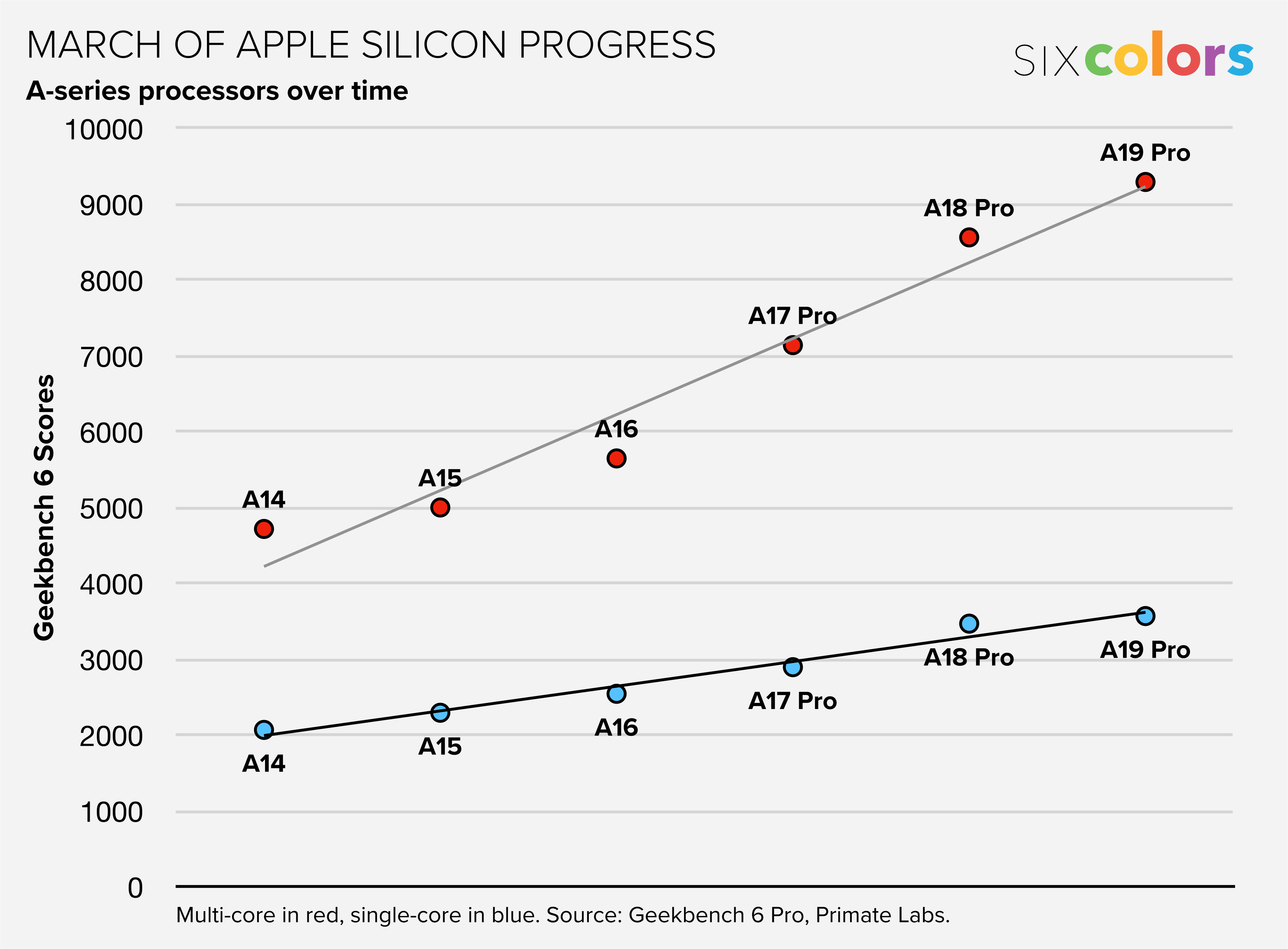
Charting the path of the A19 Pro

One of the first things I did when I got the new iPhones into Six Colors global HQ was to get the iPhone 17 Pro Max up and running and run Geekbench 6. (I know there are a lot of Geekbench scores out there, but I like to run my own, just because.) Because I’m curious about the pace of Apple silicon innovation.

The A19 Pro chip in the iPhone 17 Pro is presumably using the next generation of CPU and GPU cores that will also appear later this year or early next year in the M5 processor. So it’s not just a view into how the chips have progressed for the iPhone, but also an indication about where gains will be made in the next generation of Macs.

Chat showing A series progress.

In terms of CPU, the step from A18 Pro to A19 Pro seems smaller than normal, though there may be extenuating circumstances. Single-core performance in Geekbench only increased 3% in my preliminary tests, which is the lowest gain I’ve seen in years. Multi-core performance, on the other hand, went up by 9%—much better, even if it’s a less impressive gain than any in the last four generations.

One of the tricky things in judging raw performance on an Apple silicon chip is that it’s not a single thing, but a collection of things. The A19 Pro chip on my iPhone Pro Max has six CPU cores, only two of which are high-powered “performance cores.” The other four are power-efficient “efficiency cores,” a name that implies unimpressive cores designed for the weakest of tasks.

But over the last few years, Apple has really improved its efficiency cores. Efficiency cores may not help a device conquer the most brutal processing tasks, but the faster they are, the less likely it is that the big, bad performance cores need to be kicked into gear. The more work that can be done on efficiency cores, the better—but that work is often invisible to things like benchmarks that seek to measure maximum performance.

It’s rare to see the percentage improvement of single-core scores and multi-core scores as divergent as they are this generation. I suspect what I’m seeing is the added power of four improved efficiency cores contributing to a high multi-core score, even if the performance cores on the A19 Pro aren’t a spectacular leap forward.

If you’ve been following the progress of Apple silicon the last few years, this shouldn’t be too unexpected. From generation to generation, Apple shows love to specific parts of their chips while leaving other parts alone. Some years, it’s a revamped Neural Engine (this year with the A19 Pro, in fact) or an upgraded GPU core design. Other years, it’s all about the CPUs. It varies, and the net result is forward progress over time—but not necessarily in every area, every year.

Speaking of which, this year’s GPU scores are way up.

This is the biggest increase in the overall GPU Compute score in six generations, and even longer if you divide the score by the number of GPU cores available. The A19 Pro generates Geekbench GPU Compute scores 65 percent faster than the A17 Pro of just two years ago, with the same core count. It’s been an impressive couple of years on the GPU front.

What does this augur for the M5 processor? You never know if Apple has a trick up its sleeve, and the M5 will have an innovation not integrated into the A19 Pro, but it sure looks like the trend this year is a more efficient CPU and a big boost to the GPU. The addition of AI accelerators on the GPU and the updates to the Neural Engine also suggest to me that these new chips will do really well on AI benchmarks.

Also, for the record, these numbers don’t really change the numbers much if we’re talking about if Apple used an A-series processor in a low-cost MacBook. Either the A18 Pro or A19 Pro could be used to power a MacBook that would match the M3 in single-core and surpass the M1 in multi-core and GPU.

As always, there’s much more to come at Six Colors as we dig into these iPhones and also await the arrival of the M5 chip, whenever that happens!


We reconvene to discuss our new phones, the upcoming foldable iPhone and changing the name of the podcast.


Apple announces a new set of Immersive film releases

A pianist in black performs on stage with an orchestra. He leans forward, eyes closed, playing a grand piano. Musicians with violins and cellos are visible behind him. Audience members sit in the foreground.
Vision Pro goes to the BBC Proms at the Royal Albert Hall this fall.

Apple has announced another round of Immersive films for the Vision Pro, including Monday’s premiere of “Tour De Force” from CANAL+ and MotoGP.

“Tour De Force” is a half-hour film about French motorcycle racer Johann Zarco competing for a historic win at the French Grand Prix at Le Mans. It was announced back in June and is the first film shot with Blackmagic’s new URSA Cine Immersive camera, which lets companies that aren’t Apple create films in Apple’s Immersive format.

I watched “Tour De Force” this afternoon and came away impressed. It certainly doesn’t seem like a step down from Apple’s production values, and CANAL+ obviously had access to multiple Blackmagic cameras, which gives the doc an expansiveness that some of Apple’s productions have lacked. (“Tour De Force” also has better luck in its subject than it did with its bull-riding short, which ended in about two seconds of failure. Zarco and his team have better luck!) I’m looking forward to many more Immersive projects now that the Blackmagic camera is out in the world.

This fall, Apple’s also releasing an Immersive and spatial presentation from the BBC Proms, letting viewers get up close with the hands of pianist Lukas Sternath as he performs Grieg’s Piano Concerto in A minor with the BBC Symphony Orchestry at the Royal Albert Hall. There’s also a documentary coming in October set in a rainforest in tropical Australia; a film called “Experience Paris” that celebrates French culture (also due this fall); a K-pop documentary about the band CORTIS; and a new episode of Apple’s adventure series Elevated.

Launching in December is a new series, World of Red Bull, that does not feature partying twentysomethings powering down a can on their way to the next club, but extreme athletes in extreme situations. The series begins with an episode about backcountry skiing in British Columbia and will be followed by an episode next year about big-wave surfing in Tahiti.

Also coming next year is a climate doc, due next spring, featuring CNN journalist Bill Weir on a scientific expedition to find emperor penguins in Antarctica.

To recap:

  • Today: “Tour de Force”
  • October: “Julaymba” (Australian rainforest documentary), Elevated: Maine (Oct. 3)
  • Fall: “A Night at the BBC Proms”, “Experience Paris”, “CORTIS”
  • December: World of Red Bull: “Backcountry Skiing”
  • 2026: World of Red Bull: “Big-Wave Surfing”; “Journey to Antarctica to Find Emperor Penguins” (Spring)

By Glenn Fleishman

Solution to a “Jeopardy!” streaming conundrum: What is Tailscale?

Glenn Fleishman, art by Shafer Brown

It is perhaps not surprising that my spouse and I raised a Jeopardy! fan. Our older child, halfway through college, not only loves the show but has developed an encyclopedic knowledge of geography, transit systems, musical instruments, and much more. Or should I write encyclopaedic, as they are spending this current term in London on a study abroad program? That plays into the story.

If you have followed my career, you will know both that I won two episodes of Jeopardy! (just like Dan Moren) and that I have a nearly obsessive interest in ways to enable remote access to and control of your Mac and other devices when you are outside your local network. I have, in the past, even written an entire ebook on the topic.

London, Jeopardy!, and remote access and control all intersect when I received a text from said child late in the evening, their time. The system we use (and updated) is a good solution for any locally recorded or stored media files.

Continue reading “Solution to a “Jeopardy!” streaming conundrum: What is Tailscale?”…


Reunited in Memphis, Jason and Myke discuss iPhone and AirPods Pro first impressions, phone transfer troubles, MacBook rumors, and St. Jude shenanigans.


Better accessibility coming to Kindle books

E-reader accessibility is anything but consistent. You might find a font size adjustment, but no high-contrast or dark mode settings. And screen readers, where they exist, don’t rival those available for computers and smartphones. Even where devices offer these features, many books don’t fully take advantage of them.

Michael Kozlowski of Good e-Reader says Amazon is beefing up its accessible offerings, including accessibility information on book pages and software enhancements:

Kindle Assistive Reader is… fully available in the update that was released a couple of days ago. It will essentially convert any Kindle book into an audiobook, utilizing an advanced text-to-speech system that sounds natural.

Publishers, too, have accessibility on their minds:

Publishers have been prioritizing the submission of e-books to Amazon that include accessibility features. According to Publishers Weekly, “The move comes as publishers face increasing legal pressure to make digital content accessible, positioning accessible publishing as both a competitive advantage and a necessity as new laws such as the European Accessibility Act and expanded digital accessibility requirements under the Americans with Disabilities Act drive industry momentum toward universal accessibility.”

It’s important to note that this feature is an on-device accessibility system, which differentiates it from approaches that generate audiobooks for sale using artificial voices.


By John Moltz

This Week in Apple: The waiting is the hardest part

John Moltz and his conspiracy board. Art by Shafer Brown.

iPhone 17s begin to arrive as fresh rumors hit the mill and one iPhone’s sales performance seems a little thin.

Out for delivery

Happy delivery day to all who celebrate! Just know that at any minute I may step away from writing this column if I hear a knock at t-

Sorry, that was just some kid selling cookies. I shooed her away. NOT NOW, ADORABLE MUNCHKINS, OLD MAN MOLTZ HAS BUSINESS WITH UPS.

Anyway, where was I? Oh! New iPhones are here today and if you’re getting one you’re getting Liquid Glass whether you like it or not. And many seemingly don’t.

“iOS 26’s Liquid Glass Design Draws Criticism From Users”

Well, of course there are always going to be some who-

“iOS 26 Liquid Glass Design Makes App Icons Look Crooked, Report Users”

OK. OK. Just… one at a time.

This is not completely new territory for Apple as pinstripes were not exactly universally praised.…

This is a post limited to Six Colors members.


The hardest job in programming is progress bars

Special guest John Moltz joins Dan to discuss the arrival of the latest iPhones.

Become a member (members, sign in) to listen to this podcast and get more benefits.


Search Six Colors