My thanks to Kolide for sponsoring Six Colors this week. Kolide offers a more nuanced approach to setting and enforcing sensitive data policies. At most companies, employees can download sensitive company data onto any device, keep it there forever, and never even know that they’re doing something wrong.
IT teams routinely struggle to enforce timely OS updates and patch management, meaning that end users are storing sensitive on devices that are vulnerable to attack. Many MDM solutions are too blunt an instrument and many DLP tools are too extreme and invasive.
Kolide’s premise is simple: if an employee’s device is out of compliance, it can’t access their company’s apps. Kolide lets admins run queries to detect sensitive data, flag devices that have violated policies, and enforce OS and browser updates so vulnerable devices aren’t accessing data. And instead of creating more work for IT, Kolide provides instructions so users can get unblocked on their own. Check out Kolide today.
CNN rises to the top of the conversation again, Netflix gets the ball back, Paramount sells some crown jewels, Sports Corner travels to Utah, and we answer four listener letters!
But the changing of the guard turned out to be even more complete than that. Not only does Apple silicon reign supreme, but I broke with years of migrating my old server to new hardware and set the entire Mac up from scratch.
This is a big deal for a server. I’ve been migrating my server data since I started using Mac OS X Server a couple of decades ago. Mac OS X Server was—and I’m grossly simplifying here, but it’ll have to do—software that provided a Mac interface for a whole host of Unix-based server programs.
When Macs became Unix machines, Apple got the idea that they’d make great servers, if only all that Unix software could become a better Mac citizen. After a few attempts to bifurcate Mac OS X itself into two different versions, Apple gave up and essentially reduced Server to a single standalone app that configured stuff like file and web servers.
In the last few years, Server has faded away entirely, and Apple has swept a lot of stock Unix software entirely out of the standard installation of macOS. In taking the leap from Mojave to Ventura, my server lost its stock installations of Python and PHP, both of which I use for various tasks.
This led me to a moment of clarity: Everything that I used to rely on Mac OS X Server to handle for me was gone. So why was I now attempting to install and administer all of this stuff myself, like a Unix sysadmin? I’m running a macOS server so I can use macOS apps!
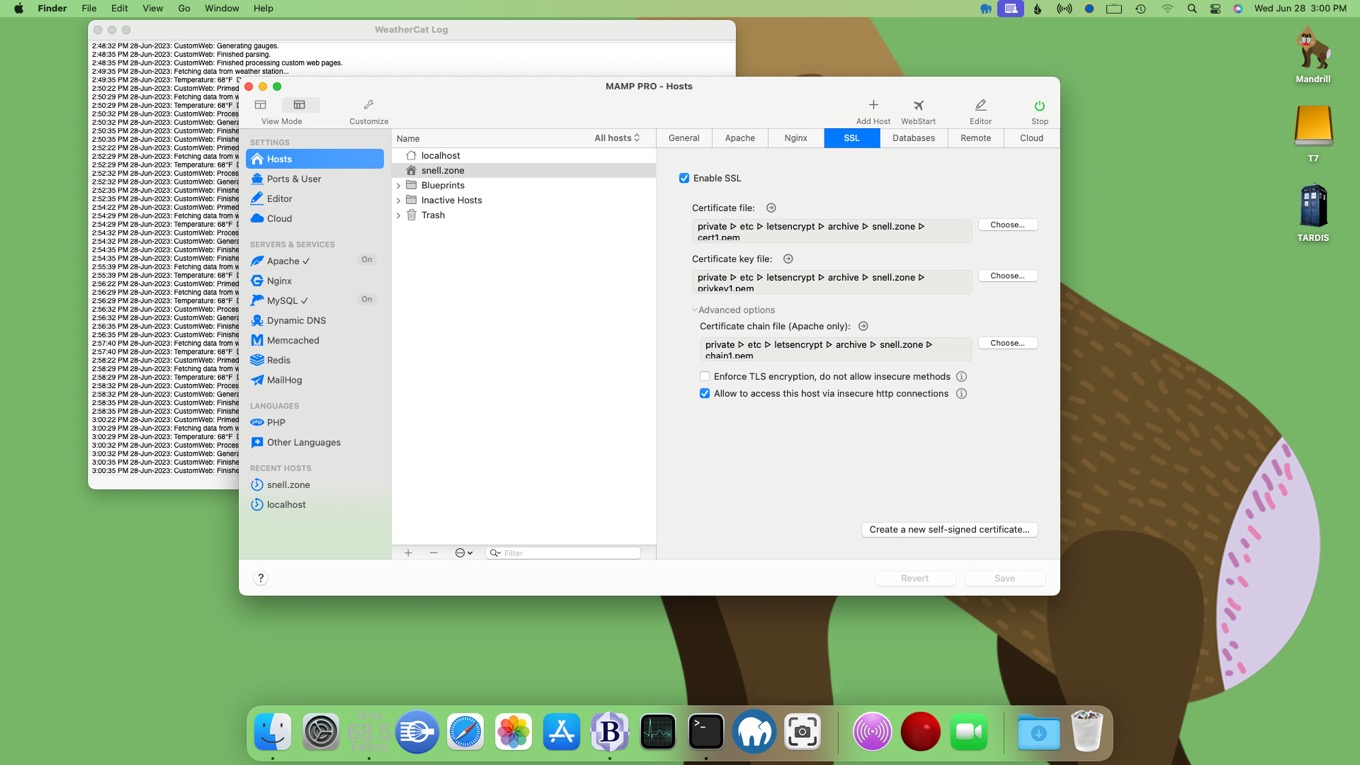
Fortunately, shrugging off the last vestiges of Mac OS X Server was made a lot easier by an app I bought while building the new WordPress version of Six Colors a couple of summers ago. MAMP is a modern take on the same stuff that OS X Server tried to accomplish back in the day: it’s Mac app interface on top of Apache, MySQL, Nginx, PHP, and more. There’s a free version and a $99 pro upgrade that adds a bunch of additional features.
With MAMP, I was able to get my web server up and running without having to wade into installing PHP myself. (I did install Homebrew and use it to install Python. Starting with a clean install of Homebrew on an Apple silicon Mac also felt like a smart move.) MAMP even let me use certificates created with Let’s Encrypt’s certbot app to set up encryption on my server.
Mac OS X Server didn’t make business sense for Apple—the company’s flirtation with the server market fell by the wayside as the iPod propelled the company toward the iPhone and beyond—but the fundamental idea of building a much better interface atop a bunch of Unix command-line utilities was a good one. The Server app itself is long dead, but its spirit lives on—on my new M2 Mac mini server.
Backstage Pass members get access to a monthly Zoom call with us! We held our latest one on Wednesday (there’s no today on the Internet!) and you can catch the archived version here.
Even for what is reputedly a somewhat smaller than usual annual update, iOS 17 still brings with it a host of new features. As the beta process begins, there’s plenty to investigate and try out ahead of the software’s full release this fall.
But as I perused the capabilities that are part of this latest upgrade, something interesting struck me: an older technology appears to be having its moment in the sun, as Apple embraces its utility in a bunch of new ways. That’s great not only because it means new features, but also because—as it’s something that’s been around for a while—those new features will be available on any iPhone that runs iOS 17.
I speak, of course, of the iPhone’s near-field communication (NFC) chip.
Google is shutting down the Google Assistant Notes & Lists integration for non-Google apps on June 20, 2023. Unfortunately, this means that beginning June 20, it will no longer be possible to use Google Assistant to add items to AnyList. We know many of our customers rely on AnyList’s integration with Google Assistant and that the loss of this feature is frustrating and disappointing.
This decision by Google to kill third-party app integration in favor of Google Keep means that my Nest Home Hub just became a whole lot less useful. Going forward, I guess I’ll try to use Siri for this purpose. The key phrase is, “Hey Siri, add apples to my grocery list in AnyList.”
It’s a mouthful, but I don’t have a lot of great options here. Well done, Google, in wrecking the utility of your own little kitchen gadget.
Update: After talking to many AnyList users, it seems like the best way forward is to share a shared AnyList list with Reminders, and share that Reminders list with your shared AnyList participants via iCloud. At that point, you can add items to the shopping list by saying “Hey Siri, put x on my shopping list,” which will add it to Reminders. The next time anyone who is using the shared Reminders list launches AnyList (say, at the grocery store), all items in the list will sync.
The problem is the thin line between encouragement and assuming everyone is a robot. At best, Apple’s exercise system wants you to maintain a strict 100% record, forever. And it periodically nags you if you’re not improving your stats. Ran a marathon the previous day? “Your rings are usually further along by now, you slovenly disappointment!” 97% full of snot due to flu? “Get up, lazybones! Or I will hurl your streak into the sun!”
I am one thousand percent in agreement with Craig on this front. Many, including myself, have argued that Apple ought to come up with a system that’s more lenient: rest days, streak recovery1, streak pausing, whatever.
Ultimately, these systems are here to help encourage us to be better, which is great. But as Craig points out, that can backfire when a streak is broken, especially due to circumstances out of our control.2
I absolutely love that Knotwords lets you recover a broken streak when you finish a new seven day streak. ↩
Personally, as someone who in this past month has had both COVID and a flare up of a mobility issue, any bit of fitness streaks are utterly destroyed. ↩
The Apple Vision Pro announcement was not focused on accessibility, but the product will definitely be accessible to people with disabilities. Existing technologies like VoiceOver and Dwell Control will be integral to the way people with disabilities use the product. Apple is bringing an astonishing number of accessibility features found on other platforms to the headset.
There. That’s sorted.
For most observers, Apple’s WWDC sessions about how to build accessible apps for the headset is as far as they feel the need to go. It’s accessible. Apple has once again considered the needs of users who interact with their tech differently than most do.
It’s true… but there is a lot more to say, even many months before the headset ships. And more to say about who is excited for the device and how it can actually enhance accessibility of the world in which it finds itself. There are also a lot of understandable unknowns about whether the user experience might tempt a specific person with a disability to part with $3500, come 2024.
Biggest potential
The interaction method at the heart of Vision Pro and visionOS is eye gaze—interacting with an item onscreen by looking at it, rather than touching or clicking it to gain focus. That’s a method of interaction already familiar to people with disabilities who don’t use touch gestures or handheld input devices and trackpads to interact with their phones or computers. In many cases, an eye blink or a mouth stick are used to act on the focused item, when users can’t touch a screen or input device.
Eye gaze access is available in some, but not all contexts on Apple platforms. So Vision Pro potentially offers a better experience to someone who uses their eyes to scroll or select things onscreen. In this way Vision Pro could be the most accessible Apple platform yet for someone with motor disabilities like cerebral palsy or quadriplegia that prevents or limits the use of one’s hands. We’ll need to learn more about potential input methods for this community, but Vision Pro could be a game changer.
Head-mounted theater
Lots of people have assumed that I, a person with low-vision, must be incredibly excited about using Vision Pro. After all, content will be close to my eyes, where it needs it to be before I can see it fully. No need to sit super close to a TV or use magnification devices as I sometimes do today. The movie or show is right there, just in front of my eyeballs. And like Apple TV, audio description will be available to catch what I don’t when the content has been described, as it is on Apple TV+. True enough. If there’s one thing I’ll personally benefit from when I eventually strap a Vision Pro to my head, it’s consuming entertainment.
But it’s unclear to me at the moment how using Vision Pro as a computer—gazing at a specific item in order to act on it—will work for me. Will the promised support for Dynamic Type, zooming, and bolded text be enough to make getting work done on the headset possible? I really don’t know. Depends on how zooming in on the screen changes/shrinks the amount of information available—how flexible the “Finder” of Vision Pro is, visually. And I’m doubtful I personally can rely on eye gaze to focus in on particular items. I might need to rely on the VoiceOver screen reader to a greater degree than I do with iOS.
I’m sure there will be alternatives that allow me to use the Vision Pro, but the question for me, and for blind users, too—many of whom are already excited about the platform—is whether the device will give enough of an upgraded experience to make it worth seriously considering it as an alternative to a Mac or an iOS device when I’m doing anything beyond watching a movie or playing a game.
Dream scenarios
Like everyone who loves technology, those of us with disabilities dream about things we might do with a brand-new product that are better than we can right now. When Apple’s wearable-device rumors centered on a pair of glasses, rather than a set of goggles, many or us hoped we’d be able to use the wearable as a navigation aid. We already have human- and AI-driven tools on iOS that allow us to navigate our environment, identify objects and people and read text we find on sings or documents. And specialty accessibility devices from Orcam and Envision, with four-digit price tags, already fulfill some of this promise, as do a handful of really cool iOS apps. Vision Pro includes 12 cameras, LIDAR, text recognition and a number of other features it would need to become a navigation aid for blind people.
But third party apps won’t have access to the camera, and the size, weight and battery requirements – not to mention the aesthetics –of version 1 of the headset seem to indicate it’s not intended to be used for travel.
Many have already imagined games and other immersive experiences they could enjoy on Vision Pro. And some people with disabilities seem to be taking for granted that developers will go that extra mile to support alternative display and input methods offered up by visionOS, not to mention building custom apps with audio-first content.
I’m cautiously hopeful here, because while many iOS and macOS developers have prioritized accessibility, others, particularly in the gaming and entertainment world, have not. And it seems that from what Apple has shared so far, providing accessibility in visionOS apps will need to be even more intentional. At a price point that limits the initial user base of the headset quite a bit, convincing developers to do the work of bringing full accessibility to their apps will be even more important than it has been to date. It takes time and intention, and users will need to be able to encourage developers to understand that the learning and work involved to become accessible is worth it.
Developers are getting their hands on (simulated) visionOS for the first time, and we speculate about how spatial apps might work. And for the Summer of Fun, we gauge our excitement level for various Apple-related product rumors.
No matter what you think of the Vision Pro headset or 3D movies, it’s become apparent over the last few weeks that a lot of people need a primer on 3D, stereoscopic movies. Love them or hate them, there’s no escaping that they’re going to be a subject of conversation again, just as they were more than a decade ago.
Captive audience
Back in the 2000s there was a push to increase movie ticket prices without making major alterations to seating. Stereoscopic movies were an interesting possibility. Sure, they were more difficult and expensive to make, but the advent of digital projectors meant that theaters could be adapted to show them relatively easily. And of course, a 3D blockbuster with impressive visual effects that would give audiences a reason to pay a bit more.
Most 3D theaters are set up with a digital projector and a polarizer set up in front of the projector from a company called RealD. Left and right images would be projected onto the screen at the same time, and special glasses worn by the audience would filter the polarized light to display separate images in both eyes. It’s the same principle as polarized sunglasses or circular polarizer filters for cameras. (Extremely bright or contrasty parts of the image might bleed through from one eye to the other, creating “ghosting.”)
The problem with this approach is that the single projector can still only output an image at its maximum brightness, which is then cut in half by the polarizing glasses. The result is that 3D movies often seem dim. There are also the gross plastic glasses, which would also have to fit over any prescription lenses you might need to wear.
So to recap: They wanted you to pay more in order to see a movie that wasn’t as bright or clear, and you’d need to wear some weird glasses for the privilege.
Apple and Reddit’s relationship with those who deal with their users continues to be a rocky road. Meanwhile, visionOS hits the streets.
Toward a more perfect union
They say both that no news is good news and that there’s no such thing as bad publicity, but if Apple’s relationship with its labor force is any example, the former is more accurate than the latter. Sadly, instead of improving, Apple’s stance on unions seems to have entered what experts in spiraling destructive thought call “irascible Facebook uncle mode.”
Apple Inc “coercively interrogated” retail employees about their pro-union sympathies…
Ironic that throwing that “1984” ad back in Apple’s face got played out years ago over important stuff like non-replaceable batteries and not allowing Flash on iOS.
The company somehow still seems to think that this is a winning move. Indeed, an unnamed Apple TV+ executive even admitted that the company is in favor of a hard line against the striking writers’ union, partly because a good outcome for writers “encourages industries in some countries to unionize in order to make more money.”
It’s OK for us to make more money, we just don’t want you to make more money.
You can argue that Apple is a business and that’s what businesses do. They’re in the business of doing business. But Apple does a lot of good things that aren’t obviously tied to the bottom line—like sustainability, privacy protection, and accessibility—and it could likewise choose to have a better relationship with its workers. If Microsoft can do it, so can Apple.
Now when your mom finds you looking at porn on your computer you can just say it’s to protest costly APIs.
Reddit communities are switching to NSFW to create some friction…
I see what you did there.
…and rob Reddit of ad revenue.
Reddit has since cracked down on this practice, removing moderators of forums that had voted to switch to NSFW. Some mods have since stepped down.
The r/formula1 mod is stepping down, citing “the admin handling of the API changes, the tone Huffman elected to use in every single interview, and because of the whole approach of u/ModCodeOfConduct.”
Apart from forcing beloved apps like Apollo out of business, Huffman’s attitude is not exactly making things better.
“It is really demoralizing,” Bucky said. Being a Reddit moderator and dealing with users is already difficult, he said. “‘I take all this abuse for you, and keep your website clean, and this is how you repay us?’”
Notable features include Guest Mode, which is how you’ll deign to let others try using your Vision Pro—when you surely get one—without allowing them access to all that stuff you’ve been posting to Reddit forums lately. It also features a Travel Mode which, ironically, “ensures that you’re stationary while you’re wearing the Vision Pro.”
In order to be traveling, you must be motionless. This is some real Zen stuff.
The “frosted glass” aesthetic of recent releases of macOS starts to make more sense when you see it in visionOS. Seeing the hint of a Finder window behind the window in front might have been annoying but seeing the outline of a kitchen countertop or desk or sinkhole can be a safety affordance.
We never knew doing spreadsheets could be so dangerous until we were walking around doing spreadsheets.
Developers will have their work cut out for them determining the best way to balance their user interfaces for this new environment, but as Commander Adama said in that Star Trek movie, this is where the fun begins.
[John Moltz is a Six Colors contributor. You can find him on Mastodon at Mastodon.social/@moltz and he sells items with references you might get on Cotton Bureau.]
Finding the gaps in Apple’s passkeys for Apple IDs, the curious.case.of.iPhone.search.periods, some details about Live Voicemail, and Jason falls down an iOS discovery rabbit hole.
My thanks to Kolide for sponsoring Six Colors this week. Kolide offers a more nuanced approach to setting and enforcing sensitive data policies. At most companies, employees can download sensitive company data onto any device, keep it there forever, and never even know that they’re doing something wrong.
IT teams routinely struggle to enforce timely OS updates and patch management, meaning that end users are storing sensitive on devices that are vulnerable to attack. Many MDM solutions are too blunt an instrument and many DLP tools are too extreme and invasive.
Kolide’s premise is simple: if an employee’s device is out of compliance, it can’t access their company’s apps. Kolide lets admins run queries to detect sensitive data, flag devices that have violated policies, and enforce OS and browser updates so vulnerable devices aren’t accessing data. And instead of creating more work for IT, Kolide provides instructions so users can get unblocked on their own. Check out Kolide today.
I have spent the last couple of decades writing about new features in Apple’s operating systems. Tens of thousands of words about new items, large and small, that enhance the experience of using a Mac, iPhone, iPad, and other Apple devices. And yet this weekend, I was reminded that most users simply don’t notice new features, even when they’ve been available for years.
If you’re reading this column right now, you’re one of the most well-educated people on the planet about Apple stuff. But your friends, family, co-workers, and acquaintances? They might never know about flashy new operating-system features unless you personally show them off. It’s one of Apple’s most vexing problems: keeping devices relatively simple while also trying to make complex new features discoverable.
Some software features have a delayed impact, like the clap of thunder reaching you seconds after a lightning strike. They may not be useful right away, but at some point something comes along that makes you realize that they’re just what you needed.
For example, take Apple’s introduction of Live Voicemail in iOS 17. Not only is this technologically impressive feature—which uses your phone to answer incoming calls and transcribe the voicemail being left as it happens—handy in and of itself, but it actually reverberates backwards through time to make an older iOS feature more useful.
Because Live Voicemail finally means I can turn on another feature that I’ve been tempted to use since iOS 13: Silence Unknown Callers.1
I’ve always been reticent to turn on Silence Unknown Callers because I worry too much about missing important calls. There are simply too many times that I get a call I don’t want to miss from, say, a doctor’s office, or a delivery person, or a contractor. Let’s be frank: I’m not going to add all these people to my contact list. And in some cases, even if I do have them in my contacts—the urgent care line in my child’s pediatrician’s office comes to mind—a call doesn’t always come from the same number.
But in iOS 17, if you have Silence Unknown Callers active, callers with unrecognized numbers will go straight to Live Voicemail, allowing you to decide whether or not to pick up. (Meanwhile, numbers that are already marked as spam by, say, your carrier, won’t even trigger this.) For those of us old enough to remember answering machines, it’s the equivalent of screening your calls. It helps insure that you can still get the benefit of not having to answer every call while not ending up playing phone tag with that one person you’ve been trying to catch.
[Dan Moren is the East Coast Bureau Chief of Six Colors, as well as an author, podcaster, and two-time Jeopardy! champion. You can find him on Mastodon at @dmoren@zeppelin.flights or reach him by email at dan@sixcolors.com. His next novel, the sci-fi adventure Eternity's Tomb, will be released in November 2026.]
How we save links for later, the app we’d make for Apple Vision Pro, how we listen to music and podcasts, and tips for tech to use when moving across the country.
Dan Kois, writing at Slate, bemoans one of my biggest annoyances with the iPhone keyboard:
No, no, I’m not searching for “luxury poisons for the rich.” But my Google searches, like hers, are lousy with periods. According to prosecutors’ filings this week as they urged the judge to deny bail, internet searches found on her phone included “what is a lethal.does .of.fetanayl” and “how to.permanently delete information from an iphone remotely.” I, too, somehow end up typing searches into my phone that are full of periods where I wanted there to be spaces, as if I’m William Shatner, emphasizing.each.word.I.type.
This has driven me bananas for many years now. Is it just my big thumbs missing the spacebar? Or is Apple overcorrecting on making sure the period is in there if I want to type a web address. I’m not saying, unlike Kois, that I never want to put a URL in this field, but I definitely search much more than I enter an address by hand, and this does end up more frustrating than useful.
The latest updates to Apple’s platforms have promised improved autocorrect and predictive text—is it too much to hope they might eliminate the dreaded period problem as well?