Six Colors
Six Colors

Apple, technology, and other stuff

Support this Site

Become a Six Colors member to read exclusive posts, get our weekly podcast, join our community, and more!

By Dan Moren

Star Wars: The Force Awakens trailer

Note: This story has not been updated for several years.

Episode VII

Okay, I’ve only watched it twice so far. But I’d suspect more viewings are in the offing.

A few general words, first: I’ve been trying to avoid spoilers about Episode VII. Hell, I’ve been considering not visiting my customary movie news sites for the next year or so, just to head off accidents like the Phantom Menace soundtrack debacle. So I don’t have any particular information about the plot of this movie, who the characters are (aside from the original trilogy members we know are returning), or anything else.

But I’ll say this: It’s a weird experience, watching something that seems both old and new. Every shot brings more questions: Wait, there are still stormtroopers? TIE Fighters? X-Wing pilots with Rebel Alliance insignia? Are we back on Tatooine? And yet there are so many new, unrecognizable things: a rolling droid, an unfamiliar-looking landspeeder, worlds that we haven’t seen before.

But if I had to encapsulate it all, there’s a moment right towards the end of the trailer—I won’t spoil it—but as the iconic music blares, something familiar makes an appearance. And I got goosebumps. Not just to see its return after so long, but because J.J. Abrams seemed to have plucked the scene directly from our collective imaginations. It just fits. It’s Star Wars.

Look, I know we’ve been burned before. I was a freshman in college when The Phantom Menace trailer arrived, and we watched it innumerable times over the next months. But despite the ultimate let down of those movies, I will never not be excited about the potential for more great stories in this universe that I dearly love.

Later, there will be time to break it down frame-by-frame, obsess over the minor details, and speculate on the whos, whys, and wherefores. But for now, I’ll sit back and revel in the pure atavistic delight of it all: after so many long years and so much disappointment, Star Wars is coming back to the big screen.

[Dan Moren is the East Coast Bureau Chief of Six Colors, as well as an author, podcaster, and two-time Jeopardy! champion. You can find him on Mastodon at @dmoren@zeppelin.flights or reach him by email at dan@sixcolors.com. His next novel, the sci-fi adventure Eternity's Tomb, will be released in November 2026.]

By Jason Snell

Gift Guide: Marvel Unlimited

Note: This story has not been updated for several years.

marvel-event
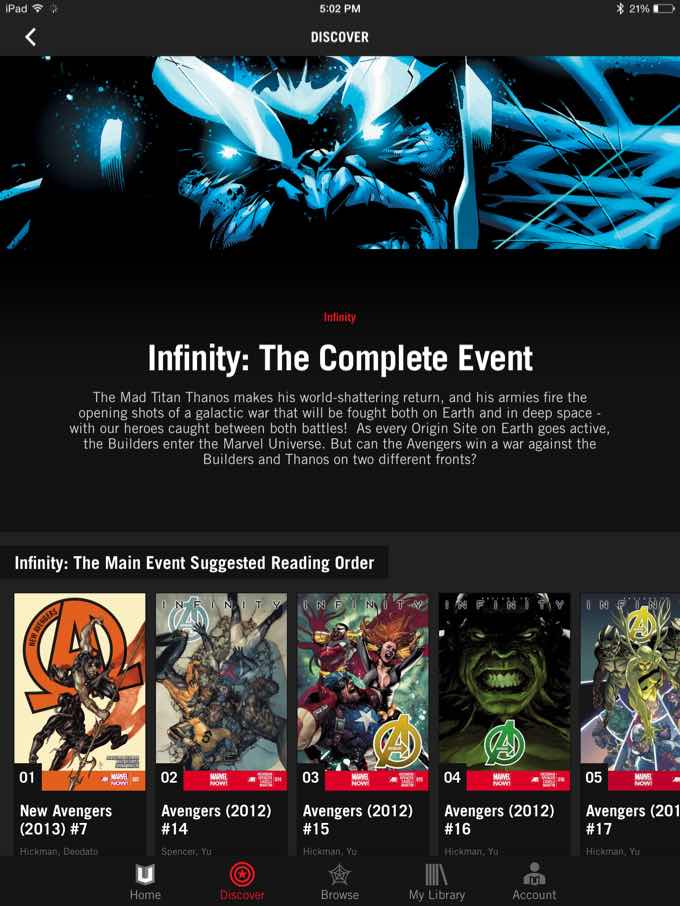
It’s a lot easier to read comic events in an app when there’s a reading order.

If you or someone you know loves, loves, loves Marvel comics—and especially if we’re talking about someone who doesn’t buy many or any comics the week they’re released—I highly recommend the Marvel Unlimited service.

It’s like Netflix for Marvel comics. (And only Marvel comics—I wish other publishers would offer a service like this, but they don’t!) For $10 per month or $69 annually, you get access to more than 15,000 comics in Marvel’s library. Read as many as you want.

To read the comics, you’ve got to be on the Internet—though you can offload 12 at a time onto any device, so even if you’re out of range or on an airplane, you can have access to the equivalent of two trade paperbacks worth of comics.

The selection on Marvel Unlimited is pretty great. There are classic runs from all of the comics you’d expect—Fantastic Four, Amazing Spider-Man, Uncanny X-Men—plus newer books. In fact, Marvel seems to be posting most of their comics with a six-to-nine month lag. I buy a handful of brand-new Marvel comics on Comixology every month, but most of their stuff just doesn’t appeal enough for me to pay $3 or $4 per issue. Once that stuff hits Marvel Unlimited, though, I’m all over it.

kittypryde
You can tap to reveal a toolbar, but otherwise you’re just reading comics pages on your iPad. It’s good stuff.

The economics of a service like Marvel Unlimited are pretty simple: If you read enough comics in a year to make it worth $69, it’s a service worth getting. I’ve had it for two years now, and have no regrets.

Recently I spent a weekend catching up on last year’s Infinity event, written by Jonathan Hickman. (It was surprisingly good!) Marvel Unlimited provided a suggested reading order for the entire event, which was a huge help. All told, there were 22 comics in the main sequence of the event. Most of those comics are now for sale on Comixology for $2, meaning in a weekend I read $44 worth of comics. It adds up quickly.

And not having to weigh whether a particular storyline or plot synopsis is worth several dollars opens you up to exploration. I’ve read numerous excellent runs of comics that I never would have bought, based on stray Twitter recommendations. (Brubaker and Fraction’s Immortal Iron Fist and Mark Waid’s Daredevil, to name two.)

When the service launched, it only worked in web browsers and was Flash based. When the iOS app arrived, it was usable but really ugly. It’s come a long way since then. The app is more stable, does a better job of pre-loading issues as you start to read them, and there’s even a Smart Panel mode that—while not as good as Comixology’s Guided View—still does a decent job of guiding you from panel to panel if you prefer to read that way.

marvel-next
When you finish an issue, hit the feeder bar—er, Read Now button—to read more.

And when you get to the end of an issue, it prompts you to immediately jump to the next issue. (Unfortunately, it doesn’t offer you the next issue in an event, which would’ve been nice when I was reading Infinity.)

Marvel Unlimited isn’t perfect. The app still has a few bugs—the inability to zoom properly on two-page spreads when in portrait orientation bugs the crap out of me, and it still crashes a little too often. The catalog of comics is still missing some classic issues (only the first eight issues of John Byrne’s Alpha Flight, really?), though in the past couple of years they’ve filled in many of the holes—all the Uncanny X-Men issues I missed are now there.

If you’ve got a comic fan who likes Marvel on your gift list, or you want to do yourself a solid, I highly recommend Marvel Unlimited. I wish Marvel’s distinguished competition offered a service like this—it might actually get me back into DC comics for the first time since I was a teenager.


On this happiest of Thanksgiving holidays, Lex talks about his new electric car, Dan talks about his new Fire TV Stick, and John talks about people with stupid advice for Apple.


By Dan Moren

Wish List: Siri integration with Apple TV

Note: This story has not been updated for several years.

Siri

As I noted in my review of the Fire TV Stick last week, I watch a lot of television. Probably too much. Who can say? But as much as I like TV, navigating my manifold smart TV accoutrements is hardly a pleasure.

The Apple TV, with its dinky little aluminum remote, is no exception, as you learn after the seventeenth time you’ve angrily entered your iTunes or Netflix or Hulu account information, one slow, painstaking letter at a time. Yes, you can use the Remote app on iOS to get a virtual keyboard instead, but that’s a pain of its own; you have to find your phone, unlock it, launch the app, connect to your Apple TV, and then enter the information. More often than not, I just suffer through using the remote, because it’s actually faster. (Inertia: the most powerful force in the universe.)

But I long for some sort of voice-based way to direct my Apple TV. We don’t have to be talking Microsoft Kinect or Amazon Echo with their always-listening creepiness. I’m thinking Apple could just harness Siri on my iPhone or iPad and make the intelligent assistant aware that I have an Apple TV.

“Siri,” I might say to my phone, “show me the latest episode of The Flash on my Apple TV.” And up would pop my list of options for watching the newest installment of Barry Allen’s escapades, whether that meant Hulu Plus, the iTunes Store, or so on. It’d be even more useful for movies, so I could watch something that’s available for free on Netflix or HBO Go instead of shelling out money to rent or buy it on iTunes. Yes, that might take some money out of Apple’s pocket, but it’d also be known as the helpful company, the friendly company. The company with a heart. (To paraphrase one of my favorite movies of the season.)

Apple TV

This kind of integration is directly in Apple’s wheelhouse. The company’s great strength, as their executives constantly delight in telling us, is that it makes its own hardware, software, and services, and it can have them all work together in seamless harmony. This, then, seems like the perfect place to exploit those connections and simplify the experience of using set-top boxes.

Plus, it will make the TV-watching experience that much lazier—especially once we can all control our Apple TVs using Siri on our Apple Watches. We may never leave the couch again.

[Dan Moren is the East Coast Bureau Chief of Six Colors, as well as an author, podcaster, and two-time Jeopardy! champion. You can find him on Mastodon at @dmoren@zeppelin.flights or reach him by email at dan@sixcolors.com. His next novel, the sci-fi adventure Eternity's Tomb, will be released in November 2026.]


By Glenn Fleishman

Web apps, native apps, and app ecosystems

Note: This story has not been updated for several years.

 web apps

[Glenn Fleishman writes regularly for the Economist, Boing Boing, and Macworld, and tweets incessantly—oh why won’t he stop?—at @glennf.]

A recent spate of articles caused yet another dustup about the future of the Web (an open publishing medium based on standards that ostensibly works anywhere) versus native apps, which are programmed according to standards for distinct platforms and may (Google) or may not (Apple) be freely distributed without oversight and review.

The Wall Street Journal‘s Chris Mims started it off with “The Web Is Dying; Apps Are Killing It“; Zach Steward wrote a rejoinder at Quartz, “The web is alive and well“; and John Gruber dissected and rejected Mims’ narrative at Daring Fireball, “Native Apps Are Part of the Web.”

I believe there were a couple of missed points among these articles, although I generally favor Gruber’s broader view of the Web’s position within apps. He notes that apps “are alternatives to websites that run in web browsers. They’re just better clients.” Most apps are just thin layers on top of modern Web standards with the added benefit of a potentially superior user-interface experience, because the operating system takes care of more details with greater consistency, and allows a complicated but more reliable adaptation to multiple sizes of devices, whether it’s iOS, Windows Phone, or Android.

A Web browser on mobile and desktop devices isn’t a stable target: creating a responsive site that works well most of the time on most browsers is doable, but difficult; an app imposes more requirements and limitations, but it’s easier to test and ensure results that more likely conform to your design requirements. (Even with Android’s hundreds of screen sizes, this appears to be true, and now iOS designers are dealing with similar issues having many, not hundreds, of screen dimensions.)

But beyond interface flexibility, why put the huge development dollars and/or sweat of one’s brow into a native app, which is necessarily limited to a specific environment and requires frequent updating to meet the ongoing operating system changes imposed by the platform’s owner? The Web changes, too, but more slowly; browser updates don’t typically break features in most Web apps, but offer more improvements to take advantage of.

Some apps need lower-level access to the OS to be effective. Could Marco Arment have programmed The Magazine‘s initial app as a responsive Web site? Almost certainly yes. I’ve seen slick Web-only publications that have most of the spit and polish of Marco’s first app. The most important parts of The Magazine‘s app aren’t in the user interface part, as I’ll explain in a moment.

Could Marco have created Overcast as a Web app? Almost certainly not. For Apps that interact with audio and video, and most games of any sophistication, being able to delve deep and tune performance, latency, and interaction are key.

But most apps don’t offer audio, video, or game elements that need native code. There are so many examples of how browsers that comprehensively support HTML5 and CSS3’s features, and have highly optimized JavaScript, can accomplish a surprisingly large amount of what native apps do. So why bother?

I’d argue that it boils down to several app ecosystem features, rather than native code advantages. When there’s a genuine choice between building a Web app or native app, and when audience and revenue are important, the ecosystem makes the difference.

Continue reading “Web apps, native apps, and app ecosystems”…


Sponsor: Things by Cultured Code

things

This week’s Six Colors sponsor is Things, by Cultured Code. It’s a great organization and to-do list app—we gave it an Eddy Award when I was at Macworld.

This week, Things 2.5 for iPhone and iPad is Apple’s iOS Free App of the Week. So you can get the iOS apps, normally $19.99 for iPad and $9.99 for iPhone, for free! (And they’re fully functional—there are no in-app purchases in these apps.)

This is the first time Cultured Code has ever given away Things. To complement the free iOS apps, Cultured Code is also cutting the price of Things for Mac by 30 percent for this week only.

This promotion is available globally, and ends on Friday, so don’t delay!

All three apps were recently redesigned for iOS 8 and Yosemite, with an “Add to Things” Extension, Handoff between all devices, Background Refresh on iOS, a new iOS app icon, support for iPhone 6 and 6 Plus, and a Today Widget on OS X.

And if you decide to take the Things plunge, don’t miss their Getting Started Guide, which is a quick read that’ll help you learn the basics.


Go Play: Crossy Road

I assumed everyone had already heard about Crossy Road, but I mentioned it on Upgrade this week and heard from a bunch of people who blamed, er, credited us for getting them into it.

Crossy Road is a free iOS game that’s inspired by Frogger. You’re a creature (many are available, some for free, some via in-app purchase, though so far as I can tell none of the creatures actually affects gameplay) jumping across lanes of traffic, railroad tracks, treacherous waters, and the like. Eventually you get run over. Your point total is the number of spaces forward that you’ve advanced.

I made a video so you could get a sense of it.

People throw around the word “addictive” to describe iOS games way more than they should, but we’ve been playing Crossy Road in my house a lot this week. I think the word might apply.


Clockwise 64: ‘Disposable Electric Car’

Clockwise Podcast

Clockwise is a weekly podcast that will never run out of gas—but it’s also never longer than 30 minutes.

In this week’s episode, my co-host Dan Moren and I chat with guests Lex Friedman (Dan’s co-host on The Rebound) and James Thomson (developer of PCalc). We talk about our backup strategies, subscription services for apps, the death of the tablet, and electric cars.

Clockwise is sponsored this week by:

  • William Shatner – Join the Captain’s Kickstarter to create a book to empower a million people, and get cool bonuses like signed books or dinner with the Captain himself.
  • Dash – Web dashboards to let you peer into the current status of your business and even your life! Try it out free today and get one private dashboard forever.

He almost missed the perfect shot… but didn’t.

Andrew Mills is a photographer for NJ Advance Media. He was shooting the Giants-Cowboys game when Odell Beckham’s spectacular catch happened right in front of him. No, I mean literally right in front of him.

Then Twitter did what it does, which is point at laugh at the guy who’s staring at the catch like a deer in the headlights.

Except, as Mills writes:

I switched cameras to the 70-200 hanging over my right shoulder and immediately swung to the center of the field, hunting for the intended receiver, but I couldn’t find one. I swung back toward the bench and spotted Beckham blazing down the sideline right at me, ball in the air.

This is the “Oh, no” point.

I am tracking him, and Beckham is closing fast. Too fast. And I am too close. Way too close. And there’s nothing I can do.

So as I began to lower the 70-200 to desperately grab the wide angle around my neck, the play is unfolding, literally, at my feet. I’m shooting (and twisting the zoom to get as wide as possible) the entire time the camera is being lowered. I was able to capture a frame that’s in focus — remember, a picture is not a picture if it’s not sharp — of the ball on Beckham’s fingertips, but again I’m tight. Way too tight.

Turns out he did okay.

[via PetaPixel]


By Chip Sudderth

How Apple can boost my iPad productivity

Note: This story has not been updated for several years.

[Chip Sudderth works in public school district communications and produces two podcasts: Two-minute Time Lord for Doctor Who fans and The Audio Guide to Babylon 5 with Erika Ensign and Shannon Sudderth.]

chip-trackpad
iPad Air 2 with Origami Workstation, Apple Wireless Keyboard, and Apple Magic Trackpad.

Jason’s November 19 review of the iPad Air 2 points out that iPad software fails to take full advantage of the phenomenal hardware in order to make the iPad a true productivity tool:

Every time I try to use a professional tool with my iPad I end up getting frustrated at how much slower the touch interactions are than just using an old-fashioned keyboard and mouse on my Mac.

Perhaps, in some very specific circumstances, touch interactions aren’t the most efficient way to interact with software. Apple might be able to unlock huge iPad productivity gains for some users through a software update that would certainly be controversial, but it’s one that I would welcome as someone who gets serious work done on my iPad Air.

Apple could add support for external pointing devices on iOS.

Continue reading “How Apple can boost my iPad productivity”…


By Jason Snell

Attack of the 50-foot Save Sheet

Note: This story has not been updated for several years.

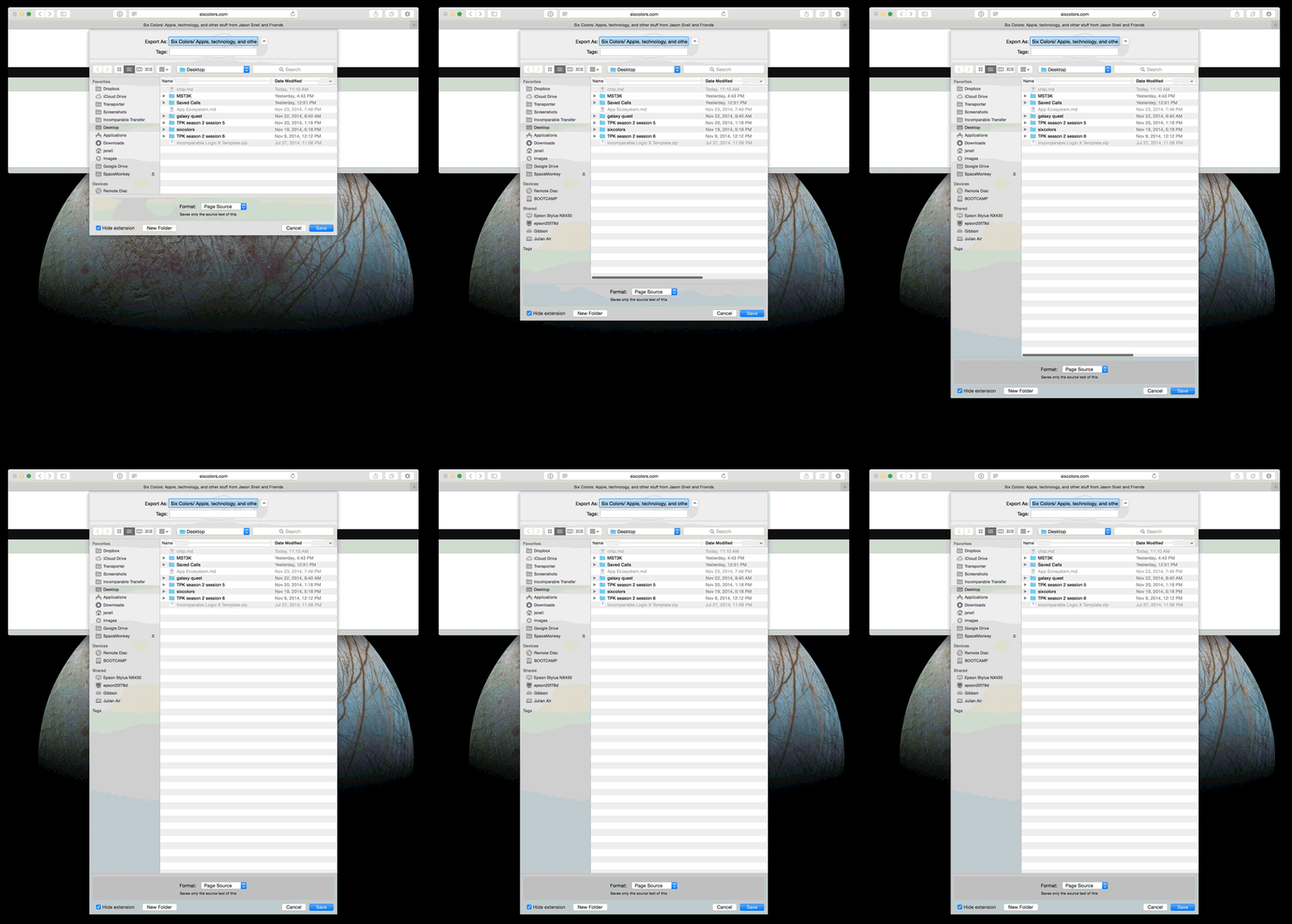
Save Sheet bug

This morning I tried to save a file in BBEdit, only to discover that I couldn’t see half of the save sheet—it was so large, it went off the bottom of the screen.

It turns out—and thanks to Jon Gotow of St. Clair Software, maker of the excellent Default Folder X, for the answer to this—that there’s a bug in Yosemite that causes a sheet to grow taller by 22 pixels every time you use it.

Once that sheet’s off the bottom of the screen, you can no longer grab the bottom of the sheet to make it shorter… so you’re hosed. And so was I, until Gotow gave me these Terminal commands:

 defaults delete -app BBEdit NSNavPanelExpandedSizeForOpenMode
 defaults delete -app BBEdit NSNavPanelExpandedSizeForSaveMode

…where you use the name of the affected app instead of “BBEdit” in the above example.

If you’re using Chrome, you need to target its bundle identifier:

 defaults delete com.google.Chrome NSNavPanelExpandedSizeForOpenMode
 defaults delete com.google.Chrome NSNavPanelExpandedSizeForSaveMode

According to Gotow, what happened is that Apple changed the file dialogs so that the title bar is now considered to be part of the window—and changed the math everywhere except in save sheets.

Hopefully Apple will fix this in a future Yosemite update. In the meantime, if you use an app that saves files via the sheet style, you might want to remind yourself to shrink its height a bit every so often.

[Update: Daniel Ericsson points out that if you hold down the shift key and drag inward on the edge of the save sheet, the sheet will get shorter—even if there’s no room for the sheet to actually get narrower!]

[Update x2: A new beta of Default Folder X now fixes this bug. It’s free for a 30 day trial, if this bug is biting you, and it’s a cool add-on!]


By Glenn Fleishman

The crashing price of storage

Note: This story has not been updated for several years.

[Glenn Fleishman writes regularly for the Economist, Boing Boing, and Macworld, and tweets incessantly—oh why won’t he stop?—at @glennf.]

Image: Kenny Louie

It’s tricky to discount the future, except when it comes to technology. In nearly every way, the march of computing power, memory, hard disk storage, screen quality and the like is toward ever more, ever cheaper. In general, the price of food, shelter, and energy increase over time in absolute terms, while the price of things that contain electronics decrease in real terms. (The big exception is bandwidth in America because of a severe market failure that preserves false scarcity.)

So I’m cagey about getting locked into a price for anything when I know it will, nearly invariably, cost less and be better if I wait. This is why I haven’t upgraded my aging-but-still-reasonably-functional mid-2011 MacBook Air, which has 4 GB of RAM and can’t be expanded to more, because I know a Retina version is coming if I only wait long enough, likely only costing slightly more than today’s Air.

But when I spotted an offer from Code 42, makers of CrashPlan, for a pre-Black Friday sale (now since expired), I leapt at it. This sale for existing subscribers took about half off the price of its unlimited storage family plan, which is usually $150 for one year or $290 for two. The reason I paid says a lot about the current dynamic in the world of computer storage.

Continue reading “The crashing price of storage”…


Upgrade 11: ‘Flexible Shower Schedule’

Upgrade Podcast

This week on the tech podcast that may or may not be wearing pajamas, Myke Hurley and I welcome special guest Greg Knauss to talk working from home and never reading the comments. We also quiz Myke about Thanksgiving.

This week, Upgrade is sponsored by:

  • Drafts: where text starts on iPhone and iPad. Now easier and more powerful than ever.
  • Studio Neat: Get 10% off anything in their store using the code UPGRADE.
  • Mailroute: a secure, hosted email service for protection from viruses and spam. Go to mailroute.net/upgrade for a free trial and 10% off, for the lifetime of your account.

Colbert and Carell recall a classic bad review

In the mid-’90s some college friends of mine and I started a website (they weren’t yet called blogs) called TeeVee, where we’d write theoretically funny stuff about TV. Stuff like my friend Pete Ko’s review of a show called “Over the Top”, which premiered in 1997 and was rapidly cancelled.

In 2001, Pete got an email from a “Daily Show” performer named Stephen Colbert:

Dear Mr. Ko,

I would like to congratulate you on your Review of Over the Top. That is
some good writing.

In 2006 when Steve Carell won the Television Critics Association award for best actor for “The Office,” his acceptance speech was mostly quotes from Pete’s review of “Over the Top.”

These guys are still talking about it, as they did Friday:

After Colbert and Carell’s short-lived run on The Dana Carvey Show came to an end, because the show was canceled after seven episodes, Carell went back to L.A. where, as he said Friday night, he did a “bunch of bad sitcoms,” including one Colbert called “the worst bad sitcom of all time,” a show called Over the Top, which lived up to its name, at least with respect to Carell’s performance. The sitcom, in which Carell played a Greek chef at a hotel run by Annie Potts’ character, also had the distinction of receiving a horrible but hilariously written review from Teevee.org, which has been quoted by Carell before. On Friday, he and Colbert recalled some of the pan’s best lines (“[Steve Carell’s appearance on screen sent] audiences and critics alike diving over their ottomans, fumbling for the TV Guide, screaming ‘Who the hell is that!?!’ and “I have stood in a freezer full of dead people at the morgue. I have seen a man’s scalp pulled back over his nose…But I can now honestly say that until Steve Carell’s turn in the premiere of Over the Top, I have never known true horror.”), and Colbert revealed he was so impressed by the reviewer’s writing, he asked the reviewer, Peter Ko, to be a writer for The Colbert Report, but Ko wasn’t remotely interested.

I don’t recall Pete ever mentioning a job offer to me, but he’s doing okay. He’s a U.S. Attorney now. So Colbert and Carell, keep on the right side of the law.


By Jason Snell

Podcasts swirling, whirling, and moving

Note: This story has not been updated for several years.

Some of my best friends are 5by5 podcasters. (Taken at the 5by5 meetup at WWDC 2014.)

Today Moisés Chiullan announced that Brett Terpstra’s Systematic podcast and Christina Warren and Brett Terpstra’s podcast Overtired are moving from 5by5 to ESN.fm.

There’s been a lot of podcast movement lately, which isn’t really surprising given how young this medium (or whatever) is. Not everyone finds podcast networks valuable, but they can helpfully group shows of similar sensibilities together, provide exposure for new shows that might otherwise be missed, and offer a technical or financial infrastructure that can be convenient for people who have something to say but don’t want to build a podcasting business1.

And sometimes after a while, those hosts or shows are ready to spread their wings, creatively or technically. Plenty of talented hosts have left 5by5, but you know what? My pals Merlin Mann and Andy Ihnatko are still there, and the indefatigable Dan Benjamin’s producing new audio and video shows all the time.

Since we moved Clockwise from IDG (with the blessing of some nice folks in IDG management) to Stephen Hackett and Myke Hurley’s new Relay FM network, the audience of that show has more than doubled. Being on Relay helped expose the show to a great audience of tech-podcast listeners, and has also helped us grow Upgrade rapidly.

I should mention that as of the most recent episode of The Incomparable, I’m no longer posting episodes to the 5by5 network. We started the show in 2010 and quickly Dan started recruiting me. A little more than a year later, we joined 5by5, and it helped expose my odd little pop-culture show to a much wider audience2.

As time wore on, I decided I wanted to build something on my own, and launched spin-off shows on The Incomparable Network. That project also allowed me to add show metadata that 5by5 simply couldn’t or wouldn’t offer, like a page of all our Star Wars episodes or an index of show topics.

At that point the clock was ticking. I began posting the show to both networks. After a communication failure at 5by5 forced me to abandon a live episode just as it was starting, we set up our own live-stream system that we could control. And most recently, I gave Dan notice that we were changing ad-sales teams. The relationship was at an end. It was time to make it official.

I’m a believer in the medium—it’s one of the ways I expect to support myself and my family now that I’m on my own. But these are the early days. Things are changing rapidly. There are always new podcasts and new networks. (And yes, it’s worth reminding ourselves that this is not the only new-media opportunity out there.)

This reminds me of nothing more than the early days of the web. The younger people out there might not remember, but that period was like the wild west. Things changed every day. Podcasting’s going through something similar.

Anyway, thanks to everyone out there who has listened to some of my podcasts. And best of luck to Brett and Christina on their new adventures with Moisés at ESN.


  1. John Gruber, Marco Arment, John Siracusa, and Merlin Mann were unlikely to have devoted the time to podcasting when they started—but Dan Benjamin offered technical expertise and an ad-sales infrastructure, as well as being an excellent conversational foil.
  2. Nothing really changed with the production of the show when we moved—I’ve produced and edited almost every episode, and Dan never had any input into the content.

The Incomparable 221: ‘Do the Hand-Wavy Thing’

The Incomparable

This week on my pop-culture podcast The Incomparable, we wrap up the latest season of “Doctor Who,” which concluded a couple of weeks back. My guests are Glenn Fleishman, Erika Ensign, Dan Moren, and David J. Loehr. There’s also some bonus material.

This week The Incomparable is sponsored by:

  • Target Acquired by Touchten Games – Visit touchten.com/geek to pledge, type I’m a geek in the comments after pledging, and get a discount toward Manami Matsumae’s CD!
  • “Catch Me Up” by William Shatner – Help the captain empower a million people to try new things by backing his Kickstarter, and choose from some cool rewards!

  • Harry’s – The official razor partner of Movember. Great shaving supplies for men. Use code SNELL at checkout of your first purchase for $5 off.

Also posted in the past week on The Incomparable network:

And I’d be remiss in not mentioning that some nifty Random Trek t-shirts are for sale at Cotton Bureau for a limited time!


Sponsor: Drafts 4

Drafts

This week Six Colors has been sponsored by Drafts by Agile Tortoise. At first glance Drafts looks like yet another iOS note-taker or text editor, but it’s so much more, and the new Drafts 4 takes it to a whole new level.

In Drafts, text comes first. When you open the app, you get a new, blank draft—ready to receive your text input. Don’t fiddle with names or tags or anything like that, and jump straight to the most important thing—getting your words down.

Once your words are down, Drafts goes to work for you. You can send that text to social media, save it (or prepend/append it) to a file on a cloud-storage site, or pass it on to a third-party app such as OmniFocus or Fantastical. Drafts can use its own multi-step actions as well as the power of JavaScript to perform complex tasks in a single tap.

Want to know more? You can read David Sparks’s review, or the five-mouse Macworld review, or the MacStories review.

Drafts 4 is available on the App Store for $9.99. Thanks so much to Agile Tortoise and Drafts for sponsoring Six Colors this week.


By Dan Moren

Amazon Fire TV Stick review

Note: This story has not been updated for several years.

Fire TV and Fire TV Stick

It’s come to my attention that I may have a problem. And that problem is: not enough HDMI ports.

Right now, connected to my TV are an Apple TV, an Xbox 360, a Mac mini, and an Amazon Fire TV. If you’re wondering, the answer is yes: I do find myself saying a little prayer every time I plug something else into the power strip back there.

I also had a Chromecast up until I left it in a hotel room last month. My new TV, purchased in August, has all those handy smart TV features. And yet, for some inconceivable reason, I still ordered an Amazon Fire TV Stick when they were announced a few weeks back. (It didn’t hurt that it was on sale for $20 for Amazon Prime members like myself.)

Basically, I buy video-streaming devices with slightly less devotion than Scott McNulty buys Kindles.

Continue reading “Amazon Fire TV Stick review”…


So what, who cares?

Allow me to suggest something a friend of mine is doing. Lisa Schmeiser, who appears regularly on a few of the podcasts I host or produce, is doing an email newsletter called So What, Who Cares?. It’s really great.

In her day job, Lisa is a tech-media newsletter maven, and she’s thought a lot about what makes a good newsletter. Newsletters as a medium seemed old and tired for a long time, mostly because most of them were link dumps used as crass traffic drivers. But a new generation of voicey newsletters has hit the scene—Dave Pell’s NextDraft is a great one—and Lisa’s unique take on news and pop culture is an enjoyable read every night before I go to bed or every morning when I’m making tea and breakfast.

As Lisa describes the newsletter:

What is news or pop culture without context? Every day, I’ll point out three to five things that you might like to know, explaining why they matter (So what?) and who they affect (Who cares?).

You can check out the archive of past newsletters before deciding if you want to subscribe.


Search Six Colors