My thanks to Igloo for sponsoring Six Colors this week. Igloo is a web intranet that your users will be able to access from anywhere and from any device. The interface is intuitive, making file sharing and collaboration easy, even on the latest iPhones.
Note: This story has not been updated for several years.
This month Apple’s celebrating “10 Years of Podcasts“, meaning that it’s been a decade since Apple introduced podcasting features into GarageBand and iTunes and added a podcast directory to the iTunes store.
Of course, podcasts have been around for more than 10 years. I remember Shawn King broadcasting radio on the Internet in 1994, and several other Apple-themed podcasts date from the early 2000s.1 Leo Laporte founded TWiT in 2005, though in a fit of pique about Apple making noises about owning the word podcast, he re-dubbed them netcasts and you still hear that word on TWiT’s promos today.
Prompted by Rene Ritchie, I looked up the first podcast I actually hosted. It was probably Macworld Podcast 27, February 8, 2006, live from a cruise ship in the Pacific Ocean—though I more vividly remember the very next episode, which featured Leo Laporte and was largely conducted in a shipboard bar. As Leo and I talked, more geek cruisers stopped to watch. By the end of the chat, Leo and I had gathered a studio audience, which applauded when we concluded. It was awesome.
The first podcast of my own was the original TeeVee podcast, in July of 2006. It was sporadic and didn’t last very long. I didn’t resume podcasting independently from my job until August of 2010, when The Incomparable debuted. Hard to believe it’s been nearly five years, until I look at the calendar and see that I’ve got to prep episode 256 for posting tomorrow.
These days I host or co-host four weekly podcasts and produce several more.2 Thanks to the rise of podcast sponsorships (and my departure from my old job), I can say that I’m not just a writer and editor who podcasts on the side—I’m also a professional podcaster.
That’s weird, but it’s good. I love to listen to podcasts and I love to make them. It’s good to be doing something you love. If podcasting couldn’t help me make a living, well, I’d still be doing it. (Just probably not quite as much of it!)
Adam Christianson’s Maccast premiered in December 2004. ↩
What did you do for PRIME DAY?! (It doesn’t matter, it’s over.)
SEATTLE IS GOING TO FALL INTO THE SEAAAAAA!!! (http://www.newyorker.com/magazine/2015/07/20/the-really-big-one)
Apple has new iPods: http://www.apple.com/ipod/
More here on these new iPods: http://sixcolors.com/post/2015/07/new-ipod-touch-gets-iphone-6-power/
Could this mean a new 4-inch iPhone is coming? (http://www.macworld.com/article/2948815/apple-phone/is-the-new-ipod-touch-a-harbinger-of-a-4-inch-iphone-6c.html)
There’s a weak rumor that Apple will drop the iPad mini: http://appleinsider.com/articles/15/07/15/rumor-apple-to-launch-end-of-life-ipad-mini-model-and-ipad-pro-in-2015-forego-ipad-air-3
If you installed the beta of El Capitan, Jason Snell’s first look will help a lot: http://www.macworld.com/article/2944996/first-look-at-the-os-x-el-capitan-public-beta.html
Dan has some thoughts on iCloud Drive: http://sixcolors.com/post/2015/07/recovering-deleted-icloud-drive-files/
Note: This story has not been updated for several years.
Part of the challenge in going freelance over the last nine months or so has been keeping careful track of the projects I do, and making sure not only that I remember to send out invoices, but also that I get paid—hopefully, promptly.
I’ve tried out a few all-in-one solutions that have been recommended, including FreshBooks and Billings Pro, and while they’re almost all perfectly fine, they’re also generally far too much for my needs. I deal only with a few clients, and most of my work does not require time-tracking.
What I really wanted was a Mac app for simple databases, Ã la the late, lamented Bento. There are a couple of spiritual successors out there, including Records—still a bit too light on features for me—and Tap Forms Mac—much more powerful, but a little idiosyncratic for my tastes.
Well, as they say, if you want something done right, do it yourself.
Ultimately, the best solution for me—and I stress, for me—has proved to be Numbers, for a few reasons. Firstly, it’s already on all my Macs and iOS devices. Secondly, while it may not be on par with the likes of Excel, it is remarkably powerful. And thirdly, well, it’s pretty and has a pretty gradual learning curve.
My freelance tracking sheet.
I figure some of what I’ve done in concocting my master freelance spreadsheet might be of interest, both to folks who have to track this kind of information, as well as other novice-to-intermediate Numbers users. (As a caveat, I’m hardly an expert on these subjects, so I’m sure there are more efficient or better solutions to some of these problems—this is simply the way I did it.)
What have I wrought?
Here are a few of the techniques I used to up my spreadsheet game:
If statements: The payment status of my projects is perhaps the most important thing that I track and here a little logic goes a long way. I’ve got four status conditions: Unsubmitted, Unpaid, Paid, and Overdue.
While I could have entered and updated these statuses manually, I determined fairly simple rules by which they could be programmatically interpreted.
Whenever I start a new project, I enter a new item. Until I submit an invoice, the Date Submitted field remains blank, which Numbers knows means that project is Unsubmitted.
When I do submit an invoice, I add the date I did so in the spreadsheet, which flips the status to Unpaid.
When I receive payment, I check the respective checkbox in the Paid column, which flips the status to Paid.
Finally, if an item is Unpaid and it’s been 30 days since the submitted date, the status changes to Overdue.
Here’s the formula I use (with “C” being the Date Submitted column and F being my Paid column):
I can also use that to automatically track the total amount of outstanding payments—i.e. how much money I’m owed from clients—by creating a cell at the top of this sheet with this formula (Paid and Amount are column names):
SUMIF(Paid,FALSE,Amount)
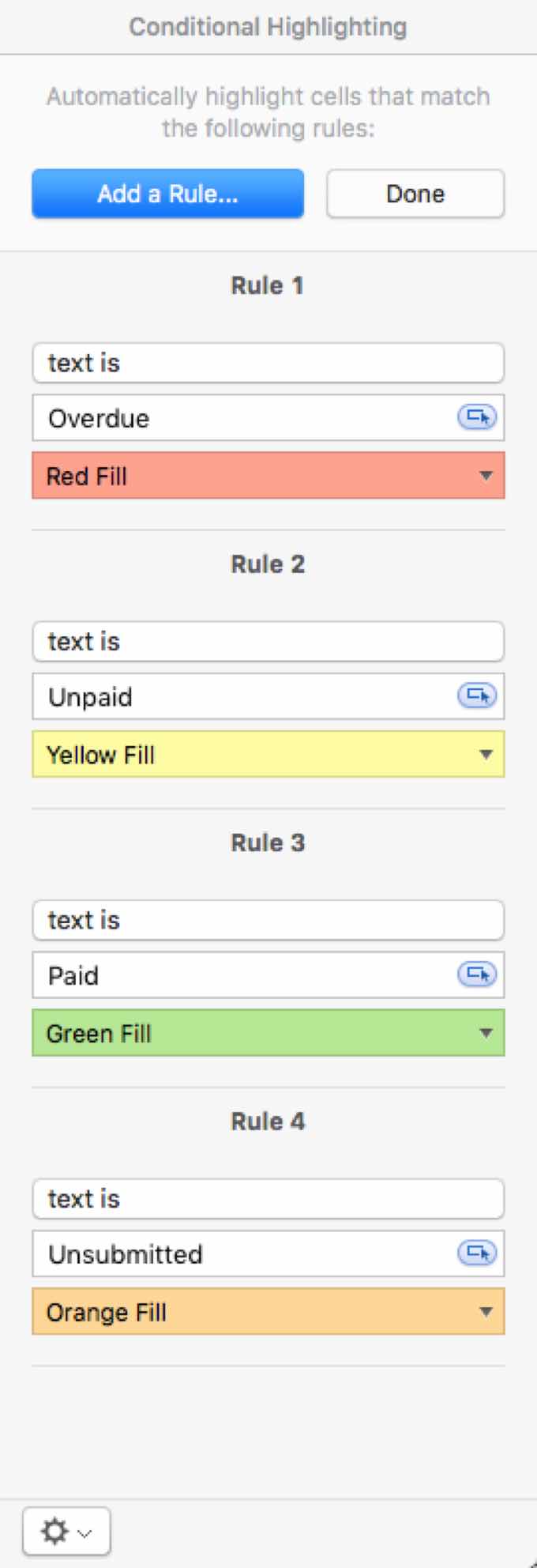
Conditional formatting: The status field is handy, but it’s not particularly glanceable. In order to make it easier to quickly skim my records, I decided to color code the status field. Green for Paid, yellow for Unpaid, orange for Unsubmitted, and red for Overdue.
Under Numbers’s Format inspector, you can click Conditional Highlighting to create rules that change a cell’s appearance depending on certain conditions. In this case I simply matched against the text of the statuses and changed the fill of the cells. Easy peasy.
Lookup: Anybody who’s spent time with a spreadsheet, whether it be Google Sheets or Microsoft Excel, knows the power of LOOKUP functions. Essentially these let you pull information from other cells, even if they’re on other sheets in the same document.
In my particular case, I wanted to automatically generate invoice identifiers. I usually format my invoice IDs by using a unique two-letter code that signifies the client, followed by the two digit month number and the last two digits of the years. So, for example, if I were doing work for Tony Stark in January of 2016, my invoice for him would be TS0116.
Well, based on the date the invoice is submitted, it should be easy enough to pluck the month and year information.1 For the client code, it was simply a matter of creating a separate sheet which listed my client names and their respective codes, and then using LOOKUP to pull the right code for the listed client.
My relatively simple Client Code sheet.
I actually ran into some tricky issues here. For one, it refused to match one of my clients accurately until I realized that it had an apostrophe, which sometimes got rendered as a “smart” (or “curly”) apostrophe and sometimes as a straight one—and those two characters won’t technically match. (I fixed that by going through manually and standardizing them.)
Secondly, while Numbers has functions for pulling the month number and year from a date string (MONTH and YEAR, respectively), the formats weren’t quite right for my invoice ID. I couldn’t figure out how to tell it to format the month with a leading zero, so I had to add an IF statement that checked if the month was less than 10, and if so, added a 0 in front. Likewise, the YEAR function returns a four-digit year, when I just wanted the last two, so I used the RIGHT function to truncate it to just two digits.
My final formula (once again “C” is the column containing the date, and “D” is the column containing the client’s name)2:
Charts: This last was purely for my own edification. I was curious to know where my money was coming from, so I decided to make a pie chart breaking down my income by client. Also, Numbers—as previously referenced—makes pretty charts.
Fortunately, it’s pretty easy with Numbers’s Chart tool. I just selected the pie chart from the toolbar and then edited the provided data values table: on the left I entered the name of each of my clients, on the right a simple formula that summed up all of the entries for that client.3 (“A” in this case references the client name from the first column.)
SUMIF(Invoice Status::Client,A2,Amount)
What else can I do?
I’m not done perfecting this quite yet; I’m looking for further ways to bend Numbers to my will. I’d love to have it start automatically generating invoices for me, but I’m not sure yet if that’s beyond its capabilities. It’s entirely possible that at some point what I’m doing will outgrow this one single Numbers file, but for now it seems to handle my modest freelance employment with aplomb and a minimum of fuss.
Of course, I don’t always submit the invoice in the same month that I do the work, which means this automatic system doesn’t always work. In which case I just manually override those cells and type in the actual invoice ID. ↩
CONCATENATE and the & operator actally do the same thing: glue strings together. I probably could have used just one or the other, but I’m strange like that. ↩
I actually have a couple other sheets that track income from other, non-writing projects, which I added in manually to the table the chart referenced. ↩
[Dan Moren is the East Coast Bureau Chief of Six Colors, as well as an author, podcaster, and two-time Jeopardy! champion. You can find him on Mastodon at @dmoren@zeppelin.flights or reach him by email at dan@sixcolors.com. His next novel, the sci-fi adventure Eternity's Tomb, will be released in November 2026.]
Note: This story has not been updated for several years.
One thing I left out of my earlier post about iCloud Drive’s file deletion issue—but which is mentioned in the original source of the link—is that you can actually recover deleted files on iCloud Drive. But it’s not an obvious feature, because you can’t do it from the Finder, where iCloud Drive lives, or from your iOS device.
In the dialog box that pops up, the first tab—handily already selected—is Recover Documents. You’ll be shown a list of all the files that have been recently deleted from iCloud Drive; you can sort either by name or by deleted date. Select any (or all) of the files, and click Recover File at the bottom, and it’ll be restored. (In my experience, it didn’t show up immediately in iCloud Drive on my Mac, but it did show up in the iCloud Drive web interface.)
You’ll also notice a time period listed next to the files (i.e. “10 days remaining”) which is how long before those files get permanently deleted; so there’s a limited window in which you can restore files, which can be tricky if you don’t realize something has been deleted, but it’s certainly better than nothing.
The recovery pane shows a lot of files that you probably don’t care about—image files generated as previews, blank files, documents you purposefully didn’t save—but it might prove handy if iCloud Drive decides to delete one of your files, or if you have other file mishaps.
[Dan Moren is the East Coast Bureau Chief of Six Colors, as well as an author, podcaster, and two-time Jeopardy! champion. You can find him on Mastodon at @dmoren@zeppelin.flights or reach him by email at dan@sixcolors.com. His next novel, the sci-fi adventure Eternity's Tomb, will be released in November 2026.]
But what happens if there are files inside this folder that haven’t yet synced to your local machine? Well, the move operation will be slower, because your Mac has to first download them from iCloud Drive. But once they download, they’ll be in their new location. Right?
Nope. Those files are now gone. Forever.
(__Note:__ The “Forever” bit appears to be overstating it. You can actually recover deleted files, but it’s not obvious. Nor is that an excuse for iCloud Drive not being better about ensuring your data remains intact when you do something like a simple move operation.)
Despite the fact that I’ve been using iCloud Drive more and more, the fact remains that I don’t quite trust it. It has some eccentricities. And it certainly doesn’t inspire the level of confidence that I have in Dropbox, Google Drive, or even Microsoft’s OneDrive.
Tsai’s anecdotes delve a bit into why that might be the case–specifically, how services are treated at Apple. I can’t say that I find that surprising, based on what I’ve seen and heard. The company’s never counted cloud storage as one of its strengths: back in the iDisk era I encountered a similar data loss loophole.
I think iCloud Drive is there because Apple thinks it needs to be in order to provide a full-featured ecosystem, but honestly, I’d be just as happy with more robust support for other cloud storage services.
So after three years, we’ve finally got a new iPod touch. After kicking around with iPhone 4S-era speed, the iPod touch has leaped right over the iPhone 5 and now sports the A8 processor and M8 motion coprocessor of the iPhone 6 and 6 Plus. And at $199 for a 16GB model, it grants access to demanding apps and games for a very good price.
The new iPod touch, for all its advancements, still sports the same 4-inch Retina display as the iPhone 5, 5s, and 5c. And it makes me wonder if maybe, just maybe, it’s the first hint that we’ll be seeing an updated 4-inch iPhone-let’s call it the 6c-this fall.
Note: This story has not been updated for several years.
When I write about Apple Music, I feel like I have to add a disclaimer: “I’m an iTunes guy.” This doesn’t mean I’m a defender of iTunes1, but it does mean that I use it every single day to play music on my Mac. Most of the music I listen to, I listen to while sitting at my desk, using iTunes.
Previously, when I’ve used music streaming services, I’ve never been satisfied. I’ve got more than 10,000 tracks in iTunes, ones I’ve bought digitally or ripped in from CD (and matched using iTunes Match). It was never fun to switch back and forth between iTunes and those other apps (whether they were Mac apps or just web apps), nor did I relish the idea of dumping iTunes, syncing my music with those services (where available) and using one of those other players exclusively to play music.
I don’t know how much of that is being a creature of habit—I’ve used iTunes since the day it was released—and how much is the fact that the online streaming services’ Mac players are no great shakes themselves.
In any event, what I’ve discovered is that for me, Apple Music’s killer feature is that it’s completely integrated into iTunes. Not just integrated in the sense that the iTunes Store is integrated, with a separate set of pages that don’t really resemble the iTunes Library. I mean integrated in the sense that, when I find new music I like, I can click the plus icon and add it to my iTunes Library.
I don’t know what I was expecting from Apple Music integration. I guess I assumed that when I added a track to “my library” from Apple Music, it would go to some special Apple Music tab, or playlist, or library. Nope—that music just shows up in the My Music section of iTunes, mixed in with all of the stuff I’ve bought over the years.
I realize that this approach may not work for everyone—one of the great challenges in designing any computer-based music service is going to be the endlessly different ways people consume music—but boy, does it work for me. I play music from a lot of self-built playlists, but now I can add Apple Music playlists too, and they’re seamlessly integrated. Apple Music’s integration with my music library lets me listen to music in the same way I’ve been doing it for the past 14 years—but with the addition of tracks from Apple Music’s nigh-endless supply.
I can also see just how insidious this approach is. My music library is no longer pristine, no longer a collection owned by me. Now I’m acquiring albums and tracks not by buying them, but by clicking that Add to Library button. It’s already started to happen, after a couple of weeks. After a few months or years with this service, how will I ever be able to cancel it? If I did, a major chunk of my library—everything I’ve discovered over the past months or years—would just vanish.
That’s why some people will always be dubious about the idea of renting, and not buying, your music. But for me, this works perfectly—and it’s why I’ve streamed more tracks from Apple Music in the last two weeks than I did in a year of Beats or two years of Rhapsody.
On the contrary, when you use iTunes every day you become quite familiar with its flaws. ↩
Note: This story has not been updated for several years.
The bright iPod family of today.
Yesterday, the current-model iPod touch was sporting an A5 processor like the one on the iPad 2 or iPhone 4S, as was more or less appropriate for when it was released in October 2012.
In the nearly three years since, though, it’s fallen out of date. iPod touch fans have clamored for a new revision, but they’ve been left disappointed until today. The new sixth-generation iPod touch features an A8 processor, the M8 motion coprocessor, an 8 megapixel camera, and a whole bunch of other hardware advancements. After a couple of years of being increasingly out of sync, the iPod touch is more or less at parity with the rest of the iOS device line-up. (No Apple Pay or Touch ID, though!)
Don’t forget about the iPod shuffle and iPod nano! They still exist too. And they, like the new iPod touch, come in six colors(!): gold, silver, blue, pink, and space gray, as well as special Product(RED) models.
The new iPod touch has the same weight and dimensions as the previous model, and continues to sport a 4-inch Retina screen. (Yes, this means that for the moment, the new iPod touch is the most advanced device Apple makes with a four-inch screen, since the iPhone 5S still uses the older A7 processor. This move also makes me even more convinced that Apple will release an A8-powered 4-inch iPhone this fall, as a successor to the 5S.)
The new iPod touch starts at $199 for a 16GB model, with 32GB for $249, 64GB for $299, and a 128GB model is available (but only from Apple, not other sellers) for $399.
Like other iOS devices, the Apple Watch uses a capacitive touchscreen. Using our bodies as a conductor, the screen senses changes in capacitance using an electrostatic field that surrounds the display. When you surround your body and screen with a conductive liquid, that dynamic is shot to hell.
Unless you’re swimming in distilled water, the touchscreen on your Apple Watch just won’t work.
A fascinating and thorough read. I’ve yet to be brave enough to even wear my Apple Watch in the shower, but Craig’s experiences are enough to convince me that the Watch would be totally fine with a quick dip in a lake or the ocean this summer. (As he says, the most important thing, particularly after swimming in the ocean, is rinsing it off to prevent corrosion.)
Personally, I’ve worn my Watch plenty when working out in the gym, and agree with his assessment about the user experience of the Workout app being somewhat sub-par. I also sympathize with the frustration that leaving the Watch off for certain activities means that not all your exercise gets reflected in the Activity app. I’ve yet to wear my Watch during an ultimate game, though that’s less about damaging it than worrying that I might injure someone else.1 But it does totally look like I didn’t work out at all those days. Alas, c’est la vie!
I still have a scar on my wrist from a spot where a guy ran into me and gouged me with his ring. ↩
Note: This story has not been updated for several years.
In launching its music-streaming service, Apple also expanded what Siri can do with music. But the intelligent agent is hardly perfect; in particular, I’ve run into a recurring annoyance when I ask Siri to play a song by name.
Song titles are hardly unique, which occasionally causes mishaps where Siri plays the wrong song. Easy enough to fix if you specify “play song title by artist” though it would also be nice if Siri presented you with a list of options, rather than simply playing what appears to be its best guess.1
But what I find really irritating is that if I ask it to play a song in my library it will still check Apple Music first. So if there happens to be a song (or album) with the same title as the song in my library, it will play that one instead. That’s led to some frustration and some hurt eardrums, when I turned up the volume anticipating a quiet piano track and was instead blasted with a loud pop song.
This is silly. The music that I own, that I bought from the iTunes Store or ripped from my CDs, should be given priority. It’s “My Music,” in Apple’s parlance, and the default should be to play from that collection. When I want to read one of my favorite books, I get it from my shelves, I don’t search the entire public library catalog first.
Given the emphasis Apple is placing on intelligence in iOS 9, it seems like Siri should be smart enough to take these kind of personal preferences into account. Right now that intelligence is really kind of, well, dumb.
It already does something similar if you tell it to send a message to Dan, for example, and you have three Dans in your address book. ↩
[Dan Moren is the East Coast Bureau Chief of Six Colors, as well as an author, podcaster, and two-time Jeopardy! champion. You can find him on Mastodon at @dmoren@zeppelin.flights or reach him by email at dan@sixcolors.com. His next novel, the sci-fi adventure Eternity's Tomb, will be released in November 2026.]
Note: This story has not been updated for several years.
Comcast
If you can’t beat ’em, join ’em.
Comcast seems to have taken the old adage to heart, as it said this week that it’s going to start rolling out a streaming television service this summer. For $15 a month, it’ll let its Internet-only customers–hey, that’s me!–stream a selection of channels over the net.
As some have already pointed out, this isn’t necessarily the best financial deal for cord cutters. I already pay around $65 per month for Internet alone; adding streaming would bring that up to $80. By comparison, a bundle of local channels (and HBO Go) is available for $75 ($45 if you’re a new customer). It’s unclear exactly which channels are available under the streaming deal–Comcast says “about a dozen” including broadcast–but I’d guess it’s a pretty similar line-up to its bundle deal.
There are also a few differences between what you can do with a TV plan and what you can do with the proposed streaming plan. For example, the streaming service includes a Cloud DVR for recording, but you can’t necessarily watch those shows on your TV without workarounds (like AirPlay, presumably).
Still, $15 per month isn’t a bad deal when you consider that it includes HBO, whose standalone service costs the exact same amount. It would certainly seem to put a lot of pressure on competitors like Sling TV, Hulu, and whatever plan Apple has up its sleeves.
But there are some intangibles, too, such as the downside of potentially having to deal with Comcast’s customer service, which isn’t exactly renowned for its helpfulness. And while Comcast touts the ability to sign up easily online, no technician visit required, it hasn’t been as explicit about how easy it is to cancel the service when you no longer want it. (One would hope you could cancel without dealing with a customer retention department, for example.)
The big (screen) picture
Taking a step back, though, it seems to me that this plan involves a certain degree of flailing on the part of Comcast. We’ve hit that point where the Titanic starts to tip upwards, inevitably to snap apart. The cable companies really don’t want to be turned into dumb pipes for bits, because they stand to make far less profit that way1. But with net neutrality pretty firmly in place, other companies will be able to offer streaming TV services, which means that Comcast is forced to compete. It no longer has a built-in advantage of being the only game in town.
This announcement has spurred more than a few comparison to the now defunct broadcast-TV-over-the-Internet service Aereo–of which I was a subscriber–and Comcast, having effectively help put them out of business, seems to be taking a page from their playbook.
I think the most important part of this move, though, is that it goes a long way towards separating the “hardware” and “software” of the TV market. Too long those two things–the infrastructure and the content that travels over them–have been conflated, despite the fact that there’s no fundamental or intrinsic reason that they should be in this day and age. And by hanging a $15-per-month price tag on its streaming service, Comcast has offered a tacit assessment of what customers should be paying for the “software.”2
Now, I’m exactly in the demographic here: a cord-cutter who uses Comcast Internet and lives in Boston, the first market that’ll get access to the service. So, yeah, I’m tempted. But as always, when it comes to the cable companies, the devil–and make no mistake, there’s always a devil–is in the details.
And, of course, most of these channels will still have commercials. So customers are still paying with both their pocketbooks and their attention. ↩
[Dan Moren is the East Coast Bureau Chief of Six Colors, as well as an author, podcaster, and two-time Jeopardy! champion. You can find him on Mastodon at @dmoren@zeppelin.flights or reach him by email at dan@sixcolors.com. His next novel, the sci-fi adventure Eternity's Tomb, will be released in November 2026.]
My thanks to Marketcircle for sponsoring Six Colors for the past week. Marketcircle has been helping Mac-based small businesses grow with award-winning apps for over a decade. Marketcircle develops small business apps exclusively for the Mac, iPhone, iPad, and now Apple Watch. With Marketcircle’s Daylite and Billings Pro, you save time, stay organized, and work happier.
You can read about how small businesses have grown with the help of Daylite and Billings Pro on the Marketcircle website.
Note: This story has not been updated for several years.
Let’s make this one short and sweet. I don’t understand why iCloud Drive generally lets one create folders of seemingly infinite depth–except for in the folders that belong to specific applications.
For example, here’s a folder several levels deep in iCloud Drive, contained within a top-level folder that I created. I can, if I want, keep creating folders, just as I can elsewhere in OS X.
Here’s a sub-folder I created within the “Preview” folder of iCloud Drive. Want to create a folder inside this sub-folder? Tough noogies.
This seems bizarre to me. I can’t think of anyplace else in OS X where the regular rules of folder hierarchies are suspended. Either it’s a holdover from the earliest days of iCloud storage, where each app had its own bin and that was it, or Apple thinks that creating multiple levels of folders is too complicated for most users. I feel like after 30 years or so, most of us have the hang of it.
As long as Apple’s opening up iCloud Drive a bit further in iOS 9 and OS X, perhaps multiple levels of folders can join the fun?
Update: The plot thickens. Some apps can nest folders seemingly indefinitely (such as TextEdit and third-party apps like PDF Expert), while others (like Preview, Pages, Numbers, Keynote) cannot. Weeeeird.
[Dan Moren is the East Coast Bureau Chief of Six Colors, as well as an author, podcaster, and two-time Jeopardy! champion. You can find him on Mastodon at @dmoren@zeppelin.flights or reach him by email at dan@sixcolors.com. His next novel, the sci-fi adventure Eternity's Tomb, will be released in November 2026.]
Apple’s going to design their own boxes for third-party accessories sold in Apple Stores: http://9to5mac.com/2015/07/06/apple-stores-white-boxes-accessories/
Where will you be on… PRIME DAY? http://www.amazon.com/b?ie=UTF8&node=11448061011
Lex and Dan talk about their Echoes but I’m tired of linking to that. You can find it.
Walt Mossberg has some tips and tricks for the Echo, which I hate: http://recode.net/2015/07/07/the-amazon-echo-everything-you-might-not-know/
Like Dan in this article, we think iTunes should be broken up: http://www.macworld.com/article/2938297/how-apple-should-revamp-itunes-for-the-better-this-time.html
Showtime is now available on the Apple TV without a cable subscription: http://9to5mac.com/2015/07/07/showtime-apple-tv/
Trent Reznor emailed Dave Wiskus
http://www.macworld.com/article/2944517/what-apple-music-connect-needs-to-succeed.html
Our thanks to Casper (https://casper.com/rebound) for sponsoring this episode. Casper makes mattresses from responsive materials to ensure great sleep for nearly everyone. You spend about a third of your life sleeping, make sure it’s on a good mattress. Go to casper.com/rebound to start your 100-day money-back trial. You’ll get $50 off by using the code REBOUND.
This time, the current version of SuperDuper is dead in the water on El Capitan. It just won’t work. But don’t dismay: we’ve worked to change that. I’m happy to say, to those of you who are on the Beta (and those who are going to join the public beta today), we’ve developed and tested a Beta version of SuperDuper that makes bootable copies of El Capitan. There’s a link to download it at the end of this post.
But please don’t skip down there. Keep reading.
Don’t let Dave down! Keep reading. It’s an interesting view into how Apple is pushing OS X forward and how developers have to figure out new ways of doing things.
Note: This story has not been updated for several years.
Due as a part of El Capitan this fall, and available right now as a public beta is the first major update to Photos for Mac, the replacement for iPhoto and Aperture that Apple launched earlier this year.
Here are the major additions you can expect to see in Photos when 1.1 arrives this fall (or when you install the public beta, depending on your enthusiasm):
Geotagging. Yes, in Photos 1.1 you can add a location to an image or batch of images that weren’t geotagged, as well as edit the location of data of already-geotagged images. To do this, you open the Inspector window. A not-yet-geotagged image will offer a section of the window labeled Assign a Location. Clicking in this area will let you enter a street address or a name of a point of interest, and Photos will search Apple’s Maps database. If that location isn’t good enough for you, you can always click on the pin and drag it around the map, placing it wherever you like.
For photos that have already been geotagged, you can click on the location label above the map in order to search for a new location, or just click on the pin and drag it to a new location. This behavior works whether you’ve got one item selected, or many.
Batch titling. If you want to name a whole bunch of images in one go, you can do that, too. Just select a bunch of images and, again from the Inspector window, click in the Add a Title field and add your title. (There doesn’t appear to be a way to apply something like a unique serial number (i.e., Photo 1 followed by Photo 2) in a batch.)
Album sorting. In the first release of Photos, albums could be sorted in one way: by date, with the oldest on top. In the Photos 1.1 public beta, you can now sort photo albums by date with either the oldest or newest on top, or alternatively you can sort the photos by title. Apple says other sorting options may arrive before Photos 1.1 ships, but I’m not sure what they might be.
Editing extensions. Photos will support image-editing extensions written by third-party developers. Like the built-in editing tools, you can actually stack multiple extensions while editing a photo, so you can combine third-party editing extensions with Apple’s own tools to get exactly the image that you want to see.
Apple says editing extensions will be available from the Mac App store, either bundled with an existing app or distributed as standalone extensions. I haven’t had a chance to try any editing extensions out, unfortunately, so I can’t report more about this feature yet.
Other stuff. Apple says you’ll be able to batch organize Faces, letting you drag multiple photos onto a Face to assign them to that person, but I couldn’t make that work in this beta. Apple also says that large libraries can launch up to 40 percent faster than in Photos 1.0, something I won’t be able to verify until I upgrade one of my primary photo libraries to the public beta.
I’ve been using both betas, and I’ve got some of the usual caveats to give you. Though the public beta versions seem quite stable, they’re still pre-release versions of operating systems and need to be used with caution. If you’ve got a spare device, test on that. At the very least, be sure your Mac is backed up.
Also, it’s a beta! So be sure to report any bugs you find. Apple includes the Feedback Assistant app with every beta, and that’s the preferred way to give feedback about problems you encounter while testing.
El Capitan’s split screen view, Safari at left (with pinned sites), Notes at right (with checklists and attachments).
OS X El Capitan’s not entirely focused on stability and performance—it’s got a bunch of user-facing features, too—but it is true that Apple is making stability and performance a bigger part of the upgrade story this year.
Apple spends a lot of time poring over anonymous crash data submitted by users and by its own metrics, the Mac is more stable than it’s been in a long time. But users have high expectations—and there’s been a wide perception that Apple hasn’t been meeting those expectations as it did in the past. Also, if you define stability as a lack of crashes, you can miss other sorts of frustrations. Looking up and seeing that your iMac is now named iMac (7) because of a networking bug isn’t a crash, but it’s a frustration.
Performance is a big part of the El Capitan story, and Apple’s making some bold claims in this area: up to 40 percent faster app launch, up to two times faster app switching, up to four times faster PDF opening, and better rendering efficiency thanks to Metal, the graphics technology introduced in iOS 8 and being brought to the Mac with El Capitan. Key Mac APIs Core Animation and Core Graphics are based on Metal in El Captain, resulting in speed boosts throughout the system—again, Apple’s claiming up to 50 percent faster rendering and a 40 percent increase in efficiency.
I’d love to say that the current public beta backs up those numbers, but as with any beta version of an operating system, it’s a moving target. The speed of an operating system can change dramatically between betas and the final version, as well as between beta versions. But Apple’s numbers are certainly encouraging.
On the iOS side, I’ve been using iOS 9 on an iPad Air 2 and enjoying it, though currently the most intriguing features—split-screen mode and slideover—will be limited to Apple’s own apps for most users. Third-party apps have to be updated to support the features, and my understanding is that Apple’s TestFlight utility for beta-testing software (let alone the actual App Store) is not yet accepting apps designed for iOS 9.
I’ve found the most recent beta releases to be fairly stable, enough that I’m basically using this iPad as my iPad rather than the iPad mini 2 I was using before. Apps occasionally crash, but it hasn’t been anything particularly frustrating. And it’s pretty cool to watch a movie in picture-in-picture mode while I’m working on something else.
I may install iOS 9 on my iPhone, but I admit that I’m a little more skittish about that. If you rely heavily on a device, moving it to a beta can be challenging—and once you’re on the beta train, especially on iOS, it’s very hard to get back off.
Honestly, I’ve barely touched Office at all since leaving Macworld, and by the time I left we were only really using it for specific projects like our Superguides. But in all too many fields, Office is still the de facto standard (especially when it comes to inter-platform compatibility).
Kudos to Microsoft for continuing to not only support the Mac platform, but also walking the fine line between providing parity across platforms while also trying to take advantage of features like multitouch, fullscreen view, and Retina support. (Although I’m not sure, looking at images on Microsoft’s site, whether you can say the apps look particularly Mac-like.)