Six Colors
Six Colors

Apple, technology, and other stuff

This Week's Sponsor

Magic Lasso Adblock: Effortlessly blocks ads, trackers and annoyances on your iPhone, iPad, Mac and Apple TV

By Jason Snell

Time Machine Baseball: Old games, computer announcer

Note: This story has not been updated for several years.
oldbaseball

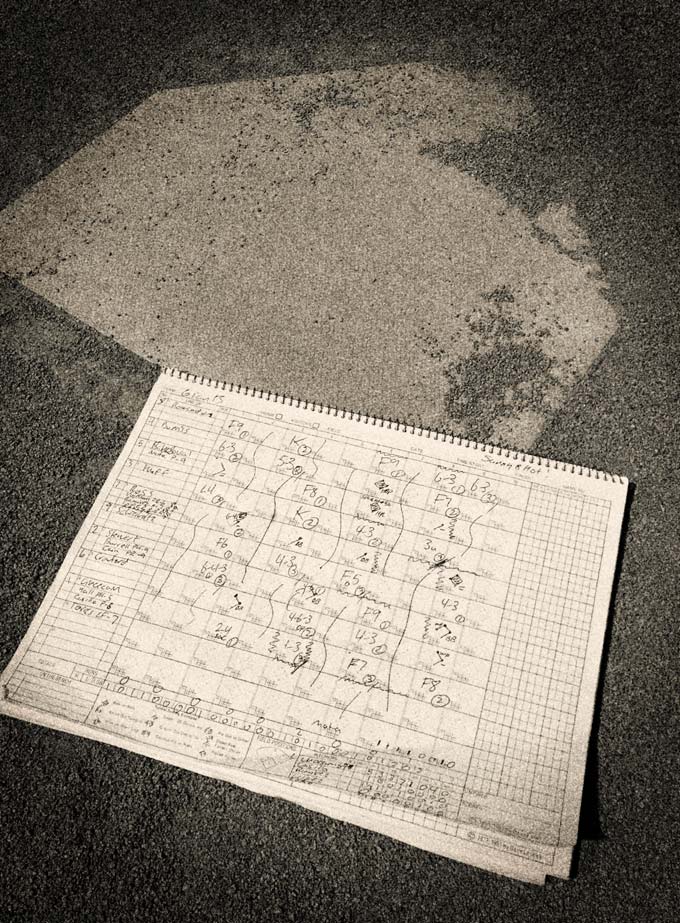
People who aren’t baseball fans won’t get it, but if you’re a baseball fan you probably know about the appeal of baseball on the radio. As a kid, I fell asleep while listening to baseball games on an AM radio next to my bed, usually the Giants but sometimes even the southern California teams, their transmissions reaching far across the state late in the night.

But sometimes you just want to listen to a game, and there isn’t one on. (This happens to me much less than it used to, now that I can use the MLB At Bat app to listen to any radio broadcast of any team.) And even MLB has dropped the ball when it comes to their huge archive of past games—it was not easy to find a way to re-listen to any of the Giants’ recent postseason runs this past winter using MLB’s streaming service.

Meanwhile, the world of baseball research has been doing some amazing things with historical baseball data. You may know that Baseball Reference has player and team stats as well as historical boxscores, but groups like Retrosheet are also compiling pitch-by-pitch data for as many past games as possible.

So one day, desperate for a change of pace on a long commute, iOS developer Doug Barnum put those two thoughts together and came up with an app that uses historical play-by-play data to generate “radio broadcasts” of past baseball games. It’s called Time Machine Baseball.

With Time Machine Baseball, you can listen to re-created games from 1927, 1970, or 2015 (or postseason games from 1937, 1969, or 2010), and can follow select teams or leagues through an entire season. Those seasons are free; Other seasons are available via in-app purchase.

This is a new app and while there’s a lot of potential, there’s also a lot more that could be done. The announcer is a synthetic voice with what appears to be an English accent, or at least a very old-timey American one? But in general, it’s a very clear voice, so I can understand what’s going on. And Barnum has tweaked the pronunciations of the player names to be more accurate, though I still ran into a few weird pronunciations in the games I listened to. Behind the announcer is stadium noise and additional sound effects that change as events on the field happen.

Mostly what the app lacks, in addition to the option for pitch-by-pitch calls (older games only have data for the result of each at-bat, not each pitch, so Barnum has opted to only include the outcome of each at-bat, compressing the games to about 20 minutes in length), is detail and variety. If you listen to a human baseball broadcaster, you’ll hear all sorts of banter that describes the game situation. When a runner grounds out to advance a man from first to second, Time Machine Baseball declares, “Single played by the center fielder.” It would be great if the app did a better job of emulating the expressions of radio announcers, offering different (and perhaps more colorful) ways of describing that event: “Here’s the pitch… Morgan hits it into center field, it’s going to fall in front of Henderson for a single.”

Even chatter between batters that reset the game situation would be welcome: “Two outs now, Morgan takes his lead from first base. Here’s the pitch…”

In any event, Time Machine Baseball is an app that a certain class of baseball fan is going to love. I think it’s a great idea, but if it’s going to keep me company during the times when I can’t find a live baseball game on the radio, it needs to add a little more broadcasting art to its line-up card.

Nest has some budget problems: http://recode.net/2016/03/30/nest-2015-sales-budget/
Someone claiming to be a Nest engineer has some comments on Tony Fadell’s management: https://www.reddit.com/r/Nest/comments/4dbbgh/is_anyone_concerned_about_the_future_of_nest/d1pjcku
Nest bought Revolv and is killing it: https://medium.com/@arlogilbert/the-time-that-tony-fadell-sold-me-a-container-of-hummus-cb0941c762c1#.wuqtzrxcy
Dan reviews his Echo Dot: https://sixcolors.com/post/2016/04/the-echo-dot-small-size-same-features/
Moltz reviews his iPhone SE: http://verynicewebsite.net/2016/04/iphone-se-review/
HP’s Spectre laptop is… a gold laptop: https://sixcolors.com/link/2016/04/hps-spectre-laptop-is-an-attempt-to-out-apple-apple/
Our thanks this week to Mack Weldon (https://www.mackweldon.com). Mack Weldon makes glorious underwear to hold your bits in the way they deserve, anti-microbially. It is truly awesome stuff. So go to mackweldon.com and use the promo code “REBOUND” to get 20 percent off your order.


FBI: iPhone crack only works on 5c or earlier running iOS 9

Speaking at Kenyon College, FBI director James Comey said that the hack it developed to open the iPhone 5c of one of the alleged San Bernardino shooters only works on an iPhone 5c or earlier model phone, running iOS 9. Newer model iPhones apparently don’t have the same vulnerability. That’s probably because from the iPhone 5s on, passcode information is stored in a secure enclave on the processor itself.

Comey also said that the FBI had still not decided whether or not to share the vulnerability–which was provided via a third-party–with Apple, though the agency has also reportedly been deluged with request from others looking to unlock iPhones. However, there are caveats:

The FBI director also confirmed that the federal agency could help local and state law enforcement by simply unlocking the older iPhones for them, but that evidence gained this way could not be used in court.

The FBI certainly has an incentive not to let Apple patch the hole as long as it’s applicable, but it will eventually become moot as older iPhones age out and are replaced with newer models. But it’s interesting that Comey says it can’t be used in court–many have speculated the NSA may have provided help, while others think that Israeli-based security firm Cellebrite was behind it. We may not know for a long while yet.


By Dan Moren

Rogue One trailer: “This is a rebellion, isn’t it?”

Note: This story has not been updated for several years.

Like we weren’t going to link a Star Wars trailer.

Rogue One is the first of the Star Wars anthology films (it’s subtitled “A Star Wars Story”, which seems to be the new branding), and it follows Jyn Erso (Felicity Jones), who is tasked to steal the plans for the original Death Star–or, in other words, the events that lead directly to A New Hope. (I don’t think it’s going too far to suggest she’ll be accompanied by a ragtag band of misfits.)

This is going to be largely unlike any Star Wars story we’ve seen before: despite the simplified piano version of John Williams’s “Force theme” in the trailer, there seems to be little involvement of any of the saga’s mystical themes, instead focusing on a classic military “on a mission” story. Think The Dirty Dozen or Guns of Navarone or Where Eagles Dare meets Star Wars.1 It seems to be playing up Star Wars‘s sci-fi and action elements, and playing down the epic fantasy. And that’s okay! The nice thing about having an anthology is it leaves room open for all sorts of different stories.

It’s also the first time that we’ve ever really had a standalone Star Wars film–you can sort of count the original movie there, but it was always formulated as an “episode”–and while the name brand alone should be enough to propel it to success, it will be interesting to see how audiences react to characters who are presumably one-and-done.2

Of course, there’s the benefit of getting to use all the iconic original trilogy characters and settings: in the trailer, we see classic stormtroopers, AT-ATs, what looks to be the base on Yavin IV, and Star Destroyers. (The latter gave me a chill, I can tell you that.) But we also get new characters and fleshing out of corners of the universe that we haven’t seen explored on the big screen before, and that’s exciting.

There are already additional standalone movies in development, and it’s hard to imagine anything with “Star Wars” in the title not doing well, especially after the success of The Force Awakens. But Lucasfilm is also being careful not to inundate us with Rogue One marketing, either: there was one previously released picture of some of the cast3, and that was it. Kind of wacky to get your first real glimpse at a Star Wars movie only about half a year before it comes out, right? I like the “less is more” approach they’re taking, and much as I doubt this will be the last we see before the film’s release, well, I’d be okay if it were.

Regardless, we’re destined to get Star Wars films every year from now until we loop back around to a long time ago in a galaxy far, far away. Here’s hoping they maintain what looks to be this level of quality for at least a while.


  1. And if you haven’t seen any of those, what are you still doing here? 
  2. Though, of course, there are already rumors that Jones’s character might be linked to The Force Awakens‘s Rey–her absentee mother, perhaps. I’m not sold: I think the anthology films are going to be linked to the main threads via plot and setting, but not quite so incestuously. 
  3. A very diverse cast, to boot! Though it could use more women. At least the trailer itself passes the Bechdel test

[Dan Moren is the East Coast Bureau Chief of Six Colors, as well as an author, podcaster, and two-time Jeopardy! champion. You can find him on Mastodon at @dmoren@zeppelin.flights or reach him by email at dan@sixcolors.com. His next novel, the sci-fi adventure Eternity's Tomb, will be released in November 2026.]


13: April 6, 2016

Figuring out Apple’s new stuff, the Echo Dot and coordinating multiple devices in a home, and taking notes.


By Jason Snell

9.7-inch iPad Pro Review: Chocolate or vanilla?

Note: This story has not been updated for several years.

Having a choice is fundamentally a good thing. Yes, give someone too many options and they may collapse under the strain of the Tyranny of Choice, but One Size never really did Fit All. Better to have a few options to choose from.

As a laptop user I’ve always found myself a bit outside the mainstream. I opted for the MacBook Air over the Retina MacBook Pro, and even within the Air line, I opted for the 11-inch model over the 13-inch. What I’m saying is, I appreciate that my choice isn’t just between chocolate and vanilla.

These past few years Apple has been diversifying its mobile product lines, expanding beyond a single, mainstream product to include variations that appeal to customers who want something a bit different. The iPhone 6 Plus gave people who wanted more battery and screen space the ability to get it; the iPhone 5S (and now the iPhone SE) serve people who want a smaller and cheaper model. The iPad mini was a nice shrunken-down variation on the classic iPad; the 12.9-inch iPad Pro offered a much larger, richer iPad experience.

Now here’s the 9.7-inch iPad Pro, but this isn’t Apple adding another device that’s nibbling at the edges. This is the flagship of the iPad line, undoubtedly the best-selling iPad model for the next year, full of impressive features (as well as a few curious omissions) and in a size that’s exactly what people expect from an iPad.

What’s in a name?

With the introduction of the 9.7-inch iPad Pro, Apple takes a page from its approach to naming Macs by classifying the iPad product line based on features, with various sizes within each product line. To be an iPad Pro is to be a top-of-the-line iPad with the fastest processors and support for Apple Pencil and the Smart Connector. Just as you can choose between the MacBook and the MacBook Pro, and then within the MacBook Pro you can choose between a 13- and 15-inch model, you can choose between the 9.7- and 12.9-inch iPad Pro. (Presumably the slots currently filled by the iPad Air 2 and iPad mini will one day just be 9.7- and 7.9-inch iPads?)

Once you start thinking about it in the context of other products, the naming scheme makes more sense, but it’s still a bit odd, and the ungainly nature of the screen sizes doesn’t help matters. (This would be a lot easier if we could call these 10- and 13-inch iPads, but tech companies have learned the hard way that rounding up on your tech specs will get you in trouble. Perhaps one day the bezel around these devices will vanish and their screens will be big enough to call them something simpler.)

The staggered release of these first two iPad Pro models has also muddied the waters a bit, because each model has features that the other lacks. Consider the plight of Old Mister Moneybags, a top-hatted gentleman with an unlimited bank account and a desire for the finest iPad in all the land. He sends a member of his staff to the local Apple Store to purchase that device, but that staff member is going to leave Old Mister Moneybags disappointed.

The new 9.7-inch iPad Pro has the same processing power as the larger model, an upgraded camera, True Tone display, and can show a wider range of colors on its screen. But the 12.9-inch model has that bigger screen, twice the RAM as the 9.7-inch model, and support for fast charging and USB 3 transfer speeds that the smaller model doesn’t offer.

Perhaps in future years, these two iPad Pro models will be released simultaneously, and this sort of mishmash of features won’t happen. But for now, if Old Mister Moneybags’ staff member wants to keep their job, they’ll need to buy one of each and hope that the boss gives them a commendation for original thinking.

Pro features, more or less

The most notable new feature of the 9.7-inch iPad Pro is the True Tone Display, which is not as much a feature of the display itself as the two four-channel light sensors near it that detect the color temperature of your surroundings and allow iOS to adjust the color temperature of the display accordingly. This is a subtle but pleasant effect, optionally warming the tone of your screen when you’re in a warmly lit room.

It’s a very Apple feature, integrating hardware and software to solve a problem nobody knew they had. But if you’ve ever turned on your iPad or iPhone at night in a room lit only by warm lights, you have probably been shocked by the blue-tinted whiteness of the screen. True Tone reduces or eliminates this effect, and I wish my 12.9-inch iPad Pro had it.

More broadly, the 9.7-inch iPad Pro cares about color, in that it can display a wider range of color than any previous iOS device. It’s basically using the same enhanced color space Apple added to the 2015 model retina iMacs, and if you work in video or photography you will find numerous colors that are more accurately rendered on this display than on any previous iPad.

And the 9.7-inch iPad Pro also cares about photography taken right on the device itself. With the previous generation of iPads, it seemed that Apple had finally embraced the idea that people take pictures with their iPads, and made the onboard cameras better. But they were still way behind the camera technology on the iPhone. That’s no longer true—the 9.7-inch iPad Pro has the same camera tech that you’ll find in the iPhone 6, right down to the slight bump on the back of the device. It’s a 12 megapixel camera with flash (for the first time on an iPad!) and support for 4K video. It’s a very good camera, just as it was on the iPhone 6S. And the front-facing camera is also 5 megapixels, as on the 6S, so the iPad selfie game has been seriously elevated.

But that’s not all! The 9.7-inch iPad Pro also offers a bunch of tech that debuted with the 12.9-inch iPad Pro: the top-of-the-line A9X processor with M9 motion coprocessor (it’s slightly less than twice as fast at single-threaded operations as the iPad Air 2), support for the Apple Pencil, and the new Smart Connector that enables the Smart Keyboard accessory. It’s also got four speakers, and while they don’t sound quite as good as the ones on the larger model, they’re much better than the ones on the iPad Air 2—most notably because you can now watch a movie with stereo sound coming out of both edges of the iPad, rather than just the side with the home button on it.

Size matters not…?

The 12.9-inch iPad Pro is a remarkable piece of hardware, with a huge display and PC-class specs. I love mine. But it’s also not a mainstream product. It’s for people who want more, who aren’t satisfied with what the regular iPad can give them. It truly fits the name iPad Pro.

The 9.7-inch iPad Pro, on the other hand… It’s got pro-level features, to be sure, but it’s also designed to appeal to people who already know what an iPad is, and are comfortable with that. It’s the same size as the original iPad (albeit a whole lot thinner and lighter!) and all the other “full-sized” models that have come after it. This is the sweet spot, the top of the bell curve, the iPad that will appeal to the most people.

It’s a size that has some big advantages. It’s much easier to carry, less bulky and heavy, than the 12.9-inch iPad Pro. You can hold the 9.7-inch iPad Pro in one hand and sketch on it with an Apple Pencil held in the other one. Its Smart Keyboard is thinner and lighter than the larger model’s, too. The screen’s not huge, and if you’re using Split View while typing on the software keyboard you will feel cramped. I found myself missing the full-sized software keyboard on the 12.9-inch model, too.

But again, that’s why they make different flavors of ice cream. For some people, the 12.9-inch iPad’s strengths counteract its additional weight and bulkiness. But my gut feeling is that for most people, the 9.7-inch iPad Pro is plenty of device on its own. It’s a “regular iPad” that’s been substantially upgraded, not just in terms of processor speed, but with the addition of Pencil and Smart Keyboard support, not to mention the upgraded cameras and display.

For most people who love their iPads and want an upgrade, the 9.7-inch iPad Pro will be a great upgrade. If the 12.9-inch iPad Pro is mint chip, the 9.7-inch model is chocolate or vanilla. And who doesn’t like chocolate ice cream?


By Dan Moren

Convert MKV files (and others) seamlessly with Permute

Note: This story has not been updated for several years.

Permute

This morning I’ve been prepping for a long plane flight, and I had it in mind to convert some videos for watching on my iPad on the trip. Most of my files are in MP4 format, which works seamlessly on iOS devices, but every once in a while I happen across one that’s in another common format: MKV.

MKV, or Matroska, is a container format, like MP4, AVI, and others. That means that it essentially has video, audio, and often subtitle components that could themselves be in one of several formats.

In general converting video files is a task that I can handle with Handbrake or VLC, but in my research and quick trials, I found that I ran into a common problem: the end result of the conversion was an MP4 file with video, but no audio. While I probably could have spent a while twiddling settings to figure out how to fix what was wrong, I’m also in a bit of a time crunch, so I went looking for a better answer.

That answer turned out to be the $10 Permute (which handily also offers a free trial with up to 10 conversions). I dragged the MKV into Permute, chose MP4 from the dropdown menu, hit Start, and a few minutes later had a perfectly pristine-looking MP4 file–with audio, hurray!–that I transferred over to my iPad.

There are a ton of video conversion utilities out there, many of which are of dubious origins, but Permute (which is available via the Mac App Store or on its developer’s site) is fast, easy to use, and on the up and up. It handles pictures, audio, and video, and converts to and from a variety of formats.1

Also, it doesn’t hurt that its icon is an adorable robot.2


  1. Amusingly, I used it to convert its own icon into a JPEG for this post. INCEPTION! 
  2. Or not. Yeah, you knew it was coming. 

[Dan Moren is the East Coast Bureau Chief of Six Colors, as well as an author, podcaster, and two-time Jeopardy! champion. You can find him on Mastodon at @dmoren@zeppelin.flights or reach him by email at dan@sixcolors.com. His next novel, the sci-fi adventure Eternity's Tomb, will be released in November 2026.]


Messaging app WhatsApp is now encrypted end-to-end

Really fascinating article from Wired by Cade Metz, about the quiet way in which messaging app WhatsApp fully encrypted its entire service:

Mountain View is home to WhatsApp, an online messaging service now owned by tech giant Facebook, that has grown into one of the world’s most important applications. More than a billion people trade messages, make phone calls, send photos, and swap videos using the service. This means that only Facebook itself runs a larger self-contained communications network. And today, the enigmatic founders of WhatsApp, Brian Acton and Jan Koum, together with a high-minded coder and cryptographer who goes by the pseudonym Moxie Marlinspike, revealed that the company has added end-to-end encryption to every form of communication on its service.

As the article points out, WhatsApp isn’t super prominent in the U.S., but it has a huge adoption overseas. A large part of its appeal is that it works on pretty much any phone platform.

It’s not hard to follow the trend line on encryption. More and more of our digital communications and data are going to be secured in this way–and they should be–which is going to be more and more frustrating for governments, including in the U.S. But frankly, tough noogies: it’s not the responsibility of citizens or private corporations to make things easy for the government, especially at the cost of everybody else’s security.


Streaming Wars, Episode VII: The Fragmentation Continues

Variety‘s Cynthia Littleton:

Starz has joined HBO and Showtime in going over the top with the launch today of a standalone streaming app that also allows users to download most of the available programs.

Starz is offering the app in partnership with Apple and Google. The service costs $8.99 a month, $2 less than Showtime’s $10.99 offering and six dollars below HBO’s monthly pricetag of $14.99.

This is how we slowly descend into madness. The downside is that all the various networks each want a piece of the streaming pie; the upside is that now you have a choice of exactly which pieces of the pie you want…though you may end up paying more than if you’d just bought the pie outright. Mmmm, pie. Where was this metaphor going again?

I’m not particularly sanguine about that choice lasting: no doubt the larger companies will be interested in bundling their various networks together.

Amazon and Hulu both seem to be banking on being the next-generation equivalent of cable companies, since they each offer options to bundle some of these over-the-top services along with their basic subscriptions. (You can add Showtime to either for an additional fee; Starz is also available on Amazon as an add-on.)

Granted, there are still other shoes to drop: neither Microsoft nor Apple have made a serious move in this direction. There have been plenty of rumors about Apple’s interest in a TV streaming service, but the content providers don’t seem to be buying what Apple’s selling–and why should they, when they can go direct to the consumers themselves?


HP’s Spectre laptop is an attempt to out-Apple Apple

The Verge’s Jacob Kastrenakes on HP’s new, thin and shiny Spectre 13 laptop:

… at just 10.4mm thick – it’s supposed to be the thinnest any major laptop manufacturer has ever made. That’s thinner than both Apple’s MacBook (13.2mm thick) and Dell’s XPS 13 (15.2mm thick). And while you might wonder how much difference a few millimeters can make, seeing the Spectre 13 in person makes it pretty clear: it’s the difference between looking really thin and looking uniquely eye catching.

The Spectre 13 is in many ways HP’s attempt at a modern MacBook Air. There are no gimmicks: no 4K display, no touchscreen, no detachable or twisting body. It’s just trying to be a really solid, stylish laptop.

To its credit, HP has managed to pack a Core i chip in there, instead of the slower Core M used in the MacBook, and hasn’t skimped on the ports–there are three USB-C ports plus a headphone jack.

But the gold styling on the model showed off in The Verge’s story just makes me think of the late ’90s, when every PC vendor figured that the way to capitalize on the success of the iMac was to make their computer blue, too. Ask eMachines how well that worked out for them.


By Dan Moren

The Echo Dot: Small size, same features

Note: This story has not been updated for several years.

echodot

Ever seen one of those collapsible camping cups? They smush flat for packing, and then expand into a full-size cup when it’s time for a meal. That’s kind of what the Amazon Echo Dot makes me think of: it’s like someone took the full-size Echo from each end and just compressed it.

In some ways, the Dot reminds me of the iPhone SE. From the outside, it’s a smaller device, but the inside packs pretty much all of the technology of the full-size Echo, with one obvious exception: the speaker.

Speaker aficionados have never been overly kind to the full-size Echo, though I’ve found it perfectly satisfactory for listening to the radio, podcasts, and the occasional musical accompaniment to dish-washing. It will never match a really nice speaker system, but as a Bluetooth speaker, it’s not too shabby.

The Dot’s is worse than that: muddy and lacking in pretty much any bass, it’s not terribly loud in the volume department either. Think somewhere between your smartphone’s speakers and a clock radio. You’re probably not going to want to listen to much music on it, but it’s sufficient for voice, even though on some occasions you might find yourself muttering “What’s that?”

Get the sound out

Echo Dot with external speaker

To compensate for the lackluster internal speaker, Amazon has added two features not present on the original Echo, one hardware and another software. On the back of the Dot, next to the micro-USB power connector, you’ll find a standard 3.5mm audio out. Plug that into an existing set of speakers1 and all of the Dot’s output will issue through those instead. (The Dot, of course, still handles all the audio input via its own microphones, of which it has the same seven as the original Echo.)

If you’ve already got some nice speakers, hooking them up to the Dot can definitely bring it up to snuff, though the one downside is that you then have to either leave those speakers on all the time, or remember to turn them on when you want to use the Dot–if the speaker is off, the Dot won’t default back to its internal speaker.

While the Dot, like the Echo before it, can play back audio from a connected Bluetooth source like your smartphone, the Dot also adds the ability to use a Bluetooth speaker as output. Once you pair a speaker for the first time using the Alexa app, you can subsequently manage it by voice by telling the Dot to connect or disconnect your speaker.

In my brief tests, the Bluetooth speaker worked just fine. One benefit is portability: the Dot has to be plugged in, but you can move its speaker anywhere within Bluetooth range. Like the Echo, the Dot’s mic setup is pretty good at picking up your voice at a distance, though you may need to speak up.

The Dot also doesn’t include a voice remote, though you can pair one you might already have. (The Echo and Fire TV voice remotes are basically the same device.)

The more things stay the same

echoandechodot

Other than its audio output options, the Dot is for all intents and purposes exactly what it appears to be: a smaller version of the Echo. At a fraction of the size, and half the price, you get all the software features of the Echo in a more compact package.

The hardware design is just as good as on the Echo, with the twisting, light-up volume ring and pleasant mute/action buttons. There’s a rubber base that’s slightly tacky, which is a bit more necessary given its lack of weight, otherwise it might slide around.

Best of all, since many of the Alexa features are associated with your profile, those who already own an Echo will find most of the same features work on the Dot right out of the box. For example, my IFTTT workflows for controlling my TV and smart plugs required no setup; my flash briefing was already configured for the correct news services; and all my connected audio services were available. I did have to set my home location for the Dot to get certain geographic-related information, though.

Double trouble

So, is adding a Dot to a house with an Echo like bringing home a new puppy to play with the more mature dog? Not quite. But the two do work together about as much as you’d expect, which is to say not very much.

With the Dot in my office and the full-size Echo in my kitchen, I could say “Alexa, what time is it?” and be serenaded from both devices at once. For the first few queries I gave, they were perfectly, eerily in sync, but then they started to drift and respond at an offset, which was distracting and not very useful.

Fortunately, there exists a solution: just change the wake word on one of the units. Disappointingly, the options are still limited, though Amazon did of late add “Echo” to the existing choices of “Alexa” and “Amazon.” So now I address the Dot by saying “Echo” and the full-size model by saying “Alexa” and oh my god personalized wake words can’t come soon enough.

It would be nice if the two Echo units could somehow work together to improve the microphone coverage in my house and then route replies to a chosen device–kind of like running multiple Wi-Fi base stations on the same network–but that’s probably a ways off. I have a pretty small apartment, which makes it feasible to have just one Echo, but for those who have a house, the Dot could be a nice ancillary device if there’s someplace outside of your existing Echo’s coverage.

On the software side, you can manage both using the Alexa app already on your iOS (or Android) devices, though you’ll probably want to give them separate names.

Tea, Earl Grey, hot

If you’ve been interested in trying the Echo but haven’t wanted to fork over the $180 for the full-size unit, the $90 Dot is a perfectly acceptable substitute–especially if you’ve got some existing speakers to connect it to. And getting more people into the Echo-system, as it were, is no doubt exactly what Amazon has in mind.

But the Dot makes me curious about the future of the Echo and Alexa. It’s certainly convinced me that voice interactions are the way things are going; we’re still not quite at the computers of Star Trek2, but we’ve definitely never been closer.

Update: An earlier version of this article mentioned that the full-size Echo comes with a voice remote, which apparently it no longer does. Thanks to Lex Friedman for the catch.


  1. Or headphones. Or pretty much anything with an audio input jack. 
  2. Yes, the header sort of works with the Echo, though Earl Grey is not my preferred tea. Sorry, Jean-Luc! 

[Dan Moren is the East Coast Bureau Chief of Six Colors, as well as an author, podcaster, and two-time Jeopardy! champion. You can find him on Mastodon at @dmoren@zeppelin.flights or reach him by email at dan@sixcolors.com. His next novel, the sci-fi adventure Eternity's Tomb, will be released in November 2026.]


by Jason Snell

The inside story on the Amazon Echo

Business Insider’s Eugene Kim:

To succeed, the Echo and its built-in Alexa virtual assistant would need to be very responsive and conversational. It really had to feel like talking to a human being.

That’s where the Wizard of Oz experiment came in.

The test involved a human “wizard” sitting in a separate room and responding in real-time to any voice query a human testing subject would make to the Echo, often without telling the tester in advance. For example, if the subject asked Echo, “What’s the weather like in New York?” the wizard in the other room would quickly type and send out an answer through Echo’s voice.

The advantage of Amazon’s try-everything product philosophy is that while sometimes you get a Fire Phone, other times you get an Echo.


by Jason Snell

Study: Grammar correctors are ‘jerks’

Alyssa Pereira at SFGate:

Everybody knows the world’s worst people are the ones who never miss an opportunity to explain the difference between who and whom. Those “friends” who are pretending to be policing spelling and grammar for the sake of posterity are probably just flexing for attention, or so it seems to everyone they’re interrupting.

As a study from the University of Michigan recently found, those people aren’t just annoying, they’re also apparently huge jerks.

I offer a special dispensation1 to copy editors, who risk being seen as jerks because of their profession.


  1. I left this misspelled all day. I am so proud of you all. 

by Jason Snell

‘My uncle works for Nintendo’

Here’s a great story from Duncan Fyfe of Campo Santo about a mysterious poster on an online forum claiming insider knowledge about its game, Firewatch:

The same general lie has been around forever. The story of the girlfriend or boyfriend your friends can never meet, because they go to another school”Š—”Šit’s basically the same thing. (“I was living in Colorado and actually had a Canadian girlfriend, and nobody believed me,” claims Campo Santo’s Nels Anderson.)

There has never actually been a real Uncle from Nintendo. Or has there?

The solution to the mystery is hilarious.


By Jason Snell for Macworld

A personal history of Apple

I first touched an Apple product in the early 1980s. The father of my best friend in elementary school was a technology enthusiast, and when I visited their house, I got to lay hands on their Apple II+. What I remember most about it was that you could play video games on it that were more sophisticated than anything you’d find on the Atari console I had at home.

The other oddity about the Apple II+ was that it couldn’t display lowercase letters. Throughout the 1980s, we could identify Apple II+ users on message boards BECAUSE THEY ALWAYS TYPED LIKE THEY WERE SHOUTING. It wasn’t them; it was their computer.

The Apple II captured my attention and started a lifelong connection with Apple products. We had them at school, of course, and my friends and I spent hours of recess and lunch and after school playing Ultima and SSI Computer Baseball and countless other games on the school computers. In early 1984 my parents allowed me to dip into the money they were saving for me to go to college-a bold move since I wasn’t yet in high school!-and buy an Apple IIe.

The IIe was a big update from the II+, with support for both upper and lower case characters, and it could fit 80 characters per line. Or to put it another way,

LIFE WITH AN APPLE II+ MEANT THAT LINES WERE SHORT AND
LOUD, LIKE A SHOUTING PERSON WITH A BREATHING PROBLEM.

Life with an Apple IIe was more elegant. Both kinds of letters, and long lines.

Continue reading on Macworld ↦


By Dan Moren for Macworld

Could Apple Pay clean up the in-app purchase mess?

It’s 2016 and I still can’t buy Kindle books from my phone.

Okay, maybe that’s a bit of a first-world problem: it’s not like I can’t buy those ebooks on Amazon’s website and have them near-magically appear on my Kindle, iPhone, iPad, and even my Mac. But given how simple it’s become to buy pretty much anything else from my smartphone—music, movies, apps, dish soap, HDTVs—it feels weird that certain digital goods, namely those from purveyors whose names don’t rhyme with Snapple, have been left out in the cold.

Perhaps it’s time that status quo was, to use a word that I hate myself for even typing, disrupted. The good news is that this is one situation where Apple can potentially disrupt itself.

Continue reading on Macworld ↦


By Jason Snell for The Verge

Remembering the early, glorious Mac web

It’s hard to believe it now, but in the early days of Steve Jobs’ return to Apple, nobody was paying attention. Well, almost nobody.

These days, when Apple announces a media event, the world’s press descends on the Bay Area to cover every last product announcement. But when I was at Macworld, we only sent one person to the announcement of the iMac in 1998 — and that was really as a courtesy, since we expected nothing particularly interesting. (Nobody made that mistake again.)

Continue reading on The Verge ↦


By Jason Snell

Happy 40th, Apple

Note: This story has not been updated for several years.

40 years ago, Apple Computer was incorporated. A whole lot has happened since. I’ve spent 32 of those years as a user of Apple products, and my entire career writing about them. Apple has changed the world more than once in those 40 years. And it will probably do so again in the future. Here’s to the next 40.


The FBI has dropped its case against Apple: http://recode.net/2016/03/28/fbi-drops-iphone-case-against-apple-after-outside-hack-succeeds/
Moltz is getting the iPhone SE: https://sixcolors.com/post/2016/03/iphonesereview/
We also discuss the 9/7-inch iPad Pro, naturally: http://www.imore.com/97-ipad-pro
OS X turns 15: http://512pixels.net/2016/03/mac-os-x-turns-15/
iOS 9.3 has a deep linking bug: http://9to5mac.com/2016/03/29/apple-ios-9-crashing-bugs-when-tapping-links-fix-software-update/
Apple has fixed the iOS 9.3 activation bug: http://www.macrumors.com/2016/03/28/apple-releases-updated-ios-9-3/
Our thanks to Upsie (http://upsie.com), the new way to warranty. Don’t get those overpriced in-store warranties, go to Upsie.com and use the coupon code “REBOUND” to get 10 percent off your first two purchases.
Our thanks also go to Harry’s (harrys.com). Harry’s sells premium shaving products for much less than those crappy blades that you have to get someone to unlock from a cabinet. Get $5 off your first order with coupon code “REBOUND”. Don’t wait, get the shave you deserve.


By Dan Moren for Rivet Radio

Looking back on 40 years of Apple

Apple’s 40th anniversary is tomorrow, April 1st, so earlier this week Rivet Radio’s George Drake, Jr. interviewed me about the biggest moves in Apple’s history, as broken down by each of the decades of its existence.

Continue reading on Rivet Radio ↦


Search Six Colors