Six Colors
Six Colors

Apple, technology, and other stuff

This Week's Sponsor

Magic Lasso AdblockBlock ads in iPhone, iPad and Mac apps

By John Moltz

This Week in Apple: The piñata of Apple rumors

John Moltz and his conspiracy board. Art by Shafer Brown.

Apple releases some new entertainment, Gruber takes on Gurman, and Apple gets set to move all those things from where you’ve come to expect them to be.

Here we are now, entertain us

Good news for you Vision Pro owners out there: the Vision Pro is still a product in Apple’s lineup! As such, the company continues to churn out new experiences for the platform, to distract you from the unbearable weight of existential ennui that is part and parcel of the human experience.

This week Apple released an immersive concert experience featuring Metallica, which many users have praised despite it featuring, you know, Metallica.

Another product still in Apple’s lineup is Apple Arcade. Such a household name is Apple Arcade that I had to look it up because I kept thinking of Game Center, although I did at least know that wasn’t right.

Apple announced some fantastic new games for the platform like, uh, Rollercoaster Tycoon Classic, Katamari Damacy, Space Invaders, The Game of Life…

OK, OK. Still, they’re new to Apple Arcade.

And finally, while not much of a surprise, Ted Lasso has officially been renewed for a fourth season. Creator and star Jason Sudeikis even dropped some tidbits about the plot for the upcoming season and I don’t want to give away too much but it involves soccer.

Apple bloggers gone wild

We now turn to the world of inside baseball. Except instead of baseball it’s Apple blogging.

It has not gone unnoticed by many in the Apple community that Daring Fireball’s John Gruber has been needling Bloomberg reporter Mark Gurman of late. In the last few weeks, Gruber has pointed out that Gurman was wrong about the processor in the new base iPad, seems to get much of his information from Apple media briefings, was wrong several times about Apple’s cellular modem, was late on the story about Apple next OSes featuring big design changes and — and this is a direct quote, you can go find it on Daring Fireball — “hangs his toilet paper in an improper underhand fashion”. (DISCLAIMER: not an actual quote, you will not find it on Daring Fireball.

(Yet, anyway.)

None of this is incorrect, it is just a palpable trend of late.

Now Gruber has taken to the airwaves to blast some company, not sure if you’ve heard of it, it’s new to me, lemme just take a look here at the name…

Apple.

It’s apparently one of those new AI companies because Gruber is taking it to task over making wild claims about what its AI offering would soon be able to do and then failing to make good on those promises.

“Something Is Rotten in the State of Cupertino”

While I have never shared characterizations of Gruber as an “Apple apologist”, let us just say that this is still a bit of a departure for him. Clearly, he thinks something is amiss with the silicon and bits mill’s AI efforts and suggests that Steve Jobs would have flipped some tables by this point.

As if to tie things up with a neat bow, Mark Gurman reported this morning that Apple’s Siri chief said at an all-hands meeting that the delays of the more conversational Siri were “embarrassing” and “ugly”. But he still reportedly praised his team without making any noticeable table adjustments.

Oh, no

In case you missed it tucked into the previous section, the rumor that iOS 19 will feature a huge design change, perhaps the biggest redesign since iOS 7, is in full swing.

iOS 7. Everyone loved that, right? Ah, yes, it was universally adored, as I recall.

It must be a sign of the times because what once would have been very exciting has seemed to be met as the equivalent of a trip to the ol’ butt doctor. Not that a trip to a young butt doctor is much better but, oof, old Dr. Crumble? I mean, have you ever looked at the diploma on his wall? It says it’s from “The Wilkes-Barre, PA, Correspondence School of Proctology (A Non-Accredited Institute of Adjacent Learning)”. It doesn’t even say “higher learning”! It says “adjacent”! What does that even mean?!

Perhaps responding to the audible groaning, John Gruber points out that while these changes can be polarizing, sometimes you gotta take a swing at things.

He should know. He’s taken enough swings at Mark Gurman. Hey-ohhh.

[John Moltz is a Six Colors contributor. You can find him on Mastodon at Mastodon.social/@moltz and he sells items with references you might get on Cotton Bureau.]

Why are all the cars on Severance old?

Because apparently I’m just doing “fun Severance tidbits” now, here’s a piece by Nico DeMattia at The Drive about something I’d found myself wondering while watching the show: why are all the cars on Severance old?

The piece is less about in-show canon than it is about the production: why they chose certain models and how they went about actually sourcing them. It’s interesting stuff if you enjoy behind-the-scenes stuff, and once again demonstrates how much thought and care goes into everything you see on the show.


Apple to add end-to-end encryption support for RCS

Jess Weatherbed writing at The Verge, with a statement from Apple’s Shane Bauer:

“End-to-end encryption is a powerful privacy and security technology that iMessage has supported since the beginning, and now we are pleased to have helped lead a cross industry effort to bring end-to-end encryption to the RCS Universal Profile published by the GSMA,” said Apple spokesperson Shane Bauer. “We will add support for end-to-end encrypted RCS messages to iOS, iPadOS, macOS, and watchOS in future software updates.”

Personally, I never really thought it made sense for Apple, a company whose brand is about security and privacy, to withhold support for encryption on RCS. But the real issue was that the RCS standard did not include support for cross-platform encryption, even though other providers, like Google, enabled encryption on their platforms. So it doesn’t surprise me to see that this move is being made in concert with the GSM Association, which oversees the RCS standard.

As a user, you shouldn’t have to worry which of your messages are secure or not, and Apple certainly doesn’t want to have explain that those blue bubbles are safe and green bubbles are not.1 It behooves Apple to be a good citizen and realize that there are people who use other platforms. Like with emoji reactions, this is a case where making a feature work cross-platform improves the lives and experience of Apple’s own customers2.

There’s no timeline for this, so it could arrive in iOS 18/macOS Sequoia updates in the next few months, but I think it more likely we’ll see it mentioned as part of Apple’s WWDC announcements in June.


  1. ‘Safe’ being a relative term of course
  2. Unless you really miss those ‘Reacted 🤪 to “Hello!”‘ messages. 

By Jason Snell

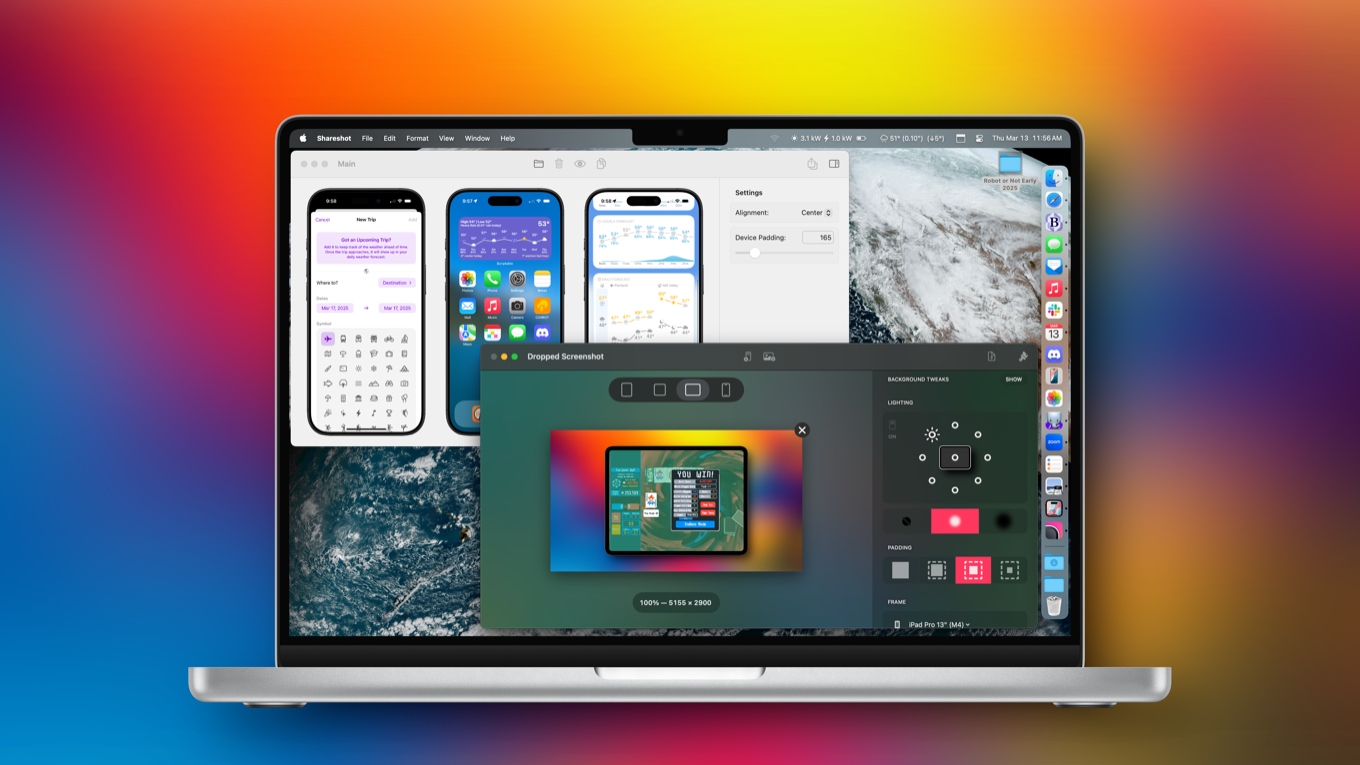
I’ve been framed: Shareshot, Framous enhance device screenshots

two screenshot utilities

Some people, whether you’re in the media or software development or technical support, take and publish a lot of device screenshots. And while an image straight from an iPhone or Apple Watch looks fine, it often looks much better to be put in context by including the device it’s running on as a frame.

Doing this manually in an app like Photoshop is doable, but labor intensive. Apple even offers design resources to help you along your way. But leave it to Federico Viticci of MacStories to try to automate the entire process with one of the most complex Shortcuts ever made, Apple Frames.

Apple Frames is great, but it ran into a lot of limitations simply because it was a shortcut and not a full app. Fortunately, two new standalone apps take what Apple Frames accomplished to the next level. Framous is a Mac app from the developer of Dark Noise, and ShareShot is a Mac/iPad/iPhone/visionOS app from Montana Floss Co. Both apps let you control which device (right down to the color) is used as a frame, and each have their strengths and weaknesses.

Shareshot offers a variety of design options.

Shareshot is the older and more polished of the two apps. It can place a framed screenshot on a background that’s transparent, based on the screenshot, an arbitrary image, or various colors and gradients. The device can optionally be set to cast a drop shadow (at any of eight different angles), and you have control over the amount of padding around the image as well as the shape of the image output.

If you want to generate a framed screenshot on an iPhone or iPad, Shareshot makes it easy. (You can even invoke Shareshot right from the Share menu in the iOS screenshot tool itself.) The app’s biggest drawback is that it’s limited to processing a single image at a time. If you want to compose an image with multiple screens at once, you have to export each one from Shareshot and then merge them together yourself.

Framous lets you compose multiple screenshots on one canvas.

Framous is much more limited—it only outputs on a transparent background and it only runs on the Mac—but it can compose multiple screenshots into a single image. I was able to drag in screen shots from an iPhone, iPad, and Apple Watch into a single canvas, and Framous automatically detected the device and added a proper frame to each one. Framous offers some basic alignment and spacing features for the canvas, and then outputs a PNG for you to use as you see fit. Framous also supports Shortcuts, so it’s possible to automate everything from images in the Finder to final output.

Unfortunately, neither app lets me specify a preferred aspect ratio or dimensions for output, so it’s up to me (and my other tools) to get them in the appropriate format for my uses.

Both of these apps have great potential. Framous feels better on the Mac, since that’s where it was conceived, and it’s my tool of choice when I’m assembling multi-image canvases. I use Shareshot all the time on iPad and iPhone, when I’m generating one-off images that I need to framed. Since all of my Six Colors images are on a transparent or white background, I don’t need the extra composition features Shareshot offers, but if you do, it’s where Shareshot has a leg up on Framous.

Both of these apps are good. For Six Colors purposes, Framous is the winner, but truth be told, I’m using both.

Shareshot is free, but a subscription ($2/month or $15/year) unlocks most customization features and removes the watermark. Framous is free, but it’s $19.99 to unlock all frames through Apple’s 2025 devices, or $9.99 per year to unlock all device frames as long as you’re subscribed.


How we maintain battery health, thoughts on Discord’s IPO and if any tech company improved post-IPO, the must-have and leave-behind tech for trips, and how to protect non-tech-savvy older adults from scams like the ‘Grandparent scam.’


By Jason Snell

Mercury Weather knows where you’re going

Mercury Weather can cover a weekend getaway.

When I was planning my trip to New Zealand a couple of years ago, I got frustrated by the fact that there was no way to see, at a glance, the weather in the various cities I’d be visiting when I’d be visiting them. I could add Christchurch, Queenstown, Wellington, and Auckland as cities, but I’d need to toggle between them all to get a sense of what the weather was looking like later in my trip.

My weather shortcut works, but it’s boring and a pain to update.

In frustration, I built a convoluted shortcut for my New Zealand trip that queried Apple Weather for forecasts from a manual itinerary. I could manually run the shortcut to see the future travel forecast. It worked, but it wasn’t glanceable and wasn’t elegant.

A few months after my trip, though, the iOS app Mercury Weather went and added a trip forecast feature, which lets you put your trip forecast on an iOS widget. It’s so good that I now pay for Mercury Weather ($2.99/month, $14.99/year, $49.99 lifetime purchase) just for this feature.

As with most other weather apps, Mercury Weather adds as many saved locations as you want. But you can also separately add Upcoming Trips, which are like saved locations but with a name, symbol, and date range attached. When the date of your trip comes within Mercury’s 10-day forecast window, the Daily Forecast chart in the app incorporates the data from the trip location instead of telling you what the weather will be like at home, where you won’t be.

But the home screen widget is my favorite. I usually keep a home-built weather widget visible on my devices, but it’s actually saved in a stack with Mercury Weather. When I have a trip upcoming, I swipe on the stack and switch to Mercury so I can see what’s in store. I’ll keep that widget active the entire time I’m traveling, so I can see what’s up in the next destination and also what the weather will be like when I get back home.

As Joe Rosensteel wrote about on this site last year, our mobile devices should get better at understanding that their users move around. They should. But in the meantime, I’m happy that Mercury Weather knows when I’m on the move.


Why the M3 Ultra chip is more than it appears to be

Just when we thought the M3 was in the ground and Apple had rapidly moved every single Mac model over to the fresh and new M4 processor, in rolls the high-end Mac Studio, equipped with the impossible-to-predict, never-before-seen M3 Ultra processor.

That’s right—in March 2025, a full 16 months after the M3 Pro and M3 Max chips arrived on the scene, Apple has introduced a new chip in the old, nearly retired family. And it means that the new Mac Studio comes simultaneously in M3 and M4 varieties—with the M3 model being the high-end configuration

So confusing. I admit to being a bit baffled when I heard the news, too. But the more I think about it, the more I have come to grips with the fact that Apple’s chip strategy isn’t quite as straightforward as it would like us to believe. What if I told you that the M3 Ultra isn’t quite an M3 or an M4 chip? Follow me, friend, and let’s see how deep this rabbit hole goes.

Continue reading on Macworld ↦


By Jason Snell

M4 Max Mac Studio review: A familiar face

The new Mac Studio is an interesting product because it’s got a surprising wrinkle: its high-end configuration, which starts at $3999 and escalates rapidly from there, is powered not by an M4 chip but by a new and unusual M3 chip, the M3 Ultra, which offers the performance of two M3 Max chips but with twice the maximum RAM and support for Thunderbolt 5. It’s a curious outlier.

The other new Mac Studio configuration, which starts at $1999, is not so interesting to close watchers of Apple products. The new M4 Max Mac Studio is a solid update, given that the Mac Studio hasn’t been updated since the M2 generation. The M4 Max chip performs as you would expect. Apple provided me with a review unit elevated from the base model, with 16 CPU cores, 40 GPU cores, 128 GB of RAM, and 1 TB of storage, which would cost $3699 on Apple’s site.

I was able to compare that Mac Studio with my own M4 Max MacBook Pro, which is powered by fewer CPU and GPU cores, and the results were as you might expect: The extra cores make a difference. But I’d expect that the base model M4 Max Mac Studio, which has the same cores as my MacBook Pro, would perform nearly identically in tests. In the Apple silicon era, generally all Macs with the same chip perform more or less the same.

Beyond that, there’s really not much to report about the new Mac Studio. Like the original model and its M2 follow-up from nearly two years ago, the Mac Studio is a powerful desktop computer that will satisfy the needs of pro users, amplified with a faster processor and support for the faster Thunderbolt 5 specification. Fewer Mac users than ever need a Mac Pro, because there’s so much power and expandability in the small Mac Studio enclosure.

That said, the arrival of the new M4 Mac mini may eat into the potential audience for the M4 Mac Studio. The high-end Mac mini model powered by the M4 Pro chip is roughly as powerful as the base-model Mac Studio at CPU-bound tasks, though the Studio comes with more RAM. What moving to the Mac Studio gets you is twice as many GPU cores, so if you’re doing GPU-bound tasks, you’ll want the Mac Studio. Plus, the Mac mini is tiny, like a shrunken-down version of the Mac Studio.

It’s a classic story. The Mac Studio steals from the Mac Pro, and the Mac mini steals from the Mac Studio. Meanwhile, the laptops steal from the desktops. (And the iPhones steal from the laptops? I’m not sure how far this story goes before it falls apart.)

I spent several years using an M1 Mac Studio as my main Mac, and it was great. If you’re someone who doesn’t need to move around with your Mac (if you do, consider a MacBook Pro instead) and really taxes GPU cores in the work you do, the Mac Studio continues to be an excellent option. I wish I had more exciting new stuff to report about, but the truth is that the M4 Max Mac Studio is the same Mac Studio we all know… it’s just on M4 now.


By Jason Snell

M4 MacBook Air review: Am I blue?

The M4 MacBook Air can drive two external displays with its lid open.

The new M4 MacBook Air is the Mac most people should buy.

It’s easy to get caught up in the small changes Apple rolls into its most popular computer as it iterates on the MacBook Air from year to year. It rolls from M1 to M2 to M3 to, in 2025, the M4. And this new model does offer a few notable changes and improvements, which I’ll get to momentarily.

But first, let’s consider the larger picture.

A very large percentage of all Macs that are sold are laptops. The last time Apple broke out desktop and laptop sales figures, 75 percent of all Macs sold in Apple’s fiscal 2012 were laptops,1 and it’s hard to imagine that number has gone down. While the MacBook Pro appeals to many higher-end users, most people opt for the MacBook Air—that’s why Apple keeps touting it as the world’s most popular laptop. Since the arrival of Apple silicon in 2020, even the humble MacBook Air combines performance and battery life in a way that makes it hard to imagine any normal, everyday computer user whose needs couldn’t be fulfilled by one.

That’s why perhaps the most important change in the M4 MacBook Air is its base configuration, which starts at $999. When Apple introduced a winning new flat-with-rounded-corners Air design in 2022, it had to keep selling older models in order to get down under a thousand dollars. Three years later, Apple is finally able to sell a brand-new Air—with a generous 16GB of unified memory—at that important price.

So: No more quibbles about stepping back a generation or two to an older model with a lower price. Apple has done away2 with that strategy for the MacBook Air: The latest and greatest model is the one most people shopping for a Mac should buy, especially if they’re coming from an Intel model.

The pace of change

In fact, before discussing the other changes in this generation of MacBook Air, I feel the need to lay out the pace of progress Apple has made during the Apple silicon era—along with an attempt to connect it back to the Intel era.

I know that a lot of very tech-focused people roll their eyes at Apple continuing to compare new models to five- or six-year-old Intel Macs, but Apple’s not just doing it in order to make pleasantly eye-popping speed comparisons. Five, six, even seven years is not a remotely unreasonable amount of time for people to keep using a laptop. I’m certain Apple knows exactly how much of its Mac installed base is still on Intel—and it’s continuing to work hard to encourage them to finally take advantage of the speed boost that comes with moving to an Apple-built processor.

I decided to run some benchmark tests on all four generations of Apple silicon MacBook Air, along with a last-generation Intel model from 2020. The charts are below, but the results are what you’d expect—there’s a huge leap from Intel to Apple silicon, and Apple’s been pushing performance forward with each generation of chip. (This new M4 actually offers the largest jump in processor performance between generations in the Apple silicon era.)

I’m a believer in the idea that at the speeds of modern computers, it’s very hard for someone to perceive a 25 percent improvement in maximum processor performance. Most of us don’t tax our processors at that level, and certainly for not that long. Sure, there’s something there—but where it really adds up is when you upgrade after two or three or four chip generations. Upgraders from a M1 Air will see more like a 40 to 60 percent speed boost, and that’s something that you might be able to notice. But upgraders from Intel, well… that’s where you will be able to notice the speed difference in literally everything you do.

A few hardware improvements

There are two major improvements to the M4 MacBook Air when compared to previous generations. First is the camera, which has been updated to a 12MP ultra-wide sensor with support for Center Stage and Desk View. This collection of specs seems to be Apple’s current baseline for Mac cameras, as they’re the same as in the M4 iMac and M4 MacBook Pro. Of course, every model’s shape differs and Apple’s not making any claims about the cameras being identical in anything but specs. I found the iMac’s camera more impressive than the MacBook Pro’s camera, for example.

In normal lighting, the new MacBook Air camera didn’t appear that different from previous generations—it offered a little better contrast. As the lighting got worse, it showed that it could do a better job. Those statements give short shrift to the versatility of the camera, however. Because it’s a 12MP widescreen camera, the default, comparable webcam view is actually zoomed in via Center Stage—and zooming out exposes that the camera covers much more ground than its predecessors.

Center Stage doesn’t seem completely necessary in a device that can easily be tilted and repositioned, and Desk View doesn’t really work well with the geometry of laptops, but adding a better, more versatile camera to the MacBook Air has been a long time coming and I’m happy with the upgrade, subtle though it may be in most circumstances.

I’m also happy to report that at last, an Apple silicon-based MacBook Air can fully support driving two external displays while also driving its internal display. Support for two external displays—a feature Intel-based MacBook Airs supported—was completely lacking in the M1 and M2 generations, frustrating people who rely on docking their laptop to two monitors. In the M3 generation, the Air picked up the ability to drive two displays with its lid closed. I plugged my Apple-supplied M4 MacBook Air into two Studio Displays and ended up with a whole lot of pixels. If you’ve been holding out for this feature—and believe me, I hear from plenty of people who have been—it’s now your time to shine.

So tired of all this traveling

The Sky Blue MacBook Air (right) next to two silver Apple products.

Finally, let’s talk about color. Though Apple occasionally goes bold with its color choices—the current iMacs and the iPhone 16 come to mind—it has been much more conservative when it comes to its laptops. Really only the G3 iBook was boldly colorful among Apple laptops. I suspect the primary reason for this is a belief within Apple that while an iMac might provide a nice color accent in a home or business, laptops are taken into various environments and therefore should be more neutral.

I don’t really agree with this approach, nor Apple’s insistence on offering no color choices for those who might prefer to show off a little bit. But it is what it is, and that’s why the M4 MacBook Air comes in four conservative colors. Space Gray is gone, but standard silver, the warmer silver of Starlight, and the beautiful almost-black navy of Midnight remain. The new color is Sky Blue.

I really don’t mean to give Apple a hard time, but I had to double-check my shipping manifest because I was convinced the company had sent me a silver laptop to review. But when I placed the MacBook Air next to other modern Apple silver products, it’s clearly a different shade, and at certain viewing angles the blue undertone becomes more pronounced. If you want to think of Starlight as silver with a yellow undertone, and silver as neutral, Sky Blue is silver with a blue undertone. They are basically three slight variations on one another.

Is it pretty? Sure, especially in the right environment and at the right angles. It’s exactly what Apple wanted to make: a new color choice that won’t draw anyone’s attention when it’s opened in a conference room or at a cafe.

I think MacBook Air users should be given at least one fun color option, but I have to grudgingly respect Apple’s commitment to this philosophy. I want to believe that a bright blue or orange or red or green MacBook Air might sell, but Apple’s the one who knows how many silver iMacs it has sold. Maybe most MacBook Air buyers just want to blend in. Until Apple tries something more daring than Sky Blue, we’ll never know.


  1. In FY12, Apple sold 13.5 million laptops out of 18.1 million total Macs sold. (We don’t know how many Macs Apple sold in FY24, but Mac revenue was up 31 percent from FY12.) 
  2. The M2 Air is available in a few countries at a lower price, and Walmart is still selling M1 Airs for now, but those are marketing experiments that are outside the canonical list of products being promoted on Apple’s site. 

It’s been a quiet week, so John Gruber briefly joins Jason to discuss Apple’s AI delay, new Macs, new iPads, and the future of Apple regulation worldwide.


The MLB/ESPN separation and the future of ESPN, the Nationals escape from MASN, Fox’s sports streaming service quandary, interesting tidbits from the Sloan Sports Conference, and our TV picks!


By John Moltz

This Week in Apple: Talk to ya later

John Moltz and his conspiracy board. Art by Shafer Brown.

Big week as Apple releases new hardware and takes on the UK government. Meanwhile, if you were holding your breath for new Siri, well, you’re probably dead already so…

Blue-ish

We once again gather together to celebrate the announcement of new Apple hardware! Mazel tov!

The iPad Air just looks like you. The Mac Studio has your nose. Please feel free to add your own birth-related jokes.

Yes, Apple made a host of announcements this week, starting with new iPads and iPad Airs. Turns out Tim Cook was right, there was something in the air. Also probably something in the water, thanks to the gutting of the EPA.

Ha-ha!

Uhnnnnnnnnnnnnnnnnnnnnnnnn.

And that was just Tuesday. On Wednesday Apple announced new M4-based MacBook Airs (don’t mind if I do) and new M4 Max and—am I reading this right?—M3 Ultra-based Mac Studios.

Naturally, being the spoiled Apple customers we are, we questioned everything.…

This is a post limited to Six Colors members.


By Jason Snell

Apple delays some anticipated Apple Intelligence features

Craig shows off Semantic Index
Craig Federighi shows off the Semantic Index in June 2024.

As reported by John Gruber, Apple announced on Friday that some of its most anticipated Apple Intelligence features won’t make it in this year’s cycle after all. Apple representative Jacqueline Roy:

Siri helps our users find what they need and get things done quickly, and in just the past six months, we’ve made Siri more conversational, introduced new features like type to Siri and product knowledge, and added an integration with ChatGPT. We’ve also been working on a more personalized Siri, giving it more awareness of your personal context, as well as the ability to take action for you within and across your apps. It’s going to take us longer than we thought to deliver on these features and we anticipate rolling them out in the coming year.

The first sentence is just a recitation of existing Siri features. The second sentence details the features that haven’t made it yet. The third sentence promises for rollouts “in the coming year,” which probably means iOS 19.

Those features were the most interesting ones Apple announced last June, but even at the time they seemed ambitious. Apple said it would build a “semantic index” of your on-device data, giving Apple Intelligence a leg up on the competition by being able to understand personal data that’s not available to cloud A.I. models. It also said it was adding the ability to look at your device’s display and understand what was happening on screen, and using the App Intents framework to allow Apple Intelligence to control your apps and use multiple apps to deal with your requests.

mom's flight lands...
Siri tracking your Mom’s flight by scanning your email.

This led to one of the killer demos of WWDC 2024, in which Siri was able to understand when someone’s mom’s flight is landing by cross-referencing an email with real-time flight tracking to get a good answer. From there, the demo pulls a lunch plan with mom out of a text thread and then displays how long the drive is to there from the airport—all from within Siri, rather than individual apps.

It became clear early on that these features wouldn’t appear until later in the iOS 18 cycle, but with this announcement Apple is admitting that it just couldn’t deliver on these ambitious announcements in time. The OS cycle is about to flip over and we’re only three months away from the next WWDC.

Those Apple Intelligence announcements at WWDC 2024 were vitally important for Apple. The company felt that it had to show that it hadn’t completely missed the boat on the hottest topic in the tech industry, and that it was working hard to infuse the power of AI through all its products. I would argue that succeeded at doing so, and its barrage of Apple Intelligence marketing the past six months has reinforced the point. People in the know might criticize that Apple’s behind, or that its tools aren’t close to the state of the art, but the general perception is that Apple’s in the game—which was a real question last year at this time.

In exchange for all of that, Apple put itself out there and took risks that it might not have if it hadn’t felt immense pressure on the AI front. If you had asked Apple executives a year ago if they should risk overpromising and underdelivering when it comes to Apple Intelligence during the iOS 18 cycle, clearly the answer would have been yes. I don’t want to say that WWDC 2024’s announcements were just about hype, but they weren’t not about hype.

And if you asked those same Apple executives if they were aware that the cost of underdelivering those features in the spring of 2025 would be getting beaten up in the press a little bit for delaying features, perhaps even back to iOS 19? I’m pretty sure they’d say that a little bit of negative press today, when the world isn’t really paying that close attention to Apple and AI, would totally be worth it.

Apple got exactly what it wanted out of WWDC 2024. The penalty for failing to ship some of those features will be the equivalent of a slap on the wrists. But this all increases the stakes for WWDC 2025, when Apple will still need to show that it’s capable of creating useful Apple Intelligence features—and its audience should be more skeptical about the company’s ability to ship them.


By Dan Moren for Macworld

Apple’s new entry-level devices are the best possible trap

Spring is the time of somewhat odd Apple announcements. We all know we’ll see the revisions to all of the company’s software platforms in June at the Worldwide Developers Conference, and that new iPhones and Apple Watches arrive in September. But spring? Anything can happen! The field’s wide open.

If this year’s spring announcements have a theme, it could perhaps be best summarized as “everything old is new again.” From the iPhone 16e’s iPhone-14-like design to the amazing staying power of the M3 line, Apple’s once again shown us how it loves to recycle.

But this week’s unveiling of the latest MacBook Air, Mac Studio, iPad Air, and base-level iPad demonstrate something else as well: Apple’s commitment to bring down the cost curve and provide its customers more for their money. That’s not a traditional Apple move, and it does raise some potential wrinkles for the company.

Continue reading on Macworld ↦


By Joe Rosensteel

Searching for settings in all the wrong places

A screenshot of Settings search showing no results for 'credit card'
Search and ye shall not find

To say that it has been controversial every time Apple rejiggers Settings on any of their platforms is putting it mildly. It is evident that whatever iOS does with Settings is the gold standard for all the company’s other platforms to follow. In theory, this makes the interface consistent for people jumping back and forth between Apple devices. The reality is that the iOS Settings are quite bad, nothing is consistent, and the attempts to duplicate iOS can only ever produce a perfect copy of a bad system under the most ideal circumstances. Relying on search as a crutch only works if search is capable of providing that support.

Top level

Settings on iOS may not be organized in a way that is important to you, or me, but it’s grouped sometimes by type and sometimes by Apple’s orgchart.

The most important part of the interface is the Search box. It’s right there at the top. It’s not collapsed, or hidden. They want you to use to find the settings you need.

Next are promotions and updates from Apple, if they exist. You might have a free trial of Apple TV+ from the purchase of new Apple hardware, or something else. Apple has decided that this is the second most important function of visiting Settings.

Continue reading “Searching for settings in all the wrong places”…


Search Six Colors