Six Colors
Six Colors

Apple, technology, and other stuff

This Week's Sponsor

Unite Pro: Turn websites into Mac apps with native enhancements


By Jason Snell

Some more hands-on experience with the new MacBook Pros

Note: This story has not been updated for several years.

Since nobody’s getting the new Touch Bar-equipped MacBook Pros until mid November, and I was fortunate enough to spend some hands-on time with them Thursday, let me do a little bit of a brain dump about what I saw and touched.

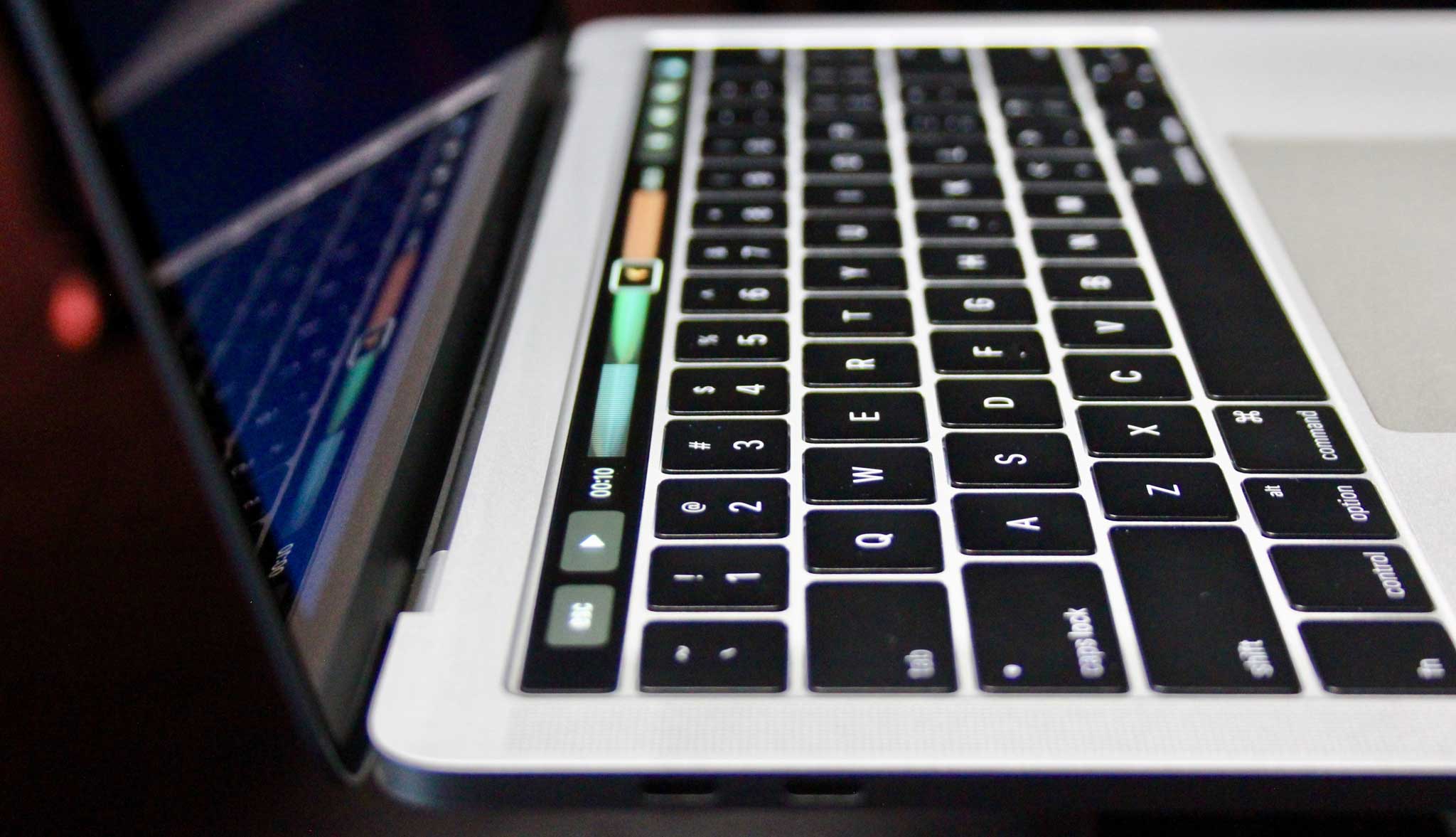
There’s no brightness control for the Touch Bar. My first impression of the Touch Bar is that the “keys” looked… like keys. It didn’t feel like I was looking at a screen, but at an extension of the keyboard. That was an intentional choice on Apple’s part. Unlike the display and the keyboard, the Touch Bar’s brightness is not manually adjustable.

Instead, the Touch Bar’s brightness varies based on lighting conditions, using the light sensor. I wasn’t able to try and trick it or confuse it, but the entire time I was using it—in a dark room and in a much more brightly lit one—it seemed to match the keyboard well. This is not a bright, glowing screen above a dark keyboard—it’s an extension of the keyboard.

Oh, and if you’re scoring at home, the Touch Bar is a 2170 x 60 OLED display. To the right side is a power button with embedded Touch ID sensor, and to the left side is a blank gap, presumably to force some sort of symmetry on the design? Ironically, it makes the Touch Bar feel a bit asymmetric because it doesn’t extend to the left edge of the keyboard, so the virtual Escape key, when it appears, is shifted over from the tilde key right below it. It’s a bit weird.

Touch Bar is designed for angled viewing. The Touch Bar itself isn’t angled, but Apple designed it knowing that its primary viewing angle isn’t straight on—it’s at an angle, down on a laptop keyboard. This went into some of the aspects of its design, including changes to the structure of the glass and a special coating. The goal was to make it feel like an input device, not a display—and in fact, make it feel similar to the trackpad.

The display is an energy saver. According to Apple, the retina display on these models is brighter—rated at 500 nits—and incorporates the same larger pixel aperture and variable refresh rate as the MacBook’s display. Despite all that, the display uses 30 percent less energy than the previous model. That’s one of the ways Apple was able to shave weight off of these laptops—by reducing battery due to the decreased power consumption of the screen.

That’s a big trackpad. The trackpad on the 13-inch model is more than half again as big as on its predecessor, and on the 15-inch model it’s doubled in size. As Phil Schiller said on stage Thursday, Apple can make the Trackpad bigger now that it’s a Magic Trackpad rather than an older hinged model because even at large sizes the entire surface is clickable. (The previous generation of MacBook Pros finished life with Magic Trackpads, but they were tucked into the space designed for older, hinged models.)

The trackpads are large enough that Apple has had to build in more palm-rejection intelligence, because when you’re typing on these things, you’re going to inevitably slide your palms across them. In my experience writing this article on a 13-inch MacBook Pro, the palm rejection worked well—I never felt that I had to change my typing approach just to avoid weird mouse movements.

So about that keyboard. When the MacBook was released with its low key-travel keyboard, the intense debate among Apple kremlinologists was if Apple would bring that keyboard to the MacBook Pro line as well. The introduction of the Magic Keyboard—which didn’t ape the MacBook keyboard and offered a lot more key travel—muddied the waters.

On stage Thursday, Schiller said that the MacBook Pro’s keyboard was a second-generation version of the MacBook keyboard and featured design changes to give it more movement feel. As someone who is not a fan of the very small amount of keyboard travel on the MacBook keyboard, I noted the phrasing. He didn’t say the keys moved more, just that they felt better.

Well, it’s my sad duty to report that the MacBook Pro keyboard has the same key travel as the MacBook. Apple says the stainless steel dome switch beneath each key has been honed to give you a more responsive feel, but to me it feels just like the MacBook’s keyboard. (To be fair, I don’t have a MacBook available to test directly. It’s possible that this keyboard does indeed feel more responsive than the MacBook, but I would never mistake it for the old MacBook Pro or MacBook Air keyboards or even the Magic Keyboard.)

If you like the MacBook’s keyboard, good news! You’re gonna get it. If you don’t like it—well, I don’t know what to tell you. It seems like this is the keyboard style Apple’s going to give us on laptops until the day comes when it does away with physical keys altogether.

More than one port is nice. I’ve only got the Touch-Bar-lacking 13-inch MacBook Pro, but I was still able to pull off a trick that I wasn’t able to do with the MacBook: attach a peripheral while also charging. The low-end 13-inch MacBook Pro has two Thunderbolt 3 ports on its left side, and a headphone jack on the right. Because it’s Thunderbolt 3 and not just USB-C, I was also able to use Apple’s new Thunderbolt 3 to Thunderbolt adapter, put my MacBook Air in Target Mode, and connect the two machines together to transfer files—all while the MacBook Pro kept charging. Imagine that.

(That Thunderbolt adapter is quite chunky, by the way. It’s not just an adapter cable, there’s a whole big cylinder connected to the Thunderbolt port.)

Having USB-C/Thunderbolt 3 with me on the trip I’m taking right now means that I could actually bring a single charger cable for the MacBook Pro and my iPad; instead of a single-purpose MagSafe charger, the Macbook Pro comes with a USB-C charger. Swap the USB-C cable for a USB-C to Lightning cable and you can use it to charge iOS devices.

Oh, and according to Apple, you can charge the MacBook Pro from any port. The higher-end models have two Thunderbolt 3 controllers, so the only real limitation across the ports is that if you want to connect two 5K monitors, you’ll need to connect them on opposite sides of the laptop.

What makes that LG Display special. Instead of announcing a new Apple-branded Thunderbolt 3 Retina Display, Apple announced that it worked with LG to create a new 27-inch 5K display that supports the wide color gamut now present on MacBook Pros, iMacs, iPhones, and the 9.7-inch iPad Pro. (This collaboration convinces me that Apple’s not going to make a display of its own.)

What makes the LG display different from any other 5K display that might offer DisplayPort 1.2 and Thunderbolt 3 support? According to Apple, there’s more hardware integration: You can adjust the brightness and settings of the LG display from your Mac, rather than pressing buttons on the display to bring up on-screen menus.

By the way, LG is also offering a smaller 4K display, but that one’s not Thunderbolt 3—it uses USB-C and doesn’t offer all the ports and the webcam that the 5K display does.

Just a reminder: USB-C isn’t Thunderbolt 3, really. Thunderbolt 3 and USB-C use the same ports, but there are compatibility issues. a Thunderbolt 3-equipped computer can use USB-C adapters and devices without a problem, but a USB-C-equipped computer—namely, the MacBook—can’t use Thunderbolt 3 stuff. I’d imagine that in practice this won’t be a huge deal, because unless a device really needs features only offered by Thunderbolt 3, it’ll opt for USB-C compatibility instead. But if you’re a MacBook user, you should be careful—that Thunderbolt 3 docking station isn’t going to work.

By Jason Snell

Perpendicular philosophy

Note: This story has not been updated for several years.

This week highlighted the fundamental differences between the product philosophies of Apple and Microsoft. Neither philosophy is unreasonable, and both are rooted in rational decisions based on the strengths and weaknesses of their businesses.

Microsoft believes that traditional computer interfaces and modern mobile-device touchscreen interfaces should be melded together, blurring the lines between tablet and PC. This week’s introduction of the Surface Studio—think of an iMac that can be folded down onto your desk and used as a gigantic iPad—is perhaps the most impressive iteration of that belief to date.

Apple, in contrast, believes that touchscreen interfaces are great and computers are great and they’re not the same thing. Apple has steadfastly resisted adding touchscreens to the Mac, and when you ask the company’s executives why, they have been remarkably consistent on this point for the past few years.

What defines a computer, they’ll say, is that it’s made up of two perpendicular surfaces. There’s a vertical display surface, more or less up and down, right in front of you. And there’s a horizontal control surface—a table or desk or the base of a laptop—that you use for input and control. If you want a Mac, that’s what you get. If you want a touch-based device, get an iPad.

Seen through this philosophy, the new MacBook Pro and its Touch Bar interface fit perfectly. The Touch Bar brings the things Apple loves about touchscreen interfaces—customizability and support for multitouch—and adds it to the control surface of the Mac, right above the keyboard. It doesn’t break Apple’s definition of a computer at all, because it’s a new sort of touchscreen, and it’s part of the keyboard area, not the display area.

On Twitter today I saw several people, flush with the excitement of the Surface Studio announcement, mock the Adobe Photoshop demo at the MacBook Pro launch by suggesting that if the Adobe employee on stage had really wanted to make edits to her photo, she could’ve done it a lot better on a Surface screen rather than using a trackpad with one hand and the Touch Bar with the other.

Apple believes that those people are exactly wrong, that sticking your arms out to interact with the vertical surface is a terrible experience. And Apple believes that if you really do prefer a device that’s a touchscreen, you’d be better off with an iPad Pro.

Is Apple right? I really don’t know, though if I had to guess, I’d say that it’s not quite as black and white as that. I’m entirely sure that for some people, Microsoft’s approach—especially the Surface Studio and its drafting-table ergonomics—is the right one. I’m also sure that for other people, it’s completely wrong. (I’m repelled by it, but then, I am not a big fan of pen input in general!)

Microsoft’s belief is that PCs can take a little bit from column A and a little bit from column B and the result is a product that’s more flexible. Apple’s belief is that it should make the best product in column A and the best in column B, and that you can’t do either if you take a little bit from both. The downside of that is, if you want to do both with Apple products, you’ve now got to buy an iPad and a laptop.

So when we look at the MacBook Pro and the Touch Bar, we’re seeing a very Apple approach to the problem. The Touch Bar exists because Apple doesn’t believe that making the Mac’s display a touchscreen makes the Mac a better computer. Instead, Apple created a new kind of control surface, powered by a custom processor and with extensive additions to macOS to support both system controls and contextual commands in the Touch Bar.

I don’t know if the Touch Bar will be successful or not, or if it’s the right approach. I’ll really need to try it out for a while to make that call. But its existence is entirely consistent with Apple’s philosophy, which finds itself at a right angle from the one espoused by Microsoft.


Lex has switched from Napster to Amazon Music: https://www.amazon.com/exec/obidos/tg/browse/-/163856011/
The Logitech Harmony Hub works with the Amazon Echo: https://sixcolors.com/post/2016/10/logitech-brings-some-harmony-to-the-amazon-echo/
New MacBooks are coming with the now confirmed touch bar: http://www.macrumors.com/2016/10/25/images-of-new-macbook-pro-leaked/
Amazon’s reviews problem: http://www.geekwire.com/2015/amazon-files-first-ever-suit-over-fake-reviews-alleging-calif-man-sold-fraudulent-praise-for-products/
Our thanks to Indochino (https://www.Indochino.com), where you’ll find the best made to measure shirts and suits at a great price. Use the promo code “REBOUND” and get any premium suit for just $389.
Our thanks as well to Movement Watches (http://mvmtwatches.com/Rebound), makers of beautifully designed watches that won’t break your budget. Go to MVMTWatches.com/REBOUND and you’ll get 15% off your order.


By Jason Snell

A few quick thoughts about Thursday’s Mac event in Cupertino

Note: This story has not been updated for several years.

Hello from the South Bay, where I just attended perhaps the last Apple media event in the Town Hall conference center at Infinite Loop. Here are some quick initial thoughts:

New MacBook Pros are quintessentially Apple

The new MacBook Pros, the first major revision of Apple’s flagship Mac since the unveiling of the Retina MacBook Pro in 2012, possess all the things you’d expect from a new Apple product. They’re thinner and lighter, more powerful, integrate Apple-originated technology, and question basic assumptions about the product category they reside in.

With the Touch Bar, Apple’s questioning the existence of the function row at the top of our keyboards. Over the years Apple has de-emphasized the size of those keys and remapped them to system functions, and now it’s doing away with keys altogether. A programmable multi-touch display can provide virtual keys and sliding interface elements based on context. Having a custom button properly labeled sure beats “Press F10.”

I got to play with a MacBook Pro with Touch Bar for a little while this afternoon and I came away impressed. I’ll have more on this later today, but I think there’s a lot of potential here. I also suspect that this is the beginning of the story, and that in the next year everyone (including Apple) will learn a lot about what sort of interactions work well on the Touch Bar, and which ones just don’t.

The other other MacBook Pro

I don’t quite get the existence of the low-end, non-Touch-Bar-having 13-inch MacBook Pro. On stage, Phil Schiller argued that it was essentially a Retina replacement for the 13-inch MacBook Air, and I can see that. But it’s $500 more and is it really a MacBook Pro? Does the MacBook Pro line need to have this extra product attached at the bottom of it, lacking the most interesting feature of the rest of the line?

Then again, it’s not really a MacBook either, because it’s heavier and has two Thunderbolt 3 ports rather than the one USB-C port on the MacBook. It’s a tweener product and Apple has apparently decided that it doesn’t want to introduce another new name to its laptop line, so MacBook Pro it is. But it’s weird. Not necessarily bad—it really does fill a niche that’s between the full-on MacBook Pro and the MacBook—but weird nonetheless.

All the new ports, and one old one

Once the MacBook came out with a USB-C port, it was clear that we were entering a port transition on the Mac. Intel’s announcement of Thunderbolt 3, which is plug compatible with USB-C, made it even clearer. And here we are. Rather than taking half measures, Apple has completely embraced Thunderbolt 3 on these new Macs.

I think I approve. We’ll grouse about adapters for a little while, but mixing and matching ports is no good. USB-C and Thunderbolt 3 adoption will happen faster than you’d think. Four ports on the high-end MacBook Pros means there’s lots of room for expansion, and those connections are fast enough to do some pretty amazing things with external displays and RAID arrays.

Oh, and the headphone jack survives. I used to take that as a given, but these days you can’t make assumptions.

Apple TV and the TV app

Apple’s new TV app is a step in the right direction for Apple TV, in terms of unifying content a bit better than the box currently does. If the future of TV is apps, the problem is that apps tend to be islands unto themselves. Users don’t want to search different apps to find the stuff they can watch—they just want to watch it. The TV app makes that possible, though app developers will need to modify their apps to work with this new approach.

And that’s all, folks

As for the Mac Pro, iMac, and Mac mini? Bupkis. Seems like we’ll get more new Macs in the spring, and I’d expect the rest of the line to be refreshed then. This was never going to be a great time for a Mac Pro update, given the current state of Intel’s processor road map. I’m a little surprised that there was no iMac refresh this year, since I’ve always assumed those computers sell well during the holidays and so it’s nice to be fresh.

I also wonder, having seen the Touch Bar, if a Magic Touch Bar accessory (attached to a Magic Keyboard) can be far away. But again, that’s probably spring at the earliest.

Check back later today for a whole lot more about the Apple event.


By Jason Snell

Live from Cupertino: Apple’s Oct. 27 event

Note: This story has not been updated for several years.

I’ll be at the Apple event in Cupertino, hopefully seeing the announcement of new Macs. I’ll be live-commenting on Twitter at @sixcolorsevent, and have embedded that timeline below. Stay tuned!


By Jason Snell for Macworld

4 ways Tim Cook made lemonade out of Apple’s Q4 2016 earnings

So you’re the CEO of one of the world’s most successful companies. You’ve just dotted the i’s and crossed the t’s on all the paperwork for the latest quarterly financial reports. What to do for an encore? You spend an hour talking to a collection of Wall Street analysts, that’s what!

But between requests for more color (hmm…) and questions for your CFO about OpEx and FX and basis-point deterioration, you’ll need to do a good job setting the table for where you’ll be taking your company in the 2017 fiscal year, which is already underway. So without further delay, here are four weird tips to having a solid call with analysts if you’re the CEO of Apple-just as Tim Cook discovered on Tuesday.

Continue reading on Macworld ↦


Report: Apple TV discovery feature in the offing

USA Today‘s Dawn Chmielewski says Apple will launch a centralized way for users to discover new content on their Apple TVs this week:

Described to network executives as “the Watch List,” the app will recommend shows based on the content viewers access through their Apple TVs. For example, a subscriber to FX Networks might be encouraged to check out the new dramatic series Atlanta.

So, a few things. One, I often find these kind of reports to be not entirely representative of an actual product; it’s possible there’s more to this feature, or that it works more subtly than what it might originally seem.

That said, while this might be a step in the right direction, on par with offering universal search, it seems to fall pretty short in other ways. For one, if you’re watching FX, chances are you will have heard about Atlanta because I watch literally one other series via the FXNOW app on my Apple TV1, and I get an ad for Atlanta about three times during the course of the half-hour show. For another, are these recommendations predicated on something more than being a subscriber? Netflix and other services don’t always do the best job of recommending things, but at least they tend to try and look at what you’re already watching before suggesting other titles.

Discovery is also only one part of the problem with watching shows on the Apple TV. Despite the “Watch List” moniker—which is supposedly internal and won’t be the feature’s final name—it seems pretty far from what I’d like in an actual watchlist, which is to say, a list of the shows I’m watching. (I’ve recommended Television Time in the past for the best version of that I’ve seen.) The USA Today story also credits the “technological groundwork for improvements to Apple TV” with the single sign-on plan the company announced in June…which still hasn’t arrived.

I’m hopeful that this feature is more than just the slice of it we’re getting in this report, but given Apple’s rather conservative updates to the Apple TV software, I’m far from convinced.


  1. You’re the Worst. It’s great. 

By Jason Snell

Apple’s fiscal 4th quarter in 5 charts

Note: This story has not been updated since 2020.

On Tuesday Apple announced its quarterly results, and then its executives spent some quality time with analysts who tried to get Tim Cook to announce unreleased products. Tale as old as time.

Here are five quick takeaways in the form of annotated charts. Because who doesn’t love charts?

Fiscal 2016 was rough for Apple in terms of growth. It turns out that the runaway year-over-year growth of fiscal 2015, fueled primarily by the huge upgrade cycle kicked off by the release of the much larger-screened iPhone 6 and 6 Plus, just couldn’t be matched. And so Apple posted three straight quarters of year-over-year revenue drops.

But all the curves began to turn back upward this quarter, and Apple is projecting that the next fiscal quarter will show growth over the holiday quarter of calendar 2015. That was Apple’s biggest financial quarter ever, so… that means Apple is basically guaranteeing that next quarter will be its biggest ever. That’ll be something to see, and a nice way to break out of this annus horribilis.

As Apple faced tough year-over-year comparisons quarter after quarter, it sounded the rallying cry: “Look at how great our services are doing!” And it’s not wrong. This is the one component of Apple’s business to grow solidly over the last year. It’s now a $6 billion per quarter business, and still growing. The App Store is a big part of this, but Apple Music and iCloud are in there too. This quarter Services was Apple’s second largest revenue line at 13 percent of total revenue, making it bigger than the Mac (12 percent) and the iPad (9 percent).

I love my iPad, but it feels like we’ve spent the last three years hoping that iPad sales have hit rock bottom, and every time it’s turned out that there’s a little bit farther to fall. This quarter’s 9.3 million iPads sold is the lowest iPad sales figure in five years, since the third quarter of 2011. The good news is that the last three quarters have shown a marked flattening of iPad sales. So we may have actually hit rock bottom… or I could be fooling myself.

This isn’t to say that the iPad isn’t a viable product—it’s clearly a solid business, generating $5 billion in revenue every quarter. But is there growth potential here, or is it a product doomed to be loved by people like me and ignored by the rest of the market?

What a lost year for the Mac. The only notable new Mac in fiscal 2016 was the 4K iMac. There were minor updates to the 5K iMac and the MacBook, and… yeah. That was about it. Is it any wonder that Mac sales slipped, and slipped again, and continued to recede from the prior year’s sales figures as the year went on? That’s a chart of a product line that hasn’t been shown any real attention in a couple of years. And that’s the story of the Mac in 2016.

Maybe Thursday’s Apple event will start turning things around. I’d love to see positive Mac growth in fiscal 2017. As for 2016… it was more like what happens when you throw a party and nobody comes.

You know, if you’re an investor you care about growth. But let’s not lose sight of some other figures: Fiscal 2016 was Apple’s second most profitable year ever, as the company generated $45.7 billion in profits. Apple ended the fiscal year with $237.6 billion in cash. (Only $21 billion of that cash was in the United States, though—the other $216 billion is cooling its heels overseas, waiting for a tax holiday from the U.S. government.)

Still, this is the big point: There’s a lot of angst about Apple’s growth, and that makes sense from certain financial perspectives. If you’re an investor, you care. If you’re someone who is more concerned with the general health and well being of Apple, well: In a year where it received financial scrutiny the likes of which it hadn’t seen since the earliest days of the second Steve Jobs era, Apple had its second-best year ever, threw off nearly $46 billion in profit, and now sits on a $237.6 billion cash pile. Yeah… as bad years go, it was pretty okay.


By Jason Snell

Analysts fail to perform Jedi Mind Trick on Apple CEO

Note: This story has not been updated for several years.

You **do** comment on unannounced products…

Analysts are like the rest of us. They want to know what Apple’s got up its sleeve in terms of new product introductions. The difference between them and us is, every three months they get on the phone with Tim Cook and get to ask him a question or two. And some analysts just can’t resist an attempt to get Cook to slip up or play coy or otherwise violate the first rule of Apple Club: We do not comment on unannounced products.

Gene Munster—who spent several years trying to get Apple to admit it was making a TV set, but to no avail—attempted to confuse Cook with a run-on sentence: “Historically in terms of new product categories you guys have always looked for unique advantage before getting into a segment, and I’m curious about the car, and there are a lot of rumors out there, and would like your perspective on how you think about an advantage that Apple could add in the auto space.”

Cook’s response is pretty great, because he knows that we know that he knows that we know about Project Titan. But we know that he knows that… well, you get the idea.

“I can’t speak about rumors, but as you know, we look for ways that we can improve the customer’s experience on different sets of products, and we’re always looking at new things,” Cook said. “It’s clear there’s a lot of technologies that will either become available or will be able to revolutionize the car experience, and so it’s interesting from that point of view. But certainly nothing to announce today.”

Are you sure, Tim? You sure you don’t want to announce the Apple Car 40 minutes deep into a telephone call? Okay, I guess, if you really want to be that way.

Steve Milunovich of UBS also took a run at Cook. “Does Apple today have a grand strategy for what you want to do? I know you won’t tell us what it is, but do you know what you want to do over the next three to maybe five years?” (In other words, I know you won’t tell me what you’re working on, but do you know what you’re working on, or are you going to be as surprised as the rest of us?)

Cook with the smackdown: “We have the strongest pipeline that we’ve ever had and we’re really confident about the things in it, but as usual, we’re not going to talk about what’s in it… We have a strong sense of where things go, and we’re very agile to shift as we need to.”

There were a couple more teases in the call as well. When asked about the possibility of Apple doing something in the media business—the question referenced AT&T’s purchase of Time Warner—Cook didn’t pooh-pooh it. “In terms of owning content and creating content, we have started with focusing on some original content… And I think it’s a great opportunity for us, both from a creation point of view and an ownership point of view,” he said. “It is an area that we’re focusing on.”

Similarly, Cook didn’t throw in-home digital assistants like the Amazon Echo and Google Home under the bus, though he could have. While extolling the virtues of Apple’s own approach with Siri, he qualified his comments: “I think that most people would like an assistant with them all the time… That doesn’t say that there’s not a nice market for a home one; I’m not making that point. I’m just saying that on a balance point of view, I think the usage of one on the phone will likely be much greater.”

Meanwhile, leave it to CFO Luca Maestri to be the biggest tease of all. “We’ll have some exciting news to share with current and future Mac owners very soon,” he said. See you at Town Hall on Thursday, Luca.


By Jason Snell

Apple Financial Results: Live coverage

Note: This story has not been updated since 2023.

It’s that time again. We’ll be covering Apple’s financial results and conference call live, with commentary, right here in a few hours. Results usually come out about 1:30 p.m. Pacific, followed by all the charts. Apple’s conference call with analysts begins at 2 p.m. Pacific.

You’ll be able to read along with our commentary in a separate window.

Continue reading “Apple Financial Results: Live coverage”…


New MacBook Pro images appear in macOS Sierra 10.12.1

MacRumors notes that some system files in the new macOS Sierra update show a MacBook Pro with a touchscreen/touch ID bar at the top of the keyboard, as has been rumored.

The files are in /System/​Library/​PrivateFrameworks/​PassKitUI.framework/​Resources/, if you’re so inclined.


By Dan Moren

Logitech brings some Harmony to the Amazon Echo

Note: This story has not been updated for several years.

Echo and Harmony

If you’ve been looking to control your home entertainment gear from your Amazon Echo without a bunch of cumbersome workarounds, good news: Logitech has officially released a Smart Home Skill for the Amazon Echo, letting you control all the devices connected to your Harmony Hub.

I set up a similar system a while back, using a combination of other services like IFTTT and Yonomi, but Logitech’s first-party integration definitely puts it in the reach of anybody with an Echo and a Harmony Hub who doesn’t want to muck around with nitty-gritty technical details.

Logitech’s integration mostly delivers what I could already do with those other services, but there are a couple of nice additions. For one thing, it gets rid of the “trigger” nomenclature imposed by IFTTT.1 Additionally, it lets you declare “friendly names” for your devices, so even if your Harmony Activity is “Watch Apple TV” you can just say “turn on Apple TV”, or you can use “turn on game console” or “turn on Xbox.” Other smart home devices that work with the Harmony Hub, like Hue lights, can also be triggered, though of course the Echo already has built-in control for those devices as well.

If you’re a Roku user, you can take things a step further by actually specifying certain apps, like saying “turn on Netflix”, and you’ll be automatically taken to that app. (It works for TV channels too, if you program an activity to go to a specific channel.) Unfortunately, that level of control isn’t available to devices like the Fire TV and Apple TV, which I believe still leverage Harmony Hub’s IR blasting features. That’s a bit of a bummer–I doubt Apple will make the Apple TV friendlier any time soon, but I wouldn’t be surprised if Amazon built in some deeper control between the Echo and the Fire TV.

As it is, you can’t do much in terms of issuing other commands to your smart devices, such as changing the volume or muting, without jumping through some more elaborate hoops. This points to some of the limitations in both Echo’s smart home skills and what Logitech currently offers with the Harmony.

That said, I’m still eagerly awaiting the Echo’s integration with Sonos, a private beta of which is supposed to roll out this fall. Along with Google Home and rumors of Apple’s entry into the market, voice control of smart home features is really starting to heat up.


  1. Yonomi, which I had been using for a few things, let you do the same thing–it essentially created virtual “devices” which you could use the Echo to turn on or off. 

[Dan Moren is the East Coast Bureau Chief of Six Colors, as well as an author, podcaster, and two-time Jeopardy! champion. You can find him on Mastodon at @dmoren@zeppelin.flights or reach him by email at dan@sixcolors.com. His next novel, the sci-fi adventure Eternity's Tomb, will be released in November 2026.]


By Jason Snell for Macworld

The 10th anniversary of the 5th anniversary of the iPod

[Yesterday was the 15th anniversary of the iPod. I’d write a reminiscence article about it, but I already did one 10 years ago…]

Since its first release five years ago on October 23, 2001, the iPod has become one of the most recognizable products in the world. It has transformed Apple’s business and its public image, and is probably responsible for a “halo effect” that has improved the Mac’s image and fortunes as well. Whether you’re a rabid iPod lover or someone who just doesn’t see why the iPod’s such a big deal, it’s hard to dispute the gigantic impact the iPod has had on our technological world.

On the day the iPod was unveiled, none of us knew we were witnessing the arrival of the first iconic product of the 21st century. We had a pretty good idea we were going to see an Apple music player, but we got more than we were expecting. I was there with Macworld’s Rick LePage, Jonathan Seff, and Philip Michaels—if you look on the video of the event posted on YouTube, you can see us in one of the cutaways.

My notes from the event are still on my Mac: an overview of the Digital Hub concept. iDVD 2’s ship date had slipped a second time, to early November. A demo of iMovie, of iTunes, and of Mac OS X’s Image Capture utility (because iPhoto wouldn’t come into being until 2002). And then, at last, the main event: a music product. “It’s a large target market,” Jobs said. “It knows no boundaries. No one has really found the recipe yet for digital music. And we think, not only can we find the recipe, but we think the Apple brand is going to be fantastic, because people trust the Apple brand.”

Continue reading on Macworld ↦


The New York Times buys The Wirecutter

Peter Kafka at Recode:

The Times will pay more than $30 million, including retention bonuses and other payouts, for the startup, according to people familiar with the transaction. Brian Lam, a former editor at Gawker Media’s Gizmodo, founded The Wirecutter in 2011, and has self-funded the company’s growth.

Brian Lam had a vision and built The Wirecutter to meet his vision. He did a fantastic job, and hired some amazing people to build it with him. Having written a couple of Wirecutter projects, I have seen how the organization has tried very hard to build a new kind of editorial process that isn’t indebted to old assumptions. It’s tough stuff—systematic product reviews in dozens of product categories is about as high a degree of difficulty as it gets.

Sometimes I disagree with what I read at Wirecutter, but I’ll tell you this: I always visit it before I buy pretty much anything. And my house is full of products bought on The Wirecutter’s recommendation.

Congratulations to Brian and the entire Wirecutter team, and congratulations to the New York Times for snapping up a gem of a digital media brand.


By Jason Snell

Go Play: Mini Metro

Note: This story has not been updated for several years.

It was an innocuous tweet. “Hey, have y’all played Mini Metro?” he asked. “It just got ported to mobile this week and it’s great.”

Oh, no, I had not played Mini Metro. It’s $5 on the App Store. And it is amazing.

Developed by Dinosaur Polo Club and available as a $10 Mac/PC download on Steam since last fall, Mini Metro is a game inspired by the classic style of Harry Beck, creator of the famous London Underground map. And now it’s available for iOS and Android.

In Mini Metro, your job is to connect stations on a map—represented by circles, triangles, squares, and the occasional special shape (I like to imagine they represent things like hospitals, stadiums, and Superman’s Fortress of Solitude)—in an efficient way to keep people moving around your city. You set up the lines and equip them with trains. After every week of simulated commutes, you get more resources, like additional subway lines, more trains and train cars, and station upgrades. Oh, and all the while, the commute traffic in your simulated city increases.

Your commuters are represented by shapes waiting at each station, indicating their destination. The app simulates all of their commutes, and the game ends if one of your stations gets too crowded for too long. You can see the little shapes riding around in the train cars—and see them get deposited at their destinations. It’s pretty amazing.

The touch interface of iOS and Android seems perfect for this game—it’s just so easy to draw out transit lines with your fingers. But there’s enough complexity here that it takes a little time to learn some of the most important gestures. You have to tap on a line and then hold on a station to disconnect the station from that line, and sometimes selecting the right line can be tricky. But once you get the hang of it, the tactile interface is great fun.

All the while, there’s an adorable, minimalist soundtrack playing in the background. It’s soothing, which is good because once the map gets complicated you can get pretty stressed out. But of course, the sound gets more complicated as the maps get complicated. You can’t win.

No, seriously: you can’t win. Losing is inevitable. You lose when a station gets too crowded—because you’ve failed in your job as a transit planner. Now, on the Steam version, once you lose the game you’re offered a chance to play in “endless” mode, where you can just keep building your transit lines as your city grows. That option doesn’t exist yet on iOS, though Dinosaur Polo Club says they’ll add it in an update. This is good, because I miss my cities once they’re gone and sometime you just want to watch the trains run and not stress out, you know?

Mini metro reminds me a whole lot of SimCity, and in the best way. You can appreciate it on a very simple level, but if you really get into it you’ll discover all sorts of layers of strategy. Don’t connect too many circles together, for instance—they’re commuter stations, and the people who arrive there want to go to squares and triangles, not other circles. The list goes on.

Based on my description, I think you probably already know if Mini Metro is for you. It’s definitely for me! You can get it for $5 on the App Store and Play Store.

Now if you’ll excuse me, it’s time for a new extension on the Blue Line.


40: October 21, 2016

Jason and Dan prepare for Apple’s Mactober event, and to see each other in person!


By Dan Moren for Macworld

What the new MacBook Pro might have learned from iPhones and iPads

As we wait with bated breath for the announcement of new Macs next Thursday, it’s worth thinking about the future of Apple’s PC line. I don’t mean its future in the grand scale of things—I’ve already said I’m bullish on the Mac, and that hasn’t changed—but the technologies that are going to propel the Mac into the next stage of its life.

With the Mac as mature as it is, we are no longer in the era of huge fundamental changes, but rather refinements and enhancements. There’s still plenty of excitement to be had over these new features and technologies, because they have the possibility to improve and update the way we interact with our computers. And though it might be scary to hear it, a lot of these decisions and additions are informed by what Apple has learned from its other major product lines, iPhones and iPads.>

Continue reading on Macworld ↦


Search Six Colors