My thanks to Clic for Sonos for sponsoring Six Colors this week. Clic for Sonos is the fastest native Sonos client for iPhone, iPad, Mac, Apple Watch, Apple TV, and visionOS. It’s easy to get set up and get going, whether you’re playing to a single device or grouping multiple speakers together.
Clic for Sonos offers deep integration with native Apple technologies, with support for Widgets, Live Activities, Shortcuts, a Mac Menu Bar app, and support for Control Center. It works with your Sonos library, Apple Music, Spotify, Plex, Tidal, and TuneIn, and supports lossless and Dolby Atmos. And Scenes can now play music, so it’s one tap to group, set volume and play a playlist.
Try it for yourself and you’ll see. Six Colors readers can get one year for just $9.99 (30% off) or lifetime updates for $30 (50% off). Go to clic.dance/sixcolors for all the details.
One of the most exciting additions in macOS Tahoe is Shortcuts automation, which (among many other things) allows Shortcuts to act when things move or change in the filesystem. More than two decades after Folder Actions brought those features to Mac OS X Jaguar, Apple has built a modern take on the feature that’s been popularized by third-party utilities like Hazel.
Unfortunately, Apple’s implementation of this feature is pretty basic—it’s a trigger that fires off a Shortcut and passes it all the information about what’s changed in the filesystem. The job of parsing, filtering, and acting on that information is entirely in the hands of the shortcut itself. This means that to take advantage of this feature, users will need a grasp of some Shortcuts fundamentals.
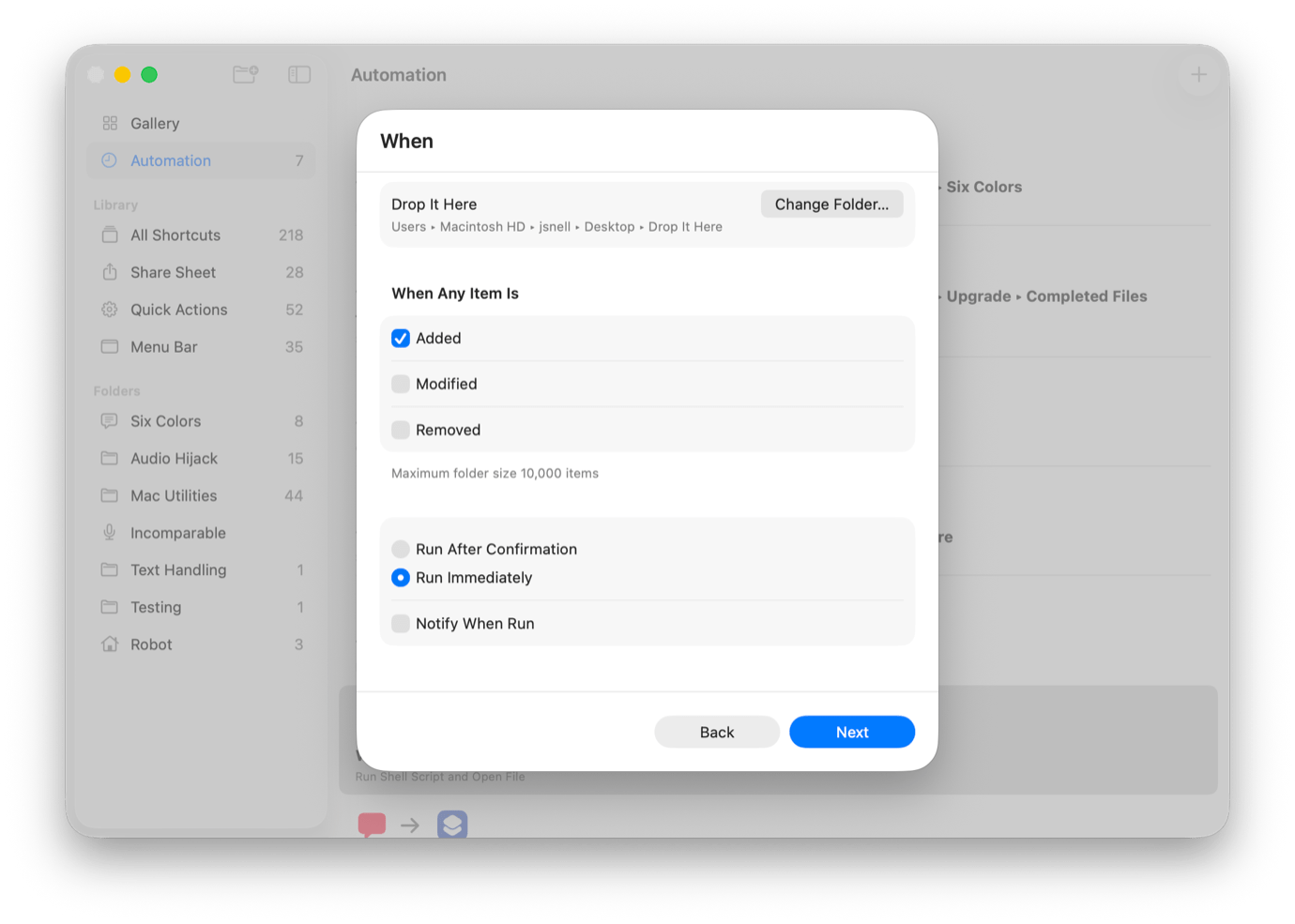
That’s what this article is for: to provide a quick guide to building a shortcut that acts on the contents of a folder when items are added to it. In this case, we’ll create a drop folder that moves Markdown files elsewhere when they’re added.
Apple preps for September, raises and lowers some prices, and takes the phrase “read the room” maybe too literally.
Touching things up
It’s less than a month until Apple’s expected iPhone 17 event and the company is rushing to dot all the “i”s in “iPhone”. Sure, it’s just one and there are no “t”s but it’s a lot of iPhones.
In preparation for eventually one day hopefully delivering the Apple Intelligence features it promised us last year, Apple has been testing its new and improved-curious Siri with a number of third-party apps that you might use such as Uber, YouTube, and Temu. Soon you’ll be able to order cheap goods then watch a video from inside a ride share, all hands free!
I do not need or want to know what you’re doing with your hands in the back of that Prius instead of using them to operate your iPhone manually.…
Apple will introduce a redesigned Blood Oxygen feature for some Apple Watch Series 9, Series 10, and Apple Watch Ultra 2 users through an iPhone and Apple Watch software update coming later today.
Users with these models in the U.S. who currently do not have the Blood Oxygen feature will have access to the redesigned Blood Oxygen feature by updating their paired iPhone to iOS 18.6.1 and their Apple Watch to watchOS 11.6.1. Following this update, sensor data from the Blood Oxygen app on Apple Watch will be measured and calculated on the paired iPhone, and results can be viewed in the Respiratory section of the Health app. This update was enabled by a recent U.S. Customs ruling.
This seems like a workaround to let Apple Watches released after Masimo successfully brought a patent case against Apple and forced the company to deactivate the blood oxygen sensor on new U.S. Apple Watch models. The main difference seems to be that data will be recorded on the watch, but only displayed on the iPhone.
I’m still surprised that it’s gone this long and this far, but Apple seems to be a company that will leave no legal stone unturned and will fight to the end when it feels it’s in the right.
Our display setup and window management; which legacy online component should be sunset after AOL dial-up; whether new Shortcuts and Apple Intelligence automation appeals; and views on YouTube’s AI age verification and the best and worst ways to do it.
Apple’s product lines follow a very specific pattern: start small, and then grow into something bigger and more complex. There was originally one Mac, one iPhone, one iPad, one Apple Watch.
Over time, the product lines got more complicated. Sometimes too complicated, as anyone who remembers Steve Jobs returning to Apple with a four-quadrant grid in his back pocket, driving out an ocean of Performas and reducing the Mac to four simple products.
Too often, people take Jobs’s move to simplify an overcomplicated product line a bit more literally than they should. The Mac product line Jobs found on his return was too complex, yes, but as he rebuilt Apple he knew he would have to simplify and focus things to get started. After the Power Mac, PowerBook, iMac, and iBook all shipped, Jobs was happy to toss in all sorts of Macs that didn’t fit into the grid, including the G4 Cube and Xserve.
Similarly, as modern Apple has grown in the years since Jobs, it has done so in part by dropping the simplicity and offering many different variations of its products. It just makes sense. And over the next few years, we may find new versions of familiar products that go far beyond what we’ve come to expect from Apple.
As Jason said on the show, he’d probably need a kayak that’s a bit bigger and more stable than mine because of the choppier water he’d encounter in his bay. While I’ve been out on windy spring days when the waves were a foot high and had whitecaps—yes, even on the relatively small lakes around here—it’s unusual for me to see much chop.
It’s about a mile (less if I walk) from my house to a boat dock I could use to kayak on the bay. So tempting, and I’ve loved it every time I’ve done it, but the logistics always get in the way. I love that Dr. Drang has found a fold-up kayak he can put in his Toyota, but I’m not sure if I can do the same for the rougher water in the bay.
Paddling regularly on the bay remains an ambition of mine. It seems wasteful to be so close and not to take advantage.
Which is not to say there aren’t really cool things happening in AI. And certainly there have been a number of moments when I have been floored by AI releases.
Come for the trenchant tech analysis, stay for the surprise marine biology.
Blind ranking bad Apple products, hope for a cheaper MacBook, the perils of Siri automation, and apparently Tim Cook took a trip to Washington D.C. for some sort of meeting?
I recently wrote about duplicating iCloud Drive and iCloud Photos to a network-attached storage (NAS) system. This struck a nerve for folks who want to keep full-resolution backups of their Photos Library when they don’t have enough local storage. (That column was focused on not needing to keep your Mac powered up to handle these iCloud offline backups when the Mac was otherwise not in use.)
Readers wrote in or replied via social media with strategies and workarounds, as well as suggesting three software options that can let you sync iCloud Photos outside of Apple’s limitations. Meanwhile, a developer dropped a line to Jason about his new app, which can sync and archive iCloud Photos and files from iCloud Drive.
This feels like it shouldn’t work, but it does
Six Colors reader Mark has a rather elaborate process of keeping a local backup of his Photo Library without enabling full-resolution downloads for his primary account and startup volume.
He started by creating a Photos Backup macOS user. While logged into Photos Backup, he logged into his primary iCloud account, the same one he uses in his main macOS account. On that backup account, he set up an external 2 TB drive and, holding down Option while launching Photos, created his Photos Library on that drive.
You can choose a library that isn’t currently the system library for a given macOS account and then click Use as System Photo Library to allow it to sync with iCloud.
He then used Photos > Settings > General to click Use as System Photo Library, which is required for iCloud Photos syncing. He also enabled Download Originals to this Mac in Photos > Settings > iCloud. Because he also has a Backblaze subscription, he enabled that service to back up his external 2 TB volume as an additional off-site protection.1
This was all a one-time setup. Now, whenever he wants to perform his on-demand backups, Mark:
Attaches the 2 TB drive.
Logs into Photos Backup, which effectively starts the background syncing.
Uses Fast User Switching to return to his main account.
When he needs to leave his current location, he swaps back to the Photos Backup account, logs out of it (Apple Menu > Logout Account Name), unmounts the external volume, and he’s all set. I have not tested this, but Mark says it works, despite the complexity.2
Mark asked, “Am I crazy, or is this an OK solution?”
You’re not making an irrational decision, Mark! This is a perfectly reasonable way to achieve results with limited options.
The only failure point I can see is very unlikely:
You’re on the road.
You create, modify, or capture new images on devices you carry with you.
Those devices are lost or destroyed after syncing.
And your iCloud.com account becomes inaccessible, or the data stored there is corrupted.
Losing your device or having it damaged beyond recovery before syncing is a scenario you can’t avoid in the above method, anyway.
Image Capture and offloading
Reader Jonathan wrote in with a strategy he was using for media management because his family opted to pay for just 200 GB of iCloud+ storage. He also has a Backblaze subscription. Instead of keeping everything in the cloud, he would offload images from time to time:
Normally, I would log into iCloud on my Mac, go to Photos, and then download the latest files to my external hard drive that gets backed up to Backblaze. Is that the best method?
As we corresponded, I found that Jonathan was also curious about how he would copy files that were not downloaded locally if optimization were enabled.
I had not thought of this strategy, either, which can work:
If optimization is off: You can move media from your Mac’s Photo Library at any time without preparation. The size of your library on your drive is within about 20% of the storage it takes up on iCloud.
If optimization is on: You have to stay more on top of adding images and videos so you don’t accidentally fill up your iCloud storage.
To remove media from a Photos Library for an archiving operation like Jonathan employs:
Select the media in Photos for Mac.
Choose File > Export and one of the options described below.
This moves media to the Recently Deleted folder. After ensuring you have an additional backed-up copy, such as through Backblaze, Time Machine, or other methods, go to the Recently Deleted folder, click Delete All, and confirm deletion.
Which of the two Export submenu items should you opt for?
Export X Photos: The export includes any modifications made in Photos and any metadata changes. The photo is converted to the format (Photo Kind) with any quality, color profile, and size options set. (Set to Full Size to preserve the original dimensions.)
Export Unmodified Originals for X Photos: The original photo as imported or created will be exported, including in any supported RAW format, with all modifications ignored.
This export dialog lets you choose the quality and format of the exported media file.
You can also make life easier on yourself by springing for PowerPhotos 3 ($40), a robust Photos Library management app. It can move items between libraries, split and merge libraries, and much more. The operation above would be far simpler: just hold down the Command key and drag the media from one library to another within the app.4
Jonathan has used Image Capture in the past to copy media from his iPhone to the external drive, although he had optimization turned on for the phone, so he wasn’t sure if he was copying full-resolution images or low-resolution thumbnails.
Apple will never copy low-resolution images through sharing or copying from the Photos app or using Image Capture. However, with optimization enabled, Image Capture shows only images and videos that are downloaded to that device. On my iPhone, for instance, Image Capture showed about 7,000 items available for copying; my Photos Library has nearly 70,000.
I command you to download and sync
There are four software solutions—two fully developed apps, two Python command-line packages—to back up an iCloud-linked Photos Library, even when optimization is enabled. Each has unique elements, including one of the Python tools working via a web connection. (I have not tried any of these packages or apps yet! And using Python for this is definitely on the edge of my personal geekiness level.) I also shout out Carbon Copy Cloner for iCloud Drive backups.
Here are the details. The three Mac apps are:
Photos Backup Anywhere (App Store, $10): Allows simple background backup of the Photos Library to any local destination, including NAS. The app temporarily downloads any newly synced images that aren’t stored locally. (Referral via reader Ted)
Parachute Backup (App Store, $5): A slightly more elaborate background Mac tool that lets you choose to backup either or both the Photos Library, including iCloud-stored images and iCloud Drive. (Newly released, referral via the developer, Eric Mann)
Parachute is a new option for set-it-and-forget-it backups to any local destination of iCloud-linked files and media.
Carbon Copy Cloner ($50): If you’re looking just for iCloud Drive file backups, CCC can download iCloud-stored files and then dismiss the local copy after backup—usually. There are oceans of provisos, as Bombich Software explains in this support note.
If you’re into command lines, installing packages, reading documentation, and tweaking results, you may find that either of the two options above will let you back up or create different kinds of archived copies that hit the sweet spot for you:
iCloud Photos Downloader: Adam Bodner pointed me on Mastodon to iCloud Photos Downloader, a Python-based system that lets you perform various syncing and download operations, including copying media out of your library and then deleting it from iCloud Photos. The app communicates with Apple’s servers directly via a web connection. I’m not sure how they have made this all work, but it apparently does!5
OSXPhotos: Another Python-based option, also from a Mastodon colleague, comes via geraint, who pointed me to OSXPhotos. Rather than talking to iCloud.com, OSXPhotos routes its requests through the Photos app. However, it also has a remarkable range of capabilities, including detecting if an optimized image is in place and forcing a download with the correct options selected.
[Got a question for the column? You can email glenn@sixcolors.com or use/glennin our subscriber-only Discord community.]
That gets him the classic formulation of a 3-2-1 backup: have a minimum of three copies on two distinct kinds of media with at least one offsite copy. The “distinct media” element is a bit outdated, but I think “on more than one storage device” is a reasonable replacement. ↩
You can’t have two different iCloud users on the same or different Macs sync the same Photo Library, and you can’t have the same iCloud user logged into two different macOS accounts on the same computer access the same Photos Library file. However, it appears Mark’s case of two accounts, each with their own Photos Library file, is working. ↩
The Photos label is contextual and will say Photo for 1 image, Photos for multiple, Video(s) for videos, and Item(s) for a mix of photos and videos. ↩
Adding Command to a copy turns it into a move across volumes in the Finder and other apps—something I learned about only a decade or so ago. Within a volume, adding Command turns a move into a copy. ↩
Because of its approach, iCloud Photos Downloader won’t work if you have disabled using a web browser to access iCloud data or have enabled iCloud’s Advanced Data Protection (ADP). You can find those settings at System Settings/Settings > Account Name > iCloud as Advanced Data Protection and Access iCloud Data on the Web. Both have to be turned off. ↩
Jim Lovell, the commander of Apollo 13 and one of three men to have gone around the moon twice, died on Thursday:
The plight of Apollo 13 in 1970 transfixed Americans. The capsule was nearly 56 hours into its flight and some 200,000 miles from Earth when the astronauts heard that ominous bang. Red lights signaling system failures glowed on their console. Captain Lovell, along with Mr. Swigert and Mr. Haise, civilians but also former test pilots who were making their first spaceflight, joined the scientists and technical experts on the ground to improvise a plan that might bring the crew home safely.
“Apollo 13” is one of my favorite films and Jim Lovell was always one of my favorite astronauts. He always seemed genial and enthusiastic and didn’t seem to wear too heavily the burden of never making it to the surface of the moon.
One of my favorite movie add-ons of all time is the commentary track Jim and Marilyn Lovell recorded for the DVD (and subsequent disc) releases of “Apollo 13.” It’s not every day that you get to listen to people who participated in history comment on how accurate, or inaccurate, the film depiction of that event is. His book (with Jeffery Kluger) Lost Moon, rebranded as a film tie-in, is also excellent.
The film ends with Tom Hanks as Lovell musing, “I look up at the moon and wonder, when will we be going back, and who will that be?” Sadly, Lovell never got to find out. But Mount Marilyn stands forever on the moon.
You will forgive me if I first read that as “Tim Cook grifts Trump”. The fun thing is, you can also read it as “graft”! Ha-ha! This is how we have fun in the hellscape that is this timeline.…
Back in May on MacBreak Weekly, Andy Ihnatko recommended an incredibly clever project called pico-mac-nano, a seemingly impossible complete emulation of the original Mac in a case only 2.4 inches/62mm high.
I bought it while we were still on the air, and it arrived a couple of weeks ago. It’s slightly wonky (sometimes the display thinks it’s wider than it is, and though it’s preloaded with MacPaint it won’t actually launch it), but the fact remains: I can attach a USB mouse to this tiny thing and click around and run Mac software. It’s a miracle!
Unfortunately, it was also too good to last. Apple contacted pico-mac-nano creator Nick Gillard, who emailed me and others who ordered the preassembled pico-mac-nano:
…an email from Apple’s Trademark and Copyright Group has put a big question mark over the future of pre-assembled units. I will continue dialog with Apple but their current position is that I should stop selling the pre-assembled Macs…
Look, I understand why this is happening. Apple’s trademarks and intellectual property are being infringed upon, and no hobby project is going to be worth the time to negotiate some sort of licensing agreement. Apple is absolutely in its rights to target Gillard, even though it knows that it’s being a killjoy. Even Gillard gets it:
In fairness to Apple, not only are they perfectly within their rights to issue a cease and desist… but they have been super-nice and polite about the project saying things like “…it’s clear you’ve poured a great deal of care and passion into your work. We genuinely appreciate your enthusiasm for—and admiration of—the original Macintosh.”. They could have requested that the whole open source project be taken down from GitHub but are currently only requesting we stop selling the assembled units. So anyone can still build one themselves for their own use.
What’s it good for? Absolutely nothing, of course — I have to take off my glasses and squint with one eye to even see what’s on the screen — but it’s such a feat of engineering that I really don’t care. It’s one of the most clever and interesting feats of retro computing I’ve ever seen. I love it.
Our approach to cable management at home, the tech we pack for inflight entertainment, the devices and chargers we bring on quick trips, and our go-to strategy for international phone data plans.