Tom spotted Crazy Apple Rumors and asked if it was the work of me and Philip Michaels because he thought it sounded like us. A flattering thought, but it wasn’t us. It turns out there was this guy Moltz who wrote a lot of funny stuff, and so we started paying for him to write funny stuff and analytical stuff and other stuff for us at Macworld. And that eventually allowed John to quit his job “toiling away in the SQL mines.”
Honest, I feel closer to Tom than some members of my actual legal family. I wouldn’t always know ahead of time that Tom would be attending a certain conference, but I always knew it was likely. One of the other members of the family would tell me “Oh, yeah, Tom and Dori are here. I said hi to them in the press room about an hour ago.” And then the ten-year-old kid in me would shout YAYYYY!!! Tom is like the cousin whose presence (and backpack full of Star Wars action figures) makes a boring grownup’s party bearable.
My thanks to Squarespace for sponsoring Six Colors this week.
Squarespace can help anyone build a beautiful home on the web. Squarespace is powered by sophisticated engineering, so you don’t need to install software, install patches, or worry about bandwidth or storage limitations. But Squarespace has also invested in design: their responsive site templates will make your site beautiful and functional across all device sizes. And Squarespace’s 24/7 customer service is first rate.
Squarespace offers domain hosting starting at $20/year, and websites start at $12/month. Squarespace Commerce lets you sell stuff online with a custom domain for $26/month.
Six Colors readers can use coupon code SIXCOLORS at checkout to get 10% off their first purchase at Squarespace.
Note: This story has not been updated for several years.
I’m going to state the obvious. Because sometimes the obvious is the thing you miss, like when I stare into my refrigerator looking for the milk and can’t see it even though it’s right in front of my face.
If there’s one thing I’ve learned about marketing, it’s that the best place to reach people is a place where they are. Like I said, it sounds obvious. And yet let me give you an anecdote from my own past to indicate just how easy this one is to screw up.
A few years ago, I decided to run a contest—shamelessly ripping off the one on The Flop House—asking listeners of The Incomparable to review the show on iTunes. I’d randomly select the writer of one review and allow them to pick the subject matter for a future podcast episode. It worked—we got lots of reviews. I picked through them, country by country, using the now-discontinued app CommentCast, and selected a winner randomly.
The winner, posted in the Australian iTunes store, was a user name (rlg74) that wasn’t connectable to a name. I looked at their review history, did web searches, the works, and there was just nothing I could find that would connect them to a real person I could contact about winning the contest.
So I went on social media, tweeting from The Incomparable’s account—and retweeting from my own—in an attempt to get the winner’s attention. A few weeks and several tweets went by, and there was no response.
Guess what? I got a response within a day. Because it turns out that while some fraction of my listenership follows me on Twitter, nearly 100% of my podcast listeners listen to my podcast. It was an important lesson—that as fun as interacting with people on social media can be, they represent a small subsection of the total audience.
An Overcast ad (bottom).
I was thinking about this the other day when Marco Arment was discussing his new ad model for the Overcast podcast player. Overcast, being a podcast player, is used entirely by people who listen to podcasts. That means that while you could advertise anything inside Overcast, by far the most successful type of ad would probably be one for another podcast. Not every podcast will appeal to every podcast listener, but 100 percent of the user base at least knows what podcasts are and cares enough to have downloaded a third-party podcast app.
We’ll have to see in the long term how Marco’s Overcast ads system performs, but I’d bet that the ads for podcasts will do pretty well, because of the simple fact that they’re perfectly aligned with the users of his app.
The best way for me to reach Six Colors readers is to post something on this site, not to say something on a podcast or use social media or even mention in the newsletter that Six Colors subscribers receive every month. All of these different avenues can be valuable in their own right, but there’s only one place where I can be in front of everyone who reads my website, and that’s my website. If you’ve got a podcast, the best place to send a message to your listeners is on the podcast, not in the ancillary material. And so on.
Like I said, obvious. And yet, somehow easy to forget.
Pros have been dissatisfied with Apple of late, and it’s not hard to see why. The so-long-in-the-tooth-it-qualifies-as-a-fang Mac Pro hasn’t been updated in more than three years, but still commands a hefty price tag. And last fall’s new MacBook Pro added the splashy new Touch Bar while seeming to skimp on practicalities like RAM and processor power.
But all may not be lost! During the recent Apple shareholder meeting, CEO Tim Cook had this cryptic answer to a question about the pro market: “Don’t think something we’ve done or something that we’re doing that isn’t visible yet is a signal that our priorities are elsewhere.” (Or, if I may paraphrase: “Absence of evidence is not evidence of absence.”)
In case that wasn’t clear, he also answered more directly, saying, “You will see us do more in the pro area. The pro area is very important to us. The creative area is very important to us in particular.” But that doesn’t mean Apple is necessarily about to drop a new Mac Pro. Cook’s definition of “pro” is open to interpretation.
Moltz is considering tricking out his 2006 MacBook: https://support.apple.com/kb/SP31?viewlocale=en_US&locale=en_US
Dan has some cheap Bluetooth headphones from Kinivo: https://www.amazon.com/Kinivo-BTH240-Bluetooth-Stereo-Headphone/dp/B00AWIPITS/ref=sr_1_1?ie=UTF8&qid=1489084446&sr=8-1&keywords=kinivo
Apple’s response to the Wikileaks claim about CIA hacking: https://www.buzzfeed.com/sheerafrenkel/apple-says-they-have-patched-the-vulnerabilities-mentioned-i?utm_term=.cuXZl3Y6q#.nvVzrRbnV
Our thanks to 23andMe for sponsoring this week’s episode. 23andMe, a genetic testing service that can tell you how your genes might influence your health, ancestry and physical traits. Go to 23andMe (https://23andMe.com/Rebound) and order your kit today.
Our thanks as well to Indochino (https://www.Indochino.com), where you’ll find the best made to measure shirts and suits at a great price. Use the promo code “REBOUND” and get any premium suit for just $389.
And our thanks to Casper (https://casper.com/therebound) for sponsoring this episode. You spend about a third of your life sleeping, make sure it’s on a good mattress. Go to casper.com/therebound to start your 100-day money-back trial. You’ll get $50 off by using the code “REBOUND”.
If you’re someone who doesn’t have any specific reasons to go there, you may have never explored the Accessibility settings on your Mac, iPhone, or iPad. While it’s true that those settings are there primarily for people who have special physical needs to modify how a device’s interface works, the fact is, many people who don’t consider themselves in need of any sort of accommodation can find something of value in these settings.
Accessibility has become a place where Apple buries some specific, nitpicky details about how its devices behave-and that’s why you should take a stroll through those settings sometime just to see if they solve problems you didn’t even realize were solvable. Here are some of my favorites.
Note: This story has not been updated for several years.
Sometimes you need more than one web browser. Maybe you’re a web designer who needs to test links in multiple browsers, maybe it’s as simple as keeping two separate accounts logged in, or maybe you keep a browser around just to run sites that require Flash.
macOS apps expect you to have a single, default browser—and that’s the browser that all links you click on, across all apps (other than browsers themselves), are sent to. The same is true for email programs, with some of the same issues—you might have work email in Apple Mail and personal mail in MailPlane, for example.
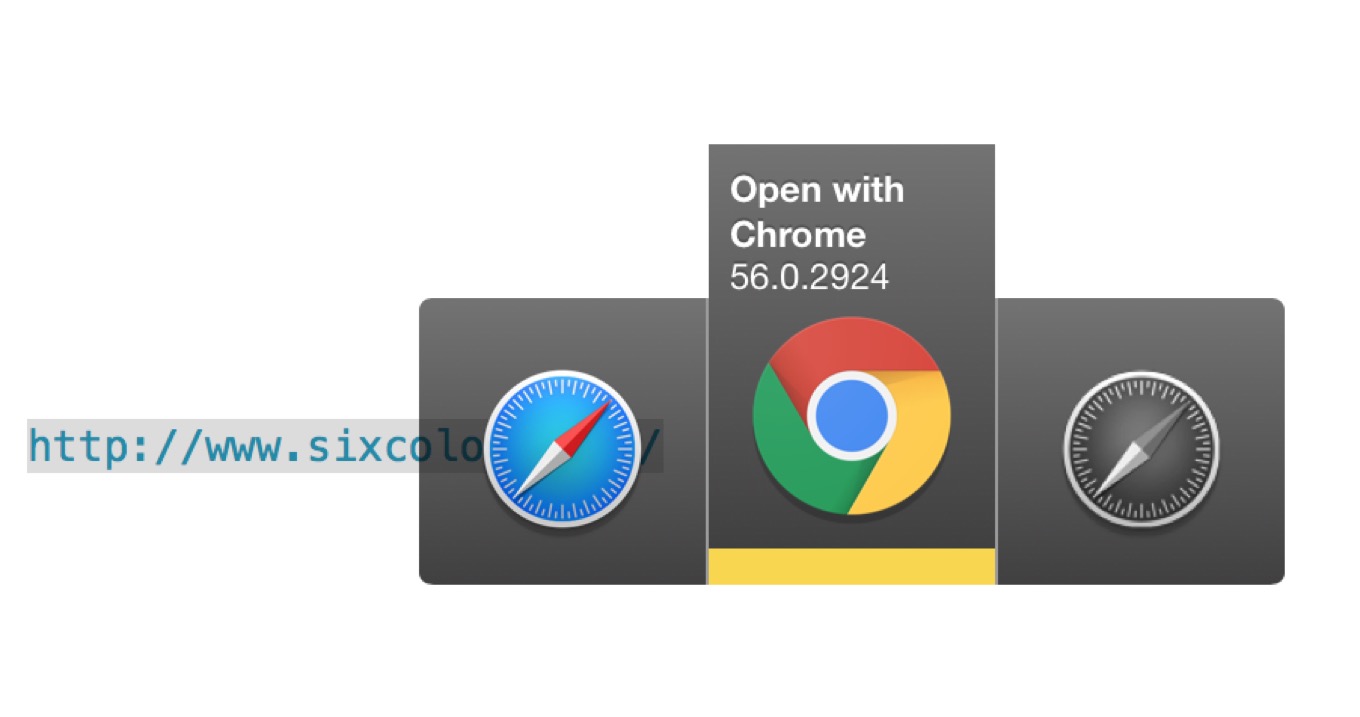
This is where Bumpr, a new $4 app from Khoi Vinh and Scott Ostler, comes in. Bumpr is a small utility that takes over as your Mac’s default browser, or email client, or both. Every time you click a link outside of a web browser, a floating window appears, giving you the option of launching that link in any browser you specify. (Optionally, you have set Bumpr to prompt you only when you have the shift key held down when you click.)
By description alone this could seem awful, but Vinh and Ostler have designed an interface that’s attractive and simple. Yes, it gets in the way—that’s its job—but it does it in an attractive way, and when you click, it’s gone as if it had never been there. When I click a web link in my Twitter app or my email client, I can send it off to Safari or Chrome or wherever I want with just one more click. (And the same works for mail links, of course.)
That’s all it does, and it does it well. If you’ve ever been frustrated by links always opening in one browser or mail client when you don’t always want that behavior, Bumpr is the solution to the problem.
I do admit that I wish it did more, specifically matching specific URL patterns and automatically moving those on to specific browsers. (For example, forwarding all Google Apps URLs to Chrome rather than Safari.) Perhaps that will be a future addition, but in the meantime you can get more power by using Choosy, a $10 app that provides much the same functionality as Bumpr, but with a bunch of extra settings to give you even more control over what happens when you click a link.
Choosy does more, but also costs more. Bumpr is cheaper, does less (but also does email), but is more attractive. Whichever app you choose, it’s good to know that on the Mac, having a default browser doesn’t have to be a either/or situation.
Tom Negrino is dying. He has been for a while, but the day is getting close when he will leave us. Ray Holley of the Healdsburg Tribune wrote a good story about what Tom and his wife, Dori Smith, have been going through.
I have known Tom since 1997. I can say the precise date because that’s when Macworld and MacUser magazines merged together. Tom was a stalwart Macworld contributor and I was thrown into the mix as a first-time features editor who had previously been employed by the opposition. That era was full of unpleasant interactions and bad behavior on all fronts, but one of the few people who I found always welcoming and professional was Tom Negrino.
Tom had already been writing about Macs for a decade at that point. He will almost certainly go down as the longest-running regular contributor to Macworld. He has written 48 books. Imagine all of this against the backdrop of lifelong health problems. The man is a survivor, and he hasn’t just survived, he’s thrived.
But the end is near. At WWDC a couple of years ago I heard from Tom and Dori that his cancer had returned and that the outcome was inevitable. Tom has focused on making the most of his remaining time, and Dori has been his steadfast supporter and partner during the darkest and most challenging moments any of us could face.
Tom may be leaving us in a week—or not, you never know with these things, but that’s the plan so far. As that moment approaches, I just wanted to say as someone who knows him: I have seen his goodness in difficult times, I have seen his humanity, and I have edited his work and can appreciate it as being of the highest quality. Personally and professionally, Tom’s the best. The world will be appreciably worse when he’s no longer in it.
Writing for BuzzFeed, Sheera Frenkel has an Apple statement about yesterday’s dump, by WikiLeaks, of CIA hacking tools:
But on Tuesday night, Apple released a statement claiming that, as far as they knew, they had patched, or fixed, the bugs allegedly used by the CIA to hack into their products.
“Apple is deeply committed to safeguarding our customers’ privacy and security. The technology built into today’s iPhone represents the best data security available to consumers, and we’re constantly working to keep it that way. Our products and software are designed to quickly get security updates into the hands of our customers, with nearly 80 percent of users running the latest version of our operating system. While our initial analysis indicates that many of the issues leaked today were already patched in the latest iOS, we will continue work to rapidly address any identified vulnerabilities. We always urge customers to download the latest iOS to make sure they have the most recent security updates,” read the Apple statement.
However, as BuzzFeed points out, the info dump did not include all the details of the iOS exploits, which could make it difficult for Apple to know for sure that all the vulnerabilities have been patched.
Elsewhere, Motherboard explains that compromising a device like the iPhone generally requires a chain of exploits, so it’s not as simple as one technique leading to game over, man.
As always, the most important thing remains keeping all your devices updated to the latest operating systems in order to have the most current security patches.
Maybe a sign that things are changing: Consumer Reports will now consider privacy and security important parts of a product:
We think devices that connect to the internet… should require consumers to choose unique usernames and passwords during setup. You can’t create an online bank account without creating a secure password; that should be true for a camera that transmits video from inside your home as well. The new standard also calls on companies to delete consumer data from their servers upon request, to protect personal data with encryption as the data is sent through the internet, and to be completely transparent about how personal consumer information is shared with other companies.
There are only two reasons why the makers of Internet-connected devices would change their ways and take customer privacy and security seriously. One would be government regulations, and at least in the United States that seems unlikely in the near future. The other is the realization that security and privacy are features that customers care about, and that if they don’t take them seriously, their sales will suffer. Consumer Reports taking this seriously—and publicizing when companies fail these tests—could be an important step along the way.
I love mechanical keyboards. I own… let’s just say more than I can actually use. For more than a year now, my primary keyboard has been a “80 percent” style mechanical model, and I can’t imagine going back to the softer laptop-style keyboard I used to use.
So when Lofree offered to let me take a test drive of their new Bluetooth mechanical keyboard, I jumped at the chance. My current keyboard, though I love it, is wired and not wireless, not particularly Mac friendly, and lacks a function row.
The Lofree keyboard, on the other hand, offers Mac keyboard shortcuts, a full function row, and backlighting while keeping an extremely small footprint. And most importantly, it combines real mechanical switches with Bluetooth, so you can type on responsive, clicky keys without a single wire, on a Mac, iPad, iPhone, whatever. In other words, this keyboard addresses my biggest complaints about my existing keyboard.
Fans of mechanical keyboards know that there are several different switch styles, each of which offer different sounds and tactile feedback. The Lofree keyboard uses Gaterone Blue switches, which feel and sound very similar to the clicky Cherry MX Blue switches I used in the first mechanical keyboard I bought last year. If you appreciate feeling a light snap and hearing a clear click when you press a key, this is the style for you.1
In the end, the most important feature of a keyboard is how well you can type on it. (Okay, maybe the most important feature is if it ruins your wrists and hands if you use it—ergonomics are important.) And the Lofree keyboard’s key design and layout, while quirky and fun, also make me a little dubious about how practical it is.
The round keycaps are cute, but I couldn’t get past the small modifier keys.
First, the keycaps themselves: They’re round. “Inspired by typewriters,” the company says, and I totally see that. The round keycaps are adorable, and after a little use, I found that I was able to get used to the different feel of round keycaps underneath my fingertips. But everyone’s touch-typing journey is going to be different; if you’ve never used round keycaps before, you may find it unnerving.
Unfortunately, the biggest problem I had when trying to use the Lofree keyboard was not the keycaps, but the unfortunate choices that were made in order to fit all the other keys into a keyboard that’s quite a bit narrower even than my current 80-percent model. There are only two double-wide keys on the entire keyboard: the left Shift key and the Return key. Every other key—including Command, Tab, Backspace, and the right Shift key—are the same size as the regular keycaps. In contrast, on my 80-percent keyboard, both Shift keys are dramatically wider—2.25 times standard width—and the command key is 1.25 times standard width. The Delete/Backspace key is also 2.25 times standard.
I suppose with enough time, I might get used to tiny Tab and Backspace keys, but I really shouldn’t have to. These keys aren’t just larger because of their importance, though that’s part of it; their sizes also help me orient my keys on the keyboard so I don’t lose my place. I could get used to them being tiny, but I’m not sure I’d ever enjoy it.
The placement of the arrow keys on the Lofree is also lacking. Because the keys are a tight grid all the way across, the up arrow key can’t be placed directly above the down arrow key, but is shifted slightly over to the right. The tiny shift key sits right next to it. I don’t want to talk about the number of times I moved my cursor when I was trying to type a capital letter.
So I have to say, my time with the Lofree keyboard was a mixed bag. It’s an attractive keyboard with a Mac focus that brings mechanical keyswitches to a small, wireless design. I love small keyboards like this. But for me, the key layout—especially the lack of space given to important modifier keys—was just too big a hurdle for me to get over. If Lofree made a version of this keyboard with a more traditional layout, I’d buy it in a heartbeat.
If you’re not as bothered by the quirks of the key layout as I am, check out Lofree’s Indiegogo campaign, which launches today. Early orders will cost $74, while later orders—the product is designed and will be shipping in a couple of months—will be $99. (To put that in perspective, I paid $130 for my wired Leopold FC660M keyboard.)
I switched to a keyboard with Cherry MX Brown switches, which bring more of a thump and less of a click. ↩
This is a fun, wacky interview with David Letterman in Vulture, but I was particularly interested by his descriptions of how the media landscape has changed:
Years ago, I wanted Worldwide Pants to be an ongoing organism whereby we could continue to employ people and develop material. In the meantime, things changed out from under us. It was explained to me that that production model doesn’t hold up anymore. So Worldwide Pants ran out of steam for lack of opportunity. But we are trying to put it back together. It would be fun not to be involved in traditional ABC, NBC, CBS television. There’s a billion different places to put something now.
And about Jerry Seinfeld:
Oh, yeah. I am platform-agnostic. What Jerry Seinfeld has done is brilliant. Because he had his little TV show that did quite well and he loves being on the road. He pursued two interests of his, and now he’s got other people watching it and paying him huge sums of money.
I’ve been thinking all along that one of these days Letterman would come up with a project that he wants to do, that pursues his own interests, and he’ll find a willing partner in a streaming service.
Also, I’m amused that David Letterman’s son is even more embarrassed by his dad than mine (they’re the same age) is of his.
My thanks to Backblaze for sponsoring Six Colors this week.
You need to back up the data on your Mac. More importantly, you also need an offsite backup. Backblaze is a service that gives you unlimited cloud backup for Macs and PCs. It backs up whatever you need and you can access backed up data from anywhere in the world, on the Web or on your phone. And Backblaze costs just $5/month, period.
Six Colors readers can get a 15-day free trial by clicking here. You owe it to yourself—and your data—to make sure you’ve got an offsite backup, so give it a try.
There’s really only one day of the year that’s pretty safe from iPhone rumors: the day the new model gets announced. The other 364 are all fair game when it comes to reading the tea leaves and sussing out what Apple has up its sleeves for the next iteration of the smartphone.
Let’s take a quick look at a few of the most prominent rumors and explore whether or not they’re likely to have a deep impact on this year’s iPhone.
A few months back I got the first part of the script—replacing Photoshop with the sips command-line utility—working without any trouble. But the second part of the equation, namely replacing an upload via Transmit with the scp command-line utility, just wouldn’t work. I wasn’t interested in typing out my complex server password every time I ran the script, which was supposed to reduce friction in my workflow.
This post describes how to set up SSH keys on your both your server and your local Mac so the SnapSCP macro can upload your screenshots securely without forcing you to type in a password or passphrase.
Not only does this mean my scripts can now upload images directly without any user-interface involvement, but it means that I can open Terminal and connect to my server via ssh without looking up the password.
The only thing I had to do above and beyond what Dr. Drang wrote was to delete an old copy of Fink, which I had no idea I had installed, by typing sudo rm -rf /sw. Once that directory was gone, all of the commands in Dr. Drang’s post worked without a problem.
The researchers wrote six files—a full computer operating system, a 1895 French film, an Amazon gift card, a computer virus, a Pioneer plaque, and a study by information theorist Claude Shannon—into 72,000 DNA strands, each 200 bases long. They then used sequencing technology to retrieve the data, and software to translate the genetic code back into binary. The files were recovered with no errors.
Researcher Yaniv Erlich:
We showed that we can reach a density of 215 Petabytes per gram of DNA! Second, DNA lasts for an extended period of time, over 100 years, which is orders of magnitude more than traditional media. Try to listen to any disk from the 90s, and see if it’s still good. Finally, traditional media suffers from digital obsoleteness. My parents have 8 mm tapes that are basically useless now. DNA has been around for 3 billion years, and humanity is unlikely to lose its ability to read these molecules. If it does, we will have much bigger problems than data storage.
That’s an amazingly dense storage medium. And it sounds like it would last a lot longer than my old Apple II floppy discs.