Six Colors
Six Colors

Apple, technology, and other stuff

This Week's Sponsor

Monologue: smart dictation and voice notes for Mac, iPhone, iPad, and Apple Watch.

December 4, 2020

Our fifth anniversary spectacular! But it’s mostly about headphones and Windows.


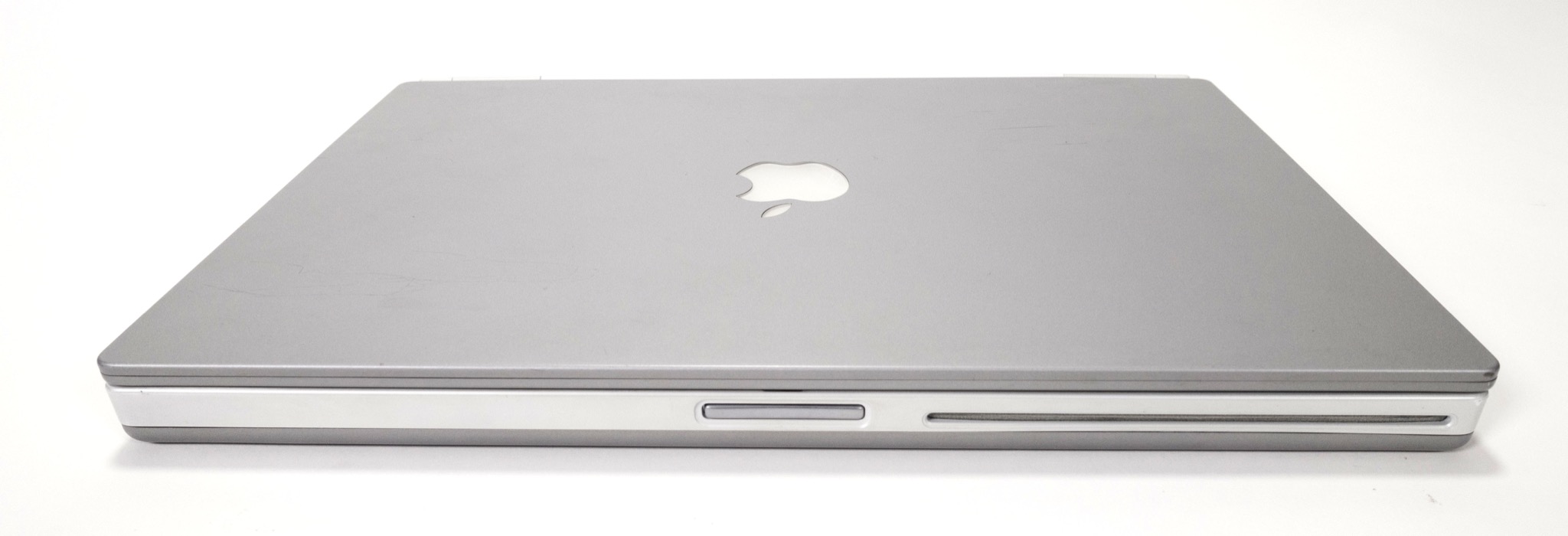
Apple’s first metallic silver laptop set the company on a path that it’s been on for two decades and counting, but it also proved that the company still had a lot to learn.


Apple updates accessibility site, support

Steven Aquino, writing at Forbes:

Apple on Thursday marked International Day of Persons with Disabilities with a slew of accessibility-centric announcements, spanning the company’s website and social media outposts.

First is a redesign of the company’s accessibility website, last refreshed in 2016 at the Touch Bar MacBook Pro unveiling. Visitors to this part of Apple’s site have long been able to learn about the assistive technologies across the company’s products. The site is divided into four sections representing the different developmental domains: vision, mobility, hearing, and cognitive. Anyone, whether they identify as disabled or not, can use the information as a resource for learning about Apple’s accessibility software. There also are helpful tips for users to get the most out of their device(s).

Next is an update to Apple Support materials. Apple has a popular presence on Twitter and particularly YouTube, where slickly-produced videos demonstrate how to use various features of various devices. New is a collection of accessibility-oriented videos covering Magnifier, Back Tap, and Voice Control. The Voice Control piece is a how-to, produced in collaboration with the United Spinal Association, on how to take selfies with the feature, introduced in 2019 as part of iOS 13 and macOS Catalina.

Aquino’s article includes an interview with Jordan Nicholson, a photographer who Apple is featuring on its Instagram account.


Warner Bros. to stream all new movies on HBO Max in 2021

Zack Sharf, writing at IndieWire:

Warner Bros. Pictures Group has announced its entire 2021 film slate will open via a “distribution model in which Warner Bros. will continue to exhibit the films theatrically worldwide, while adding an exclusive one month access period on the HBO Max streaming platform in the U.S. concurrent with the film’s domestic release.”

Last month it was announced that the upcoming Wonder Woman 1984 would debut on Christmas Day both in movie theaters (where open) as well as on HBO Max, and Warner seems to think this is a winning strategy: it’s expanding the move to more than a dozen films, including big blockbusters like The Suicide Squad, Dune, and Matrix 4.

Like WW84, the movies will only be available on the streaming service for one month, before being in theaters only, and then eventually moving to the usual distribution windows (like online sales and rental).

In may ways, it feels as though we’ve been waiting for the other shoe to drop with regards to Hollywood movies. A lot of studios have chosen to push big releases from this year, with occasional dangles into experiments like offering movies online for an additional fee (Mulan, Bill & Ted Face the Music), but Warner clearly wants to goose subscribers to HBO Max, and this sure seems like a compelling way to do it.

The biggest question is outside the U.S., where HBO Max doesn’t really exist: its first international launches are scheduled for next year in Latin America and some parts of Europe. But due to licensing deals outside the U.S., it will almost certainly take some time before there’s parity on programming internationally—if ever. Customers in those countries will likely have to go on a more case-by-case basis and potentially wait for the normal at-home distribution.

It will also be interesting to see how other big studios react to this news. Disney seems to have remained steadfast in holding some of its biggest titles—such as Black Widow—until theaters reopen, but it is making the next Pixar movie, Soul, available exclusively to Disney+ subscribers for free later this month.

Right now, we’re kind of back in uncharted territories, as different companies try different approaches, and as someone who probably won’t be going back to a movie theater anytime soon, I’m glad to see that even big corporations are being forced to take chances.


Apple opens App Store Small Business Program enrollment for reduced cut

Apple:

The new App Store Small Business Program is designed to accelerate innovation and help propel your small business forward with the next generation of groundbreaking apps on the App Store. It features a reduced commission rate of 15% on paid apps and in-app purchases, so you can invest more resources into your business to continue building quality apps that customers love.

The details promised by Apple about its reduced commission program for small businesses on the App Store have rolled out, and they are largely consistent with what was announced last month. Eligible businesses—those that have made less than $1 million in 2020—can apply for a reduced commission of 15 percent in 2021. If they cross that line, they will go back up to 30 percent for the remainder of the year and the following year; businesses whose proceeds drop below $1 million in a calendar year can reapply for the subsequent year.

Further details clarify that the program takes affect by January 1 if you apply by December 18; beyond that, there’s a bit of a lag time. Apple also spells out how developers whose bank accounts aren’t in U.S. dollars can figure out if they’re eligible and details about Associated Developer Accounts. The company also notes that app transfers (i.e. transferring an app to another developer account) is not allowed while in the program, no doubt to prevent people from bouncing their app around to different developers to avoid the higher commission.

It will be interesting to see precisely how this plays out, but chances are the biggest question will be a year from now, with developers hovering right around that $1 million mark. Will they pull their app from the store to avoid crossing the line? How will that experience go for users, and will Apple want to make changes to avoid that kind of behavior?

Recent third-party numbers suggest that the Small Business Program could cover as many as 98 percent of developers on the store, which certainly seems like a net positive. But it’s clear from the way Apple has set this up, that despite the vast majority of developers the deal will cover, it’s still treating it as an exception, rather than the rule.


How Salesforce’s purchase of Slack could affect Slack’s future, how we’re shopping and gifting this holiday season, inexpensive gadgets that impressed us, and our photo-posting habits on social media.


Windows on M1: It’s gonna happen

QEMU emulator

When Apple announced the M1 processor, it highlighted the possibility of virtualizing Linux but remained coy about Windows. One of the great advantages of using Intel processors on the Mac is that Windows is also built for Intel processors. Even in a virtual machine, apps ran at near-native speeds.

So what happens with the M1? The major virtualization could run the Intel version of Windows in emulation, but anyone who remembers the bad days of Virtual PC on PowerPC will know that running an entire emulated system can be painfully slow.

But Microsoft also makes a version of Windows that runs on ARM processors, currently available only when preinstalled on a “Windows 10 on ARM” PC such as Microsoft’s own Surface Pro X. In theory, a standalone version of Windows 10 for ARM might actually work well inside a virtual machine on an M1 Mac—running at more or less native speeds, just like the Intel version of Windows on Intel Macs.

It was unclear if other technical roadblocks might remain that would make this less likely to happen. But things are clearing up, as 9to5Mac’s Michael Potuck reports:

Alexander Graf was the first to successfully run an ARM Windows virtualization on an M1 Mac. He used the QEMU open source machine emulator and an Insider Preview of Windows. Now, based on the work by Graf, there’s a new build of the open source ACVM launcher (by Khaos Tian and 3 others) that works with QEMU to run ARM Windows on ARM Macs.

In short, using a beta version of Windows on ARM downloaded from Microsoft, people have used the open-source QEMU emulator to get Windows running on Apple silicon. You can watch Martin Nobel’s YouTube video to see the process in action. Nobel even ran GeekBench 5 on the M1 Mac, and ended up with higher test scores than the Surface Pro X.

This might explain why Apple has shifted from being tight-lipped about Windows to Craig Federighi telling Ars Technica:

That’s really up to Microsoft… We have the core technologies for them to do that, to run their ARM version of Windows, which in turn of course supports x86 user mode applications. But that’s a decision Microsoft has to make, to bring to license that technology for users to run on these Macs. But the Macs are certainly very capable of it.

It seems to me that it’s only a matter of time before Windows on ARM is officially running on M1 Macs. The ball is in their court. There seem to be few technical roadblocks. It makes too much sense.


By Stephen Hackett

Apple’s ‘vintage’ list needs rethinking

This week, Apple added several machines to its list of vintage models:

  • iMac (21.5-inch, Late 2013)
  • iMac (27-inch, Late 2013)
  • iMac (21.5-inch, Mid 2014)
  • iMac (Retina 5K, 27-inch, Late 2014)
  • iMac (Retina 5K, 27-inch, Mid 2015)

If you aren’t familiar with it, Apple’s vintage list is for products “that have not been sold for more than 5 and less than 7 years ago.”

Maddie Stone at OneZero explains:

Once Apple hasn’t sold a product for seven years, it’s considered “obsolete,” meaning the company won’t offer any repair services. But vintage products exist in a liminal space: Despite what I learned when I called Apple Support, Apple Stores as well as AASPs can, in theory, repair them for you “subject to availability of inventory, or as required by law,” according to Apple.

In practice, people in the repair community told me Apple isn’t particularly interested in fixing vintage tech. “The AASPs I’ve spoken to in the past have told me they don’t bother with customers looking to repair older devices,” said Rob Link, a right-to-repair advocate who owns a company that sells repair parts for older devices including iPhones, iPods, and iPads. In the past, Link said, he would call up AASPs to see if they had older parts to sell “but I would stop when no one did.”

So after a machine is marked vintage, serious repairs get tricky. Once seven years pass and that product gets added to the obsolete list, they are all but impossible.

This can put users in an awkward position if they experience a hardware failure, especially if their hardware — including all of the iMacs listed above — are still supported by the current version of macOS and are perfectly capable machines.

This wasn’t such a big issue ten or fifteen years ago when Mac OS X moved at a slower pace and Macs were full of spinning disks, but today, Macs last longer than ever, and a new version of macOS shows up every fall. I suspect that Apple silicon-based Macs will remain viable for even longer. (In Apple’s defense, newer versions of macOS don’t always run great on older hardware, and new features may not be supported at all, but that’s really a story for a different time.)

Apple should extend the number of years it supports Mac hardware. Such an extension would give users more options when it comes to running older Macs, which is good for the environment, customer loyalty and third-party repair shops.

There’s a big reason I don’t think we’re going to see that. Aaron Holmes at Business Insider writes:

Apple hasn’t turned a profit on repairing people’s broken devices in the past decade, the company disclosed this week…. The company made the disclosure in response to a House Judicial Committee probe, which is investigating whether Apple engages in anticompetitive practices to edge out competition when it comes to repairs and third-party apps.

Gulp.

It’s not all doom and gloom. In the last few years, Apple has opened programs to give third-party repair providers1 better access to parts, tools and diagnostics, but that doesn’t really solve the problem of the ticking clock.


  1. And to the horror of some, Best Buy. 

[Stephen Hackett is the author of 512 Pixels and co-founder of Relay FM.]


Why the M1 is so fast

Here’s a detailed post by Erik Engheim that breaks down how Apple’s M1 chip is structured and compares it with other PC chips:

In Unified memory the GPU cores and CPU cores can access memory at the same time. Thus in this case there is no overhead in sharing memory. In addition the CPU and GPU can tell each other about where some memory is located. Previously the CPU would have to copy data from its area of the main memory to the area used by the GPU. With unified memory, it is more like saying “Hey Mr. GPU, I got 30 MB of polygon data starting at memory location 2430.” The GPU can then start using that memory without doing any copying.

That means you can significant performance gains by the fact that all the various special co-processors on the M1 can rapidly exchange information with each other by using the same memory pool.

Processors are complicated. I found this article to strike a good balance between technical and understandable.


AWS offers Mac mini hosting

In a surprise move, Amazon has jumped into the hosted Mac world, adding Mac minis to its EC2 service. As TechCrunch reports:

The target audience here — and the only one AWS is targeting for now — is developers who want cloud-based build and testing environments for their Mac and iOS apps. But it’s worth noting that with remote access, you get a fully-featured Mac mini in the cloud, and I’m sure developers will find all kinds of other use cases for this as well.

Amazon has a lot of advantages over smaller hosting companies, but of course, the smaller hosts who have specialized in Mac hosting for a while have advantages of their own. It’s still remarkable to see Amazon actually sticking Mac hardware in racks and renting it out to customers.

The current offering is i7 based 2018 vintage Mac minis. Amazon says M1 models will be available next year.


This week Jason embraces the iPhone 12 mini and then reboots his complaints about Apple’s focus on Mac security leading to bad user-experience issues. Then we consider the future, as we interpret early reports about new Apple Watch, iPad, and MacBook Pro models for 2021.


Photos by Stephen Hackett.

By Jason Snell

20 Macs for 2020: #5 – Titanium PowerBook G4

Note: This story has not been updated since 2020.

Imagine a slideshow of images of every portable Mac Apple has made, displayed in chronological order. It starts with the Macintosh Portable and ends with two M1 MacBooks.

For a while, the slides are of chunky plastic laptops in light gray, dark gray, and black. The G3 iBook appears briefly to provide some needed color.

And then, 12 years into Apple’s portable Mac journey, you see it. You might want to pause the slides for a moment, because the computer on the screen is undeniably a modern Apple laptop. It’s thin (at least for the time) and boxy and sheathed in silvery metal instead of plastic.

When you resume the slide show, silver metallic laptops will alternate with cheaper plastic models for a little while, but during the final decade of slides, they’ll all settle on this one basic design.

It all started with the Titanium PowerBook G4. But Apple still had a lot to learn.

Continue reading “20 Macs for 2020: #5 – Titanium PowerBook G4″…


By Dan Moren

The Back Page: Everything Apple Didn’t Announce This Fall

With an unprecedented three events this fall, Apple has revamped the vast majority of its key products. We’ve seen new iPhones, a new iPad Air, new Apple silicon Macs, and even a new HomePod model and an Apple services bundle.

But even that embarrassment of riches might not be enough to satisfy the most die-hard of Apple fans. After all, what about all the products that Apple didn’t announce this year? You know what I’m talking about—they’re the ones you wanted the most. And yet Apple, in its capricious whims, decided not to release new models.

Probably just to aggrieve you personally.

So, with the end of the year on the way, it seems as safe a time as ever to run down the full, comprehensive list of everything Apple didn’t announce this fall. And I do mean everything. Stand back: the first few rows might get wet.

AirTags: These rumored Bluetooth- and U1-enabled tracking fobs have been rumored for years, hinted at by everything from uncovered software to regulatory filings. And yet, we still have no proof that they actually exist.1 For now, we’ll just have to go on losing our keys or our wallets and never finding them. Thanks, Apple.

AirPods Studio: Some people don’t like sticking things in their ears. Like Pavel Chekov, for example. For those people, AirPods and AirPods Pro are a non-starter, so they’ve been waiting on the very edges of their seats for news that Apple would release over-the-ear headphones with its patented AirPods technology and finish. Sorry, it’s not going to be this year. Stick your fingers in your ears and yell “lalalalalalala” at the top of your lungs; it’s the next best thing.

Apple TV 8K: What, you’re still on 4K? There’s a whole bunch more Ks out there now, and if Apple doesn’t release a set-top box that supports these most high end of TVs, then it is doomed. DOOMED, I say.

Higher base iCloud storage plans: Sure, there’s the Apple One bundle now, but 5GB for the free storage plans? Come on, pull the other one.

Augmented reality glasses: We know you’re working on them, Apple. All those AR gewgaws on your event invitations? The weird multilayered Big Sur icons? Lidar? Your constant insistence that, no, AR is actually a thing, really, we promise. Well, your promises mean nothing to us. They are as worthless as the promise that you actually “get” gaming now.

Apple Car: It’s the year 2020. But where are the Apple Cars? I was promised Apple Cars. I don’t see any Apple Cars. Why? Why? Why?

Apple mesh router: The AirPort Extreme must live again. We could really use Apple’s simplicity, security, and privacy to support all the various Apple gadgets around our house. Because why? Because Apple all the things, that’s why!

Apple breakfast cereal: I’m still eating raisin bran, like a chump, and I’m disappointed every single morning. You think Tim Cook eats raisin bran every morning?2

Apple furniture line: What, I’m just going to sit on some ratty IKEA garbage? I know Jony Ive is gone, but would a chair as comfortably enveloping as his white void be too much to ask?

Apple apple: Come on Apple, you’ve been around for more than forty years, you have an orchard on the Apple Park campus, and you still haven’t created your own apple variety? Disappointing. What would it be like? Rainbow colored, obviously, and its taste would be buttery smooth.


  1. Apple fans of a certain age will nod knowingly when I say the words “Asteroid breakout box.” The rest of you will just roll your eyes at this old man. 
  2. Come to think of it, yes. Yes I do. 

[Dan Moren is the East Coast Bureau Chief of Six Colors, as well as an author, podcaster, and two-time Jeopardy! champion. You can find him on Mastodon at @dmoren@zeppelin.flights or reach him by email at dan@sixcolors.com. His next novel, the sci-fi adventure Eternity's Tomb, will be released in November 2026.]


By Dan Moren

Automate This: Conversation mode for the AirPods Pro

Note: This story has not been updated since 2020.

One of my only opportunities for solace these days is taking walks. I try to get outside every day, not just to close the rings on my Apple Watch, but also because I need a break from staring at screens. My AirPods Pro have become my constant companion on these perambulations, and I really appreciate not only how they let me block out the noise around me, but also that I can use the Hey Siri feature to easily respond to text messages or control music playback.

That said, one thing I get annoyed by using my AirPods Pro is when I need to, say, step into the convenience store to buy something. I’ve gotten accustomed to using Siri to tell my AirPods Pro to pause the audio I’m listening to and then to switch them into Transparency Mode so I can have a conversation without having to pull out the earbuds every time.1

Seems like it should be easier to do this, doesn’t it? Well, thanks to the power of Shortcuts, it can be! I’ve created two simple shortcuts: the first I call Conversation Mode, which both pauses the currently playing audio on my iPhone and switches my AirPods Pro to transparency mode. The second is Back to Audio, which does the reverse: turns on noise cancellation and then resumes audio. (You can download the shortcuts at the links above, though they are easy enough to re-create on one’s own.)

I debated creating a single shortcut to toggle between the two modes, but it proved a little trickier than anticipated to detect the current headphones audio mode, so to keep thing simple, I stuck with the two shortcut method.

Now, whenever I’m stepping up to the counter to grab something I ordered or paying at a cashier, I can just say “Hey Siri, conversation mode.” And, when I’m done, I can tell Siri “Back to Audio” to pick up right where I left off.

It’d be nice if Apple made this an actual option for AirPods Pro, or let you use Shortcuts to automate these features—say, pausing audio when I switch into Transparency mode–but for the moment, these will have to suffice.


  1. And with my clumsy fingers, sometimes risk dropping an AirPod. 😬 

[Dan Moren is the East Coast Bureau Chief of Six Colors, as well as an author, podcaster, and two-time Jeopardy! champion. You can find him on Mastodon at @dmoren@zeppelin.flights or reach him by email at dan@sixcolors.com. His next novel, the sci-fi adventure Eternity's Tomb, will be released in November 2026.]


November 27, 2020

It was a quiet week, but we found time to ponder the future of the Mac and complain about the cable company.


Smart home automations, creativity in the time of pandemic, our Black Friday habits, and the impact of the latest improvements to Shortcuts.


By Jason Snell for Macworld

How to fix the M1 Macs’ most disappointing feature: iOS apps

If there’s a single disappointment in the release of Apple’s first wave of M1 Macs, it’s the lackluster launch of iOS apps running inside of macOS. What should be an amazing unification of Apple’s platforms and a massive expansion of the Mac software base is, instead… kind of a non-event.

Running iOS apps on the Mac can be a little weird, it’s true. But it can sometimes be good. Unfortunately, a lot of interesting iOS apps just aren’t available at all, because their developers have removed them from the Mac side of the iOS App Store.

It’s not a great situation. It needs to get better. Here are some ways that might happen.

Continue reading on Macworld ↦


Rogue Amoeba’s apps updated for M1–with a catch

I love Rogue Amoeba’s audio apps and rely on them every day. Audio Hijack is the best. Loopback is a vital tool when I’m streaming video live.

This year, though, Apple made some major changes to how audio on macOS is handled, and that required major changes to ACE, the engine that enables most of Rogue Amoeba’s apps. The company managed to get versions supporting Big Sur out just before the official release of the operating system, and today it posted beta versions that work with M1 Macs.

There is one big caveat, however, and it’s all down to Apple’s increased focus on security. To install an app like ACE, which requires a system extension to function in Big Sur, you have to reboot. That’s not great—rebooting to install software feels very 1990s to me—but at least it’s palatable.

On M1 Macs, though, the situation intensifies. Before you can reboot to enable ACE, you first have to reboot into Recovery Mode in order to tell the system to allow extensions. Then you have to change a setting from “Full Security” to “Reduced Security,” and check a box allowing kernel extensions from identified developers. (ACE isn’t actually a kernel extension, but… the box must still be checked.)

The good news for Rogue Amoeba’s customers is that their stuff works, and once you do the reboot two-step, you shouldn’t need to do it again. It’s a multi-step process, but it’s over fast and then you can get on with your work.

But it really shouldn’t work this way, and that’s on Apple. One reboot is bad, but two is ridiculous. Surely there’s a way, at the very least, to pre-approve an extension before rebooting to adjust the security setting? I know that Apple is trying to protect users from bad actors, but when a list of instructions like these are required to install Mac software, something’s really gone wrong.

But at least Rogue Amoeba’s apps are now available. They’re indispensible. If I had to choose between upgrading my Mac or continuing to use Audio Hijack, I would choose Audio Hijack every time1.


  1. I’ve been using a Mac mini running macOS Mojave to record all my podcasts since I started using the Big Sur beta this summer. It’s uncomfortable to have a Mac without Audio Hijack installed. 


Search Six Colors