

By Philip Michaels
App Report: All that Jazz
Sometimes, putting these columns about intriguing macOS and iOS apps together feels a little like improvisational jazz — I’m not always sure where this is going or how it’s going to wind up, but hopefully there’s a note or two that someone gets some enjoyment out of. Well, this week, we’re going to look at an app that deals with actual jazz. How’s that for a tie-in?
Before we get to that offering, though, there’s a pair of Mac productivity boosters that caught my eye, particularly for research projects. And just so iPhone users don’t feel left out, we’ve got a couple of iOS entries, too, aimed at helping improve your sleep and your brain power, respectively.
Do you know of an app that makes your heart sing? Let us know by emailing apps@sixcolors.com with a brief description. Due to the large volume of tips we get, we’re not able to respond to each email, but rest assured if you send us a note about an app, we’re going to read it.
And now on to our first number…
Eno PDF
I’m of the mind that AI is best suited to perform repetitive tasks that might otherwise derail me from getting my main work done, and Eno PDF seems to be of the same mind. Billed by its developer as “AI for people who hate AI,” the app taps into artificial intelligence to dive into documents to find the information you might otherwise invest a lot of time to track down on your own.
Eno PDF doesn’t just expect you to take its word for it, though, as it summons up the exact part of the text that shows what you’re looking for, so that you can verify the result.

When testing Eno PDF, I loaded up four years of Apple SEC filings into the app and asked it to track down exactly how much revenue Apple made from iPhone sales last year. Eno PDF produced the right answer and even highlighted the part of the fiscal 2024 report that showed the number. (And yes, the 2024 fiscal year was the last full year of data I had Eno PDF search through.) More impressively, as it was searching, Eno PDF listed what documents it was poring over, further reinforcing the idea that its results aren’t being pulled out of thin air.
The searches take place natively on your Mac, so they’re relatively speedy depending on the size of the documents you’re having Eno PDF sort through. Nothing’s stored on external servers, though snippets of documents are sent out for AI analysis.
You can download Eno PDF for free, with 1,000 free credits available for you to test out the app. After that, it will cost you $15 to add 5,000 credits for future searches.
Not everyone’s going to need a tool like Eno PDF on their Mac, with the developers touting the app for professionals like lawyers and academics. But if you work on any project that requires research, Eno PDF can take a lot of the grunt work out of your hands while giving you the confidence that the results coming back to you aren’t some AI hallucination.
Caddy

Speaking of research projects, I’m a sucker for any app that can keep all my related ideas in one place. And Caddy, which adds a project tab to the side of your Mac’s screen, fits that description to perfection.
Caddy can hold whatever you need to have on hand for a particular assignment — notes, files, documents, images or what have you. I’ve set up a Caddy tab to contain research for a story I’m working on so that I can slide out the tab when I need to reference my notes without distracting from the app I have open. You can set up multiple Caddy tabs, using different colors to distinguish them.
The app is a free macOS download with a subscription-based Caddy Club ($3.99/month or $29.99/year) adding the ability to further customize tabs, collaborate with other people or send a copy of your Caddy to someone else so they can see what you’re working on.
Sessionography
I don’t think I’m saying anything controversial when I contend that the more specific your music tastes, the less you might feel well-served by streaming music apps built with general audiences in mind. Sessionography looks to bridge that gap, at least when it comes to appreciating jazz music.
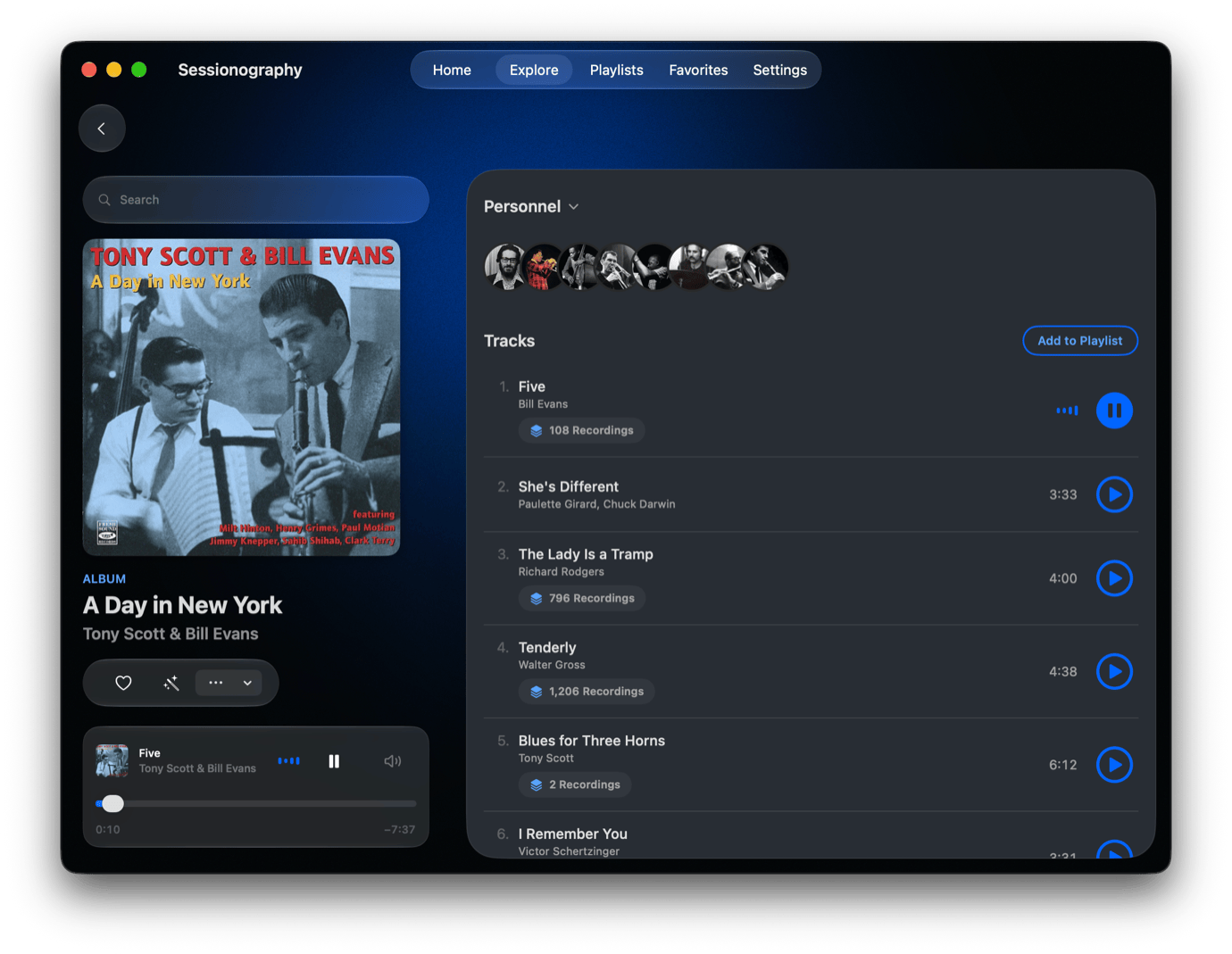
Type an artist, album or song into the Sessionography app, and you can easily fall down a jazz wormhole. (Jazz Wormhole, incidentally, is the name of my poorly received second album.) Typing “Bill Evans,” for example, brings up a list of all the pianist’s albums, which you can then sort through by whether the artist was the leader or sideman. Speaking of sidemen, you can get a list of everyone who played on a particular album, delving into their catalog, too. Create a smart playlist with the tap of a button — assuming you’ve got an Apple Music subscription to also enjoy playing back your selections, that is.
The free version of Sessionography limits you to 10 taps per day for exploring artists and music along with three smart playlists, but a subscription (99 cents/week or $19.99/year) unlocks unlimited activity. It’s an ideal app for jazz enthusiasts to find new combinations and for the jazz-curious to find out what kind of tunes they like.
Wavelength

Like a lot of people reading this, I struggle to get a good night’s sleep, and while there are probably many factors at play, perhaps one I can take more control of is the quality and duration of the ambient light around me. That’s the notion behind Wavelength, an iOS app that taps into your iPhone’s camera to measure the light around you to see if it might be throwing off your body clock.
The first time you fire up Wavelength, you’ll enter in the time you woke up that morning along with your preferred wake-up time. Wavelength then charts out the times of day you should be out in daylight or at least bright light to boost your body clock and when you might want to steer clear of brighter lights, lest you throw off your body clock. Not only does this help with sleep, but it can help you stave off jet lag, too, the app’s developers claim.
If this sounds like hooey to you, Wavelength’s release notes point to the research all this is based on. So there’s some circadian science behind all the app’s recommendations on heading to the light.
Normally a $29.99 download for the full app, all of Wavelength’s features are currently free to all users through September 2027, according to the Wavelength App Store listing.
Geo Text

Part of my daily puzzle habit is to play the latest edition of MapTap online, where I have to drop a pin on a globe as accurately as possible to whatever city is part of that day’s game. Geo Text takes a similarly geographical approach to gaming, bringing a guessing game to the Messages app on your iPhone.
After downloading Geo Text to your iPhone, you access it in Messages, where you’re given a 360-degree photo of a place to scroll around looking for clues. You then tap the part of the globe where you think that photo was taken — the closer your pin to the right result, the more points you accrue.
Here’s where the Messages component comes in. Sharing your Geo Text result to a chat or group message lets everyone you’re chatting with play along — provided that they download Geo Text, too, of course. It’s a way to add a little friendly competition to your chats, as you battle friends for geographic supremacy.
There’s just one Geo Text game per day in the free version of the app, but $1.99 in-app purchases unlock separate games for the 50 U.S. states as well as soccer stadiums around the world.
[Philip Michaels has been writing about technology since 1999, most notably for Macworld and Tom’s Guide. He currently finds himself between jobs, so if you need someone who can string a few sentences together (or make your sentences read a lot better), drop him a line.]
If you appreciate articles like this one, support us by becoming a Six Colors subscriber. Subscribers get access to an exclusive podcast, members-only stories, and a special community.