

By Jason Snell
Last updated October 24, 2026
M6 Mac mini review: Tiny, pricey, and powerful

2024’s M4 Mac mini was a revelation. It packed Apple silicon power into a shockingly compact space, breathing new life into Apple’s all-time utility Mac and (eventually) making it into a go-to device for home AI and even back-end podcast transcription.
Two years later, the Mac mini gets its first update since it became such a popular purchase. It’s a bit surprising: while the high-end model has been updated to the familiar M5 Pro chip found in the MacBook Pro, the lower-end model has skipped right over the M5 and become the first Mac to be released using the next-generation 2-nanometer M6 chip.
It has also, unfortunately, seen a price increase. The Mac mini famously debuted in 2005 at $499 ($855 in today’s dollars), and the M4 model was introduced at $599 in 2024 dollars. Unfortunately, after a midstream price increase and the release of this new version, the starting price has been boosted to $899, a 50% increase over that relatively recent base price.
I get it. Memory and processors are skyrocketing in price due to the AI gold rush, on top of inflation. But the fact remains that at $599, the Mac mini was about as close to an impulse buy as a Mac desktop could get. At $899, it’s crossed an invisible threshold. I can understand it, but I don’t have to like it.
Previously, on Mac mini…

On the outside, this Mac mini is identical to the previous model. It’s still a 5-inch square that’s only two inches high and weighs only 1.5 pounds, a shock of a size if you’re used to the Mac mini’s pre-2024 silhouette. It’s got two USB-C ports on the front and three Thunderbolt ports on the back. (It’s Thunderbolt 4 if you’ve got the M6 model, Thunderbolt 5 for the M5 Pro.)
We’ll get to the chip momentarily, but Apple has made internal upgrades to some other Mac mini parts. Wi-Fi and Ethernet were left untouched in the 2024 Mac mini update, but not this year—the M6/M5 Pro models support Wi-Fi 7 and Bluetooth 6. Both models also come standard with 2.5Gb Ethernet, with 10Gb Ethernet as a configure-to-order option.
And now, the star of the show
The Mac mini vaulted right over the base M5 processor entirely, preventing me from making more references to that classic “Star Trek” episode where a computer tries to take Captain Kirk’s job because some A.I. genius has conned people in positions of authority into thinking that’s a good idea. (Thank goodness I have no more need to reference such outdated, irrelevant themes.)
As a result, the release of this Mac mini also marks the debut of the M6, an entirely new generation of Apple silicon that will undoubtedly populate numerous Macs and iPads over the next year. That makes it worth peeking into the details of how the M6 is structured and how it performs, even if you’re not currently in the market for a new tiny Mac.
Since the beginning, Apple’s M-series processors have included two different sets of CPU cores designed with different characteristics. The performance cores were designed to run at high speed and rip through tasks, albeit at the cost of greater power usage. (Apple would tell you that even its performance cores are also optimized to use power intelligently whenever possible, of course.) The company’s efficiency cores, on the other hand, were designed to perform lower-priority low-level tasks—and computers have a lot of those!—while excelling at energy savings.
While power efficiency isn’t as important for a Mac plugged into an outlet, it’s vitally important to laptops, which make up the bulk of Apple’s Mac sales. And of course, power efficiency can also reduce thermal issues that require venting, and reduce the amount of electricity you’re paying for.
Last year, though, Apple introduced a new core type, the “super core,” with the M5. What differentiates a super core from a performance core? It comes down to the different ways computer programs do work. Software splits up tasks into individual components, or threads, and passes those to the system to send to the processor. Some software is very good at breaking up work into tiny individual components, which is good, because those tasks can be distributed across many CPU cores, where work can proceed in parallel. But some tasks aren’t broken up so readily—whether it’s because the software hasn’t been optimized, or because the task itself really is just a single big chunk that must be processed at once.
According to Apple, super cores are focused on chewing through those single-threaded tasks at maximum performance. This differentiates them from performance cores, which Apple says are tuned to perform better at complex, multi-threaded jobs. Meanwhile, those efficiency cores are percolating quietly in the background, taking care of lesser tasks that don’t require the muscle that the other two core types deliver.
In the M6, for the first time, Apple has decided to apply all three different core types to a single design: It’s got six efficiency cores, four performance cores, and two super cores. Something for every kind of task, ideally, leading to the most optimal mix of power and efficiency.
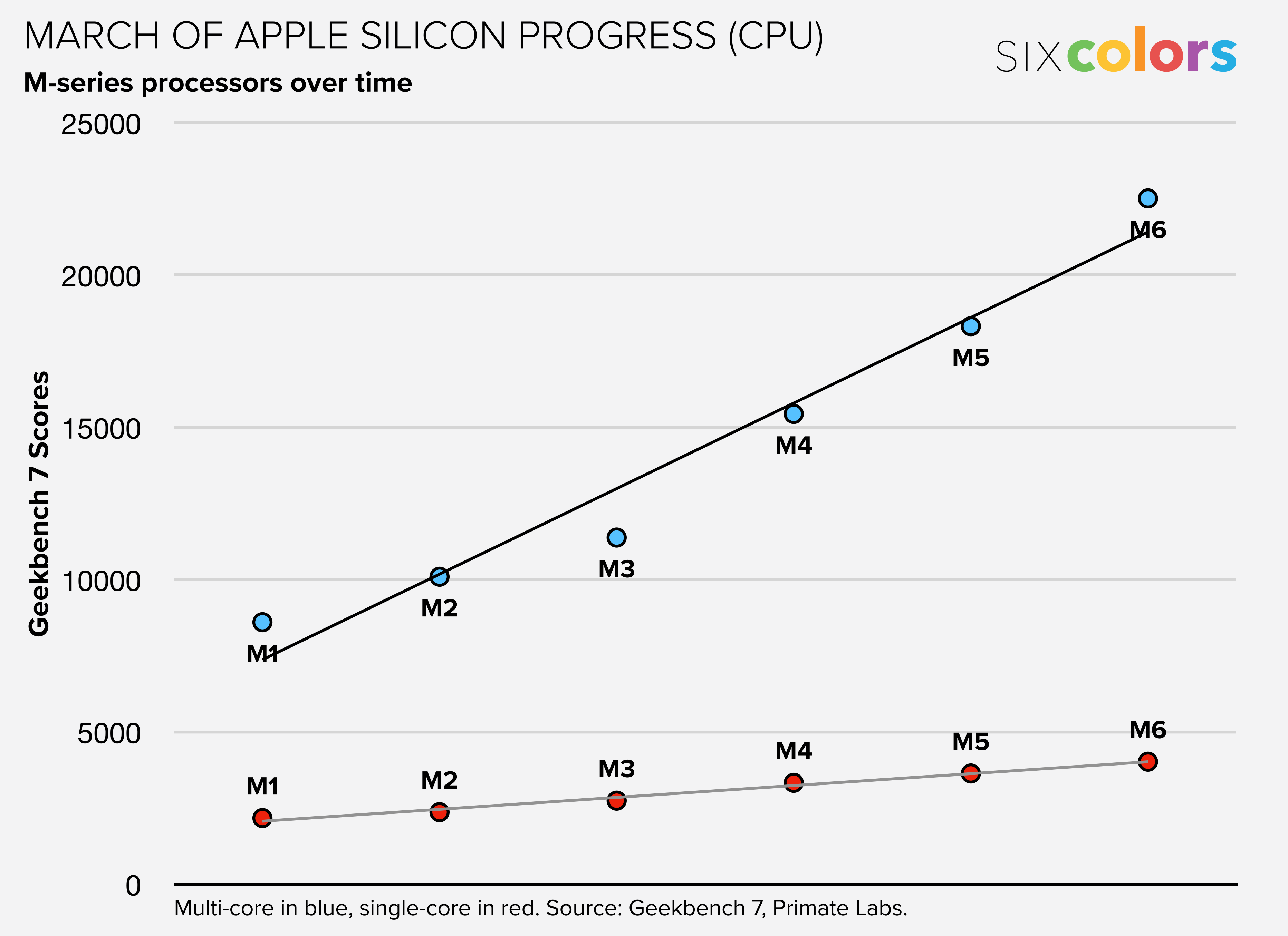
In addition, the M6 has 12 GPU cores, which pick up the neural accelerators Apple added in the M5 generation (and therefore never before seen in the Mac mini), to assist in AI jobs that run on the chip’s graphics hardware. There’s also a new dual 16-core Neural Engine, so Apple’s doubling its own home-made neural processors, all with the goal of making the M6 more impressive as a processor for AI jobs.
With these changes, the M6 ran 11% faster than the M5 in single-core CPU performance, according to my tests. That’s slightly below average for an M-series generational update, though of course if you’re specifically upgrading from any previous Mac mini, you’ll see much greater performance boosts.
In multi-core testing, the M6 performed 23% faster than the M5 generation, very slightly above average for an Apple silicon generation change.
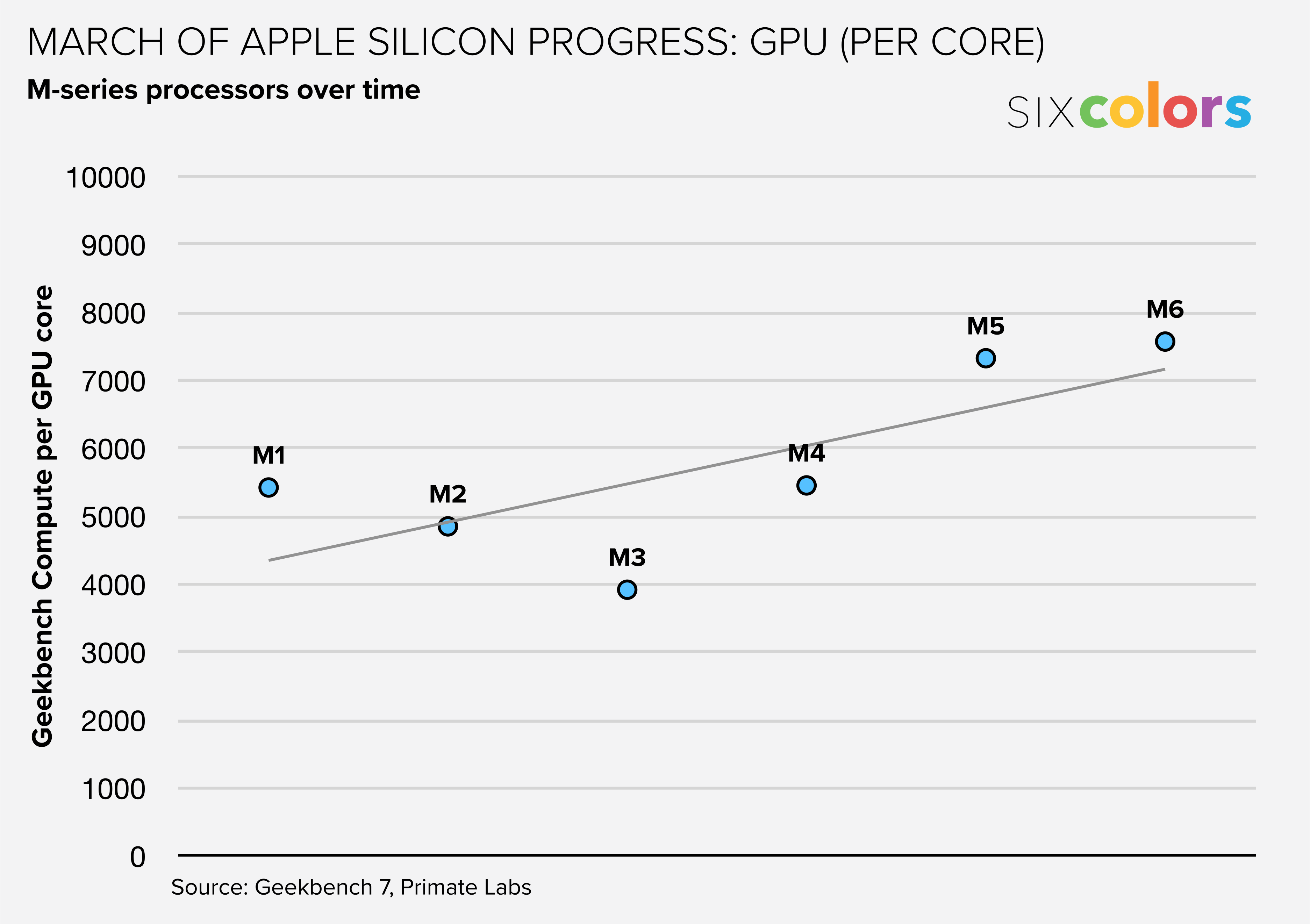
And when it comes to GPU scores, they’re up 24% from the M5 generation—again, a very slightly above average per-generation improvement. Of course, this improvement is largely built on the back of Apple’s choice to include 12 GPU cores in the M6, up from 10 in the M5. If you divide the scores per GPU core, it suggests that Apple (quite understandably) took this generation off from massively improving its GPU core design, given the major steps forward it took in the previous two generations.
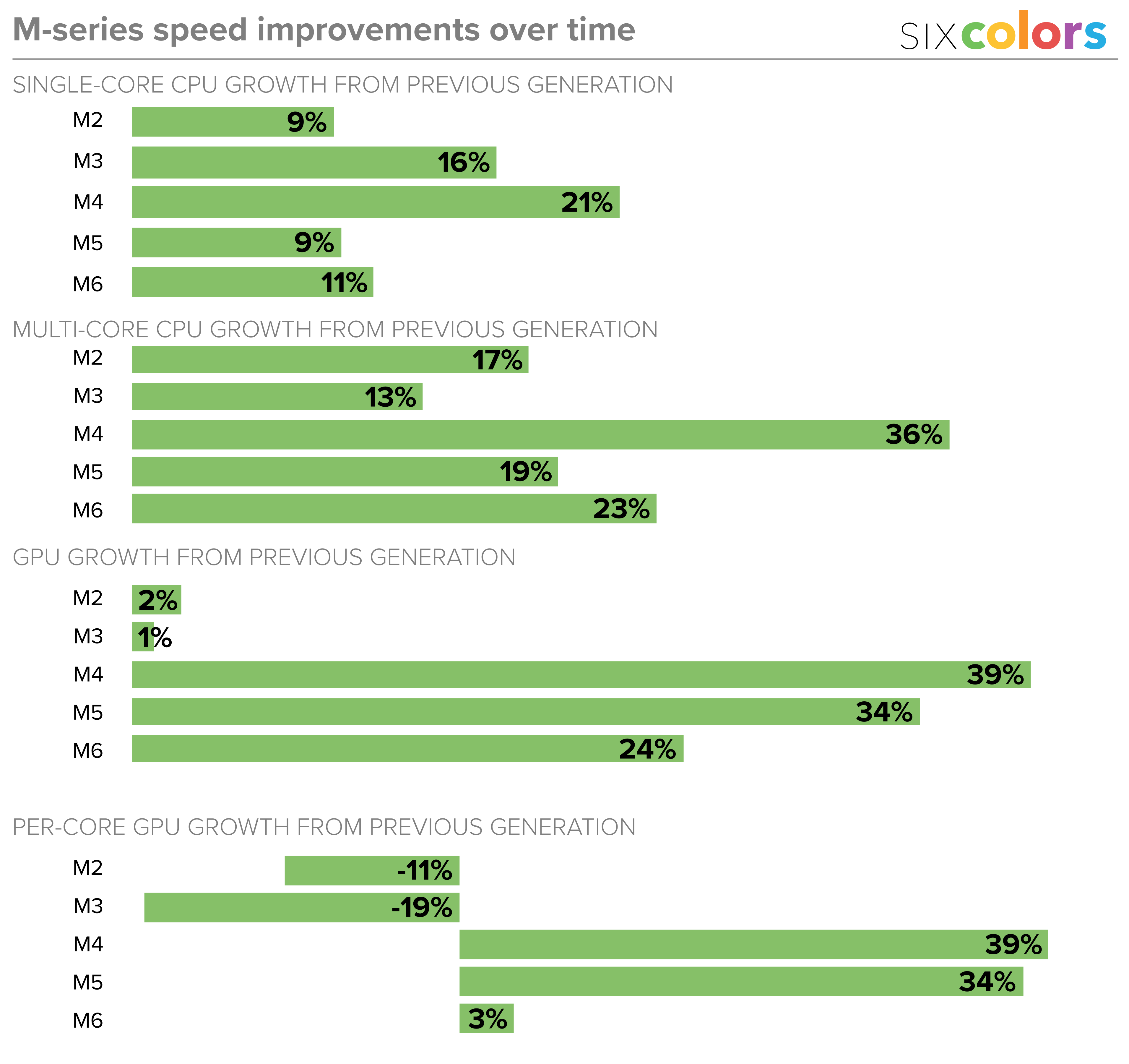
This is now part of the Apple silicon playbook. If you see Apple add GPU cores in a processor generation, it’s most likely doing so because the actual GPU cores aren’t particularly improved, so to make the chip faster, it piles in more. Increasing the GPU count by 20 percent will generally improve your GPU performance by… 20 percent. The strategy allows Apple to crow about improved GPU performance even in a year where its attention is turned elsewhere.
What’s harder to tease out in any sort of benchmark test is how the chip will perform day to day, with a varied workload. Maxing out one CPU core or all the CPU cores provides a clean answer; Apple’s three-core-type design likely works more subtly in practice. My guess is that the mix of CPU core types will result in a better balance of power and efficiency, which is essentially Apple’s holy grail when it comes to processor design. Apple wants its chips to be able to rip through a task when you need it to, but run effortlessly (and in a low-power state) the rest of the time. That’s much more difficult to measure, however.
The Apple silicon Mac era has now lasted so long that we can begin to see patterns and judge how individual generations fit into the story. The M6 processor appears to be an average improvement, so close to dead-on average that it feels like it was made specifically to meet an internal metric for improved CPU and GPU performance.
These results are colored, at least a bit, by Bloomberg’s report that Apple has decided not to ship high-end M6 processors at all, and jump directly to a new M7 generation that is better suited to “meet growing demand for on-device AI capabilities and more graphics-intensive software.” There’s nothing wrong with the M6 at all, but if Apple’s next-generation chip design includes some major AI and graphics performance leaps, I can see why the company might want to prioritize that release rather than rolling out an entire chip line-up based on an adequate but uninspiring creep forward in performance.
Small is beautiful

Back to the Mac mini. Because Dan Moren reviewed the last two releases of this product, I haven’t gotten a chance to spend much time with it, or to write about it in detail.
Let me be clear: I love it.
I’ve been using Mac minis since the very beginning. I’ve had a Mac mini in my home as a server for most of its existence as a product.
In the late 2010s the Mac mini was in the wilderness. It wasn’t updated for more than three years.
But thanks to Apple silicon, it has gotten a new lease on life—and a new design. The fact that the Mac mini became a hot product in the last year just warms my heart. It’s always been Apple’s most versatile Mac, capable of performing whatever Mac jobs you want to throw at it. The smaller size just makes it that much more delightful. It’s a shame about the price, but you could say that about most tech prices these days.
Still, what a computer! Even the performance of the base M6 model is more than enough for most computing tasks that regular people will ever need. If you invested in an external display a few years ago, most likely that display is still going strong—and attaching a new Mac mini to it will just refresh everything. If you want a Mac to live in a closet and serve files and web pages and run AI agents or whatever, it’ll be great for that too.
The Mac mini has come into its own at last, and I’m glad for that. Perhaps in the next few years, prices will settle down and Apple will allow it to cross back over into territory where it’s more of an impulse buy, a “why wouldn’t you upgrade?” sort of proposition. Right now, make no mistake, it’s still a great option if there’s a tiny space for it in your life—but you’ll need to actually do the work to calculate the value it will provide you before making that decision.
If you appreciate articles like this one, support us by becoming a Six Colors subscriber. Subscribers get access to an exclusive podcast, members-only stories, and a special community.