

By Dan Moren
June 8, 2026 12:41 PM PT
All the little details Apple did show in its WWDC 2026 keynote…just very quickly
One of my favorite bits of most Apple events is picking out the little things that Apple doesn’t talk about in its keynotes. At WWDC 2026, however, a lot of those little details did get mentioned—but if you blinked, you might have missed them.
During its discussion of platform improvements, Apple zoomed out on a small-text screen of many of the changes coming in its platforms this year—and there are a lot of them. Good news, now you can read at your own convenience—still in very small text.
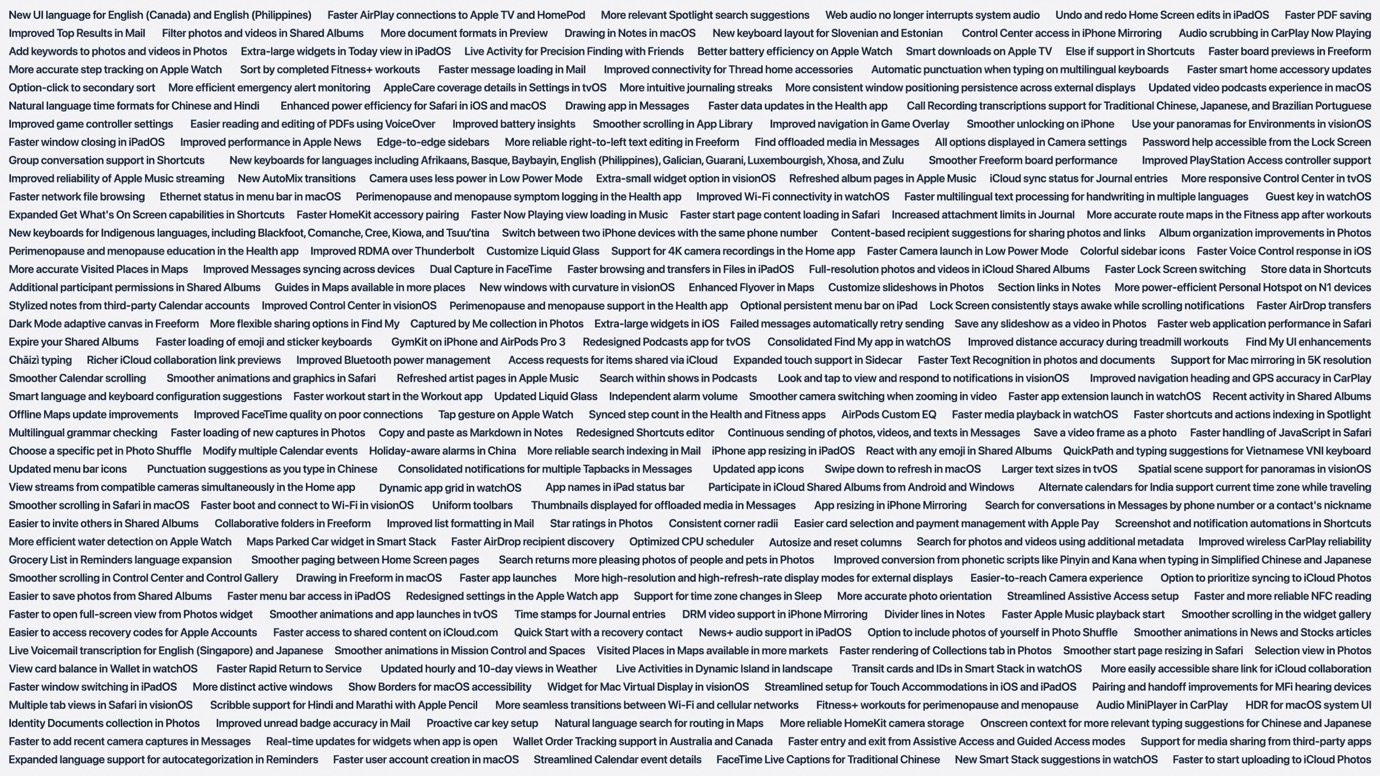
I’ve been skimming through these items to pull out some of personal highlights. As I’ve said before, these quality of life improvements are among my favorites because I generally want to see the quality of my life improved. Who doesn’t?
At a glance, here are some particular favorites:
Else if support in Shortcuts – I’ve been requesting this for quite some time, and I’m glad to finally see it here. It seems likely that a lot of the improvements to Shortcuts are driven by the new “Describe a Shortcut” feature, which highlighted shortcomings in the app.
More consistent window positioning persistence across external displays — I’m a single display user, but I’ve heard this complaint for years from my friends and colleagues who use multiple monitors; here’s hoping it delivers for them.
Faster HomeKit accessory pairing — Honestly, it would be pretty hard for it to get slower, but this is definitely a place where a speed improvement is welcome.
Store data in Shortcut — Exactly what the mechanism for this is unclear, but having previously relied on third-party apps for this, a first-party solution is a good addition.
Improved Control Center in visionOS — I’m hopeful this allows for easier toggling between environments, especially now that you can create your own with panoramas.
Optional persistent menu bar on iPad — In case your iPad wasn’t Mac-like enough.
Expanded touch support in Sidecar — There’s always been a limit to using the standard touch interface in Sidecar; you could use two fingers to scroll or other gestures, or use the Apple Pencil, but you couldn’t just use a single finger. Interesting to see this improvement, along with the ability to draw in Notes and Freeform in macOS, right around the time we’re expecting to see the first Mac with a touchscreen.
Faster workout start in the Workout app — There were a lot of complaints about watchOS 26’s redesign of the Workout app, in particular making it harder to start workouts, so we’ll see if this addresses that.
Copy and paste as Markdown in Notes — Notes added Markdown export a while back, but now it’ll be even easier to work with the markup language.
Redesigned Shortcuts editor — 👀 Yeah. Vague, but again, it needs improvements, so I’ll take it.
React with any emoji in Shared Albums — I have a shared album of my pictures of my kid that my family can view, and while the thumbs up emoji is fine, it hardly covers every eventuality.
Updated menu bar icons — Another set of 👀 for that one.
Consolidated notifications for multiple Tapbacks in Messages — Thank god.
Screenshot and notification automations in Shortcuts — Automations are one of my favorite aspects of Shortcuts, and adding more potential triggers means even more options for how to kick them off.
As I said, there’s a ton more there—you can click through the screenshot above to see it at full size, but it certainly appears that Apple has spent a lot of time making these little improvements throughout all of its platforms this year.
[Dan Moren is the East Coast Bureau Chief of Six Colors, as well as an author, podcaster, and two-time Jeopardy! champion. You can find him on Mastodon at @dmoren@zeppelin.flights or reach him by email at dan@sixcolors.com. His next novel, the sci-fi adventure Eternity's Tomb, will be released in November 2026.]
If you appreciate articles like this one, support us by becoming a Six Colors subscriber. Subscribers get access to an exclusive podcast, members-only stories, and a special community.