

By Dan Moren
February 10, 2026 6:39 AM PT
Quick Tip: Excise old email recipients…on iOS
The other day a Slack pal wondered aloud if there was a way to remove a previous recipient from a family member’s iPhone. The address wasn’t in their contacts, but it kept showing up in the autocomplete for the recipient line.
This tickled something in my brain and sure enough, I wrote about this very topic more than a decade ago—but I only covered how to do it on the Mac. Which got me wondering if it was possible to do on iOS.
Sure enough, it is, but you’d be excused for not finding it, since it’s a bit buried.
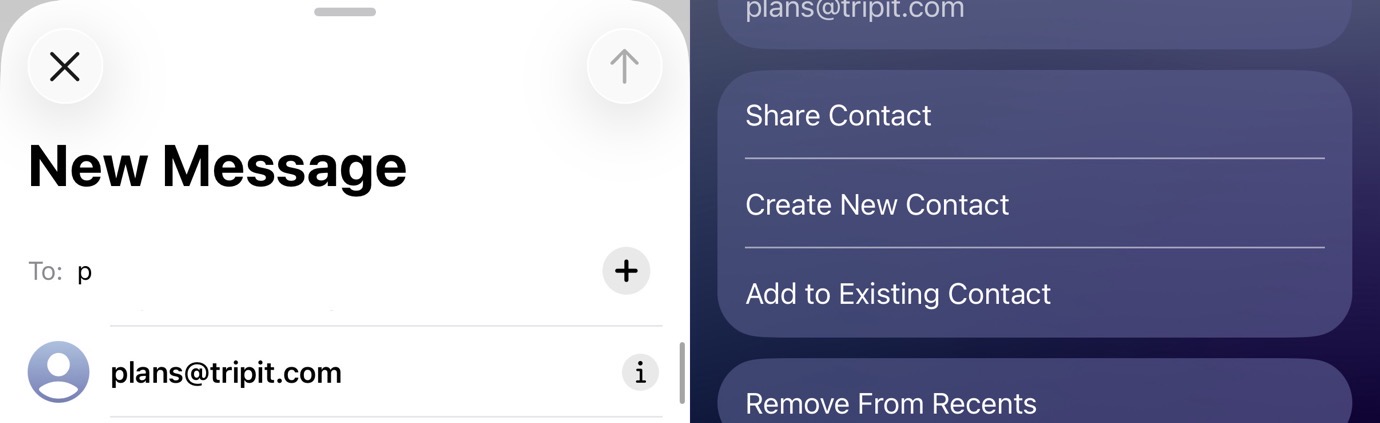
First, start typing the address in Mail’s To field until you see it show up in the dropdown menu. If it’s not in your contacts1 you’ll see it has a little “i” icon next to it. Tap that to bring up a screen where you can add it to your contacts or, more relevantly, scroll to the bottom and you’ll find “Remove From Recents.” Tap that and it should banish it…well, at least until you send them another email.
So there we are, only eleven years later. And, if you’re wondering, the macOS instructions above still work, even if the UI looks a little different these days.
- If the email address is in your contacts, you’ll have to delete it first before you can do this. ↩
[Dan Moren is the East Coast Bureau Chief of Six Colors, as well as an author, podcaster, and two-time Jeopardy! champion. You can find him on Mastodon at @dmoren@zeppelin.flights or reach him by email at dan@sixcolors.com. His next novel, the sci-fi adventure Eternity's Tomb, will be released in November 2026.]
If you appreciate articles like this one, support us by becoming a Six Colors subscriber. Subscribers get access to an exclusive podcast, members-only stories, and a special community.