

By Jason Snell
March 13, 2025 11:59 AM PT
I’ve been framed: Shareshot, Framous enhance device screenshots
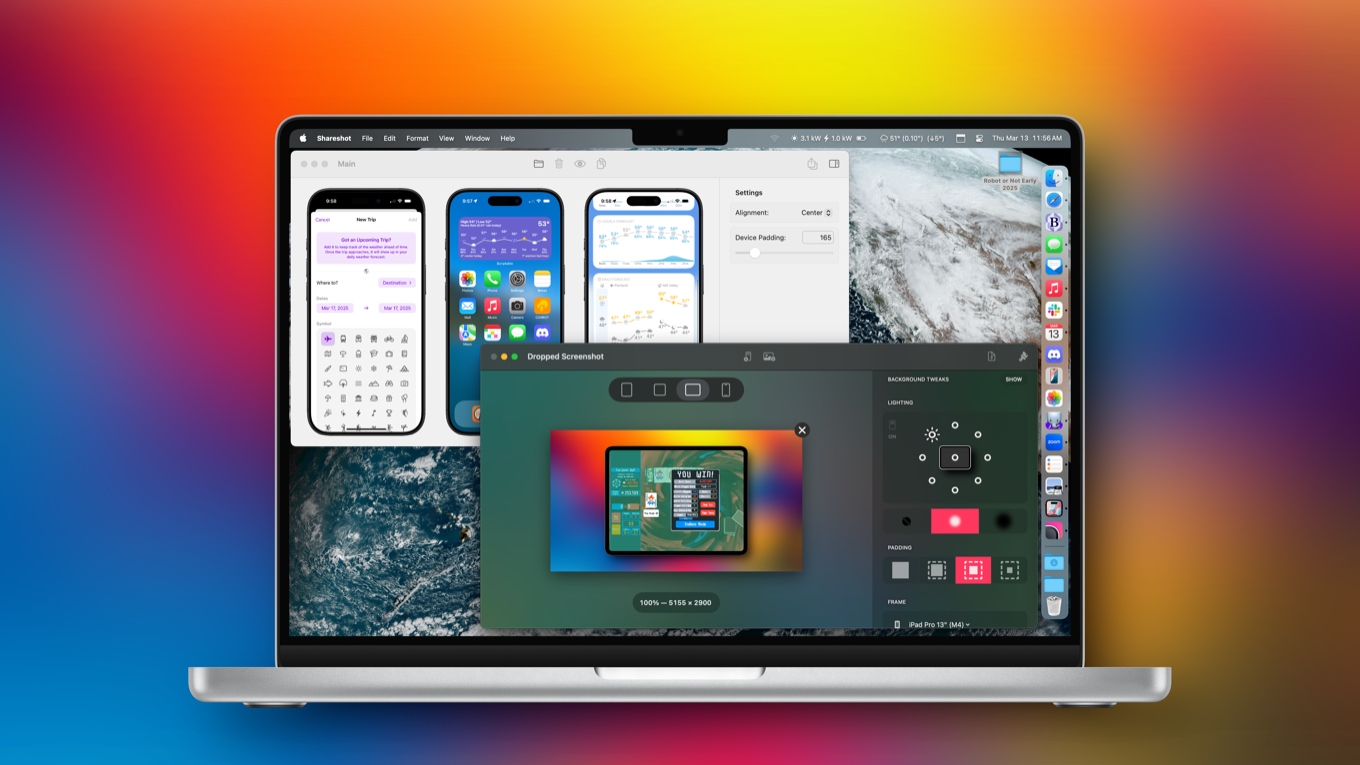
Some people, whether you’re in the media or software development or technical support, take and publish a lot of device screenshots. And while an image straight from an iPhone or Apple Watch looks fine, it often looks much better to be put in context by including the device it’s running on as a frame.
Doing this manually in an app like Photoshop is doable, but labor intensive. Apple even offers design resources to help you along your way. But leave it to Federico Viticci of MacStories to try to automate the entire process with one of the most complex Shortcuts ever made, Apple Frames.
Apple Frames is great, but it ran into a lot of limitations simply because it was a shortcut and not a full app. Fortunately, two new standalone apps take what Apple Frames accomplished to the next level. Framous is a Mac app from the developer of Dark Noise, and ShareShot is a Mac/iPad/iPhone/visionOS app from Montana Floss Co. Both apps let you control which device (right down to the color) is used as a frame, and each have their strengths and weaknesses.

Shareshot is the older and more polished of the two apps. It can place a framed screenshot on a background that’s transparent, based on the screenshot, an arbitrary image, or various colors and gradients. The device can optionally be set to cast a drop shadow (at any of eight different angles), and you have control over the amount of padding around the image as well as the shape of the image output.
If you want to generate a framed screenshot on an iPhone or iPad, Shareshot makes it easy. (You can even invoke Shareshot right from the Share menu in the iOS screenshot tool itself.) The app’s biggest drawback is that it’s limited to processing a single image at a time. If you want to compose an image with multiple screens at once, you have to export each one from Shareshot and then merge them together yourself.

Framous is much more limited—it only outputs on a transparent background and it only runs on the Mac—but it can compose multiple screenshots into a single image. I was able to drag in screen shots from an iPhone, iPad, and Apple Watch into a single canvas, and Framous automatically detected the device and added a proper frame to each one. Framous offers some basic alignment and spacing features for the canvas, and then outputs a PNG for you to use as you see fit. Framous also supports Shortcuts, so it’s possible to automate everything from images in the Finder to final output.
Unfortunately, neither app lets me specify a preferred aspect ratio or dimensions for output, so it’s up to me (and my other tools) to get them in the appropriate format for my uses.
Both of these apps have great potential. Framous feels better on the Mac, since that’s where it was conceived, and it’s my tool of choice when I’m assembling multi-image canvases. I use Shareshot all the time on iPad and iPhone, when I’m generating one-off images that I need to framed. Since all of my Six Colors images are on a transparent or white background, I don’t need the extra composition features Shareshot offers, but if you do, it’s where Shareshot has a leg up on Framous.
Both of these apps are good. For Six Colors purposes, Framous is the winner, but truth be told, I’m using both.
Shareshot is free, but a subscription ($2/month or $15/year) unlocks most customization features and removes the watermark. Framous is free, but it’s $19.99 to unlock all frames through Apple’s 2025 devices, or $9.99 per year to unlock all device frames as long as you’re subscribed.
If you appreciate articles like this one, support us by becoming a Six Colors subscriber. Subscribers get access to an exclusive podcast, members-only stories, and a special community.