Note: This story has not been updated for several years.
Logitech’s $100 Base is the first product to use the iPad Pro’s Smart Connector that isn’t an Apple Smart Keyboard or the Logitech Create keyboard. Compatible with both sizes of iPad Pro, it’s an aluminum stand with integrated charging via the Smart Connector.
I like the construction of the Base, which is solid aluminum that looks and feels like an Apple-caliber accessory. The iPad connects magnetically to the base, aligning automatically to the Smart Connector pins on the left side of the iPad’s case. The Base bends around to provide support for the iPad a bit higher up on the case. A Lightning connector on the back of the Base provides the power for charging.
When attached to the Base, the iPad is only slightly reclined. In my kitchen I’ve got a wooden iPad stand from Chef Sleeve that I use a lot; it’s got two angles, and I use both based on how far below my eyeline my iPad is sitting. The Base’s angle matches the taller of those two orientations, meaning that when I’m writing on the bar in my kitchen with the iPad in the Base, I can’t stand—I need to sit on a barstool in order to get a comfortable viewing angle. It’s also a bit too upright to do much typing on the software keyboard—this is an angle suited more for watching video than anything else.
The Base isn’t adjustable, so if the angle doesn’t work for you, you’re out of luck. It strikes me as being a better angle for video viewing than for using with a Bluetooth keyboard, but your mileage will vary.
I was impressed with how solid the iPad feels when it’s docked in the Base. There’s no wiggle or sense of instability. My biggest complaint about the usability of the device is actually related to its unique asset: You can’t attach the iPad to the stand without peeling off the iPad’s Smart Cover or Smart Keyboard, both of which also attach on the left side of the iPad.
The Logitech Base is solidly made and does what it says on the box. This is a product that’s been designed for someone who wants an attractive stand and doesn’t want to fuss with plugging and unplugging Lightning cables to charge their iPads, and is willing to pay for the privilege. On this, the Logitech Base delivers.
The question is really about its limited utility. For $99, you get a very nice aluminum iPad stand that charges via Lightning. You can probably get a simpler stand for a lot cheaper and just plug the same Lightning cable into your iPad rather than the back of the Base stand. For most people, that’s a better—and cheaper—option, unless you’re wowed by the novelty of charging via the Smart Connector.
Many Tricks has been making useful Mac utilities for over a decade; their tools help you get the most out of your Mac. Amongst their suite of solutions, Moom makes moving and sizing windows a snap, Witch lets you easily switch between all open windows, Name Mangler handles batch file renaming tasks, and Desktop Curtain covers your clutter. See the full selection of apps at manytricks.com.
Save 20% on anything you buy from Many Tricks for the next month by using discount code SixColors20.
Tim Cook should be replaced by Elon Musk: https://www.washingtonpost.com/news/innovations/wp/2016/04/28/why-tesla-is-the-spark-that-apple-needs/
No, wait, Jon Rubinstein: http://investorplace.com/2016/01/apple-inc-aapl-stock-buy/
Well, whatever, he just needs to go: http://daringfireball.net/linked/2016/05/02/lefsetz
Neil Cybart lists some warning signs about the iPhone business: http://www.aboveavalon.com/notes/2016/5/2/iphone-warning-signs
TalkShow is a social app that’s held Moltz’s interest longer than many: https://appsto.re/us/bOCQ9.i
Our thanks to Harry’s (harrys.com). Harry’s sells premium shaving products for much less than those crappy blades that you have to get someone to unlock from a cabinet. Get $5 off your first order with coupon code “REBOUND”. Don’t wait, get the shave you deserve.
I’ve been a user of the Nest thermostat since the very earliest days, and I like it a lot. A year and a half ago, I also reviewed smart thermostats for The Sweethome1. What I found was a bit surprising: Nest’s thermostat hadn’t really advanced much since its original product release, while competitors such as Ecobee and Honeywell were closing the gap quickly.
In the intervening time, Nest has released a third generation of its thermostat, but other than getting a bit thinner it’s yet another boring update. The Nest software has gotten a little bit better, but only marginally. And in the meantime, the company has released a smoke alarm not a lot of people like and… not really much else.
I don’t have any inside knowledge about Nest, so I can’t speculate on why it’s happening, but as an observer, it’s baffling to see how a company could create such an interesting, attractive product like the original Nest thermostat and then fail to substantially update it for five years.
One of Nest’s big issues originally was a lack of good connectivity to other smart devices, and that’s been improved over the years. I can control my Nest thermostat with my Amazon Echo now, which is good.
But one of Nest’s biggest missing features has gone unaddressed over the years, and I’m baffled: There’s no official remote temperature sensor. This is a huge deal if your thermostat doesn’t live in the place where you spend most of your time. The Ecobee3 thermostat, in addition to supporting Apple’s HomeKit, comes with a tiny battery-powered remote sensor and supports additional sensors that you can buy for an extra fee. There are some expensive third-party sensors that will integrate with Nest, but nothing from the company itself.
Not everyone needs a remote sensor, but for a lot of homes it could make the Nest work a lot better. (I know there are many mornings when the temperature in my bedroom is far more important than in my hallway.) And yet five years in, Nest appears to be uninterested in (or incapable of) making its product better.
Instead, Nest seems to be focused on buying other companies—leading to some products being killed. Nest’s acquisition of Dropcam sort of made sense, but the new Nest Cam software actually removed features that were a part of Dropcam, generating customer ire.
I don’t know what’s happening over there. And I still enjoy my Nest thermostat, including how great it looks on my wall. But after five years of imagining where an innovative company like Nest could go in reimagining formerly boring and dumb home appliances, it appears to have done very little. And I’m starting to think that the Ecobee is looking more attractive by the day.
I won’t be updating that review; my house is a single climate zone and doesn’t do air conditioning, so I’m not the best choice for testing more complex heating or cooling scenarios. ↩
Cleaning out my office has been an uphill struggle.
Sure, sorting through all the crap that’s accumulated over the last six years is challenging. (When you get down to the strata of stuff that you trucked over from the last apartment is when you know you’re in trouble.) But as much as it’s been a pain to sort through all the out-of-date equipment, empty boxes, and stacks of paper, that’s nothing compared to the next step of the equation: old data.
Not only do I have a couple old Macs sitting here, no longer in active use, but worse I have half a dozen hard drives of various vintages. I’m lucky if they’re labeled, and doubly so if those labels are even close to accurate.
So I guess what I’m saying is: Hi, my name’s Dan. And I’m a digital packrat.
There’s an link making the rounds, a story written by an upset iTunes user who claims that Apple Music deleted all the music on his hard drive. I was going to write about this, but Serenity Caldwell did it so I don’t have to:
Apple Music has definite problems and its matching algorithms aren’t great, but this is simply not how the service works. Apple Music should never automatically delete files off your primary Mac’s hard drive unless you specifically delete them first.
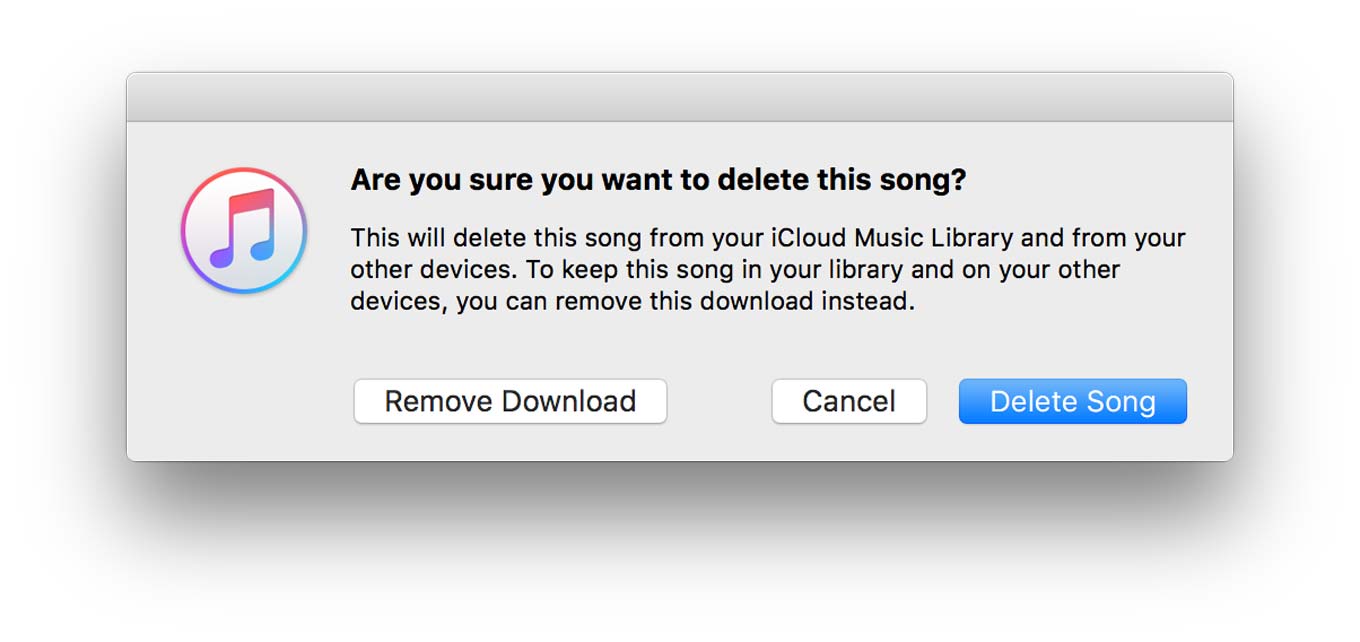
While there might be a bug at work that actively deletes files, my guess is that this is more of a case where a user moves his or her files to the Trash without actually realizing it. And my prime suspect is this dialog box:
This could use some work. The default button will remove your tracks from the cloud and move your local files to the trash. The far left button, “Remove Download,” will still throw your tracks in the trash. The term download seems fundamentally wrong here, since it generally suggests an ephemeral nature that’s not the case with that MP3 you ripped from your CD collection five years ago. While the text of the dialog box does spell out what’s going to happen, can we really expect most users to read and understand all of that text before making a decision? “Remove Download” comes across as the opposite of “Delete Song,” when it isn’t. Yes, Cancel is the best option there—but this could be a lot clearer.
Sometimes I think the biggest problem with Apple Music is not its content or its price but its forced integration with existing iTunes libraries. Apple is bad at identifying music that isn’t among the most popular out there, replacing live albums and alternative tracks and sometimes even greatest-hits tracks with different versions. That would be an annoyance (and Apple should really dial back the confidence it has in whatever algorithm is doing that job) if you could tell iCloud Music Library that it was wrong and upload your on-disk version of songs to your library, but you can’t do that. If Apple gets it wrong, you’re just out of luck.
Apple is supposedly making changes to the Music app in iOS 10. I can quibble about the importance of “larger artwork” to the usability of a music app, but the real problems with Apple Music seem to be happening in the cloud.
The rise of sort-of-intelligent machines that can drive us and hold conversations with us. Also, Apple Music and iTunes Music Library are kind of a mess.
The menu bar at the top of the screen has been with the Mac since the beginning. It’s one of the defining characteristics of the Mac, one that even Microsoft didn’t dare duplicate—in Windows, the menu bars go on the top of windows, not at the top of the screen. The Mac menu bar is a constant, a north star.
Except… things have been getting a little weird lately. Last year, Apple added an “Automatically hide and show the menu bar” feature to the General pane of System Preferences. When that preference is selected—or you’re in full-screen mode—the menu bar only appears when you move your mouse to the top of the screen. It feels spectacularly wrong to me, but then, I’ve been using a Mac since George Bush was President. (The first one.)
Apple also recently added a new “Use dark menu bar and Dock” mode, which flips the normally black-on-white menu bar into a design only Darth Vader could love: white text on a black background. It’s not my cup of tea, and flipping that setting doesn’t change the style of any of the other black-on-white windows on my Mac’s screen, but if you like it, more power to you.
Even as someone who has committed plenty of keyboard shortcuts to memory, I find the menu bar incredibly valuable. And while it’s almost always in the faces of every Mac user, it’s too often ignored. The menu bar, like the Utilities folder, is a place that make you a more efficient and informed Mac user.
The cast of Inconceivable! records live from a hotel room with a Zoom H6 and a variety of microphones. And a bell.
The bulk of the podcasting I do involves me sitting alone in a room talking into a microphone to other people who are somewhere else, doing the same thing. There are lots of advantages to this approach: It lets me host podcasts with people who live all over the world, for one thing, but it also isolates everyone’s sound. We’re all recording in our own little isolation booths, and that can make editing a whole lot easier, since I can clip out the coughing fit or barking dog from your recording and it won’t bleed through from anyone else’s microphone.
Unfortunately, when you’re recording live and in person, the isolation booth is gone, and things get much more complicated. The environment itself can be noisy and challenging, and using more than one microphone at one time can make things complicated. But on the bright side, you won’t need to spend much time editing, because there’s not much point, since even if you clip the sound out of one microphone, it’ll still be audible on the others.
Here’s the set-up I use for remote recording:
The recorder. I recently upgraded to the $400 Zoom H6, which allows me to record up to six XLR microphones at one time (with an additional adapter for the extra two microphones). My previous recorder, the $160 Zoom H4N, is only capable of recording two XLR microphones alongside its own built-in mic, which wasn’t enough for the larger groups I find myself recording live, so I sold it and upgraded. It’s a great value as a starter recorder, and can double as a USB microphone interface when you attach it to a computer. (And yes, if your subjects are willing to snuggle up a little bit, you can record many people with just two or three microphones.)
I choose to use a portable recorder rather than a computer and a USB interface mostly because it’s a much simpler set-up. With a laptop (or iOS device), you need you make sure it’s got power, you need to tote along a second box for the XLR-to-USB interface (and it may need its own power source), and you have to count on your recording software not to let you down. Small portable recorders are self contained, writing their output to a SD card for later import to a computer for editing. They can be powered by AC power or AA batteries that you can find in any store, in a pinch. It’s better this way.
(You may be asking yourself, can I attach two or more USB microphones to a Mac and record that way? I don’t recommend it. I’ve tried it in the past and the microphones generally seem to get out of sync, so when it comes time to put the tracks together later, it gets all echoey and weird.)
The microphones. I have a small collection of XLR microphones. Look at Marco Arment’s review of XLR microphones for details, but if you’re recording live you’re going to need to buy more than one, so price will be a factor.
The best trait of a microphone for live recordings is that it rejects sound that isn’t directly in front of the microphone. If you record with microphones that tend to pick up a lot of room noise, that noise will be magnified and you’ll get a noisy, echoey recording. I have two $150 Shure Beta 58As, but I also have two $20 Pyle PDMIC58s. If you buy the excellent value $60 ATR-2100-USB, you can take advantage of the fact that this USB microphone can also work as an XLR microphone and let it pull double duty.
The accessories.. All the handheld microphones get covered with a $3 windscreen, and I screw their microphone clips onto a cheap fold-up mic stand. You’ll also need to buy XLR cables, and if your microphones are going to be spaced far away from each other and the recorder, you’ll need to make sure that they’re long enough to manage that.
If you need to use microphones in a space where there’s no table or desk, you could have everybody stand and hold the microphones as if they were ready to belt out some classic rock at the top of their lungs. Or you could invest in a few $25 boom stands. I bought one of these and it’s incredibly flexible—I’ve used it to record in all sorts of environments, and because it’s not attached to a table, it isn’t affecting by people doing something noisy like pounding on that table.
The environment. This is a tough one. Record where you can record; if you can avoid super echoey spaces (empty walls, high ceilings, huge glass windows or doors), do so. Recording outside can be surprisingly quiet, unless you’re standing on a crowded sidewalk next to a major road. If you can find a quiet, non-echoey space, you’ve hit the jackpot. But I’ve done some good-sounding outdoor podcasts and some lousy-sounding indoor ones.
Note: This story has not been updated for several years.
The Washington Postteases a look at Viv, a new artificial intelligence system developed by the team that originally created Siri:
Most virtual assistants today can understand a set of human questions. But those queries have to be stated in a precise way, and they trigger largely scripted responses. What distinguishes Viv is that it aims to mimic the spontaneity and knowledge base of a human assistant, said Oren Etzioni, chief executive of the Allen Institute for Artificial Intelligence in Seattle.
By working with data from movie-ticket vendors, it can understand the multitude of ways people can ask it to buy movie tickets. It can look up showtimes and, on its own, suggest entertainment alternatives from other vendors if the desired showing is sold out. And it can compare prices and then buy the tickets, along with making a restaurant reservation beforehand. If the user changes her mind, the assistant can take care of the cancellations and let her know it’s done.
There’s clearly a paradigm shift underway. Siri, Alexa, Cortana, OK Google, Hound, Viv–all the major players, and a few upstarts, are racing to provide the best intelligent agent. Viv’s pedigree, developed as it is by Siri’s creators, is impressive, but it hasn’t gotten a public workout yet.
Overall, the risks I see with the future of the intelligent agent are choice and opacity. Ask Viv to buy some flowers, the Post story suggests, and it’ll contact FTD. If you don’t want to order flowers from FTD, you’re apparently out of luck. Everything comes down to who Viv makes deals with–just as with Siri and other intelligent agents. If you want to order a pizza from Domino’s, that’s great, because Domino’s has been incredibly smart and now lets you order pizza on everything from your watch to your TV. The downside is that you then have to eat Domino’s pizza. Viv at least is also making deals with delivery services like Grubhub, and is aiming for a ubiquity that would hopefully make choice a bigger part of the equation.
That’s intertwined with the issue of opacity. When an intelligent agent invariably messes up and orders you the wrong pizza or delivers flowers at the wrong time, how do you figure out what’s gone wrong? The system’s inherently a black box. That said, our trend has been towards increased opacity as technology has gotten more and more complex. Troubleshooting an iPhone, for example, is much more limited than troubleshooting a Mac–force quit an app or restart the phone…after that, you’re probably best off taking it to the Genius Bar. Same goes for automobiles today versus thirty years ago. And yet people have, by and large, taken that tradeoff: transparency for convenience. It’s not hard to see why: when I ask Alexa to play a song and it just plays it, well, it doesn’t really matter to me where it comes from.
I’m eager to see Viv’s technology demoed publicly1 on Monday at TechCrunch’s Disrupt conference, especially since it’s increasingly seemed like Siri needs a kick in the pants.
A friend of mine who worked on Siri at Apple has joined his former compatriots at Viv, along with many of the other members of the Siri team. ↩
[Dan Moren is the East Coast Bureau Chief of Six Colors, as well as an author, podcaster, and two-time Jeopardy! champion. You can find him on Mastodon at @dmoren@zeppelin.flights or reach him by email at dan@sixcolors.com. His next novel, the sci-fi adventure Eternity's Tomb, will be released in November 2026.]
I’m afraid the fourth-generation Apple TV has entered the dreaded “chicken or egg” zone, something I’ve seen countless times with living room devices, mainly video game consoles. Software moves hardware, and if the apps aren’t there, people won’t buy the boxes. And if hardware sales are slow, developers won’t build software for the platform. It’s a vicious cycle, but I think Apple is better equipped to break free of it than most.
After a stint with the Fire TV, I’ve mostly switched back to the Apple TV1, but there really isn’t a huge reason to recommend one platform over the other right now. For example, as much as I like the idea of Siri, having switched to a Harmony universal remote control means I have to dig up the Apple TV remote to use it. Which is often not worth the time.
Part of the stagnation of the platform, and something Josh doesn’t really go into in his otherwise excellent write-up, is that many of the content providers are now pushing their apps as a “platform.” Look at the Hulu or Netflix apps on the Fire TV and Apple TV and you’ll find that they’re actually pretty similar. That’s often more jarring on the Apple TV, where there seems to be a more “unified” design style, than on the Fire TV, which still feels like a hodgepodge of apps. (Akin to an iOS vs. Android experience.)
I’d argue that Hulu and Netflix’s apps are kind of crappy—interface and navigation wise, at least—on all of the platforms. But for those companies, it’s probably more efficient to have one standard codebase that they can deploy to multiple devices, so there’s little incentive for them to spend time tuning apps to work better with the Apple TV.
There’s still a lot of potential on the fourth-generation Apple TV, and fingers crossed that Apple isn’t content to let it sit and fester at WWDC this year.
Thanks in no small part to “fixing” the Apple TV’s wonky Wi-Fi issues via the revolutionary tactic of using an Ethernet cable. ↩
Apple is altering the user interface of Apple Music to make it more intuitive to use, according to people familiar with the product who asked not to be identified because the plans aren’t public. Apple also plans to better integrate its streaming and download businesses and expand its online radio service, the people said. The reboot is expected to be unveiled at the company’s Worldwide Developers Conference in June. The changes will be accompanied by a marketing blitz to lure more customers to the $10-per-month streaming service. An Apple spokesman declined to comment.
As someone who dropped his subscription to Apple Music after the initial 3-month trial period, that comes as, well, interesting news. Would a better UI lure me back to Apple Music? Probably not on its own. I’m more interested in exactly how this is going to affect the Music app, which I still use everyday, and into which Apple Music has seemingly sunk its claws to a near inextricable level.1 I worry that a redesigned Apple Music service will invade the Music app even further.
I still occasionally–at seemingly random intervals–get that popup screen that asks me to join Apple Music. Seriously? I said no already. Stop asking. ↩
While Mr. Bonnie continued on his way to the Bahamas for a few days of relaxation, his iPad began a strange odyssey of its own, turning Mr. Bonnie into a digital gumshoe and the narrator of a personal thriller that played out on Facebook, to the delight of his online friends.
“I said, ‘I’m definitely going to lose my iPad, but I’m going to have some fun,'” Mr. Bonnie said in a phone interview.
Note: This story has not been updated for several years.
I’ve bought the flagship Amazon Kindle for just about every generation of the device. Yes, I have a bit of an addiction, but I’ve found plenty of takers in my extended family for hand-me-down Kindles, and I love ebook readers so much that I’m always excited to use the latest and greatest version of the technology.
Without belaboring the point, I love ebook readers specifically because they are not phones or tablets. They’re unitaskers that are great at letting me read text on a page, without push notifications or the ability to flip over to Twitter for a minute, with almost no glare in the brightest light and a lighting scheme that’s much easier on my eyes when I’m reading with the lights off. Ebook readers aren’t for everyone, but if you’re a heavy reader with room in your bag (or by your nightstand) for another device, they’re worth it.
With the Kindle Oasis, Amazon raises the bar on what a premium ebook reader can be. The company tried this last year with the Kindle Voyage, with mixed results. The Voyage is better than the Paperwhite (owing to a haptic page-turn control on the bezel, a light sensor for automated brightness adjustment, and a completely flat face rather than the screen being recessed below the bezel), but I’m not sure those changes were enough to justify the price difference between the two products.
The Oasis, on the other hand, is miles above the Paperwhite and Voyage. It weighs 4.6 ounces and is 5.6 by 4.8 inches, with a grabbable edge that’s .33 inches thick, with the rest of the device being only .13 inches thick. This is a compact, thin, light device that’s a delight to hold. It fulfills one of the design ambitions Amazon has always had for the Kindle, which is for the device to disappear, leaving nothing between you and the book you’re reading. Holding the Kindle Oasis in one hand for an extended period of time is easy, because it’s so light.
The key to the Oasis design is that it’s asymmetrical. One edge has a larger bezel, physical page-turn buttons (yes!!!), and is thicker than the rest of the device. This is the edge you hold in your hand, and I found that my thumb naturally came to rest right on the lower page-turn button. (You can toggle the behavior of these buttons, so no matter your grip, you’ll be able to turn pages on the Kindle Oasis easily, and if you prefer gripping with the other hand, just flip the Kindle over so that the wide bezel is on the other side—the screen automatically rotates.) Beyond the one edge, though, the Oasis is practically not there. It’s an ultrathin slab with very little bezel.
Shaving three ounces off of the Paperwhite’s weight does have an effect, though: In my limited use, the naked Oasis has much worse battery life than its predecessors. Not enough to make you afraid to take it to the beach, but I only needed to charge my Paperwhite or Voyage once a week, or even less. The Oasis, by itself, seems to need a recharge every couple of days.
The Oasis in its case.
This is probably why you can’t buy the Oasis by itself. Instead, Amazon bundles the Oasis with a leather battery case. This would seem to explain the Oasis’s high price—you’re not just buying the reader but a mandatory accessory—and as someone who generally eschewed a case for my Kindle, I was kind of bummed out that it was a requirement of the Oasis.
Now that I’ve used it, though, I’ve changed my tune. First off, having seen the battery life of the Oasis, it makes perfect sense that Amazon would want Oasis owners to have a case that extends the device’s battery life. The Oasis battery case attaches magnetically to the back of the Oasis, and charges the Oasis battery from its own store of power whenever it’s connected. Amazon’s rated battery life of the Oasis and the case together is essentially the rated battery life of the Kindle Paperwhite.
The Oasis case is only held on magnetically, so it’s easy to pop on and off.
It’s a trade-off, but I actually think it’s a smart move on Amazon’s part. This is going to be a flight of fancy, but imagine if Apple made an iPhone that got five days of battery life. That’s more battery life than most people need, given how they use their iPhones. So Apple would be absolutely right to make the decision to reduce the size of the iPhone battery in exchange for a thinner, lighter device. (Alas, the iPhone has never had a surplus of battery life.)
This is the decision Amazon made. Your Kindle itself doesn’t need to run for a week between charges, because nobody reads for several days straight without taking a break. When you’re done reading, if you pop the Oasis back into its case—even if you’re miles from an electrical outlet—the reader will charge from the case’s battery and will be ready for your next reading session later. Clever. (You charge the Oasis via a Micro-USB port on the reader itself; if the case is attached while you’re charging, the case charges too.)
The case is pretty great itself. Like the Oasis, it’s thin and light, adding very little bulk. Even with the case attached and the cover folded back, the Oasis feels compact.
When it comes to the reading experience itself, the Oasis isn’t really much different from the Voyage or the Paperwhite. They all light themselves so you can read in the dark, via LED light channeled in from the sides of the display. (The Oasis apparently has more LEDs, but the effect didn’t seem markedly different from the lighting on the Voyage.) This lighting approach feels more natural than the backlighting on a phone or tablet display, because it’s reflecting light off the E-Ink display rather than blasting light through an LCD. The Oasis’s E-Ink display itself, alas, is the same 300 dpi as the Voyage.
So let it be known: The Kindle Oasis is a really great ebook reader, probably the nicest one ever built. And if you are a Kindle fanatic like me or you just like nice things, if you buy one you’ll be happy. But at a starting price of $290, it’s a high-end product for a narrow audience. If you’re just curious about the Kindle or want to replace an older model, I highly recommend the Kindle Paperwhite, which is still the best buy in the product line. It starts at $100, lights itself, has the same 300 dpi resolution of the Oasis, and runs more or less the same software.
The combination of a slowing iPhone upgrade rate and declining number of growth catalysts for expanding the iPhone’s addressable market will make it very difficult for management to report unit sales growth going forward given its current strategy. In addition, the iPhone SE highlights how any strategy to fix some of these issues will likely end up jeopardizing iPhone ASP and margin trends.
Cybart’s quick to point out that this isn’t about Apple doom, just that the prevalent trend of the constantly growing iPhone is unsustainable. And I think he makes a particularly smart point that the key is in the messaging from the company itself:
The one thing management needs to work on is moving the Apple narrative away from iPhone unit sales growth. [emphasis in original]
One Steve Jobs quote displayed at Apple HQ will end up doing a great job of describing Apple’s path forward for iPhone: “If you do something and it turns out pretty good, then you should go do something else wonderful, not dwell on it for too long. Just figure out what’s next.”
Resting on one’s laurels is a danger to any company that manages to achieve significant success: in many ways, Apple has bucked the trend by always seeming to be working on the Next Big Thing. Tim Cook reiterated on CNBC last night that the company has “great innovation in the pipeline” and even went so far as to say that upcoming iPhones would convince folks to upgrade.
The astronomical success of the iPhone has meant that more and more of Apple’s eggs were in that single basket. But it seems unlikely that any new Apple product will match the size of the iPhone business–certainly in the near-term, but perhaps ever. It’s perfectly possible for Apple to survive that shift, but the key is perception: You want to look like you knew that was going to happen, not like you were taken by surprise when that unsinkable ship you were on goes belly up.
Hulu is developing a subscription service that would stream feeds of popular broadcast and cable TV channels, people familiar with the plans said, a move that would make the company a competitor to traditional pay-TV providers and other new digital entrants.
So live TV and a cloud-based DVR, rather than the on-demand day-after service the company currently offers. But the report also says this would be separate from Hulu’s current offerings, and would offer channels from Hulu’s backers, like ABC, the Disney Channel, ESPN, Fox, FX, and Fox News.
However, there’s a catch:
Hulu hasn’t set a price for its planned service but Sanford C. Bernstein media analyst Todd Juenger estimated that it would likely cost around $40 a month. An executive close to Hulu said that figure was in the ballpark.
For a subset of channels, $40/month is a lot to ask, especially when traditional cable bundles throw in a lot more for not much more. This would especially seem to compete poorly against the streaming services cable companies themselves are beginning to offer, such as the $15/month Stream TV service I’ve been using.
This is my biggest worry about moving TV online: we’re just going to end up recreating what we used to have, with a different middleman. So I guess it’s yet another case of “be careful what you wish for…”
Marco Arment’s free Quitter is a Mac app that lives in the menu bar and automatically hides or quits apps after periods of inactivity. I’ve been using it the past few days and it’s been useful in getting rid of apps that don’t need to hang around and be in my face at all times, like Slack, Twitter, and Messages.
Over the weekend, SoundCloud turned off RSS feeds for all its hosted podcasts for a while.
I have no ill will toward SoundCloud, but they have never seemed to see podcasting as anything but a way to capture users and draw them in to their own ecosystem. Podcasting is a side business for SoundCloud, and linking to episodes of podcasts hosted by SoundCloud is usually a gigantic pain, because SoundCloud tries very hard to suppress file URLs. I don’t know whether they do it because they don’t get how podcasting works, or because they do get how podcasting works and want to try to break that approach so that people are driven to SoundCloud.
In any event, I don’t recommend that podcasters use SoundCloud. There are better options, including Libsyn and Podbean, that do the job much better than the podcasting features that are grafted onto SoundCloud.
Imprint is a curated retailer and lifestyle publication, offering weekly collections of exclusive products for the modern gentleman.
Rather than selling thousands of same-ish products, Imprint only sells a limited selection of the very best clothing, literature, coffee, and more. And if you don’t want to shop aimlessly, you can just consult with our Concierge for on-demand personal styling advice at any time.
Imprint is available on the web and iOS, whilst shipping is free in the U.S. and flat-rate abroad. (Returns are free worldwide.) Curious Six Colors readers can use the code COLORS for 20% off their order.