Fourteen years ago this month, Steve Jobs resigned and Tim Cook became the CEO of Apple. Given Jobs’s ongoing health issues, Cook’s ascension wasn’t unexpected; he had, in fact, filled the role during Jobs’s multiple leaves of absence. Cook was a familiar face and promised to be a steady hand at Apple, but if there ever was a tough act to follow, it was Steve Jobs.
But here we are, living in an era where Cook has now served as Apple CEO longer than Jobs did. The Apple of 2025 is quite different from the company Cook took control of back in 2011. Today’s Apple generates nearly four times the revenue that the company did when Cook took over, driven by more-than-quadrupling iPhone revenue. Back in 2011, there was one iPhone; now there are five, along with several iPad models, a wearables business that basically didn’t exist, an experimental headset, and a revitalized Mac powered by iPhone chips.
It’s been a ride. And while it’s not over yet, now seems as good a time as any to look back at what Cook has done and consider where he and Apple may be going in the future.
John Voorhees of MacStories has a review of Tot 2.0, the simple Mac/iPhone/iPad/Apple Watch notes app by The Iconfactory:
My favorite 2.0 feature is that Tot now supports automatic indenting. If you indent a line using the Tab key, the next line will begin at the same indentation level when you hit Return. That makes creating hierarchical lists a lot faster than before. My only quibble with the feature is that if you’re making a bulleted list, to indent a line, you need to first back up and place your cursor before the bullet, whereas other text editors allow you to indent a line even though the cursor appears after the bullet. Still, it’s an excellent addition that I’m glad to see included in the update.
Tot is a clear concept, delightfully designed, and built for Apple’s platforms with care. I’m glad to see that it’s gotten an update to make it even better.
John McCoy (host of the Sophomore Lit podcast on The Incomparable!) used the recent kerfuffle over the Cracker Barrel rebranding (if you don’t know, he covered it in his post) to discuss a trend in corporate branding:
Just because I doubt that these choices were motivated by politics doesn’t mean the detractors don’t have a point: something basic is being lost here. In both cases the companies have discarded character and context in an effort to streamline their identity. I have written previously about the often misguided penchant art directors have towards simplifying their brands. I suspect that the lion’s share of this tendency is simply following trends, and the current fashion in corporate design is simple, flat typography and short (often single-word) brand names. To the extent that someone actually gave this a thought, the rationale is to remove any attributes that might complicate a consumer’s attitude towards the brand….
If you want to be charitable, and I try to be when I can, the move towards brand simplification also reflects a longstanding adage in design—be it visual art, design, writing, or engineering: “less is more.” This saying, often misattributed to Mies van der Rohe, emphasizes clarity and utility. The goal is to focus on what is essential. Practitioners of this belief make outsized claims about the effects of this approach.
McCoy, who works at an art museum and has curated some really interesting exhibits, has an interesting perspective about the limits of design simplification. I really enjoyed his post, especially the digression about how Lyle’s Golden Syrup is related to the Bible.
An entirely original piece in the Hideout was an industrial-style fan in the ceiling, an idea that dated all the way back to Field’s original safehouse concept. “I really wanted to make sure that something was moving,” says DeBaun. “Most everything in the room is still, except for the fan.” Using a fan acquired by Hirschfield and a cover made by Johnson, DeBaun mechanized the piece to spin gently, adding tubing and related detail inside the fan’s housing. As an accompaniment, he went to even greater lengths to create a self-described “impossible shadow” on the floor.
“We can’t physically make that shadow in the space because of the height of the ceiling,” DeBaun explains. “So we project the shadow to spin in time with the fan’s rotation position so that it matches.” The result is a subtle but poignant accent that pulls the room’s many details together in a believable way. “It has a lot of capability to tell a story,” DeBaun notes, who hopes to incorporate a new passing shadow effect within the year. “No one talked about doing all of that,” adds DiComo. “Paul just dreamed it up and did it. A rudimentary sketch became this unbelievable thing.”
I read about this project a couple months ago and we talked about it on A Complicated Profession (my Star Wars podcast, which you should check out). It’s definitely become a bucket list item for me to visit some day.
But I think what I appreciate the most about this story, having recently finished season two of the Light & Magic documentary series on Disney+, is the vibe of this project—it’s just fun. Everybody is having a good time, they’re coming up with clever ideas, and they’re solving problems with a very detail-oriented mindset. There’s a lot of mention that it feels like “the old days” of ILM, and it’s nice to see that attitude and ethos persist.
Apple is nothing if not consistent. That announcement we all expected might happen today, happened today: Apple is giving the world two weeks’ notice that its next media event (which we all know is an iPhone launch event, though Apple never admits that) will be on September 9 at 10am Pacific.
The tag line for this event is: “Awe dropping.” It’s expected to include new iPhone and iPhone Pro models as well as a new, ultra-thin iPhone design never seen before.
If the usual timelines continue to be usual, this means the first new iPhones will arrive in the hands of Apple customers on September 19, and Apple will presumably release the first official versions of its new 26-era operating systems earlier that week.
After an era of stability, Apple may be about to mix things up with the iPhone, including a bunch of new models and even a change to the traditional fall roll-out cycle. And we end the Summer of Fun with a summery Ask Upgrade!
Tear those epaulettes off one of your admin accounts in macOS. It knows what it did! And what’s that? It’s just too darned powerful. An account marked as an administrator can carry out nearly every operation—probably every operation—on your Mac during an active session.
Six Colors reader Bob writes in with a question about that:1
Back in the Mac OS 9 days, I had a single user account (“Bartleby”), which had administrator privileges by default. Once I entered the OS X era, I kept the account as-is, but I added additional administrator accounts as fallbacks. Many years of inertia have gotten me to macOS 12 while still using my main account as an admin account, but I would prefer not to.
I’m planning to upgrade my Mac soon, and it seems like a good time to demote Bartleby from admin to standard. I’d use one of the other administrator accounts’ credentials when admin privileges are needed. Are there any issues that might arise if I remove admin status from that original Bartleby account?
One of the joys of answering questions is that I encounter issues I’ve never written about before. There are factors to weight with account privileges before you eject a Bartleby from his administrative post, starving him of his power.
Account types in macOS
Let’s do a quick review of account types, something that’s remained fairly static in macOS for many years. There are four main types of Mac user accounts: administrator, standard, guest user, and sharing-only. Of these, administrator and standard are by far the most common. The usual reason to have more than one account is so that each person who uses a particular Mac can have a separate space for files and settings. But accounts can also be used to restrict access to certain files or resources in order to improve your security.
Every Mac needs at least one administrator account. When you set up a new Mac or perform a clean installation of macOS, you are be prompted to create an administrator account before you can do anything else. That’s because only administrators can perform certain crucial tasks. You can have more than one administrator account. In some cases, you may want to set up an extra one to use for testing and troubleshooting.
The risk is that administrator accounts are all-powerful. Administrators can create, modify, and delete other user accounts. They can unlock any pane of System Settings, and authorize any type of software installation. They can (with a quick trip to the Terminal utility) open any file on the Mac, belonging to any user—and can change any non–system file’s permissions. They can upgrade macOS to a new version. The list goes on and on.
I don’t know if I trust this Nnelg Namfleish person. I’d better demote their account.
So not only is an administrator account overkill for users on a Mac who don’t need such privileges, it can be a toehold for a naive user to grant permission to the few pieces of malware that successfully target Macs. If someone with an administrator account launches an app, that app has more expansive access to files on the Mac, although Apple’s sandboxing limits that scope somewhat.2 A malicious or compromised app launched by someone with an administrator account might be able to do serious damage across the Mac.
Even sophisticated users may want to work in the constraints of a standard app, because you can get most things done. Standard users can run apps, work with files, and perform most ordinary day-to-day tasks. When you or another user with a standard account tries to do something that only an administrator is allowed to do, simply entering an administrator’s username and password (or having an administrator do so) does the trick—there’s no need to log out or switch accounts first.
So you can downgrade your primary account to a standard one as long as you have an administrator account that you may rarely log into, but which you invoke when you need those privileges.
Turn down the power
If you’re ready to adjust your settings, here’s what to do:
Start by making sure you have a working administrator account that you can log into. You want to be absolutely positive that this is functional before you downgrade another account.3
Make sure there’s nothing that relies on the account you plan to downgrade that needs administrator privileges, though those tend to be specialized items, like scripts or crontab entries that run in the background.
Are there files or folders that you’re using administrator privileges to access? With permissions still intact, it’s much easier to move files into locations that your user account will have access to, and to use File > Get Info with files or folders selected to make sure that you have the permissions you need as that user. (You can fix this later, too.)
You can have multiple accounts set with administrator access.
Now, follow these steps:
Log out of your standard account. ( > Log Out User Name.)
Log into the administrator account you’ll use in the future for authorizations as needed.
Go to > System Settings > Users & Groups.
Click the info icon to the right of the your logged-out user’s name.
Disable “Allow this user to administer this computer.”
Enter the current administrator user’s name and password and click Unlock.
Click OK at the dialog that notes “You must restart the computer for your changes to User Name‘s administrator settings to take effect.”
Restart your Mac.
Log into your now reduced-in-power main user.
If you’ve used a Mac for a while, you might recall that, with FileVault enabled, you may need to enable this new downgraded user to have permission to log in from a “cold start” (power off) or restart. Check > System Settings > Privacy & Security > FileVault. Apple says you might see an Enable Users button with FileVault turned on. If so, click it, and make sure that your demoted user is authenticated for FileVault logins.
Now you’re set! See if you can get “Bartleby” to work.
[Got a question for the column? You can email glenn@sixcolors.com or use/glennin our subscriber-only Discord community.]
I made minor edits to Bob’s query for brevity. But I needed to leave his scrivener joke intact. ↩
Sandboxing is a low-level approach to using app execution privileges to limit the files they can act on to a limited set—within a sandbox. It’s not perfect, though. ↩
macOS should prevent you from removing administrator access from all accounts, but I prefer to ensure I don’t need the operating system’s protections from my own actions. ↩
Wait, Moltz is on vacation this week? Who allowed that? Dan, did you give Moltz the go-ahead?
Great, Dan’s not even answering. I know, it’s long past Miller Time on a Friday in Boston, but you never know.
Oh well. At least I can give people a reminder of what they’re losing this week, unless they happen to catch a glimpse of Moltz as he drives across the country. I hear he and the Macalope are doing a buddy comedy road trip. When they get to Chicago, watch out.
In the streaming business, the ugliest word is churn. (That’s because in the streaming business, the FCC is not involved, so all the other bad words are allowed! And possibly encouraged!) Churn is a nice, but weird, way of referring to the people who cancel a service in a given time period. (Some new people also come in, along with the people going out. Is that how churning butter works? I grew up on a ranch. Our cows didn’t get milked.)
So what does this price increase have to do with churn? Everything. Apple’s made it much more expensive to get a monthly TV+ subscription, but the cost of an annual plan and AppleOne subscription have remained unchanged. This is a little like the Golden Gate Bridge (hey, it’s the bridge closest to my house), which charges locals a dollar less than the people who are just passing through.
Some reports suggest that Apple’s got the biggest churn in the streaming biz. Maybe this price hike will encourage more people to sign up for a whole year at a time, or get in Apple’s bundle, which has now increased in value.
And I know what you’re saying: Apple TV+ is not worth $13 a month. Maybe, maybe not. But have you seen what the other services are charging for their ad-free subscriptions these days? (Your terrifying thought for the day: It’s almost inevitable that Apple will put ads on TV+ eventually. And raising this price gives them more room underneath for a cheaper, ad-filled plan.)
I’m old enough to remember when MSNBC was a joint venture of Microsoft/MSN and NBC. The NBC has to come out, because NBC is spinning all of its cable channels into something called Versant. But the MS… somehow remains? That’s Microsoft for you, it’s like a horror movie monster, it just can’t be killed. (It just shows the Blue Screen of Death and reboots.)
As for that MS NOW logo… uh… even Microsoft has better taste than that.
Kendall Baker of Yahoo says Apple’s Friday Night Baseball is about to enter its final month on action, as NBC (not MS NOW!) is scooping up those rights. Goodbye, angry social media posts from fans who don’t know where Apple TV+ is on the dial.
But it’s okay—Apple’s probably buying U.S. rights to Formula 1. Since so many F1 races seem to be run in the middle of the night U.S. time, this is good news—I won’t be awake to see those complaints.
Come back, Moltz! All is forgiven! This job’s harder than it looks!
The Bluesky social network has decided to block all devices from the state of Mississippi due to its far-reaching law that has some exceptionally broad requirements in the name of protecting children. The Bluesky Team:
The Supreme Court’s recent decision leaves us facing a hard reality: comply with Mississippi’s age assurance law—and make every Mississippi Bluesky user hand over sensitive personal information and undergo age checks to access the site—or risk massive fines. The law would also require us to identify and track which users are children, unlike our approach in other regions. We think this law creates challenges that go beyond its child safety goals, and creates significant barriers that limit free speech and disproportionately harm smaller platforms and emerging technologies.
Laws like these favor tech giants (which have the money to throw at compliance) and require the collection of sensitive identification material from every user for any purpose. As anyone who has followed the data leaks in the Tea app already knows, strict ID requirements for all users open up enormous risks for all users.
Bluesky complies with the UK’s Online Safety Act, “where age checks are required only for specific content and features.” But Mississippi’s law is a bridge too far.
Important to note: The case is being appealed and Justice Brett Kavanaugh has gone so far as to write, that the appealing party “has, in my view, demonstrated that it is likely to succeed on the merits—namely, that enforcement of the Mississippi law would likely violate its members’ First Amendment rights under this Court’s precedents.” Unfortunately, Kavanaugh and his colleagues refused to set aside the law in the meantime.
ESPN has left the exclusivity of the cable bundle at long last, and we break down what it all means. Also: TV Picks and your letters! (Downstream+ listeners also get: MLB’s complex new TV deals, and can Jason cut the cord for real?)
Guy English joins us to talk about Lex’s guilt-inducing new Mac purchase that he sacrificed his morals for. We talk about refurbed Macs and Vision Pros, Dan’s new Folder Automations, iCloud woes, and the reality that Apple just needs to stop doing things. There’s a little Lex.Games talk, too.
Guy mentions Lex’s interview with Marco Arment from 2018 about the podcast industry.
This episode is brought to you by our friends at Steamclock:
Steamclock: We make great apps. Design and development, from demos to details.
It’s also brought to you by our pals at ZocDoc.
Zocdoc: Find the right doctor, right now with Zocdoc. Sign up for free.
It’s way past time for you to check out Rebound Prime. Bonus episodes, bootlegs, our Discord, submitting questions we answer on the show, and more. Check out prime.reboundcast.com.
Whether we’ve used tech to build habits lately, if we edit Wikipedia, our approach to software updates, and if we blog or have any blog recommendations.
The passkey was introduced with some excitement by Apple and varying degrees of hurrahs from Microsoft and Google a few years ago.1 This humble method of combining strong encryption, avoiding password entry, and adding the best aspects of second-factor authentication seemed like a winner. The excitement died down, even as operating systems, browsers, and websites provided increasingly robust support.
Why haven’t passkeys seemed to match their hype? Or do they “just work” and are being ignored despite their value?
I recently found one of the best arguments for using them, which I’ll share below. I’ve also seen quietly increasing adoption, even by the least-technology-focused sites, like those of home-improvement retailers and shipping suppliers.
What’s wrong with a password, anyway?
I think you know the answer to this, but I’ll spell it out a little. Being text, a password can be copied or stolen, even if it’s generally obscured. Someone might be able to extract your password in a bunch of ways:
Phishing: Don’t be too smug about not falling for fake SMS or email attempts to make you log in. I’ve received phishing messages alleged to be from American Express, DHL, the local Washington State highway tolling authority, and SendGrid (an email-sending service provider) in the last few years, and almost been taken in! The reason? They didn’t ask me for money, but told me I needed to log in to check the status or update something.
Social engineering: Again, we all believe no one will talk us out of our password, but the right person at the right time, particularly when we’re vulnerable or panicked, can often pry information out of the mostly tightly shut clams among us.
Shared password and weak sites: One of the most common ways we have our passwords stolen is because we reuse them. Maybe you generate a unique one now, but you (and I) surely have some sites we never updated our passwords at, and it might be the same among 10 or 100 old sites. Poorly stored passwords that are exfiltrated from a site and then cracked (or, horribly, stored in plain text) can then be applied against our other sites.2
Shoulder surfing: Most passwords are too complicated to watch someone type them in, and most of us use password managers, so we’re using our finger or face to validate automatically filling in a password or login. But it still happens. Someone with an iPhone can film you in 4K from across a room and see each letter as it briefly appears.
The strongest password from a complexity angle still has the weakest links: it can be used anywhere, by anyone, and has to remain accessible to you in plain text. When it’s pasted or filled into a Web page, it may be transmitted through secure https transport, but it’s still in the clear briefly at your end and the other.3
What if there were a way to eliminate these flaws and simplify the process? That’s the goal of the passkey.
Double, secret validation
A passkey isn’t just an extra-secure password. Rather, it relies on public-key cryptography (PKC), in which your system creates a secret that can be derived into two parts: one public and one private. The public key portion can be freely shared without risk through a variety of methods.4 The private key must be kept secret. It never leaves your device and is never typed in or shared.5
Because there’s no shared, identical (or “symmetrical”) password used between two parties that’s send in the clear (over an encrypted method like https or otherwise), there’s nothing useful that can be intercepted or stolen.
One of the useful aspects of PKC for proving your identity to access an account at a site is that the site only needs your public key to validate who you are. The private key, only you have access to, can encrypt a message that any possessor of the public key can validate could only have come from someone with that private key. Similarly, someone with the public key can encrypt a message that only you, with the private key, can decrypt.
PKC allows passkeys to provide two-way validation along with the primary purpose of a secure login. When you enroll to use a passkey at a site, you use your existing credentials to log in, often including a second-factor code or process. Your device generates a fresh private-public key pair for this login and sends the public key to the site.
The next time you log in, you opt to use a passkey, and the site sends a challenge through the browser that the browser or operating system manages. Using a fingerprint, your face, or a password, you confirm you want to use your locally stored passkey. Your system creates a message signed by the private key, which is sent to the site, which uses the public key to validate it. Easy as pie!
This graphic may seem complicated at first glance, but it describes a neat flow that starts with a server generating a challenge that is answered by a user authenticating and their device providing a passkey-based response back. (Source: Google)
If someone tries to log into your account with a passkey, they would lack the proper keys and be unable to. Likewise, if you’re being phished, your browser won’t offer to log in to that site with a passkey, because the details don’t match. This is true with password managers, too, of course, which match accounts to sites. However, even if someone suborned a domain and a password manager “thought” it was the correct site, there’s no way for the phisher to provide a valid request your passkey system would respond to. Even then, that login information isn’t portable—it couldn’t be reused (or “replayed”) at the legitimate Web site.
PKC also prevents man-in-the-middle attacks, where a third party captures information from one side and silently hands it over to the other, and back to the first as a way to grab data or credentials. Without the private key, there’s no way for a third party to impersonate the logging-in user.
Notice that this process effectively removes the necessity for a second factor because the second factor becomes an integral part of the enrollment process: you have a unique set of information shared between the site and your device (or account ecosystem, like iCloud) that can’t be intercepted. A passkey makes logging in as easy as automatically filling in a password while offering the security advantages of two-factor authentication.
I’m not aware of a widely available website that allows you to disable password-based logins or two-factor authentication exclusively in favor of a passkey. Most sites that have adopted them shifted their login process in a way that you might have noticed a couple of years ago that added some friction: instead of a dialog for your email address or account name and then password, you were first asked for your user name. In a second step, you can enter a password or click or tap a button to use a passkey.
Some sites have pushed a “passkey login” button to their main login page in recent months. The credit-card processor Stripe makes it one of several options, which makes sense given the security needed for its account. However, the company does let you disable SMS-based second-factor codes once you have a passkey or other non-phone authentication method set, which is a significant move.6
Web sites love passkeys more than users, possibly, because it reduces friction: it’s less effort to login, the password doesn’t have to be found or entered, and it likely saves money on customer support from people losing their password and being unable to reset it.
Stripe presents the passkey login options on its main authentication page (left). Clicking Sign in with passkey results in a request by your browser to authenticate biometrically.
Enrolling in passkeys and managing them
Most sites have made it a trivial process to add a passkey to your account. The steps usually work like this:
Log in to a site through your normal method.
Go to your account preferences for password or security.
Look for a section that says “add passkey” or “add authenticator.”
Follow the steps provided, which typically involve just using Touch ID, Face ID, or entering a passcode/password at the right moment.
The passkey is stored in Passwords.
Walmart is one of many sites now pushing passkey enrollment (top left), as it reduces friction for customers. Using Touch ID (top right) creates and stores the passkey, which is synced among your iCloud Keychain enabled devices. Bottom, Walmart notes you’ve set a passkey.
When you’re using a single ecosystem, like Apple’s with Safari, you visit a Web site, click or tap use passkey, and use Touch ID or Face ID to complete the login, with a fallback to entering your passcode or macOS account password.
You can still use a passkey while outside of your ecosystem by using a mobile device and a passkey-system-generated QR code.
When you’re using a browser or operating system that doesn’t connect to Passwords, or when you’re using someone else’s Apple device, there is a nifty built-in login workflow:
You’re presented with an option to use a mobile device. Choose that option.
A QR code appears that you scan with your iPhone or iPad. Scan that code with your iPhone or iPad.
Tap the link that appears reading “Sign in with a passkey.”
Use Touch ID, Face ID, or a passcode to proceed.
The browser acknowledges the response, and the site proceeds to log you in.
While this seems a little sus, as the kids say,7 the whole process is well defined in the industry-standard passkey protocol, and is as fully secure as if you were using a passkey through authentication directly on the device.8
Passkeys were a little mistreated in Passwords until the fall 2024 upgrade to Apple’s operating systems. Now the Passwords app has its own category. An entry for a passkey also includes the user name, password, and other information associated with a site, such as the included domains.
Passkeys’ biggest flaw right now is that they aren’t exchangeable across password-management systems. I recommend Apple-centric people use the Passwords app to leverage the Safari and iCloud Keychain infrastructure and end-to-end encryption at the moment. If you regularly use Android or Windows, 1Password can manage passkeys across all its supported platforms, so it’s a better choice for now.
The whole industry touts the portability of passkeys without yet offering such a thing. But it’s inevitable, as there’s no lock-in benefit. Finding a secure way to sync or transfer passkeys without introducing security holes that bypass their value is the key (sorry) issue remaining.
One weird trick to share passkeys in Passwords
You can use Passwords as one nifty workaround I hinted at in the intro. My wife and I share a login at our auto insurance’s site, but it requires a second-factor SMS code, and it will only allow one phone number. So I have to bother her every time I’m paying a bill on the site for the code sent to her phone. The company recently upgraded to passkey support, which I enrolled in. Using Passwords, I moved the passkey to my spouse and my shared group. Now, either of us can use the same passkey across all our collective devices.
[Got a question for the column? You can email glenn@sixcolors.com or use/glennin our subscriber-only Discord community.]
The passkey relies on protocol work at the FIDO Alliance, an industry trade group that developed the underlying bits needed for hardware security keys, and is dedicated to simplified or password-free secure logins. ↩
If you ever get messages that say “someone tried to log in at such-and-such site” or “someone is trying to log in,” that can often be because your user name or email address and an old password are in a cracked database, and attackers are using it at common sites, including financial ones. ↩
Some Web sites, particularly ones related to money, require that you use a second factor at all times or whenever you log in from a Web browser or location that’s a first for you for that account. That can help somewhat. ↩
For personal use of PKC—say, to encrypt email—you can publish your public key on your Web site, post it in a social media profile, use something like Keybase.io (which layers additional verification), or even text it via end-to-end secure messaging, leaning on Apple, Google, or WhatsApp’s underlying cryptographic infrastructure. ↩
Apple’s Secure Enclave holds a lot of private keys generated on your devices for Apple services, adding an extra level of protection, as nothing entering the Secure Enclave can be extracted later. However, passkeys were designed to be portable, so their private key portion is protected in the general filesystem, not in the Secure Enclave. ↩
It’s unfortunately relatively easy for people with motivation and means to intercept SMSes, as phone numbers are tied to carriers, not precisely to phones. Passkeys are another part of the effort to get away from SMS-based second factors. ↩
Behind the scenes, the browser creates a secure session with the mobile device over which they can exchange information that can’t be snooped by sniffing a Wi-Fi or Ethernet network. ↩
My thanks to Clic for Sonos for sponsoring Six Colors this week. Clic for Sonos is the fastest native Sonos client for iPhone, iPad, Mac, Apple Watch, Apple TV, and visionOS. It’s easy to get set up and get going, whether you’re playing to a single device or grouping multiple speakers together.
Clic for Sonos offers deep integration with native Apple technologies, with support for Widgets, Live Activities, Shortcuts, a Mac Menu Bar app, and support for Control Center. It works with your Sonos library, Apple Music, Spotify, Plex, Tidal, and TuneIn, and supports lossless and Dolby Atmos. And Scenes can now play music, so it’s one tap to group, set volume and play a playlist.
Try it for yourself and you’ll see. Six Colors readers can get one year for just $9.99 (30% off) or lifetime updates for $30 (50% off). Go to clic.dance/sixcolors for all the details.
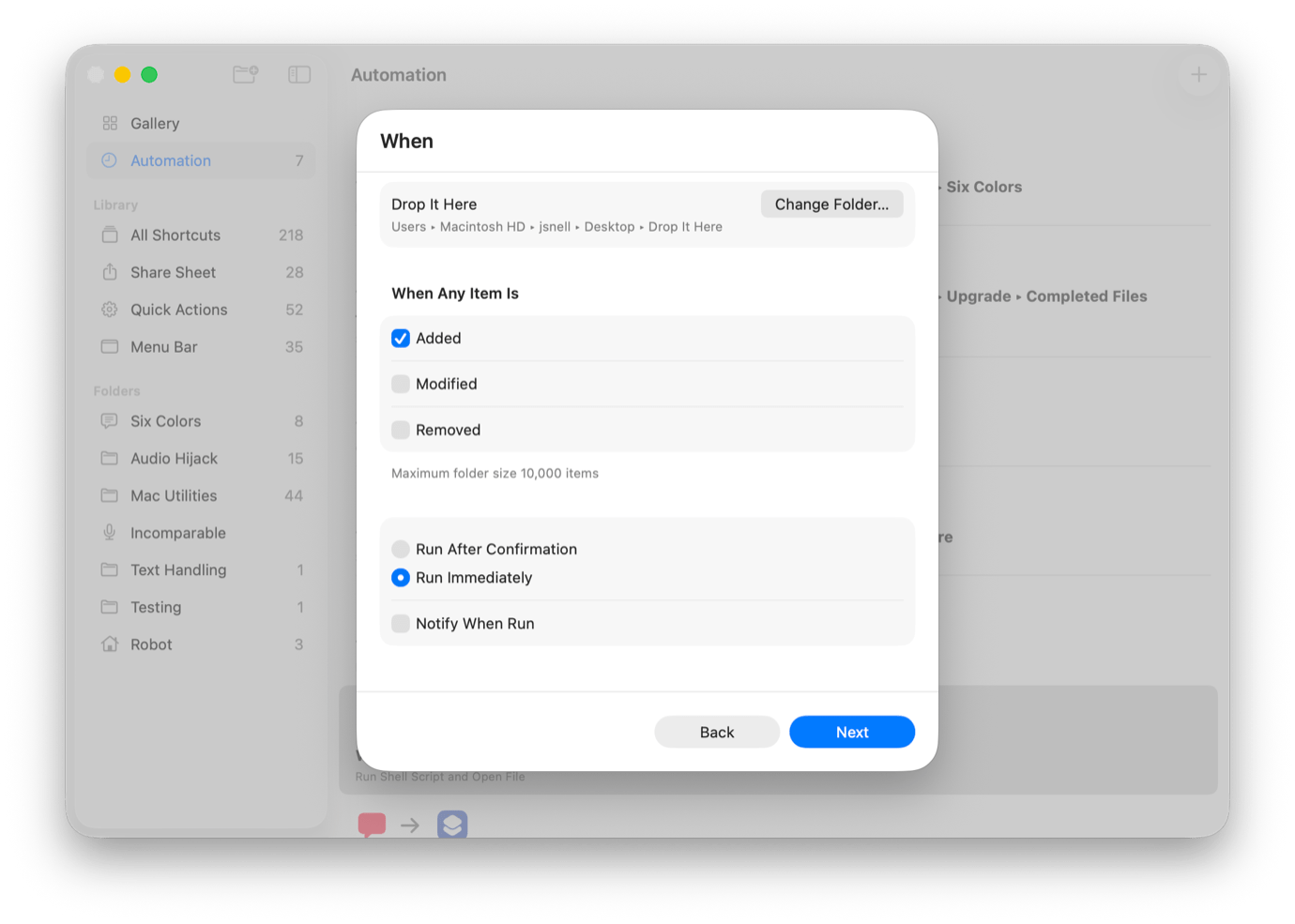
One of the most exciting additions in macOS Tahoe is Shortcuts automation, which (among many other things) allows Shortcuts to act when things move or change in the filesystem. More than two decades after Folder Actions brought those features to Mac OS X Jaguar, Apple has built a modern take on the feature that’s been popularized by third-party utilities like Hazel.
Unfortunately, Apple’s implementation of this feature is pretty basic—it’s a trigger that fires off a Shortcut and passes it all the information about what’s changed in the filesystem. The job of parsing, filtering, and acting on that information is entirely in the hands of the shortcut itself. This means that to take advantage of this feature, users will need a grasp of some Shortcuts fundamentals.
That’s what this article is for: to provide a quick guide to building a shortcut that acts on the contents of a folder when items are added to it. In this case, we’ll create a drop folder that moves Markdown files elsewhere when they’re added.