Note: This story has not been updated for several years.
A new app from veteran Mac developer Rogue Amoeba is always a reason to celebrate1, but that’s even more the case when the app in question fills an actual need. The latest offering from the team is Farrago, an attractive and powerful soundboard app that is not only impressive in its own right, but also works in harmony with the company’s other audio apps, such as Audio Hijack and Loopback.
For podcasters and live performers, Farrago provides a quick and easy way to have a library of sound effects at your fingertips. You can drag your clips into a grid, each of which is assigned a keyboard hot key; then, during your performance, you can trigger the sound clip with cursor or keyboard.2
Farrago supports separate sets of sound clips, if you need to maintain different groups for different shows, and has a slew of customization options, including multiple volume levels per clip, fade-in and fade-out points, the ability to play a sound as a loop, and keyboard shortcuts to fade in or immediately stop all audio.
If you do happen to use a tool like Rogue Amoeba’s Loopback, it’s a pretty simple affair to mix microphone audio with Farrago, so that, for example, other people on a Skype call with you can hear both you and your sound clips.
Personally, Farrago is a lot more pleasant looking than the last tool I used for this purpose, which was simply QuickTime Player with a bunch of audio clips lined up and routed through Loopback.
There are other soundboard apps that have done what Farrago does, but probably the chief contender, Ambrosia’s Soundboard, hasn’t been updated in almost 5 years. And Farrago benefits from Rogue Amoeba’s long experience with developing audio applications.
You can grab a free, fully functional download of Farrago from Rogue Amoeba’s site, though it will degrade the audio after 20 plays per launch. A license will currently run you $39, a discount on the eventual $49 full price.
Full disclosure: Rogue Amoeba’s CEO Paul Kafasis is a longtime friend. ↩
Finally, I’ll be able to create the Morning Zoo-style podcast of my dreams. ↩
[Dan Moren is the East Coast Bureau Chief of Six Colors, as well as an author, podcaster, and two-time Jeopardy! champion. You can find him on Mastodon at @dmoren@zeppelin.flights or reach him by email at dan@sixcolors.com. His next novel, the sci-fi adventure Eternity's Tomb, will be released in November 2026.]
While Apple doesn’t preview every point release, the company’s been known to do it before when announcing a midstream update of some significance.
Of the improvements described, the ones that caught my eye were the improvements to ARKit, which include the ability to put virtual objects on vertical surfaces like walls, and the briefly mentioned HomeKit software authentication feature–something that had been discussed during WWDC last year, and I thought had already been included in iOS 11. Apparently not?
Oh, also there are four new Animoji. In case you’re wondering what really drives adoption.
Also of note is that while iOS 11.3 does include a new iMessage-related feature–Business Chat–there’s no mention whatsoever of the iMessage in iCloud feature that was teased for iOS 11’s initial release, repeatedly pushed back, and eventually disappeared from Apple’s site (Update: As MacRumors notes, Messages on iCloud does appear to be back in the iOS 11.3 beta–at least for now.) . AirPlay 2, which we were yesterday told will arrive later this year for the HomePod in a software update, isn’t included in the iOS 11.3 update either.
Turns out all you have to do is complain on Twitter, and lo and behold, Apple delivers.
HomePod, the innovative wireless speaker from Apple, arrives in stores beginning Friday, February 9 and is available to order online this Friday, January 26 in the US, UK and Australia. HomePod will arrive in France and Germany this spring.
At least one promised feature isn’t shipping on release, though. Apple says that multi-room audio will come later this year in a free software update. According to the now revamped HomePod product page, the same goes for the “stereo pair” functionality and AirPlay 2, which still has yet to materialize, despite being a promised part of iOS 11.
I’m not sure exactly when HomePod preorders start on Friday, but I’m really hoping not to have to wake up at 3 a.m.
Update: Updated at 9:01 a.m. Eastern with more detail on non-shipping features.
Note: This story has not been updated for several years.
On our most recent episode of The Rebound, my co-hosts and I were discussing our usage of iOS’s very handy Do Not Disturb feature. One of them mentioned the frustration that it doesn’t apply to texts, which reminded me of a lesser known feature that accomplishes many of the same purposes: Emergency Bypass.
Added in iOS 10, Emergency Bypass is a way to ensure that you will always be alerted by a certain contact’s phone calls and/or texts, even if the phone is in Do Not Disturb mode and even if the mute switch is engaged. But this feature is a little bit hidden, so here’s how to turn it on.
First, open the Contacts or Phone app, and go to the selected contact. Tap the Edit button in the top right corner, then scroll down and tap either the Ringtone field or the Text Tone field.
At the top you’ll see a slider for Emergency Bypass, which tells you that you’ll get alerts (sounds and vibrations) when that person calls or texts, even when Do Not Disturb is on. (If you want both call and text alerts to bypass DND, you need to activate this feature for both the ringtone and text tone separately.) Turn that on, tap Done, and you’re all set. You’ll notice the entry next to the tone will now say “Emergency Bypass On” instead of listing the alert sound.
If you want to get alerts, but don’t like the idea of sounds always going off, you can set the Ringtone or Text Tone to None and just enable a vibration instead. That can be handy if you’ve got someone’s ringtone set to Old Car Horn, for example. Not that I would ever do that to anybody.
[Dan Moren is the East Coast Bureau Chief of Six Colors, as well as an author, podcaster, and two-time Jeopardy! champion. You can find him on Mastodon at @dmoren@zeppelin.flights or reach him by email at dan@sixcolors.com. His next novel, the sci-fi adventure Eternity's Tomb, will be released in November 2026.]
Disney’s BAMTech Media has hired former Apple and Samsung executive Kevin Swint as SVP and GM, Disney SVOD Service, to build, and ultimately run, the company’s upcoming Netflix competitor, Variety has learned.
Most recently, Swint worked as VP product / content & services for Samsung, where he built out the company’s Milk Music streaming service as well as Milk Video, a mobile video aggregation service. Before that, he worked for five years at Apple, heading the worldwide iTunes movie business. Earlier in his career, Swint led digital products and services for Walmart.
Disney is gearing up to launch several streaming services, including an ESPN-branded one focused on sports and at least one more entertainment brand that will definitely be competing with Netflix. Interesting to see that they’ve picked someone who put in time working on movies at iTunes (not running a streaming service). The Apple-Hollywood connection runs both ways.
Four years since Apple last shipped a desktop Mac with the word “pro” in the name, the iMac Pro has arrived. Holding down the high end of the Mac product line until the day (hopefully in 2018) when a new Mac Pro arrives, the iMac Pro fuses the look of the 27-inch 5K iMac with the priorities of a professional workstation.
This is not a computer designed for the masses—a new iMac Pro starts at $5,000 and you can pay five figures for a high-end model. If you aren’t sure if you need the power of the iMac Pro, you almost certainly don’t. If, on the other hand, you are hungry for multi-core performance and a powerful GPU that will let you crank through intense tasks—in video editing, software development, photo and audio processing, science, graphics, and similar applications—this is the new Mac Pro you’ve been looking for, albeit in the shape of an iMac.
If there’s one philosophy that seems to exemplify the vast majority of decisions that Apple has made about their products, it’s this: “We know best.”
Now, I get it. That’s kind of the upside of having a benevolent dictator: decisions get made for you, and you don’t have to worry yourself about making the right ones. Of course, the downside to a benevolent dictator is that they’re still, fundamentally, a dictator.
Apple’s taken its fair share of backlash over these kind of high-level decisions throughout the years, and the latest firestorm is about the company’s decision to make the tradeoff of battery life versus performance in older iPhones. Whether or not the company is right to have chosen for us, it’s now walking that decision back, with Tim Cook saying this week that a future version of iOS will allow users to decide for themselves.
Which, of course, got me thinking about other places that Apple could stand to give users a little more agency instead of making the “best” decisions for us.
Lex recounts the delightful story of Starfish: https://www.macworld.com/article/2027044/starfish-smartwatch-saga-illustrates-entrepreneurial-stumbling-blocks.html
Apple may shrink the notch in upcoming iPhones: https://www.macrumors.com/2018/01/16/2019-iphones-could-have-smaller-notch/
Dan and Lex discuss their experiences with Descript: https://descript.com
Dan likes Rocket, an app that lets you access Emoji Slack-style anywhere. Lex is doing it wrong. https://sixcolors.com/post/2018/01/get-slack-style-emoji-everywhere-with-rocket/
Our thanks to Indochino (https://www.Indochino.com), where you’ll find the best made to measure shirts and suits at a great price. Use the promo code “REBOUND” and get any premium suit for just $359.
Our thanks as well to The Art of Charm, an iTunes top 50 podcast that is packed with wisdom in the truest sense of the word. Go to (http://TheArtOfCharm.com/podcast) or search for The Art of Charm on iTunes or wherever you listen to podcasts, and start taking your life to the next level.
The reports are in from the 2018 Consumer Electronics Show, and they’re not good if you’re an Apple watcher: The days of CES being a show full of products trumpeting their connections to the App Store are over. This year, it’s all about smart assistants—and that means Alexa and the Google Assistant, not Siri. It’s bad news for Apple—or is it?
Note: This story has not been updated for several years.
Nintendo, always known for its lateral-thinking, has announced its newest venture: Labo. What is Labo? Well, check out this video:
Wild. It’s like the company took a look at Google Cardboard and thought, “How much further could we take it?”1
As someone who just got a Switch a few weeks back, I’ve been hugely impressed with the hardware. But as with the Wii before it, I’ve been impressed at how Nintendo has continued to think outside of the box of traditional consoles. If you don’t want to compete on sheer pixel-pushing power, then compete on innovation. Safe to say you’re not going to see Sony or Microsoft get into the cardboard business.
The Labo sets cost a little more than a standard game ($70 for the Variety Kit, which includes a host of different constructs plus a game cartridge; $80 for the Robot Kit, which turns you into a freaking robot), but the fact that they get you doing something other than staring at a screen is perhaps the most compelling part.
It’s worth remembering that Nintendo started its life as a company that made playing cards, back in 1889. So, to paraphrase Tim Cook, I guess you could say that cardboard’s in their DNA. ↩
[Dan Moren is the East Coast Bureau Chief of Six Colors, as well as an author, podcaster, and two-time Jeopardy! champion. You can find him on Mastodon at @dmoren@zeppelin.flights or reach him by email at dan@sixcolors.com. His next novel, the sci-fi adventure Eternity's Tomb, will be released in November 2026.]
Note: This story has not been updated for several years.
The iMac Pro, unlike the 4K and 5K iMacs (but, strangely like some previous iMac models), comes with a stand but can be converted into a VESA-mountable version through the purchase of the $79 VESA Mount Kit Adapter for iMac Pro.
My previous 5K iMac was a VESA version, because I like my iMac to float above my desk rather than sit on it. For the iMac Pro, I bought the VESA mount adapter and made a video of the installation procedure.
Note: This story has not been updated for several years.
It’s probably not too much of a surprise to reveal that I’m a dyed-in-the-wool fan of John Williams, the man behind many of the most iconic movie scores of the late 20th century (and more than a few of the early 21st)–chief among them his scores for the entire Star Wars saga. Even in the lackluster prequel installments Williams managed to imbue the stories with depth and grandeur well beyond their measure.
If I have one complaint about the more recent Star Wars scores, it’s that they’ve only been released in partial form. The album cuts of both The Force Awakens and The Last Jedi clock in at 78 minutes each, despite films that are more than two hours in length. That means there’s a lot of material that hasn’t made its way out into the wild.
However, there are every once in a while legit opportunities to catch material that’s not been previously released. As Academy Awards time approaches, movie studios often put out packets for those who will be voting on said awards. Disney actually has a pretty extensive site with extras for a lot of its films, including The Last Jedi.
And among those offerings is a For Your Consideration cut of The Last Jedi score. Though it’s mostly pretty similar to the official album that was released, it does feature a few unreleased tracks and some alternate versions of existing cues. And you can stream it via your browser from Disney’s site. (There have also been FYC versions of The Force Awakens‘s score and Michael Giacchino’s Rogue One score released in 2015 and 2016, respectively.)
Personally, I’m hoping that Disney gets around to releasing complete scores for all the movies, as Lucasfilm did with the double-disc sets of the original trilogy. But the last Star Wars film to get the deluxe treatment was The Phantom Menace, for reasons that are probably pretty apparent. But I’d be certainly be first in line to bolster my Star Wars score collection.
[Dan Moren is the East Coast Bureau Chief of Six Colors, as well as an author, podcaster, and two-time Jeopardy! champion. You can find him on Mastodon at @dmoren@zeppelin.flights or reach him by email at dan@sixcolors.com. His next novel, the sci-fi adventure Eternity's Tomb, will be released in November 2026.]
This is the screen that set off the ballistic missile alert on Saturday. The operator clicked the PACOM (CDW) State Only link. The drill link is the one that was supposed to be clicked. #Hawaiipic.twitter.com/lDVnqUmyHa
In Mailchimp… you are asked to manually type in the word “DELETE” as a confirmation for deleting a template (an action a tiny bit less consequential than sending out a ballistic missile launch alert).
That menu is a really dangerous bit of interface design and adding an “oopsie, we didn’t mean it button” doesn’t help. The employee made a mistake but it’s not his fault and he shouldn’t be fired for it. The interface is the problem and whoever caused that to happen — the designer, the software vendor, the heads of the agency, the lawmakers who haven’t made sufficient funds available for a proper design process to occur — should face the consequences. More importantly, the necessary changes should be made to fix the problem in a way that’s holistic, resilient, long-lasting, and helps operators make good decisions rather than encouraging mistakes.
A sleepy employee did not cause this alert. It happened because whomever paid for, designed, and approved this interface didn’t give design a moment’s thought. The creators of this system are complicit in its complete failure.
Note: This story has not been updated for several years.
Ten years ago, Steve Jobs and Apple pulled a laptop out of an envelope, and the MacBook Air was born. Stephen Hackett writes about it in great detail over at MacStories, and also created a nifty video about it.
I have used the MacBook Air since the very beginning. In fact, I reviewed the first model and most of the subsequent ones.
The MacBook Air ended up as the Mac laptop with the broadest appeal, but it sure didn’t start out that way. The original Air, thin enough to fit in that envelope, was full of compromises. Start with the weird flip-down port door, which concealed a single USB port, no FireWire, and a nonstandard video port that wouldn’t ever make its way to any other Mac model. We early MacBook Air users could carry our laptops with confidence—we knew we wouldn’t be attaching them to any external display or projector unless we brought the adapters with us.
Then there was the processor itself, so underpowered that the MacBook Air was slower than Mac laptops released several years before. I believe we clocked it as the slowest Intel Mac laptop ever, despite the fact that the Intel transition was long over. Worse, the processor had the unfortunate trait of turning off one of its two processor cores when it got too hot, making the entire system unresponsive. There were obscure utilities to change the processor timing in attempts to make it more usable, but the fact was, if you were using the MacBook Air in a warm room—and this happened to me every afternoon in my office at Macworld, which had west-facing windows—it would start to slow down. It was a great laptop to use in a meat locker, though.
The storage options were ridiculously small. I had to delete a massive amount of data from my previous Mac before I could migrate my data to the original Air’s 80GB hard drive. (There was also an optional 64GB SSD model, for an extra $999!) There was no internal optical drive. The battery wasn’t removable. And of course, the original price tag—$1799—brought bottom-of-the-line performance to the top of the price charts.
And yet my affection for the MacBook Air was legitimate! It was so much thinner and lighter than any laptop I’d used before. It felt like the future. And the truth is, this is the biggest legacy of the MacBook Air: It predicted the future of laptops and then brought that future into being. It created an entire category for PC laptops, Ultrabooks, which was loosely defined as “PC laptops kind of like the MacBook Air.”
Today’s Mac laptops look an awful like the MacBook Air. Fortunately, the Air also evolved in the intervening time, adding ports and losing that drop-down door in a second-generation hardware redesign that introduced the ultimate form of the device, the 11- and 13-inch MacBook Airs that most people think of today when they think of the MacBook Air.
But in turning every Mac laptop into a MacBook Air, the Air made itself obsolete. The new MacBook is clearly its spiritual successor, and its days seem numbered. But when you chart the history of the laptop from 2008 to 2018, it’s hard to argue that the most influential model during the past ten years is anything other than the MacBook Air. Happy birthday, little buddy.
Note: This story has not been updated for several years.
One of these disks is from the 21st century. The rest are not.
I used an Apple IIe computer throughout high school and into my second year in college, before I bought a Mac SE. That following summer I sold the Apple IIe and everything that came with it—the monitor, floppy drives, and dot-matrix printer—and pocketed the cash1. What I was left with were two boxes containing two dozen 5.25-inch floppy disks.
I could’ve thrown the disks away—I had already transferred all the files I cared about to the Mac2. But for some reason I saved them instead. And the two dozen floppy disks stayed in two battered boxes for the next 27 years.
Every now and then I would find them in whatever storage box they’d been hidden in, as they moved from the house I grew up in to various apartments and ultimately the house I’ve lived in for the last couple of decades. In 2001 my curiosity and a feeling of nostalgia got the best of me and I decided I’d try to copy them so I could run them in an emulator on my Mac, so I bought an Apple IIc on eBay3 and an Apple IIc to Mac Serial connector cable.
The Apple IIc and some disks, mid transfer.
Whatever motivation I had to excavate my late-80s life faded with the 9/11 attacks and vanished a couple months later when my daughter was born. The IIc went in the box with the disks and there they sat until December, when I decided I was going to finally finish this project, once and for all—if the disks hadn’t rotted in the intervening 16 years.
In the intervening decade and a half, the Mac Serial-to-USB adapter I had counted on (I have two of them!) fell out of compatibility; the most recent driver I could find for it was compatible with Snow Leopard. I actually pulled a Core 2 Duo Mac Mini off a shelf and installed Snow Leopard on it, but plugging in the adapters only resulted in a kernel panic.
Fortunately, there are sites out there to help people like me with problems like these. I ended up buying a couple of cables from RetroFloppy, one that connects to the Apple IIc modem port and has a standard PC serial plug on the other end, and a PC serial-to-USB adapter that has modern Mac drivers.4
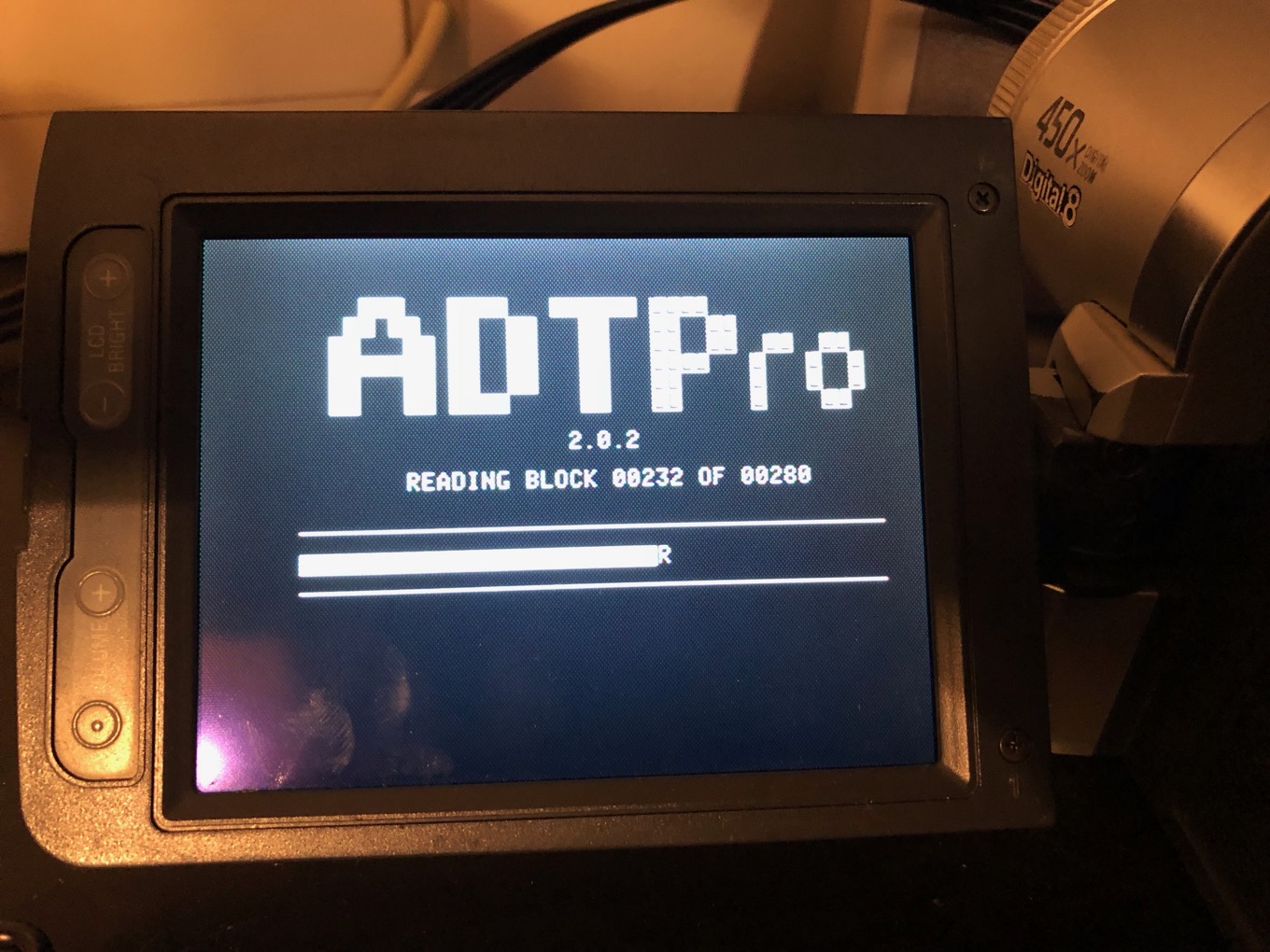
Since I was placing an order with RetroFloppy, I also bought a copy of David Schmidt’s ADTPro for Apple II (on 5.25-inch floppy disk!) because I needed a copy of it anyway. ADTPro—short for Apple Disk Transfer ProDOS—is the go-to software for copying files off of an Apple II.
The next step in the process was figuring out how to see anything on my Apple IIc. That computer’s stock video-out port is a single composite RCA plug, the kind you’d plug into any TV or VCR back in the day. Unfortunately, since 2001 almost every single video device in my life has been replaced with one that doesn’t offer composite video ports. I was concerned that I was going to have to buy an adapter, but then I realized that I still have my old digital camcorder, which has composite ports and which I have used (via a FireWire daisy chain of epic proportions5) to convert old VHS tapes from an old VCR into digital files on my Mac. Yes, I ended up booting an Apple IIc and using a Sony Digital 8 camcorder as the external monitor.
With that all set, it was time to run ADTPro on my Mac. It’s a Java app and therefore not the prettiest thing, but it did the job—I was able to connect to the Apple IIc and boot into ADTPro, at which point I could simply start inserting disks one by one and watch as they were transferred (at a surprisingly fast rate—less than a minute) across the serial cable to my Mac, where they were saved as 143K Apple II disk image files. Talk about anticlimactic. Imaging took less than an hour. There were no bad disks, nearly 30 years later.
Sending a file using ADTPro. As seen on my camcorder-monitor.
After the imaging was done, it was time to read them on my Mac using Gerard Putter’s Virtual II emulator. The disks with DOS or ProDOS on them booted just fine. There’s even a Quick Look extension for Virtual II that would display the contents of a disk in the Finder when I pressed the space bar. How civilized.
Then came a new problem: How do you get text files out of a virtual computer? The answer seems to be the same as with a real one: you “print” the files, and Virtual II’s virtual printer can generate a PDF or put text on the clipboard. But to print a text file, you need to load it into a program. Fortunately, I found a disk image of my preferred word processor—Apple Writer II—in an archive of old Apple II software on the web, and was able to boot up that program and load all the disks that I had formatted in the ProDOS disk format.
Quick Looking an Apple II disk image in the High Sierra Finder.
But a lot of my disks were in DOS 3.3 format instead, and couldn’t be read. How to get the files off of there? Apparently there exists no bootable disk image of Apple Writer II for DOS 3.3 out there—every single version I found failed to boot on Virtual II—so I had to try some other techniques.
One thing I tried was to create a “bootstrap” version of the disk converter utility, ADT, on my Apple IIc. This didn’t end up proving a fruitful avenue—turns out my own copy of Apple Writer II for DOS 3.3 was also impossible to copy to a disk image—but it did provide the most hilarious moment of this entire project.
You might be asking yourself, how would this project have gone if I hadn’t given in and ordered that floppy disk containing ADT Pro from RetroFloppy? The answer is that you can bootstrap an Apple II from nothing but a serial connection back to your Mac. You type a couple of commands into the Apple II, and then ADT Pro proceeds to use the serial connection to type in an entire program in machine code that you can run to begin transferring files or even initialize a bootable disk. Bananas.
The bootstrapping! Or a ghost who knows machine code.
In the end, how did I get the text files off of the DOS 3.3 disks? I tried to remember how I did it when I made the switch to ProDOS back in the day, and with a couple of Google searches the answer was revealed: There was a disk utility, Copy II Plus, that would transfer files from a DOS 3.3 disk to a ProDOS disk6. So I downloaded the right Copy II Plus disk image from a web archive of Apple II software, inserted a virtual blank disk into my drive, and transferred all those files from DOS 3.3 to ProDOS—retracing steps I had taken in 1988.
One final thing I wanted to do was run the my old computer bulletin board system, which signed off for the last time when I went to college in the fall of 1988. I still had the disks. Unfortunately, they just don’t work—the BBS program was built to work with a specific modem, the Apple-Cat II, that Virtual II can’t emulate. Without that modem, the BBS wouldn’t run.
Fortunately, all of its data files were simply saved on the floppies as text files—so I could read the contents of the BBS, but not actually run it. In any event, I posted my findings to my Facebook page and that led to an impromptu reunion of the people who were on that BBS 30 years ago, many of whom I’m friends with on Facebook today. (The contents of the BBS itself? Nothing special or memorable—the files are all basically Twitter posts made a couple of decades before Twitter existed.)
Oh, Apple Writer. Oh, 1989 me.
As for those text files that I had saved for 30 years, and plotted to revive since 2001? It turns out the journey, through old computers and transfer cables and disk images, was the true reward. Nobody needs to see the term papers they wrote in high school 30 years after the fact. I did discover some of the earliest short stories I wrote, which were more terrible than I’d even imagined.
Most distressing was all the stuff I’d written that I have absolutely no memory of. The real lesson of my spelunking through my disks from the 1980s is that out of the dozens and dozens of essays and stories that I wrote back then, I only really remember a handful of them today. The rest faded from view, largely because they were irrelevant and deserved to fade from view. But I’d be lying if I said it wasn’t a little sobering to be shown a clear snapshot of my life in 1988 and fail to recognize a huge amount of it.
Am I glad I did this project? I am. It was a huge amount of fun to revisit an era of computing that I just don’t think about very often. These were the days when you booted off a disk, loaded the program on the disk, and then took the disk out of the drive—because once the program was in memory, you didn’t need the program disk anymore!
From the perspective of 2018 I’m also not impressed with the user interfaces of the 80s. To load a new file into Apple Writer, I have to type control-N (to make a “new” editor without the previously loaded file), type “y” to confirm and hit return, then type control-L, and then type the filename of the file I wish to load—including its volume name. If I want to see a directory listing of a disk, that’s a different command nested in a list of menus based on a different keyboard shortcut.
Ugh. No thank you. Nostalgia is great, but progress is greater.
I kind of regret not keeping it, but can’t really picture myself hauling that thing around for all these years. ↩
I bought a 3.5-inch drive for my Apple II, and I could copy files off of that disk and onto my Mac’s hard drive with an Apple-built transfer utility. ↩
So far as I can tell from an etching on the side, it was originally owned by NCTRC. ↩
But device proliferation is at an all-time high: I’ve got devices that range in size from an Apple Watch all the way up to a 5K iMac. There’s a place and purpose for each and every one of these devices; they serve distinct and specific niches in my work and play. I’d be hard-pressed to part with any of them.
Still, part of me yearns for the simplicity of accomplishing all the same tasks, but with fewer things. Maybe one device could take the place of multiple devices? Blasphemy, perhaps, especially when Apple makes so much of its money on hardware. But there’s precedent for both the technology industry and Apple creating one device that can operate in more than one context.
Our apologies: Lex recorded this episode inside a tin can.
The power went out at CES: https://slate.com/technology/2018/01/the-power-went-out-at-ces.html
Apple investors urge the company to do something about kids and screens: https://www.nbcnews.com/tech/apple/apple-investors-urge-action-iphone-addiction-among-kids-n835866
The App Store preferences panel can be unlocked with any password: https://www.macrumors.com/2018/01/10/macos-high-sierra-app-store-password-bug/
Jimmy Iovine denies he’s leaving Apple: https://www.theverge.com/2018/1/10/16873398/jimmy-iovine-apple-music-denies-leaving
Dan is a textbook example: https://twitter.com/ItMightBeKyle/status/951032824491995137
Panic suspends sales of Transmit for iOS: https://panic.com/blog/the-future-of-transmit-ios/
Lex likes Infuse for iOS: https://firecore.com/infuse
Our thanks to Casper (https://casper.com/therebound) for sponsoring this episode. You spend about a third of your life sleeping, make sure it’s on a good mattress. Go to casper.com/therebound to start your 100-day money-back trial. You’ll get $50 off by using the code “REBOUND”.
Our thanks as well to The Art of Charm, an iTunes top 50 podcast that is packed with wisdom in the truest sense of the word. Go to (http://TheArtOfCharm.com/podcast) or search for The Art of Charm on iTunes or wherever you listen to podcasts, and start taking your life to the next level.
“At what point is it just trying to one-up things and at what point is it to thwart law enforcement?” FBI forensic expert Stephen Flatley said yesterday while speaking at the International Conference on Cyber Security in Manhattan, according to a report by Motherboard. “Apple is pretty good at evil genius stuff.”
Flatley also used the word “jerks” to describe Apple and its approach to iPhone security, according to Motherboard.
I guess it’s like the old saying goes: one person’s “evil genius” is another’s “champion of personal privacy.”