Everybody predicted that Apple would do a second event this fall, thanks to rumors that an iPad Pro and new Mac laptop were on the horizon. But nobody would’ve predicted that the event would be held in Brooklyn, New York. Yet there I was yesterday, standing outside an opera house on the campus of the Brooklyn Academy of Music, with multiple streets blocked off and a large Apple logo hanging off the front of the building. Surprise!
Also, no one would have predicted earlier this year that Apple would revive the seemingly dead MacBook Air and Mac Mini, but that’s what happened. For the first time in what feels like a long time, Apple took the stage and spend a lot of time talking about the Mac. As a Mac user it was good to see, and to see two products that were basically left for dead by the side of the road get updates at last.
As a longtime MacBook Air user, I’m happy that Apple has brought it back. As you’ll read later, I’m under no illusions that this product was in Apple’s original plans. It felt like the MacBook was being groomed as the Air’s replacement, but for whatever reason, that never happened. The new MacBook Air’s price tag means that in many ways, it’s also not really replacing the old MacBook Air. But if you like the shape, size, and look of the Air, it’s back—and is Apple’s most affordable Retina MacBook, even if it’s $200 more than the old Air.
I’m also a longtime Mac mini user and am happy to see it finally get an update. Again, the base price is more expensive than I’d like—but I appreciate that Apple didn’t skimp on features the way it did when it last updated this product four years ago.
But the star of the show, and the one part of the event that was entirely predictable, was an update to the iPad Pro. It seems to me that the iPad fits in a weird in-between place in Apple’s priority list. The Mac is about nostalgia and legacy and existing user bases and people who seek continuity. The iPhone is a must-have product that is Apple’s most successful and profitable by far. And then there’s the iPad, which benefits from some iPhone developments, but in many ways more closely resembles a new remix of the same stuff people do with their Macs.
By splitting the iPad line in two, with the low-end iPad at a pretty great price, it frees Apple to load up the high end with cutting-edge, high-end parts (and prices). The new iPad Pro is priced like a laptop, but it’s also got the power of the laptop. Still, the iPad is a product that exposes the fact that Apple’s running on all cylinders as a hardware company but doesn’t quite have it together when it comes to software.
For all the power in the new iPad Pro, there are a bunch of places where iOS itself lets the hardware down. That new USB-C port is great, but you can’t plug in a USB hard drive and see the files on it. There are plenty of reports that Apple intended iOS 12 to be full of iPad stuff and it ended up getting delayed to iOS 13. That means it’s entirely possible the new iPad Pros will be even more awesome next summer and fall. But right now, you can see the gap between Apple’s hardware ambitions and the ability for its software to deliver. (And if you think that’s harsh, remember that I love the iPad Pro and no longer travel with a Mac! Nobody knows the flaws of a product like someone who uses it every day.)
Last night as I was flying back from New York, I poured out everything I could think of about all the products in one sitting, fueled by complimentary soda, snacks and Wi-Fi from my airline. I posted them on Six Colors from the plane, but if you haven’t read them, I’ve added them to this special issue of the newsletter. It’s hot off the presses!
Note: This story has not been updated for several years.
I’ve been participating in Apple’s Public Beta programs for both iOS and macOS for the last couple years, and generally it’s been a pretty smooth experience. But there’s often some trickiness when it comes to getting off the beta–and this year, that’s where I hit a speed bump.
When macOS 10.14.1 arrived yesterday, I fired up Software Update–newly relocated in Mojave to a pane in System Preferences–to install it on my MacBook Air. Lo and behold, however, Software Update insisted that my current version of macOS Mojave 10.14 was the most recent, and no updates would be forthcoming, thank you very much.
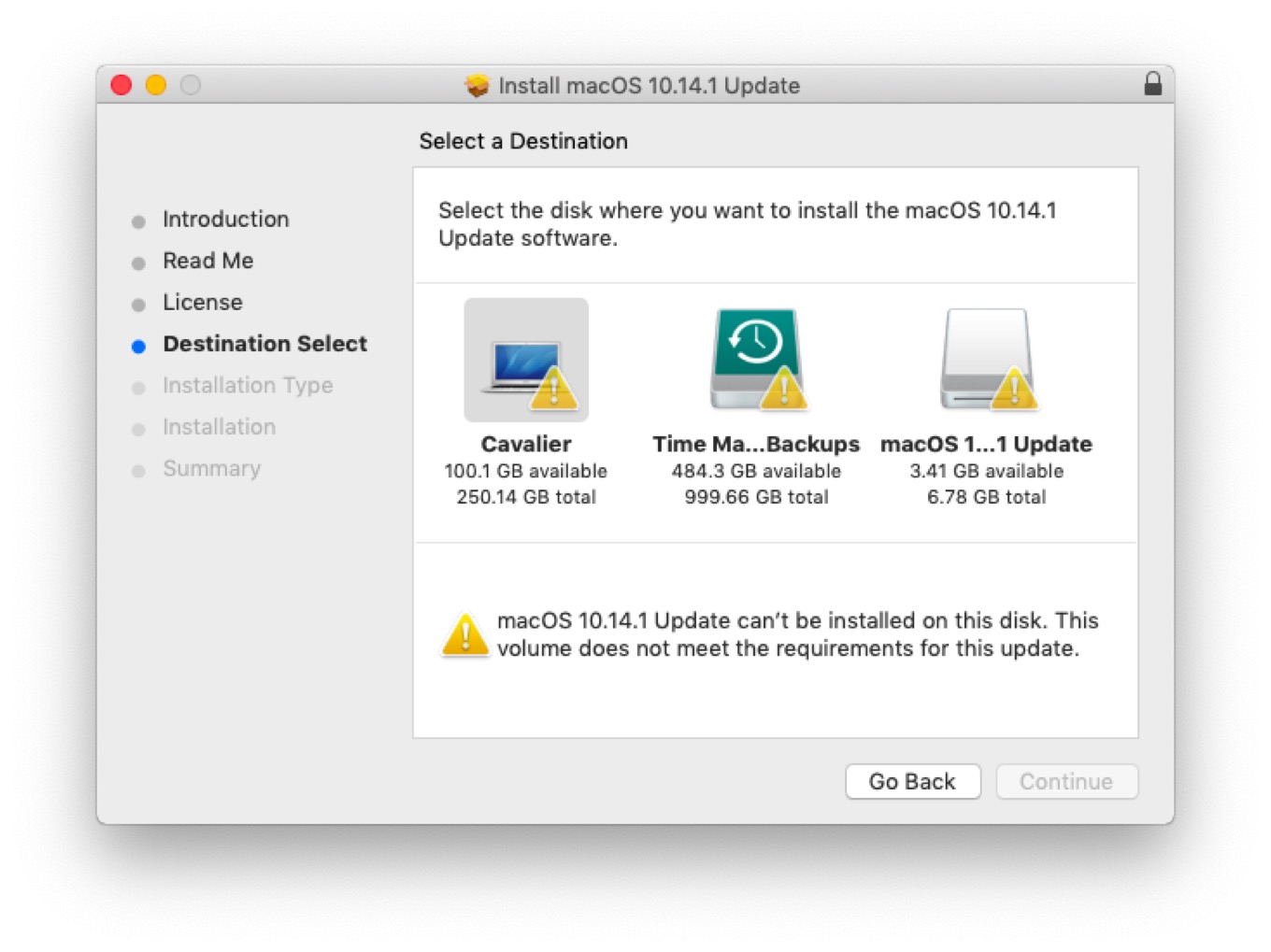
Or so I thought. See, when I opened up the installer, I was met with another roadblock: an error message telling me that my Air “does not meet the requirements for this update,” with no further information. More and more puzzling.
I was fairly confident that the root of the issue here was something to do with having been in the Public Beta program. I’ve heard of others being stuck with dead-end builds of an OS and a tweet from Eric Holtam seemed to confirm that the build I was using, 18a389, wasn’t eligible for the update. I tried re-enrolling in the Public Beta program, restarting my Mac, then unenrolling and restarting again to see if it would point me towards the right update, but no dice.
So, what’s a guy to do? I contacted Apple Support, whose less than helpful suggestions were either a) roll back to a Time Machine backup from before I enrolled in the Public Beta and then install the update (less than ideal, since I would lose any files created after that backup or modifications to other files), or b) do a full restore and start from there.1
Neither of those were terribly appealing options, so I went for door number three: download the macOS Mojave installer from the App Store. I figured I would download it, reinstall Mojave to the shipping build of 10.14, and then install the 10.14.1 update on top of it.
In fact, it worked better than expected–downloading the Mojave installer kicked me back to the Software Update pane and informed me that I’d be downloading and installing the official build of 10.14.1. And half an hour and several progress bars later, here I am, on the latest update, safe and sound. And hopefully on a stable build that won’t run into this problem in the future.
So, if you’re likewise suffering from a case of no-update-itis, get thee to the Mac App Store post haste and try the Mojave installer. It sure beats restoring from a backup.
When I expressed some frustration about this, I was reminded that I shouldn’t be installing the Public Beta on a mission-critical machine. Fair enough. I’m not sure why some builds get dead-ended like this, but if it’s just an oversight on Apple’s part, seems like something that could be fixed. ↩
[Dan Moren is the East Coast Bureau Chief of Six Colors, as well as an author, podcaster, and two-time Jeopardy! champion. You can find him on Mastodon at @dmoren@zeppelin.flights or reach him by email at dan@sixcolors.com. His next novel, the sci-fi adventure Eternity's Tomb, will be released in November 2026.]
As always, Jeremy Burge of Emojipedia has the details about every change to emojis in iOS 12—not just the new emojis you’ve read about and how they’re implemented in Apple’s emoji picker, but some art changes to existing emojis as well. For example, the phone emoji is now an iPhone X:
Courtesy Emojipedia.
There are many more subtle changes, and Jeremy sees all and knows all, so check it out if you’re as fascinated by the evolution of emoji as I am.
As detailed in a blog post by the right-to-repair organization iFixit, helium atoms can wreak havoc on MEMS silicon chips. MEMS are microelectromechanical systems that are used for gyroscopes and accelerometers in phones, and helium atoms are small enough to mess up the way these systems function. Yet both Android and Apple phones use MEMS silicon for their devices, so why were only Apple phones affected?
The answer, it seems, is because Apple recently defected from traditional quartz-based clocks in its phones in favor of clocks that are also made of MEMS silicon. Given that clocks are the most critical device in any computer and are necessary to make the CPU function, their disruption with helium atoms is enough to crash the device.
No word on whether it caused Siri to speak in a very high voice.
Note: This story has not been updated for several years.
With the new iPad Pro, introduced Tuesday at Apple’s media event in Brooklyn, Apple got a chance to apply everything it’s learned in the past three years about what makes the iPad Pro different from the iPad, and everything it learned in building the iPhone X and XR. It got to address nagging issues with the Smart Keyboard and Apple Pencil. This is a reboot of the iPad Pro, and I’m so here for it.
Let me offer up a little disclosure right at the top: I love the iPad Pro. I basically don’t use a Mac laptop anymore. When I’m not at my desk on my iMac Pro, I am almost always using the 12.9-inch iPad Pro as my device of choice. The prospect of a new and improved iPad Pro was the thing I was looking forward to the most as I headed to the event on Tuesday morning. I wasn’t disappointed.
All the right moves
I love the new design of the iPad Pro models. The flat back with the flat sides, which remind me of the original iPad design and the iPhone 4/5/SE, is a delight. But when you pick one up, the first thing you notice is that the bezels are even all the way around—and they’re almost, but not quite, gone entirely.
This is the iPhone X factor, applied to the iPad. The home button is gone, replaced with a TrueDepth camera system that allows Face ID to work from any orientation. It’s surprising and impressive when you see the iPad unlock using Face ID when you’re holding the iPad upside-down. The camera can still see your face from down there? Apparently so.
I did immediately worry that my fingers were touching on the screen due to the small bezels, and that it would lead to a bunch of mistaken touches. I can only assume that Apple has applied the same software (or an updated version) that they wrote when the side bezels shrunk on the iPad Air—it does a surprisingly good job of ignoring fingers when they’re holding the iPad rather than tapping and swiping.
And if you hold your hand over the camera when it’s trying to unlock, it warns you — displaying a “camera covered” alert while also pointing at the camera with an arrow, to help you quickly realize which hand is doing the blocking.
We’ll see if there are quirks about any of this in practice—it’s very hard to get a real idea when you only get to handle the iPad for a few minutes in a very crowded, noisy room. (Having that TrueDepth camera also means that the iPad Pro can shoot portrait selfies and do Animoji, which is fun and cool.)
As it approached changing the design of the two different sizes of iPad Pro, Apple made the right decisions. The 10.5-inch model seemed like a great size, so they left it alone—and just stretched out the screen, creating an 11-inch diagonal model. The 12.9, on the other hand… that screen is gorgeous but there’s no denying that the iPad felt big, heavy, and awkward. (And I’m saying that as the guy who has used one for three years.)
So Apple kept the big, gorgeous screen and reduced the volume of the 12.9-inch model by 25% by shrinking the bezels and making it thinner. Again, it’s hard to judge by a few moments of holding it, but I’m hopeful that this will result in a device that’s better balanced and easier to hold. I was thinking that maybe this time I’d opt for the smaller iPad Pro, but having held the new 12.9-inch model, I’m starting to think that I’d rather take the big screen in a smaller package. We’ll see.
It’s a laptop, okay?
Apple made a bunch of announcements about the iPad Pro that I could summarize as: “Yes, this is a computer.” (No matter what that one iPad ad says.) It started with Tim Cook’s charts, comparing last year’s iPad unit sales to the unit sales of the top laptop makers. (The iPad sold more units than any of them.)
Then came the comparison of the A12X Bionic processor to PC laptops. According to Apple, the new iPad Pros are faster than 92 percent of all the portable PCs sold in the last 12 months. The larger point here is that the iPad Pro is not a low-powered device. It’s faster than your laptop, probably, so don’t write it off.
You know, fast storage is great. Lots of storage is great. The iPad Pro has both, offering a high-end option with a terabyte of storage. That’s the kind of storage real computers have. (I didn’t even have a terabyte of storage on my old 5K iMac!)
You can use all that storage for Photoshop and Autodesk files, I guess? That was probably the most predictable part of the iPad Pro announcement, given the fact that Adobe had previewed Photoshop for iPad on stage at Adobe Max a couple weeks ago. Still, the refrain “this is real Photoshop” is important. Real computers run real Photoshop. The iPad Pro is a real computer.
Which brings us to USB-C. The iPad Pro is the first iOS device to ditch Lightning for the port standard favored by computers. This is another sign that the iPad Pro is really embracing being a computer—but the sad fact is, it’s hamstrung by iOS itself. The hardware is willing, but the software is weak. iOS’s support for USB devices is sorely limited. It will import photos and videos from cameras and memory cards. You can hook up a keyboard or an Ethernet adapter or a microphone or audio mixer. And I assume the iPad Pro will be able to power a much wider array of devices than could have been powered by the USB 3 Lightning Adapter without a power assist.
But plug in a hard drive or flash drive and you can’t view the files in the Files app. Plug in a USB webcam and I assume nothing happens? There’s more to be done here. On a standard computer we have an expectation of what happens when we plug in a USB device. iOS has holes. Maybe the existence of USB on iPad will finally prompt Apple to prioritize better USB device support in future versions of iOS.
In the meantime, yes, it’s cool that the iPad Pro can drive a 4K or 5K external monitor—even though you can’t use it for input, so it’s just for mirroring or as a second screen for video previews, slide presentations and the like. And it’s cool that you’ll be able to use your iPad Pro to charge your iPhone! But there’s more to be done here.
Finally, if it’s a fast as a computer and it has ports like a computer and runs software like a computer and has storage like a computer… it’s going to have a price tag like a computer. And these iPad Pros do. Both of the base prices are higher than the previous models. (In fact, Apple’s keeping the old 10.5-inch iPad Pro in the price list at the original price.) So now you’ll shell out $799 for the base model 11-inch iPad, and $999 for the base model 12.9-inch. Throw in LTE or more storage and the price rapidly increases.
Again, you’re getting more so you’re paying more. And Apple still makes a low-cost iPad (with support for the Apple Pencil!), so there’s still an option for people who can’t envision spending $1000 on an iPad. I don’t love that these things cost more now, but I’ve come to heavily rely on my iPad Pro, so it’s worth it for me.
Pencil No. 2
When the iPad Pro made its debut, so did the Apple Pencil. Now it’s time for a second generation Pencil, and Apple has addressed all the major issues with the original.
This Pencil has a flat side that doesn’t roll off the table and attaches magnetically to a spot on the wide side of the iPad Pro. This means you can attach the Pencil to the iPad Pro and keep it there rather than having to look for it whenever you want to use it. (My podcast pal Myke Hurley stuck a loop on his iPad Pro so he could keep his pencil secure at all times.) The magnet’s not a light attraction, either—I shook an iPad Pro a bit, striking fear in the heart of the Apple employee responsible for its well-being—and it didn’t budge.
But it’s not just a magnet! That little spot is also an induction charger, so the Apple Pencil doesn’t just stay attached, it stays charged. And the first time you attach the Pencil to that spot, it offers to pair it with your iPad. Gone is the weird Lightning plug hiding under a rattly plastic cap.
Then there’s the desire many users had for gesture or button support on the pencil. Again, Apple sort of went its own way here. So far as I can tell, the Pencil must have an accelerometer inside it, just like the AirPods do, so it can detect when you do a double tap with your finger. Individual apps can decide what that double-tap gesture means; by default the Notes app considers it a toggle between whatever tool you’re using and the eraser, but you can also set it to just toggle between your two most recently used tools.
Keyboard reconfigured
Finally, the accessory I’m always the most interested in: the keyboard! I have always liked the Smart Keyboard, introduced with the Pencil and the iPad Pro back in 2015. Well, that’s not entirely true—I think it’s a pretty good keyboard in terms of typing feel, but the 12.9-inch model was always a victim of the massive area of the iPad itself. With the new 12.9-model being much smaller, I have some hopes that its keyboard accessory will also be less awkward.
But what we’re not getting with these models is another Smart Keyboard. Instead, Apple has relocated the Smart Connector to the back side of the device and created the Smart Keyboard Folio, which attaches magnetically to the device’s back and provides front and back protection.
We’ll see how easy it is to attach and detach the folio in practice, but it seems likely that it will be a little less fiddly than trying to attach the Smart Keyboard to the side of an iPad Pro. It’s also possible that this magnetic attachment will make the entire thing more stable, making it easier to use in your lap as well as on a table.
Apple seems to think it will, because it’s also put two grooves above the keycaps themselves, both of which allow you to place the iPad in a different display angle. Apple says one is more optimized for using on a table or desk, and the other for sitting in a lap.
As someone who has taken to clipping my iPad Pro into a metal shell in order to get a laptop-style feel, I’m fascinated by Apple’s new approach here. I’m going to need to use it in my lap before I decide how I feel, but I’m optimistic? It’s funny that Apple, after going entirely away from the front-and-back case approach in recent iPad generations, has apparently embraced it again with these models. I really like the Smart Cover, though, and I’m going to miss it if these models truly don’t have magnets in the right places to make a simple front cover work.
Speaking of keyboards, I need to once again bring up the Brydge Keyboard I use with my current iPad Pro. I’m curious how companies like Brydge and Logitech, which has made keyboard cases for previous iPad Pro models, will approach this new device. Brydge’s current design requires you to drop the iPad Pro in to two clips that go up against the device’s bezels. Welp! Those bezels are basically gone. Could the magnets on the back of the device be enough to hold an iPad Pro in place? Will any other vendor have access to the new Smart Connector location? Assuming people buy the iPad Pro, someone will try to provide alternatives to Apple’s keyboard. But what form that will take is anyone’s guess.
Note: This story has not been updated for several years.
“People love the Mac,” said Apple CEO Tim Cook, kicking off Tuesday’s Apple event in Brooklyn. And Cook—who has always seemed to bring more enthusiasm to his discussions of the iPhone and iPad—proceeded to spend several minutes on stage testifying about the Mac’s relevance and importance. (I wondered aloud to the person sitting next to me if Cook had lost a bet.)
Still, it’s good to hear the CEO of Apple profess his love of the Mac and back it up with some stats, like 100 million Macs in the active installed base, a growing number of first-time Mac buyers (especially in China, a favorite market of Cook’s). And most importantly, the Mac ranks number one in Tim Cook’s favorite statistic, customer satisfaction. Or to put it another way: Yeah, people do love the Mac!
Oh, and Apple introduced two brand-new revisions of old Mac favorites. And they’re apparently made out of the shavings left over when Apple’s done making iPads and iPhones? That’s a detail that will launch a thousand metaphors about Apple’s priorities.
Anyway, here’s a quick take on the Mac news from Tuesday’s event.
MacBook confusion not resolved
I was really hoping that Tuesday’s event would be the final item in Apple’s slow-moving revision of its entire laptop line into something that’s simple and clear. That didn’t happen! In fact, things might be messier than ever.
There’s a new MacBook Air, which is quite a turnaround from the introduction of the MacBook (and later, the MacBook Pro “Escape” model), both of which were sort of pitched as replacements for the MacBook Air. The MacBook Air continued to exist, largely because of its $999 price, and it just kept selling.
So now there’s a new Air, plus the MacBook, plus the MacBook Escape, plus the 13- and 15-inch MacBook Pro with Touch Bar, and the old $999 MacBook Air is still being sold! The MacBook and Escape didn’t get updated, either. Things are clear as mud.
This new MacBook Air is cheaper than the MacBook, but it’s also larger and more capable, with two Thunderbolt 3 ports as opposed to the MacBook’s single USB-C port. The processor is likely superior, though it seems like it may be from the same low-wattage family as the one in the MacBook, which means this Air is not necessarily going to be as impressive a worker as the old Air was. (For that extra power, you’ll have to go up to the MacBook Escape, which remains a product in Apple’s line-up.)
So the real question is, why did people keep buying the MacBook Air all this time? Was it that $999 price? Was it the design? The size? The fact that it was the last Apple laptop without the new butterfly keyboard design?
Apple’s about to find out, because this new Air costs $1199, has that new keyboard style, but retains the design and size of the old model.
Welcome back, buddy
Continued confusion about the laptop line aside, can I just say how I’m glad that the MacBook Air didn’t die after all? This is a deathbed reprieve of the best kind.
I have used the MacBook Air since the very first model. It turned into Apple’s best-selling laptop (and maybe Mac?) for a good reason—it offered great performance and good value in a tiny package. We still have three different MacBook Airs in use in my house. The old model lingered so long on Apple’s price lists that I began to wish for a mercy killing, but this is even better. It’s back, baby!
The moment I got my hands on one after the event on Tuesday. I closed it and picked it up. I looked at the hinge. I flipped it over and looked at the curved underside with the four little feet. Yes, this is a very different device—Those USB-C ports! That retina display! That black bezel!—but it’s still absolutely a MacBook Air. (Except it was gold! That’s weird.) This is the next-generation Air that I wished Apple had made in 2015. It didn’t then, but here it is now.
The addition of Touch ID to the Air is really interesting. It’s the first Mac to get Touch ID without also getting the Touch Bar. I’m not quite sure what the future of the Touch Bar is, but this is clearly a vote of approval for Touch ID on the Mac. At this point I’d expect every new Mac laptop design to have Touch ID, which means every new Mac laptop will have the T2 processor or a successor.
I’m a little surprised that Apple hasn’t brought Face ID to the Mac yet, but perhaps that will be an upgrade that hits the MacBook Pro models first. (It also makes the most sense for desktop Macs—perhaps in an updated iMac and a standalone 5K display?—because desktop Macs don’t have built-in keyboards that have room for a Touch ID sensor.)
Anyway, that butterfly keyboard. I don’t hate it but I certainly don’t love it. My daughter uses her MacBook all the time and doesn’t complain, so apparently it doesn’t bother her? And Apple probably has a bunch of user research that shows that most people don’t care. But if you hate that keyboard—and it seems to be a more polarizing design than the last one—it means you have no good options on the Mac right now.
Regardless of what you think of the butterfly keyboard, you’ve got to chuckle at least a little at Apple’s breathless promotion of how the keyboard offers unprecedented precision and key stability. Was anyone complaining that the keys on their laptop were unstable and imprecise? What a strange thing to single out. I typed hundreds of thousands of words on the MacBook Air keyboard without once thinking that the keycaps should be a little more stable. Oh well—that keyboard’s gone. It’s the butterfly way or the highway for the foreseeable future.
Comet Macmini returns
Like a comet, the Mac mini appears in the spotlight briefly and then vanishes from view for years. This was the first time in four years since the Mac mini got love on stage, and that last update was completely underwhelming. This one’s waaaaay better. In fact, I have to say that it pretty much checked every box I wanted it to check. This is the Mac mini Apple should be making.
First, the look: Uh… they took the old case and made it Space Gray? I like Space Gray just fine, but I don’t entirely understand Apple’s apparent enthusiasm for it. It’s just dark silver? I’m a little surprised Apple didn’t design a new and smaller case, but instead they apparently redesigned everything on the inside of that 100% recycled aluminum case. That’s fine.
Let’s check the boxes: A four-core processor by default, with built-to-order options up to a six-core model. Keep in mind, in 2014 Apple removed the four-core option that had been previously available for the Mac mini. I guess they got the message?
On the memory side, it can take up to 64GB, and it’s on two 2666MHz SO-DIMMs that are apparently user replaceable. (Apple recommends you get a professional to do the upgrade, though. As someone who has disassembled and reassembled a Mac mini and broke a bunch of stuff along the way, I think this is good advice.)
The storage story is also good. Spinning hard drives have been sent to the cornfield at last, and the new high-speed SSD storage is controlled by the Apple-built T2 ARM chip. This is the way of the future. It enables not only improved security, but fast storage, speedy video encoding, and a bunch of other features. It’s hard to imagine Apple doing any new Mac designs that don’t eject spinning disks and replace them with SSDs controlled by a T2 (or successor).
Then there are the ports! Apple’s go-to move is simplification—fewer ports, fewer buttons, the works. On the new Mac mini, it’s gone the other way, giving all us nerds exactly what we were clamoring for. Hello, four Thunderbolt 3 ports, plus two USB-A ports, plus HDMI, Gigabit Ethernet (upgradeable to 10GB Ethernet!) and a headphone jack. What is this, 2015?
In what is very definitely a trend with Apple, the Mac mini is also more expensive than before. It starts at $799 and goes up rapidly from there. But I’ve got to say that this doesn’t bother me as much, because this is Apple building a much more capable Mac mini. The days when the Mac mini was a bridge for switchers to use to replace their PCs seem… almost quaint now? The Mac mini serves a different purpose. In reality, it’s probably been serving that purpose for a long time. Apple has finally caught up. I know I’m ordering one.
Note: This story has not been updated for several years.
As we all know with Apple keynote days, some things get lost in the shuffle. So here’s a quick roundup of interesting tidbits that weren’t covered in the keynote or were clarified by those at the event itself:
Apple’s Shortcuts app for iOS got an update to 2.1, including new actions for weather, clock, and conversion and measurements.
The company also posted a whitepaper on the T2 security chip found in the new MacBook Air as well as the 2018 MacBook Pros and the iMac Pro. This paper specifically calls out that the microphone is disabled in hardware when you close the laptop’s lid.
TechCrunch’s Matthew Panzarino points out that if you cover the FaceID sensors or front-facing camera on the new iPad Pro, it will alert you to the fact, as well as putting an arrow onscreen to show you where the camera currently is.
iMore’s Rene Ritchie confirms that the RAM in the new Mac mini is user-upgradeable, although Apple recommends having the work carried out by an authorized service provider.
The MacBook Air’s gold color apparently has a new shade; the MacBook has been updated to match it, and also removes the rose gold option.
MacRumors reports that Apple has bumped AppleCare+ prices for some iPads, standardizing them at $129 across the board. Accidental damage repairs cost $649 for the new iPad Pros.
Developer Steve Troughton-Smith says that the new 1TB iPad Pros have 6GB of memory, but the rest have 4GB.
iOS 12.1, macOS Mojave 10.14.1, tvOS 12.1, and watchOS 5.1 are all out now.
[Dan Moren is the East Coast Bureau Chief of Six Colors, as well as an author, podcaster, and two-time Jeopardy! champion. You can find him on Mastodon at @dmoren@zeppelin.flights or reach him by email at dan@sixcolors.com. His next novel, the sci-fi adventure Eternity's Tomb, will be released in November 2026.]
Note: This story has not been updated for several years.
In the past, choosing which iPhone to buy has been pretty simple. You could buy this year’s model in large or small sizes, or you could buy an older model. (Back in the old days, it was even simpler: there was one iPhone and you could buy it or not.)
Things are more complicated now. At the top of the line, Apple’s got small and large phones packed with the latest technologies, starting at $999 and increasing rapidly in price from there. There are still some appealing older models at relatively good prices. And then there’s the iPhone XR, which at $749 isn’t quite a bargain, but is by far the best value you’ll find in an iPhone today.
Though it lacks a few features found on the higher-end iPhone XS models, the iPhone XR is so good that the choice of which 2018 model of iPhone to buy might be a lot simpler than we all expected. Unless you have some very specific needs that the iPhone XR can’t fulfill, it’s an incredibly appealing combination of features and value.
Case for, case against
Let’s start with the industrial design of the iPhone XR: It’s bold and striking and I pretty much love it. The front is straight out of the iPhone X playbook, an expanse of screen with curved edges and a notch containing the TrueDepth camera and sensors. The sides are ringed with Apple’s go-to material for many years, anodized aluminum. And there’s a glass back with a multi-layer color process that’s similar to the attractive effects found on the iPhone X and XS.
But the iPhone XR embraces color in a way that’s more reminiscent of the iPod. Apple of late has felt stuck in a metallic coloring rut, and adding some gold and pink-tinted gold to a collection of light silver and dark silver products didn’t really make it feel much less monochromatic. All of a sudden, here’s the iPhone XR, with four bright color options—Red, Coral, Blue, and Yellow. (There are also black and white models, if bright color isn’t your thing. Choice is always a good thing.)
All the back colors are pretty great. The iPhone XR Apple provided to me for review was Coral, and it’s beautiful—a bright orange skewed a bit toward pink. Apple has tried to apply complimentary colors to the anodized aluminum bands around these phones, and you’ll need to judge how your like that two-tone approach for yourself. The colors aren’t quite the same (and the pebbly finish of the aluminum is itself a contrast to the ultra-smooth glass back), but in most cases I think the combo works.
So once again, Apple has created a beautiful design, a phone that’s crying out to be carried without a case. (And, funny thing, Apple’s not making any cases for the iPhone XR, at least not yet.) The problem is, like its other iPhone models, the iPhone XR is an ice-cream sandwich made of glass. I didn’t find the XR particularly slippery to hold, but the fact is, if you drop it and the glass on either side shatters, it will be a costly mistake.
I’ve been carrying my iPhone in a case since the iPhone 6 arrived on the scene, with its curved edges that made it feel like a very expensive bar of soap, and I’ve gotten used to it. But the more beautiful the hardware inside the case, the more frustrating it is to use one. It would break my heart a little bit to tuck the Coral iPhone XR in a case, even though it would probably be the right thing to do.
Spared (almost) no expense
It’s funny—the iPhone XR reminds me a bit of the iPhone SE. Not in terms of size, of course. This is a large phone, almost as large as the old iPhone Plus models, and if you think the iPhone 6/7/8 size is already a bit too big for your hands, you’re not going to like the size of this one, either.
No, the iPhone XR reminds me of the SE because it’s a device that costs a lot less than other devices in its model year, yet it’s equipped—as the SE was when it was launched—with the latest and greatest Apple tech. The XR has the same A12 processor as the iPhone XS phones, the same primary rear camera, and the same TrueDepth camera and sensors. These are all areas where you might expect Apple to hold back a bit of tech for its $1000-and-up class of phones, but instead the XR is nicely appointed.
(It does make me wonder if Apple intends the iPhone XR to be updated infrequently if at all, as was the case with the iPhone SE. I suppose we’ll find out next fall.)
The areas where the iPhone XR lacks features offered by the iPhone XS are:
Screen tech. This is an LED-backlit LCD screen, like every previous iPhone before the iPhone X, which introduced OLED to the iPhone line. Apple calls it the best LED screen it’s ever put in an iPhone and they’re not kidding. The company has done a bunch of engineering to re-create the curved edges of the much more malleable OLED screen with an LCD. The screen looks great; the average user is not going to look at the backlit blacks on this display and weep that they aren’t OLED deep. (If you prefer those beautiful OLED blacks, Apple has a phone to sell you that costs you several hundred dollars more.)
Screen resolution. The iPhone XR has a Retina screen, but it’s lower resolution than the iPhone XS models and, in fact, the iPhone Plus models of old. It looks great, but yes, if you watch a movie on it, it’ll be scaled down from full 1080p resolution. Depending on your eyes, you might notice this resolution change, but I didn’t find it noticeable unless I was directly comparing it to a higher-resolution screen, and even then only when I looked very carefully. And once again, if you can tell the difference, the iPhone XS will take care of you and lighten your wallet, too.
Bezels. The iPhone X was Apple’s first phone without bezels around its display, notch excepted. This isn’t entirely true—there’s still a border around the OLED screen on the front, as the front glass curves away—but it’s very subtle and easily forgotten. The iPhone XR’s bezel is slightly larger. It’s nothing like the bezels on previous iPhone models, but you can see more of a black frame around the screen than you can on the iPhone XS. I got used to it quickly and it didn’t bother me. Getting rid of the huge “chin” bezel where the home button used to live is, to me, the big victory in these designs, much more than the elimination of every fraction of a millimeter of blank space right at the edge of the device.
2x camera. The iPhone XR lacks the 2x telephoto camera that’s on the back of the iPhone XS (and several previous models). If you’ve never owned an iPhone with that 2x camera, you won’t be able to miss it. As for me, ever since I got the iPhone X I have reveled in the ability to use it to take better pictures, whether close-ups or distant shots. I took the iPhone XR to a college football game and took a few shots before realizing that some of the photos I’ve been snapping over the last year relied on a second zoom level that was no longer available to me. It’s honestly the single feature I missed the most on the iPhone XR.
Portrait mode (sort of). The iPhone XR has a portrait mode, which is interesting since Apple originally sold portrait mode to us as a feature that was enabled by having two back cameras—the parallax effect between the two cameras allowed the phone to build a depth map it could use to artificially blur the background, emulating a shot taken by a traditional camera with a long lens. With the iPhone XR, what Apple has done is build a depth map using data from focus pixels on the one rear camera, combined with machine-learning algorithms that analyze the image and make guesses about what’s in the foreground and what’s in the background.
This sounds kind of weird, but it’s the technique Google is using for its portrait mode in the Pixel 3, and by all accounts it works quite well. Apple’s version works a bit less well, and is limited to human faces—the Camera app won’t let you take portraits unless it detects a face. Even with the two cameras, Apple’s portrait mode is far from flawless, and the XR portraits I took were similarly okay. Despite its flaws, it’s a fun effect and I’m glad Apple has managed to bring it to the iPhone XR.
(Because the iPhone XR has the TrueDepth camera in the front, you can take portrait selfies, just as you can on the iPhone X and XS. In that direction, the depth map is being built via the infrared dot projector and flood illuminator that’s also used for Face ID.)
Some lesser materials. The back glass on the iPhone XR, while stronger than on the iPhone X, is not as strong as that on the iPhone XS. The metal ring is anodized aluminum, not stainless steel as on the XS. But let me be clear: Nothing about the iPhone XR feels cheap. This is a $749 phone and it feels like it, even if it’s not in the $1000-plus club.
Everything else the iPhone XS has, the iPhone XR has. Smart HDR photos that take your breath away, with their capture of bright and dark elements in the same scene? Yes. Extended dynamic range 4K video shooting at 30 frames per second? Yes. Fast Face ID? Yes. All of that stuff is there.
Moving the goalposts
I’m of two minds about the iPhone XR’s place in Apple’s overall price list. On the one hand, it’s much cheaper than the iPhone XS and as a result, it’s a great value. If you don’t care about some very specific features that the iPhone XS offers, it’s a much better buy. Even the most expensive iPhone XR configuration is $100 cheaper than the base-model iPhone XS.
On the other hand, at $749 this is the most expensive iPhone ever to reside at the bottom of the price list of brand-new phones. Yes, Apple makes an array of older models available at big discounts—the iPhone 8 was a great phone last year and it’s cheaper this year—but I don’t love the company’s abandonment of the $650 price point for a new iPhone.
Yes, it makes sense. Smartphone buying cycles are lengthening, and all of these new iPhones are high-quality products that should be usable for many years to come. In an era where smartphone sales figures are now relatively flat, increasing the average sale price of an iPhone is a way for Apple to grow its revenue. I get it. I just don’t love it when someone calls the iPhone XR a “cheap” iPhone. It does the product a disservice—it’s anything but cheap—but it also leaps over the fact that just two years ago, this is what Apple charged for the more expensive of its two iPhone models. And if you want a 2018 model that’s not the size of a Plus phone, you’ll need to spend even more—namely, $999 for an iPhone XS.
Something for everyone
When Apple announced the iPhone 5C, with its lower price tag and bright colors, I really thought it would sell well. It didn’t, probably because everyone realized that it was just last year’s model with a colorful plastic back.
At the risk of repeating a failed prediction, I think that the iPhone XR will be a big seller. It’s definitely not last year’s model—it’s got the Face ID and A12 processor to prove it. It’s got those bright, fun color options. It’s got a big screen, which by all accounts is a crowd-pleasing feature these days. And, most importantly, it costs $250 less than the iPhone XS and $350 less than the iPhone XS Max.
This isn’t a phone for everyone. Many, if not most, of the tech fans I know will prefer the iPhone XS models because they do care about those deep OLED blacks, the size of that bezel, and the 2X camera. The iPhone XS models are better phones than the iPhone XR in pretty much every way (except color). But are they better enough to matter for most people? I doubt it. They are the luxury model, and the iPhone XR is a step down—a premium-quality, mass-appeal device.
Which is why when someone asks me what iPhone they should buy, I will encourage them to go to the Apple Store and hold an iPhone XR in their hands. For most people, this is clearly the best value in modern iPhones. I’m glad that Apple threw out its old iPhone playbook to create it.
As rumors built over the last year that Apple would release three iPhone X models in 2018, pundits and analysts alike were a bit mystified at Apple’s strategy. Why three? Why a lower-priced, larger model?
Now that the iPhone XR has arrived, completing Apple’s 2018 lineup, it’s worth considering what the purpose of the iPhone XR is and where it fits in Apple’s overall strategy.
While there are a number of large and small announcements expected at Apple’s event next week, there’s one big-picture issue that cuts across at least two of the company’s product lines: the future of its mobile computing devices.
With rumors of a new iPad Pro and new iPad mini plus the possibility that a MacBook Air refresh or successor will see the light of day, Apple’s line of mobile devices is potentially about to get some big updates. But as these products grow closer together, I’ve started to wonder about Apple’s mobile computing strategy.
Convergence is a dirty word to many consumers of Apple products, conjuring up images of toaster fridges and Microsoft Surfaces. But it’s undeniable that the iPad Pro and the MacBook are, if not converging, then certainly on a collision course. The real question is whether both can survive.
John Gruber’s iPhone XR review: https://daringfireball.net/2018/10/the_iphone_xr
Mike Hurley’s iPhone XS vs Pixel 3 photo comparison: https://www.instagram.com/stories/highlights/17861051287295881/
Apple’s October 30th event invitations were unique: https://www.macrumors.com/2018/10/18/apple-event-new-york-city/
Tim Cook asks Bloomberg to retract its China chip spying story: https://www.reuters.com/article/us-apple-bloomberg/apple-ceo-urges-bloomberg-to-retract-spy-chip-story-idUSKCN1MT2Z8
Jason Snell talks to Mike Hurley about the story on Upgrade: https://www.relay.fm/upgrade/214
Our thanks to Glip (http://glip.com/rebound) team messaging and collaboration in one digital workspace. Glip’s all-in-one task management is a fast and effective to get everyone on the same page. Sign up for a free Glip account by going to glip.com/rebound (http://glip.com/rebound).
Our thanks as well to Robinhood, an investing app that lets you buy and sell stocks, ETFS, options, and cryptos, all commission-free. Robinhood is giving listeners of the Rebound a FREE stock like Apple, Ford, or Sprint to help build your portfolio! Sign up at REBOUND .robinhood.com (http://rebound.robinhood.com).
And our thanks to the National Security Agency. The National Security Agency plays a big role in protecting us from foreign cyber operations, and you can help! If you work in computer science, networking, programming or electrical engineering, learn more about careers at the National Security Agency by visiting IntelligenceCareers.gov/NSA (http://intelligencecareers.gov/nsa).
The iPhone XR is available for pre-orders now and it officially arrives in stores on Friday. I got my hands on one Wednesday and after using it for a few hours, my initial impression is that it’s going to be a mainstream hit that pleases buyers while also improving Apple’s bottom line. Let’s dive in.
On Thursday, Jack Nicas of the New York Times posted a profile of the people who lead the Apple News editorial curation team. It’s a rare look inside some of the processes Apple uses to highlight stories in the Apple News app:
Apple has waded into the messy world of news with a service that is read regularly by roughly 90 million people. But while Google, Facebook and Twitter have come under intense scrutiny for their disproportionate — and sometimes harmful — influence over the spread of information, Apple has so far avoided controversy. One big reason is that while its Silicon Valley peers rely on machines and algorithms to pick headlines, Apple uses humans like [former New York Magazine executive editor Lauren] Kern.
According to the article, Apple has 30 former journalists spread across the world, updating the lead items in the app as time passes and stories come and go. It’s a dramatic contrast to the algorithm-based approach used by Google and Facebook.
Cook did not mention triggers for this crisis, but his comments clearly reference recent events like the Cambridge Analytica scandal, in which the personal data of millions of Facebook users was harvested by a consulting firm with the aim of swaying users’ political views. Similarly, while Cook never mentioned by name tech companies like Facebook and Google, it’s clear that these were targets in his criticism of indiscriminate data collection.
Cook’s argument has the virtue of not only being right but also aligning very well with Apple’s competitive advantages. Privacy laws will hurt rivals like Facebook, Google, and Amazon much more than they will hurt Apple, which has already made strong privacy one of its chief messages.
Stronger data privacy is also something that most customers (and thus, voters) will probably get behind given the staggering number of data breaches over the past several years; the naysayers, by comparison, are disproportionately composed of the corporations that profit from collecting and selling personal information and the politicians they lobby.
iOS 12.1 isn’t even out yet—that update will bring support for this year’s batch of new emoji—and already the Unicode consortium is hard at work on next year’s batch. Jeremy Burge at Emojipedia has the details, of course.
Previously-announced candidates such as a white heart and flamingo remain as draft candidates in the Emoji 12.0 beta, as do accessibility-related emojis proposed by Apple in early 2018 including people in wheelchairs, a service dog, a mechanical arm and leg, and more.
Skin tone support for emojis such as the handshake and wrestlers have been added in this release, which are already supported by a number of vendors including Google and Facebook.
It’s fascinating to see this method of communication evolve.
Recently unearthed documentary from 1980 about the making of The Empire Strikes Back1. It’s pretty low quality, but there’s a lot of great stuff in here that has probably not seen the light of day in years. (One highlight is a crew member swearing after dropping a particularly expensive piece of equipment.)
A few things I noticed: First, I think there were far more female extras playing pilots in the Hoth scenes than made it to screen in the final version. Also, you do get an idea of other scenes/takes that didn’t make it into the final version, and it’s always impressive to watch the diligence and work that went into the practical effects. (Stop-motion, motion-controlled cameras, layered shots, etc.)
Which, perceptive readers know, is my favorite movie ever. ↩
Well, it’s just another quiet week here in the Apple worl–JUST KIDDING! Thursday brought news that Apple has another event in the works, this one coming just before the end of October in a slightly unusual location: Brooklyn, New York.
As with any Apple event, there’s plenty of speculation about what the October 30 show could bring. So far, those whispers have largely been about new iPads with Face ID and edge-to-edge displays, and possibly a new Mac mini and/or consumer-level MacBook. Plus, of course, there’s always the expectation of there being a few surprises up the company’s sleeves.
Of course, those surprises are the most interesting part, so let’s focus on what the company might have in store for announcements that aren’t about the company’s major product lines.
Dan is curious about the new AirPlay 2 speakers from Libratone: https://www.libratone.com/us/products/#speakers
Steve Troughton-Smith is making some cool Watch faces: https://twitter.com/stroughtonsmith/status/1051918185941913601
Yves Luther explains how you can do it: https://yves.io/blog/2018/10/what-watch-is-it
Jason Snell has some thoughts about the stock Watch faces: https://www.macworld.com/article/3309450/apple-watch/why-are-apple-watch-faces-such-a-mess.html
No, Moltz isn’t getting the new Palm phone: https://www.theverge.com/2018/10/15/17974850/new-palm-smartphone-android-lifemode-time-well-spent-verizon
He’s waiting for the folding iPhone: https://9to5mac.com/2018/10/16/folding-iphone/
Photoshop is coming to iOS and it’s a big deal: https://www.macworld.com/article/3313331/photoshop/why-photoshop-on-ios-is-a-huge-win-for-the-ipad-pro.html
Our thanks to Legacybox (http://legacybox.com/rebound) the world’s largest, most trusted, digitizer of home movies and photos. There’s never been a better time to digitally preserve your old home movies, film reels, and photos. Go to Legacybox.com/REBOUND to get 40% off your first order!
And our thanks to the National Security Agency. The National Security Agency plays a big role in protecting us from foreign cyber operations, and you can help! If you work in computer science, networking, programming or electrical engineering, learn more about careers at the National Security Agency by visiting IntelligenceCareers.gov/NSA (http://intelligencecareers.gov/nsa).