

By Jason Snell
When your Mac just won’t let go of the Wi-Fi connection

You ever have one of those moments when you start to copy a large file in the Finder and groan when the Progress Window tells you it’s going to take forever? I used to have them all the time, and it didn’t make sense until I figured out that macOS was gaslighting me about my network connection.
The other day, Friend of the site Todd Vaziri wrote on Mastodon:
Two M4 Mac minis, both running Tahoe on the same local network, gigabit ethernet, using standard File Sharing. I can’t reliably play a Blu-ray rip from one computer to another without it stuttering… a measly 2.82 Mbit/sec file. What am I doing wrong here?
I replied, as did many other people, to tell Todd that he could probably solve his problem by disconnecting both Macs from his in-house Wi-Fi network. He tried that, and all of a sudden, his file transfers were running at fast Ethernet speeds.

You’d think that your Mac would detect the fastest network connection available and prioritize that, but it doesn’t. There is, however, a very helpful setting you can use to prioritize your settings. You can find it in the Settings app, under Network. Scroll to the very bottom of that pane and click on the inscrutable downward-facing caret next to the inscrutable ellipsis symbol (yep, System Settings is still terrible four years later), and choose Set Service Order.
In the resultant window, you can drag all of your Mac’s possible network connections up and down to create a priority list. Items at the top are your Mac’s preferred network connections; ones at the bottom will only be used if there are no other active connections. If you put Wi-Fi at the very bottom, your Mac should only use it when no other active connections are available.
Except: It doesn’t work reliably, and hasn’t for years. Because I’ve been exactly where my friend Todd was the other day, baffled as to why my two Macs on fast Ethernet connections were chugging through an impossibly slow file transfer. The answer was solved the moment I manually disconnected from my Wi-Fi router.
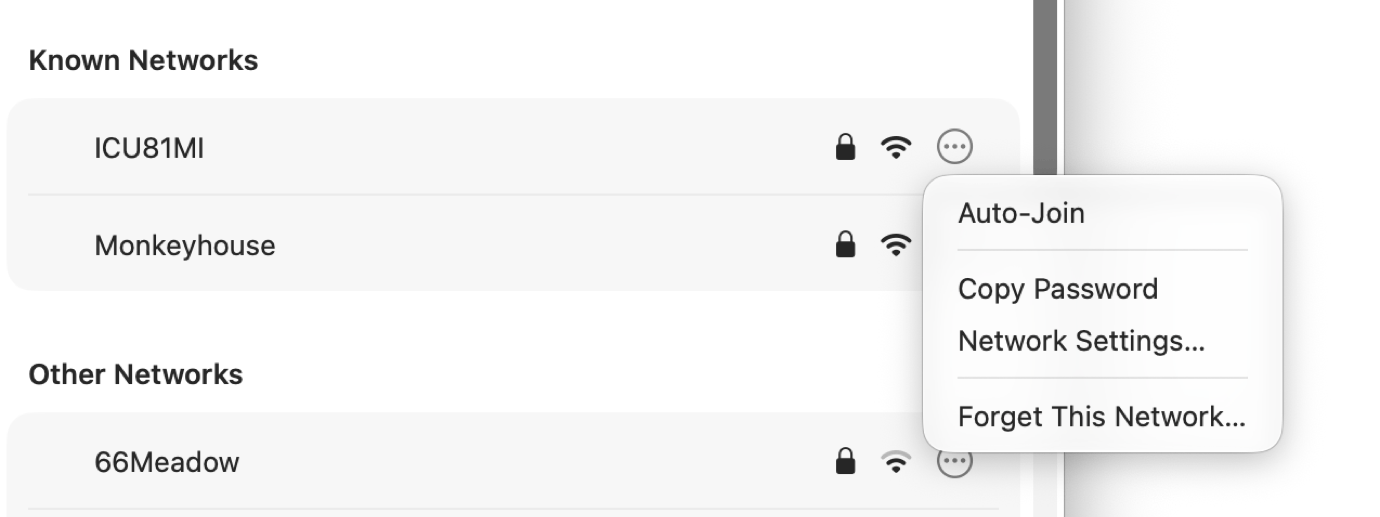
So what is a Mac user to do? The obvious answer would seem to be to turn off your Wi-Fi, but that’s not advisable: Macs use Wi-Fi for all sorts of features beyond getting on the Internet. If you turn off Wi-Fi, you’ll lose access to Continuity features, including the ability to AirDrop.
Instead, the right way to approach this is to leave your Wi-Fi on, but not connected to any routers. As a convenience, any Wi-Fi network you connect to is set to “auto-join,” so when you see it again later, your Mac will reconnect. That’s great, but if you’re being bitten by this issue, that convenience becomes a frustration. Instead, open Settings, choose Wi-Fi, and click the ellipsis button at the far right side of your Known Networks list. You’ll be given a small menu of options, including the (presumably checked) Auto-Join. Uncheck this setting by choosing it, and now your Mac won’t automatically glom onto your local Wi-Fi network. Do this for any networks that your Mac might connect to when you’re trying to be on your at-home or in-office Ethernet.

There is a downside to this approach. When I unplug my laptop from its docking station and open it up somewhere in my house, I have to manually connect to my Wi-Fi network. And when I’m back at my desk, I need to manually disconnect. (These can both be handled by clicking on the Wi-Fi symbol next to the network’s name, right from the Wi-Fi menu in Control Center.) Gray means it’s not connected, white with an accent color means it’s connected.
Yes, it’s a little bit of a hassle. So you need to ask yourself: How much am I affected by my Mac inadvertently using my Wi-Fi connection when it’s also connected to a wired network? The answer may be “not at all,” in which case you should probably keep using Wi-Fi using the Auto-Join regimen that Apple uses as its default.
But if you’re like me, and have seen slow file transfers and unstable videoconference connections resolved by dropping off of Wi-Fi and back to Ethernet, you may find that manually connecting and disconnecting from Wi-Fi is a small price to pay for networking stability.
[Apple folks take note: I have re-filed this bug, “Network traffic often sent to wrong interface based on network priority,” as FB24893093 after originally filing it as FB16275329, which was closed in 2025 because it was theoretically fixed in a late Sequoia build. Either it’s back, or it never left.]
If you appreciate articles like this one, support us by becoming a Six Colors subscriber. Subscribers get access to an exclusive podcast, members-only stories, and a special community.