

By Jason Snell
July 15, 2024 1:31 PM PT
First look: iPadOS 18 Public Beta
The iPadOS 18 Public Beta is here. Dan Moren has his first impressions of all the features it shares with iOS 18, but there are a few that are exclusive to the iPad.
The good news: A bunch of features that in recent years might have been iPhone-only are rolling out for both platforms this year. For example, the ability to customize home screens is going to change the look of iPad screens—and iPad users won’t have to wait until the fall of 2025 to get what iPhone users got the year before. I like it.
The bad news: There’s not a whole lot that’s special for iPad users. There are really only a handful of new features to speak of, and I’ve got questions about several of them.
And the other bad news: If you’re most excited about Apple Intelligence, well, you know the drill. None of that stuff is in the Public Beta and most of it won’t be shipping until later this fall or even sometime next year.
But still, let’s look on the bright side. Here’s a first take on the new features that are available in the iPadOS 18 Public Beta.
Handwritten notes

I have terrible handwriting and I hate writing by hand. But for you, dear reader, I have picked up my Apple Pencil and written many paragraphs in Notes on iPadOS 18.
Apple has given handwriting a serious upgrade in iPadOS 18. It’s treating text written with the Apple Pencil as text, essentially. You can select words and copy the text, sure, but what’s new is the ability to edit that text. Misspelled words will be marked and can be tapped to correct them, and words can be deleted and inserted.
This is all enabled by a new subsystem that learns your handwriting, meaning it can insert or change words without giving the corrected text an incongruous look. It’s not perfect—Apple somehow was not able to perfectly synthesize my unreadable chicken scratch—but it’s close enough not to seem jarring. Apple’s engine also works to realign what you write, cleaning up messy words or lines so that it’s all more readable—again, something it couldn’t do if it wasn’t able to generate a synthetic version of your handwriting.
I can’t speak to what the experience will be like for people with good handwriting, but I was somewhat let down by what iPadOS could do for my handwriting. I noticed some words being “corrected” into incorrect words, and messy writing not being cleaned up. Perhaps I’ve just defeated Apple’s system—it wouldn’t surprise me. But it wasn’t as impressive as I had hoped.
Let’s be honest: I’m never going to be the target audience for this feature. I’m very impressed that it works, and for people who prefer to take notes in longhand, this will make the entire experience better. But I wasn’t as impressed as I thought I’d be.
Calculator and Math Notes
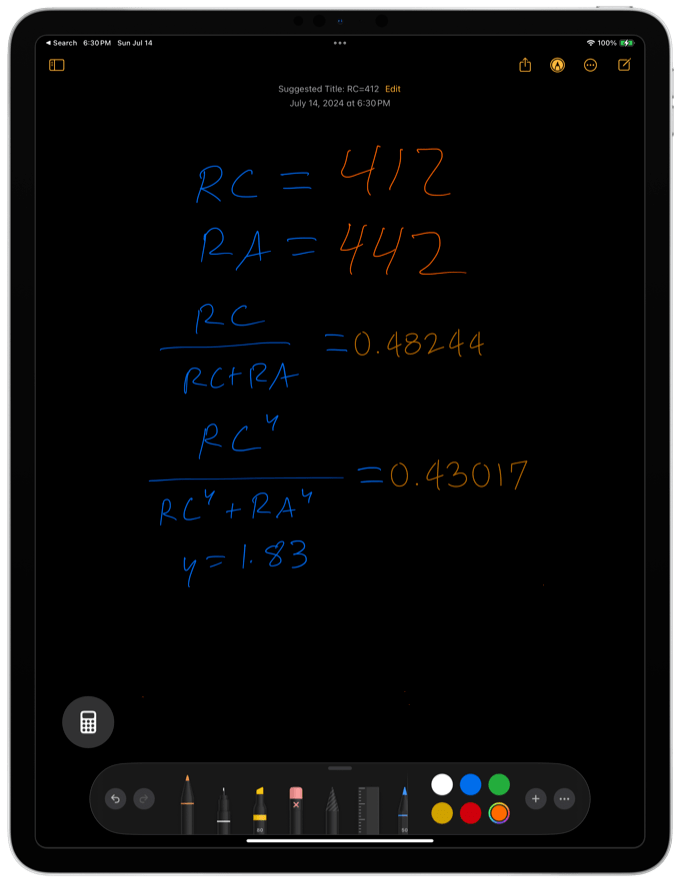
The iPad has, for some reason, not had a built-in calculator app since its inception. I have no idea why this was the case, and there have been many third-party apps to fill the gap, but in iPadOS 18 Apple has finally included a version of its basic calculator app. It’s silly it took this long, but it’s a good move.
Of course, Apple couldn’t leave it at that. So the Calculator app has added a new iPad-only feature, handwritten Math Notes. (You can also use it inside Notes.) In Notes across iOS 18, iPadOS 18, and macOS Sequoia you can type math problems and get them answered by typing the equals symbol, but only on iOS can you write them out by hand as you would on a piece of paper, and watch in awe as they are solved for you by a magical elf that lives inside your iPad.
When it works it’s spectacular. Math notation is hard to type, but it’s easy to write, making it a perfect fit for the Apple Pencil. However, I had some issues. Perhaps it’s my terrible handwriting, but even when I was very diligent, quite frequently I found that Math Notes just didn’t understand what I had written and wouldn’t give me an answer. And while sometimes it would display a little dotted-line box that I could tap on to get “autocorrect” suggestions that would allow me to indicate what I had written, sometimes those choices were themselves a bit baffling to me—and other times, no choices were offered and I couldn’t get an answer.
Still, Math Notes is a great idea and I want Apple to keep pushing in this direction, because (especially for students) it’s a much more natural way to do math than using a calculator or typing equations in with a keyboard. But I also hope it gets a little more consistent in recognizing what I’m writing—and more understandable when it’s asking for clarification.
Tabs or sidebars?
With iPadOS 18, Apple has introduced a new interface convention for iPad apps to use. It’s a new floating tab bar that appears at the top of the screen, replacing the longstanding convention of having individual tab buttons at the bottom of many apps. Depending on the app, the tab bar can also include a sidebar icon that moves the contents of the tab bar into a sidebar, and users can customize which items appear in the floating tab bar when the sidebar is minimized.
Which… is fine as an idea, I guess? But I’m a little baffled about the plethora of different floating tabs and sidebars on display on the iPad, and why this change was necessary. I guess Apple is trying to combine the tabbed navigation concept with the sidebar, so there can be a single, flexible approach to expose both concepts.
But there are a bunch of issues with this approach, including the removal of glyphs (which many people prefer to navigating by text), the issue of long words (German, anyone?) polluting the tab bar, and some limitations in what’s possible in the resulting sidebar.
As someone who uses the largest iPad Pro primarily in a horizontal orientation, I’m also not a fan of approaches that seem—as this one does—to prefer that sidebars disappear “to make more room for content.” Some content — most notably textual content — does not need to be any wider on an iPad held horizontally. The sidebar serves a useful secondary purpose as a frame that reduces the width of the content area in some apps.
I’m also not convinced that moving items that used to be tappable at the bottom of the screen up to the top is actually better in general. Don’t most people hold their iPads in their hands or maybe prop the bottom of the iPad up on their chest or knees or legs? I sure do. Less movement is required to tap at the bottom of the screen than the top. Also, reaching to the top of the screen causes my arm to cover all that precious content Apple’s making space for. Over-relying on top tabs on an iPad interface doesn’t make a lot of sense to me.
And if you do like top tabs, you’ll start looking at all the other sidebars in iPadOS with a little bit of suspicion. Why can’t I pin my three most used mailboxes in Mail in a top tab, so I don’t need to keep the sidebar open there? Because it’s using the old sidebar style and Apple doesn’t think these tabs are fit for that purpose. It’s a sidebar, but not that sidebar.
I’m also a bit disappointed that Apple didn’t use this experience to make the tabs more functional. Not only do they lack glyphs, but they also lack any sort of hierarchical option—think tap-and-hold to drop down additional functionality—that might make them serve more like an equivalent of the Mac menu bar. Instead, they’re just dumb tabs that swap between content views. Again… that’s fine, I guess, but this is the big iPad interface addition Apple chose to roll out for iPads?
Early days
As always, betas are called betas for good reasons. Things can change over the summer. I hope Apple can clean up some of the issues with its handwriting-based features this summer. I’ll be watching carefully to see how the new iPad sidebar/tab combination gets used in apps not from Apple. And of course, I’ll look forward to using some of the features rolled into iOS as well as iPadOS this fall—as we all wait for the slow roll-out of Apple Intelligence over the next year.
If you appreciate articles like this one, support us by becoming a Six Colors subscriber. Subscribers get access to an exclusive podcast, members-only stories, and a special community.