

By Joe Rosensteel
How Sandwich streamed The Talk Show Live in 3D on Vision Pro
Note: This story has not been updated since 2024.
During last week’s WWDC festivities, John Gruber interviewed Apple executives on stage for The Talk Show Live, as he’s done for years. This time it was different because people at home with a Vision Pro could watch the event live from the Theater app by Sandwich Vision, streamed by SpatialGen. (The stream is still available to watch after the fact in the Theater app.)
Sandwich is Adam Lisagor’s media empire specializing in commercial production, and Sandwich Vision is the Vision Pro development arm. I had the chance to talk to Adam, Andy Roth, and Dan Sturm. Andy is the developer for Sandwich Vision’s Television and Theater apps. Dan is the visual effects supervisor for Sandwich.
Disclosure: I am friends with Dan, and have worked for Sandwich as a freelance compositor on some projects, but I am not connected to Television, Theater, or The Talk Show Live in any capacity. The following was lightly edited for clarity and length.
For those that haven’t watched it in a Vision Pro, how would you describe the experience of viewing The Talk Show Live in the Theater app?
Adam: The experience is entirely unique. It’s a blend of different immersive styles and definitions that combine to create a unique kind of immersion that’s more than the sum of its parts.
- The user is immersed in an immersive space within visionOS (the theater inside the app, surrounded by theater seating, with a sense of scale and perspective—and the equivalent of a 76′ screen in front of them, so it’s the feeling of a typical huge AMC style multiplex theater with few enough cues from lighting, shape, and texture to break the illusion.
-
The user sees a human-scaled “portal” to the stereoscopic capture of humans on a stage, separated forward from the big screen in z-depth about the same distance as the actual humans would be in a real theater environment. So the human scale is immersive, and the stereo capture is immersive.
-
The user hears spatialized audio of the humans on stage combined with the audience captured in a stereo image, creating a sense of immersion in sound within the environment (as well as a sense of place in the community). This is a real psychological effect that happens when a person sits within a large group that’s having a communally similar reaction—we get a sense of overwhelm from the uncommonly emergent scale of the group of which we’re now a member.
-
The user experiences the event in real time, which, in combination with the other immersion styles, is almost never experienced—we watch broadcast TV of live events all the time, but we never experience live events in real time with multiple styles of immersion.
All of this combined leads to a sense of nowness and thereness that is, as some social media users described, “magical.”

Before this, Sandwich also produced the 2D video for The Talk Show Live. That features a more traditional multi-cam setup, including cutting from camera to camera. Did you ever consider creating stereo camera pairs for all that traditional multi-cam work, like a stereoscopic 3D movie, or spatial video?
Dan: No, I don’t think so. This was always intended to be a new, experimental version of the show in addition to the traditional 2D version (which we did produce in parallel with the 3D version).
We wanted to recreate the feeling of sitting in a theater, watching the show live. That’s why we created a custom screen position and scale for the 3D video, and we even placed it on a small stage at the front of the virtual theater.
The goal was to let people around the world attend the live show in a way that was as close to the real thing as possible. The Theater experience is arguably a better experience than being there in person because you can sit wherever you’d like and change seats whenever you feel like it.
What were the design goals of the Theater app when it comes to immersive vs. spatial video? I hear people sometimes say “spatial” when they mean “immersive” and vice versa, so it must be difficult to set expectations for the people you’re collaborating with, as well as the audience, on the end result.
Andy: Theater started from our first app, Television. We wanted to try taking the systems we had built for Television and putting people into a fully immersive environment where they could watch movies on the big screen.
The first version of Television had supported spatial videos, but that support was dropped due to some technical changes when YouTube was added. When we started talking about the idea of streaming a live video in spatial, we quickly added that capability back to the app.
So from the start, the design goal was to create an immersive environment for 2D or 3D videos, and it made sense to support Apple’s spatial video format.
Adam: This nomenclature came up in our discussions with Apple, actually: the distinction between spatial, 3D/stereoscopic, and immersive. Apple wants us to think of spatial as not just stereoscopic capture but the experience of viewing the stereoscopic video within the UI that Apple has designed, meaning all the benefits of those softened edges that feather out into the borders so that separation does not jolt the user. We could call ours spatial probably if we could recreate the same UI effect, but Apple doesn’t give that API access to devs, so we’re constrained by the hard edges of the frame in stereoscopic; we can’t fairly call ours spatial.
We also don’t call it immersive video because immersive is defined (either colloquially or officially) as having a wide field of view, either 180° or 360°. We deliberately constrained our field of view with a 17mm (equivalent 35mm) lens to provide that constrained stage portal experience I mentioned above.
We’ll definitely move into immersive capture soon, but we wanted to constrain our approach for this maiden voyage to set ourselves up for the least technical hurdles. And we almost got to perfection 🙂
If this were an immersive video with a 180-ish degree camera in a seat, you’d see some of the live audience. With the 3D theater, you have the spatial audio of that audience, but the seats are empty. There’s no good way to put in a 3D audience, but did you consider spatial personas in the same space?
Andy: We’re currently working on SharePlay integration with spatial personas, which we built for Television, but that only lets you watch with a few people on a FaceTime call. We’re also discussing ways to include an audience in the seats so the theater isn’t so lonely.
Dan: Personally, I love my big, private movie theater. But the SharePlay experience with spatial personas is really great.
Adam: I’m with Dan. I hate going to the movies (I feel like there’s a Medium post coming soon about this), and I love sitting in a big movie theater by myself because it’s the scale of the experience that’s more important to me than the community. But I do love hearing the audience, especially because it’s a real, real time audience who is not spitting popcorn on me or yelling all the things they’ve just figured out to their friend and spitting popcorn on their friend.
And the undeniable thing about immersive video capture that shows real audiences is that it’s no-go for privacy. This isn’t the Jimmy Kimmel show, and we’re not about to start getting image releases for every event we livestream.
How was The Talk Show Live in the Theater app initially pitched, and did anything about the initial conception evolve in this fast-paced production cycle? An eight-week turnaround is asking a lot for an app, and a workflow Sandwich hasn’t taken on before.
Adam: This was my pitch to Gruber. The only thing that changed between the pitch and the event was that we pivoted away from capturing anything with iPhones; we shot with really good box cameras and lenses for the stereoscopic, and traditional 2D cameras for the multicam.
But you can see his reaction here, like I reported it—skeptical, but excited:

What preproduction steps did you take to figure out the theater space, the “seating” viewing angles, and where to place the stereo video on your stage?
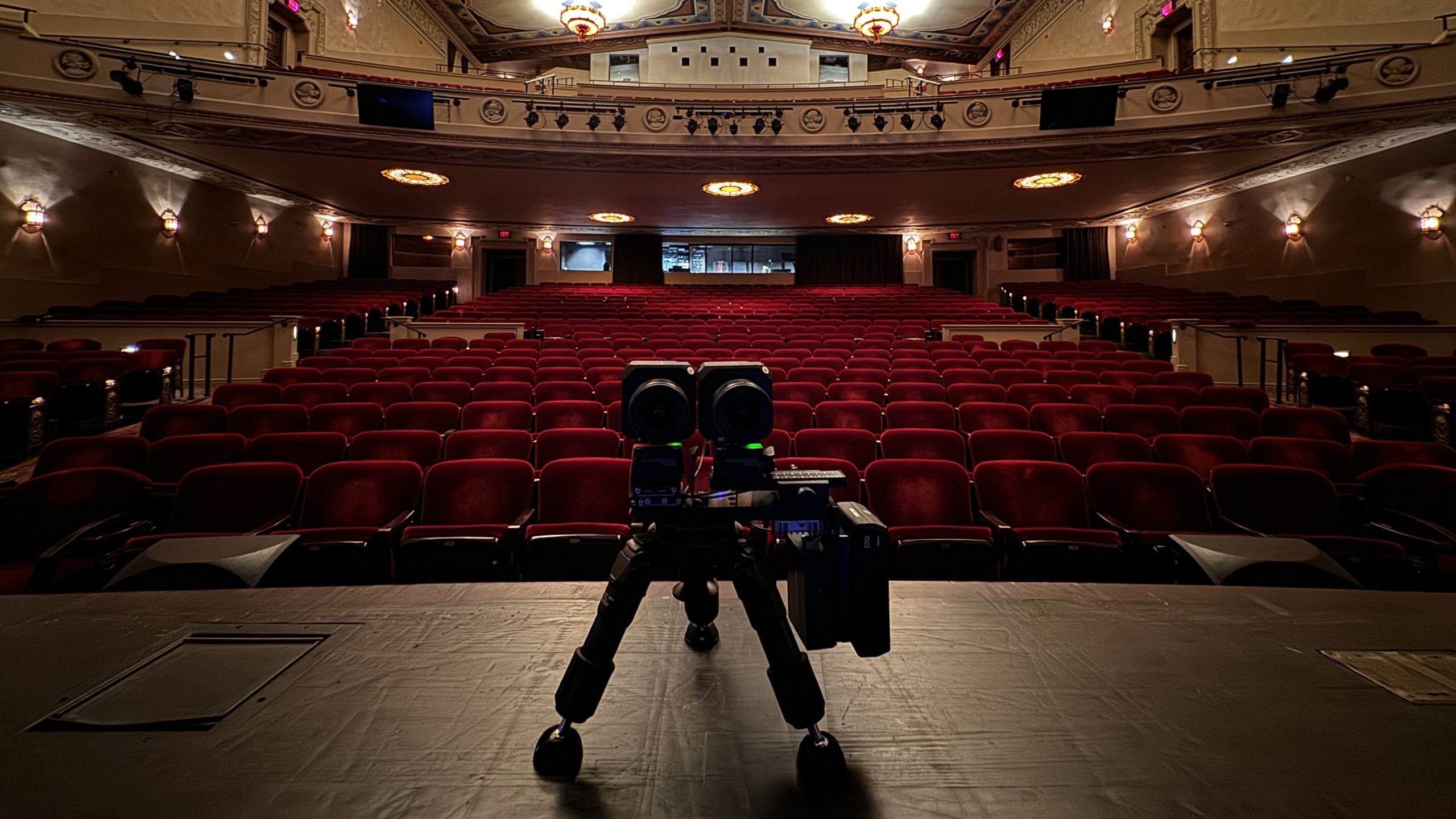
Dan: We wanted the viewer to feel like they were sitting in the front row of the California Theatre, so we aimed to mimic that just-below-the-elevated-stage viewing angle. We set up our cameras low, right on the front edge of the stage, to create that effect.
When a viewer in the app sits in the front row of Theater, looking up at the 3D video sitting on its virtual stage, it really does recreate that feeling.


Adam: Yep exactly. We knew we had two priorities: have the Theater app feel like actually being in the theater with the same angle and distance of perspective, and make the rig small and low enough to not block anyone’s view except Siracusa, which was very important to us. In the Siracusa-blocking realm, we absolutely delivered a world-class blocking experience.

We also had to make sure that viewing that one perspective from the middle row and back row of the theater wasn’t too cognitively dissonant. And it’s not perfect of course, but it’s close enough for cognitive consonance. There were reportedly a few users who were unhappy that when they sat in the back row, the people were small.
The partnership with SpatialGen allowed for live-streaming the event, but what technical work went into making sure you supplied SpatialGen with the appropriate video and audio feeds and pipe them into your app? What tests did you do before the live event to make sure that there weren’t any codec or formatting errors? People have a hard enough time getting their video to work in Zoom meetings or live-streaming in 2D so I can’t imagine this was something you took for granted.
Andy: We found a good solution that leveraged OBS, which already has many live streaming features and could more easily pull in the show’s audio along with video. The easiest and fastest way for us to get 3D video was using a two-camera setup to create a side-by-side (SBS) video since SpatialGen was already set up to convert SBS to MV-HEVC.
As soon as we realized this solution could work, Dan put together a quick proof-of-concept with a couple of iPhones. Then we got on a call with SpatialGen, put all the pieces together, and had the first working version streaming to the app. It was pretty mind-blowing, and that was the moment we all thought, “Okay, we can really pull this off.”
After that, it was just a lot of fine-tuning to put together the right cameras and rig and optimize the stream configuration for the show.
Dan: The proof-of-concept was an iPhone 15 Pro Max and an iPhone 14 Pro Max (since they have the same 1x lenses)
The hardware rig for the event was, as far as I know, a one-of-a-kind assembly of cameras, lenses, and hardware. Can you describe the rig? What were you able to test with the rig before the live event, and what changes needed to be made?
Dan: The camera rig was a one-off side-by-side rig we had built specifically for the show. The cameras were Panasonic Lumix BGH1 Micro 4/3 cameras with Olympus 17mm lenses.
We used Blackmagic HDMI to Thunderbolt converters to get the camera feeds into a MacBook Pro running OBS, along with the audio feed. From there, we created the side-by-side stereo image that was sent to SpatialGen for conversion and streamed to the app.
The cameras were shooting 1080p 60fps to reduce motion blur. So, our final side-by-side image was 3840×1080, but was streamed at 30fps for bandwidth considerations.

How did you calibrate the lenses to make sure they were aligned, and was there any 2D testing you could do to check it on site?
Dan: Before the show, I created a calibration chart that helped us get the cameras into parallel alignment. Our rig had one fixed camera and one adjustable camera, so it was mostly a matter of aligning the chart to the fixed camera and dialing the adjustable camera to hit its target on the chart.
Of course, no camera rig or alignment will be perfect, so once we had the cameras physically aligned, we made final tweaks in OBS. We were able to overlay the two cameras to see how they were lining up. They were very close from the chart calibration, I think we nudged them maybe 1 pixel vertically and half a degree in rotation.
Since we were shooting parallel, we also used these same controls to adjust our convergence plane. We moved our calibration chart to the spot on stage where we wanted to converge, and aligned the images with software transforms. For this setup, we wanted everyone on stage to be in positive parallax, so we set our convergence plane a few inches downstage of everything.
Were there any technical issues that came up once you went live, or unexpected snags?
Dan: The only technical snag we ran into was a network issue that had nothing to do with the stereo3d aspect of the shoot. There was a stutter in the video transmission somewhere in the networking chain that we weren’t able to fully diagnose before show time. Something we didn’t encounter in any of our pre-production testing.
Adam: It was on the theater bandwidth side, regrettably. We paid for dedicated hard line to the Internet and it still wasn’t enough.

Reactions have been positive, so I have to assume that wheels are turning on doing this again for other live events, or at least The Talk Show Live 2025?
Adam: Yes the wheels are turning. In one case, Big Wheels actually. We’re extremely excited for what we’re building, based on the early promise of this live without-a-net proof of concept going so well.
Since this is both a production by Sandwich to live-stream this, and the Theater app venue to stream in, is Sandwich accepting pitches to stream events, or sell promotional space to events shot by other people?
Adam: Yes and yes.
[Joe Rosensteel is a VFX artist and writer based in Los Angeles.]
If you appreciate articles like this one, support us by becoming a Six Colors subscriber. Subscribers get access to an exclusive podcast, members-only stories, and a special community.